Email to Lead Salesforce: The Complete 2026 Setup Guide
Salesforce can turn an inbound email into a Lead record automatically — but the default setup quietly creates duplicates, blank fields, and leads nobody owns. Here is the config that actually holds up.
An email to lead Salesforce workflow turns an inbound message into a Lead record on its own. Built well, nothing that lands in a shared inbox goes to waste. Built on the defaults, it quietly fills your org with blank, duplicate Leads.
TL;DR
- Salesforce has no product called "Email-to-Lead." You build it from Email Services, Email-to-Case, Web-to-Lead, or a third-party parser.
- The default setup will happily create a Lead with a name, an email, and nothing else. That Lead is unroutable, unscoreable, and often a duplicate.
- Use a four-layer pipeline: parse → verify → enrich → assign. Skip verification and your bounce rate will tell on you within one send cycle.
- Configure Duplicate Rules and Matching Rules before you switch parsing on. Retro-deduping 40,000 Leads is a weekend you will not get back.
- Budget for enrichment. Parsing is free. Knowing who
j.smith@acme.iois, and whether the mailbox is real, is not.
What is email to lead Salesforce routing?#
Email to lead Salesforce routing is the pattern where an inbound message is parsed by Salesforce and written into a Lead record instead of sitting in someone's inbox. The message might be a reply to an outbound sequence, a note to a sales@ alias, a partner referral, or a conference badge dump a rep forwarded in.
Think of it like a restaurant's order rail. Tickets come in from the front of house in whatever handwriting the server used. The rail does not cook anything. It just makes sure every ticket lands in one place, in a readable format, assigned to a station.
Email to lead is that rail. It does not sell anything. It guarantees no inbound intent evaporates in a personal mailbox.
Salesforce gives you several mechanisms and no single button:
- Email Services + Apex inbound handler — the native, programmable route. Salesforce gives you an email address. You write an
InboundEmailHandlerclass and control the parsing. - Email-to-Case, then convert — route inbound to Cases first, then convert. It works, but you inherit Case semantics on a Lead-shaped problem.
- Web-to-Lead — really form-to-lead. Many teams pipe form notification emails through it. Standard orgs cap out at 500 leads per day.
- Third-party parsers — Zapier, Make, Parseur, or custom middleware that extracts the fields and posts them through the Salesforce API.
- Marketing automation handoff — Pardot, HubSpot, or Marketo catches the email and syncs a Lead into Salesforce.
Every email to lead Salesforce path produces a Lead. Only one of them produces a Lead a rep can work on day one. The Salesforce Help docs cover the mechanics of each. What they skip is the data-quality debt each route creates.
Which email to lead Salesforce method should you use?#
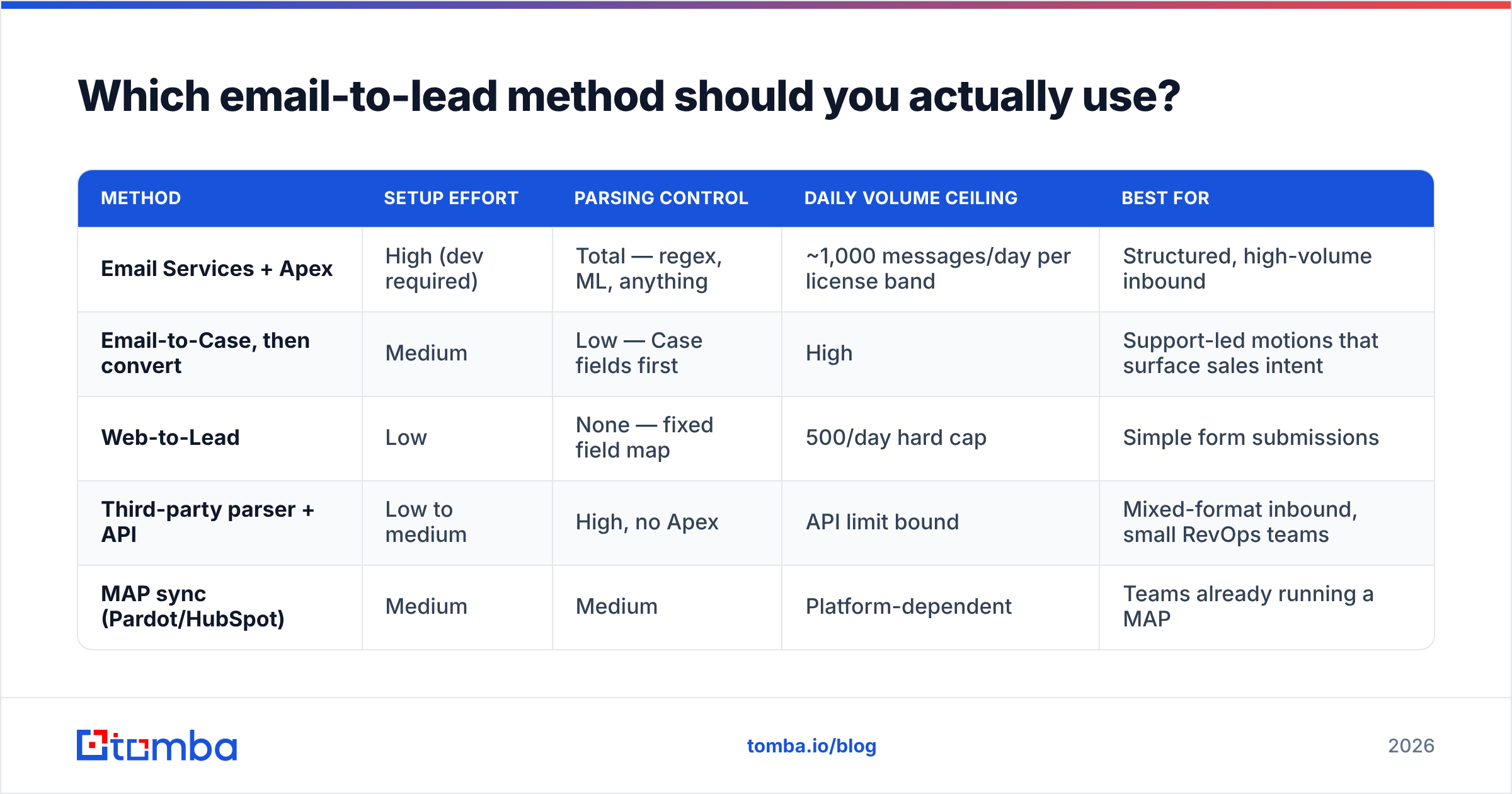
Pick based on volume, engineering appetite, and how structured the inbound email is. A templated form notification parses cleanly. A free-text reply from a VP of Ops does not.
| Method | Setup effort | Parsing control | Daily volume ceiling | Best for |
|---|---|---|---|---|
| Email Services + Apex | High (dev required) | Total — regex, ML, anything | ~1,000 messages/day per license band | Structured, high-volume inbound |
| Email-to-Case, then convert | Medium | Low — Case fields first | High | Support-led motions that surface sales intent |
| Web-to-Lead | Low | None — fixed field map | 500/day hard cap | Simple form submissions |
| Third-party parser + API | Low to medium | High, no Apex | API limit bound | Mixed-format inbound, small RevOps teams |
| MAP sync (Pardot/HubSpot) | Medium | Medium | Platform-dependent | Teams already running a MAP |
The honest recommendation: if your inbound is templated, use Email Services with a tight Apex handler. Form notifications, partner feeds, and event exports all qualify.
If your inbound is human-written replies, use a parser plus enrichment. No regex survives contact with "hey, can you send that over to my colleague Dana instead?"
How do you set up email to lead Salesforce routing step by step?#
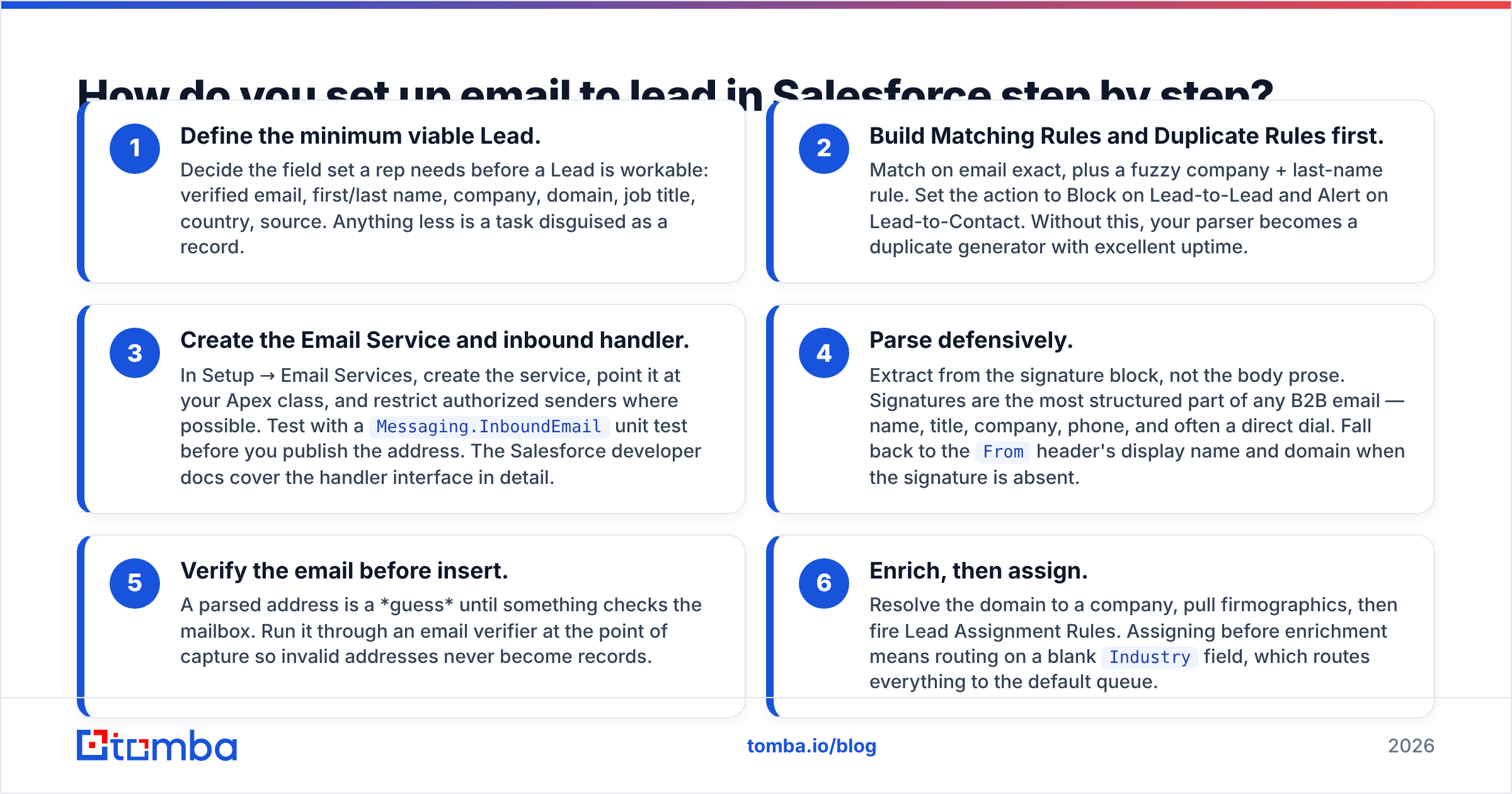
Here is the sequence that avoids rework. Steps 2 and 3 come before you turn anything on.
- Define the minimum viable Lead. Decide what a rep needs before a Lead counts as workable: verified email, first and last name, company, domain, job title, country, source. Anything less is a task dressed up as a record.
- Build Matching Rules and Duplicate Rules first. Match on exact email, plus a fuzzy company and last-name rule. Set the action to Block on Lead-to-Lead and Alert on Lead-to-Contact. Skip this and your parser becomes a duplicate generator with excellent uptime.
- Create the Email Service and inbound handler. In Setup → Email Services, create the service, point it at your Apex class, and restrict authorized senders. Test with a
Messaging.InboundEmailunit test before you publish the address. The Salesforce developer docs cover the handler interface.
Once those guardrails exist, wire up the parsing itself.
- Parse defensively. Pull fields from the signature block, not the body prose. Signatures are the most structured part of any B2B email: name, title, company, phone, often a direct dial. Fall back to the
Fromheader when there is no signature. - Verify the email before insert. A parsed address is a guess until something checks the mailbox. Run it through an email verifier at the point of capture, so invalid addresses never become records.
- Enrich, then assign. Resolve the domain to a company, pull firmographics, then fire Lead Assignment Rules. Assign before enrichment and you route on a blank
Industryfield, which sends everything to the default queue.
That order matters more than any single step. Most broken setups do 3 → 6 first and bolt on 2 and 5 six months later. Usually right after someone notices the SDR team is working one account from four Leads.

Why do most email-to-lead setups produce dirty data?#
Because parsing solves the transport problem and nothing else. The email arrived, a record exists, the dashboard shows Leads Created going up. Everyone declares victory.
Then the first campaign runs against those Leads, and the failures surface all at once:
- Role addresses.
info@,sales@,contact@,hello@parse perfectly and convert almost never. They also drag down your sender reputation when they hit spam traps. - Aliases and forwards. A rep forwards a lead email and your handler grabs the rep's own signature. You just created a Lead for your own AE.
- Catch-all domains. The domain accepts everything, so a naive SMTP check returns "valid" for
asdfgh@company.com. Use a catch-all verifier to tell real mailboxes from accept-all noise. - Free-mail signups. Gmail and Outlook addresses on a B2B form are not always junk. They do need a different routing path than a corporate domain.
Format problems cause the rest:
- Partial signatures. Mobile replies strip signatures. You get a first name and an email — no company, no title. That Lead cannot be scored or routed.
- Encoding and HTML soup. Rich-text signatures bury the phone number in three nested tables. Your regex finds a Zoom dial-in instead.
The measurable symptom is bounce rate. If your inbound-sourced Leads bounce harder than your outbound-sourced ones, the parser is the culprit — not the list.
How do you enrich a lead record so it is actually workable?#
Enrichment is the difference between a row in a table and a lead a rep will call. Three things need resolving at insert time:
Identity. Who is behind this address? A reverse email lookup takes the parsed address and returns name, title, company, and social profiles. That backfills every field the signature dropped.
Company. Map the email domain to a firmographic profile: employee count, industry, tech stack, HQ country. This is what your Assignment Rules and scoring model consume. Without it, every Lead scores the same.
Reachability. Beyond validity: is this a direct mailbox or a shared alias? Is there a mobile number attached? Teams running multithreaded outbound layer a phone finder on top, so the Lead arrives with a callable number.
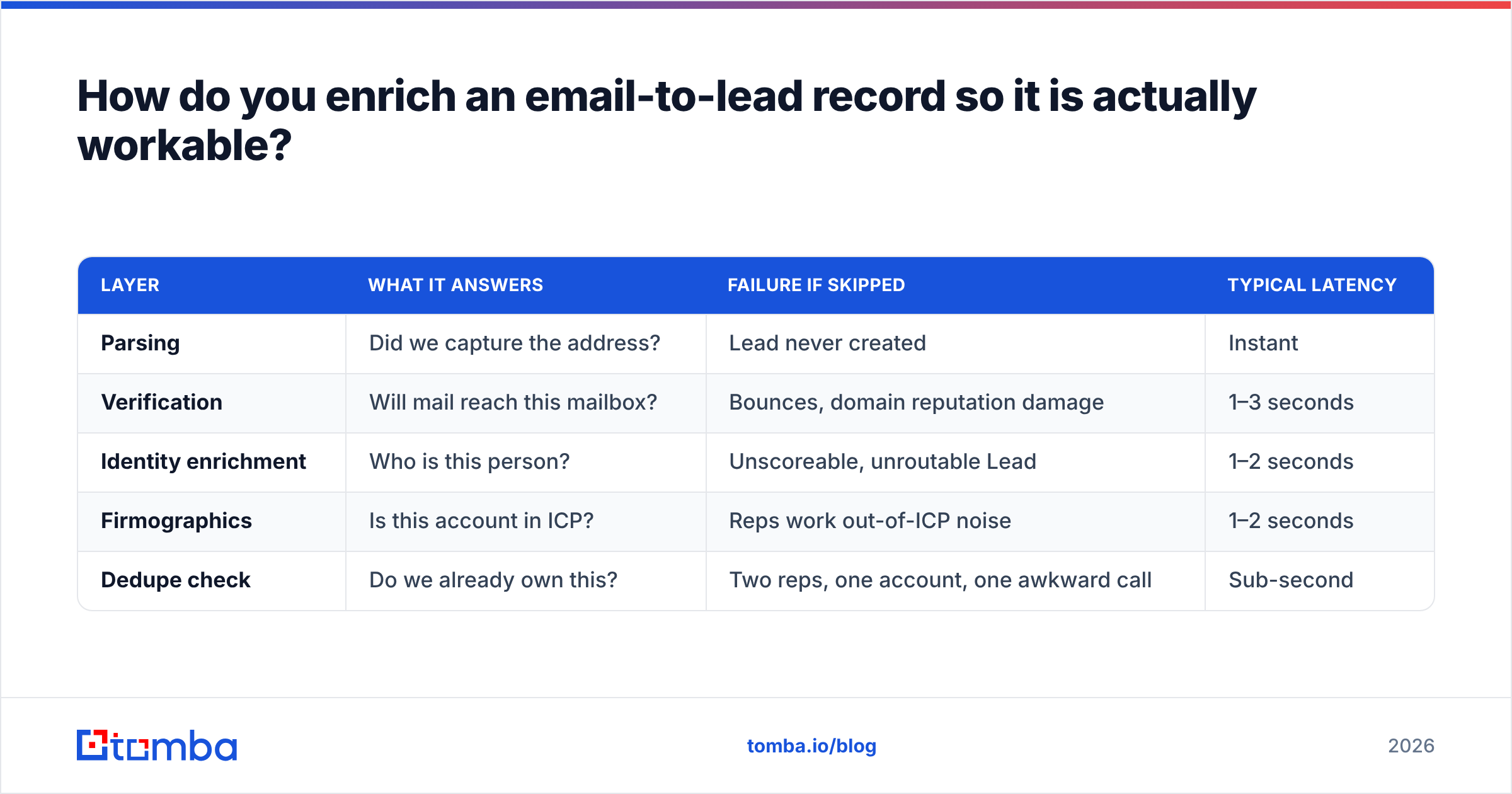
Here is how the layers compare in practice:
| Layer | What it answers | Failure if skipped | Typical latency |
|---|---|---|---|
| Parsing | Did we capture the address? | Lead never created | Instant |
| Verification | Will mail reach this mailbox? | Bounces, domain reputation damage | 1–3 seconds |
| Identity enrichment | Who is this person? | Unscoreable, unroutable Lead | 1–2 seconds |
| Firmographics | Is this account in ICP? | Reps work out-of-ICP noise | 1–2 seconds |
| Dedupe check | Do we already own this? | Two reps, one account, one awkward call | Sub-second |
Run all five before the insert. Nightly batch enrichment leaves Leads unworkable for up to 24 hours, and inbound intent has a half-life measured in hours.
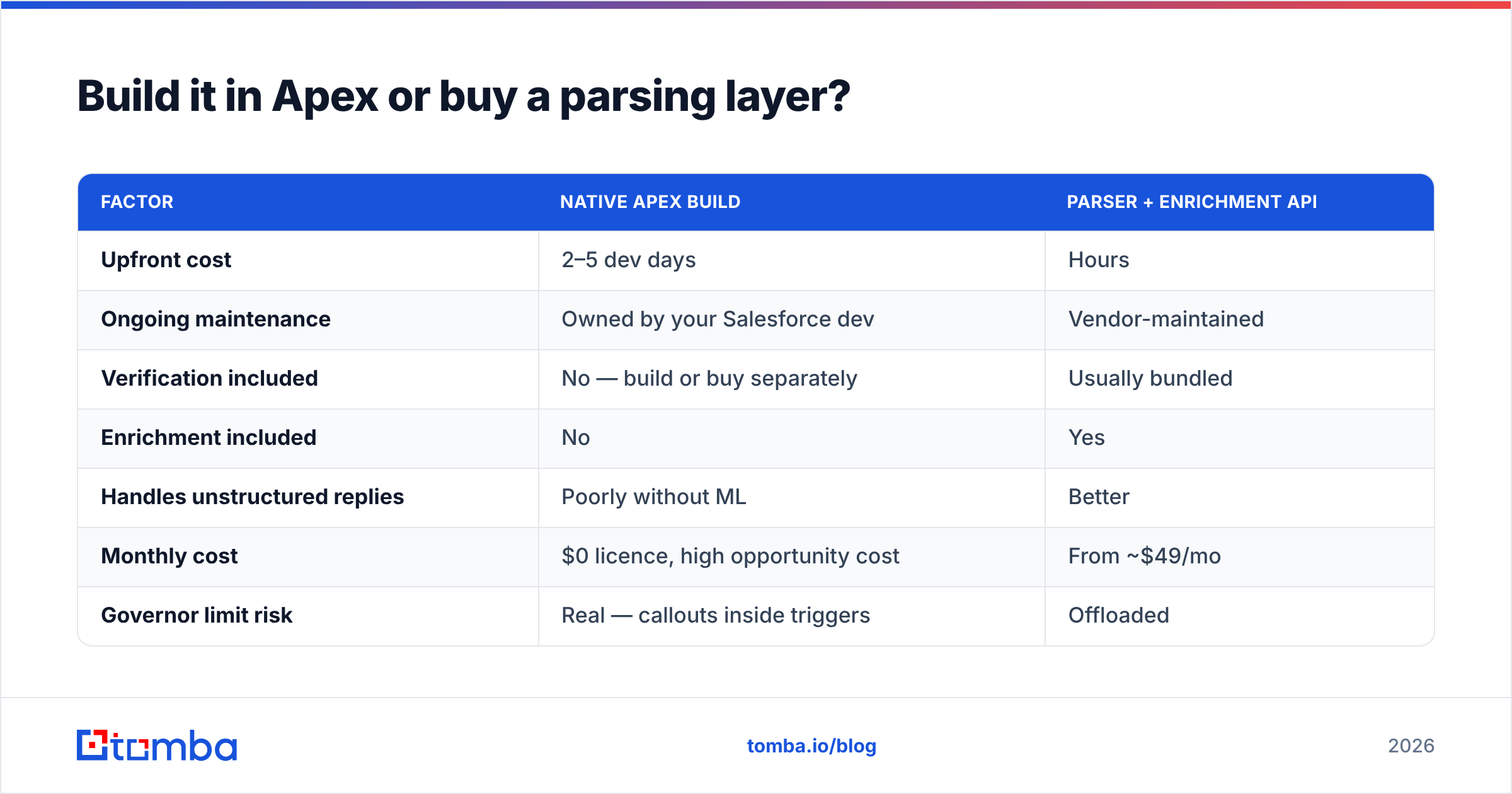
Build it in Apex or buy a parsing layer?#
The build-versus-buy math is less about the parser and more about who maintains it when the email format changes.
| Factor | Native Apex build | Parser + enrichment API |
|---|---|---|
| Upfront cost | 2–5 dev days | Hours |
| Ongoing maintenance | Owned by your Salesforce dev | Vendor-maintained |
| Verification included | No — build or buy separately | Usually bundled |
| Enrichment included | No | Yes |
| Handles unstructured replies | Poorly without ML | Better |
| Monthly cost | $0 licence, high opportunity cost | From ~$49/mo |
| Governor limit risk | Real — callouts inside triggers | Offloaded |
The trap in the Apex column is the "$0 licence" line. It is true and it is misleading. A hand-rolled handler nobody has touched in eighteen months, written by a contractor who has left, silently failing on a new signature format — that is the most expensive line in this table.
Most RevOps teams land on a middle path. Keep the Email Service and handler thin: capture, normalise, queue. Then call out to an enrichment and verification API asynchronously via @future or Queueable. That keeps you inside governor limits and makes the intelligence layer someone else's maintenance problem.
Tomba's email finder API is one option here. Tomba pricing starts at $49/mo for the Starter plan, with a free tier of 25 searches per month for testing the flow first. Peers like Clearbit and BookYourData solve adjacent slices of the same problem. BookYourData is strong if you need pre-built B2B contact lists rather than real-time inbound resolution.

What breaks at scale, and how do you catch it early?#
Four failure modes, in the order they usually appear:
Governor limits. Synchronous callouts inside an InboundEmailHandler will hit limits under burst load. A conference dump of 800 emails in ten minutes is a burst. Queue the enrichment. Do not inline it.
The 500/day Web-to-Lead cap. If any part of your pipeline routes through Web-to-Lead, you have a hard ceiling. Leads past the cap go to a pending queue or get dropped, depending on your org config. Monitor it.
Assignment rule drift. Rules reference fields that enrichment populates. When a provider changes a value taxonomy — say Industry from "Software" to "Computer Software" — your rules stop matching and everything lands in the default queue. Alert on default-queue volume, not just on total Leads.
Duplicate accretion. Even with Duplicate Rules on, cross-object duplication builds up: a Lead exists, and so does a Contact. Run a quarterly reconciliation. Bulk verify the existing Lead database at the same time. Addresses decay at roughly 2–3% per month as people change jobs, so a Lead captured in January is measurably worse by June.
A useful operating metric is the share of inbound Leads worked within 24 hours. If a Lead is created but never touched, the pipeline delivered a record, not a lead.
Analyst coverage from firms like Gartner has long pointed at speed-to-lead as the highest-leverage variable in inbound conversion. Every enrichment second you add before assignment is borrowed against that clock. Keep the whole pipeline under five seconds and it costs you nothing. Let it drift to a nightly batch and it becomes the most expensive latency in your funnel.
What does a good email to lead Salesforce pipeline look like?#
- Capture — the Email Service address receives the message; the handler extracts sender, signature block, and body entities.
- Normalise — lowercase the email, strip plus-addressing, resolve the root domain, and send role addresses to a review queue instead of the main Lead flow.
- Verify — SMTP-level check plus catch-all detection; invalid addresses are logged, not inserted.
- Enrich — identity and firmographic lookup by domain and email; backfill title, company, size, country.
- Dedupe — match against Lead and Contact; merge or attach rather than create when a match exists.
- Assign — territory or round-robin rules fire on a full record, and the SLA timer starts.
Six steps, and only the first is what most teams mean when they say "email to lead." That gap is why so many Salesforce orgs show healthy Lead-creation charts and flat conversion rates.
Ready to stop shipping half-empty Leads?#
The parsing layer is the easy half. The half that decides whether your reps trust the queue is verification and enrichment: knowing the address is real, the person matches the signature, and the company fits your ICP before the Lead reaches an owner.
Start with the Tomba Email Finder and its API to slot verification and enrichment into your Salesforce inbound handler. The free tier gives you 25 searches a month to prove the flow against real inbound. Starter runs $49/mo when you are ready for production volume. Wire it in once, and every Lead arrives verified, enriched, and routable — instead of a name, an address, and a question mark.
Related guides#
Ready to find emails that actually work?
Join 150,000+ professionals who stopped guessing and started sending. Free credits on signup — no credit card required.
Get the Tomba newsletter
Practical outbound tactics and product updates — once every two weeks.
About the author