How to Write an Email to a Prospective Client: 2026 Guide
A first email to a prospective client has about eight seconds to earn a reply. Here is the structure, the templates, and the reply-rate benchmarks that actually work in 2026 — plus the data hygiene most reps skip.
TL;DR
- A first email to a prospective client gets roughly eight seconds of attention. Everything after the second sentence only matters if the first two earn it.
- The highest-performing structure in 2026 is four blocks: trigger, relevance, single ask, exit. Under 120 words total.
- Personalization beats volume, but only above a threshold — one genuinely researched line outperforms five merge tags.
- Your reply rate is capped by your data quality. A 2% bounce rate is fine; a 9% bounce rate quietly kills the whole domain before your copy ever gets tested.
- Verify before you send, send from a warmed domain, and follow up three times. Most deals in the pipeline came from email two, three, or four — not email one.
What is an email to a prospective client, exactly?#
It is the first commercial message you send to someone who has never asked to hear from you. That last clause is the whole problem. A newsletter subscriber opted in. A demo requester raised a hand. A prospective client did neither — so your email arrives as an interruption, and the only currency you have is relevance.
That framing changes what "good" looks like. A good marketing email optimizes for clicks. A good email to a prospective client optimizes for a single reply, from a single person, about a single topic. Clicks are a distraction. Attachments are a liability. Nine paragraphs of company background is a delete.
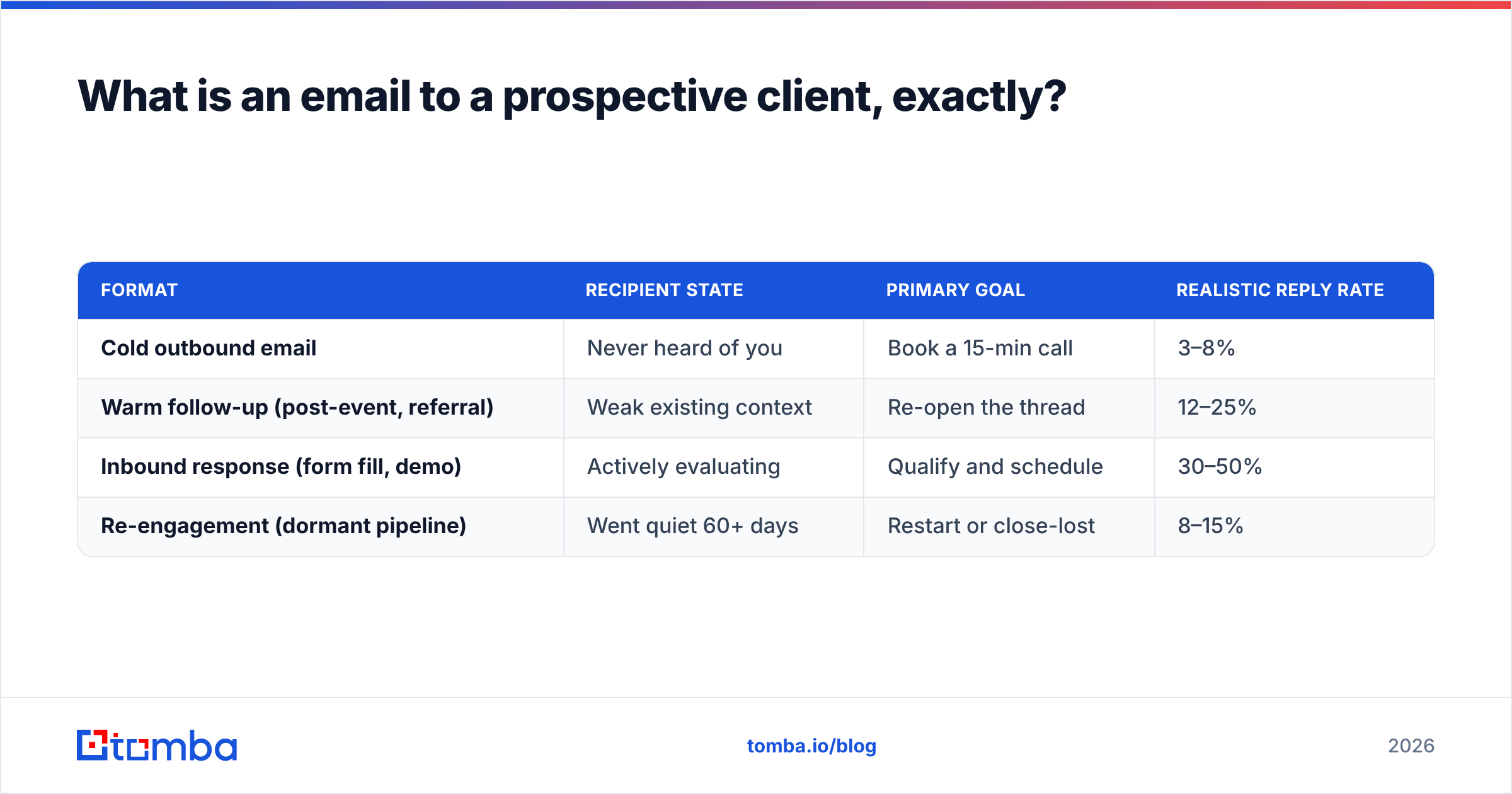
Three formats get confused constantly, and they need different rules:
| Format | Recipient state | Primary goal | Realistic reply rate |
|---|---|---|---|
| Cold outbound email | Never heard of you | Book a 15-min call | 3–8% |
| Warm follow-up (post-event, referral) | Weak existing context | Re-open the thread | 12–25% |
| Inbound response (form fill, demo) | Actively evaluating | Qualify and schedule | 30–50% |
| Re-engagement (dormant pipeline) | Went quiet 60+ days | Restart or close-lost | 8–15% |
Those benchmarks assume verified addresses and a healthy sending domain. Strip either one out and every number in the right column drops by half. That is not an opinion — it is what happens when 20% of your sends bounce and mailbox providers start routing you to spam.
Why do most emails to prospective clients get ignored?#
Because they are written from the sender's point of view. The classic failure pattern reads like this: introduce yourself, introduce your company, list three features, ask for 30 minutes. Every sentence is about you. The prospect has to do the translation work of figuring out why any of it matters, and they will not.
The four most common structural mistakes:
- The buried ask. The request for a meeting appears in paragraph four, after the reader has already stopped. If someone reads only your first and last sentence, they should still know what you want.
- Fake personalization. "I loved your recent post!" with no specifics reads worse than no personalization at all, because it signals automation and dishonesty at the same time.
- The 30-minute ask. Asking a stranger for half an hour is asking for a large commitment before you have earned a small one. Ask for a reply, or for 15 minutes, or for permission to send one paragraph.
- Too many exits. A calendar link, a case study PDF, a website link, and a "let me know" in the same email gives the reader four decisions. Give them one.
There is a fifth, quieter mistake: sending to addresses you guessed. Pattern-guessed emails like firstname.lastname@company.com are right often enough to feel productive and wrong often enough to wreck your sender reputation. Bounces are the single fastest way to teach Google and Microsoft that your domain is untrustworthy.

What structure should you use for a first email to a prospective client?#
Use four blocks, in this order, in under 120 words.
- The trigger (1 sentence). Why you are emailing this person this week. A funding round, a job posting, a product launch, a headcount change, a specific line in their pricing page. No trigger means no reason, and no reason means no reply.
- The relevance bridge (1–2 sentences). Connect the trigger to a problem you solve, framed as an outcome for someone in their role. Not "we offer X." Instead: "teams that just doubled their SDR headcount usually hit a data-coverage wall around month two."
- The single ask (1 sentence). One question, answerable with yes or no. "Worth a 15-minute look next week?" beats "let me know if you'd like to explore how we might partner."
- The exit (1 short line). Give permission to say no. "If this is off-base, just say no and I'll close the loop." Counterintuitively, this raises reply rates — because a cheap "no" is easier to send than silence, and a "no" tells you something.
Everything else — social proof, metrics, logos — is optional and belongs in email two or three. The first email is a knock on the door, not the pitch.
A working template#
Subject: question about your Q3 hiring
Hi Dana,
Saw you're hiring three more AEs in EMEA — congrats on the expansion.
Most teams scaling into EMEA hit the same snag around month two: European contact data goes stale fast, and reps burn a third of their week rebuilding lists by hand.
Worth 15 minutes next Tuesday to show you how two other teams handled it?
If it's not a priority, just say no and I'll stop here.
— Sam
That is 78 words. It names a trigger, states a specific problem, makes one small ask, and offers an exit. Test the subject line before you scale the send — a subject line tester will flag the spam-triggering phrasings that quietly halve your open rate.
How much personalization does an email to a prospective client actually need?#
Enough that the email could not be sent to anyone else without editing. That is the bar.
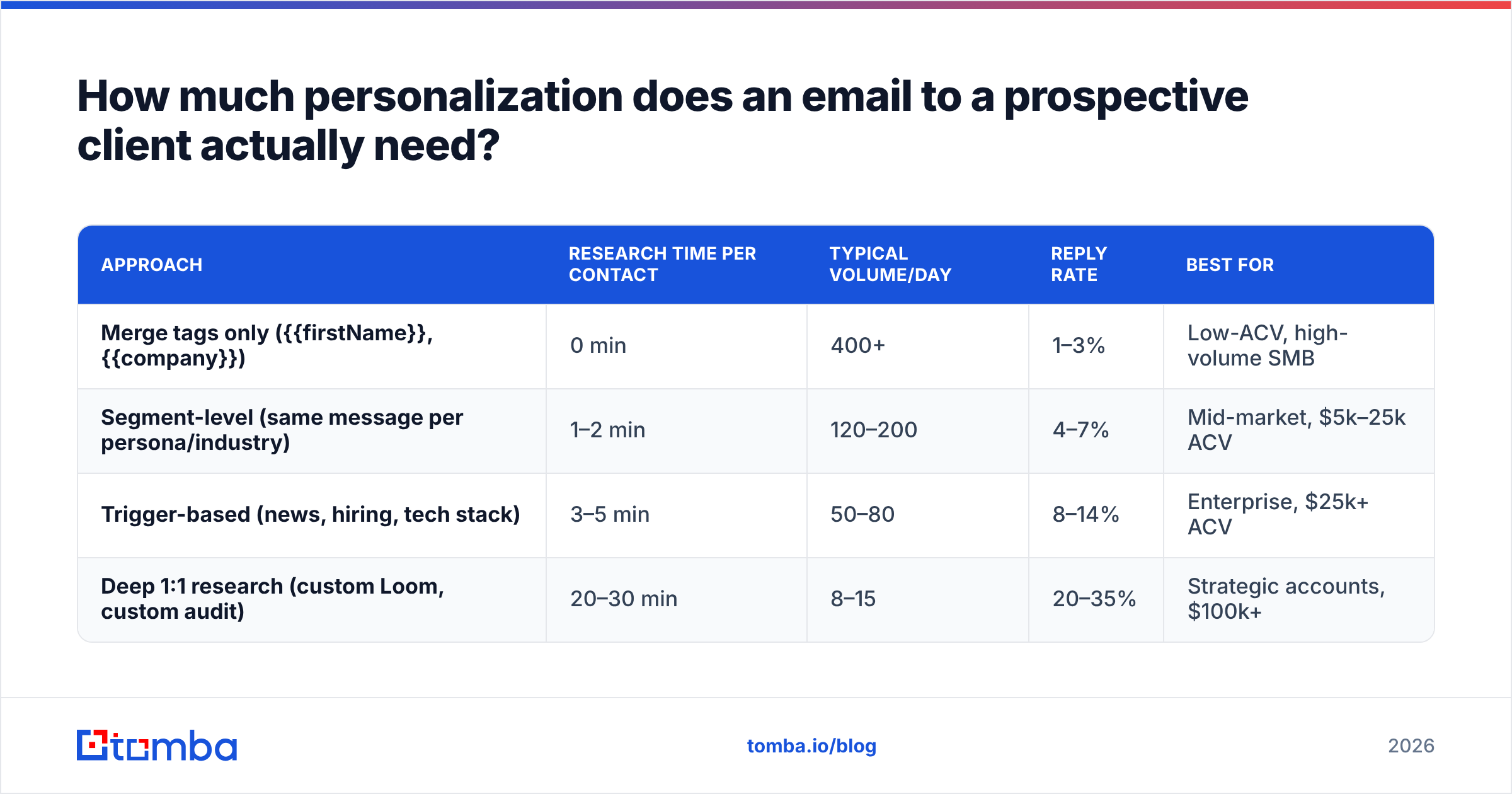
There is a real trade-off between depth and volume, and the honest answer is that it depends on deal size. Here is how the tiers compare in practice:
| Approach | Research time per contact | Typical volume/day | Reply rate | Best for |
|---|---|---|---|---|
| Merge tags only ({{firstName}}, {{company}}) | 0 min | 400+ | 1–3% | Low-ACV, high-volume SMB |
| Segment-level (same message per persona/industry) | 1–2 min | 120–200 | 4–7% | Mid-market, $5k–25k ACV |
| Trigger-based (news, hiring, tech stack) | 3–5 min | 50–80 | 8–14% | Enterprise, $25k+ ACV |
| Deep 1:1 research (custom Loom, custom audit) | 20–30 min | 8–15 | 20–35% | Strategic accounts, $100k+ |
The mistake is picking a tier that does not match your deal economics. Spending 25 minutes researching a prospect for a $99/month product is a losing trade. Blasting merge-tag emails at a $250k enterprise account is also a losing trade — just a slower one, because you burn the account for a year.
Most B2B teams land in the trigger-based row. Research from vendors like HubSpot's sales team and category analysts at Gartner consistently points the same direction: buyers respond to specificity about their situation, not eloquence about yours.
Does the email address you send to matter more than the copy?#
Yes — and this is the part most guides skip because it is unglamorous.
Run the math. Say you send 1,000 emails with a 6% reply rate. That is 60 replies. Now say 22% of those addresses were guessed and bounce. You have effectively sent 780 emails, you got 47 replies, and your bounce rate just told Gmail your domain behaves like a spammer. Next month, the same copy on the same list delivers to inbox 30% less often. The copy did not change. The list did.
The fix is boring and mechanical:
- Find the address, don't guess it. An email finder resolves a name plus a domain into a real, sourced address instead of a permutation you hope is right.
- Verify before every send, not once a quarter. B2B contact data decays at roughly 22–30% per year as people change jobs. A list you validated in January is meaningfully wrong by June. An email verifier catches the dead rows before your sending domain does.
- Handle catch-all domains deliberately. Catch-all servers accept everything, so standard verification returns "unknown." A catch-all verifier gives you a confidence signal instead of a coin flip. If you cannot get one, cap catch-all addresses at a small share of any given send.
- Deduplicate across reps. Two reps emailing the same prospect in the same week is the fastest way to look disorganized. A shared, deduped source of truth prevents it.
- Warm the domain before volume. New domains need weeks of gradual ramp. Skipping warmup and sending 300 on day one is a self-inflicted deliverability wound.
How do the main tools for finding prospect emails compare?#
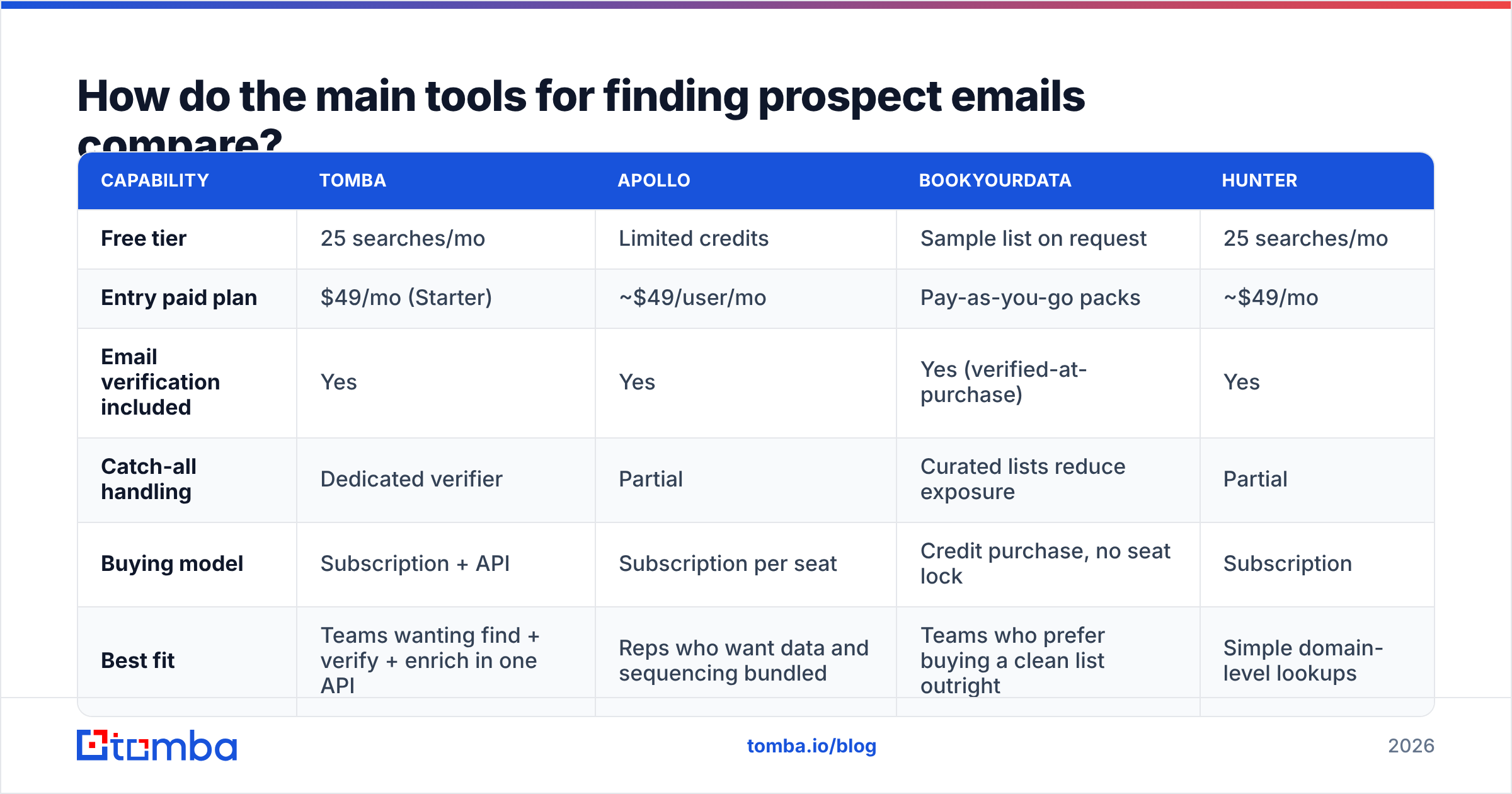
Most teams end up using two or three tools: something to find and verify contacts, something to sequence, and a CRM. On the data side, the practical differences are coverage, verification depth, and price per contact.
| Capability | Tomba | Apollo | BookYourData | Hunter |
|---|---|---|---|---|
| Free tier | 25 searches/mo | Limited credits | Sample list on request | 25 searches/mo |
| Entry paid plan | $49/mo (Starter) | ~$49/user/mo | Pay-as-you-go packs | ~$49/mo |
| Email verification included | Yes | Yes | Yes (verified-at-purchase) | Yes |
| Catch-all handling | Dedicated verifier | Partial | Curated lists reduce exposure | Partial |
| Buying model | Subscription + API | Subscription per seat | Credit purchase, no seat lock | Subscription |
| Best fit | Teams wanting find + verify + enrich in one API | Reps who want data and sequencing bundled | Teams who prefer buying a clean list outright | Simple domain-level lookups |
Note the buying models differ more than the features do. BookYourData's pay-per-record approach genuinely suits teams that run two or three campaigns a year and do not want a monthly seat commitment — it is a different shape of purchase, not a worse one. Subscription tools like Tomba make more sense when prospecting is continuous and you want programmatic access. Check current Tomba pricing and compare against your actual monthly contact volume before assuming a subscription is cheaper; below roughly 500 contacts a month it often is not.
If you want third-party read on any of these, G2's sales intelligence category has volume-weighted reviews that are more useful than any vendor comparison page, including this one.
How many follow-ups should you send, and when?#
Three to four total touches, spaced across 12–18 days. Most positive replies land on touch two or three, which means teams that send one email and stop are leaving the majority of their pipeline unclaimed.
A cadence that works without being obnoxious:
- Day 0 — the initial email. Trigger, relevance, single ask, exit.
- Day 3 — the value add. No "just bumping this." Send one genuinely useful thing: a benchmark, a relevant case, a one-line teardown of something on their site. Re-ask the same question.
- Day 8 — the reframe. Same prospect, different angle. If email one led with cost, lead with speed. If it led with the VP's problem, lead with their team's problem.
- Day 15 — the close. "I'll assume timing is wrong and stop here — happy to circle back in Q4?" This gets a surprising number of replies, because it is the last easy exit.
Keep every follow-up in the same thread. Keep each one shorter than the last. And stop at four — a fifth email does not convert, it just generates spam complaints, which cost you more than the marginal reply is worth. If email deliverability is already shaky, cap the sequence at three.
What should you measure?#
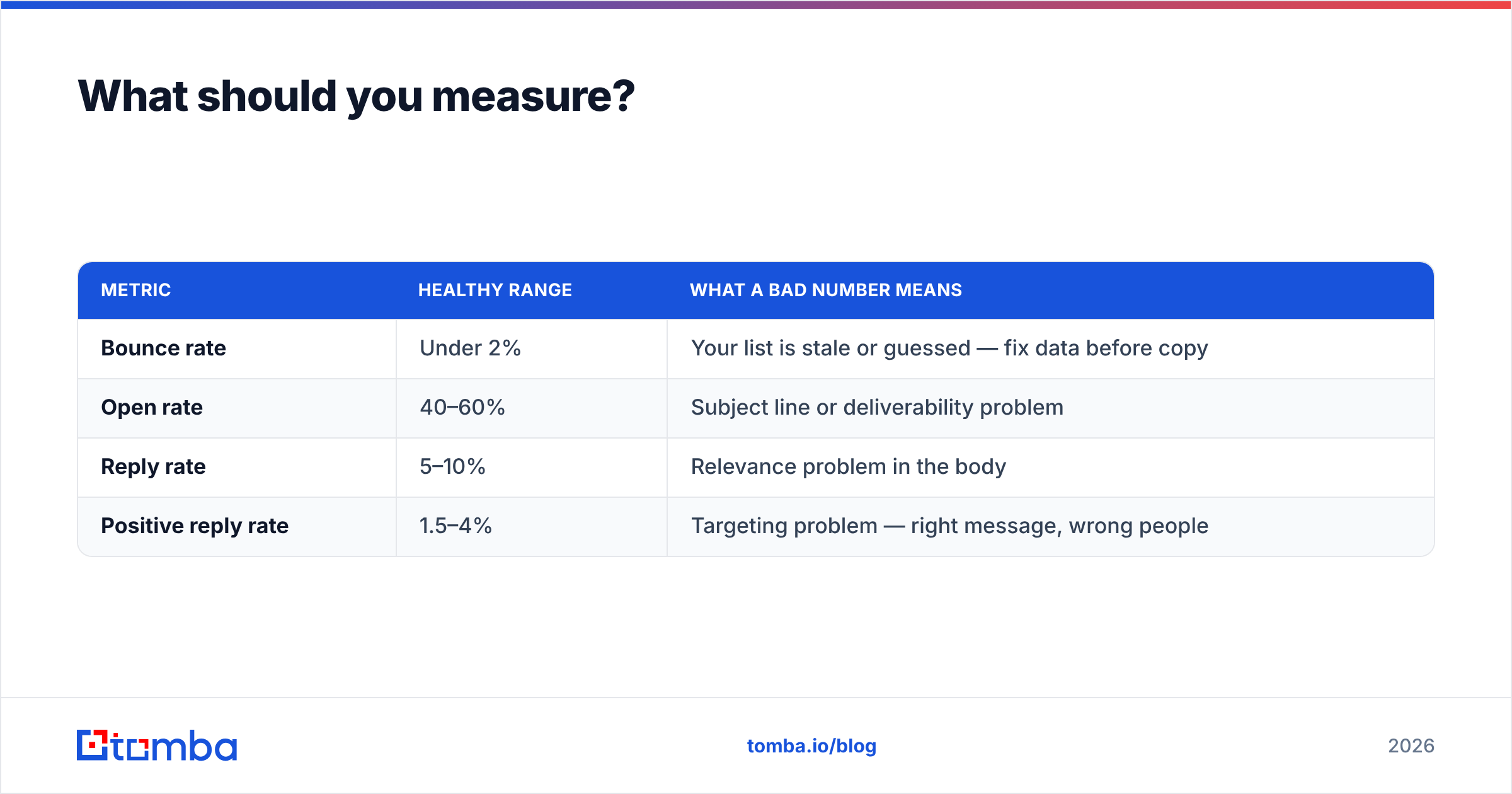
Track four numbers, in this order:
| Metric | Healthy range | What a bad number means |
|---|---|---|
| Bounce rate | Under 2% | Your list is stale or guessed — fix data before copy |
| Open rate | 40–60% | Subject line or deliverability problem |
| Reply rate | 5–10% | Relevance problem in the body |
| Positive reply rate | 1.5–4% | Targeting problem — right message, wrong people |
Diagnose top-down. A 12% bounce rate makes every other number meaningless, so fix it first. If bounces are clean and opens are low, the issue is deliverability or subject lines. If opens are healthy and replies are not, the body is about you instead of them. If replies are healthy but positive replies are not, your copy works and your list is aimed at the wrong titles.
Do not optimize copy against a broken list. It is the single most common wasted month in outbound.
Where to start this week#
Pick 50 accounts you would genuinely be glad to close. Find one real trigger for each. Write 50 emails of under 120 words using the four-block structure. Verify every address before the first send, and give it 18 days with three follow-ups. That is a real test — 500 unverified merge-tag blasts is not.
The part you should not do by hand is the data. Use the Tomba Email Finder to turn a name and a domain into a sourced, verified address, so the only variable you are testing is your message. The free tier covers 25 searches a month if you just want to check the coverage on your own account list first; Starter at $49/mo covers a typical rep's monthly prospecting, and the API handles it if you would rather build the lookup into your own workflow.
Get the addresses right, and your copy finally gets a fair hearing.
Related guides#
Ready to find emails that actually work?
Join 150,000+ professionals who stopped guessing and started sending. Free credits on signup — no credit card required.
Get the Tomba newsletter
Practical outbound tactics and product updates — once every two weeks.
About the author