Email to Request a Meeting With a Client: 2026 Playbook
Most meeting request emails fail on structure, not charm. Here are nine tested templates, the send-time data, the follow-up cadence, and the deliverability checks that decide whether your ask ever gets read.
TL;DR
- A meeting request email has one job: make saying yes cheaper than saying no. Everything else — pleasantries, company boilerplate, your product's feature list — reduces reply rate.
- The highest-performing structure in 2026 is four lines: context, reason, specific ask, easy exit. Under 120 words beats long pitches in almost every test we've seen reported.
- Ask for 15 minutes with two named time slots. Open-ended "let me know what works" asks push the scheduling work onto the client and stall.
- Follow-up is where meetings actually get booked. Roughly half of accepted meetings come from email two, three, or four — not the first send.
- None of it matters if the address is wrong. Verify before you send: a bounced meeting request costs you the contact and your sender reputation.
What is an email to request a meeting with a client?#
An email to request a meeting with a client is a short, single-purpose message that converts an existing relationship or a warm signal into time on a calendar. It is not a pitch, not a newsletter, and not a check-in. It is a scheduling transaction wrapped in one sentence of justification.
Think of it like asking a busy neighbor to help you move a couch. You do not open with your life story. You say what, when, how long, and what happens if they say no. The whole ask fits in a doorway conversation. Meeting request emails work the same way — the client is standing in a doorway called their inbox, and you have about four seconds of attention.
That framing matters because most people write these emails as if they were persuasive essays. They are not. They are logistics with a reason attached.
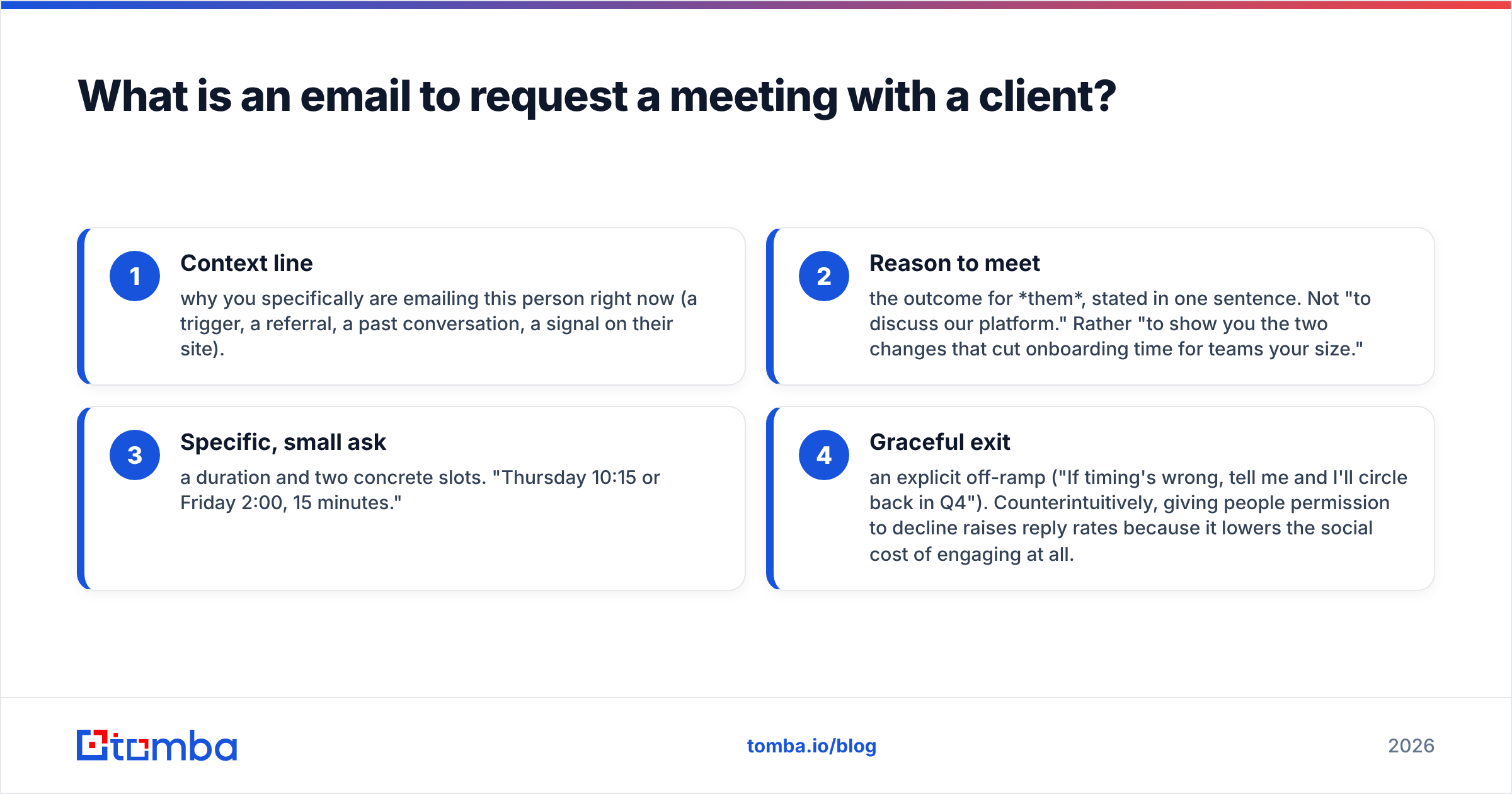
The four components that appear in nearly every high-reply meeting request:
- Context line — why you specifically are emailing this person right now (a trigger, a referral, a past conversation, a signal on their site).
- Reason to meet — the outcome for them, stated in one sentence. Not "to discuss our platform." Rather "to show you the two changes that cut onboarding time for teams your size."
- Specific, small ask — a duration and two concrete slots. "Thursday 10:15 or Friday 2:00, 15 minutes."
- Graceful exit — an explicit off-ramp ("If timing's wrong, tell me and I'll circle back in Q4"). Counterintuitively, giving people permission to decline raises reply rates because it lowers the social cost of engaging at all.
What makes a meeting request email get a reply in 2026?#
Three things changed since 2023, and they all favor short, specific, well-targeted asks.
Inbox filtering got stricter. Google and Microsoft both tightened bulk-sender enforcement, and complaint-rate thresholds are now enforced rather than advisory. A meeting request sent to a stale list behaves, statistically, like spam — so it gets treated like spam. Your beautiful copy never renders.
Buyers do more pre-research. Analyst coverage from firms like Gartner has consistently found that B2B buyers spend the majority of their buying cycle not talking to vendors. By the time a client agrees to meet, they have usually already read something. So a meeting request that re-explains what your company does is redundant; one that offers a decision-useful input is not.
AI-written outreach flooded inboxes. The generic, grammatically perfect, faintly enthusiastic email is now the default noise. Specificity is the differentiator: a real number, a real observation about their business, a real name.
Here is the practical test. Read your draft and ask: could I send this exact email to 50 other companies without editing anything? If yes, delete the parts that make it portable and replace them with parts that only apply to this client.
Which meeting request format should you use?#
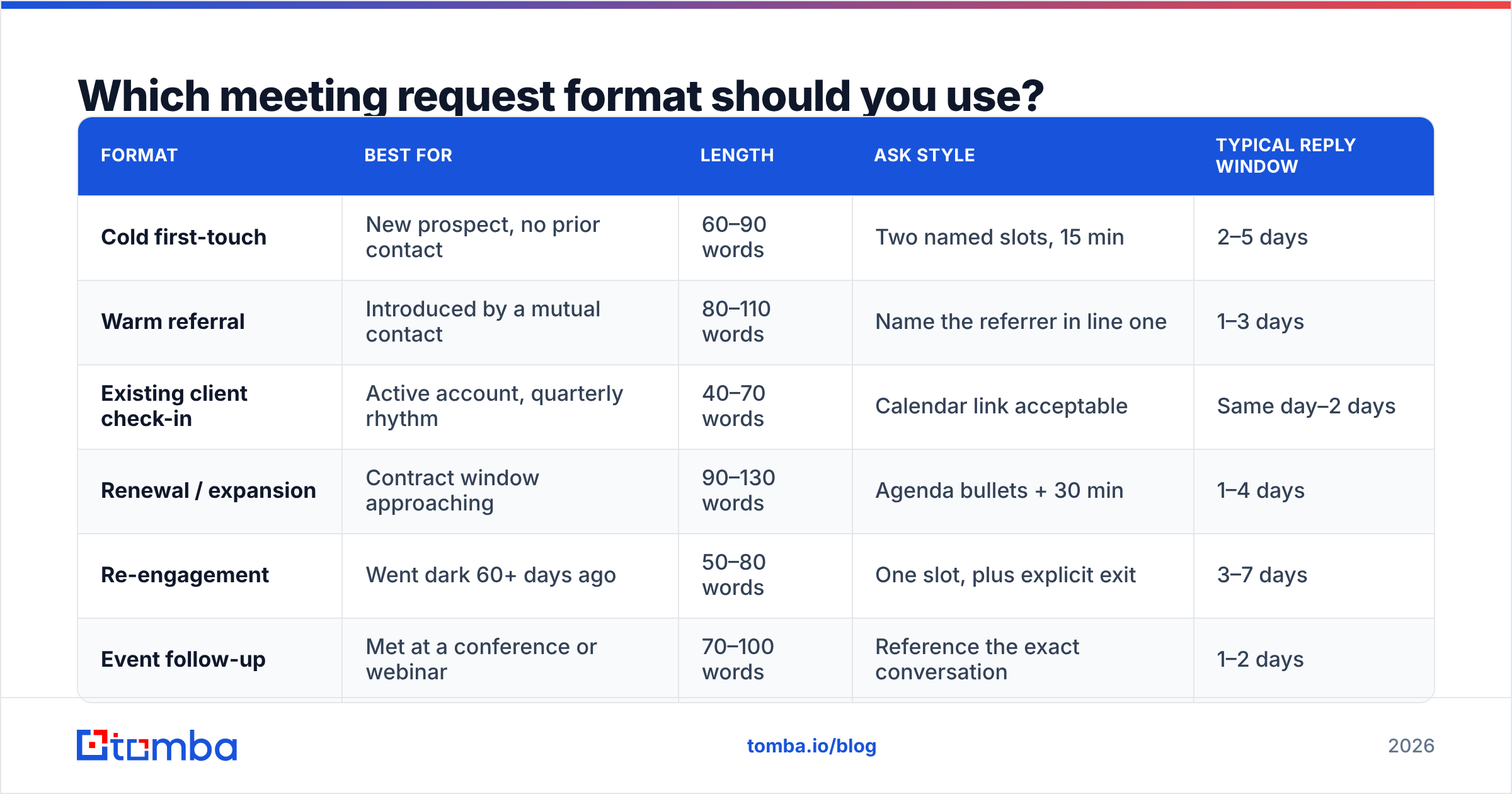
Different situations need different formats. Sending a formal, structured request to a client you speak with weekly reads as cold; sending a two-line casual note to a procurement lead you have never met reads as sloppy. Match the format to the relationship.
| Format | Best for | Length | Ask style | Typical reply window |
|---|---|---|---|---|
| Cold first-touch | New prospect, no prior contact | 60–90 words | Two named slots, 15 min | 2–5 days |
| Warm referral | Introduced by a mutual contact | 80–110 words | Name the referrer in line one | 1–3 days |
| Existing client check-in | Active account, quarterly rhythm | 40–70 words | Calendar link acceptable | Same day–2 days |
| Renewal / expansion | Contract window approaching | 90–130 words | Agenda bullets + 30 min | 1–4 days |
| Re-engagement | Went dark 60+ days ago | 50–80 words | One slot, plus explicit exit | 3–7 days |
| Event follow-up | Met at a conference or webinar | 70–100 words | Reference the exact conversation | 1–2 days |
Two rules cut across all six rows. First, calendar links are earned, not assumed — drop a scheduling link on a cold contact and you have asked a stranger to do your admin work. Name the slots instead, and hold the link for reply two. Second, the shorter the relationship, the shorter the meeting you should request. Fifteen minutes is a low-risk yes. Thirty is a commitment. Sixty is a negotiation.
What are the best templates for each scenario?#
Use these as scaffolding, not scripts. Every bracket is a place where a real detail has to go, and the email fails in proportion to how many brackets you leave generic.
1. Cold first-touch (trigger-based)
Subject: quick question re: [specific initiative]
Hi [First name],
Saw [company] just [specific trigger — opened a Berlin office, shipped the self-serve tier, posted three SDR roles]. When teams do that, [specific downstream problem] usually shows up about a quarter later.
We helped [comparable company] cut that from [X] to [Y]. Worth 15 minutes to see if the same applies here?
Thursday 10:15 or Friday 14:00 work on my side. If it's not a priority, say so and I'll stop.
[Your name]
2. Warm referral
Subject: [Referrer name] suggested I reach out
Hi [First name],
[Referrer] mentioned you're the one thinking about [topic] at [company] — she thought a short conversation would be useful.
Context: we handle [narrow thing] for [2–3 named peers]. The part [Referrer] thought was relevant to you was [specific detail].
15 minutes Tuesday or Wednesday afternoon?
3. Existing client quarterly
Subject: Q3 review — 20 min?
Hi [First name],
Time for the quarterly. I'd like to cover: (1) [metric] vs. target, (2) the [feature/process] rollout, (3) anything you want to push into next quarter.
Tuesday 11:00 or Thursday 15:30 — grab whichever works: [calendar link].
4. Renewal or expansion
Subject: [Company] renewal — agenda for a 30-minute call
Hi [First name],
Your term ends [date]. Before it does, I'd like to walk through three things: what you actually used this year, where the current plan is over- or under-sized, and the two options we can offer for next term.
No surprises in the meeting — I'll send the usage numbers 24 hours ahead so you can react rather than absorb.
Does [date, time] or [date, time] work?
5. Re-engagement after silence
Subject: closing the loop
Hi [First name],
We spoke in [month] about [topic] and it went quiet — which usually means priorities moved. Totally fine.
One thing changed since then: [specific, concrete change]. If that shifts anything, I have Thursday at 09:30. If not, I'll close the file and stop emailing.
6. Event follow-up
Subject: the [specific thing] you mentioned at [event]
Hi [First name],
You said your team was rebuilding [thing] in-house and worried about [specific concern]. I've since pulled together how [named company] handled the same call.
15 minutes next week to walk you through it?
Three more worth keeping in the swipe file: the executive-to-executive request (three sentences, no product mention, purely peer-level), the post-demo scheduling nudge (restate the one objection, request a call to resolve it), and the multi-threading request (ask your champion to bring one named colleague, with a reason that benefits the champion). If you want a broader starting library, browse the ready-made cold email templates and adapt rather than write from zero.
When should you send it, and how long should the meeting be?#
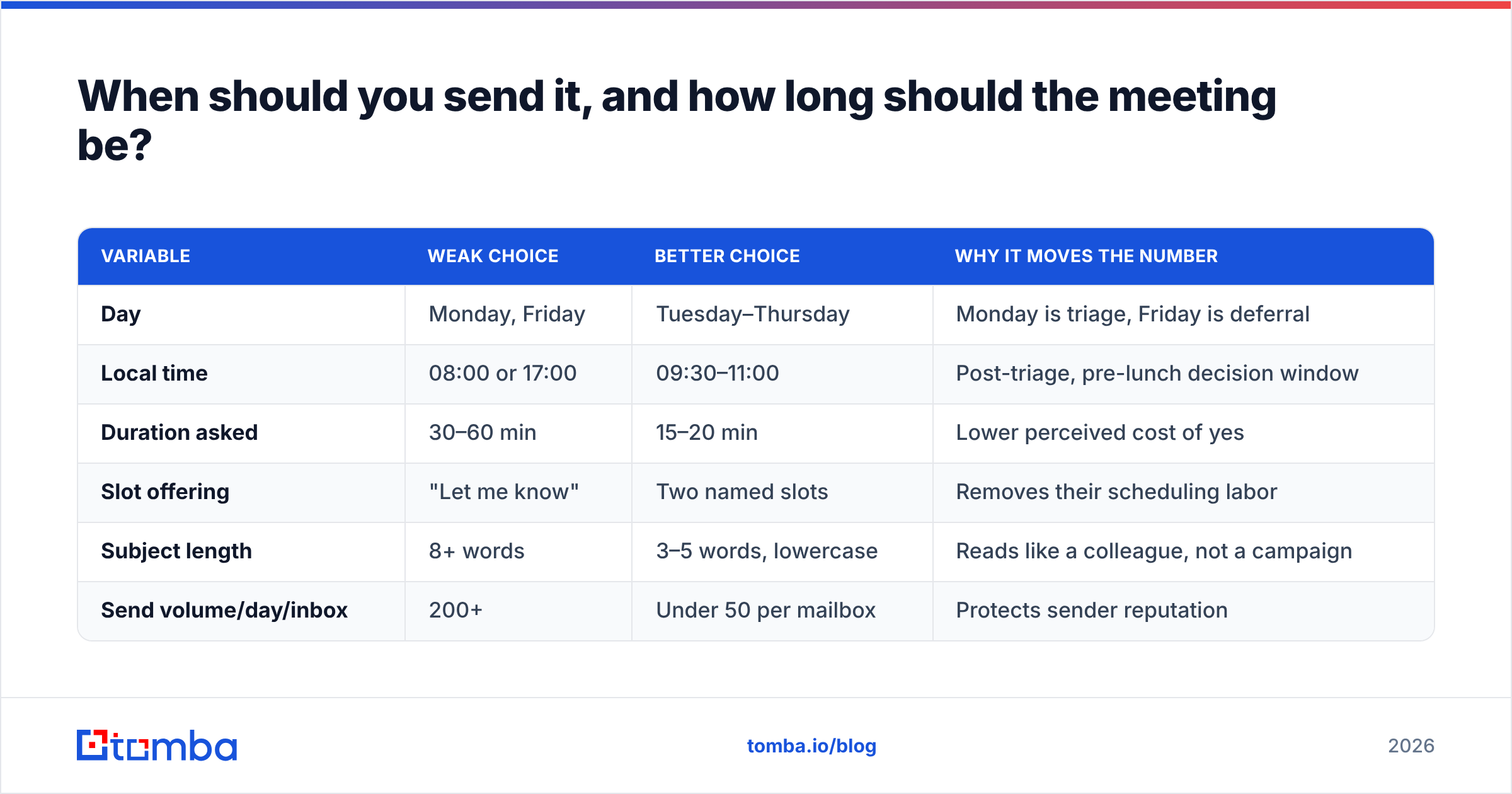
Send timing matters less than people claim, but it is not nothing. The durable pattern across published benchmarks — including HubSpot's sales research — is that mid-week mornings in the recipient's local time outperform Monday-morning and Friday-afternoon sends, and that the difference is measured in a few percentage points, not multiples.
| Variable | Weak choice | Better choice | Why it moves the number |
|---|---|---|---|
| Day | Monday, Friday | Tuesday–Thursday | Monday is triage, Friday is deferral |
| Local time | 08:00 or 17:00 | 09:30–11:00 | Post-triage, pre-lunch decision window |
| Duration asked | 30–60 min | 15–20 min | Lower perceived cost of yes |
| Slot offering | "Let me know" | Two named slots | Removes their scheduling labor |
| Subject length | 8+ words | 3–5 words, lowercase | Reads like a colleague, not a campaign |
| Send volume/day/inbox | 200+ | Under 50 per mailbox | Protects sender reputation |
The duration row is the one people ignore. Asking for 15 minutes and running 40 because the client stayed engaged is a win. Asking for 60 and getting silence is not a more ambitious strategy — it is a worse one.
How do you follow up without being annoying?#
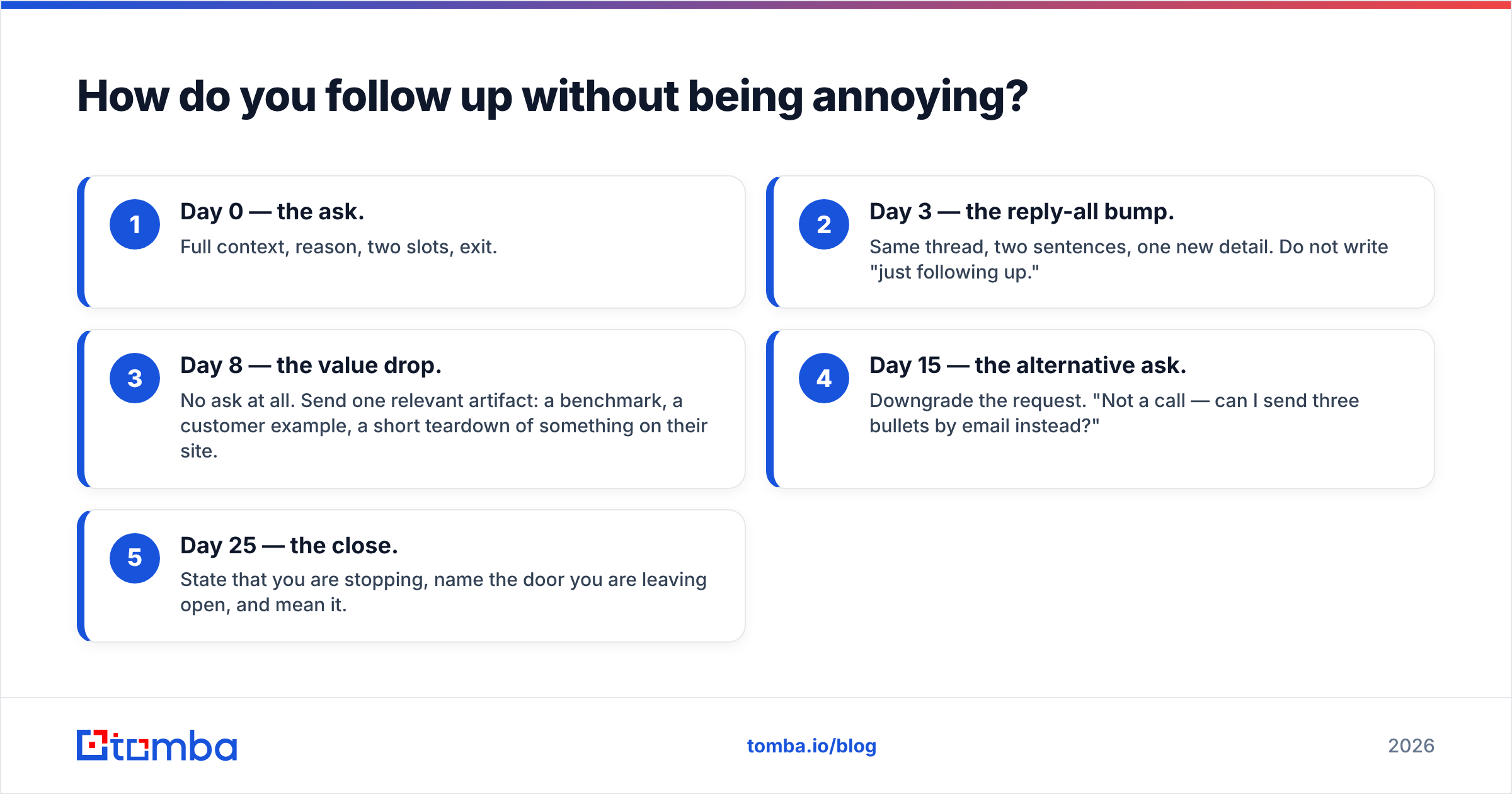
Most meetings are not booked on the first email. They are booked on the second, third, or fourth — and the difference between persistent and annoying is entirely about whether each message carries new information.
A cadence that holds up:
- Day 0 — the ask. Full context, reason, two slots, exit.
- Day 3 — the reply-all bump. Same thread, two sentences, one new detail. Do not write "just following up."
- Day 8 — the value drop. No ask at all. Send one relevant artifact: a benchmark, a customer example, a short teardown of something on their site.
- Day 15 — the alternative ask. Downgrade the request. "Not a call — can I send three bullets by email instead?"
- Day 25 — the close. State that you are stopping, name the door you are leaving open, and mean it.
Five touches over roughly a month, each with a distinct job. What kills sequences is repetition without addition — four copies of the same request in different fonts. If you cannot think of new information for touch three, that is a signal your research was thin, not that you need a cleverer subject line. Testing your openers with a subject line generator is a cheap way to avoid recycling the same phrasing across the whole cadence.
Why do meeting request emails never get seen at all?#
Because a meaningful share of them never arrive. This is the least glamorous section and the one with the biggest effect on booked meetings.
Three failure modes account for most of it:
- Wrong address. Pattern-guessed emails (
first.last@company.com) are right often enough to feel safe and wrong often enough to be dangerous. Each bounce is logged against your domain. - Reputation damage. Bounce rates above roughly 2% start affecting inbox placement for every message from that domain — including the emails to clients who do want to hear from you. Your sender reputation is a shared resource across your whole outbound motion.
- Authentication gaps. Missing or misconfigured SPF, DKIM, and DMARC records get messages filtered before content is even evaluated. This is a 20-minute fix that people postpone for years.
The workflow that avoids all three is boring and effective: find the address from a real source, verify it, then send. Use a domain search to pull the verified contacts at the target company, run the list through an email verifier to drop unknowns and catch-alls, and only then load the sequence. If you are sending at any volume, the bulk email finder handles the same flow across a whole account list.
For deliverability hygiene beyond addresses, the vendor documentation and buyer reviews on G2's sales engagement category are a reasonable neutral starting point for comparing what different sending platforms actually enforce.
What mistakes kill your meeting request rate?#
- Burying the ask. If the request for time is in paragraph three, it does not exist. Put it in the first half of the message.
- Asking about their priorities in email one. "What are your biggest challenges around X?" is a discovery-call question. Asking it in a cold email transfers work to a stranger.
- Over-personalizing the wrong thing. Complimenting someone's podcast appearance and then pitching an unrelated product reads as manipulation. Personalize the reason to meet, not the greeting.
- Attaching a deck. Attachments to cold contacts trigger filters and get ignored. Link to it after they reply, if at all.
- Using a scheduling link too early. It signals your time is structured and theirs is available.
- Sending from a domain you also use for billing and support. One aggressive campaign can poison the mailbox your clients actually depend on.
How should you measure whether any of this works?#
Track four numbers per template, not per campaign: delivery rate (are you arriving), open rate as a rough directional signal only, reply rate (the honest one), and meeting-set rate. The gap between reply rate and meeting-set rate tells you whether your ask is the problem or your targeting is. High replies with few meetings means people are engaging but declining — usually a duration or relevance issue. Low replies across the board with clean delivery means your context line is generic.
Change one variable at a time, give each version at least 100 sends before you judge it, and keep a written record. Most teams "test" by rewriting the whole email every two weeks and then have no idea what improved.
Ready to send meeting requests that actually land?#
Great copy is wasted on an address that bounces. Start by building a clean, verified contact list: the Tomba Email Finder locates professional email addresses by name, company, or domain, and flags confidence so you know what you are sending into before the first template goes out. The free tier covers 25 searches a month, Starter is $49/mo, and Growth is $99/mo — full breakdown on the Tomba pricing page. Get the addresses right, then let the templates above do their job.
Related guides#
Ready to find emails that actually work?
Join 150,000+ professionals who stopped guessing and started sending. Free credits on signup — no credit card required.
Get the Tomba newsletter
Practical outbound tactics and product updates — once every two weeks.
About the author