Email To Schedule A Meeting With Client: 2026 Guide
Meeting-request emails fail for boring reasons: no clear ask, three options nobody wants, and a subject line that reads like spam. Here are the templates, timing rules, and follow-up cadence that actually get calendars filled.
TL;DR
- A meeting-request email needs exactly one ask. Two proposed times beat a calendar link for cold and semi-cold clients; a link is fine once the relationship exists.
- Subject lines that name a date or a specific outcome ("15 min Thursday re: Q3 renewal") outperform vague ones ("Quick chat?") because the recipient can decide without opening.
- Timing matters less than people claim, but Tuesday–Thursday mid-morning in the recipient's timezone remains the safest default.
- Follow up three times over 10 days, then stop. Most accepted meetings come from touches two and three, not the first send.
- The email is downstream of the address. If your deliverability or contact data is bad, no template saves you — verify before you send.
What is an email to schedule a meeting with client?#
It's a single-purpose message whose only job is to convert attention into a calendar entry. That's it. Not to pitch, not to educate, not to attach a deck.
Think of it like asking someone for directions on a busy street. You don't open with your life story. You state where you're going, ask one clear question, and let them answer in five seconds. Every extra sentence in a meeting-request email is another second the stranger spends deciding whether to keep walking.
Most of these emails fail for the same three reasons:
- The ask is buried. The request appears in paragraph four, after context nobody read.
- The ask is compound. "Can we chat, and also could you send over the current spec, and let me know who else should join?" Three decisions, zero replies.
- The value is assumed. "I'd love to learn about your business" describes value to you, not to them.
A working meeting-request email has five parts and nothing else: a reason you're writing now, a one-line reason it's worth their time, a specific ask with a duration, two proposed slots, and a low-friction exit ("if this isn't the right time, tell me when to circle back").
Why do most meeting request emails get ignored?#
Because they read like they were written for the sender's pipeline, not the recipient's week.
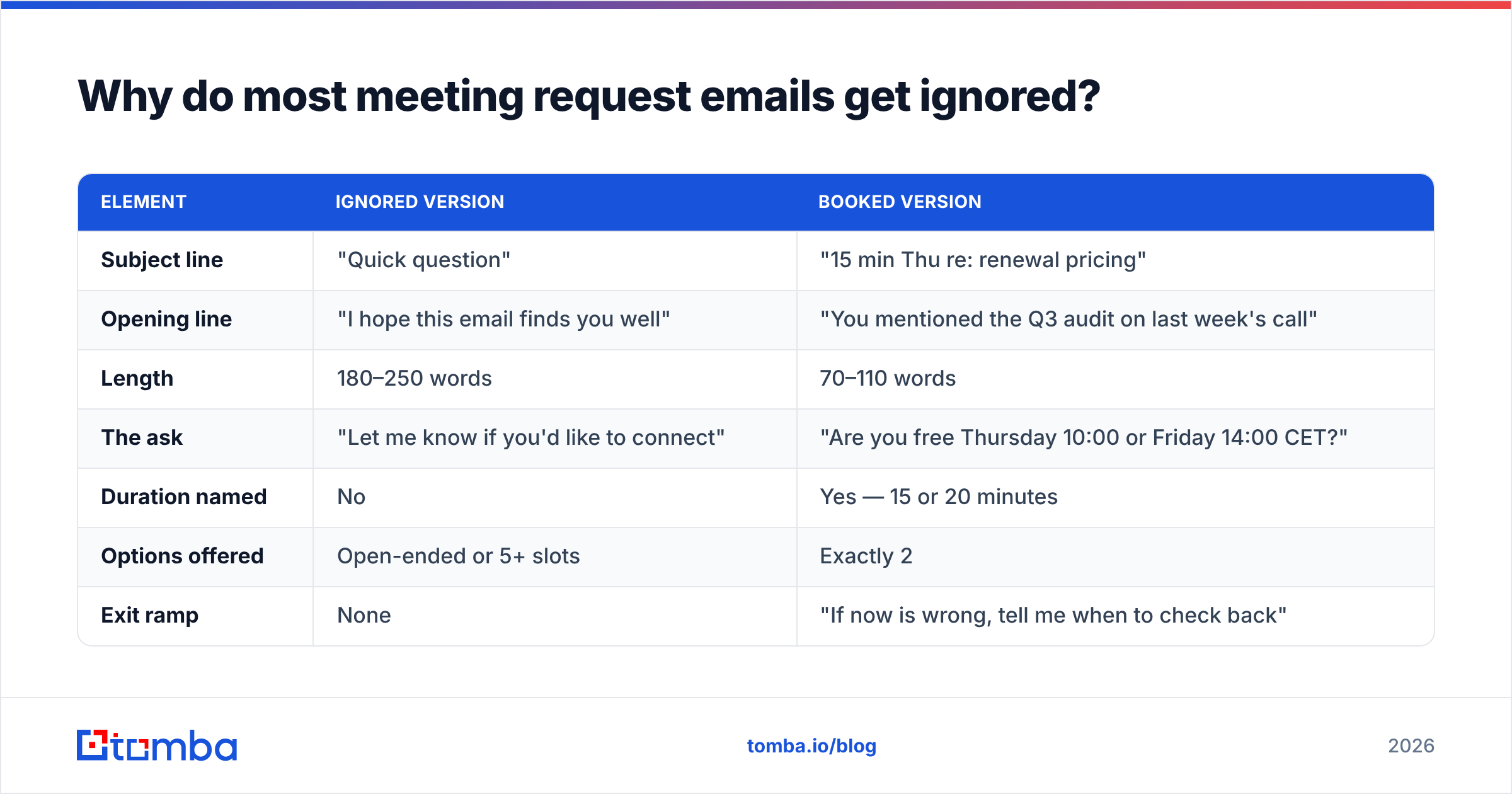
Look at the structural differences between a request that gets ignored and one that gets a reply:
| Element | Ignored version | Booked version |
|---|---|---|
| Subject line | "Quick question" | "15 min Thu re: renewal pricing" |
| Opening line | "I hope this email finds you well" | "You mentioned the Q3 audit on last week's call" |
| Length | 180–250 words | 70–110 words |
| The ask | "Let me know if you'd like to connect" | "Are you free Thursday 10:00 or Friday 14:00 CET?" |
| Duration named | No | Yes — 15 or 20 minutes |
| Options offered | Open-ended or 5+ slots | Exactly 2 |
| Exit ramp | None | "If now is wrong, tell me when to check back" |
| Signature | Full block, 3 links, banner | Name, role, one link |
The pattern behind that table is decision cost. Every open question you leave in the email becomes work for the recipient. Two dated options require a yes/no/counter — about four seconds of thought. "Let me know when works" requires them to open a calendar, do timezone math, and compose a sentence. Guess which one gets deferred.
What should the subject line say?#
Name the outcome or name the date. Ideally both, in under 50 characters so it survives mobile truncation.
Working patterns, with why they work:
- "15 min Thursday re: [specific topic]" — duration, day, and subject in six words. Nothing to decode.
- "[Mutual connection] suggested I reach out" — borrowed trust does the opening for you. Only if true.
- "Following up on [specific thing they said]" — proves this isn't a blast.
- "Question about your [specific process/tool]" — curiosity, but anchored to something real on their side.
- "Re: [their initiative] — 20 minutes?" — works when you've actually read their press release, job posts, or earnings call.
Patterns to retire: "Touching base," "Circling back," "Quick chat?", anything with an emoji, anything in ALL CAPS, and anything that promises a "game-changing opportunity." Spam filters and humans have converged on the same blocklist. Run drafts through a spam checker before a large send, and use a subject line tester if you're A/B-ing at volume.
One more thing: subject lines with a specific date age badly. If you write "Thursday" on Monday and follow up the next Tuesday, the thread is now confusing. Either update the subject on follow-ups or use a topic-based subject you can reuse across the sequence.
What are the best templates for different client scenarios?#
Seven situations cover almost everything. Swap the brackets, keep the structure.
1. Cold first contact (no prior relationship)
Subject: 15 min re: [their specific initiative]
Hi [Name],
I saw [specific trigger — funding round, job posting, product launch]. Teams at that stage usually hit [specific problem] within a quarter.
We helped [comparable company] cut [metric] by [number] doing [one-sentence how].
Worth 15 minutes to see if the same applies? Tuesday 10:00 or Wednesday 15:00 [their timezone]?
If the timing's wrong, tell me when to check back.
[Name, role, one link]
2. Warm inbound (they downloaded or replied)
Thanks for grabbing [asset]. Most people who read that one are working through [problem]. Happy to walk you through how three other [role]s solved it — 20 minutes Thursday 11:00 or Friday 09:00?
3. Existing client, quarterly review
Subject: Q3 review — Thu 14:00 or Fri 10:00?
[Name] — time for the quarterly. I'll bring: usage trend, the two open tickets, and the renewal timeline. 30 minutes. Thursday 14:00 or Friday 10:00 work?
4. Re-engaging a stalled deal
We paused in [month] because [their stated reason]. [Thing that changed — new feature, new pricing, their new hire]. Is it worth a 15-minute reset, or should I close the file?
The "should I close the file?" line is uncomfortable and it works. It gives a clean out, which is exactly why people reply.
5. Escalating to a decision-maker
[Champion's name] and I have been working on [project]. Before we go further, I'd rather sanity-check the direction with you — 20 minutes, and I'll send the one-page summary beforehand so we skip the recap.
6. Post-event or post-webinar
You asked about [specific question they raised] during [event]. Short answer: [one sentence]. The longer answer needs a screen share — 15 minutes next week?
7. The final follow-up (breakup)
I've sent a few notes about [topic] and haven't heard back, which usually means it's not a priority right now. Totally fine. I'll stop here — if it comes back on your roadmap, reply to this thread and I'll pick it up.
Keep a personal library. Version them, track which one books, and retire the losers quarterly. A starter set of cold email templates is a reasonable place to begin before you build your own.
When should you send it, and how often should you follow up?#
Send Tuesday through Thursday, between 08:00 and 11:00 in the recipient's local time. That window has been the consensus across send-time studies for years, and while the effect size is modest, it costs you nothing to respect it.
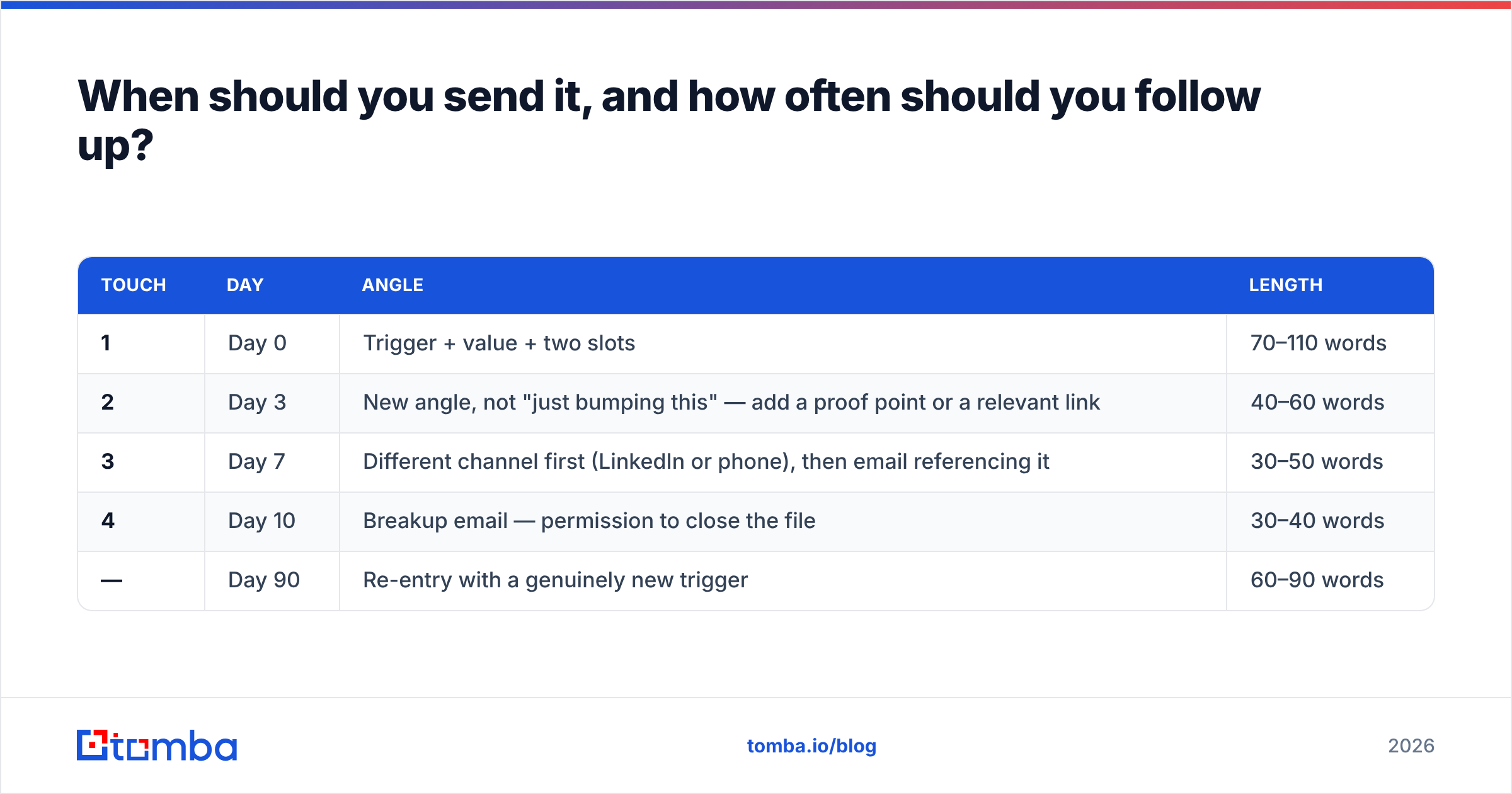
What actually moves the number is the follow-up cadence. A single send is a coin flip. A sequence is a process.
| Touch | Day | Angle | Length |
|---|---|---|---|
| 1 | Day 0 | Trigger + value + two slots | 70–110 words |
| 2 | Day 3 | New angle, not "just bumping this" — add a proof point or a relevant link | 40–60 words |
| 3 | Day 7 | Different channel first (LinkedIn or phone), then email referencing it | 30–50 words |
| 4 | Day 10 | Breakup email — permission to close the file | 30–40 words |
| — | Day 90 | Re-entry with a genuinely new trigger | 60–90 words |
Four touches over ten days, then stop. Sending a fifth, sixth, and seventh email doesn't demonstrate persistence; it demonstrates you aren't reading signals, and it raises your complaint rate, which damages sender reputation across every domain you send from.
A note on channel mixing: pairing email with a LinkedIn view or a short call before touch three consistently lifts reply rates in practice. It's not magic — it's just that a name someone has seen twice reads as familiar. HubSpot's sales research library is a decent public reference if you want to see how these cadence norms are reported across industries.
Should you use a calendar link or propose times?#
Propose times when you're asking for something. Send a link once they've said yes.
This is the most common tactical mistake in meeting-request emails. A Calendly link in a cold email says: my time is structured, yours is available. To a VP who's never heard of you, that reads as presumptuous. Two proposed slots say: I've thought about your week.
The rule of thumb:
- Cold or first contact → propose two specific slots with timezone.
- Warm inbound or referral → propose two slots, add the link as a fallback ("or grab any slot here if neither works").
- Existing client or confirmed yes → link only. They know you; friction is the enemy now.
- Executive or hard-to-reach → propose slots and offer to work around them entirely. Never send a link to someone senior to your champion.
How does contact data quality change your results?#
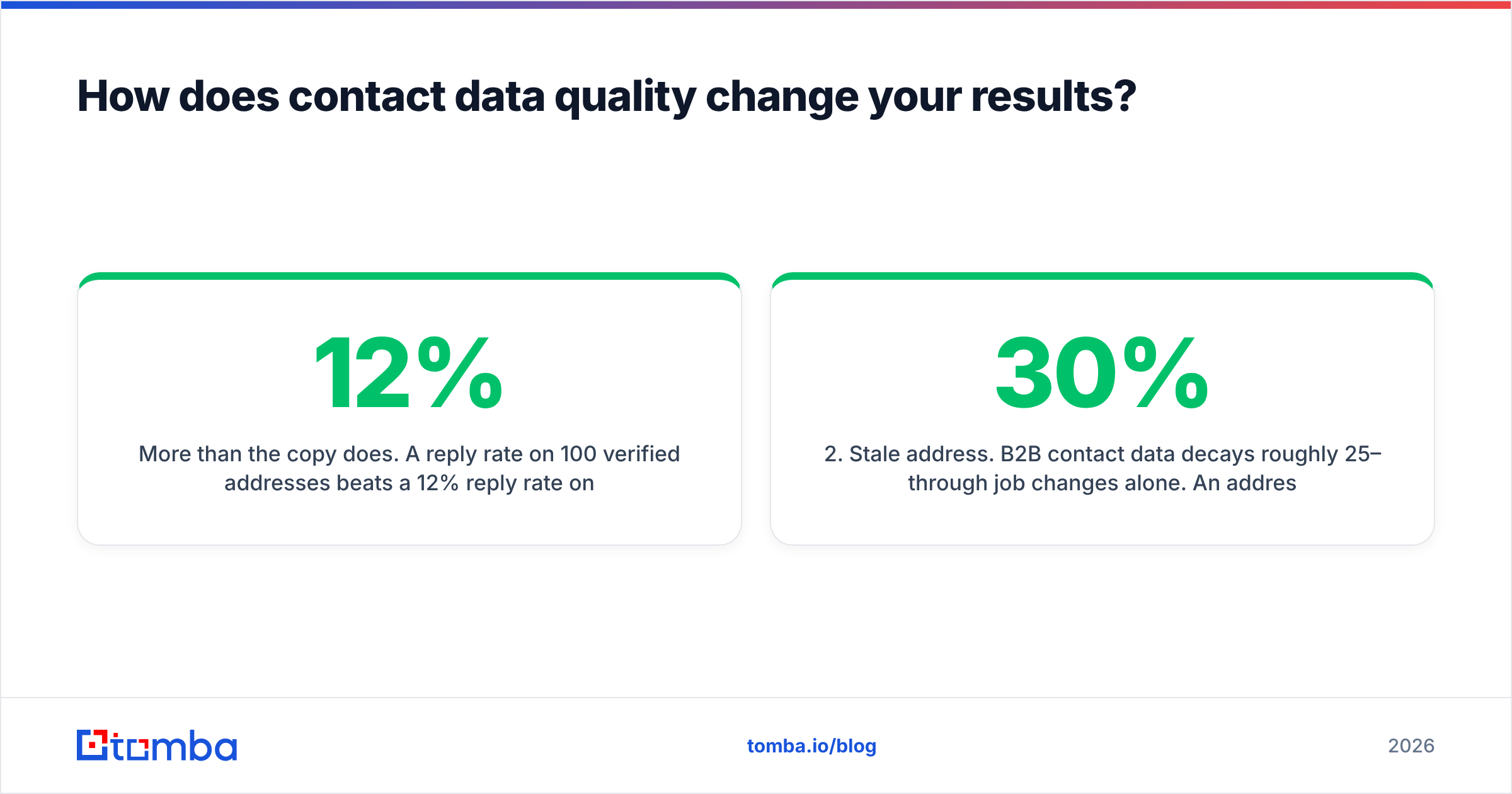
More than the copy does. A 12% reply rate on 100 verified addresses beats a 12% reply rate on 100 addresses where 30 bounce — because the bounce rate itself degrades the inbox placement of the other 70.
Three data problems sink meeting requests before anyone reads them:
- Wrong person. You emailed the ops manager about a security decision. The copy was fine; the target wasn't. Verify the role, not just the address.
- Stale address. B2B contact data decays roughly 25–30% per year through job changes alone. An address that worked last October may not work now.
- Unverified catch-all. Catch-all domains accept everything, so a "valid" result means nothing. Use a catch-all verifier to separate real mailboxes from black holes before you commit budget to a sequence.
The hygiene routine that fixes most of this: pull addresses with a domain search or email finder, run the list through an email verifier, drop everything that isn't deliverable, and re-verify anything older than 90 days. If you're building lists at scale, tools like Tomba, BookYourData, and Apollo all cover this ground with different tradeoffs — Tomba leans toward per-domain accuracy and API access, BookYourData toward pre-built verified lists you buy outright. Pick based on whether you want to find contacts or purchase them.
Also check your sending setup once a quarter: SPF, DKIM, and DMARC records aligned, warmup running on new domains, and a sender reputation score you've actually looked at. Google's Postmaster Tools is free and shows you exactly what Gmail thinks of your domain — most senders never open it.
What should you measure?#
Four numbers, checked weekly:
- Open rate — a weak signal since Apple Mail Privacy Protection, but a sudden drop still flags a deliverability problem.
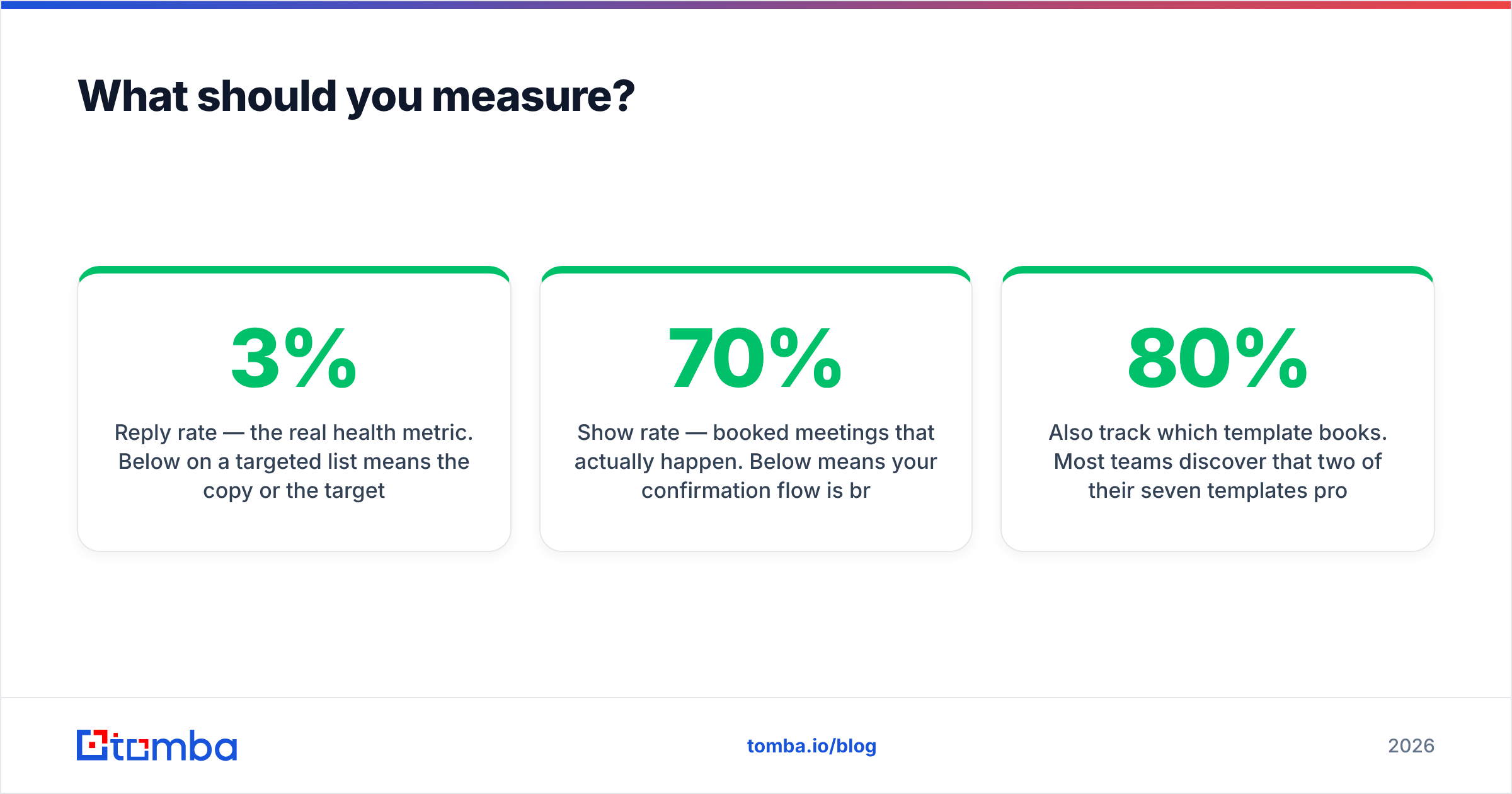
- Reply rate — the real health metric. Below 3% on a targeted list means the copy or the targeting is off.
- Meeting-booked rate — replies that convert to a calendar entry. If replies are high but bookings are low, your ask or your slot options are the bottleneck.
- Show rate — booked meetings that actually happen. Below 70% means your confirmation flow is broken, not your email.
Fix them in that order, and don't change two variables in the same week. If you rewrite the subject line and the CTA simultaneously, you learn nothing.
Also track which template books. Most teams discover that two of their seven templates produce 80% of meetings, and the other five exist because someone wrote them in 2023 and nobody deleted them.
Getting the address right before you write the email#
Every template above assumes the message reaches a real human at a real mailbox. That assumption fails more often than most teams measure — job changes, typos in a scraped list, and catch-all domains quietly eat a chunk of every send.
Start with the address. Tomba Email Finder resolves professional emails by name and domain with confidence scoring, and the built-in verifier flags catch-alls and dead mailboxes before they cost you inbox placement. The free tier covers 25 searches a month if you just want to test a short list; paid plans start at $49/mo, with details on the Tomba pricing page. Get the data clean, then let the templates do their job.
Related guides#
Ready to find emails that actually work?
Join 150,000+ professionals who stopped guessing and started sending. Free credits on signup — no credit card required.
Get the Tomba newsletter
Practical outbound tactics and product updates — once every two weeks.
About the author