Email Tracking Chrome Extension: The 2026 Buyer's Guide
Open tracking is noisier than it was in 2020 — Apple MPP, Gmail image proxies, and privacy law all distort the numbers. Here's how email tracking Chrome extensions actually work in 2026, which signals still matter, and how to pick one.
TL;DR
- An email tracking Chrome extension injects a 1x1 pixel (and rewritten link URLs) into mail you send from Gmail or Outlook Web, then reports back when those assets get fetched.
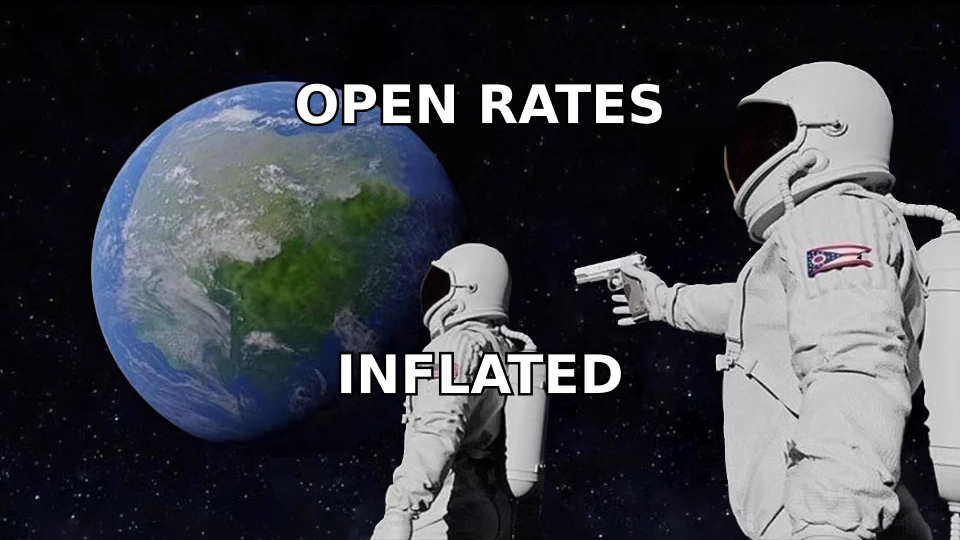
- Since Apple Mail Privacy Protection and Gmail's image proxy became the default path for most inboxes, raw open rates are inflated by roughly 30–70% depending on your audience mix. Treat opens as a weak signal, not a metric.
- Link clicks, reply rate, and meeting-booked rate survived the privacy shift. Build your reporting on those.
- Free extensions usually monetize by reading your mailbox metadata. Read the OAuth scopes before you install anything — "Read, compose, send, and permanently delete all your email" is a real scope some tools request.
- Tracking is worthless if the address is wrong. Verify contacts before you send, then track what happens after.
What is an email tracking Chrome extension?#
It's a browser add-on that hooks into Gmail's or Outlook Web's compose window and quietly modifies each message you send so you can tell whether it got opened, clicked, or ignored.
Think of it like a return receipt stapled to a physical letter — except the recipient never signed anything, and the postal service sometimes opens the envelope itself just to scan for anthrax, which counts as a "signature." That last part is why 2026 tracking data is messier than the dashboards suggest.
Mechanically, three things happen when you hit send with a tracker installed:
- Pixel injection — a transparent 1x1 image hosted on the vendor's domain is appended to the HTML body. When the recipient's mail client fetches that image, the vendor logs a timestamp, IP, and user agent.
- Link rewriting — every URL in your message is replaced with a redirect through the vendor's domain (
track.vendor.com/c/abc123), which logs the click before forwarding to the real destination. - Thread stitching — the extension keeps a local map of message IDs so the sidebar can show "opened 3x, last 12 minutes ago" next to the right conversation.
Everything else — sequences, templates, mail merge, CRM sync — is a layer bolted on top of those three primitives. When you're comparing tools, you're mostly comparing the bolted-on layers and the OAuth scopes, not the tracking itself.
Does email open tracking still work in 2026?#
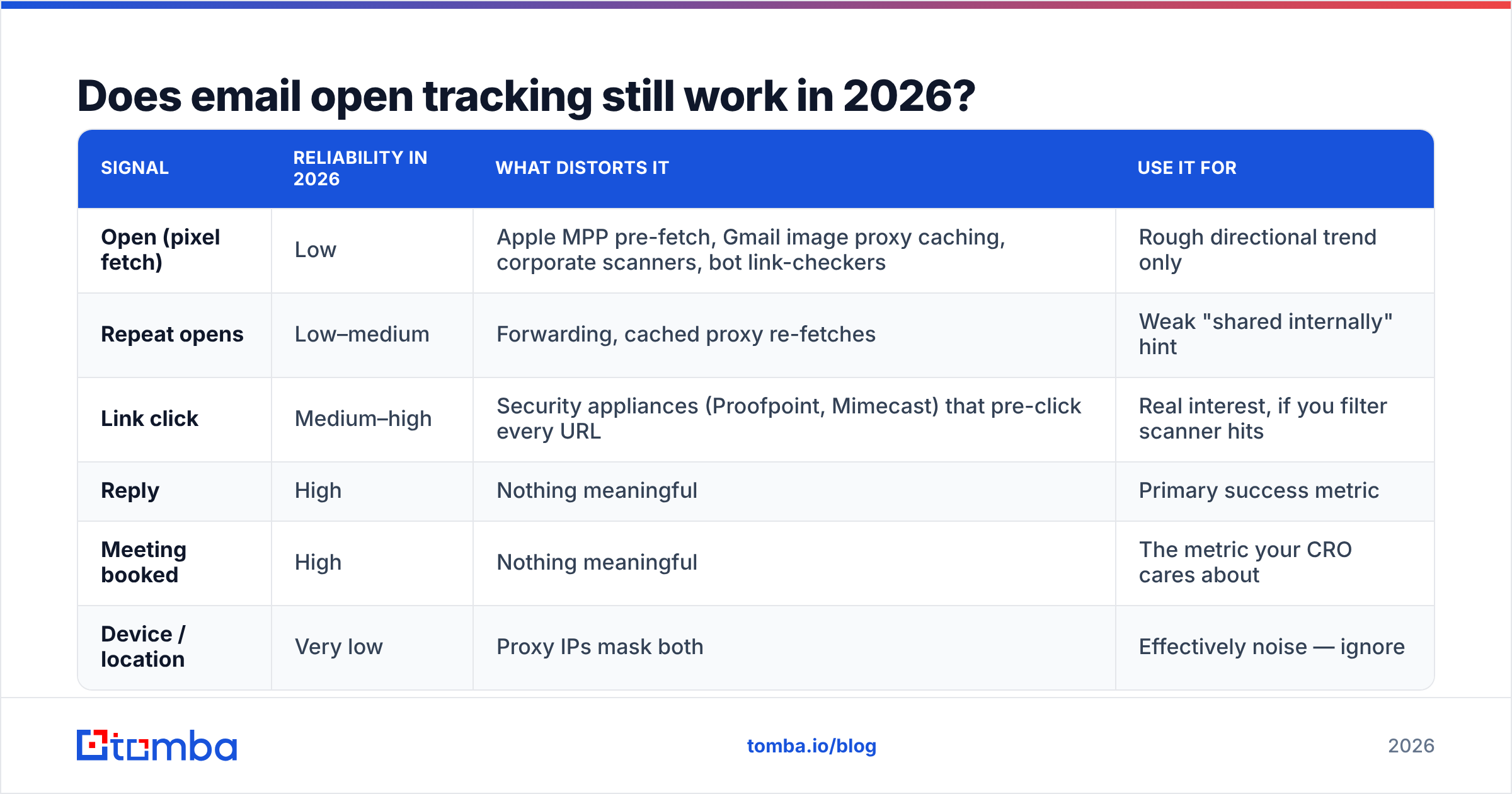
Partially, and less than the dashboards imply. Here's the honest breakdown by signal.
| Signal | Reliability in 2026 | What distorts it | Use it for |
|---|---|---|---|
| Open (pixel fetch) | Low | Apple MPP pre-fetch, Gmail image proxy caching, corporate scanners, bot link-checkers | Rough directional trend only |
| Repeat opens | Low–medium | Forwarding, cached proxy re-fetches | Weak "shared internally" hint |
| Link click | Medium–high | Security appliances (Proofpoint, Mimecast) that pre-click every URL | Real interest, if you filter scanner hits |
| Reply | High | Nothing meaningful | Primary success metric |
| Meeting booked | High | Nothing meaningful | The metric your CRO cares about |
| Device / location | Very low | Proxy IPs mask both | Effectively noise — ignore |
Apple's Mail Privacy Protection, introduced back in 2021 and now on by default for the majority of Apple Mail users, pre-loads remote images on Apple's servers whether or not a human reads the message. Gmail has proxied images through googleusercontent.com since 2013, which caches the pixel and can suppress or duplicate fetches. Add enterprise security gateways that detonate every link in a sandbox, and a "45% open rate" on a B2B list can easily be 20% real humans.
The practical fix isn't to abandon tracking. It's to change what you look at:
- Anchor on replies. Reply rate is unspoofable and correlates with pipeline. Track your response rate by segment and sequence step.
- Filter machine clicks. Discard any click that lands within 5 seconds of delivery, or that hits every link in the message. That's a scanner, not a prospect.
- Use opens as a tiebreaker only. Two identical accounts, one shows six opens over three days from different user agents — that's worth a call. One open at 3:01 AM is not.
- Never mention the open in your follow-up. "I saw you opened my email twice" is the fastest way to sound like a stalker and get blocked. It also exposes you when the open was a proxy artifact.
Which email tracking Chrome extension should you pick?#
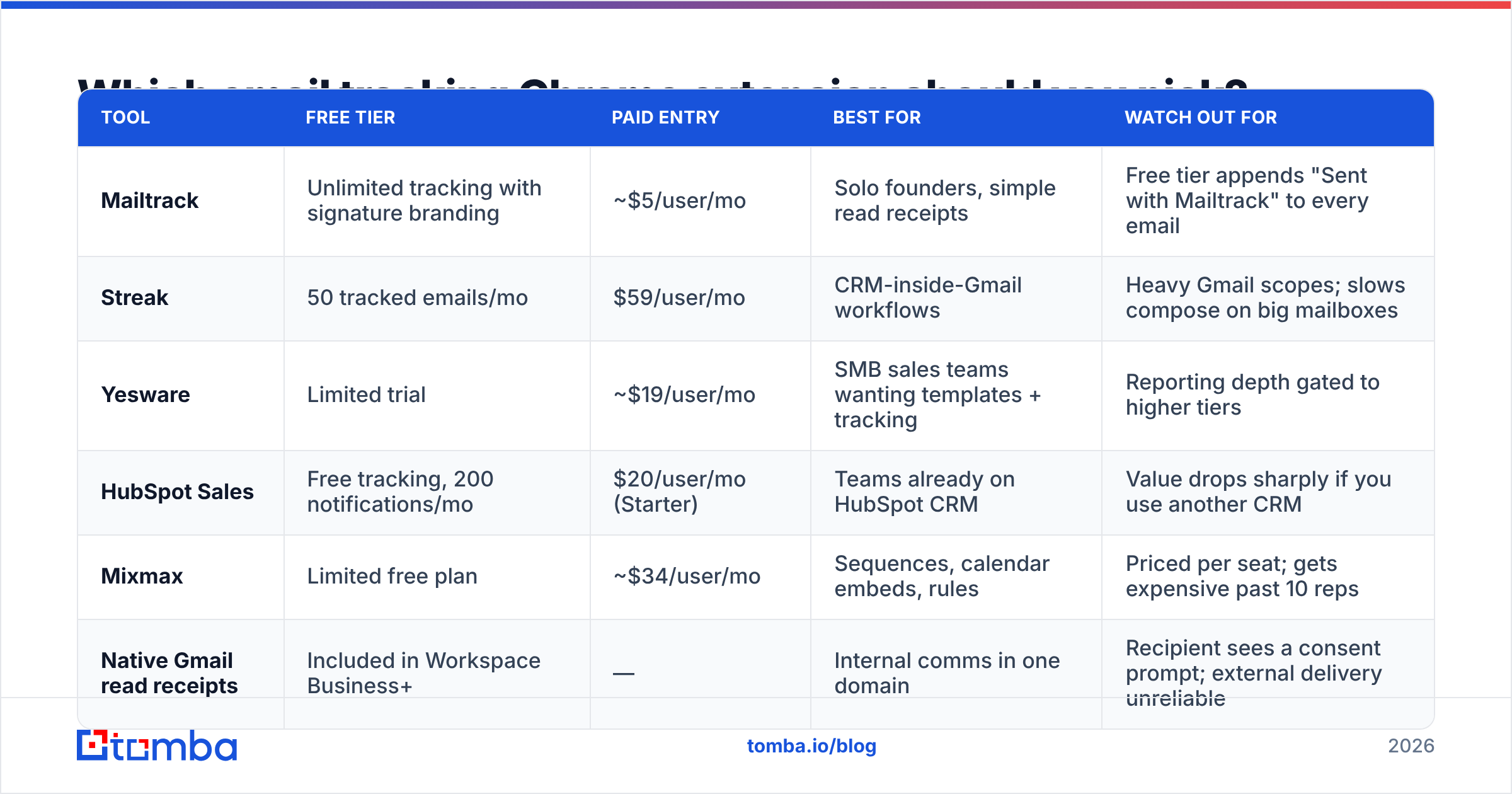
Depends on whether you want a lightweight receipt or a full outbound stack. Here's the landscape as of 2026, using publicly listed pricing.
| Tool | Free tier | Paid entry | Best for | Watch out for |
|---|---|---|---|---|
| Mailtrack | Unlimited tracking with signature branding | ~$5/user/mo | Solo founders, simple read receipts | Free tier appends "Sent with Mailtrack" to every email |
| Streak | 50 tracked emails/mo | $59/user/mo | CRM-inside-Gmail workflows | Heavy Gmail scopes; slows compose on big mailboxes |
| Yesware | Limited trial | ~$19/user/mo | SMB sales teams wanting templates + tracking | Reporting depth gated to higher tiers |
| HubSpot Sales | Free tracking, 200 notifications/mo | $20/user/mo (Starter) | Teams already on HubSpot CRM | Value drops sharply if you use another CRM |
| Mixmax | Limited free plan | ~$34/user/mo | Sequences, calendar embeds, rules | Priced per seat; gets expensive past 10 reps |
| Native Gmail read receipts | Included in Workspace Business+ | — | Internal comms in one domain | Recipient sees a consent prompt; external delivery unreliable |
None of these solve the input problem. A tracker tells you what happened to an email; it can't tell you the address was a guess. That's a separate job — see the data section below.
How to evaluate one in 15 minutes#
- Check the OAuth scopes at install. If a read-receipt tool asks for
gmail.modifyor full-delete permission, close the tab. Pixel injection only needs compose-time access andgmail.send. - Send yourself a test from an incognito profile. Open it on an iPhone with Mail Privacy Protection on. If the tool logs an "open" before you've touched it, you now know its baseline noise level.
- Look for scanner filtering in the docs. Vendors that publicly document bot-click suppression have thought harder about data quality than ones that don't mention it.
- Test the tracking domain. Shared tracking domains get blocklisted collectively. Ask whether you can set a custom CNAME — this matters enormously for email deliverability.
- Time the compose window. Some extensions add 400–900ms of lag to opening a reply. Multiply that by 60 emails a day and you'll notice.
- Read the data-retention policy. Some free trackers retain recipient metadata indefinitely and reserve rights to aggregate it.
Does email tracking hurt deliverability?#
Yes, modestly — and the damage scales with how sloppy your setup is.
Three mechanisms are at work. First, link rewriting replaces your clean destination URL with a redirect on a third-party domain. If hundreds of other users share that same tracking domain and one of them blasts spam, the domain picks up a poor reputation and your links inherit it. Spam filters weight redirect-domain reputation heavily.
Second, adding an image to an otherwise plain-text-looking message shifts your HTML-to-text ratio. A one-paragraph cold email whose only image is an invisible pixel is a recognizable spam pattern — filters have been fingerprinting it for a decade.
Third, tracking encourages volume. Once you can see opens, the temptation is to send more and follow up faster, which is exactly what damages sender reputation.
Mitigation is straightforward:
- Use a custom tracking domain (
links.yourcompany.com) rather than the vendor's shared one, so your reputation is yours alone. - Turn off open tracking for the first touch in cold sequences. Enable it from email two onward, once the thread already exists.
- Skip link rewriting for one-link emails. If your message contains a single calendar link, the redirect buys you almost nothing and costs you a reputation hop.
- Keep authentication tight. Run your SPF record through a checker, and confirm DKIM and DMARC alignment before you blame the tracker.
Google's own bulk sender guidelines spell out the authentication and spam-rate thresholds that matter more than any tracking setting. Get those right first.
What should you track instead of opens?#
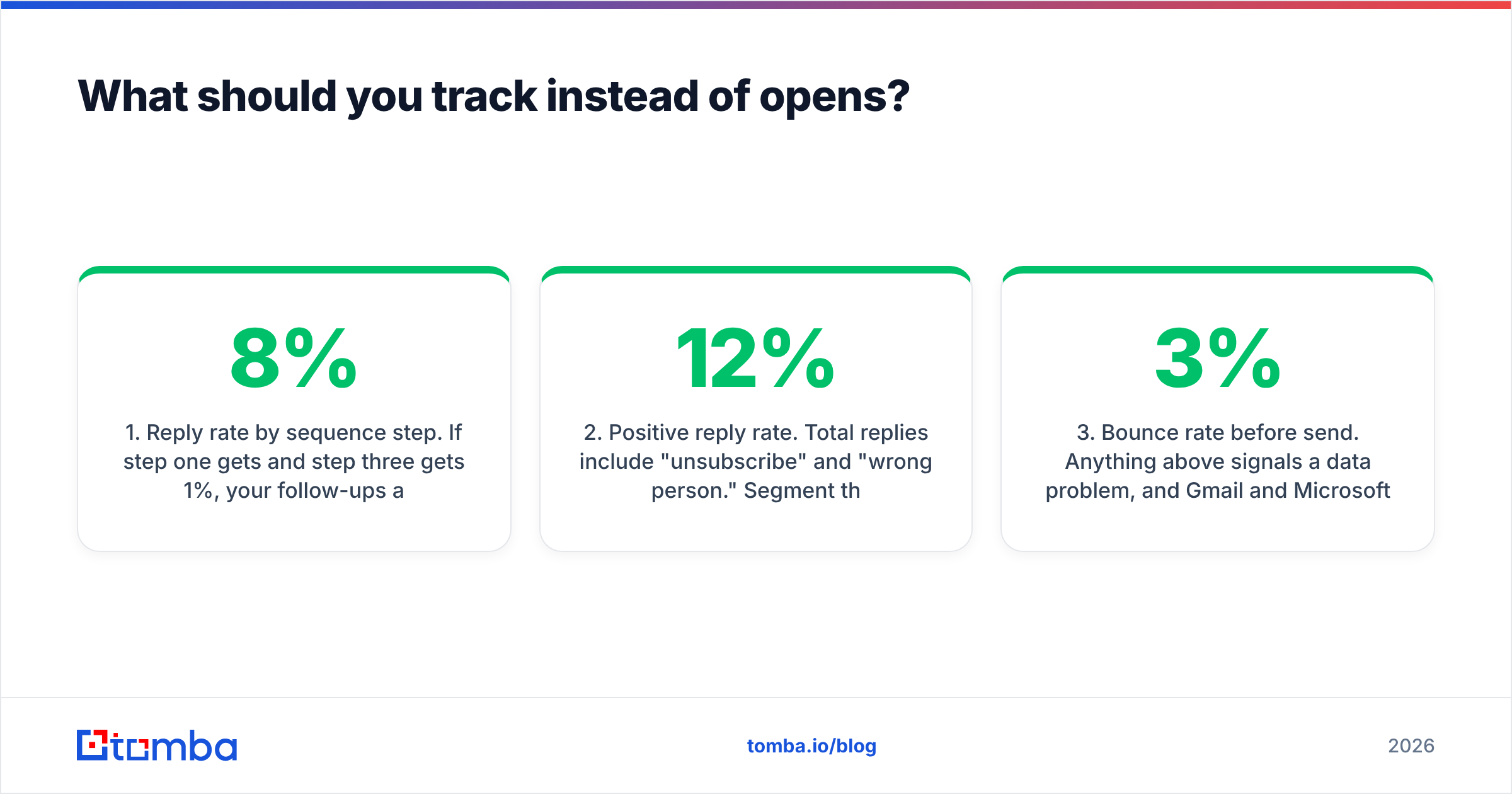
Build your dashboard around four numbers that survive privacy proxies:
1. Reply rate by sequence step. If step one gets 8% and step three gets 1%, your follow-ups are adding noise, not value. Cut them.
2. Positive reply rate. Total replies include "unsubscribe" and "wrong person." Segment them. A 12% reply rate that's half opt-outs is worse than a 5% rate that's mostly interest.
3. Bounce rate before send. Anything above 3% signals a data problem, and Gmail and Microsoft both start throttling well before that. This is the metric a tracker can't help with — it's upstream.
4. Meeting-booked-per-100-sent. The only number that connects outbound activity to revenue. Everything else is a proxy for this.
Notice that three of the four have nothing to do with the extension you install. Tracking tools measure the tail end of a process whose quality was determined much earlier — at the list-building stage.
Why does data quality beat tracking sophistication?#
Because a perfectly tracked email to a dead address produces a perfectly formatted zero.
Run the math. Send 1,000 emails to a list where 22% of addresses are stale — a realistic figure for scraped or year-old data. You lose 220 sends outright, your bounce rate torpedoes your domain reputation, and the resulting throttling suppresses delivery on the 780 valid addresses too. Your tracker will faithfully report a low open rate and give you no idea why.
Now flip it. Verify the list first, drop the 220 bad rows, and send 780 clean messages. Same effort, higher absolute reply count, intact reputation, and your tracking data actually means something because the denominator is real.
That's the sequencing most teams get backwards:
- Find the right contacts. Use a domain search to pull every reachable address at a target company, rather than guessing patterns by hand.
- Verify before you send. An email verifier catches syntax errors, dead mailboxes, role accounts, and disposable domains. Handle catch-all domains separately with a catch-all verifier, since standard SMTP checks return ambiguous results there.
- Enrich for personalization. Title, company size, and tech stack give you something to write about. Data enrichment fills those gaps without manual research.
- Then track. With clean inputs, your reply rate becomes a measurement of your message rather than a measurement of your list rot.
Independent review sites like G2 show the same pattern in user feedback: complaints about tracking tools cluster around data accuracy and deliverability side effects, not around the tracking features themselves.
How do you set up tracking without annoying people?#
Tracking sits in a genuine gray zone. It's legal in most jurisdictions when tied to a legitimate business interest, but GDPR and similar frameworks expect proportionality and disclosure. A few guardrails keep you clean and keep prospects from feeling surveilled:
- Disclose in your privacy policy. One clear line about open and click tracking on outbound communications covers you in most reviews.
- Honor opt-outs immediately, including informal ones ("please stop emailing me" counts).
- Never act visibly on an open. Use it internally for prioritization, never as a conversational reference.
- Don't track internal email. Your colleagues will find the pixel, and it will be a bad day.
- Skip tracking in regulated verticals where recipients are more likely to have image loading blocked anyway — healthcare, legal, and government inboxes typically strip remote content, so you're taking deliverability risk for zero data.
There's also a practical argument. The teams with the highest reply rates tend to send fewer, better-researched emails. Tracking rewards the opposite instinct. Set your own guardrail — a daily send cap per rep — before you install anything that makes volume feel measurable.
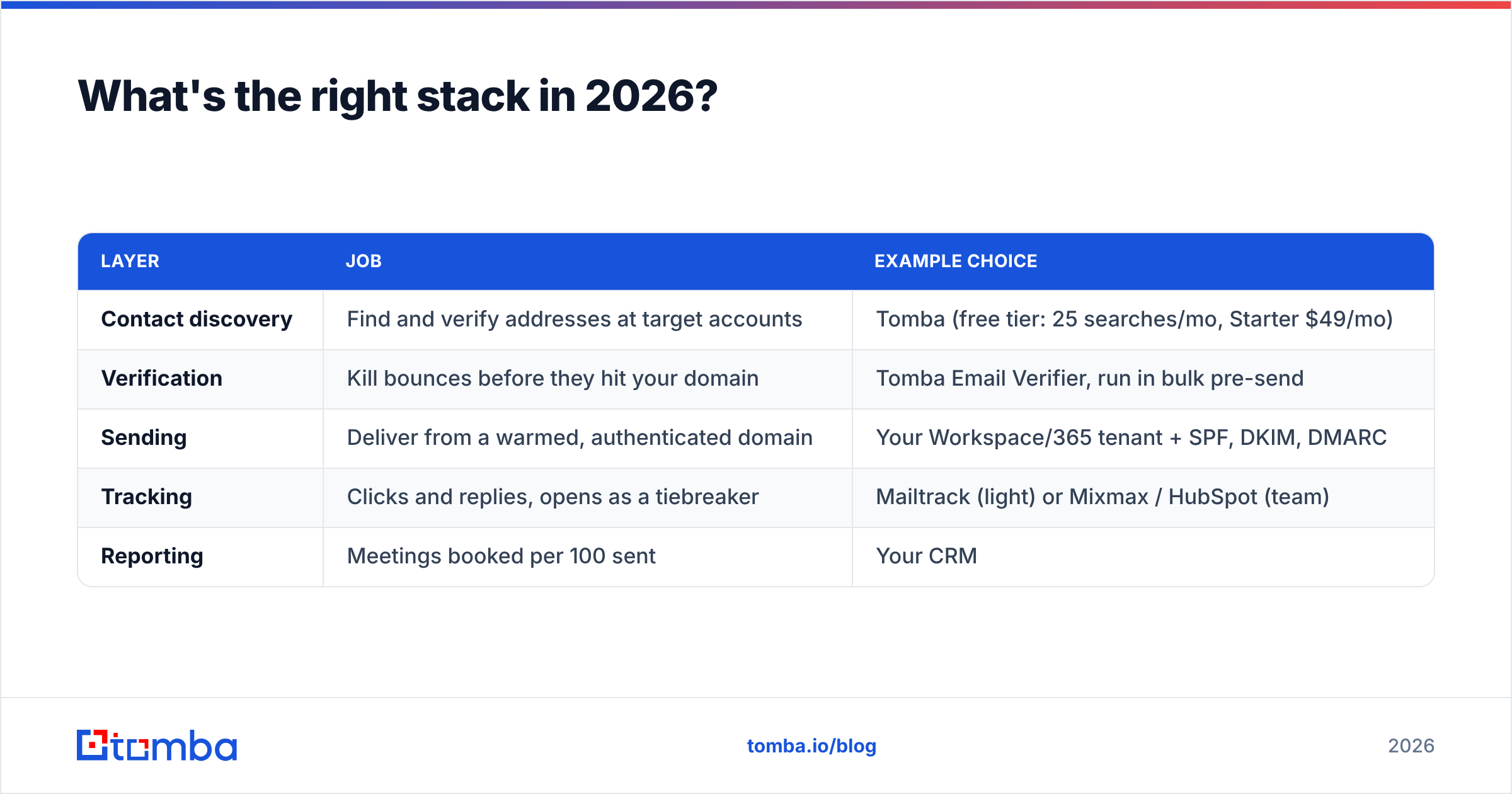
What's the right stack in 2026?#
A minimal, defensible setup looks like this:
| Layer | Job | Example choice |
|---|---|---|
| Contact discovery | Find and verify addresses at target accounts | Tomba (free tier: 25 searches/mo, Starter $49/mo) |
| Verification | Kill bounces before they hit your domain | Tomba Email Verifier, run in bulk pre-send |
| Sending | Deliver from a warmed, authenticated domain | Your Workspace/365 tenant + SPF, DKIM, DMARC |
| Tracking | Clicks and replies, opens as a tiebreaker | Mailtrack (light) or Mixmax / HubSpot (team) |
| Reporting | Meetings booked per 100 sent | Your CRM |
Two notes on cost. First, tracking extensions are cheap per seat but multiply fast — ten reps on Mixmax runs more per year than most data budgets. Second, data spend has better leverage: cutting your bounce rate from 8% to 1% improves every downstream number, while a fancier open-tracking dashboard improves none of them.
If you're auditing spend, compare Tomba pricing against what you're paying for seats on tools whose primary output is a metric you've just learned to distrust.
The bottom line#
An email tracking Chrome extension is a useful, cheap instrument that measures the least reliable part of your outbound process. Install one — pick the lightest tool that does what you need, use a custom tracking domain, disable open tracking on cold first touches, and report on replies and meetings rather than opens.
Then spend the attention you free up on the input side, where the leverage actually is. Clean contact data changes your results; a better open-rate chart does not.
Start there with the Tomba Email Finder — find verified professional addresses by name, domain, or company, check them against the email verifier before you send, and let your tracking extension report on a list that's actually deliverable. The free tier covers 25 searches a month if you want to test the difference on a single campaign before committing.
Related guides#
Ready to find emails that actually work?
Join 150,000+ professionals who stopped guessing and started sending. Free credits on signup — no credit card required.
Get the Tomba newsletter
Practical outbound tactics and product updates — once every two weeks.
About the author