Email Tracking Domain Setup: The Complete 2026 Guide
A shared tracking domain is one of the fastest ways to land in spam. Here's how custom tracking domains actually work, the exact DNS records to add, and when tracking is worth turning off entirely.
TL;DR
- A tracking domain is the hostname that rewrites your links and hosts your open pixel. If you never configured one, you're sharing a domain with thousands of other senders — including spammers.
- The setup itself is one CNAME record, sometimes two, plus SSL. It takes ten minutes. The strategy around it takes longer.
- Use a subdomain of a domain you control that is related to the sending domain (
go.yourbrand.com, orlink.yourbranding.comif you send from a secondary domain). Never point a tracking domain at a domain you don't own. - Open tracking in 2026 is mostly noise. Apple Mail Privacy Protection, Gmail image proxying, and security scanners inflate opens by 30–70%. Link tracking still works; open tracking mostly doesn't.
- None of it matters if your list is dirty. A 20% bounce rate destroys sender reputation faster than any tracking pixel ever will — verify before you send.
What is an email tracking domain?#
An email tracking domain is the hostname that appears in the middle of your tracked links and image pixels.
Think of it like a toll booth on a highway. When you send a cold email with a link to yourbrand.com/demo, your sending platform doesn't put that URL in the email. It puts something like https://track.instantly.ai/x7Kp2q — a toll booth the recipient's click passes through so the platform can log it, then forwards them to the real destination. Same with the open pixel: a 1×1 transparent image loaded from the platform's server.
The problem: by default, that toll booth is shared. Every sender on the platform's free or default tier routes clicks through the same hostname. Mailbox providers evaluate domains in an email holistically — the From domain, the links, the image hosts. If track.somesendingplatform.com has been used by 4,000 accounts, several of which were blasting crypto pitches last Tuesday, that reputation attaches to your message too.
A custom tracking domain replaces the shared hostname with one you control: go.yourbrand.com. Your links and your From address now align to the same brand. That alignment is the entire point.
Why does a shared tracking domain hurt deliverability?#
Four mechanisms, in rough order of impact:
- Domain reputation contagion. Spam filters maintain reputation on every domain in the message, not just the envelope sender. Spamhaus DBL, Google's internal URL reputation, and Microsoft's SmartScreen all evaluate link hosts. A shared tracking domain inherits the worst behaviour on the platform.
- Mismatch signals. You send from
sales@yourbrand.comand every link resolves toclick.randomvendor.io. To a filter, that pattern is indistinguishable from a phishing template — legitimate senders normally link to themselves. - Blocklist collateral damage. When a shared tracking domain gets listed, every account on it degrades at once, and you have no control over remediation timing. Run your own domain through a blacklist checker and you at least own the outcome.
- Link redirect depth. Some platforms chain two or three redirects before the final URL. Security appliances (Proofpoint, Mimecast, Barracuda) treat long redirect chains as suspicious and will sometimes rewrite or strip them entirely, breaking your CTA.
A custom domain fixes 1, 2, and 3. It does nothing for 4 — that's a platform architecture question you should ask before you buy.
What DNS records does email tracking domain setup need?#
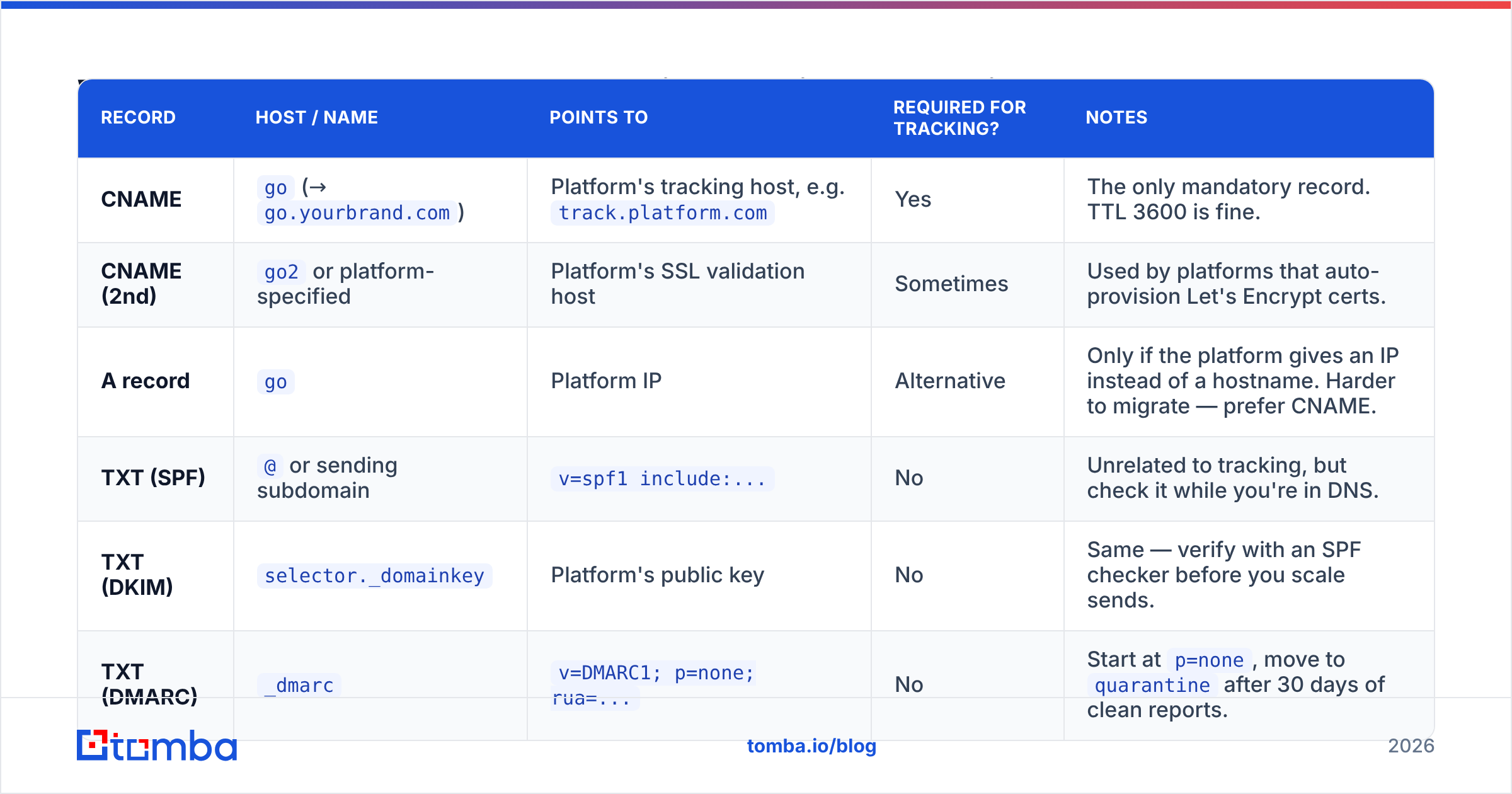
Fewer than people expect. Here's the full picture, including the authentication records that surround it.
| Record | Host / Name | Points to | Required for tracking? | Notes |
|---|---|---|---|---|
| CNAME | go (→ go.yourbrand.com) |
Platform's tracking host, e.g. track.platform.com |
Yes | The only mandatory record. TTL 3600 is fine. |
| CNAME (2nd) | go2 or platform-specified |
Platform's SSL validation host | Sometimes | Used by platforms that auto-provision Let's Encrypt certs. |
| A record | go |
Platform IP | Alternative | Only if the platform gives an IP instead of a hostname. Harder to migrate — prefer CNAME. |
| TXT (SPF) | @ or sending subdomain |
v=spf1 include:... |
No | Unrelated to tracking, but check it while you're in DNS. |
| TXT (DKIM) | selector._domainkey |
Platform's public key | No | Same — verify with an SPF checker before you scale sends. |
| TXT (DMARC) | _dmarc |
v=DMARC1; p=none; rua=... |
No | Start at p=none, move to quarantine after 30 days of clean reports. |
The critical detail most guides skip: proxying. If your DNS sits behind Cloudflare, the CNAME must be set to DNS only (grey cloud), not proxied (orange cloud). A proxied record breaks the platform's SSL provisioning and, in some cases, the redirect itself. Cloudflare's own DNS record documentation covers the toggle.
How do you set up a custom tracking domain, step by step?#
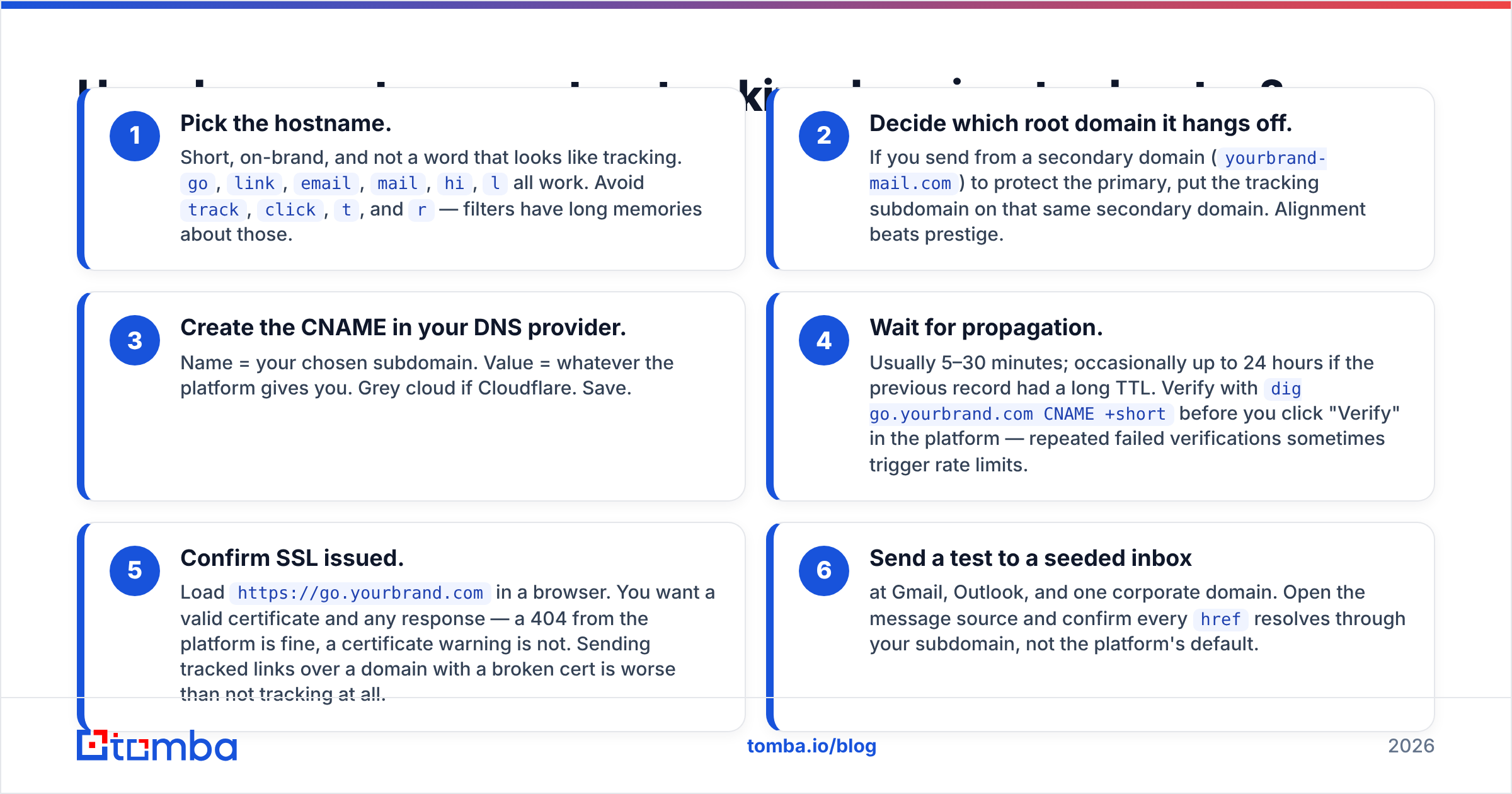
The mechanics are near-identical across Instantly, Smartlead, Lemlist, Apollo, HubSpot, and Salesloft. Six steps:
- Pick the hostname. Short, on-brand, and not a word that looks like tracking.
go,link,email,mail,hi,lall work. Avoidtrack,click,t, andr— filters have long memories about those. - Decide which root domain it hangs off. If you send from a secondary domain (
yourbrand-mail.com) to protect the primary, put the tracking subdomain on that same secondary domain. Alignment beats prestige. - Create the CNAME in your DNS provider. Name = your chosen subdomain. Value = whatever the platform gives you. Grey cloud if Cloudflare. Save.
- Wait for propagation. Usually 5–30 minutes; occasionally up to 24 hours if the previous record had a long TTL. Verify with
dig go.yourbrand.com CNAME +shortbefore you click "Verify" in the platform — repeated failed verifications sometimes trigger rate limits. - Confirm SSL issued. Load
https://go.yourbrand.comin a browser. You want a valid certificate and any response — a 404 from the platform is fine, a certificate warning is not. Sending tracked links over a domain with a broken cert is worse than not tracking at all. - Send a test to a seeded inbox at Gmail, Outlook, and one corporate domain. Open the message source and confirm every
hrefresolves through your subdomain, not the platform's default.
Step 6 catches the most common failure: the domain verifies, but existing campaigns were created before the domain was attached and still carry the old links. Most platforms don't retroactively rewrite. Duplicate the campaign or edit each sequence step.
Should you use your main domain or a separate one?#
This is where the advice splits, and the honest answer is "it depends on how aggressive your volume is."
- Subdomain of your primary domain (
go.yourbrand.com) — strongest brand alignment, best click-through, and reputation flows both ways. Correct choice if you send under 1,000 cold emails a month and your list quality is genuinely good. - Subdomain of a dedicated sending domain (
go.yourbrand-hq.com) — the standard for high-volume outbound. Your primary domain's reputation stays insulated. Requires you to buy and warm a lookalike domain, which costs about $12/year plus three weeks of warmup. - Separate registrable domain used only for tracking — occasionally recommended, usually a mistake. You lose alignment, gain nothing, and now have an orphan domain with zero reputation history sitting in your links.
- Platform's shared domain — acceptable only for transactional or opted-in newsletter sending where the platform has strong list hygiene enforcement. Never for cold outbound.
The volume threshold where insulation starts to matter is roughly 50 emails per inbox per day, or the point at which you're using more than two sending inboxes. Below that, keep it simple and use a subdomain of the domain you actually sell from.
Is open tracking still worth enabling in 2026?#
Mostly no. Link tracking, yes. Open tracking, no.
Three things broke open rates and none of them are reversing:
- Apple Mail Privacy Protection pre-loads every image in every message on Apple Mail, regardless of whether the human ever looked at it. Apple Mail is the single largest email client by share, so a meaningful slice of your "opens" are Apple's servers.
- Gmail image proxying caches images through Google's servers, which strips geolocation and device data and fires on preview-pane render.
- Corporate security scanners — Proofpoint, Mimecast, Microsoft Defender for Office 365 — detonate every link and load every image before delivery. That's a fake open and a fake click, usually within seconds of send.
The practical consequence: a 68% open rate on a cold campaign tells you nothing. Worse, the open pixel is an extra remote asset in a message that already has a rewritten link, and some filters score image-loading beacons negatively.
Turn off open tracking. Keep link tracking on your custom domain. Judge campaigns by replies and meetings booked, which are the only metrics that survived 2024. Google's Postmaster Tools gives you far more honest deliverability signal than any pixel — spam rate, domain reputation, and authentication pass rates straight from the source.
If you must keep open tracking for a lifecycle-marketing use case, at least strip clicks that fire under 3 seconds after delivery — those are scanners, not humans.
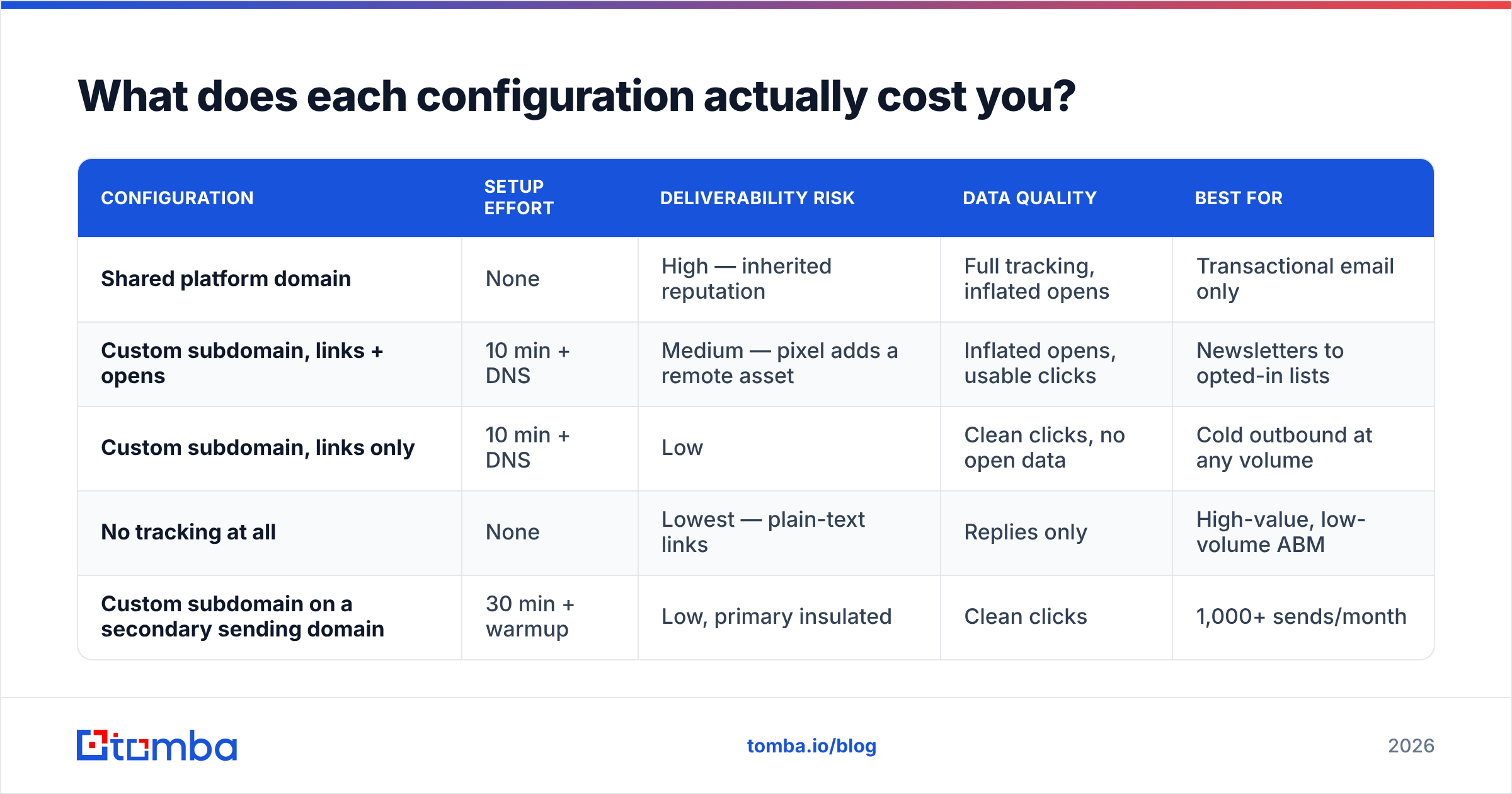
What does each configuration actually cost you?#
| Configuration | Setup effort | Deliverability risk | Data quality | Best for |
|---|---|---|---|---|
| Shared platform domain | None | High — inherited reputation | Full tracking, inflated opens | Transactional email only |
| Custom subdomain, links + opens | 10 min + DNS | Medium — pixel adds a remote asset | Inflated opens, usable clicks | Newsletters to opted-in lists |
| Custom subdomain, links only | 10 min + DNS | Low | Clean clicks, no open data | Cold outbound at any volume |
| No tracking at all | None | Lowest — plain-text links | Replies only | High-value, low-volume ABM |
| Custom subdomain on a secondary sending domain | 30 min + warmup | Low, primary insulated | Clean clicks | 1,000+ sends/month |
The row most teams should land on is row three. Row five if you're running multi-inbox outbound at scale. Row one is the default you got when you signed up, and it's the one costing you inbox placement right now.

How do you verify the setup actually works?#
Run these five checks before your next campaign goes out. Each takes under a minute.
- DNS resolution —
dig go.yourbrand.com CNAME +shortshould return the platform's host with no NXDOMAIN and no chain of unexpected hops. - Certificate validity — open
https://go.yourbrand.comin an incognito window. Valid padlock required. If the cert is issued to the platform's domain rather than yours, SSL provisioning didn't finish. - Raw message inspection — send to a seed inbox, view original, and grep the HTML for the platform's default domain. Zero hits is the pass condition.
- Redirect depth — paste a tracked link into a redirect checker. One hop to the destination is good; three or more will get rewritten by enterprise security gateways.
- Placement test — send to seeds across Gmail, Outlook/M365, and Yahoo. Compare placement with tracking on versus off. If the tracked variant lands in Promotions or Junk and the plain-text one lands in Primary, your tracking setup is the variable.
Re-run checks 1 and 2 quarterly. Certificates expire, platforms migrate hosts, and DNS records get "cleaned up" by whoever inherits your registrar account.
What are the most common tracking domain mistakes?#
- Tracking domain on a domain you don't own. Some agencies configure clients' campaigns to point at the agency's tracking domain. When the client leaves, every historical link dies and reputation is unrecoverable.
- Leaving the Cloudflare proxy on. Breaks SSL issuance silently. The platform shows "verified" and the certificate never provisions.
- Reusing one tracking domain across unrelated brands. Same contagion problem as a shared platform domain, just at smaller scale.
- Forgetting existing campaigns. New domain, old sequences, old links. Always duplicate and re-verify.
- Adding tracking before authentication. SPF, DKIM, and DMARC come first. A tracking domain on an unauthenticated sending domain is a nicer-looking path to the spam folder. Read up on email deliverability fundamentals if any of those three acronyms are unfamiliar.
- Optimising the plumbing while ignoring the list. This is the big one, and it's covered next.
What actually moves the deliverability needle more than tracking?#
List quality. It isn't close.
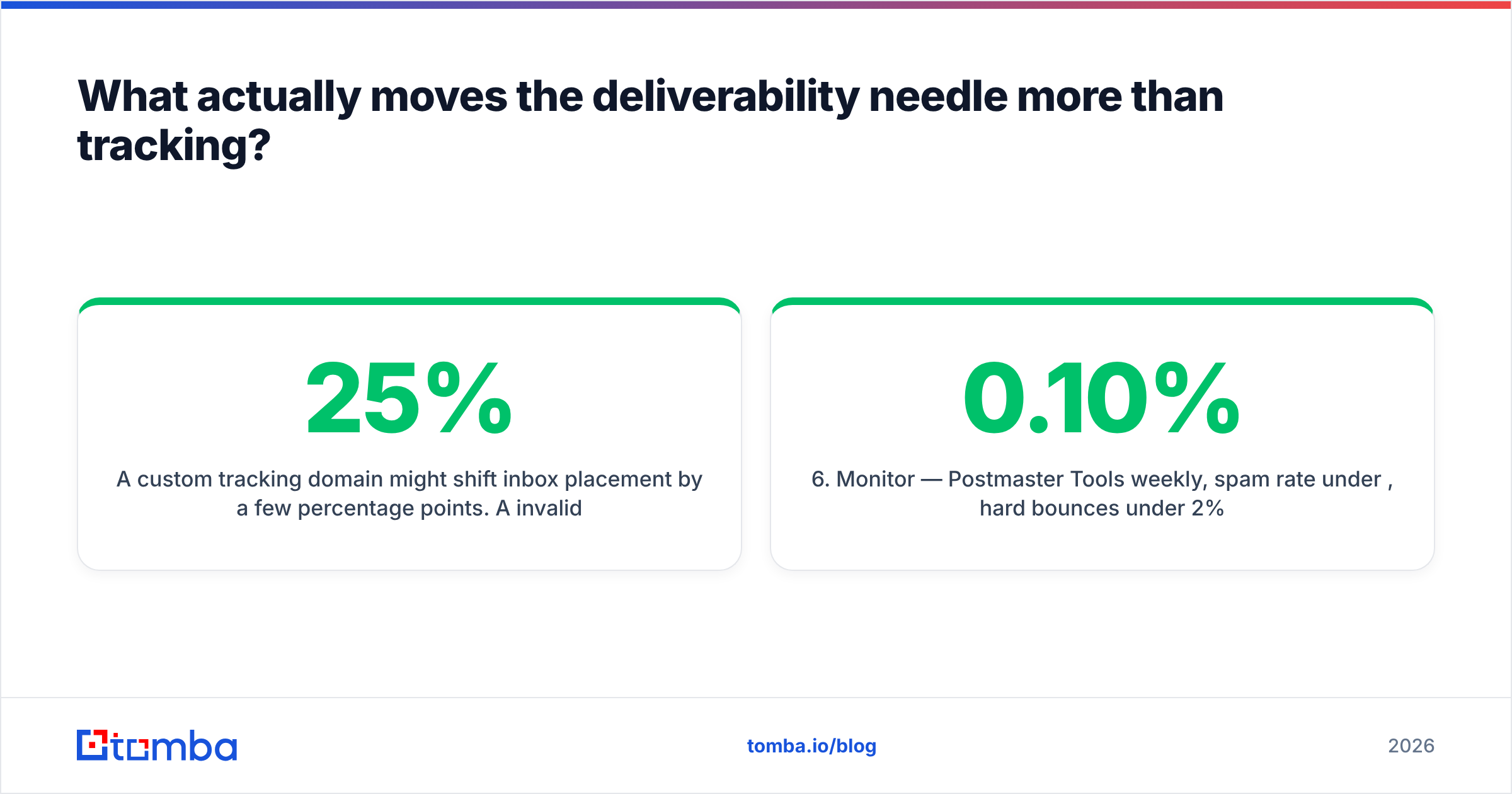
A custom tracking domain might shift inbox placement by a few percentage points. A 25% invalid-address rate will tank your domain reputation inside two campaigns, and no DNS record recovers that. Mailbox providers weigh hard bounces and spam complaints far more heavily than link-host reputation.
The order of operations that works:
- Authenticate — SPF, DKIM, DMARC at
p=none, then tighten. - Warm — 2–3 weeks of ramping volume per inbox before real campaigns.
- Verify — run every address through an email verifier and drop anything that isn't deliverable. Catch-all domains need a separate decision: risk them or exclude them.
- Set the tracking domain — the ten-minute job in this guide.
- Kill open tracking — keep clicks, drop pixels.
- Monitor — Postmaster Tools weekly, spam rate under 0.10%, hard bounces under 2%.
Steps 1–3 are worth more than 4–5 combined. Teams get this backwards constantly, spending an afternoon on DNS while sending to a scraped list they never validated. Independent reviews on G2 reflect the same pattern — the vendors that rank on deliverability outcomes are the ones with verification built into the workflow, not the ones with the prettiest tracking dashboards.
Where should you start?#
If you're setting up outbound from scratch this quarter: authenticate first, warm second, verify third, then spend ten minutes on the CNAME. If you already have campaigns running on a shared tracking domain, fix that this week — it's the cheapest deliverability win available to you.
And before your next send, make sure the addresses are real. Tomba's email finder returns verified professional addresses with a confidence score attached, so you're not paying for bounces you could have prevented. The free tier covers 25 searches a month; paid plans start at $49/mo on Starter, with Growth at $99/mo — see Tomba pricing for the full breakdown. Get the list right, then the tracking domain has something worth tracking.
Related guides#
Ready to find emails that actually work?
Join 150,000+ professionals who stopped guessing and started sending. Free credits on signup — no credit card required.
Get the Tomba newsletter
Practical outbound tactics and product updates — once every two weeks.
About the author