Email Tracking Pixel: How It Works and Why Opens Lie
A tracking pixel is one transparent GIF and a logged HTTP request. Here is exactly how it works, why Apple broke open rates, and what to measure instead in 2026.
TL;DR
- An email tracking pixel is a 1x1 transparent image hosted on a server you control. When the recipient's client loads it, your server logs the request and calls it an "open."
- Since Apple Mail Privacy Protection shipped, a large share of "opens" are machine prefetches, not humans. Corporate security scanners inflate the number further.
- Pixels do not directly get you blocked, but the tracking domain you use, image-heavy HTML, and link rewriting all touch deliverability.
- Open rate is now a directional signal at best. Click rate, reply rate, and meeting rate are the metrics that survive scrutiny.
- The cheapest fix is upstream: send to verified, correctly matched addresses so your denominator is real in the first place.
What is an email tracking pixel?#
An email tracking pixel is a tiny image — usually a 1x1 transparent GIF or PNG — embedded in the HTML of an email. The image lives on a server the sender controls, and its URL carries a unique identifier for that specific recipient and campaign.
Think of it like a hotel keycard reader. The card itself does nothing interesting; the value is the log entry created the moment someone swipes it. The pixel is the card, the recipient's email client is the swipe, and your analytics dashboard is the log.
Technically this is a web beacon, the same mechanism websites used for third-party analytics before cookies took over. Nearly every mainstream sending platform uses one: Mailchimp, Klaviyo, Outreach, Instantly, Lemlist, and HubSpot's email tracking all rely on the same underlying trick.
The raw HTML looks roughly like this:
<img src="https://track.yourdomain.com/o/9f2c1b.gif"
     width="1" height="1" alt="" style="display:none" />
That is the entire technology. Everything else — the dashboards, the "hot lead is reading your email right now" notifications, the engagement scores — is interpretation layered on top of one HTTP GET request.
How does an email tracking pixel actually work?#
The chain has five steps, and every one of them is a place where the data can break.
- The send — Your platform generates a unique pixel URL per recipient per email, then injects the
<img>tag into the HTML part of the message. Plain-text-only emails cannot carry a pixel at all. - The delivery — The message lands in the inbox, promotions tab, spam folder, or a quarantine appliance. The pixel has not fired yet, and delivery alone tells you nothing about human attention.
- The image load — When something renders the HTML and requests remote images, the recipient's client (or a proxy acting for it) fetches the pixel from your tracking server.
- The log — Your server records the request timestamp, the identifier in the URL, the user agent, and the requesting IP. That is the entire payload. There is no "read receipt" protocol involved.
- The interpretation — The platform maps the identifier back to a contact, stamps an "open," and possibly infers device, location, and repeat views. This is where confident-sounding fiction gets introduced.
Notice what the server never sees: whether a human looked at the screen, how long the message stayed open, whether it was read or immediately archived. It sees one image request. Everything richer than that is inference.
Why are email open rates unreliable in 2026?#
Because too many non-humans now load your pixel, and too many humans never do.
Apple Mail Privacy Protection. Since iOS 15, Apple Mail can prefetch remote content through a proxy before the recipient ever opens the message. The pixel fires, the IP is Apple's relay rather than the recipient's, and your platform records an open that may correspond to nobody. Apple Mail accounts for a large slice of consumer mail and a meaningful slice of B2B inboxes on iPhones, so this is not a rounding error. See Apple's privacy overview for the company's framing of the feature.
Gmail image proxying. Google has cached and proxied remote images through googleusercontent.com for years. The pixel still fires on first render, but geolocation and device data derived from the requesting IP are largely worthless, and cached loads can suppress repeat-open counts.
Security scanners. Corporate gateways such as Proofpoint, Mimecast, and Microsoft Defender detonate links and fetch remote assets to check for malware. That produces opens — and sometimes clicks — within seconds of delivery, from datacenter IPs, often several per message.
Blocked images. Outlook desktop, many Android clients, and privacy-conscious users still block remote images by default. Those recipients can read your email start to finish, forward it internally, and reply — and register as "never opened."
The net effect: your open rate is inflated at the top by machines and deflated at the bottom by image blocking, and the two errors do not cancel out in any predictable ratio. A 62% open rate in 2026 is not comparable to a 62% open rate in 2019, and it is not comparable across segments where Apple Mail share differs.
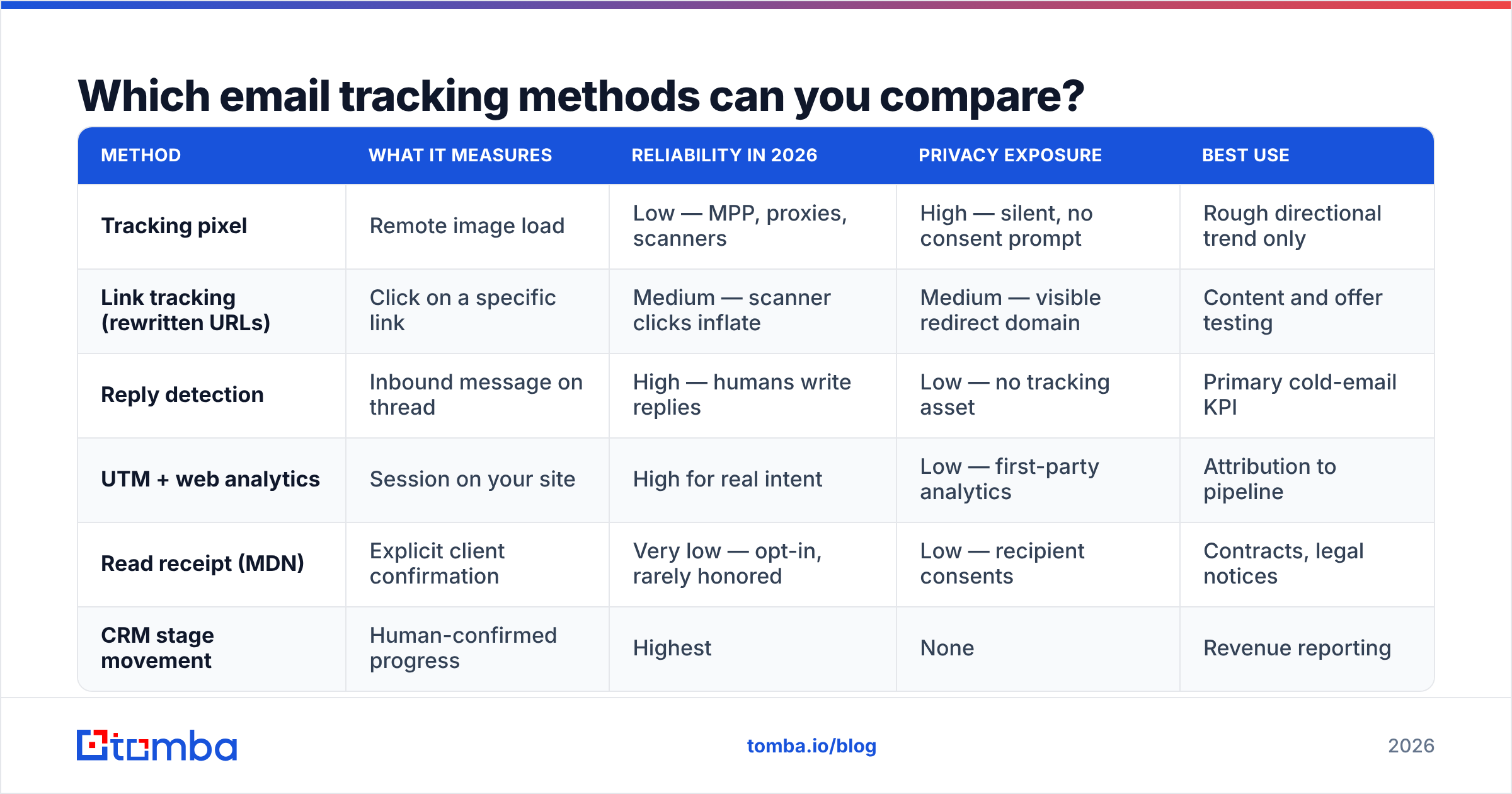
Which email tracking methods can you compare?#
Pixels are one option among several. Each trades accuracy against effort and privacy exposure.
| Method | What it measures | Reliability in 2026 | Privacy exposure | Best use |
|---|---|---|---|---|
| Tracking pixel | Remote image load | Low — MPP, proxies, scanners | High — silent, no consent prompt | Rough directional trend only |
| Link tracking (rewritten URLs) | Click on a specific link | Medium — scanner clicks inflate | Medium — visible redirect domain | Content and offer testing |
| Reply detection | Inbound message on thread | High — humans write replies | Low — no tracking asset | Primary cold-email KPI |
| UTM + web analytics | Session on your site | High for real intent | Low — first-party analytics | Attribution to pipeline |
| Read receipt (MDN) | Explicit client confirmation | Very low — opt-in, rarely honored | Low — recipient consents | Contracts, legal notices |
| CRM stage movement | Human-confirmed progress | Highest | None | Revenue reporting |
The pattern is consistent: the further right you move, the less you can automate — and the more the number actually means something. Most teams over-invest in the leftmost column because it produces the biggest, prettiest chart.
Does an email tracking pixel hurt deliverability?#
Not by itself, but three things around it can.
Your tracking domain's reputation. If your platform serves pixels and redirects from a shared domain used by thousands of other senders — including bad ones — filters can associate you with it. A dedicated, properly configured tracking subdomain on your own root domain is the standard fix, and it should be authenticated in line with your SPF record and DKIM setup. Run a quick SPF checker before you assume this is fine.
HTML weight and structure. Cold email that is heavy on images, hidden elements, and redirect wrappers reads as "marketing blast" to filters. A plain-looking message with one bare link routinely outperforms a designed template in a one-to-one outbound context, and it happens to be pixel-free.
Link rewriting. Redirect chains through an unknown domain are one of the strongest spam heuristics still in use. If your click tracking rewrites every URL through t.somevendor.io, you are inheriting whatever reputation that host has today.
The bigger deliverability lever, though, is not the pixel — it is the list. Bounces from stale or guessed addresses damage sender reputation far faster than any tracking asset. Running addresses through an email verifier before send removes the failure mode that actually gets domains throttled. Check your current standing with a sender reputation checker if you have been sending to unverified data.
Is email tracking legal under GDPR and CCPA?#
Short answer: pixels are personal-data processing in the EU and UK, and consent-or-legitimate-interest rules apply. This is general guidance, not legal advice — check with counsel for your jurisdiction.
Under GDPR, a tracking pixel tied to an identifiable person processes personal data. Regulators in Germany and France have been explicit that silent open-tracking of individuals generally requires consent, and several DPAs have issued fines over exactly this. Some B2B senders lean on legitimate interest, but that requires a documented balancing test and a clear opt-out — not a footer link nobody sees.
US rules are looser but tightening. CCPA/CPRA gives Californians a right to know what is collected and to opt out of sale or sharing; a tracking pixel whose data flows to a third-party vendor can fall in scope.
Practical posture for most B2B teams:
- Disclose it. One line in your privacy policy describing open and click tracking.
- Honor opt-outs immediately. Suppress tracking, not just sending.
- Skip pixels for EU one-to-one prospecting. The signal is weak anyway, so the risk-to-value ratio is poor.
- Keep retention short. Ninety days of open logs is plenty for any real decision.
- Never track a personal address you scraped. That is the pattern regulators pursue hardest.
How do you track cold email without a pixel?#
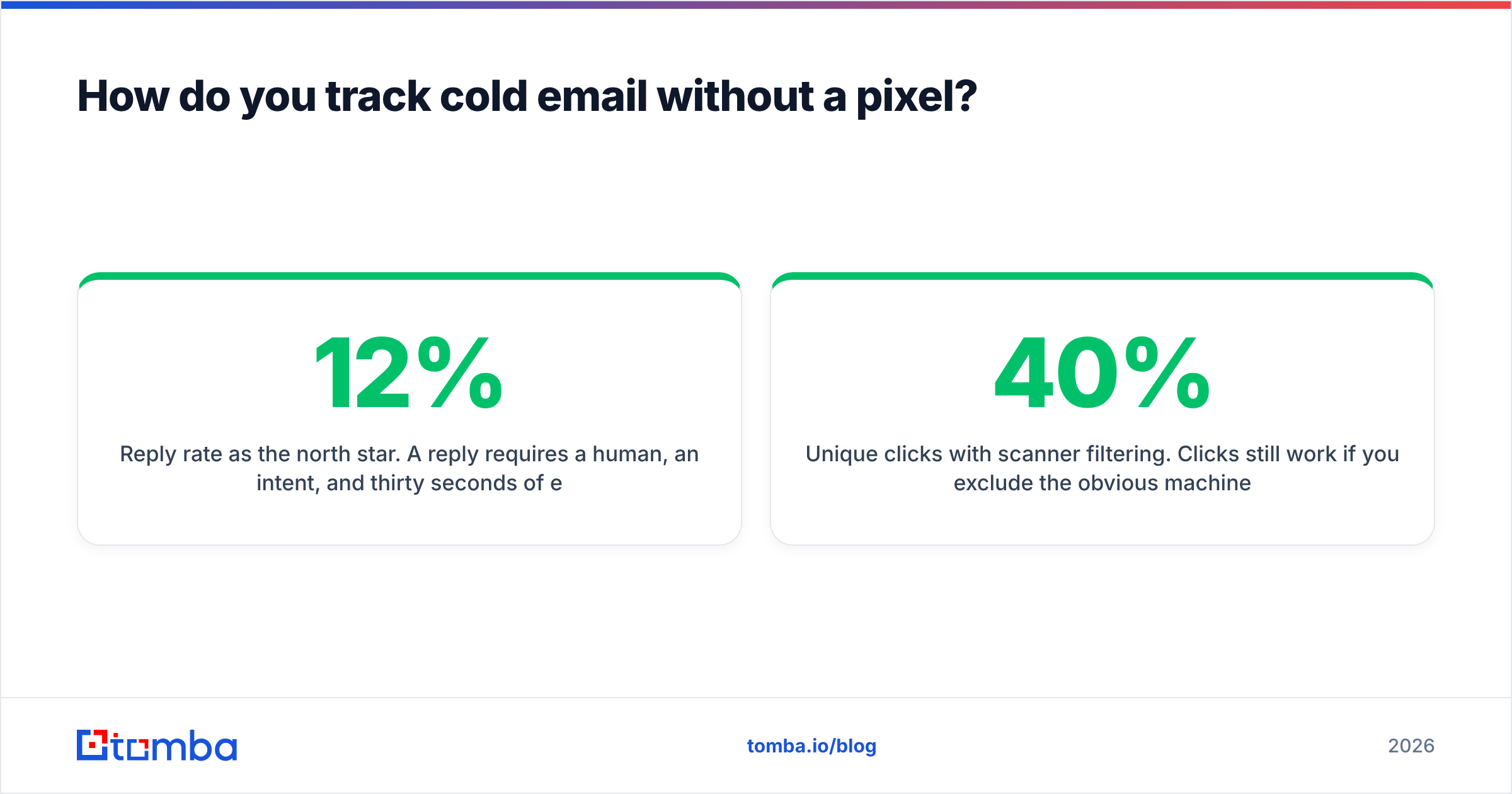
You replace one weak proxy metric with three stronger ones, and you accept a slightly smaller dashboard.
Reply rate as the north star. A reply requires a human, an intent, and thirty seconds of effort. It cannot be faked by a scanner. Track positive, neutral, and negative replies separately — a 12% reply rate that is 80% "unsubscribe" is worse than an 6% rate that is half interested. See how the benchmarks shake out in response rate terms before you set a target.
Unique clicks with scanner filtering. Clicks still work if you exclude the obvious machines: hits within a few seconds of delivery, datacenter IPs, multiple distinct links clicked in the same second, and known scanner user agents. Most platforms now offer a "filter bot clicks" toggle — turn it on and expect your reported numbers to drop 20 to 40%.
Site sessions via UTMs. Tag every outbound link with campaign parameters and read the result in your own analytics. A prospect who lands on your pricing page for ninety seconds is worth more than a hundred proxy opens, and the data lives in a first-party system you already trust.
Website visitor identification. For accounts you are targeting, anonymous traffic can be resolved to companies, which tells you a sequence is landing even when nobody replies. Tomba's website visitor reveal covers this angle.
Positive-reply-to-meeting ratio. The only metric your CFO cares about. If opens are up and meetings are flat, opens were never the constraint.
What should you fix before you touch tracking at all?#
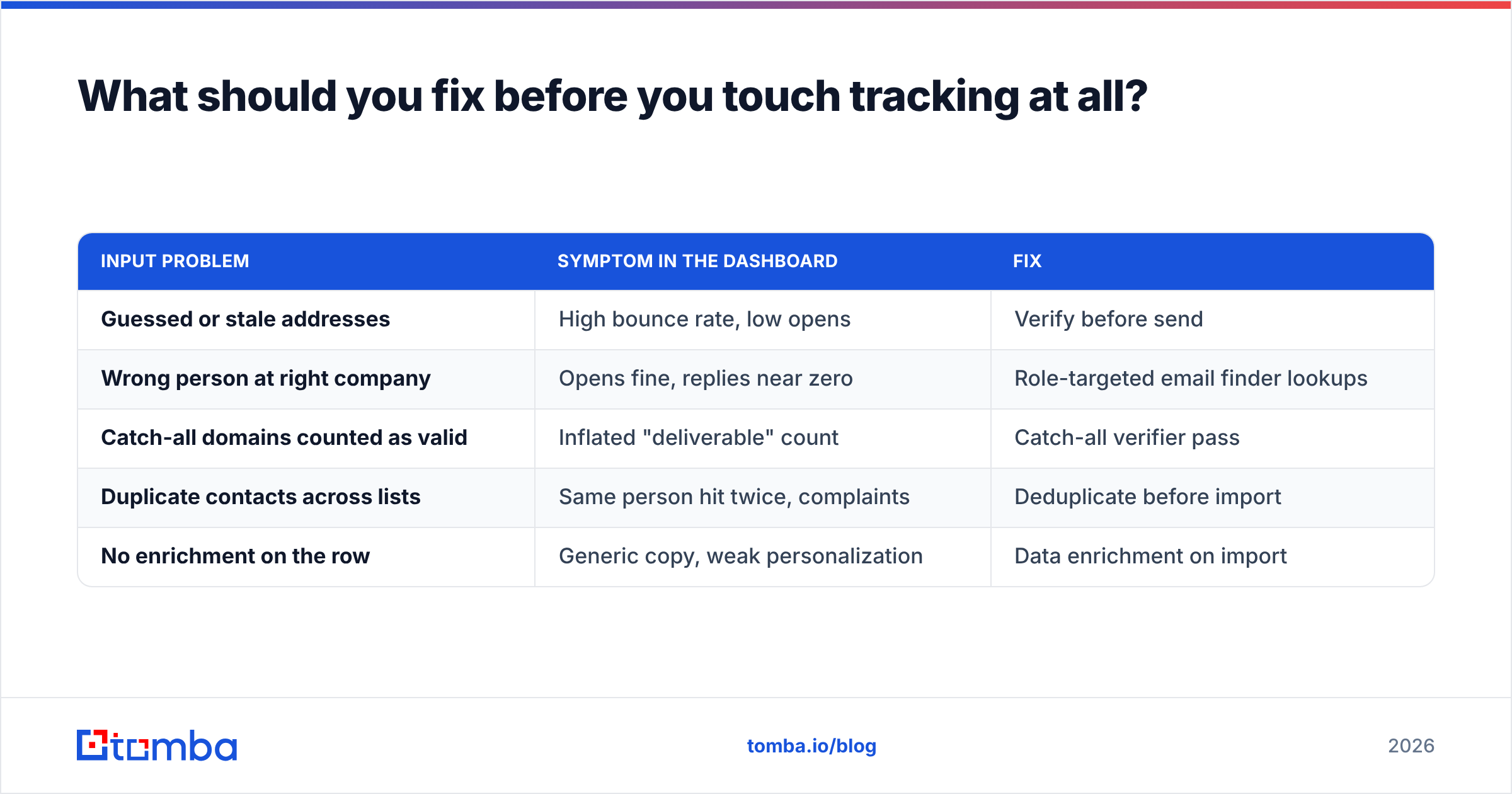
Tracking measures the outcome of a send. If the inputs are bad, better measurement just gives you a higher-resolution picture of the same failure.
| Input problem | Symptom in the dashboard | Fix |
|---|---|---|
| Guessed or stale addresses | High bounce rate, low opens | Verify before send |
| Wrong person at right company | Opens fine, replies near zero | Role-targeted email finder lookups |
| Catch-all domains counted as valid | Inflated "deliverable" count | Catch-all verifier pass |
| Duplicate contacts across lists | Same person hit twice, complaints | Deduplicate before import |
| No enrichment on the row | Generic copy, weak personalization | Data enrichment on import |
Run that column of fixes first. In most audits, list quality moves reply rate more than any subject-line test, tracking configuration, or send-time optimization — and unlike open rate, the improvement shows up in pipeline.
What does a sane 2026 measurement stack look like?#
Keep the pixel if your platform includes it and your jurisdiction allows it, but demote it. Concretely:
- Report reply rate and meeting rate weekly. Open rate goes in an appendix, if anywhere.
- Segment open data by client family so Apple Mail contacts do not pollute the trend for everyone else.
- A/B test on clicks and replies only. Declaring a subject-line winner on opens is now close to coin-flipping.
- Alert on bounce rate, not opens. A bounce spike is an actual emergency; an open dip usually is not.
- Re-verify quarterly. B2B contact data decays roughly 2 to 3% per month as people change jobs, which silently degrades every metric downstream.
Tools like G2's email tracking category will keep listing dozens of vendors promising better pixel fidelity. Treat that as a solved-and-declining problem, not a differentiator. The competitive edge moved to knowing exactly who to contact and having a correct address for them.
Start with data you can trust#
A tracking pixel can only tell you what happened to an email you already sent. If the address was guessed, the person left twelve months ago, or the domain is a catch-all that swallows everything, no amount of analytics will rescue the campaign.
Fix the top of the funnel first. Tomba's Email Finder returns verified professional addresses by name, domain, or company, with confidence scoring and source attribution so you know why an address is considered valid. The free tier gives you 25 searches a month; Starter is $49/mo, Growth $99/mo, and Pro $249/mo with bulk processing and full API access — see Tomba pricing for the breakdown. Verify the list, send the sequence, and measure replies. That is a number that never lies to you.
Related guides#
Ready to find emails that actually work?
Join 150,000+ professionals who stopped guessing and started sending. Free credits on signup — no credit card required.
Get the Tomba newsletter
Practical outbound tactics and product updates — once every two weeks.
About the author