Email Tracking Software in 2026: How It Works and What to Use
Open-rate tracking has been quietly breaking since Apple's Mail Privacy Protection shipped. Here's what email tracking software still measures reliably in 2026, what it costs, and when tracking pixels do more harm than good.
TL;DR
- Email tracking software works by embedding a 1x1 tracking pixel and rewriting links. When the image loads or a link is clicked, the vendor logs it. That mechanism has not changed in fifteen years — what changed is who loads the image.
- Apple Mail Privacy Protection, Gmail's image proxy, and corporate security scanners now pre-fetch images on the recipient's behalf. Open rates for consumer-heavy lists are inflated by 30-70% and are effectively unusable as a per-contact signal.
- Click tracking survives, but link rewriting can trip spam filters and breaks deliverability if you use a shared tracking domain.
- Reply rate, meeting-booked rate, and bounce rate are the three metrics that still map to revenue. Everything else is directional at best.
- The highest-leverage fix is upstream: verified, accurate contact data. A tracked email sent to a dead address tracks nothing.
What is email tracking software?#
Email tracking software tells you what happens to a message after you hit send. At minimum that means opens and clicks. Better tools add reply detection, link-level attribution, device and location metadata, engagement scoring, and CRM sync so a rep sees "opened your proposal three times this morning" before they dial.
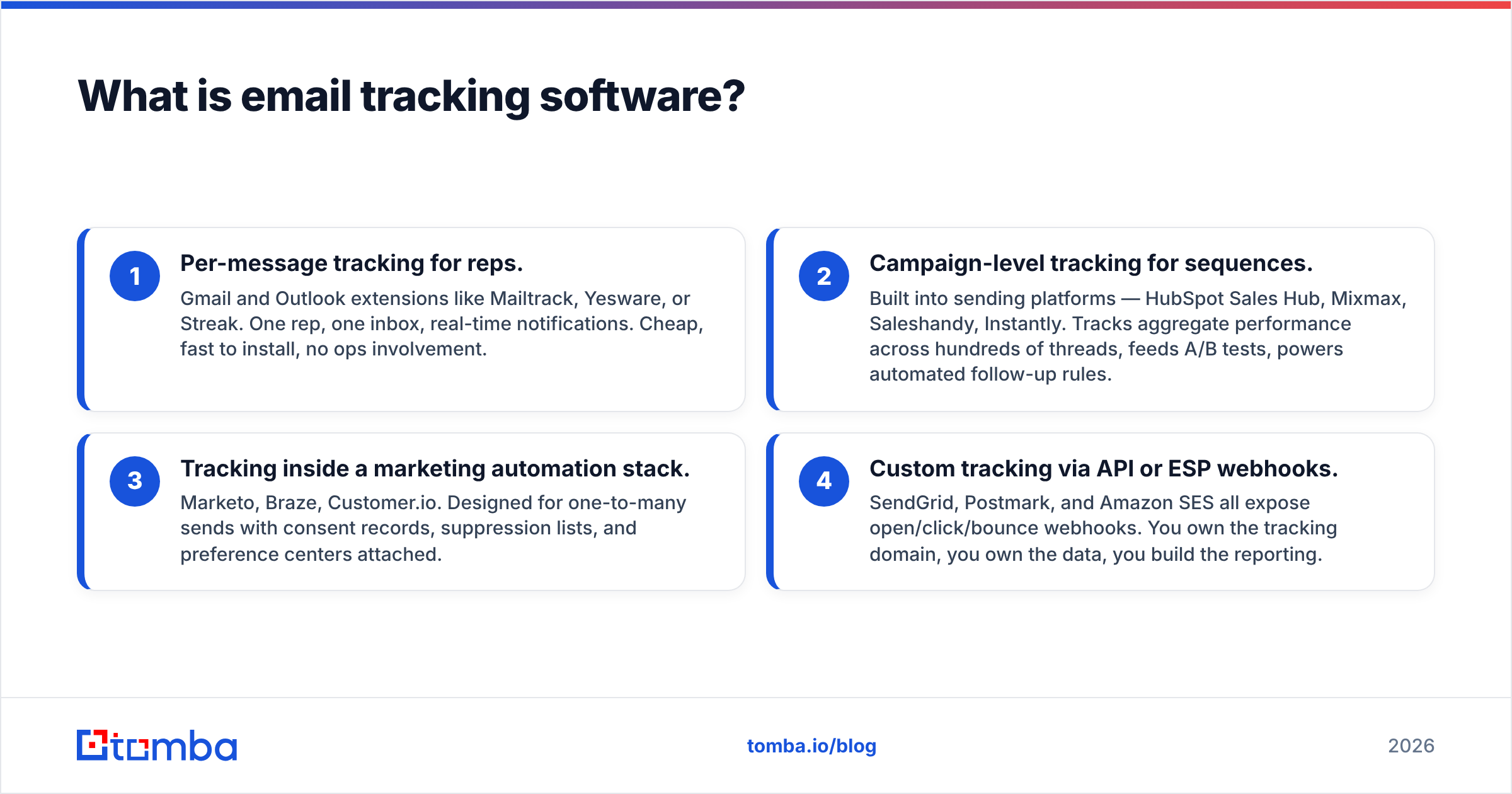
Two categories get lumped under the same name, and they solve different problems:
- Per-message tracking for reps. Gmail and Outlook extensions like Mailtrack, Yesware, or Streak. One rep, one inbox, real-time notifications. Cheap, fast to install, no ops involvement.
- Campaign-level tracking for sequences. Built into sending platforms — HubSpot Sales Hub, Mixmax, Saleshandy, Instantly. Tracks aggregate performance across hundreds of threads, feeds A/B tests, powers automated follow-up rules.
- Tracking inside a marketing automation stack. Marketo, Braze, Customer.io. Designed for one-to-many sends with consent records, suppression lists, and preference centers attached.
- Custom tracking via API or ESP webhooks. SendGrid, Postmark, and Amazon SES all expose open/click/bounce webhooks. You own the tracking domain, you own the data, you build the reporting.
Most B2B teams end up running two of these at once — a rep extension and a sequencer — which is where duplicate-tracking problems start.
How does email tracking actually work?#
Two mechanisms, both decades old.
The tracking pixel. The sender's tool injects a transparent 1x1 image hosted on its own server, with a unique ID in the URL. When the recipient's email client renders the message body, it requests that image. The request hits the vendor's server, which logs a timestamp, IP address, and user agent against the message ID. That's an "open." The technique is a web beacon, the same one used across the ad industry.
Link rewriting. Every URL in the body gets swapped for a redirect through the vendor's domain — track.vendor.com/c/abc123 — which logs the click and then 302s the recipient to the real destination. That's a "click."
Both mechanisms have the same weakness: they depend on the recipient's mail client behaving like a browser. It increasingly does not.
Sorry — that renders as:
Why are open rates broken in 2026?#
Because three separate parties now load your pixel before the human ever sees the email.
Apple Mail Privacy Protection. Since iOS 15, Apple Mail pre-fetches all remote images through a proxy the moment the message arrives, regardless of whether the user opens it. Apple Mail accounts for roughly a third to a half of email opens depending on your audience. Every one of those registers as an open at delivery time, with a proxied IP that also destroys location data.
Gmail's image proxy. Google has cached remote images through googleusercontent.com since 2013. Opens still register, but the IP is Google's and repeat opens are often served from cache — so you undercount re-opens while the geo data is fiction.
Security scanners. Corporate gateways — Proofpoint, Mimecast, Microsoft Defender — detonate links and load images in a sandbox before delivery. In enterprise B2B this produces both phantom opens and phantom clicks, usually within seconds of delivery, often from a datacenter ASN.
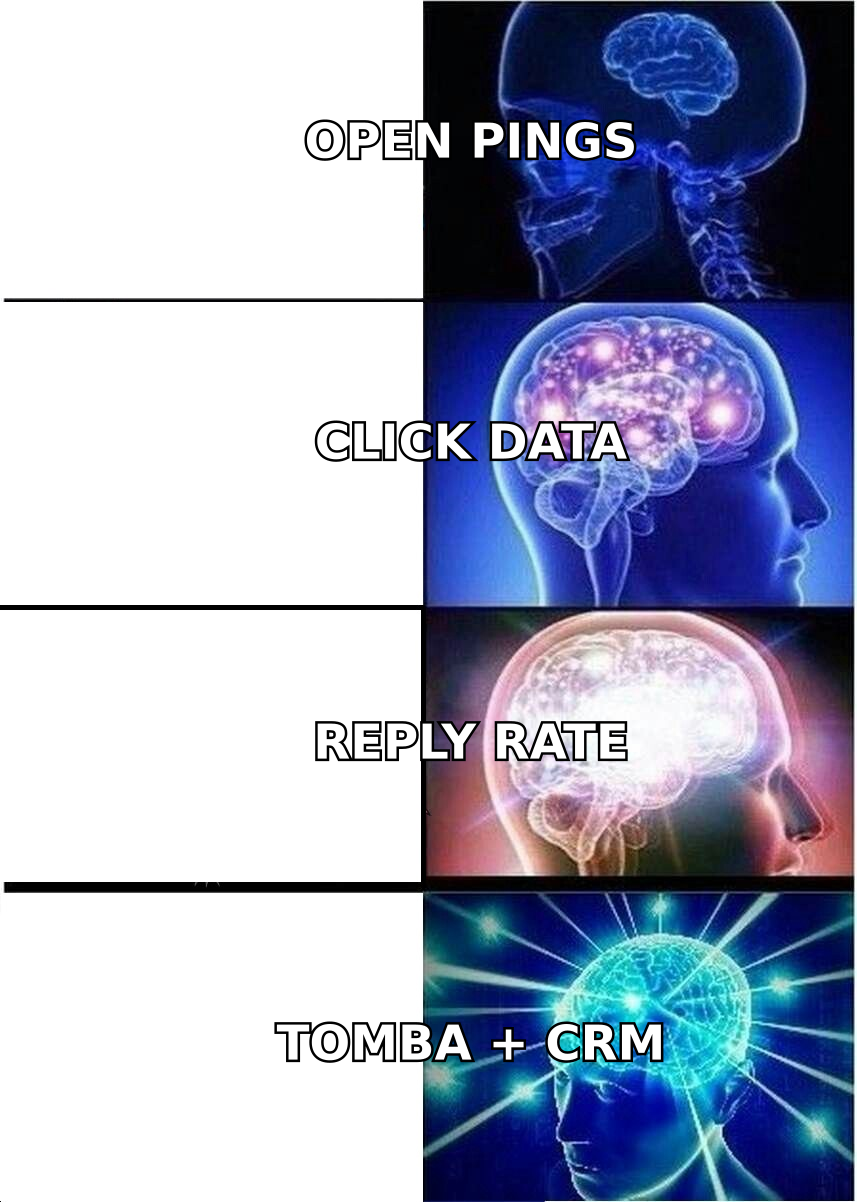
The practical result: a 62% open rate on a cold sequence tells you almost nothing. Worse, if your automation triggers follow-ups on "opened but didn't reply," you are now sending aggressive bump emails to people who never saw message one.
There are partial mitigations. Filter opens that occur within 5 seconds of delivery. Discard opens from known proxy IP ranges. Look at unique clicks minus scanner clicks rather than raw opens. Most serious sequencers now ship some version of this filtering — ask the vendor exactly which heuristics they run before you trust the number on the dashboard.
What should you track instead?#
Rank your metrics by how hard they are to fake. Here is that ranking, from most trustworthy to least:
- Meetings booked. Unfakeable. A human took an action with a calendar. This is the only metric that survives contact with a CFO.
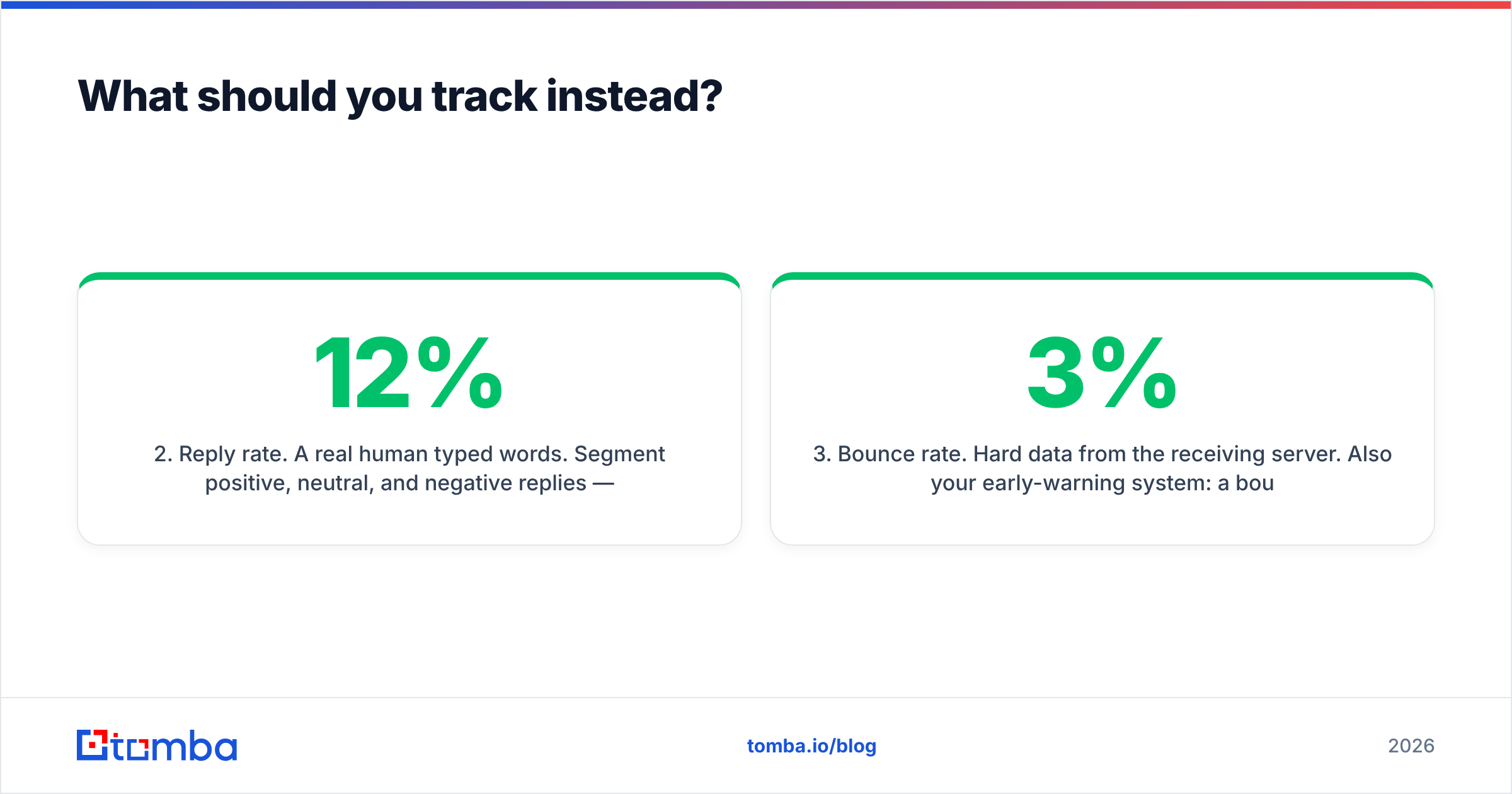
- Reply rate. A real human typed words. Segment positive, neutral, and negative replies — a 12% reply rate that is 80% "unsubscribe" is a worse outcome than 4% that's half positive. See how response rate should be defined before you benchmark yourself against anyone.
- Bounce rate. Hard data from the receiving server. Also your early-warning system: a bounce rate creeping past 3% means your list hygiene has failed and your sender reputation is next.
- Click rate, scanner-filtered. Still useful for comparing two versions of the same CTA, provided you strip sub-2-second clicks and datacenter IPs.
- Open rate, aggregate only. Fine for spotting a week-over-week collapse that signals a deliverability problem. Useless as a per-contact intent signal.
- Device, location, and "read time." Treat as noise. Proxies have destroyed all three.
If your team's weekly pipeline review leads with open rate, you are optimizing a number that Apple controls.
Which email tracking tools are worth it in 2026?#
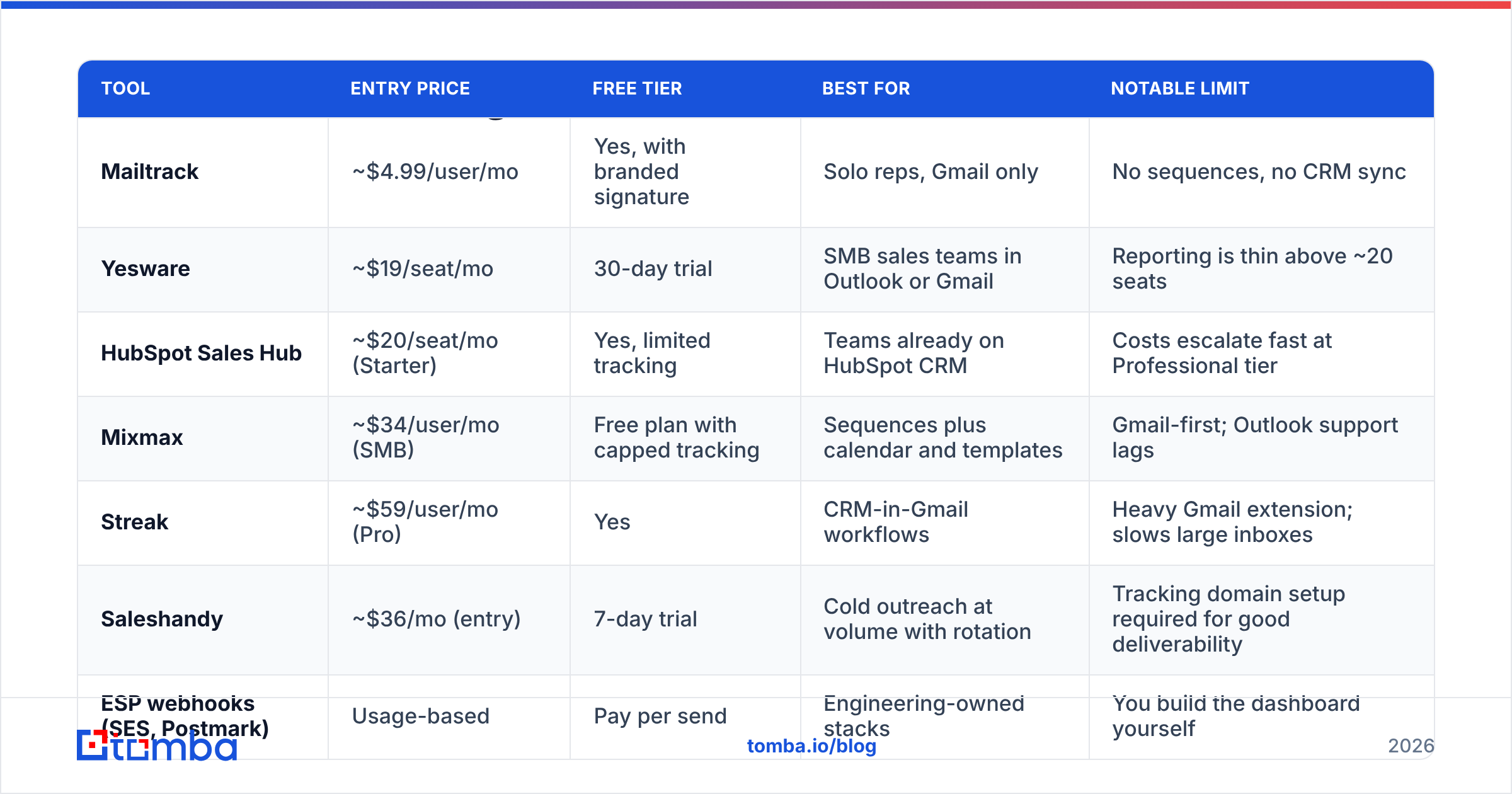
Pricing below reflects publicly listed rates at time of writing; vendors change tiers frequently, so confirm on the vendor's own page before you buy. The G2 email tracking category is a reasonable place to sanity-check current reviews.
| Tool | Entry price | Free tier | Best for | Notable limit |
|---|---|---|---|---|
| Mailtrack | ~$4.99/user/mo | Yes, with branded signature | Solo reps, Gmail only | No sequences, no CRM sync |
| Yesware | ~$19/seat/mo | 30-day trial | SMB sales teams in Outlook or Gmail | Reporting is thin above ~20 seats |
| HubSpot Sales Hub | ~$20/seat/mo (Starter) | Yes, limited tracking | Teams already on HubSpot CRM | Costs escalate fast at Professional tier |
| Mixmax | ~$34/user/mo (SMB) | Free plan with capped tracking | Sequences plus calendar and templates | Gmail-first; Outlook support lags |
| Streak | ~$59/user/mo (Pro) | Yes | CRM-in-Gmail workflows | Heavy Gmail extension; slows large inboxes |
| Saleshandy | ~$36/mo (entry) | 7-day trial | Cold outreach at volume with rotation | Tracking domain setup required for good deliverability |
| ESP webhooks (SES, Postmark) | Usage-based | Pay per send | Engineering-owned stacks | You build the dashboard yourself |
Three buying rules that matter more than the feature grid:
- Own your tracking domain. Shared tracking domains inherit the reputation of every other customer using them. A dedicated
link.yourdomain.comwith proper CNAME setup is table stakes. If the vendor won't let you set one on your plan, that plan isn't for cold outreach. - Check what the tool does with your contact list. Some tracking extensions harvest and resell aggregated engagement data. Read the DPA, not the marketing page.
- Count the seats you actually need. Per-seat tracking pricing looks trivial at 3 reps and painful at 40. Compare against Tomba pricing style flat-credit models if your bottleneck is data volume rather than seats.
Does email tracking hurt deliverability?#
It can, and the mechanism is specific.
Link rewriting replaces a clean, recognizable destination with a redirect through a third-party domain. Spam filters weigh domain reputation heavily. If track.somevendor.com has been used by a spammer this week, your message inherits that signal. This is the single most common self-inflicted deliverability wound in cold outreach.
Three concrete mitigations:
- Set up a dedicated tracking subdomain with its own CNAME, and warm it alongside your sending domain. Confirm your SPF record and DKIM alignment are correct on the sending domain while you're in there.
- Turn open tracking off for cold, first-touch emails. The pixel adds an HTML image to a message that would otherwise be plain text. Plain-text-only first touches consistently land better, and the open data was unreliable anyway.
- Never track and never verify is a false choice. Bounces damage reputation far more than pixels do. Run the list through an email verifier before send, then decide what to track.
You can pressure-test a draft with a spam checker to see how much your tracking setup is contributing to the score before a campaign goes out.
Is email tracking legal?#
Short answer: it depends on jurisdiction and on whether the recipient is a consumer or a business contact, and this is not legal advice.
Under GDPR, a tracking pixel is generally treated as accessing information on a user's device, which brings ePrivacy consent requirements into play for marketing email. Business-to-business outreach under legitimate interest is a defensible position in several member states, but "we tracked opens without disclosure" is a weaker position than "we disclosed tracking in our privacy policy and honor opt-outs immediately." German and French regulators have been the most active here.
Under CAN-SPAM (US), tracking pixels are not restricted. The obligations are accurate headers, a real physical address, and a functioning unsubscribe honored within 10 business days.
CASL (Canada) requires consent for the message itself, which effectively covers the tracking attached to it.
Practical posture for most B2B teams: disclose tracking in your privacy policy, keep a suppression list that actually works, drop open tracking on cold first touches, and don't use device or location data for anything a recipient would find creepy if you described it out loud. HubSpot's guidance on email tracking is a reasonable vendor-side reference for how mainstream tools frame consent.
How do you set up email tracking without wrecking your data?#
A checklist you can run in an afternoon:
- Pick one system of record. If both your Gmail extension and your sequencer log opens to the CRM, you get double-counted activity and inflated engagement scores. Turn one off.
- Configure a dedicated tracking domain and verify the CNAME resolves before your first send.
- Set your filtering rules. Exclude opens under 5 seconds post-delivery, exclude known scanner ASNs, exclude clicks that fire on every link in the message within the same second.
- Define the reply-detection logic. Auto-replies and out-of-office messages should not count as replies. Most tools get this wrong out of the box.
- Verify the list first. Tracking a bounced address produces a null row and a reputation hit. Run bulk verification as a pre-send gate, not a post-mortem.
- Audit monthly. Compare tracked opens against replies. If opens climb while replies flatline, your open number is measuring proxies, not people.
Where does contact data fit into all this?#
Tracking is a measurement layer. It cannot improve a campaign whose inputs are wrong.
Run the math. A 1,000-contact sequence with a 12% invalid-address rate loses 120 sends to bounces, drags the domain reputation down enough to push another slice into spam, and produces tracking data for maybe 700 real humans. Fixing the data quality problem raises deliverable volume by 15-20% before you have optimized a single subject line. No tracking dashboard will surface that, because the dashboard only reports on what got delivered.
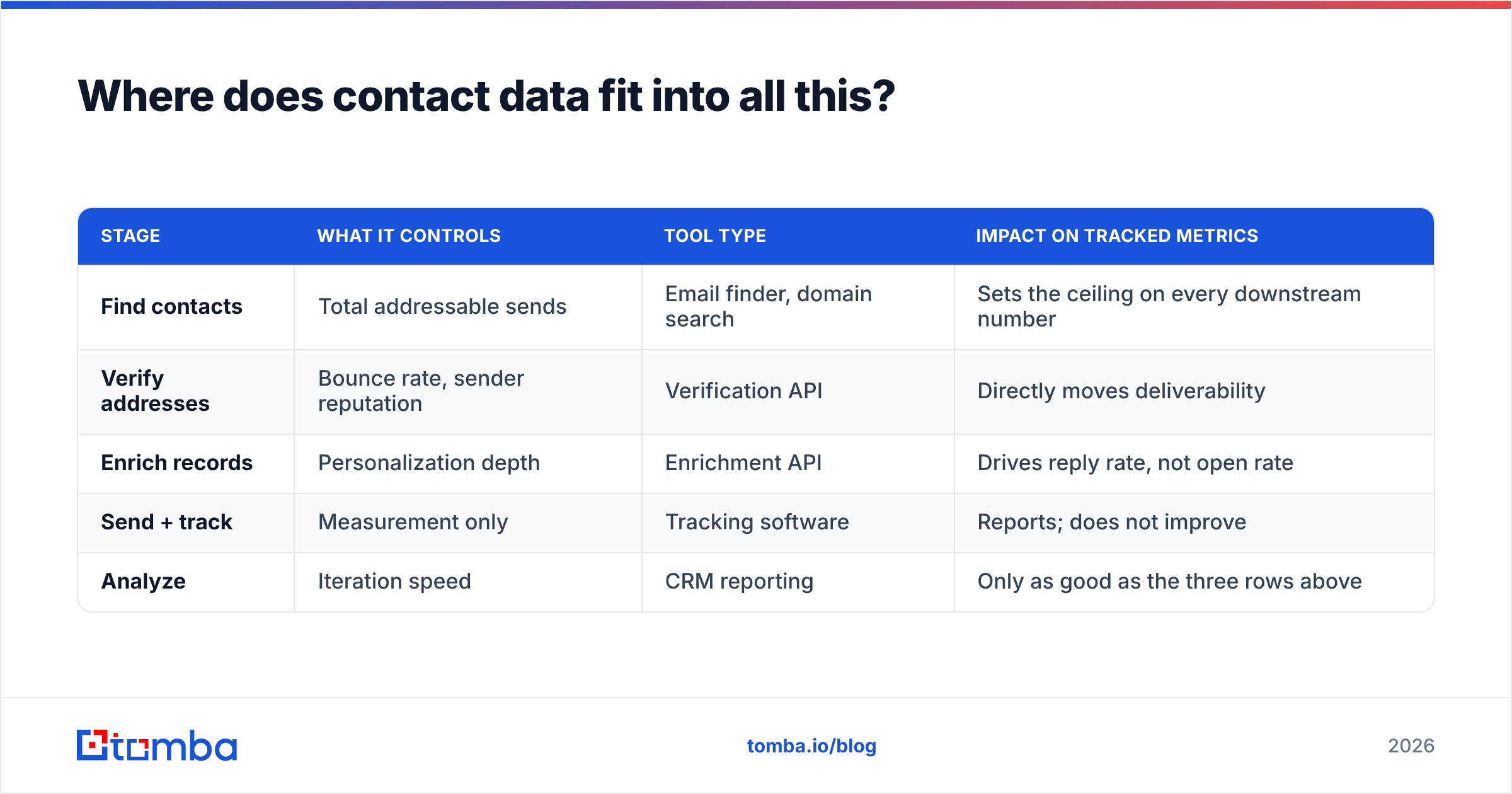
That means the sequence of operations matters:
| Stage | What it controls | Tool type | Impact on tracked metrics |
|---|---|---|---|
| Find contacts | Total addressable sends | Email finder, domain search | Sets the ceiling on every downstream number |
| Verify addresses | Bounce rate, sender reputation | Verification API | Directly moves deliverability |
| Enrich records | Personalization depth | Enrichment API | Drives reply rate, not open rate |
| Send + track | Measurement only | Tracking software | Reports; does not improve |
| Analyze | Iteration speed | CRM reporting | Only as good as the three rows above |
If you are picking one thing to fix this quarter and your bounce rate is above 3%, fix the data. If your bounce rate is already under 1% and your reply rate is flat, fix the copy — tracking will tell you which version won. Teams that want the whole flow in one place usually pair verification with data enrichment so the personalization tokens in the sequence are actually populated.
What's the honest verdict on email tracking software in 2026?#
Buy it, use a narrow slice of it, and stop reporting on the rest.
Click data with scanner filtering is genuinely useful for CTA testing. Reply detection wired into your CRM saves reps real time. Real-time "they're reading it now" notifications still help a rep time a call, as long as the rep knows a proxy may have fired it.
Open rate as a KPI belongs in the same bin as "impressions" — a number that goes up and correlates with nothing. If your board deck has an open-rate line, replace it with meetings booked per 1,000 verified contacts. That metric is harder to move and impossible to fake, which is the point.
And before your next sequence goes out, check the input side of the equation. Pull clean, verified contacts with the Tomba Email Finder — find addresses by domain, name, or company, verify them in the same pass, and start with a list where every tracked send actually reaches a person. The free tier covers 25 searches a month if you want to test the accuracy against your current provider before committing; paid plans start at $49/mo.
Related guides#
Ready to find emails that actually work?
Join 150,000+ professionals who stopped guessing and started sending. Free credits on signup — no credit card required.
Get the Tomba newsletter
Practical outbound tactics and product updates — once every two weeks.
About the author