Email Validation API in 2026: How to Pick the Right One
An email validation API is only as useful as the edge cases it gets right: catch-all domains, role accounts, disposables, and greylisting. Here's how the major providers compare on accuracy, latency, and price.
TL;DR
- An email validation API checks syntax, DNS/MX records, mailbox existence, and risk signals (disposable, role, catch-all) in one HTTP call — usually in 200–900 ms.
- Vendor "99% accuracy" claims are mostly marketing. What separates providers is how they handle the 10–25% of B2B addresses that sit on catch-all domains.
- Real-time validation belongs at your signup form. Bulk validation belongs before every campaign send. Most teams need both, and pricing models differ sharply between them.
- Budget roughly $0.001–$0.008 per email depending on volume and vendor. Credit rollover, catch-all handling, and rate limits matter more than the headline price.
- Do not validate your list twice with the same vendor and call that verification. Cross-check a sample against a second provider before you trust any score.
What is an email validation API?#
An email validation API is a hosted endpoint you call with an email address; it returns a structured verdict about whether that address can actually receive mail. Think of it as a credit check for an inbox. You would not wire $50,000 to a bank account without confirming it exists — an email validation API is the same reflex applied to your outbound list.
The call itself is boring. You POST or GET an address, you get JSON back:
GET https://api.tomba.io/v1/email-verifier/john.doe@stripe.com{
"email": "john.doe@stripe.com",
"status": "valid",
"result": "deliverable",
"score": 96,
"mx_records": true,
"smtp_check": true,
"accept_all": false,
"disposable": false,
"webmail": false,
"gibberish": false
}What is not boring is what happens when that JSON is wrong. A hard bounce rate above 2% puts you in Google and Microsoft's penalty box, and once your domain reputation drops, even your valid recipients stop seeing you. The API is cheap. The bounces are not.
How does an email validation API actually check an address?#
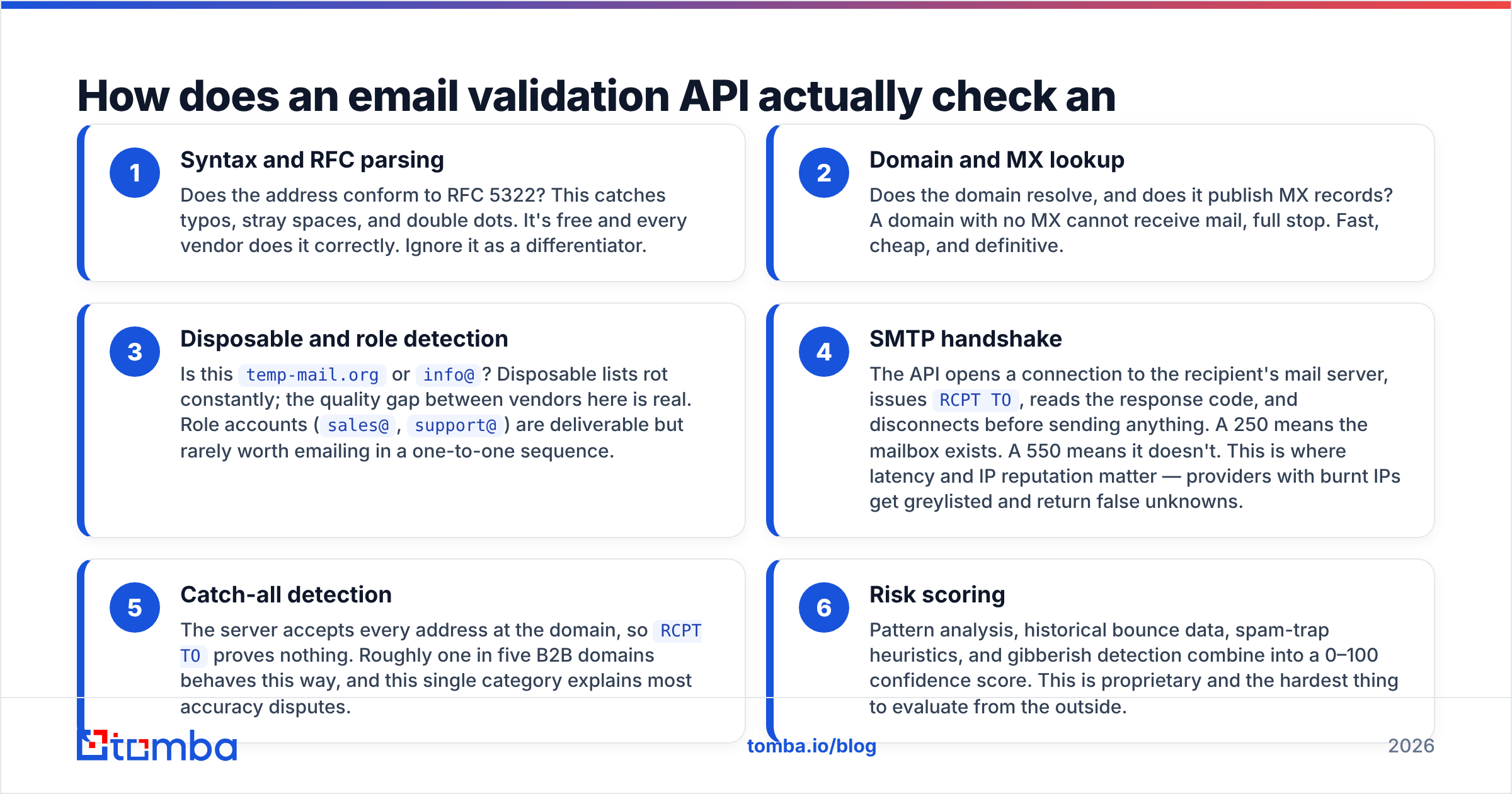
Every serious provider runs the same layered pipeline. Understanding the layers tells you where a vendor can cut corners.
- Syntax and RFC parsing — Does the address conform to RFC 5322? This catches typos, stray spaces, and double dots. It's free and every vendor does it correctly. Ignore it as a differentiator.
- Domain and MX lookup — Does the domain resolve, and does it publish MX records? A domain with no MX cannot receive mail, full stop. Fast, cheap, and definitive.
- Disposable and role detection — Is this
temp-mail.orgorinfo@? Disposable lists rot constantly; the quality gap between vendors here is real. Role accounts (sales@,support@) are deliverable but rarely worth emailing in a one-to-one sequence. - SMTP handshake — The API opens a connection to the recipient's mail server, issues
RCPT TO, reads the response code, and disconnects before sending anything. A 250 means the mailbox exists. A 550 means it doesn't. This is where latency and IP reputation matter — providers with burnt IPs get greylisted and return false unknowns. - Catch-all detection — The server accepts every address at the domain, so
RCPT TOproves nothing. Roughly one in five B2B domains behaves this way, and this single category explains most accuracy disputes. - Risk scoring — Pattern analysis, historical bounce data, spam-trap heuristics, and gibberish detection combine into a 0–100 confidence score. This is proprietary and the hardest thing to evaluate from the outside.

What do the response fields actually mean?#
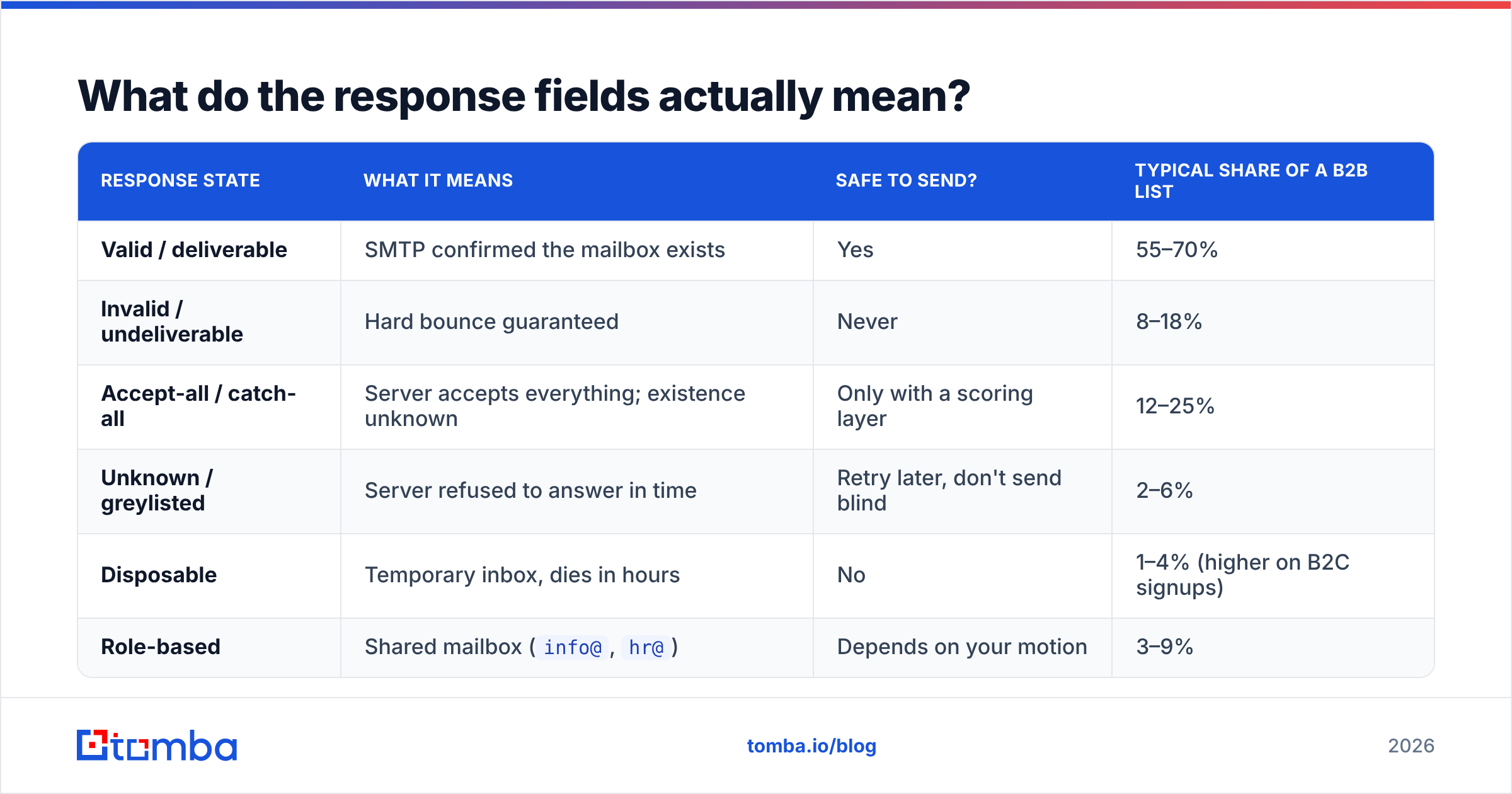
Different vendors use different vocabulary for the same states, which makes migration painful. Here's the practical translation layer:
| Response state | What it means | Safe to send? | Typical share of a B2B list |
|---|---|---|---|
| Valid / deliverable | SMTP confirmed the mailbox exists | Yes | 55–70% |
| Invalid / undeliverable | Hard bounce guaranteed | Never | 8–18% |
| Accept-all / catch-all | Server accepts everything; existence unknown | Only with a scoring layer | 12–25% |
| Unknown / greylisted | Server refused to answer in time | Retry later, don't send blind | 2–6% |
| Disposable | Temporary inbox, dies in hours | No | 1–4% (higher on B2C signups) |
| Role-based | Shared mailbox (info@, hr@) |
Depends on your motion | 3–9% |
The trap is treating catch-all as a binary. A naive integration either drops every catch-all address — throwing away a quarter of your addressable market, including most Microsoft 365 tenants — or sends to all of them and eats the bounces. The right answer is a dedicated catch-all verifier that layers pattern confidence, historical engagement, and secondary signals on top of the ambiguous SMTP result.
How accurate are email validation APIs in 2026?#
Every vendor's homepage says 98–99%. The number is close to meaningless because nobody publishes the denominator. Accuracy on a list of Gmail addresses is trivially high. Accuracy on a list of mid-market B2B domains running Microsoft Exchange with tarpitting enabled is a different sport.

Run your own benchmark before you commit. It takes an afternoon:
- Build a control set of 500 addresses. Include 100 you know are live (your own team, current customers), 100 you know are dead (bounced addresses from your last six months of sends), and 300 random prospects from your ICP.
- Run the same file through two or three APIs. Record the raw verdict, not the marketing category.
- Measure false positives, not overall accuracy. A vendor that marks a dead address as valid costs you reputation. A vendor that marks a live address as risky only costs you a lead. These are not symmetric errors.
- Check the unknown rate. Anything above 8% means the vendor's SMTP infrastructure is getting throttled, and you're paying for guesses.
- Re-run the same file a week later. Verdict instability on unchanged addresses reveals cache staleness and flaky infrastructure.
Third-party reviews on G2's email verification category are useful for support quality and billing complaints, but treat accuracy scores there as sentiment, not data.
Which email validation API should you choose?#
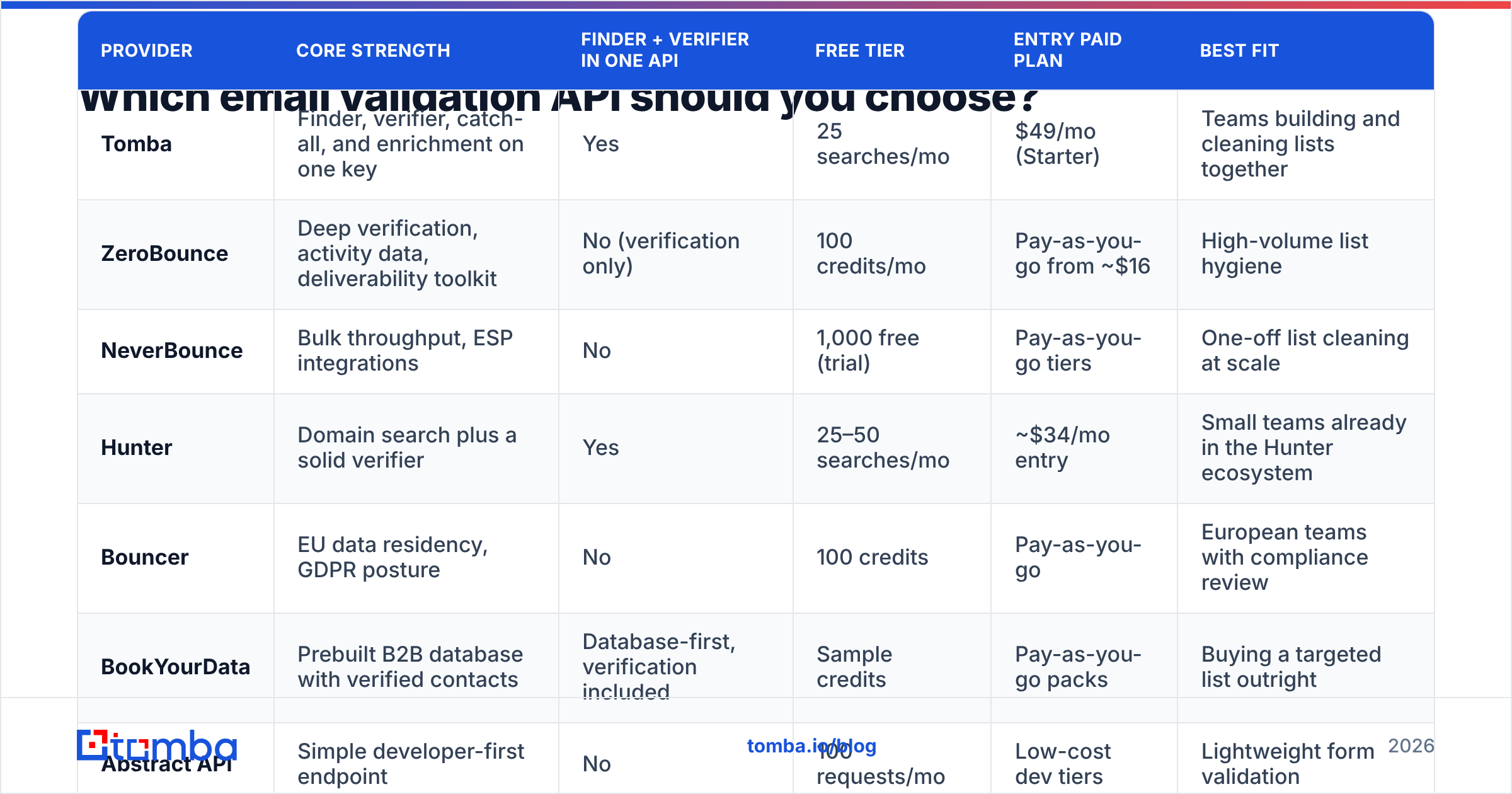
The honest answer depends on whether validation is your whole problem or half of it. If you already have a list and only need it cleaned, a pure-play verifier is fine. If you're building the list and cleaning it, an API that does both saves an integration and a reconciliation headache.

| Provider | Core strength | Finder + verifier in one API | Free tier | Entry paid plan | Best fit |
|---|---|---|---|---|---|
| Tomba | Finder, verifier, catch-all, and enrichment on one key | Yes | 25 searches/mo | $49/mo (Starter) | Teams building and cleaning lists together |
| ZeroBounce | Deep verification, activity data, deliverability toolkit | No (verification only) | 100 credits/mo | Pay-as-you-go from ~$16 | High-volume list hygiene |
| NeverBounce | Bulk throughput, ESP integrations | No | 1,000 free (trial) | Pay-as-you-go tiers | One-off list cleaning at scale |
| Hunter | Domain search plus a solid verifier | Yes | 25–50 searches/mo | ~$34/mo entry | Small teams already in the Hunter ecosystem |
| Bouncer | EU data residency, GDPR posture | No | 100 credits | Pay-as-you-go | European teams with compliance review |
| BookYourData | Prebuilt B2B database with verified contacts | Database-first, verification included | Sample credits | Pay-as-you-go packs | Buying a targeted list outright |
| Abstract API | Simple developer-first endpoint | No | 100 requests/mo | Low-cost dev tiers | Lightweight form validation |
Two structural notes. First, verification-only vendors are usually cheaper per credit but force you to run a second tool to find addresses in the first place, and every extra hop is a place where records drift. Second, pay-as-you-go looks cheaper than a subscription until you need the API more than twice a quarter — credits that expire are the industry's quietest margin.
If you want the full picture on where records originate before they get scored, Tomba publishes its data sources, which is worth reading against any vendor you shortlist.
How much should an email validation API cost?#
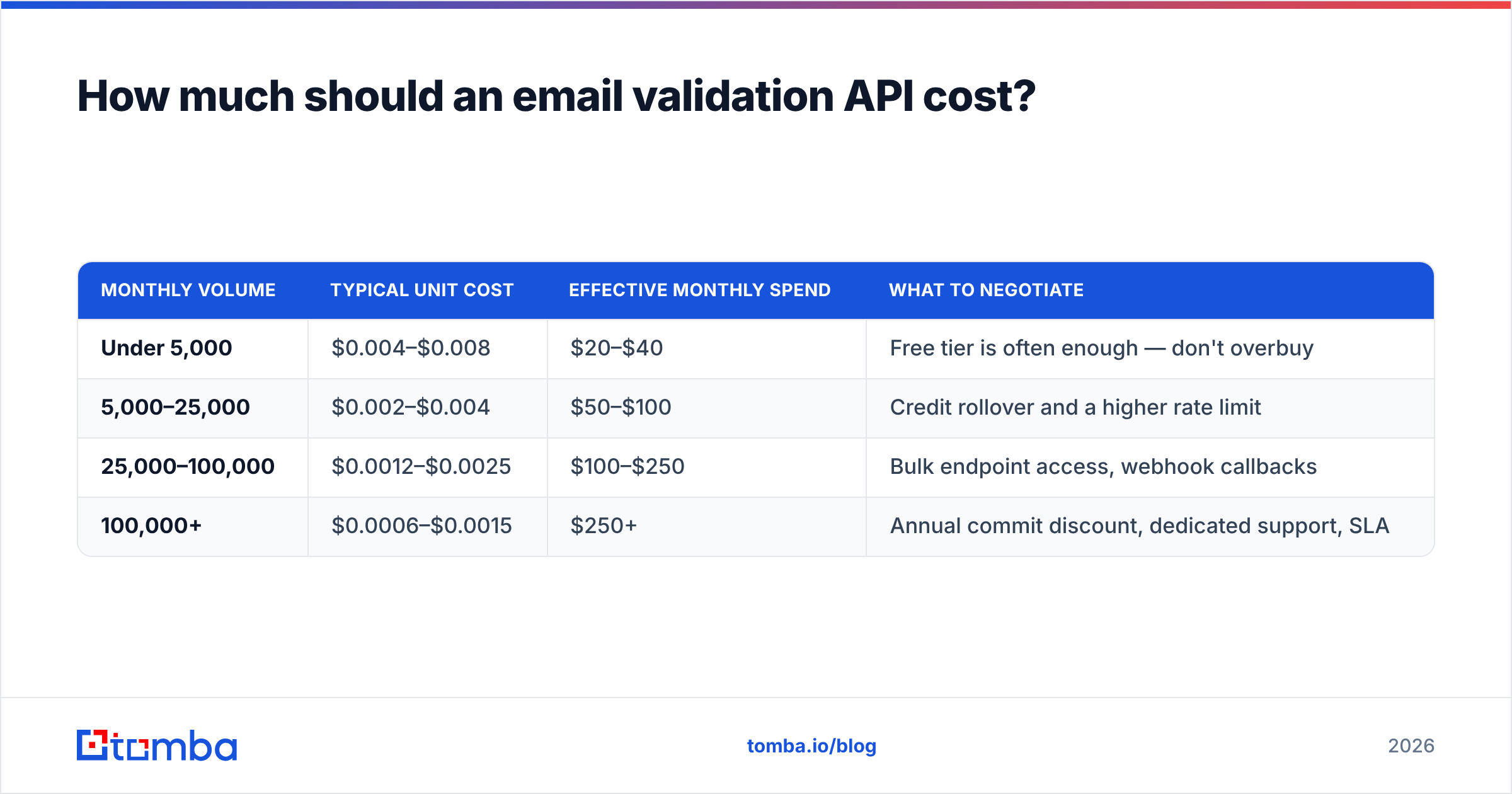
Per-email cost drops steeply with volume, and every vendor prices in credits rather than dollars to make comparison harder. Normalize before you sign anything.
| Monthly volume | Typical unit cost | Effective monthly spend | What to negotiate |
|---|---|---|---|
| Under 5,000 | $0.004–$0.008 | $20–$40 | Free tier is often enough — don't overbuy |
| 5,000–25,000 | $0.002–$0.004 | $50–$100 | Credit rollover and a higher rate limit |
| 25,000–100,000 | $0.0012–$0.0025 | $100–$250 | Bulk endpoint access, webhook callbacks |
| 100,000+ | $0.0006–$0.0015 | $250+ | Annual commit discount, dedicated support, SLA |
Tomba's published tiers — Free at 25 searches/mo, Starter at $49/mo, Growth at $99/mo, Pro at $249/mo, and custom Enterprise — sit in the normal band for a combined finder-plus-verifier. Check the current Tomba pricing page before budgeting, since credit allocations move.
Three cost traps to watch:
- Charging for unknowns. Some vendors bill you for a greylisted verdict that told you nothing. Ask explicitly.
- Expiring credits. Monthly-reset credits punish seasonal outbound. Rollover is worth a 20% higher unit price.
- Separate bulk pricing. A few providers charge more per address through the batch endpoint than the single-lookup one, which is backwards but common.
Real-time or bulk: which endpoint do you actually need?#
Both, at different points in the lifecycle.
Real-time single lookup goes in your signup form, your CRM's create-lead hook, and your chatbot. Latency budget: under 500 ms, or users notice. Fail open — if the API times out, accept the address and flag it for async re-check. Never block a paying signup because a third-party API had a bad second.
Bulk validation goes before every campaign send and on a rolling 90-day schedule for your existing database. B2B email decays at roughly 2–2.5% per month through job changes alone, so a list validated in January is meaningfully dirtier by April. A bulk email finder workflow that accepts a CSV and returns results by webhook is the practical shape here — synchronous bulk calls will time out on anything over a few thousand rows.

How do you integrate it without breaking things?#
The integration pattern that survives contact with production looks like this:
- Validate at capture, asynchronously. Accept the input, return success to the user, then queue the validation. Write the verdict back to the record within seconds.
- Store the full response, not just the boolean. You will want the score, the catch-all flag, and the timestamp six months from now when you're debugging a deliverability drop.
- Set a revalidation TTL. Ninety days for prospects, 180 for engaged customers. Anything older than that is a guess wearing a verdict.
- Suppress, don't delete. Move invalid addresses to a suppression table. Deleting them means you'll re-import the same dead record from a data vendor next quarter.
- Handle 429s with exponential backoff. Rate limits differ wildly between plans; a naive loop will get you throttled on your first bulk job.
- Monitor your actual bounce rate against the API's predictions. If the API says 98% deliverable and your ESP reports 5% hard bounces, the API is wrong and you need to know that within one campaign, not one quarter.
The Tomba API documents rate limits and response schemas openly, which is the minimum bar — if a vendor hides its docs behind a sales call, that tells you something about how the integration will go.
What mistakes kill validation ROI?#
Validating once and never again. The single highest-leverage change most teams can make is moving from ad-hoc cleaning to scheduled revalidation.
Dropping every catch-all address. You just deleted a quarter of your enterprise pipeline. Score them instead and send to the high-confidence tier.
Treating validation as a deliverability strategy. A clean list prevents bounces. It does not fix a missing DMARC record, a cold domain, or a subject line that reads like a phishing attempt. Validation is one input to sender reputation, not the whole thing.
Buying on headline accuracy. Buy on false-positive rate against your own control set. Everything else is a brochure.
Ignoring the finder side. If your addresses are guessed permutations, no verifier will save you — you're just confirming that made-up addresses bounce. Sourcing quality upstream beats scoring quality downstream every time.
Where should you start?#
If you're validating a list you already own, start with a free tier and a 500-address control set. If you're building the list and cleaning it in the same motion, a combined tool removes an entire class of sync bugs.
Tomba's email verifier and Email Finder run on the same API key and the same underlying data, so an address you find is already scored when it lands in your CRM — no second vendor, no reconciliation job, no credits burned twice on the same record. The free tier gives you 25 searches a month to run your own benchmark before you spend anything. Run it against your control set, compare the false positives, and let the numbers pick your vendor.
Related guides#
Ready to find emails that actually work?
Join 150,000+ professionals who stopped guessing and started sending. Free credits on signup — no credit card required.
Get the Tomba newsletter
Practical outbound tactics and product updates — once every two weeks.
About the author