Email Validation Checker: How to Cut Bounces in 2026
An email validation checker is supposed to protect your sender reputation — but syntax checks, MX lookups, and SMTP pings are not the same thing. Here is what actually gets tested, what gets guessed, and how to pick a tool that earns its price.
TL;DR
- An email validation checker tests whether an address can receive mail — through syntax parsing, DNS/MX lookups, SMTP handshakes, and risk scoring. Only the last two tell you anything useful.
- Mailbox providers now enforce hard bounce thresholds. Google and Yahoo both point bulk senders at a sub-0.3% spam complaint rate, and bounce rates above roughly 2% start throttling your delivery.
- The honest accuracy ceiling for any validation tool is about 95–99% on standard domains, and much lower on catch-all domains where the server accepts everything.
- Price per verification ranges from about $0.001 to $0.01 depending on volume. The bigger cost difference is credits burned on unknown results.
- If you need finding and verification in one place, a combined platform is cheaper than stacking two vendors. If you only verify a purchased list once a quarter, a pay-as-you-go verifier is fine.
What is an email validation checker?#
An email validation checker is a tool that decides whether an email address will accept mail before you send to it. Think of it like calling a phone number and listening for the ring instead of the "this number is no longer in service" recording — you learn the line exists without anyone picking up.
It answers four questions in sequence:
- Is the syntax legal? Does the address conform to the RFC rules for a valid email address? This kills typos like
john@@acme.comandjane@acmeinstantly. - Does the domain exist and accept mail? A DNS lookup for MX records.
acme.cmohas no mail exchanger, so nothing sent there can ever land. - Does the mailbox exist? An SMTP conversation with the receiving server that asks about a specific recipient without delivering a message.
- Is this address risky even if it exists? Role accounts (
info@,sales@), disposable domains, known spam traps, and catch-all servers all get flagged separately.
Steps 1 and 2 are cheap and every tool does them identically. Steps 3 and 4 are where vendors actually differ, and where you should focus your evaluation.
Why does email validation matter more in 2026 than it did in 2022?#
Because the penalty changed. Mailbox providers used to treat a bad list as your problem. Now it is theirs, and they price it accordingly.
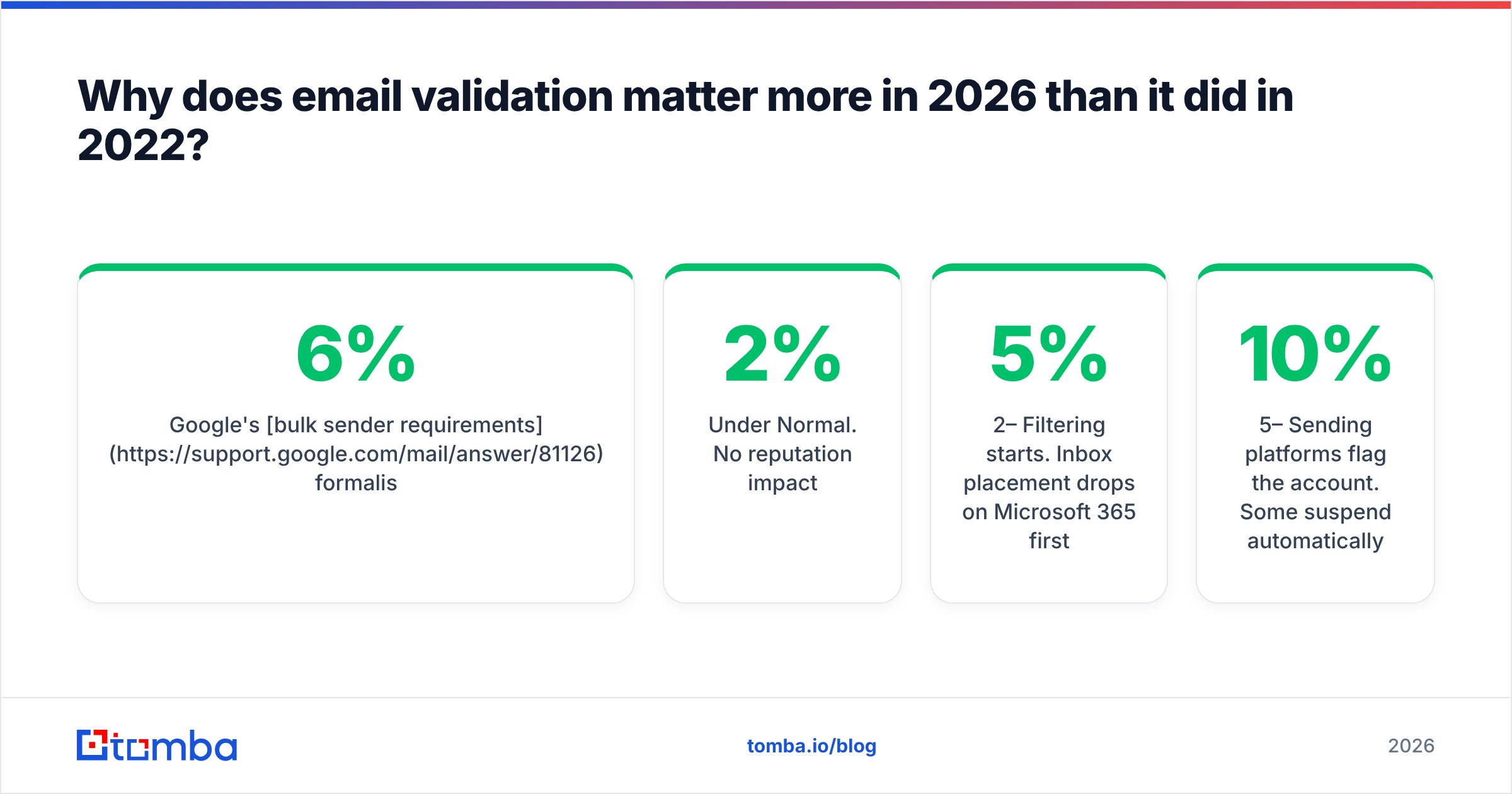
Google's bulk sender requirements formalised authentication and complaint-rate thresholds, and Yahoo followed with near-identical rules. The practical effect: a campaign with a 6% bounce rate does not just lose 6% of its recipients. It signals to the receiving filter that you are mailing a list you did not build, and the remaining 94% start landing in spam.
The rough thresholds most deliverability teams work to:
| Bounce rate | What happens |
|---|---|
| Under 2% | Normal. No reputation impact. |
| 2–5% | Filtering starts. Inbox placement drops on Microsoft 365 first. |
| 5–10% | Sending platforms flag the account. Some suspend automatically. |
| Over 10% | Domain reputation damage that takes weeks of low-volume warmup to repair. |
A validation pass in front of every send is the cheapest insurance available. At $0.004 per check, cleaning a 10,000-address list costs $40 and protects a domain you have spent a year building.

How does an email validation checker actually work under the hood?#
Here is the pipeline, in the order a good tool runs it:
- Syntax and normalisation. Strip whitespace, lowercase the domain, catch invalid characters, and expand known alias patterns (Gmail dots and
+tagsresolve to the same mailbox). - Disposable and free-provider classification. Match the domain against a list of temporary-mail services. A
mailinator.comaddress is technically deliverable and commercially worthless. - DNS and MX resolution. Confirm the domain resolves and publishes mail exchangers. Cache aggressively — thousands of addresses on one domain need one lookup.
- SMTP verification. Open a connection to the highest-priority MX host, issue
HELO,MAIL FROM, andRCPT TO, then read the response code before disconnecting. A250means the recipient is accepted. A550means it does not exist. - Catch-all detection. Probe a random address that cannot exist (
x7f2q9@domain.com). If the server accepts it, the domain accepts everything and the previous250proves nothing. - Risk scoring. Combine role-account detection, spam-trap heuristics, historical engagement data, and domain age into a single confidence value.
Steps 4 and 5 are the expensive ones. They require distributed IP pools, because a server hammering RCPT TO from a single IP gets rate-limited or blocked within minutes. This is the main reason free browser tools are unreliable at volume: they share one exhausted IP range.
What do the result statuses actually mean?#
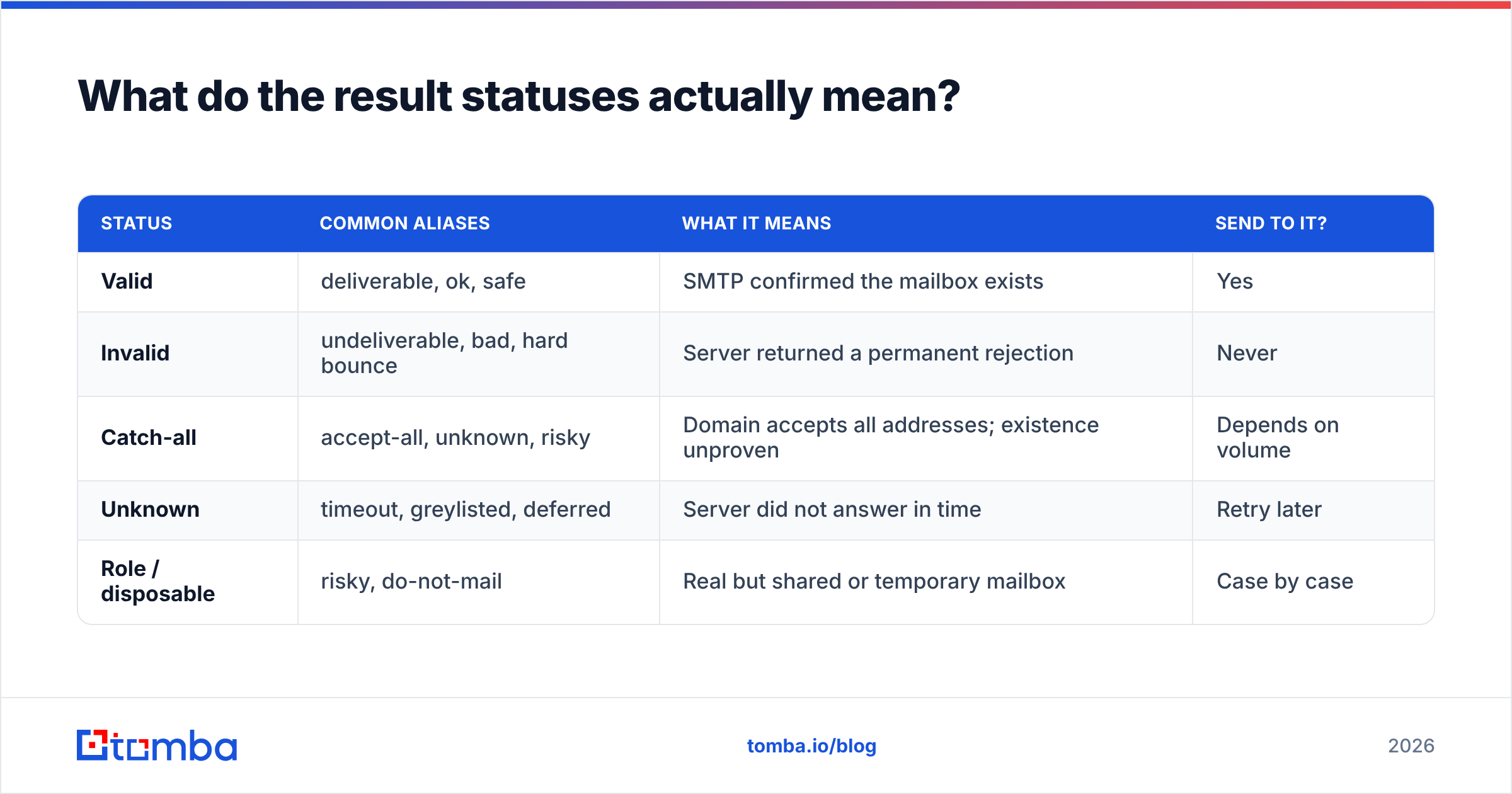
Vendors use different labels for the same four outcomes. Translate before comparing.
| Status | Common aliases | What it means | Send to it? |
|---|---|---|---|
| Valid | deliverable, ok, safe | SMTP confirmed the mailbox exists | Yes |
| Invalid | undeliverable, bad, hard bounce | Server returned a permanent rejection | Never |
| Catch-all | accept-all, unknown, risky | Domain accepts all addresses; existence unproven | Depends on volume |
| Unknown | timeout, greylisted, deferred | Server did not answer in time | Retry later |
| Role / disposable | risky, do-not-mail | Real but shared or temporary mailbox | Case by case |
The number that separates a good tool from a mediocre one is the catch-all and unknown percentage. If a vendor returns 30% of your B2B list as catch-all, you have paid full price for a shrug. Tools with a dedicated catch-all verifier push a portion of that bucket into a real verdict using pattern data and secondary signals, which is worth more than a fractionally cheaper per-credit rate.
Ask any vendor for their catch-all resolution rate on a sample of your own domains. Most will not volunteer it.
How accurate are email validation checkers in 2026?#
Between 95% and 99% on standard domains, and materially lower on catch-alls. Any vendor advertising 99.9% across the board is measuring something narrower than you think — usually only the addresses they were confident about, with unknowns excluded from the denominator.

Three things distort published accuracy numbers:
- Denominator games. Excluding catch-all and unknown results inflates the score. Ask whether the figure is over all submitted addresses or only over scored ones.
- Test list composition. A list that is 70% Gmail and Outlook validates beautifully. Corporate domains behind Proofpoint, Mimecast, or Barracuda are far harder, and those are the addresses B2B teams care about.
- Recency. Validation is a snapshot. About 22–30% of B2B email addresses decay per year through job changes. A list validated in January is meaningfully stale by July.
The practical test: take 200 addresses you have already mailed and know the outcome for, run them through each candidate tool, and compare verdicts against ground truth. It costs a few dollars and beats every marketing claim.
Which email validation checker should you choose?#
Depends on whether you also need to find addresses. Verification-only vendors are excellent at one job. Combined platforms cost less overall when you are building lists from scratch.

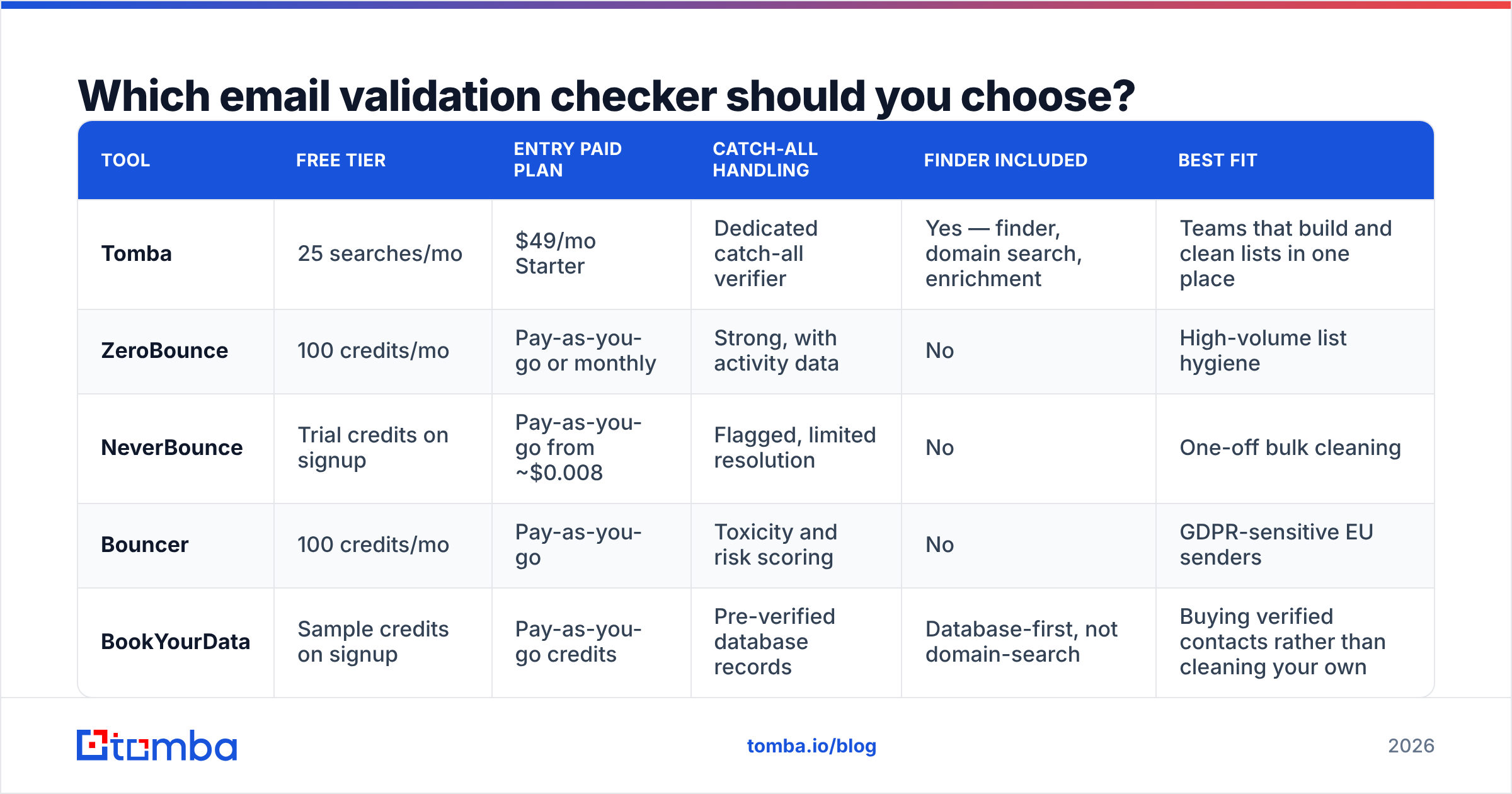
| Tool | Free tier | Entry paid plan | Catch-all handling | Finder included | Best fit |
|---|---|---|---|---|---|
| Tomba | 25 searches/mo | $49/mo Starter | Dedicated catch-all verifier | Yes — finder, domain search, enrichment | Teams that build and clean lists in one place |
| ZeroBounce | 100 credits/mo | Pay-as-you-go or monthly | Strong, with activity data | No | High-volume list hygiene |
| NeverBounce | Trial credits on signup | Pay-as-you-go from ~$0.008 | Flagged, limited resolution | No | One-off bulk cleaning |
| Bouncer | 100 credits/mo | Pay-as-you-go | Toxicity and risk scoring | No | GDPR-sensitive EU senders |
| BookYourData | Sample credits on signup | Pay-as-you-go credits | Pre-verified database records | Database-first, not domain-search | Buying verified contacts rather than cleaning your own |
Free tiers and entry prices reflect published information at the time of writing; confirm on each vendor's own pricing page before committing. Independent user reviews on the G2 email verification category are useful for spotting support and refund complaints that never appear in vendor comparisons.
The decision usually collapses to one question: do you already have the addresses? If yes, a pay-as-you-go verifier is the cheapest path. If you are sourcing addresses from domains and names, paying two vendors makes no sense — run finding and verification through the same email verifier and stop reconciling two credit balances.
How much should an email validation checker cost?#
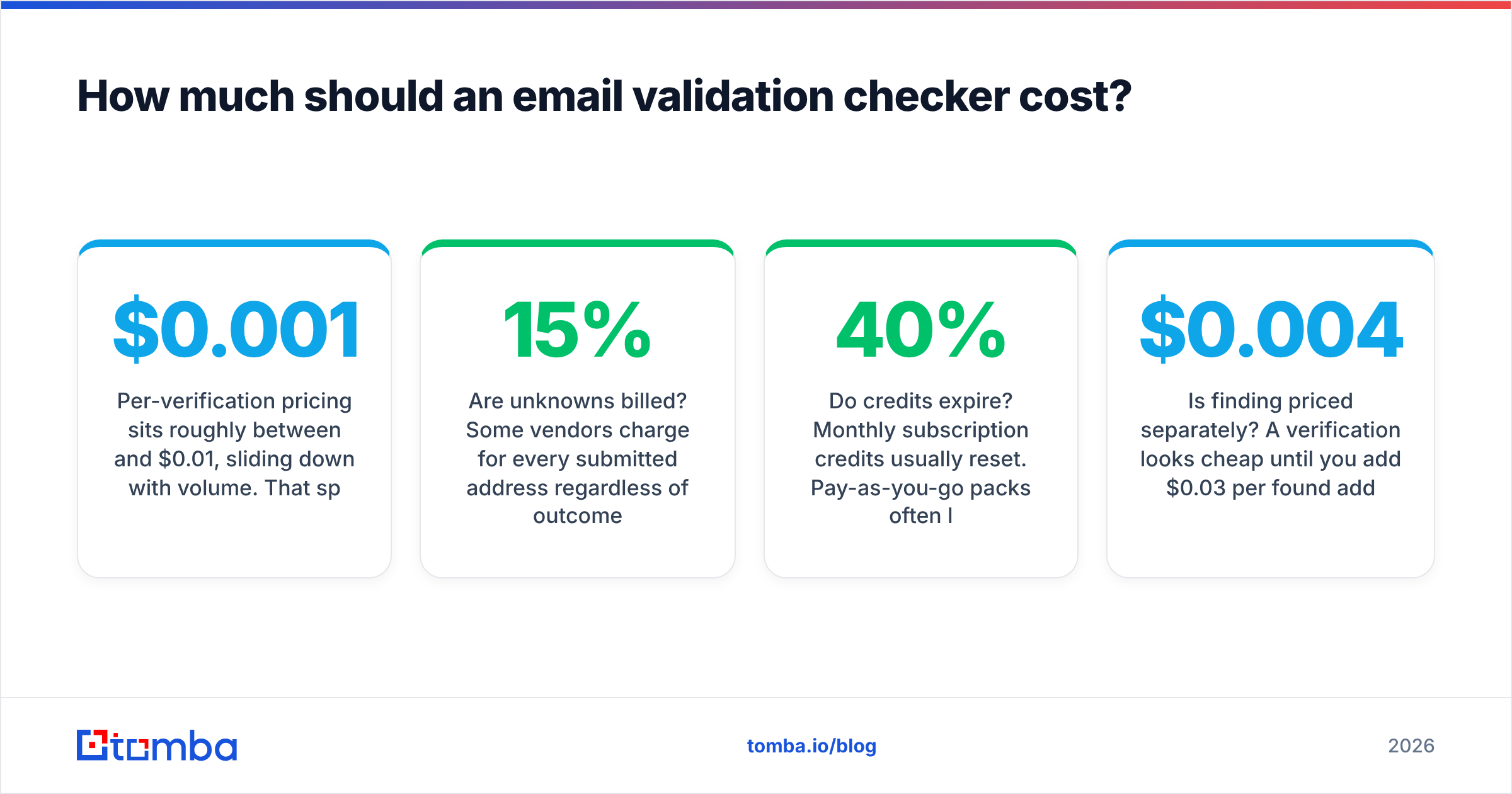
Per-verification pricing sits roughly between $0.001 and $0.01, sliding down with volume. That spread matters less than three details buried in the terms:
- Are unknowns billed? Some vendors charge for every submitted address regardless of outcome. Others refund or do not deduct credits for
unknown. On a hard B2B list, that difference can be 15% of your spend. - Do credits expire? Monthly subscription credits usually reset. Pay-as-you-go packs often last 12 months. If your verification is bursty — quarterly list cleans rather than continuous — expiring credits are a hidden 40% price increase.
- Is finding priced separately? A $0.004 verification looks cheap until you add $0.03 per found address from a second vendor.
For reference, Tomba pricing runs Free (25 searches/mo), Starter at $49/mo, Growth at $99/mo, Pro at $249/mo, and custom Enterprise — with finding, verification, domain search, and enrichment drawing from one credit pool rather than four separate meters.
Run the math on your actual monthly volume, not the headline rate. A team verifying 5,000 addresses per month and finding 2,000 new ones has a very different optimal vendor than a team cleaning 200,000 addresses once a year.
Can you validate emails for free?#
For small volumes, yes. For a list, not reliably.
Free single-address tools — including a browser-based free email checker — run the same syntax, MX, and SMTP sequence as paid APIs. They are genuinely useful for confirming one prospect's address before a high-value outreach email.
Where free breaks down:
- Rate limits. Shared IPs get throttled after a few dozen checks, and throttled connections return
unknown, notinvalid. - No catch-all resolution. The expensive part of validation is exactly the part free tools skip.
- No bulk upload or API. Pasting 4,000 addresses one at a time is not a workflow.
The sensible split: free tools for spot checks, a bulk verify run for anything over a hundred addresses, and an API call inside your form or CRM for continuous hygiene.
How do you build validation into your workflow?#
Validation as a one-time cleanup is a wasted purchase. Put it at three points instead:
- At capture. Call a validation API on form submit. Reject invalid addresses while the user is still on the page — this is the single highest-ROI placement, because it prevents bad data from ever entering the CRM.
- At import. Every purchased list, conference scan, and scraped export gets validated before it touches your sending tool. No exceptions.
- Before each campaign. Re-verify any segment older than 90 days. Job-change decay is invisible until it bounces.
- On bounce. Feed hard bounces back as suppression immediately, and treat repeated soft bounces on the same domain as a signal that your sending IP has a reputation problem, not that the addresses are bad.
The fourth point is the one teams skip. A validation checker cannot fix a blocklisted sending domain, and if your bounce rate spikes across all domains at once, the problem is your reputation, not your list.
What should you check before you sign up?#
Short checklist, in priority order:
- Run your own 200-address ground-truth test. Non-negotiable.
- Ask for the catch-all resolution rate, not the accuracy rate.
- Confirm the credit policy on unknowns and expiry.
- Check the API rate limit against your peak volume, not your average.
- Verify GDPR posture if you process EU data — where processing happens and what the retention policy is.
- Test support response time with a pre-sales question. It predicts post-sales support accurately.
Where to start#
If your problem is purely list hygiene on addresses you already own, any of the dedicated verifiers above will do the job — pick on price per verification and credit expiry.
If you are building lists as well as cleaning them, run both jobs through one system. Tomba's Email Finder finds addresses by domain, name, or company and verifies them in the same request, so you never pay two vendors to disagree about the same contact. Start on the free tier with 25 searches a month, run your own ground-truth test against whatever you use today, and let the numbers decide.
Related guides#
Ready to find emails that actually work?
Join 150,000+ professionals who stopped guessing and started sending. Free credits on signup — no credit card required.
Get the Tomba newsletter
Practical outbound tactics and product updates — once every two weeks.
About the author