Email Validation Rules: The Complete 2026 Guide for Teams
Regex only catches typos. Here are the email validation rules that actually stop bounces in 2026 — syntax, DNS, SMTP, catch-all, and role-based — plus where each layer breaks.
TL;DR — the email validation rules that matter
- Email validation rules work in layers: syntax → DNS/MX → mailbox (SMTP) → risk. Skip a layer and you get bounces.
- Regex is the weakest layer. It catches
john@@corpand little else. A well-formed address can still be dead, disabled, or a trap. - Catch-all domains accept everything at SMTP. Roughly 15–25% of B2B domains do this. You need a confidence score, not a yes/no verdict.
- Aim for under 2% bounce on cold sends. Google and Microsoft read high bounce rates as a spam signal. Your domain pays for it.
- Context changes the rules. A signup form needs speed and low friction. A bought or scraped list needs full SMTP checks first.
What are email validation rules?#
Email validation rules are the ordered checks you run on an address before you send. Think of airport security. The ID check at the door is syntax. The boarding-pass scan asks whether the domain exists. The gate agent confirms your seat, which is the mailbox check. The watchlist flags traps and throwaway addresses. Each layer catches what the last one missed.
Most teams build layer one, call it done, then wonder why a 4,000-address list bounces at 11%.
Here is the working definition. An address passes when it is legal in form, when its domain has mail exchanger records, when the receiving server accepts that exact mailbox, and when it sits outside the risk buckets you chose to block. The first two checks are cheap and certain. The third is a good guess. The fourth is a policy call, not a technical one. That last one is where most teams slip.
Which syntax rules actually matter?#
The formal spec — RFC 5322 and the email address grammar — allows far more than anyone expects. Quoted local parts, comments in parentheses, and IP-literal domains are all legal. "very.unusual.@.unusual.com"@example.com is a valid address. You will never send to it.
So the useful rule set is much narrower than the RFC:
- Exactly one
@, with text on both sides. Extra unescaped@symbols are always a reject. - Local part ≤ 64 characters, whole address ≤ 254 characters. These are hard SMTP limits, not style rules.
- No leading, trailing, or doubled dots in the local part.
.john@corp.comandjohn..doe@corp.comfail on almost every real mail server. - The domain needs at least one dot and a real TLD.
john@localhostpasses many regex patterns. It fails every time in production. - Reject anything that breaks your own tools. Unicode local parts (SMTPUTF8) are legal, but CRMs, sequencers, and CSV pipelines handle them badly. Decide now, not mid-send.
- Normalize before you compare. Lowercase the domain, trim whitespace, strip
mailto:prefixes. Gmail ignores dots and plus tags, soj.o.h.n+news@gmail.comisjohn@gmail.com. Do not apply that rule to other domains, where dots and plus signs can matter.
That last rule is quietly expensive. Teams dedupe without normalizing, then mail the same person three times in one week.
Why does regex fail as a validation rule?#
Because form and delivery are different problems. Regex is only the first of the email validation rules, and the cheapest. It tells you an address is shaped like an email. It cannot tell you whether a human reads it.
Here is what passes every regex on Stack Overflow and still burns your domain:
jsmith@acmecorp.comwhen the real pattern isjohn.smith@acmecorp.com. That guess hard-bounces.careers@acmecorp.com, a role address that feeds an ATS. Nobody reads it, and it drags your engagement metrics down.sarah@acmecorp.com, where Sarah left 14 months ago. The mailbox is now a spam trap run by the domain's security vendor.hello@mailinator.com, a throwaway address someone used to grab your lead magnet.john@acmecorp.co, a typo domain that a squatter owns and watches.
None of those are syntax problems. All of them are validation problems. The most common mistake I see in B2B teams is simple. They read "the regex passed" as "safe to send." The gap shows up after the first campaign, once sender reputation is already hit. Google's bulk sender guidelines are blunt about it. High bounce and complaint rates get your mail filtered or refused, and recovery takes weeks.
What are the layers of email validation?#
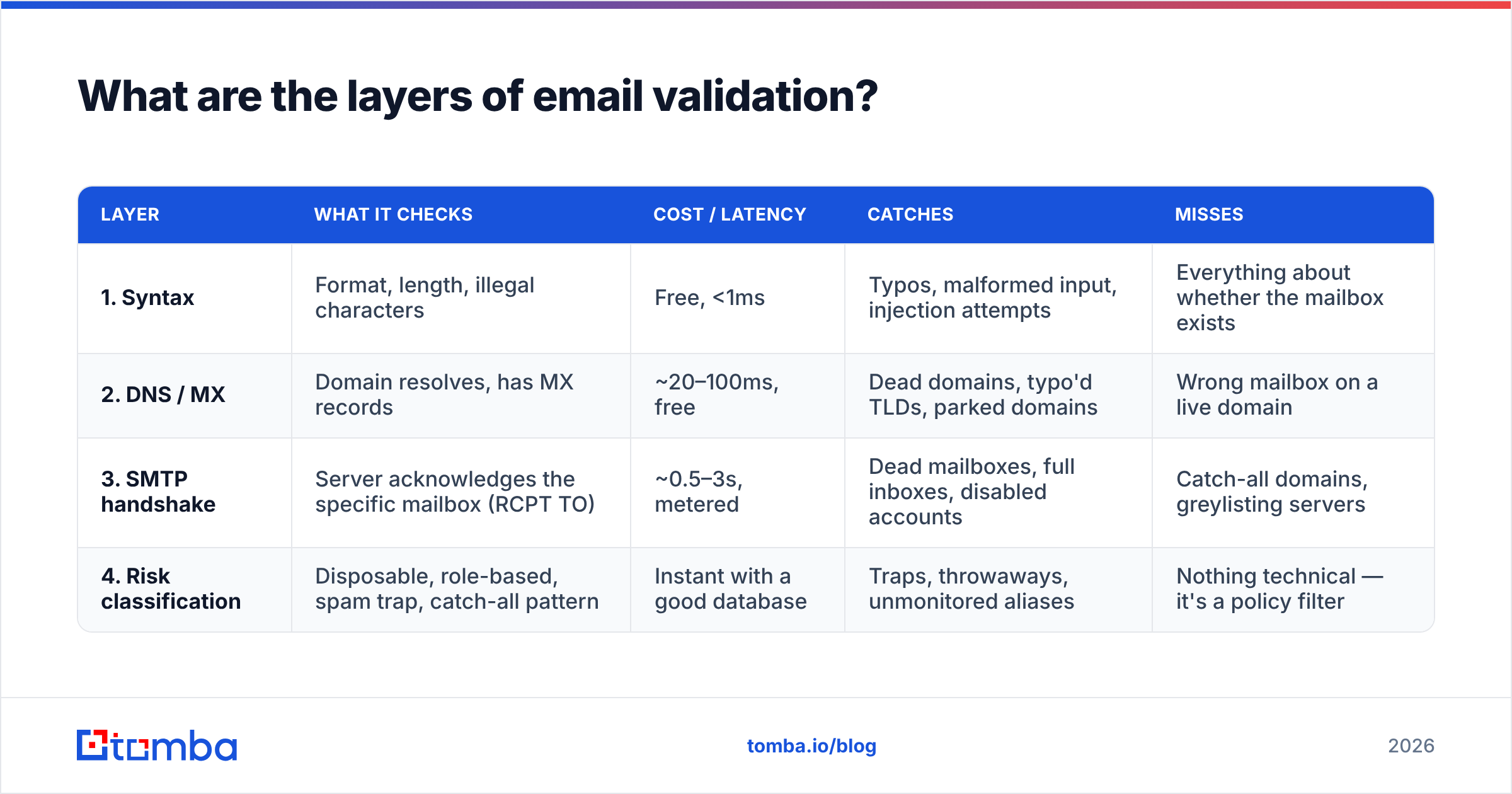
This is the core model. Every serious stack runs these four email validation rules in order, cheapest first.
| Layer | What it checks | Cost / latency | Catches | Misses |
|---|---|---|---|---|
| 1. Syntax | Format, length, illegal characters | Free, <1ms | Typos, malformed input, injection attempts | Everything about whether the mailbox exists |
| 2. DNS / MX | Domain resolves, has MX records | ~20–100ms, free | Dead domains, typo'd TLDs, parked domains | Wrong mailbox on a live domain |
| 3. SMTP handshake | Server acknowledges the specific mailbox (RCPT TO) | ~0.5–3s, metered | Dead mailboxes, full inboxes, disabled accounts | Catch-all domains, greylisting servers |
| 4. Risk classification | Disposable, role-based, spam trap, catch-all pattern | Instant with a good database | Traps, throwaways, unmonitored aliases | Nothing technical — it's a policy filter |
Layer 3 is where the interesting engineering lives. An SMTP check opens a connection to the receiving server. It sends MAIL FROM and RCPT TO, reads the reply code, then hangs up before DATA. A 250 means the mailbox is accepted. A 550 means it does not exist.
Except when it doesn't. Microsoft 365 tenants often return 250 for every address to block enumeration. Some servers greylist strangers and reply 4xx for a while. Others rate-limit your checking IP after a few hundred probes and start returning noise.
That is why running SMTP checks at scale is harder than it looks. The quality gap between vendors comes down to IP pool diversity and retry logic, not anything exotic.
How do you handle catch-all and role-based addresses?#
Separately, and on purpose. These two groups are the ones a simple yes/no model gets wrong.
Catch-all domains accept mail for any local part. asdfgh@theirdomain.com returns 250, just like the CEO's real address. Between 15% and 25% of B2B domains work this way, and the share is higher at large firms. SMTP checks tell you nothing here. What helps instead:
- Pattern confidence. If 40 known-good addresses at that domain use
first.last@, thenjane.doe@is a strong guess andjdoe@is not. - Source corroboration. An address in a public directory, a press release, or a git commit is real, whatever SMTP says.
- Dedicated catch-all logic. A catch-all verifier scores these instead of shrugging. Mark every catch-all "valid" and your list bloats. Mark them all "invalid" and you throw away a fifth of your enterprise market.
Role-based addresses — info@, support@, sales@, admin@, careers@ — are valid and usually live. The problem is behavior. They land in shared inboxes, earn low engagement, and often turn into complaints or traps. Rule of thumb: keep them out of cold outbound, allow them for transactional and inbound mail, and never make them your main contact when a named person exists.

Do email validation rules change between signup forms and cold lists?#
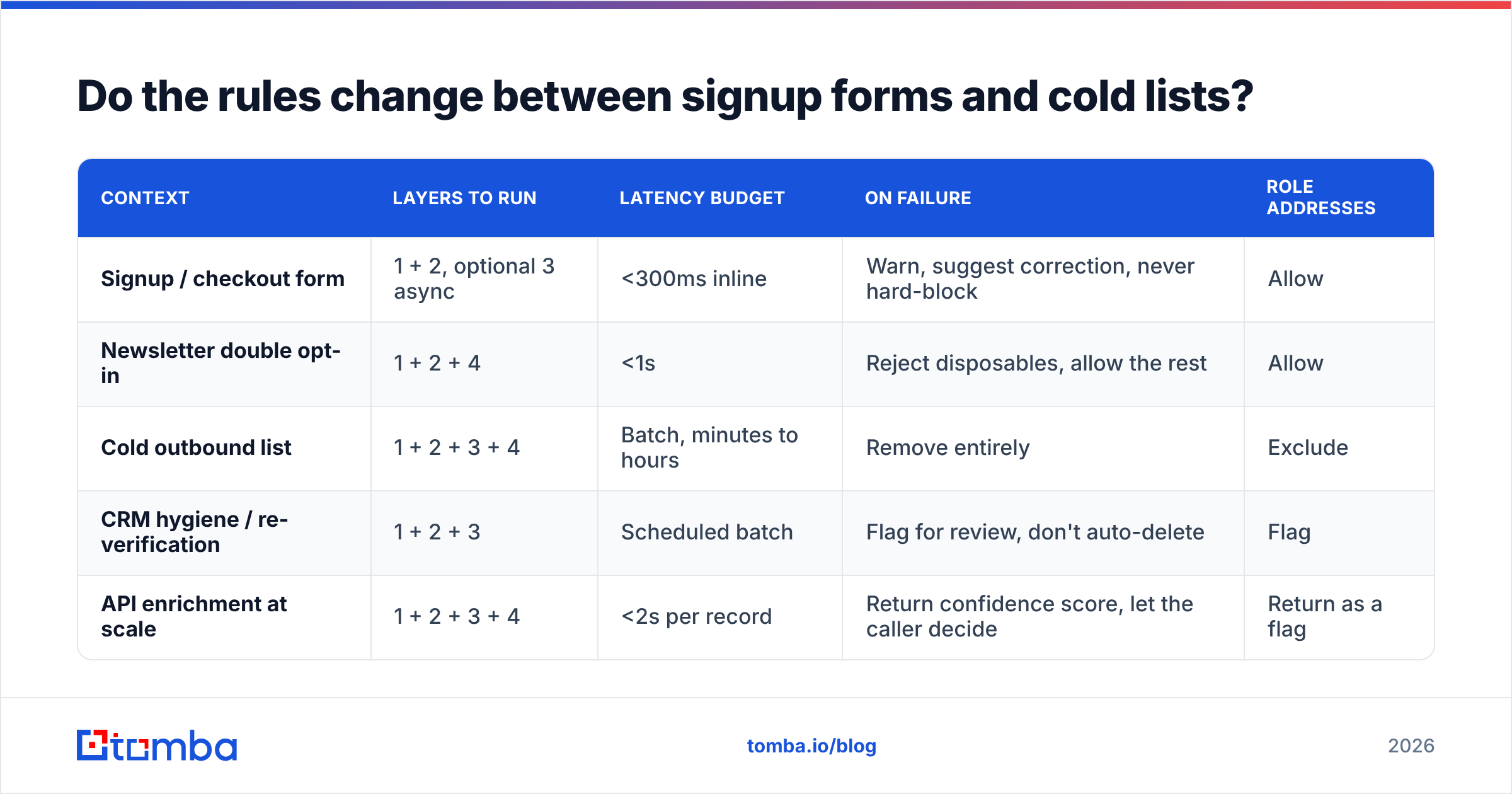
Yes, a lot. Same layers, different thresholds. The cost of a wrong call is not the same in both places.
| Context | Layers to run | Latency budget | On failure | Role addresses |
|---|---|---|---|---|
| Signup / checkout form | 1 + 2, optional 3 async | <300ms inline | Warn, suggest correction, never hard-block | Allow |
| Newsletter double opt-in | 1 + 2 + 4 | <1s | Reject disposables, allow the rest | Allow |
| Cold outbound list | 1 + 2 + 3 + 4 | Batch, minutes to hours | Remove entirely | Exclude |
| CRM hygiene / re-verification | 1 + 2 + 3 | Scheduled batch | Flag for review, don't auto-delete | Flag |
| API enrichment at scale | 1 + 2 + 3 + 4 | <2s per record | Return confidence score, let the caller decide | Return as a flag |
The form case matters most. Blocking a signup because your checker said "unknown" is a conversion leak, and "unknown" comes back often for greylisting servers and catch-alls. Suggest a fix instead ("did you mean gmail.com?") and let the person through. On a cold list, flip it. Unknown means excluded, because one bad send costs more than one lost prospect.
For quick one-off checks during list triage, a free email checker covers layers 1, 2, and 4 with no pipeline. Above a few hundred addresses, run bulk verify and work from the confidence scores.
What bounce rate should your email validation rules target?#
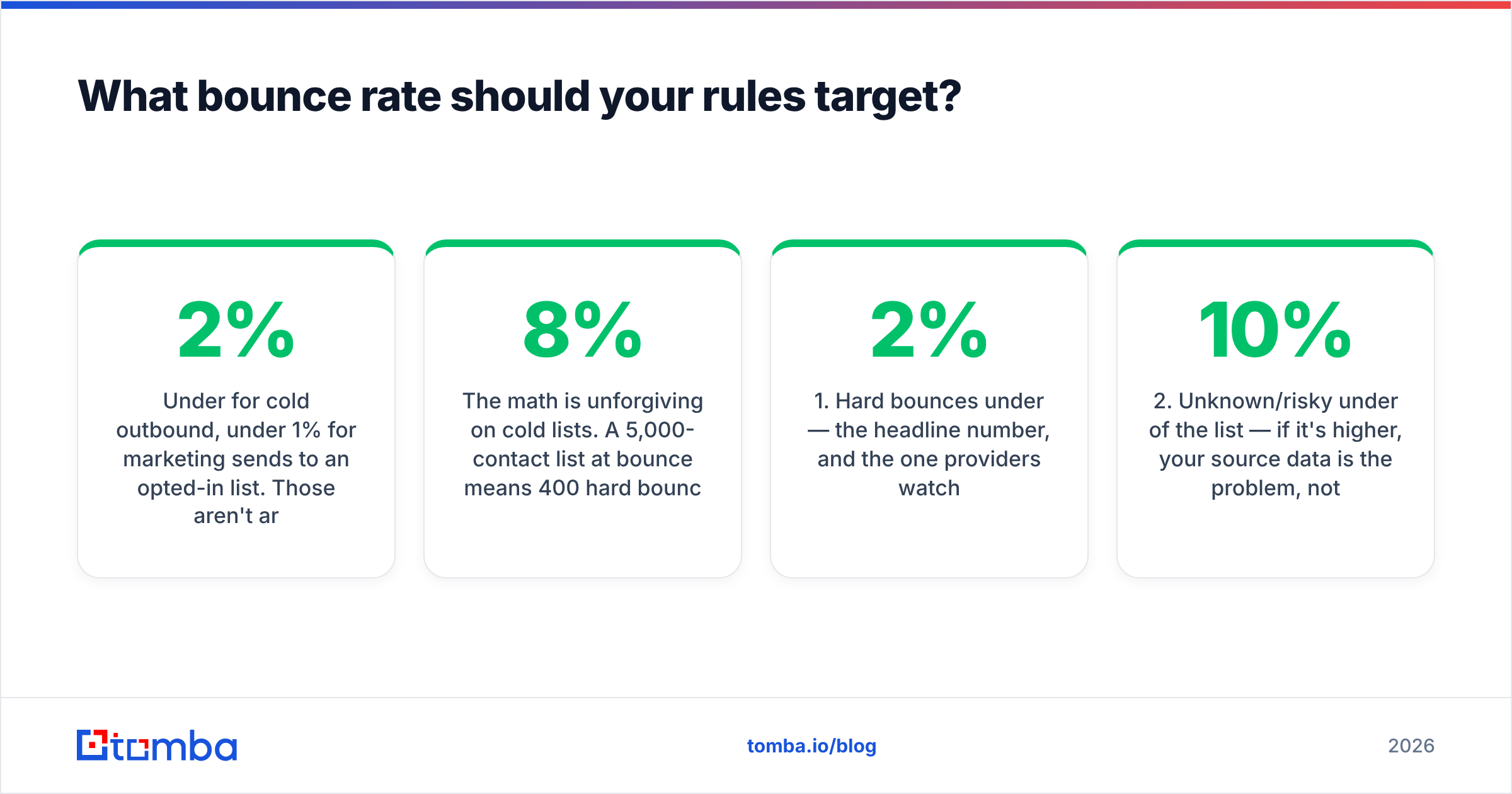
Under 2% for cold outbound. Under 1% for marketing sends to an opted-in list. Those numbers are not arbitrary. They are roughly where mailbox providers stop seeing noise and start seeing a bad list.
The math is harsh on cold lists. A 5,000-contact list at 8% bounce gives you 400 hard bounces. Spread that over three mailboxes and two weeks, and you will dent your sender reputation. Inbox placement then drops for every later campaign from that domain, clean ones included.
A realistic quality target after full validation:
- Hard bounces under 2% — the headline number, and the one providers watch.
- Unknown or risky under 10% of the list — if it is higher, blame your source data, not your checker.
- Catch-all addresses segmented, not deleted — send to them from a separate sending domain if the volume is worth it.
- Re-check every 90 days for CRM records. B2B email data rots at 22–30% a year from job changes alone.
- Zero disposable domains in outbound. They are pure waste, and some are traps.
How do the validation approaches compare?#
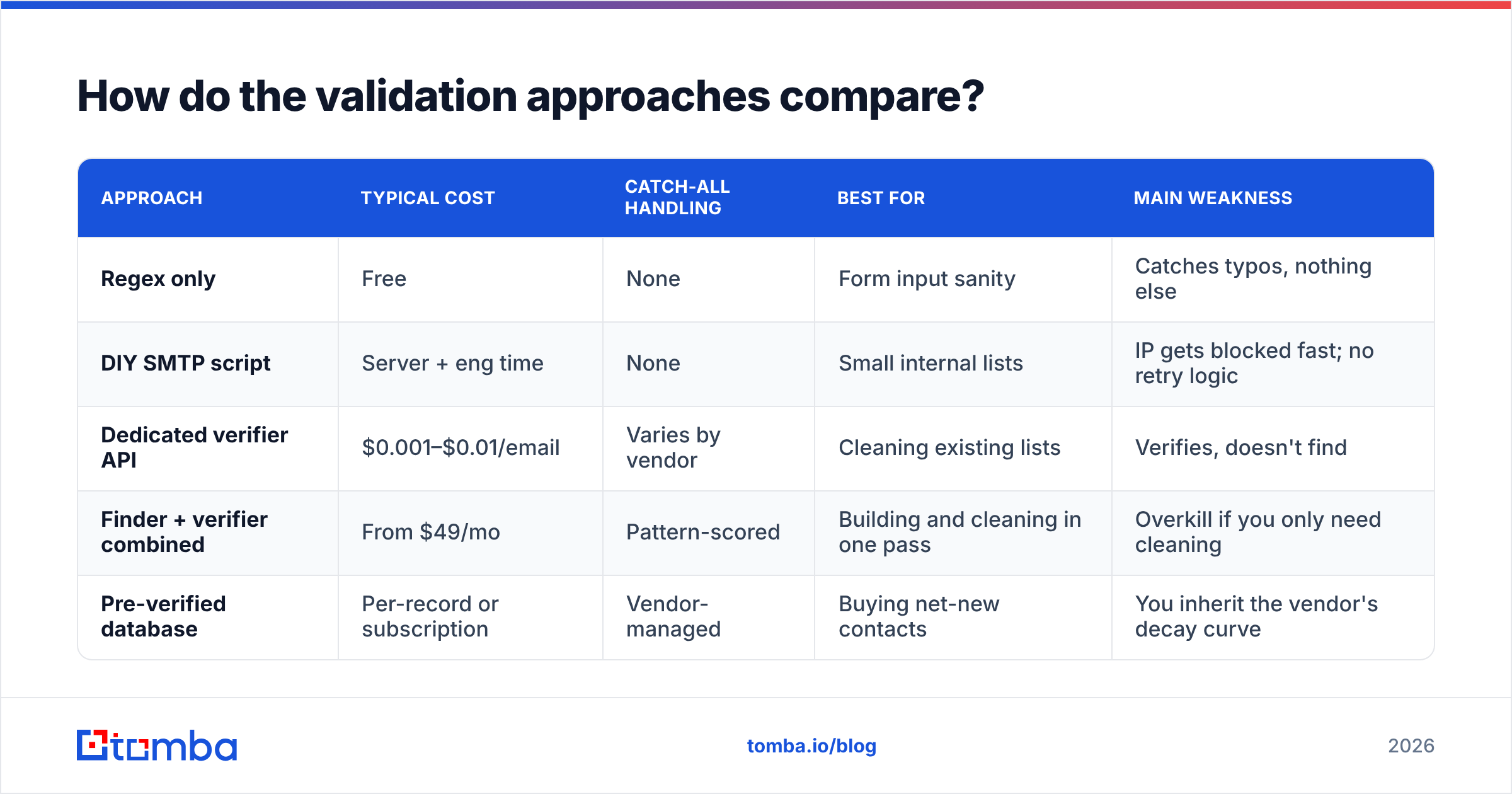
The email validation rules stay the same across tools. What changes is who runs them, and how well.
| Approach | Typical cost | Catch-all handling | Best for | Main weakness |
|---|---|---|---|---|
| Regex only | Free | None | Form input sanity | Catches typos, nothing else |
| DIY SMTP script | Server + eng time | None | Small internal lists | IP gets blocked fast; no retry logic |
| Dedicated verifier API | $0.001–$0.01/email | Varies by vendor | Cleaning existing lists | Verifies, doesn't find |
| Finder + verifier combined | From $49/mo | Pattern-scored | Building and cleaning in one pass | Overkill if you only need cleaning |
| Pre-verified database | Per-record or subscription | Vendor-managed | Buying net-new contacts | You inherit the vendor's decay curve |
Tomba sits in the fourth row. The email verifier runs all four layers and returns a confidence score instead of a yes/no. It shares infrastructure with the finder, so an address found from a domain pattern arrives already scored. Tomba pricing starts free at 25 searches a month, then $49/mo Starter, $99/mo Growth, and $249/mo Pro.
Peer tools like BookYourData come at this from the database side. You buy pre-verified contacts instead of discovering them. That fits better if your bottleneck is net-new volume rather than list hygiene.
Check vendor claims against real user reports on G2 rather than marketing pages. Every verifier claims 95%+ accuracy. The number that counts is the bounce rate on your segment. Run a 500-address sample through two vendors and compare.
What's the practical ruleset for 2026?#
These are the email validation rules to implement, in order. Stop when the next layer costs more than it returns.
- Normalize first. Trim, lowercase the domain, strip display names and
mailto:. Do it before you dedupe, or you will dedupe nothing. - Apply narrow syntax rules, not the full RFC. Reject the six failure classes above and skip the rest of the grammar.
- Check MX records before anything costly. It is one DNS lookup. It clears out dead and typo domains for free.
- SMTP-verify only the survivors, and only near send time. A check is a snapshot, not a permanent property. A result from six months ago is close to worthless.
- Classify, then decide. Disposable, role-based, catch-all, and accept-all each need their own policy. Do not dump them in one "risky" bucket.
- Log the verdict with the address. When a campaign flops, you need to know whether the list was bad or the copy was.
The most common leftover mistake is validating once at import and never again. Contacts rot. A quarterly re-check against your CRM catches job changes before your sequencer does. It is the highest-ROI hygiene job most RevOps teams skip.
Start with addresses that don't need fixing#
The cheapest of all email validation rules is the one you never have to run. Addresses found from verified domain patterns and corroborated sources arrive clean. Addresses scraped from a list broker need all four layers and still bounce.
Building lists from scratch? Run discovery and verification in one pass with the Tomba Email Finder. It returns a confidence score with every address, and it handles catch-all domains with pattern logic instead of a shrug. The free tier gives you 25 searches, so you can test the accuracy on a segment you already know before you commit to a plan.
Related guides#
Ready to find emails that actually work?
Join 150,000+ professionals who stopped guessing and started sending. Free credits on signup — no credit card required.
Get the Tomba newsletter
Practical outbound tactics and product updates — once every two weeks.
About the author