Email Validation Tool: How to Pick the Right One in 2026
Most email validation tools agree on the easy 80% of a list. The money is in the other 20% — catch-alls, role accounts, and greylisted domains. Here's how the main options actually differ.
TL;DR
- An email validation tool exists to do one job: stop you from sending to addresses that will bounce, because bounces are the fastest way to torch a sending domain.
- Almost every vendor scores 95%+ on clean, easy lists. The real differences show up on catch-all domains, role accounts, and greylisting — that's where accuracy claims get slippery.
- Pricing splits into two models: pay-per-credit verification (ZeroBounce, NeverBounce, MillionVerifier, Bouncer) and bundled find-plus-verify subscriptions (Tomba, Apollo, Hunter). Which is cheaper depends entirely on whether you also need to find the emails.
- Anything above a 3% bounce rate puts you in Google and Microsoft's penalty zone. Validation is insurance, not a growth tactic.
- Verify at two points — at import and again within 48 hours of send. Lists decay roughly 2-2.5% per month.
What is an email validation tool?#
An email validation tool checks whether an address can actually receive mail before you send to it. Think of it like a bouncer at the door checking IDs: it doesn't care whether the person is interesting, only whether they're real and allowed in.
Under the hood, most tools run the same stack of checks in sequence, getting progressively more expensive as they go:
- Syntax check — does the address conform to RFC 5322? Catches
john@@acmeandjane doe@acme.com. Free, instant, and catches maybe 2% of a typical list. - Domain and MX record lookup — does
acme.comexist, and does it publish mail exchange records? A domain with no MX record cannot receive mail, full stop. - Disposable and role detection — is this
mailinator.com? Is itinfo@,sales@,support@? Neither bounces, but both wreck reply rates and inflate complaint rates. - SMTP handshake — the tool opens a connection to the receiving mail server and asks, essentially, "would you accept mail for this person?" without ever delivering a message. This is the SMTP
RCPT TOprobe, and it's where real accuracy is won or lost. - Catch-all resolution — some servers say yes to everything. Handling this honestly is the single biggest differentiator between vendors.
Steps 1-3 are commodity. Any tool can do them, and a decent free email checker will handle them fine. Step 4 requires clean IP pools that mail servers haven't blacklisted. Step 5 requires actual data — historical engagement signals, pattern libraries, and known-good records — not just a protocol probe.
What do the validation statuses actually mean?#
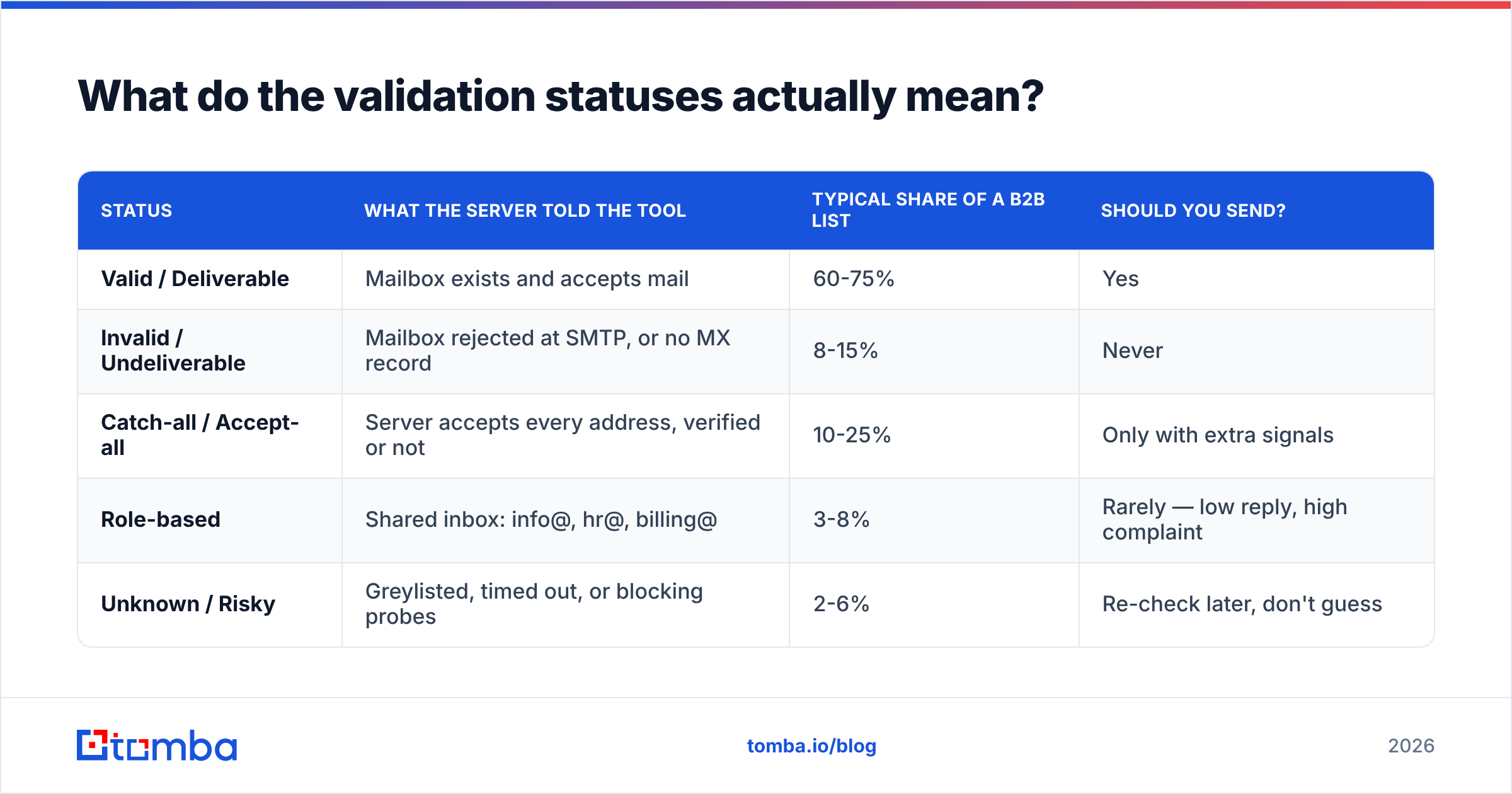
Vendors use slightly different labels, but they map onto the same five buckets. This is the table worth memorising, because misreading "accept-all" as "valid" is the most common way teams blow up a domain.
| Status | What the server told the tool | Typical share of a B2B list | Should you send? |
|---|---|---|---|
| Valid / Deliverable | Mailbox exists and accepts mail | 60-75% | Yes |
| Invalid / Undeliverable | Mailbox rejected at SMTP, or no MX record | 8-15% | Never |
| Catch-all / Accept-all | Server accepts every address, verified or not | 10-25% | Only with extra signals |
| Role-based | Shared inbox: info@, hr@, billing@ | 3-8% | Rarely — low reply, high complaint |
| Unknown / Risky | Greylisted, timed out, or blocking probes | 2-6% | Re-check later, don't guess |
The catch-all row is where money leaks. On a 10,000-record list, 2,000 catch-all addresses represent either 2,000 wasted sends or 2,000 abandoned prospects, depending on how you handle them. A tool that flags catch-alls and stops there has handed the problem back to you. A tool with a real catch-all verifier tries to resolve them against pattern data and known-good records instead of shrugging.

Why does bounce rate matter so much in 2026?#
Because the mailbox providers made it a hard rule instead of a soft suggestion.
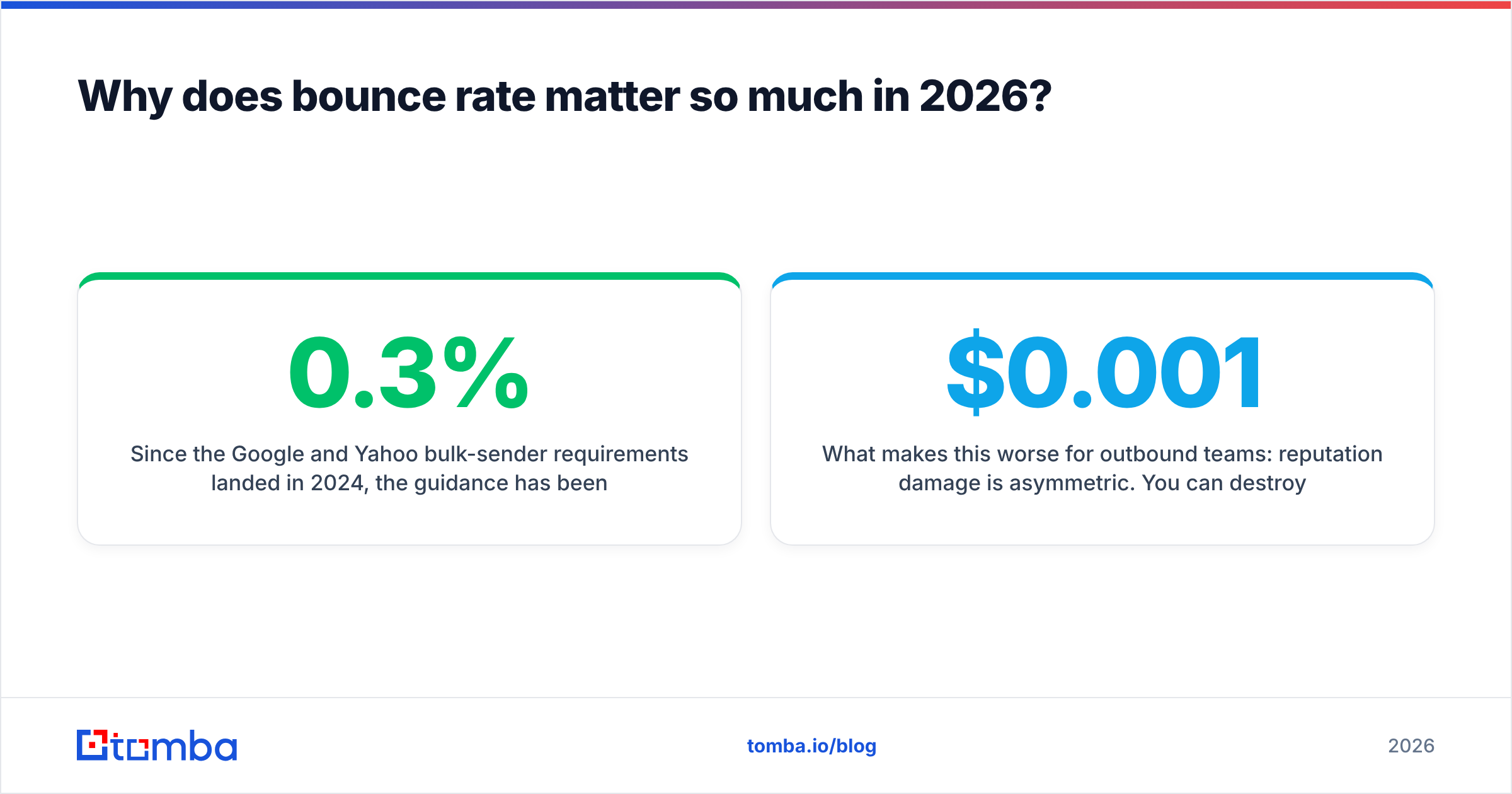
Since the Google and Yahoo bulk-sender requirements landed in 2024, the guidance has been explicit: keep spam complaints under 0.3% and authenticate everything with SPF, DKIM and DMARC. Bounce thresholds aren't published as a single number, but the consensus across ESPs is that sustained hard bounces above 2-3% will get your throughput throttled, and above 5% you should expect your sender reputation to collapse within a couple of sends.
The mechanics are unforgiving. A hard bounce is a signal that you don't know who you're mailing — which is the defining behaviour of a spammer. Filters don't distinguish between "bought a bad list" and "our CRM is three years stale." Both look identical from the receiving end.
What makes this worse for outbound teams: reputation damage is asymmetric. You can destroy a domain's standing in one afternoon and spend six weeks warming your way back. Running a validation pass costs somewhere between $0.001 and $0.008 per record. Recovering a burned domain costs weeks of pipeline.
Watch your own numbers in Google Postmaster Tools rather than trusting your sending platform's dashboard alone — the platform reports what it sent, Postmaster reports what Gmail thought of it.

How do the main email validation tools compare?#
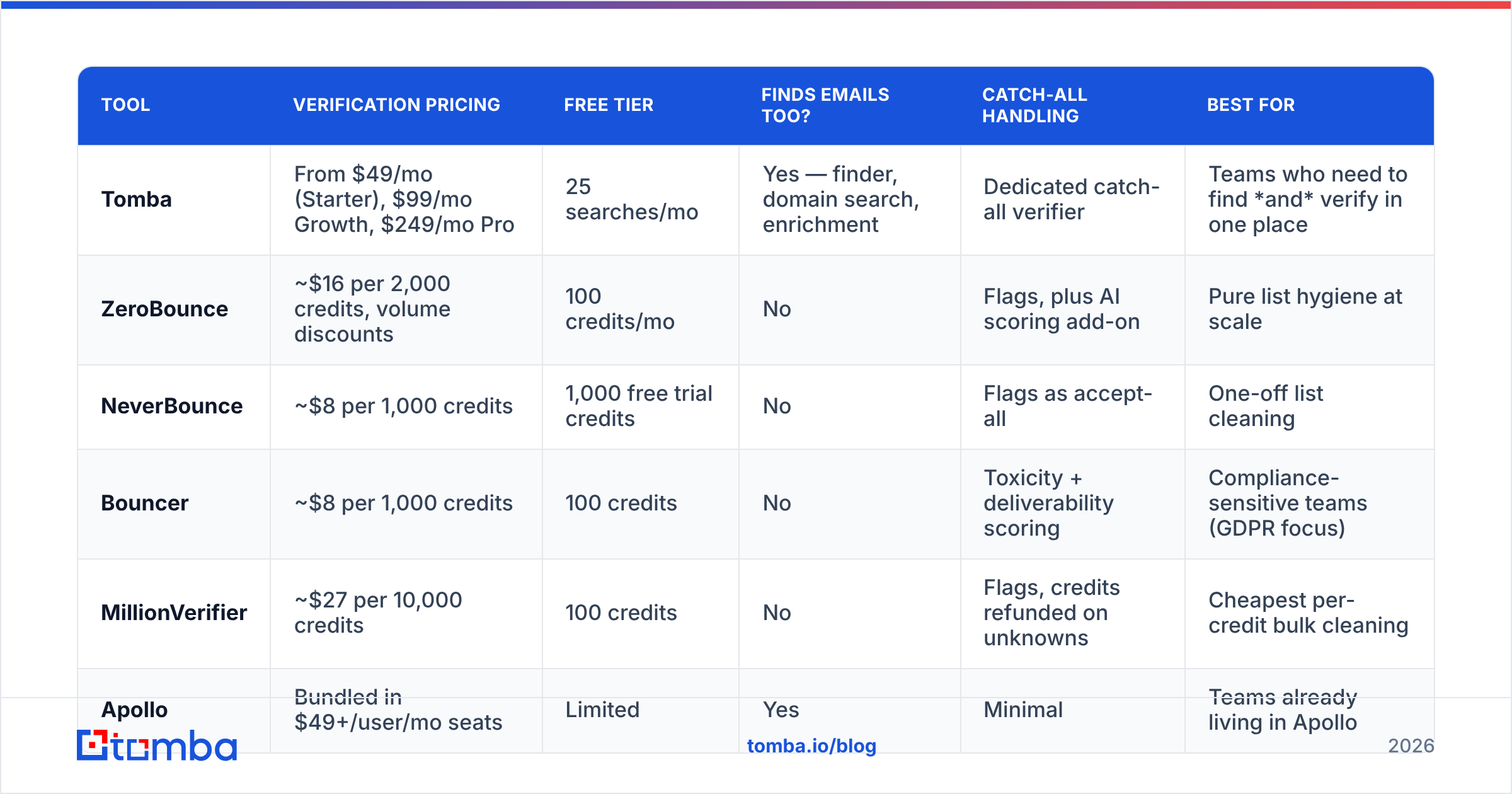
Here's the honest state of the market. Prices are list prices as published in early 2026 and change often — check the vendor page before you buy.
| Tool | Verification pricing | Free tier | Finds emails too? | Catch-all handling | Best for |
|---|---|---|---|---|---|
| Tomba | From $49/mo (Starter), $99/mo Growth, $249/mo Pro | 25 searches/mo | Yes — finder, domain search, enrichment | Dedicated catch-all verifier | Teams who need to find and verify in one place |
| ZeroBounce | ~$16 per 2,000 credits, volume discounts | 100 credits/mo | No | Flags, plus AI scoring add-on | Pure list hygiene at scale |
| NeverBounce | ~$8 per 1,000 credits | 1,000 free trial credits | No | Flags as accept-all | One-off list cleaning |
| Bouncer | ~$8 per 1,000 credits | 100 credits | No | Toxicity + deliverability scoring | Compliance-sensitive teams (GDPR focus) |
| MillionVerifier | ~$27 per 10,000 credits | 100 credits | No | Flags, credits refunded on unknowns | Cheapest per-credit bulk cleaning |
| Apollo | Bundled in $49+/user/mo seats | Limited | Yes | Minimal | Teams already living in Apollo |

Two things stand out.
First, the pure verifiers are cheap and the bundles are not — until you count the finding step. If you already have 50,000 addresses and just need them cleaned, MillionVerifier at roughly $0.0027 per record is impossible to beat on price. If you have 50,000 company names and no addresses, a verifier is useless to you; you need a bulk email finder first, and then the bundled pricing looks very different.
Second, "accuracy" claims are mostly unfalsifiable. Every vendor advertises 97-99%. None of them publish the test list. Independent comparisons on G2's email verification category are more useful than vendor pages, but even those skew toward whoever is running review campaigns that quarter. The only benchmark that matters is your own: take 500 records, split them across two tools, send, and compare actual bounce rates.
What separates a good tool from a cheap one?#
Five things, in rough order of impact on your results.
- Catch-all resolution, not just catch-all detection. Detecting an accept-all domain is a two-line check. Resolving one requires a data asset. Ask any vendor what percentage of catch-alls they return a confident verdict on. If they don't have a number, they don't resolve them.
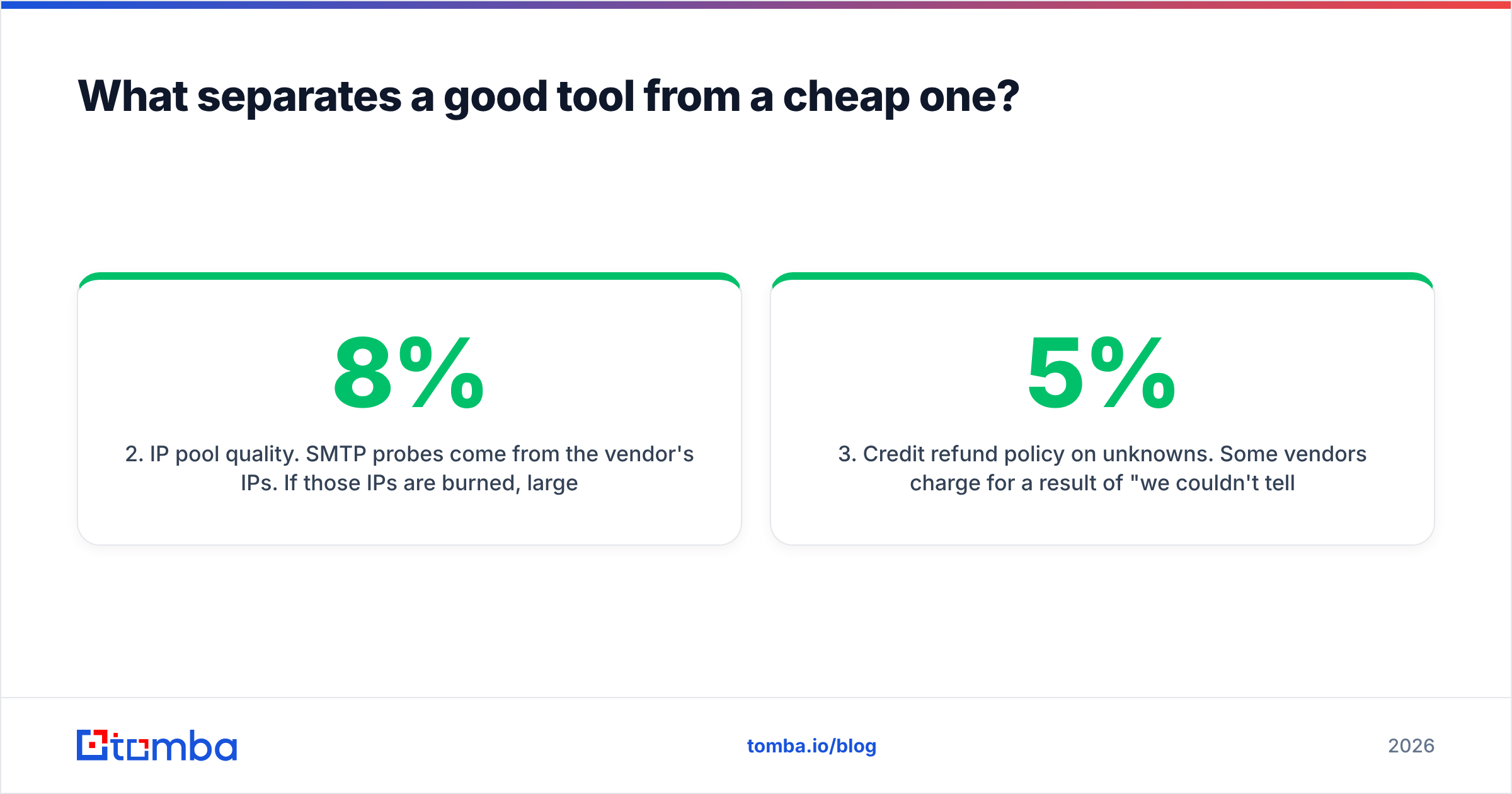
- IP pool quality. SMTP probes come from the vendor's IPs. If those IPs are burned, large providers throttle or blackhole the probe, and everything comes back "unknown." This is why the cheapest per-credit tools sometimes return 8% unknown on a list where a better-provisioned tool returns 2%.
- Credit refund policy on unknowns. Some vendors charge for a result of "we couldn't tell." Others don't. On a 100,000-record list with a 5% unknown rate, that's 5,000 credits of difference.
- API latency and rate limits. Batch cleaning is fine at 200ms per record. Real-time form validation is not. If you're gating signups, you need sub-100ms and a documented SLA — check the email verification API docs before committing.
- Data provenance and compliance. Under GDPR, where the vendor sourced its data and whether it processes EU records inside the EU is a real procurement question, not a checkbox. Vendors that publish their data sources make legal review much shorter.
There's a sixth factor that's less about the tool and more about you: whether validation lives inside your workflow or beside it. A tool you have to remember to run is a tool you'll skip during a busy week. One that fires automatically on CRM import — via a HubSpot integration or a Zapier step — never gets skipped.

Should you use a standalone verifier or a combined finder plus verifier?#
It depends on where your addresses come from. Three common situations:
You inherited a database. A CRM with 80,000 contacts of unknown age, an old event list, a merged company's records. Buy credits from a pure verifier. You need one big clean, then quarterly maintenance. Standalone wins on price and there's nothing to integrate.
You're building lists from scratch. You have target accounts, job titles, and a LinkedIn search. You need finding first — domain search to pull the pattern, then per-person lookup, then verification. Buying a finder and a verifier separately means two subscriptions, two APIs, two credit balances, and a manual CSV shuffle between them. A combined platform removes an entire step. Providers like BookYourData take a different but valid route here, selling pre-verified contact lists outright, which suits teams that would rather buy the data than build it.
You're running high-volume outbound. 20,000+ sends a month, multiple domains, a sequencer. You need both, plus a re-verification loop. The right setup is usually a finder with an API you can call programmatically and a verification step wired into your sending platform, so nothing enters a sequence unverified.
The mistake to avoid is buying a verifier and expecting it to solve a sourcing problem. Verification tells you whether an address is real. It cannot tell you whether the person still works there, whether they're the decision maker, or whether the address exists at all. Those are enrichment and discovery jobs — which is why contact enrichment and validation are usually sold together.
How often should you re-verify a list?#
Every 60-90 days for active outbound lists, and always within 48 hours of a send for anything older than a month.
The math behind that: B2B contact data decays at roughly 22-30% per year, driven mostly by job changes. That's about 2-2.5% per month, which means a list verified in January has drifted around 6% by April. Send to it unchecked and you're already at the edge of the bounce threshold before you've written a single subject line.
A practical cadence:
- At import — verify everything entering the CRM, no exceptions.
- Pre-send — re-verify any segment older than 30 days.
- Quarterly — sweep the whole active database.
- On bounce — suppress immediately and don't retry hard bounces, ever.
Layer on the basics while you're at it: confirm your SPF record is valid, keep DKIM signing on, and run a spam-score check on the template itself. Validation protects the list; authentication protects the domain. You need both, and neither substitutes for the other.
What's the verdict?#
If you only need cleaning, buy credits from whichever pure verifier has the best per-record price and a refund policy on unknowns — MillionVerifier and NeverBounce both do this well, and ZeroBounce is the safe enterprise pick when procurement wants a big vendor name.
If your bottleneck is finding addresses in the first place, a standalone verifier solves the wrong half of the problem. You'll spend more time moving CSVs between tools than you save on credits.
That's the case for a combined platform. Tomba runs discovery and verification on the same data layer: find the address with the email finder, confirm it with the email verifier, resolve the catch-alls that other tools hand back as "unknown," and push the result straight into your CRM. The free tier gives you 25 searches a month to test the accuracy on your own accounts, and Tomba pricing starts at $49/mo for Starter with Growth at $99/mo when volume picks up.
Start with 200 of your own records. Run them through whatever you use today and through Tomba, then compare bounce rates on a real send. That's a two-hour test, and it settles the question better than any vendor's accuracy page ever will.
Related guides#
Ready to find emails that actually work?
Join 150,000+ professionals who stopped guessing and started sending. Free credits on signup — no credit card required.
Get the Tomba newsletter
Practical outbound tactics and product updates — once every two weeks.
About the author