Email Validation Tools in 2026: The Honest Buyer's Guide
Most email validation tools quote 98% accuracy and then hand you a list full of catch-alls, role accounts, and unknowns. Here is what the checks actually do, what they cost, and how to pick one without wasting credits.
TL;DR
- Email validation tools run a stack of checks — syntax, DNS/MX, disposable and role detection, then an SMTP-level mailbox probe. The last step is where vendors differ, and it's the only one that actually predicts bounces.
- "98% accuracy" is a marketing number. What matters is how many addresses a tool marks unknown and how it handles catch-all domains, because those are the addresses you'll be guessing on.
- Per-credit pricing looks cheap until you realise most vendors charge for unknowns and re-checks. A $0.004/email tool that returns 22% unknowns is more expensive than a $0.006 tool that returns 6%.
- Validation is a maintenance job, not a one-off. B2B data decays roughly 22-30% a year as people change jobs, so re-verify anything older than 90 days before you send.
- If you're already finding contacts, buying a separate verification vendor is usually redundant — a combined finder + verifier (Tomba's free tier starts at 25 searches/mo, paid from $49/mo) removes an export/import loop.
What are email validation tools, and what do they actually check?#
An email validation tool is a service that decides, without sending a real message, whether an address will accept mail. Think of it like a courier checking an address before the van leaves the depot: is the street real, does the building exist, and is there a letterbox with that name on it?
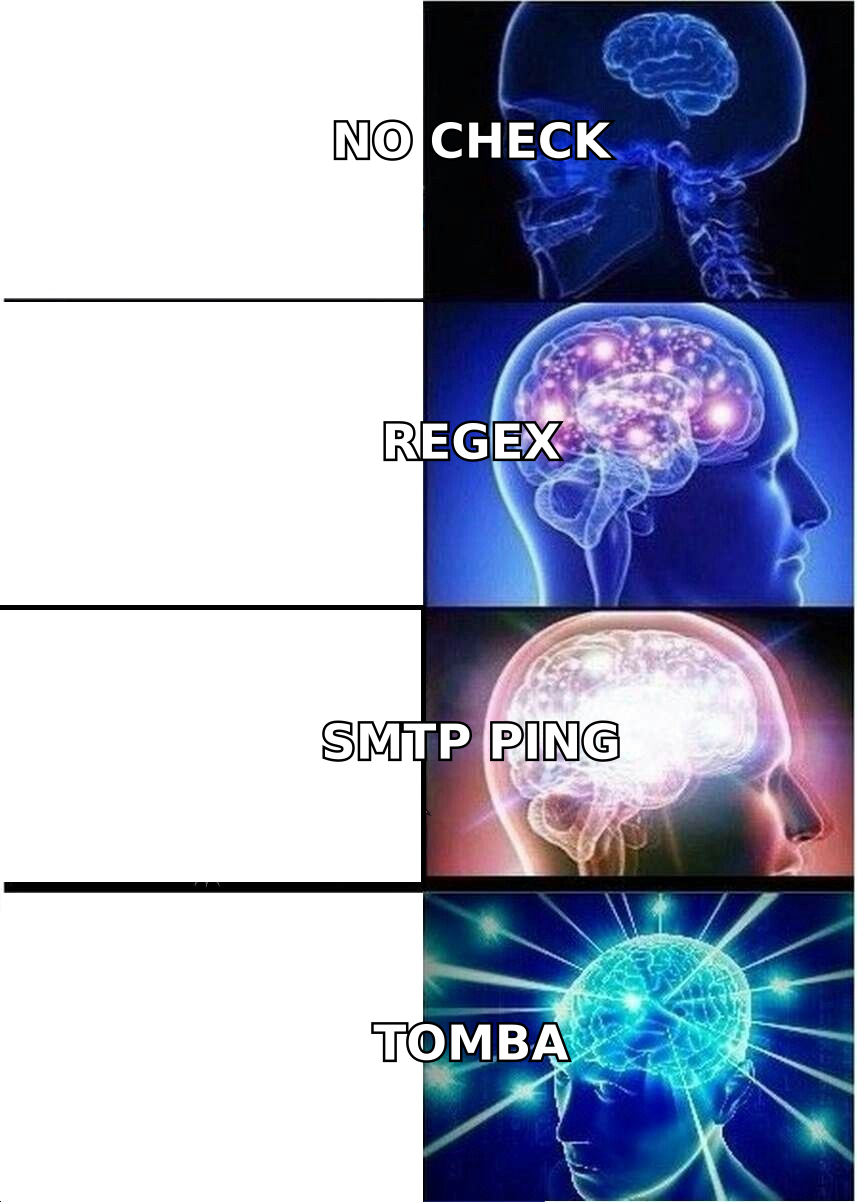
Every serious tool runs roughly the same pipeline. The differences show up in step 5.
- Syntax and format check — Is
john.doe@@acmeeven a legal address under RFC 5322? This is regex work, costs nothing, and catches typos and paste errors. Any vendor that charges you a credit for a syntax rejection is one to avoid. - Domain and MX record lookup — Does
acme.comresolve, and does it publish mail exchanger records? A domain with no MX cannot receive mail, full stop. This also catches parked domains and expired companies. - Disposable and free-provider detection — Flags
mailinator.com,10minutemail, and thousands of throwaway domains, plus tags Gmail/Outlook consumer addresses so you can segment them out of B2B campaigns. - Role and alias detection —
info@,sales@,support@,noreply@. These deliver fine but convert badly and generate complaints, which is why deliverability teams strip them before sending. - SMTP mailbox verification — The tool opens a connection to the receiving mail server and asks whether the specific mailbox exists, without completing the send. This is the expensive, rate-limited, IP-reputation-sensitive part, and it's where cheap tools quietly give up and return "unknown."
There's a sixth layer the better vendors add: catch-all resolution. Roughly 15-20% of business domains accept mail for every address, valid or not, so step 5 returns "yes" for garbage. Handling that well requires historical engagement data, pattern confidence, and honest labelling — not a bigger SMTP farm. A catch-all verifier exists as a separate product category precisely because generic validation breaks here.
Why does email validation matter more in 2026 than it did in 2023?#
Because the mailbox providers made it a hard requirement rather than a best practice.
Google and Yahoo's bulk sender rules, rolled out in 2024 and tightened since, put a 0.3% spam complaint ceiling on senders and require authenticated, low-bounce sending. Google's own bulk sender guidelines are explicit: keep bounce rates low or your mail gets throttled and then filtered. Microsoft followed with similar enforcement for high-volume senders into Outlook.
The practical translation for outbound teams:
- A hard bounce rate above 2% starts damaging your sender reputation. Above 5% you're in throttling territory within a week.
- Reputation damage is domain-level and sticky. One bad 5,000-contact blast can cost you six weeks of inbox placement across every sequence you run.
- Cold outbound is the highest-risk category because you have no prior engagement signal to offset a bad list.
The other force is data decay. Contact data goes stale as people change roles — industry estimates cluster around 22-30% annual decay for B2B email, higher in tech and startups where tenure is short. A list you validated in January is measurably worse in June. That's why validation belongs in your workflow on a schedule, not as a launch-day chore.
How accurate are email validation tools really?#
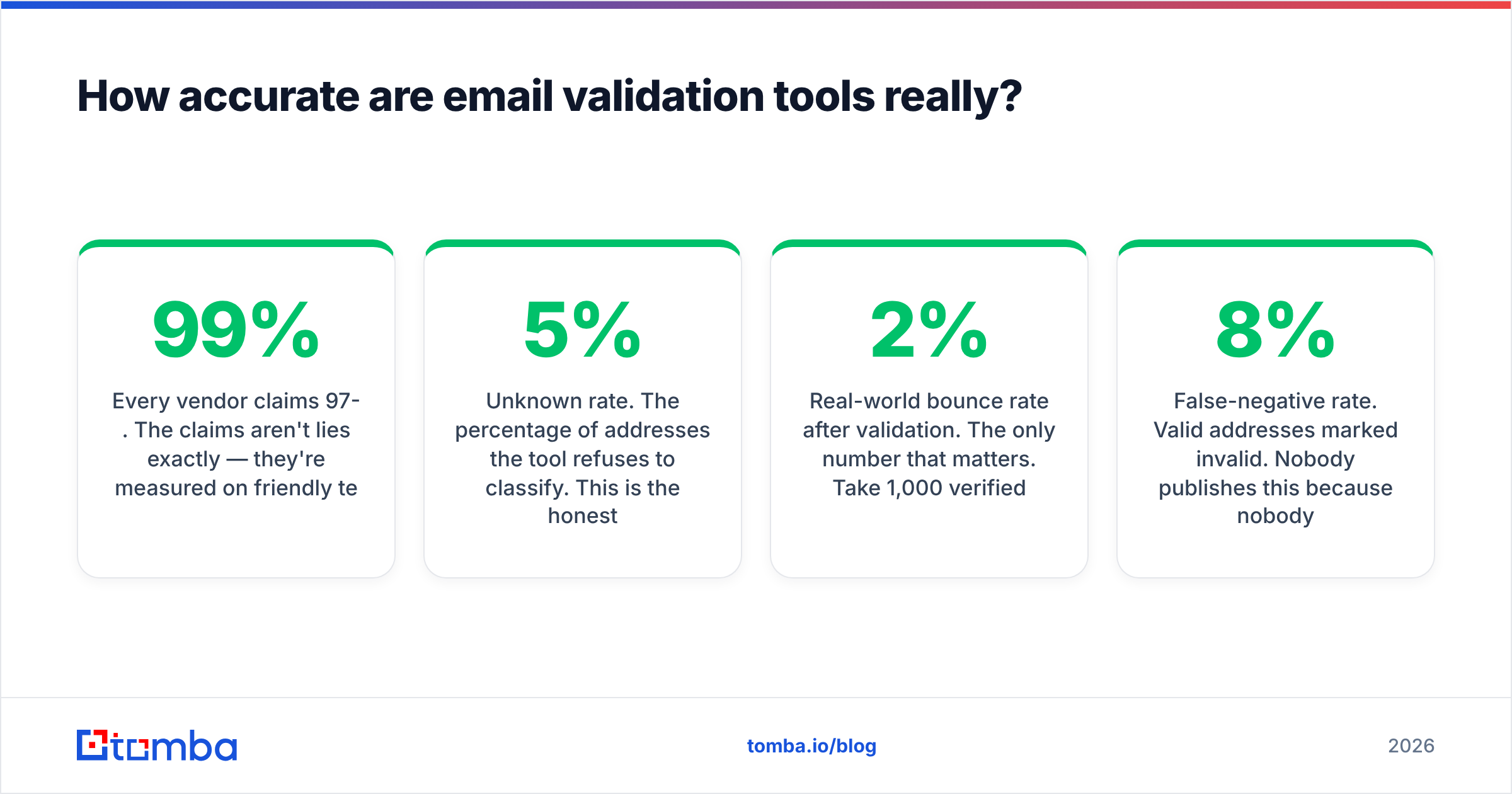
Every vendor claims 97-99%. The claims aren't lies exactly — they're measured on friendly test sets, usually excluding catch-alls and unknowns from the denominator. Read the fine print and you'll see phrasing like "accuracy on deliverable/undeliverable classifications," which quietly removes the hard cases.

Three metrics tell you more than the headline number:
- Unknown rate. The percentage of addresses the tool refuses to classify. This is the honest measure of SMTP infrastructure quality. Under 5% is strong, 10-15% is typical, over 20% means you're paying to be told "no idea."
- Real-world bounce rate after validation. The only number that matters. Take 1,000 verified addresses, send, and count hard bounces. Under 2% is acceptable; under 1% is good.
- False-negative rate. Valid addresses marked invalid. Nobody publishes this because nobody can measure it without sending. It's real, though — an aggressive tool that deletes 8% of your good contacts costs you more pipeline than a permissive one costs you in bounces.
How to run your own test in an afternoon: take 300 addresses you have ground truth on — your CRM's known-good contacts, plus 50 you know are dead (departed employees, bounced records). Run them through two or three free tiers. Score each tool on: correct valids, correct invalids, unknown count, and how it labels your known catch-all domains. It takes an hour and beats any comparison article, including this one.
One caveat on test-set design: don't build the sample entirely from Gmail and Outlook addresses. Those are the easy cases. Load it with mid-market company domains on Google Workspace, Microsoft 365, and self-hosted mail, because that's the real distribution in B2B.
Which email validation tools are worth comparing in 2026?#
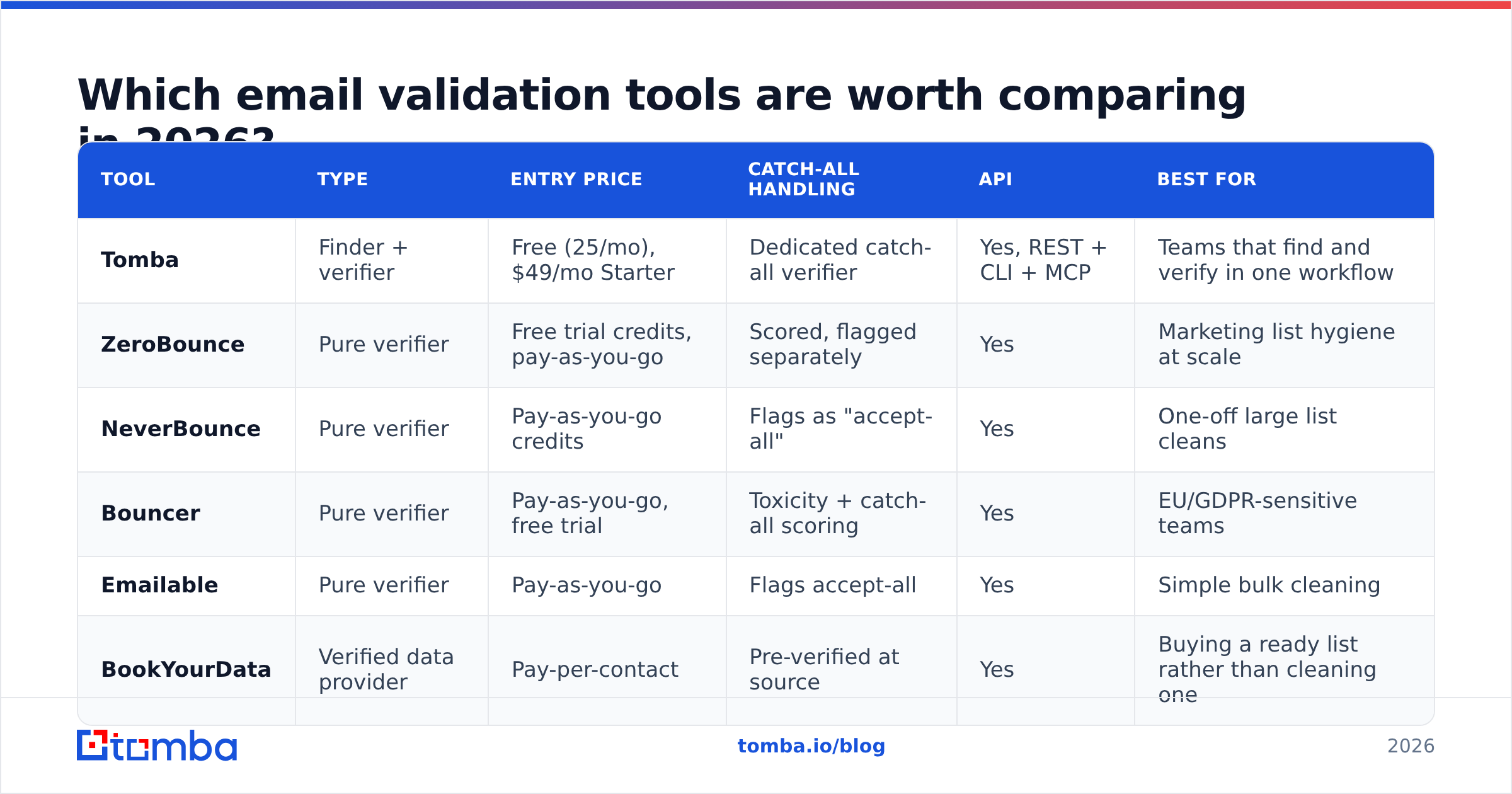
The market splits into three groups: pure verifiers that only validate lists you already own, finder-plus-verifier platforms that source and clean in one step, and data providers that sell pre-verified contacts.

| Tool | Type | Entry price | Catch-all handling | API | Best for |
|---|---|---|---|---|---|
| Tomba | Finder + verifier | Free (25/mo), $49/mo Starter | Dedicated catch-all verifier | Yes, REST + CLI + MCP | Teams that find and verify in one workflow |
| ZeroBounce | Pure verifier | Free trial credits, pay-as-you-go | Scored, flagged separately | Yes | Marketing list hygiene at scale |
| NeverBounce | Pure verifier | Pay-as-you-go credits | Flags as "accept-all" | Yes | One-off large list cleans |
| Bouncer | Pure verifier | Pay-as-you-go, free trial | Toxicity + catch-all scoring | Yes | EU/GDPR-sensitive teams |
| Emailable | Pure verifier | Pay-as-you-go | Flags accept-all | Yes | Simple bulk cleaning |
| BookYourData | Verified data provider | Pay-per-contact | Pre-verified at source | Yes | Buying a ready list rather than cleaning one |
A note on that last row: BookYourData solves a different problem. If you don't have a list yet, buying pre-verified contacts skips the sourcing and validation loop entirely. If you already have 40,000 rows in HubSpot, you need a verifier, not a data purchase. Both are legitimate — just don't buy the wrong one.
For crowd-sourced signal beyond vendor marketing, the G2 email verification category is worth ten minutes, though weight recent reviews heavily. SMTP infrastructure quality changes fast, and a 2023 review tells you nothing about a vendor's 2026 unknown rate.
What do email validation tools actually cost?#
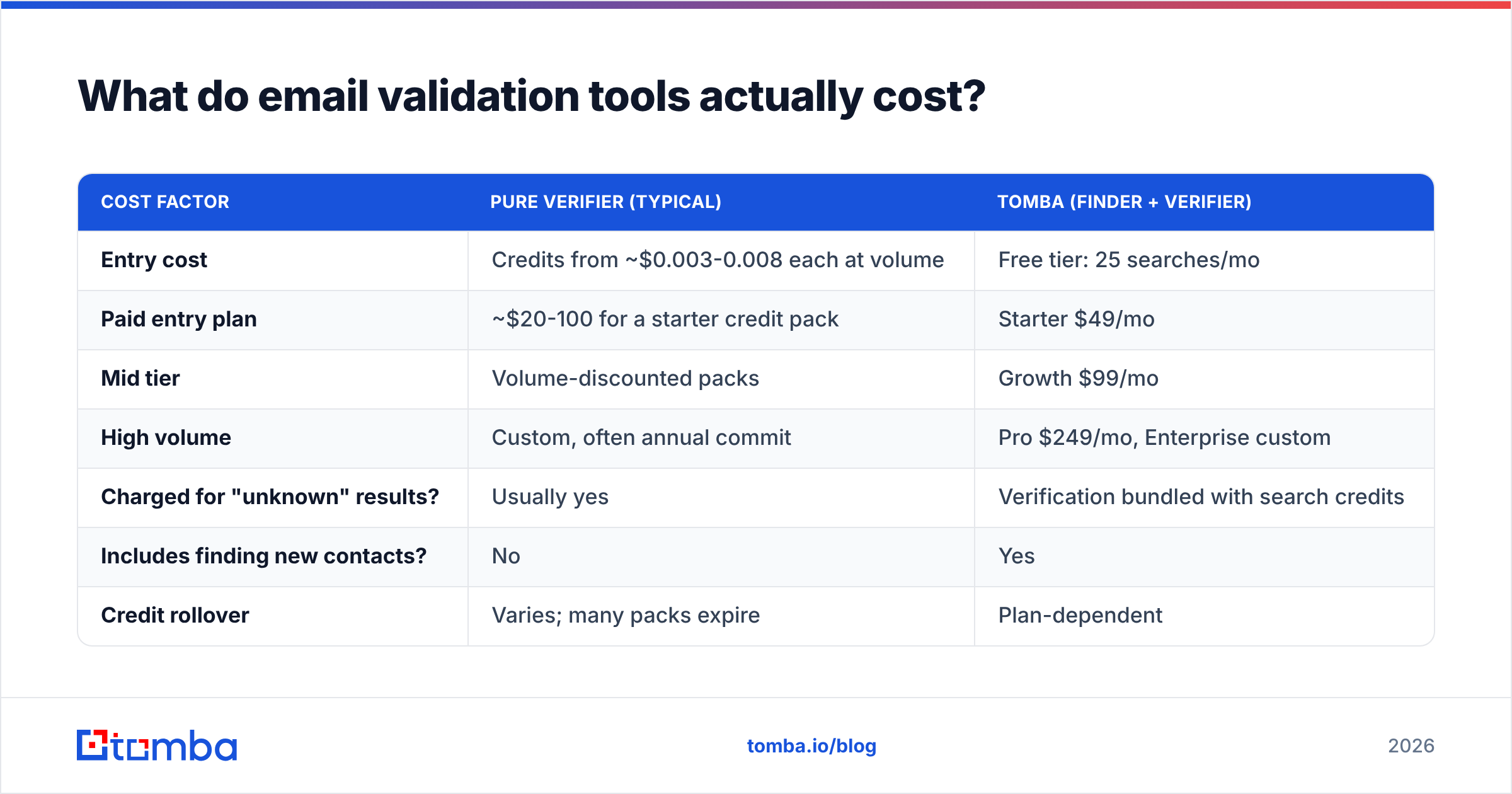
Pure verifiers price per credit, with volume tiers. Combined platforms price per seat or per monthly search allowance. The comparison is only fair once you normalise for two things: whether unknowns are billed, and whether finding is included.
| Cost factor | Pure verifier (typical) | Tomba (finder + verifier) |
|---|---|---|
| Entry cost | Credits from ~$0.003-0.008 each at volume | Free tier: 25 searches/mo |
| Paid entry plan | ~$20-100 for a starter credit pack | Starter $49/mo |
| Mid tier | Volume-discounted packs | Growth $99/mo |
| High volume | Custom, often annual commit | Pro $249/mo, Enterprise custom |
| Charged for "unknown" results? | Usually yes | Verification bundled with search credits |
| Includes finding new contacts? | No | Yes |
| Credit rollover | Varies; many packs expire | Plan-dependent |
Run the arithmetic on your own list before choosing. For 50,000 addresses at $0.005/credit you're at $250, plus whatever share comes back unknown that you'll re-run or discard. If a quarter of those unknowns are actually valid and you delete them, you've paid $250 to shrink your addressable market by 12%. Full Tomba pricing is public if you want to compare it against a per-credit quote directly.
The hidden cost nobody quotes: engineering time. Exporting a CSV, uploading it to a verifier, waiting, downloading, re-importing, and reconciling the diff against your CRM is 45-90 minutes per cycle. Do that weekly and it's a working week per year. An email verification API that runs at the point of capture makes that cost disappear.
How should you handle catch-all domains?#
This is the question that separates people who understand validation from people who bought a tool.
A catch-all (or "accept-all") domain accepts SMTP traffic for every address at that domain, then decides internally whether to deliver or discard. anything@catchalldomain.com returns a positive SMTP response. So does the CEO's real address. The protocol gives you no way to distinguish them.
What good tools do about it:
- Label it honestly — a separate
catch-allstatus, never bundled intovalid. - Score it with additional signals — has this exact address appeared in public sources, does it match the company's dominant email pattern, has it engaged with mail before.
- Offer a dedicated resolution path — pattern confidence plus historical data rather than another SMTP attempt.
What to do operationally:
- Never mix catch-alls into a cold blast. Send to confirmed-valid first, establish your sending reputation, then introduce catch-alls in small batches.
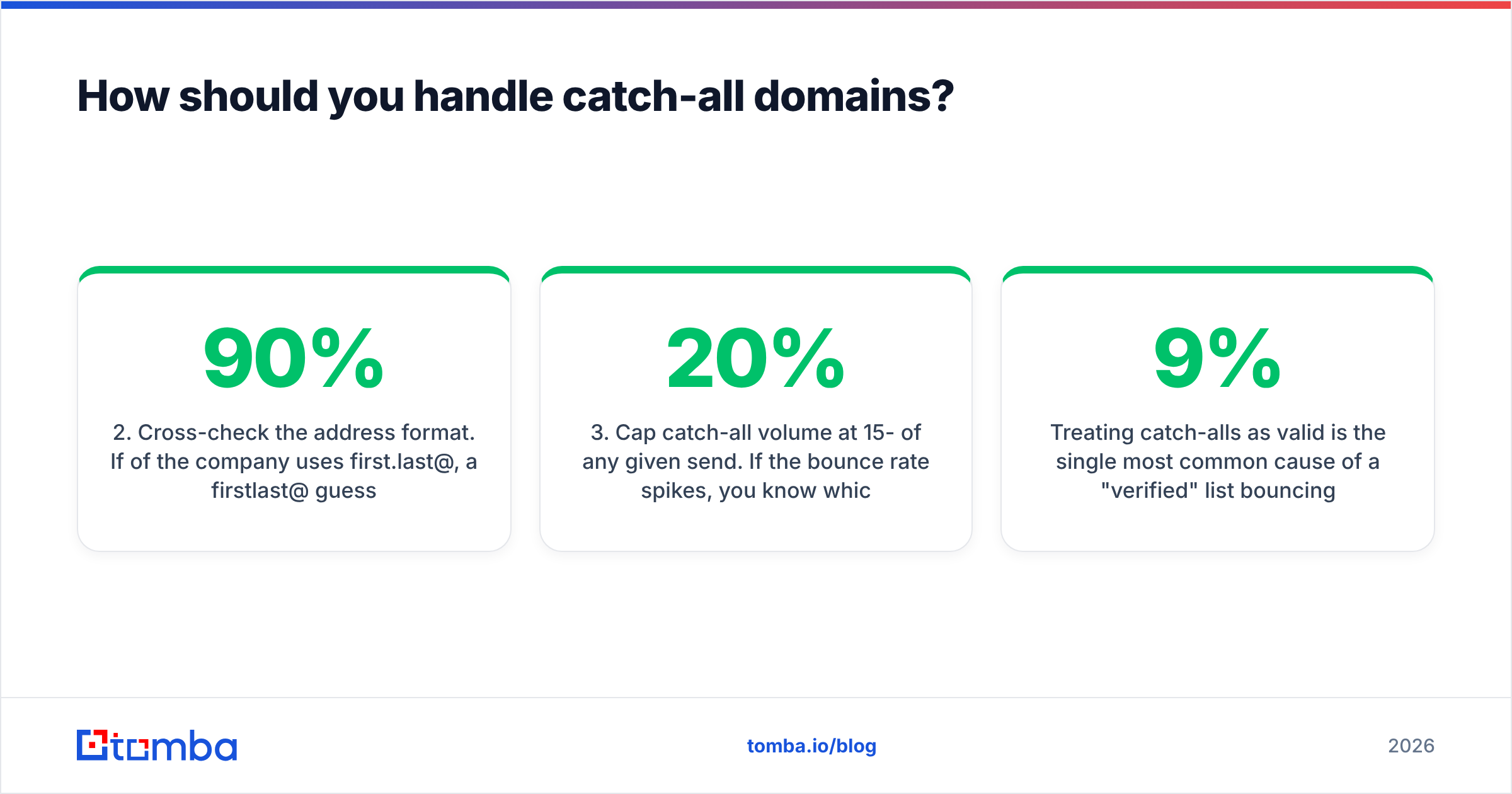
- Cross-check the address format. If 90% of the company uses
first.last@, afirstlast@guess on a catch-all domain is probably wrong. A company email pattern check costs nothing and filters most of the noise. - Cap catch-all volume at 15-20% of any given send. If the bounce rate spikes, you know which segment did it.
- Track them separately in your CRM. A catch-all that replies is confirmed valid forever — record that.
Treating catch-alls as valid is the single most common cause of a "verified" list bouncing at 9%.
How do you pick the right email validation tool for your workflow?#
Match the tool to where the addresses come from, not to the feature list.
- You already own a large, aging list (CRM, newsletter, past events). You need bulk throughput, a low unknown rate, and CSV/API round-tripping. A pure verifier or a bulk verify workflow is the fit. Priority: cost per 10,000 and unknown rate.
- You're building lists from scratch for outbound. Validation should happen at find-time, not as a second pass. Priority: a combined email finder with verification built in, so nothing enters the CRM unverified.
- You capture emails through a signup form or product. You need a real-time API with sub-second response, called on blur, blocking disposables before they hit the database. Priority: latency and uptime SLA, not price.
- You run a small team and check a handful of addresses a week. A free email verifier or browser extension covers it. Don't buy a credit pack you'll never finish.
- You're in a regulated or EU-heavy market. Priority: data processing location, GDPR posture, DPA availability. Ask where SMTP probes originate and whether address data is retained.
Whichever you pick, wire it into a process rather than a calendar reminder:
- Verify at the point of entry — capture, import, or enrichment.
- Re-verify anything untouched for 90 days.
- Suppress hard bounces permanently and immediately.
- Track bounce rate per source so you can kill bad data suppliers early.
- Re-verify the entire active database quarterly.
What mistakes cost teams the most?#
Validating once and treating the list as clean forever. Decay is continuous. A quarterly cycle is the minimum.
Deleting every "risky" or "unknown" address. Many are valid. Segment them into a low-priority send from a secondary domain instead of destroying them.
Assuming validation fixes deliverability. It fixes bounces. It does nothing for authentication, content filtering, or reputation. You still need SPF, DKIM, DMARC, warmup, and sane volume ramps — validation is one input to email deliverability, not the whole system.
Buying on headline accuracy. Test with your own data. Every vendor with a free tier is telling you they expect to win that test — take them up on it.
Ignoring role accounts. info@ addresses inflate your list size and your complaint rate simultaneously. Strip them from cold sequences.
Where should you start?#
If you only need to clean an existing list, run a free tier from two vendors against a 300-address sample and pick on unknown rate. That's an hour of work and it settles the question with your data instead of someone's marketing page.
If you're sourcing contacts as well as cleaning them, the split-vendor setup is the thing to question. Finding an address and then paying a second company to check it is two bills, two APIs, and a CSV round-trip between them. Tomba's Email Finder returns addresses with a confidence score and verification status in the same call, with a catch-all verifier, bulk processing, and an API behind the same key. The free tier gives you 25 searches a month to test it against your own known-good contacts — no credit card, and no reason to trust an accuracy claim you haven't checked yourself.
Related guides#
Ready to find emails that actually work?
Join 150,000+ professionals who stopped guessing and started sending. Free credits on signup — no credit card required.
Get the Tomba newsletter
Practical outbound tactics and product updates — once every two weeks.
About the author