Email Validator Online Free: 2026 Accuracy Test and Limits
Free online email validators all promise the same thing: fewer bounces. Most only check syntax and MX records. Here's what each free tier actually catches, where it guesses, and when paying is cheaper than bouncing.

TL;DR
- Every email validator online free tool runs the same three cheap checks — syntax, domain/MX, and a disposable-domain blocklist. Those catch typos and junk, not dead mailboxes.
- The real difference between free and paid is SMTP-level mailbox probing and catch-all handling. Free tiers usually skip both or return an unhelpful "unknown".
- Free single-address checkers are genuinely useful for one-off verification before a high-value send. They fall apart above roughly 50–100 addresses.
- Expect 15–25% of a scraped B2B list to be undeliverable. A syntax-only pass will clear almost all of it as "valid" and let your bounce rate do the filtering.
- Use free tools for spot checks, paid verification for anything that touches a sending domain you care about.
What does an email validator online free tool actually check?#
Short answer: less than the marketing copy implies.
Think of it like checking whether a house exists before mailing a letter. A free validator confirms the street name is spelled correctly and that the street appears on a map. It does not knock on the door to see if anyone still lives there. That last step — the knock — is where cost, latency, and legal-ish gray areas live, and it's why most free tiers stop short.
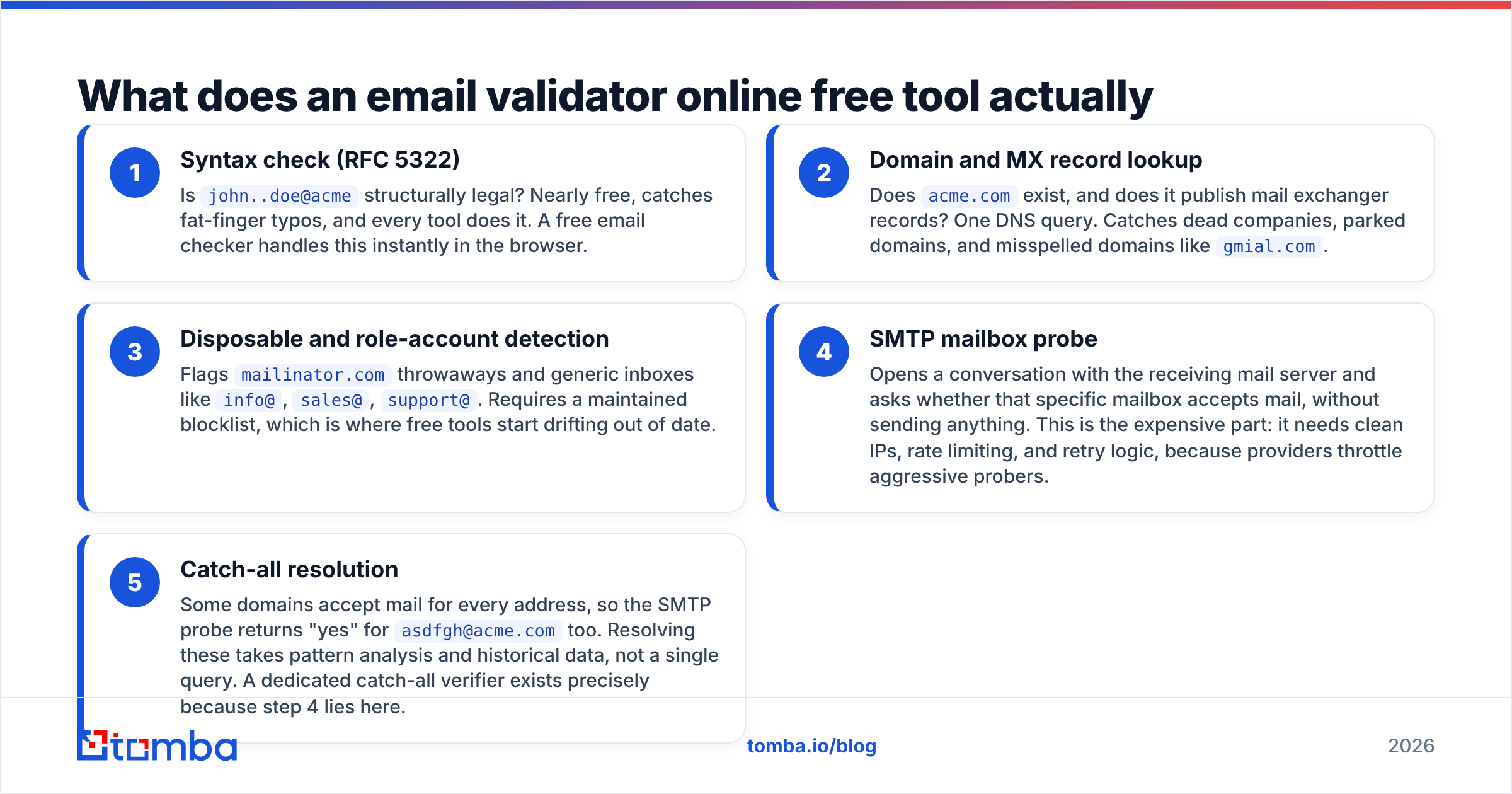
Here are the layers a validator can run, from cheapest to most expensive:
- Syntax check (RFC 5322) — Is
john..doe@acmestructurally legal? Nearly free, catches fat-finger typos, and every tool does it. A free email checker handles this instantly in the browser. - Domain and MX record lookup — Does
acme.comexist, and does it publish mail exchanger records? One DNS query. Catches dead companies, parked domains, and misspelled domains likegmial.com. - Disposable and role-account detection — Flags
mailinator.comthrowaways and generic inboxes likeinfo@,sales@,support@. Requires a maintained blocklist, which is where free tools start drifting out of date. - SMTP mailbox probe — Opens a conversation with the receiving mail server and asks whether that specific mailbox accepts mail, without sending anything. This is the expensive part: it needs clean IPs, rate limiting, and retry logic, because providers throttle aggressive probers.
- Catch-all resolution — Some domains accept mail for every address, so the SMTP probe returns "yes" for
asdfgh@acme.comtoo. Resolving these takes pattern analysis and historical data, not a single query. A dedicated catch-all verifier exists precisely because step 4 lies here.
Free tools reliably deliver layers 1 and 2. Layer 3 is hit-or-miss. Layers 4 and 5 are where the paid line sits — and they're the only layers that meaningfully reduce bounce rate.
Is a free email validator accurate enough for cold outreach?#
Not on its own. Here's the arithmetic.
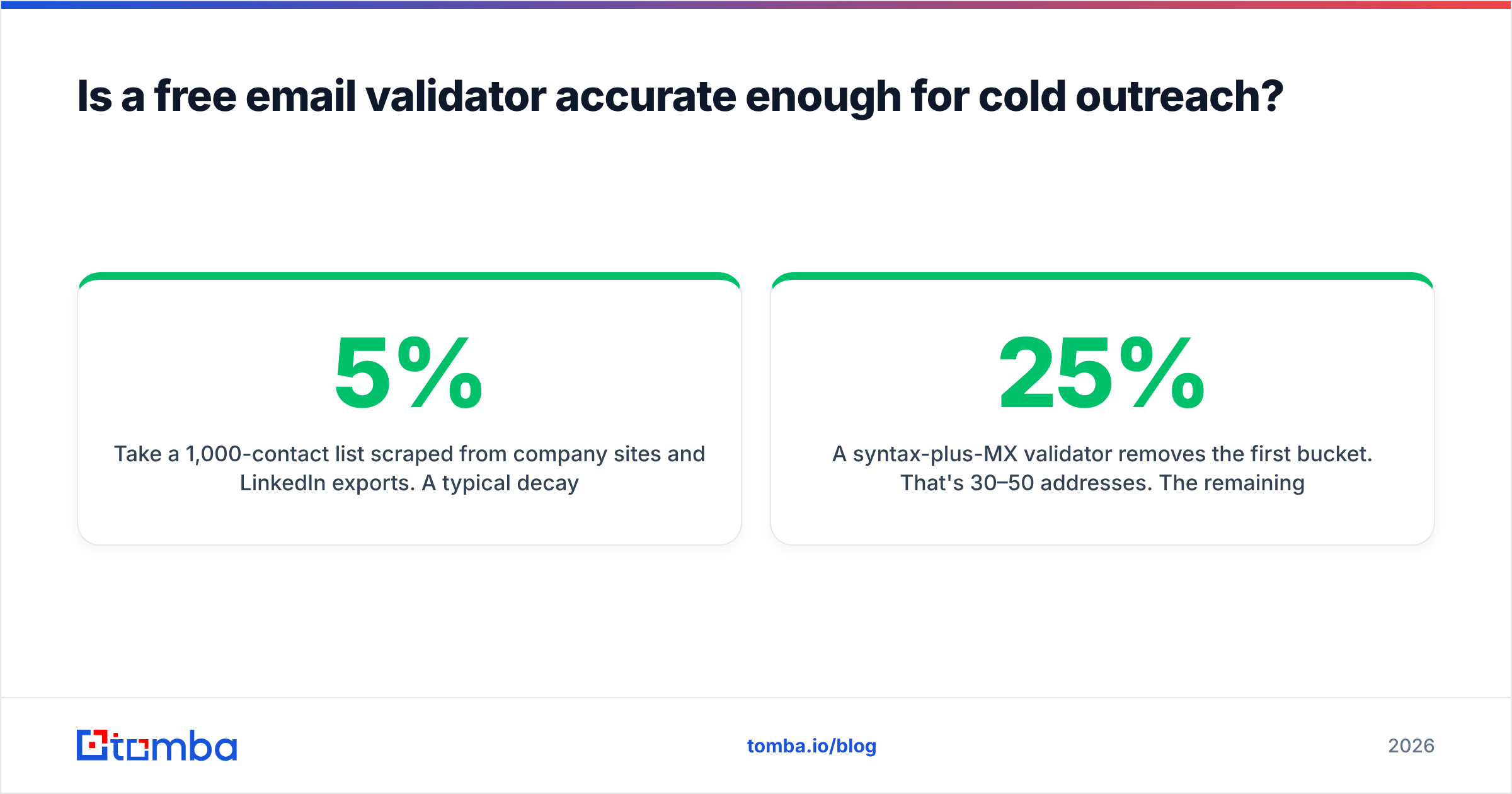
Take a 1,000-contact list scraped from company sites and LinkedIn exports. A typical decay profile looks like this: 3–5% syntax or domain garbage, 10–15% mailboxes that existed once but are now deactivated (people leave jobs at roughly 20% per year in B2B sales and marketing), and 5–10% catch-all domains where nobody can be certain without a send.
A syntax-plus-MX validator removes the first bucket. That's 30–50 addresses. The remaining 150–250 bad addresses sail through marked "valid," and you discover them at 15–25% bounce rate — well past the 2% threshold where Google and Microsoft start throttling your domain. Gmail's bulk sender rules put the hard line at 0.3% spam complaints, and bounces feed the same reputation signal.

So the honest framing: free validation is a hygiene step, not a deliverability strategy. It prevents you from emailing jhon@acme.con. It does not prevent you from emailing someone who quit in 2024.
The one place free tools genuinely shine is the single high-stakes check. You're about to email a VP you found through a conference page. You have one shot at the address. Pasting it into a browser-based validator takes four seconds and tells you whether the domain is live and whether the format matches the company's pattern. That's a good use of a free tier.
Which free email validators are worth using in 2026?#
Every vendor on this list gives away a limited amount of verification to get you into the funnel. The differences are in what the free tier actually runs, how many checks you get, and whether bulk upload is included.

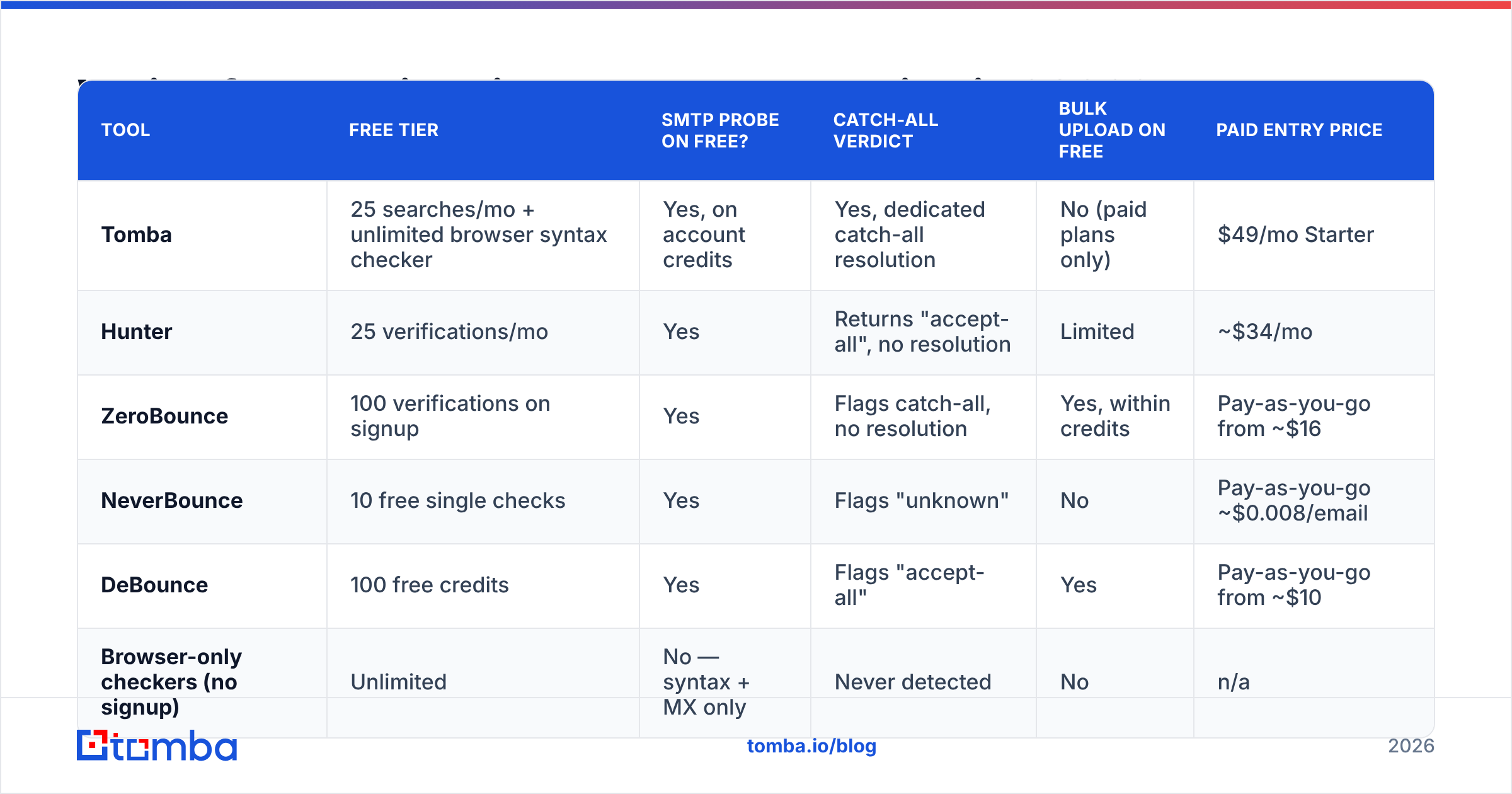
| Tool | Free tier | SMTP probe on free? | Catch-all verdict | Bulk upload on free | Paid entry price |
|---|---|---|---|---|---|
| Tomba | 25 searches/mo + unlimited browser syntax checker | Yes, on account credits | Yes, dedicated catch-all resolution | No (paid plans only) | $49/mo Starter |
| Hunter | 25 verifications/mo | Yes | Returns "accept-all", no resolution | Limited | ~$34/mo |
| ZeroBounce | 100 verifications on signup | Yes | Flags catch-all, no resolution | Yes, within credits | Pay-as-you-go from ~$16 |
| NeverBounce | 10 free single checks | Yes | Flags "unknown" | No | Pay-as-you-go ~$0.008/email |
| DeBounce | 100 free credits | Yes | Flags "accept-all" | Yes | Pay-as-you-go from ~$10 |
| Browser-only checkers (no signup) | Unlimited | No — syntax + MX only | Never detected | No | n/a |
Two patterns jump out.
First, "free forever" almost always means syntax-only. Any tool that lets you validate unlimited addresses without an account is not opening SMTP connections — that costs real money and real IP reputation. It's checking string format and DNS. Useful, but don't confuse it with verification.
Second, credit-based free tiers are trials, not tiers. 25 to 100 checks gets you through one prospect list, once. If your workflow involves recurring validation, you're picking a paid plan eventually; the free tier just tells you whether the accuracy is worth paying for. Sort the email verification category on G2 by recent reviews and you'll see the same complaint across vendors: the free result set looked great, the 10,000-row paid run had more "unknowns" than expected.
How do you test a free email validator before trusting it?#
Build a control list. This takes twenty minutes and saves you from a vendor's marketing numbers.
Assemble 40 addresses you already know the status of:
- 10 known-good — colleagues, your own aliases, addresses that replied to you last week.
- 10 known-dead — addresses that hard-bounced in your last campaign. Pull them from your ESP's suppression list.
- 10 role accounts —
info@,hello@,careers@at real companies. - 5 syntax traps — double dots, trailing spaces, missing TLD, Unicode lookalikes.
- 5 catch-all domains — find one by testing a nonsense address like
zzqq7@targetdomain.comand seeing if it's accepted.
Run all 40 through each candidate. Score three things: how many known-dead addresses it correctly rejects (this is the number that matters), how many known-good addresses it wrongly rejects (false positives cost you real pipeline), and what it does with the catch-all block. A tool that marks all five catch-alls "valid" is guessing in your favor, which is worse than saying "unknown".
Most free tiers score well on syntax traps and poorly on known-dead. That asymmetry is the entire story.

When should you stop using free tools and pay?#
There are four clear triggers. If any one applies, free validation is costing you more than it saves.
You're sending more than ~500 emails a month. Manual single-address checks stop being a workflow at that point. Bulk verification with CSV upload and API callbacks is the only sane path, and no free tier includes it at volume.
Your list is older than 90 days. Data decay is the dominant failure mode in B2B, and it's invisible to syntax checks. Re-verification is a recurring cost, not a one-time one.
You send from a domain that also carries transactional or customer mail. Torching sender reputation on a shared domain is expensive in ways that don't show up in a spreadsheet. A single bad campaign can push your invoices and password resets into spam folders for weeks.
Your target accounts use catch-all domains. This is common in enterprise and in companies running Microsoft 365 with a wildcard rule. If half your ICP is catch-all, a validator that shrugs at catch-all is validating nothing that matters.
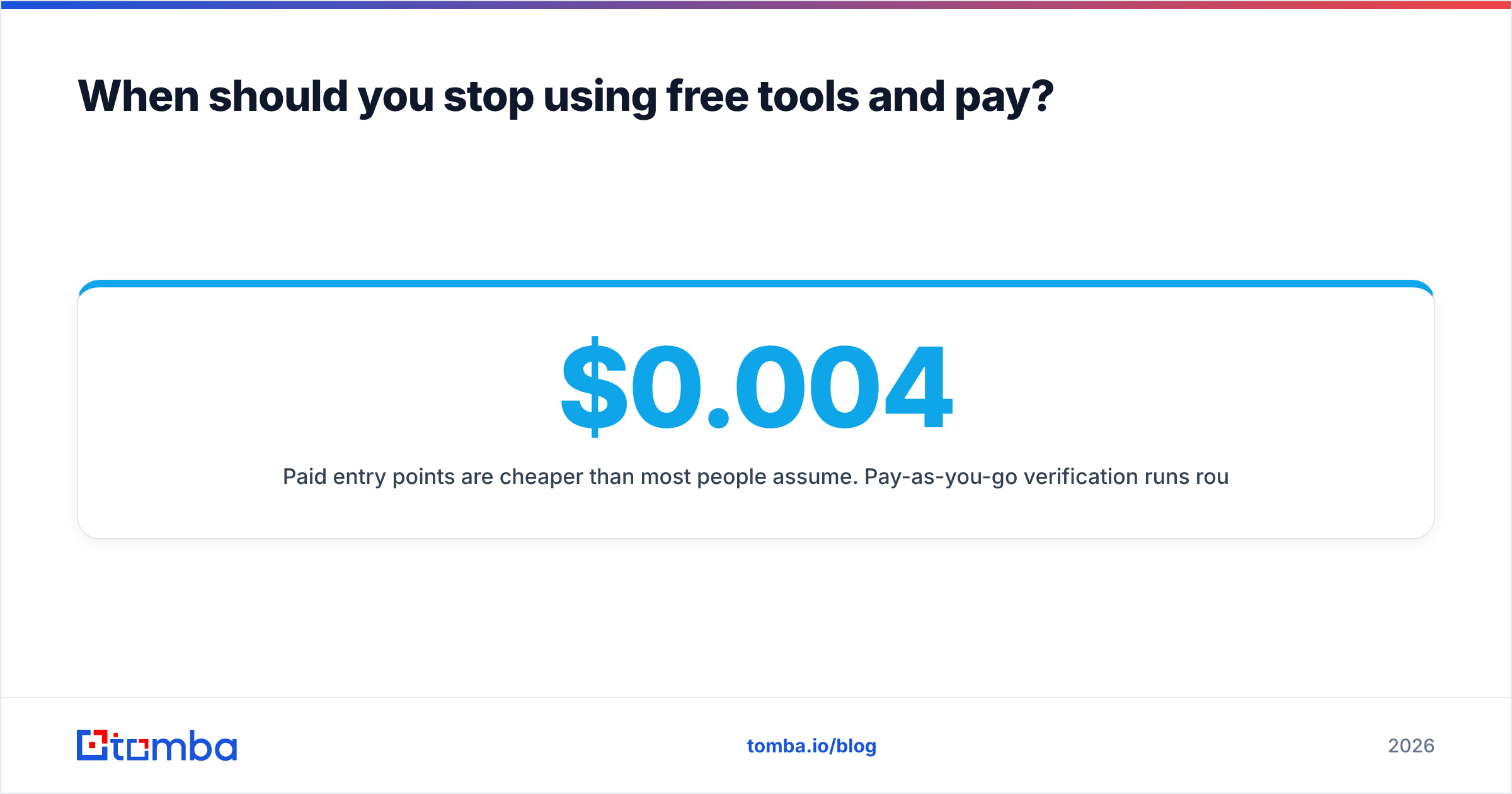
Paid entry points are cheaper than most people assume. Pay-as-you-go verification runs roughly $0.004–$0.01 per address across the market, so a 10,000-row list costs $40–$100 once. Subscription tools bundle it with finding: Tomba pricing starts at $49/mo for Starter with a free tier at 25 searches per month, and moves to $99/mo Growth and $249/mo Pro as volume climbs. Compare that against the cost of a single deliverability incident — usually two to four weeks of degraded inbox placement — and the math resolves quickly.
What's the difference between validating and finding an email?#
They're separate jobs, and conflating them is the most common workflow mistake.
Finding answers "what is this person's address?" You have a name and a company; you need the mailbox. That's pattern inference plus source data — crawled sites, public filings, signature blocks. An email finder or a domain search does this.
Validating answers "does this address still accept mail?" You already have a string; you need a verdict. An email verifier does this.
Good finders return a confidence score because they validate as part of finding — there's no point returning an address the source data suggests is dead. That's why buying a finder that includes verification usually beats buying two separate tools: you avoid paying twice for the same SMTP handshake, and you avoid the export-import shuffle between vendors.
If you're building this into a product or a script rather than clicking through a UI, both jobs are one HTTP call away through an email verification API, which is also the only realistic way to validate at the moment of form submission rather than in a nightly batch.
What free validation limits should you plan around?#
A few practical constraints that vendors bury in documentation:
- Rate limits on free tiers are aggressive. Expect 1–5 requests per minute on unauthenticated endpoints. Fine for spot checks, useless for scripts.
- "Unknown" is a real result, not a failure. Some mail servers (notably Yahoo and a chunk of Microsoft 365 tenants) refuse to confirm mailbox existence at the SMTP layer. Any tool claiming 100% certainty on those is inventing it.
- Greylisting produces false negatives. A server that temporarily defers your probe looks like a rejection to a validator with no retry logic. Cheap tools don't retry.
- Free tiers rarely include role-account flags. You'll import
info@addresses that technically deliver and never reply, inflating your "valid" count while depressing reply rate. - Some free checkers log what you paste. Read the privacy policy before pasting a client list into an anonymous web form. If you can't find one, assume the worst.
For a reference point on what a well-documented free verifier discloses, Hunter's email verifier publishes its result taxonomy openly — worth reading even if you use a different vendor, because it sets the vocabulary the rest of the market copies.
The practical recommendation#
Use a free browser checker for one-off addresses — it costs nothing and catches the embarrassing typos. Use a credit-based free tier to run your 40-address control list against two or three vendors before you commit. Then pick the one that rejected the most known-dead addresses, not the one with the prettiest dashboard.
Above 500 sends a month, or on any list older than a quarter, move to paid verification with real catch-all resolution. The break-even is somewhere around your first throttled campaign, and it arrives faster than most teams expect.
If you'd rather solve finding and validating in one pass instead of stitching two free tools together, start with the Tomba Email Finder. It returns addresses with a confidence score already attached, runs SMTP and catch-all checks before handing anything back, and the free tier gives you 25 searches a month to test it against a list you already know the answers to. Run your control list through it first — that's the only benchmark that counts.
Related guides#
Ready to find emails that actually work?
Join 150,000+ professionals who stopped guessing and started sending. Free credits on signup — no credit card required.
Get the Tomba newsletter
Practical outbound tactics and product updates — once every two weeks.
About the author