Email Validity Check: How to Verify Any Address in 2026
Most teams run a regex test, call the list clean, then watch 15% of it bounce. Here is what a real email validity check looks like in 2026 — all four layers, plus how to handle catch-all domains.
TL;DR
- An email validity check has four independent layers: syntax, domain/DNS, mailbox (SMTP), and risk scoring. Skipping any one of them is how "clean" lists still bounce.
- Regex only proves an address is formatted correctly. It cannot tell you whether anyone reads that inbox.
- SMTP-level checks are the real workhorse, but roughly 15-25% of B2B domains are catch-all, where a plain SMTP ping says "yes" to every address you try.
- Bounce rate above 2% starts costing you deliverability with Google and Microsoft. Above 5% you are actively damaging your sending domain.
- Verify at capture, verify again before every send, and re-verify anything older than 90 days. B2B contact data decays roughly 2-2.5% per month.
What is an email validity check?#
An email validity check is the process of confirming that an address can actually receive mail — not just that it looks like an email address.
Think of it like checking a street address before mailing a contract. "123 Fake Street, Springfield" is formatted perfectly. It has a number, a street name, a city. That tells you nothing about whether the building exists or whether anyone lives there. Most teams stop at "the format is fine" and wonder why a fifth of their envelopes come back.
Technically, validity is a stack of separate questions, each answered by a different mechanism:
- Is the syntax legal? Does the string conform to the address rules described in RFC 5322 — one
@, a valid local part, a plausible domain? This is a local check that costs nothing and catches typos likejane@@acme.comor trailing spaces. The email address format is more permissive than most regex patterns assume, which is why over-strict regex rejects real addresses. - Does the domain exist and accept mail? A DNS lookup confirms the domain resolves and has MX records.
jane@acmee.com(typo domain) dies here. So do parked domains and companies that shut down. - Does the mailbox exist? An SMTP conversation opens a connection to the receiving mail server and asks about the specific recipient without delivering anything. This is where
jane.smith@acme.comgets separated fromj.smith@acme.com. - Is the address risky even if it exists? Role accounts (
info@,sales@), disposable domains, spam traps, and known complainers are all technically valid and still bad ideas to email. - Is the domain catch-all? If the server accepts every recipient, layer 3 returns a false positive. You need pattern intelligence and historical data to make a real judgement.
A tool that only does layers 1 and 2 is a syntax checker. A tool that does 1 through 5 is a verifier. The price difference between them is small; the deliverability difference is not.

Why do valid-looking emails still bounce?#
Because "valid" is a snapshot, and B2B data rots fast.
The typical culprits, in rough order of how often they show up in audits:
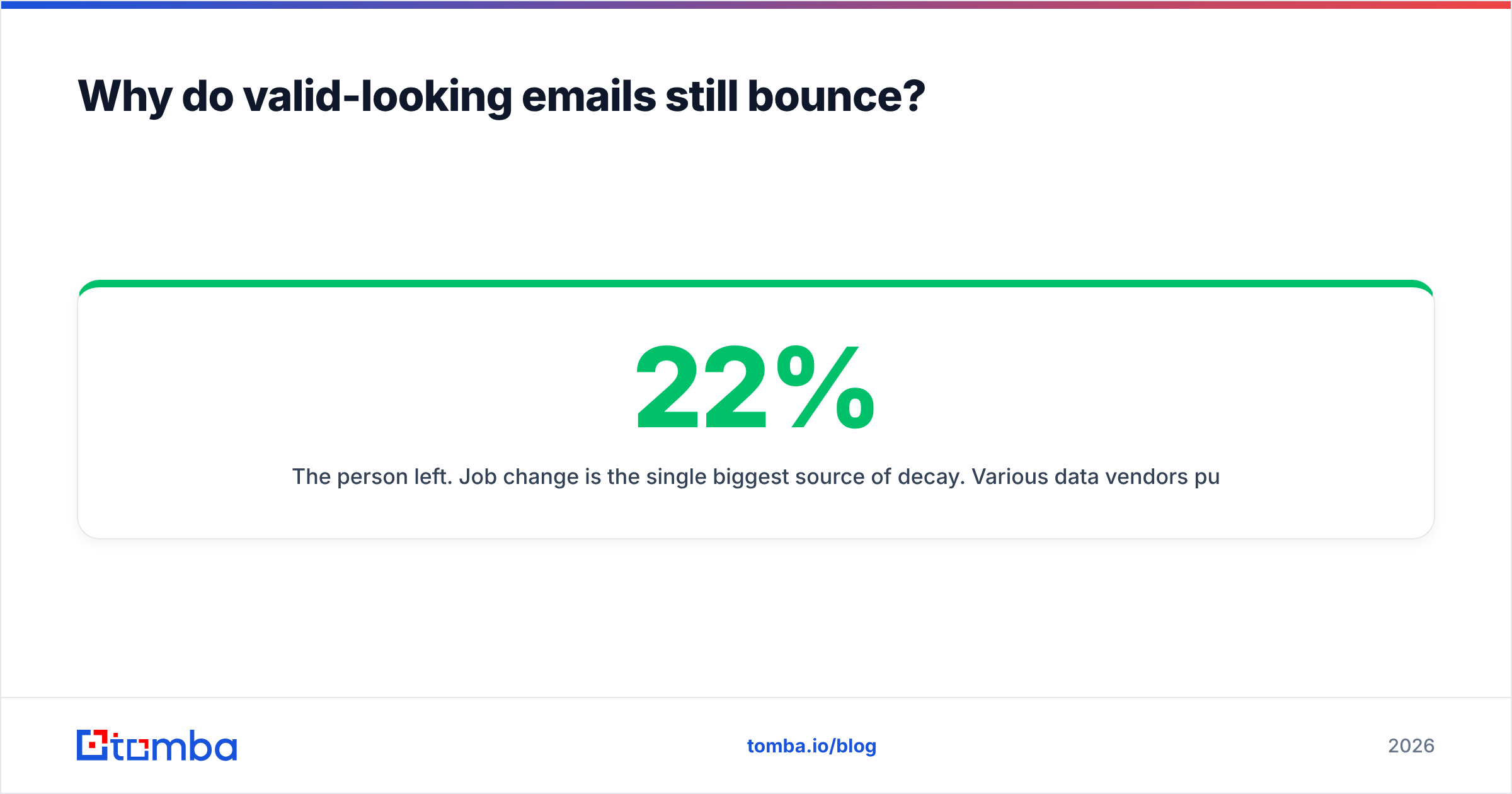
- The person left. Job change is the single biggest source of decay. Various data vendors put annual B2B contact churn between 22% and 30%; at 2.5% monthly, a list you built in January is roughly a quarter wrong by December.
- The domain was migrated. Acquisitions, rebrands, and Google Workspace → Microsoft 365 moves all break mailbox routing while the domain still resolves cleanly.
- The address was guessed and never verified. Permutation tools generate
first.last@,flast@,first@and hand you all of them. Guessing is fine as a starting point; shipping guesses to a sequencer is not. If you generate patterns, run them through a free email checker before they touch a campaign. - The domain is catch-all. Your verifier returned "accept_all" and your ops person mapped that to "valid" in the CSV import.
- Greylisting and rate limits. Some servers temporarily defer unknown senders, which a fast verifier can misread. Good tools retry; cheap ones return "unknown" and you decide.
- The mailbox is full or disabled. Common with contractors, interns, and long-term leave.
None of these are exotic. They are the default state of any list older than one quarter.
How accurate is SMTP verification in 2026?#
Accurate enough to be the foundation, not accurate enough to be the whole answer.
Two structural problems have gotten worse, not better:
Catch-all domains. A catch-all (or "accept-all") configuration tells the mail server to accept every recipient at the domain and sort it out internally. Ask about zzzz@company.com and it says yes. In B2B, roughly 15-25% of domains behave this way, and it skews higher in enterprise and in regions with heavy alias use. Plain SMTP verification is blind here. The workaround is inference: does the address match the company's dominant pattern, has this exact mailbox been observed in public sources, has mail to it engaged before? That is what a dedicated catch-all verifier does that a generic SMTP ping cannot.
Provider hardening. Microsoft 365 in particular has spent years making recipient probing unreliable, returning uniform responses regardless of whether the mailbox exists. Verifiers that rely purely on a single SMTP handshake against Outlook-hosted domains produce a lot of "unknown" results. Vendors compensate with proprietary methods, IP rotation, and historical databases — which is exactly why two verifiers can disagree by 10 percentage points on the same list.
Practical accuracy expectations for a good verifier in 2026:
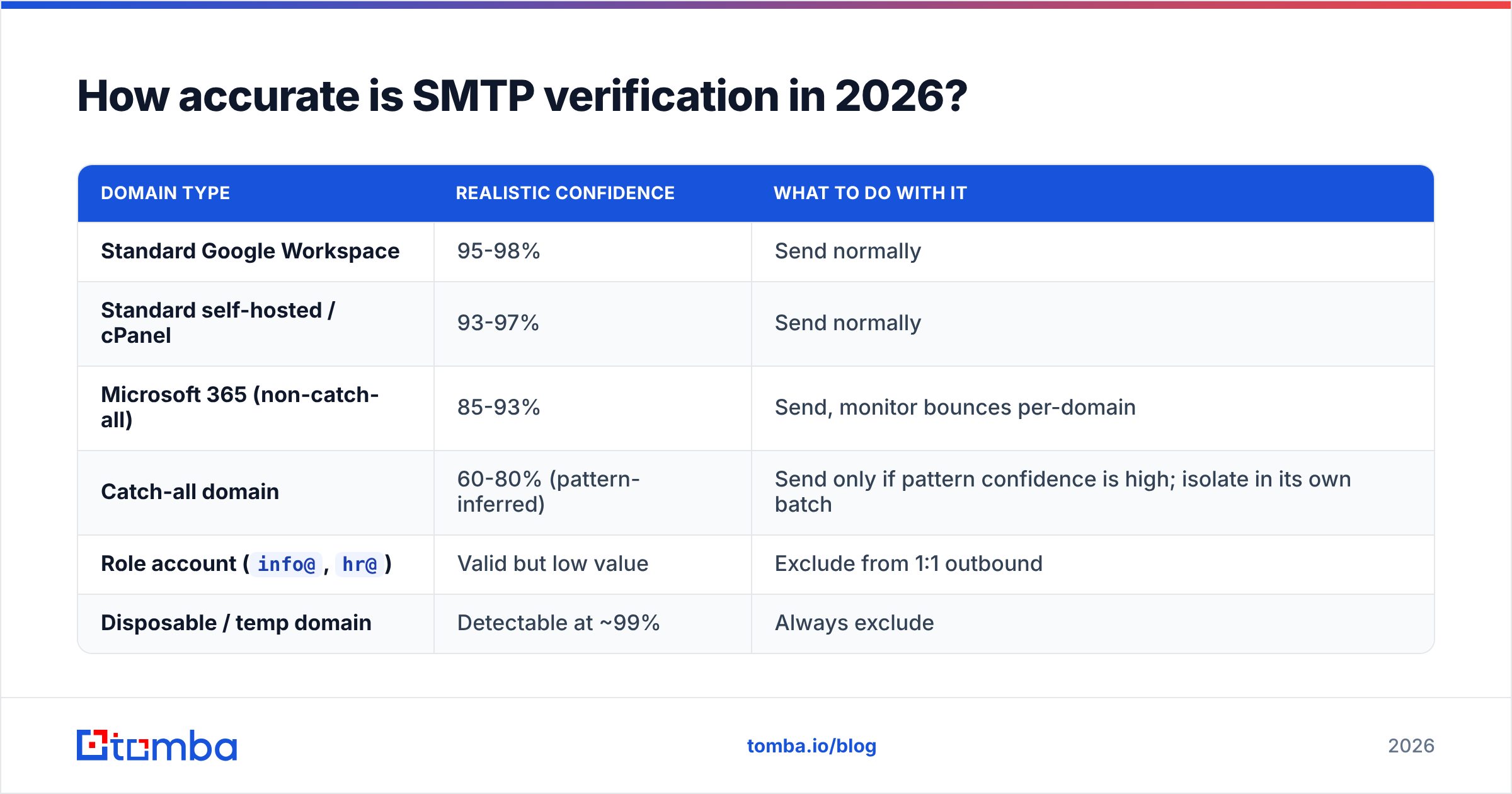
| Domain type | Realistic confidence | What to do with it |
|---|---|---|
| Standard Google Workspace | 95-98% | Send normally |
| Standard self-hosted / cPanel | 93-97% | Send normally |
| Microsoft 365 (non-catch-all) | 85-93% | Send, monitor bounces per-domain |
| Catch-all domain | 60-80% (pattern-inferred) | Send only if pattern confidence is high; isolate in its own batch |
Role account (info@, hr@) |
Valid but low value | Exclude from 1:1 outbound |
| Disposable / temp domain | Detectable at ~99% | Always exclude |
The operational takeaway: never treat verifier output as a binary. Treat it as three buckets — send, hold, discard — and let bounce data from your own sends refine the middle bucket.
What does an email validity check cost, and which tool fits?#
Verification is cheap relative to what a burned domain costs. The real question is whether you need verification alone or finding plus verification in one workflow.
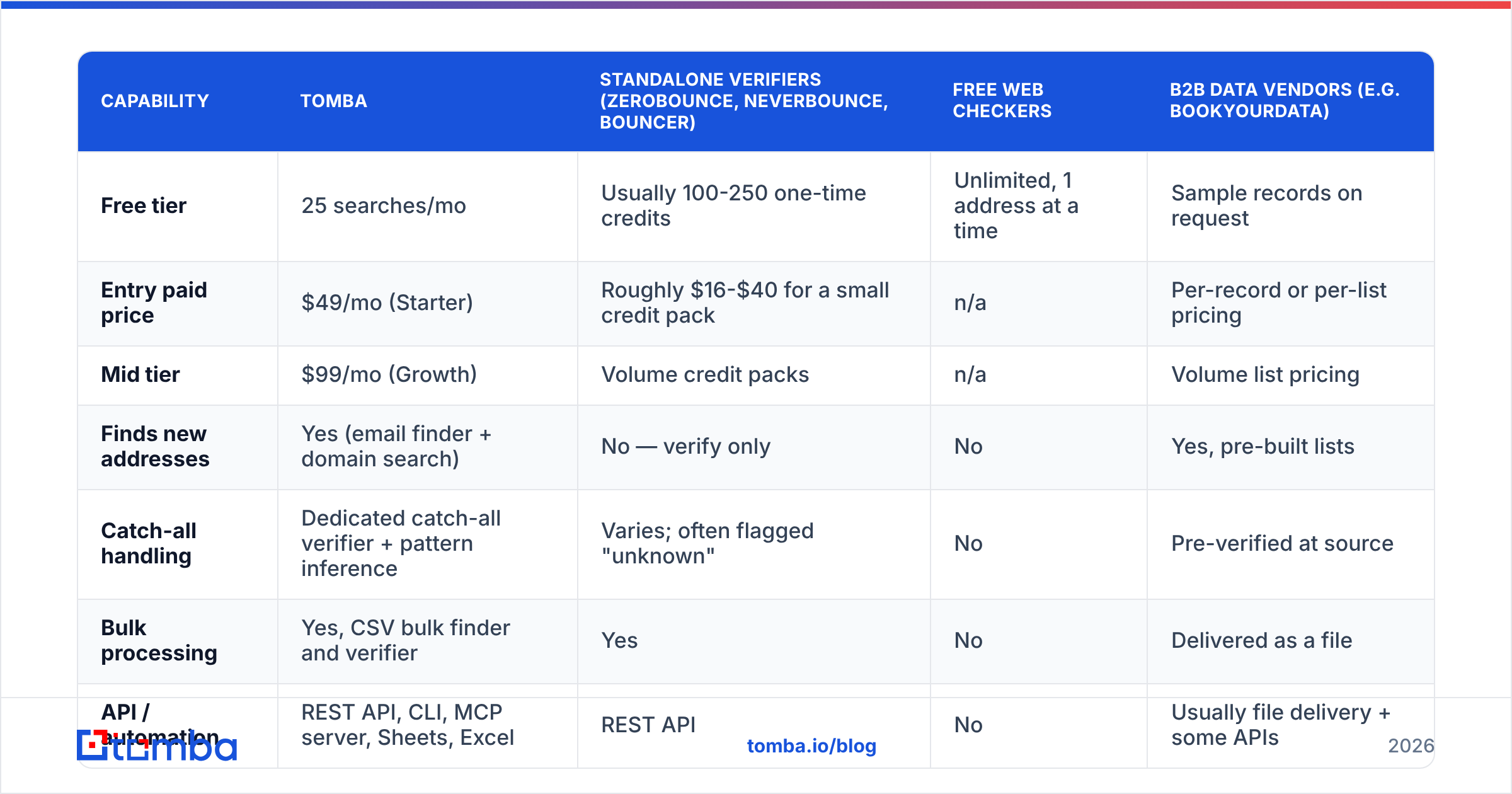
| Capability | Tomba | Standalone verifiers (ZeroBounce, NeverBounce, Bouncer) | Free web checkers | B2B data vendors (e.g. BookYourData) |
|---|---|---|---|---|
| Free tier | 25 searches/mo | Usually 100-250 one-time credits | Unlimited, 1 address at a time | Sample records on request |
| Entry paid price | $49/mo (Starter) | Roughly $16-$40 for a small credit pack | n/a | Per-record or per-list pricing |
| Mid tier | $99/mo (Growth) | Volume credit packs | n/a | Volume list pricing |
| Finds new addresses | Yes (email finder + domain search) | No — verify only | No | Yes, pre-built lists |
| Catch-all handling | Dedicated catch-all verifier + pattern inference | Varies; often flagged "unknown" | No | Pre-verified at source |
| Bulk processing | Yes, CSV bulk finder and verifier | Yes | No | Delivered as a file |
| API / automation | REST API, CLI, MCP server, Sheets, Excel | REST API | No | Usually file delivery + some APIs |
| Best for | Teams that build lists and keep them clean | Teams with an existing list to scrub | One-off manual checks | Teams buying coverage in a specific segment |
Read the table as a fit question, not a ranking. If you already have 400,000 addresses sitting in a CRM and you only need them scrubbed once, a pure credit-based verifier is the cheapest path. If you buy targeted lists for a specific ICP, a vendor like BookYourData that verifies at source removes a step. If you are building lists continuously — scraping, enriching, prospecting weekly — then finding and verifying in the same system removes an entire handoff, and you can compare current Tomba pricing against the credit math of running two vendors.

How do bounces actually damage deliverability?#
Mailbox providers read bounce rate as a proxy for "does this sender know who they are writing to."
Google's bulk sender guidelines are explicit that sending to non-existent addresses harms your reputation, and both Google and Yahoo tightened enforcement in 2024 with authentication and complaint-rate requirements that are now table stakes. The rough thresholds most senders operate against:
- Under 2% bounce rate — healthy. Normal for a verified list.
- 2-5% — warning zone. Expect inbox placement to slip before you see hard failures.
- Above 5% — providers begin throttling or filtering. Recovery takes weeks of low-volume, high-engagement sending.
- Above 10% — you are training filters to distrust your domain. Stop sending and fix the list.
The compounding problem is that reputation damage is retroactive. A single 12%-bounce blast does not just fail — it makes your next three campaigns underperform, including the ones to good addresses. That is why verification belongs before the send, not as a post-mortem. If you want to see where you stand today, a sender reputation checker will tell you whether your domain is already carrying damage.
What does a good verification workflow look like?#
Four checkpoints, each cheap, each catching a different failure:
- Verify at capture. Any address entering your system — form fill, scrape, imported list, enrichment result — gets checked before it is written. Wire this through the email verification API so it happens without a human deciding to do it.
- Verify in bulk before every send. Even a list verified last month has drifted. Run the segment through a bulk verify pass the day before launch and drop everything that is not in the "send" bucket.
- Split catch-all into its own batch. Do not mix inferred addresses with confirmed ones. Send catch-alls separately, at lower volume, from a subdomain if you have one. Their bounce data then teaches you which patterns are real at those companies without polluting your main reputation signal.
- Suppress on the first hard bounce, permanently. One hard bounce is a fact, not a fluke. Add it to a global suppression list that every tool in your stack reads.
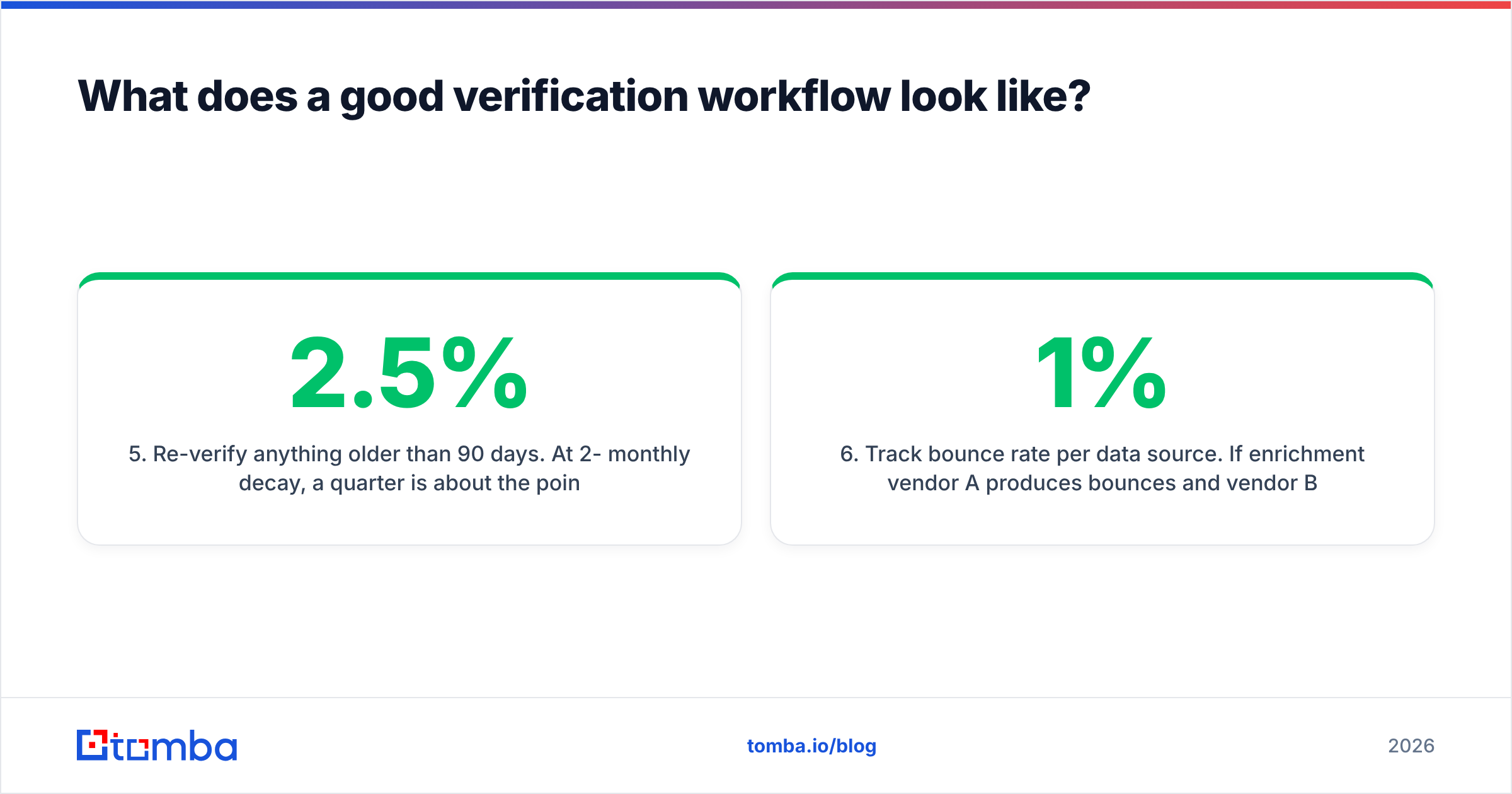
- Re-verify anything older than 90 days. At 2-2.5% monthly decay, a quarter is about the point where re-verification costs less than the bounces it prevents.
- Track bounce rate per data source. If enrichment vendor A produces 1% bounces and vendor B produces 7%, that is a procurement decision, and you can only make it if you tag the source on every record.
That is the whole system. It is not sophisticated. It is just consistent, which is the part most teams miss — verification gets treated as a project ("we cleaned the database in March") instead of a pipeline step.
When is a validity check not enough?#
When the address is real and the person is still the wrong target.
Verification answers deliverability, not relevance. A perfectly valid address belonging to someone who left the buying committee, or who never had budget, or who works at a company outside your ICP, will not bounce — it will just be ignored, and ignored mail is its own reputation problem now that engagement signals matter as much as bounces.
So pair verification with two other checks. First, confirm the person still holds the role, which is where contact enrichment earns its cost by refreshing title and company on records you already own. Second, confirm the address type: a verified info@ inbox is technically valid and practically useless for a personalised sequence, so filter role accounts out before they reach your sequencer rather than after.
The honest summary: verification is necessary and insufficient. It stops you from destroying your domain. It does not make a bad list into a good one.
Where should you start?#
If you have a list right now and no idea how clean it is, sample it. Pull 500 random addresses, run them through a verifier, and look at the split. If more than 8% come back invalid or risky, the whole list needs a pass before your next campaign, and your capture process needs a fix so the problem does not return next quarter.
Then close the loop at the source. Most bad addresses exist because someone guessed a pattern and shipped it. Finding the address correctly the first time — from the domain, the name, and the company's actual observed pattern — is cheaper than verifying a pile of permutations after the fact.
That is what the Tomba Email Finder is built for: give it a name and a domain and it returns the address with a confidence score and its sources, so the validity check happens before the record ever lands in your CRM. The free tier covers 25 searches a month if you want to test it against addresses you already know are good, and the email verifier handles the list you have already got. Start with the sample, fix the source, then automate both.
Related guides#
Ready to find emails that actually work?
Join 150,000+ professionals who stopped guessing and started sending. Free credits on signup — no credit card required.
Get the Tomba newsletter
Practical outbound tactics and product updates — once every two weeks.
About the author