Email Verification in 2026: How It Works and What to Use
Email verification is sold as a bounce-rate fix, but half the results you get back are guesses. Here is how the checks actually work, what each status means, and how to spend credits without wasting them.
TL;DR
- Email verification is a chain of cheap-to-expensive checks: syntax, domain, MX record, then an SMTP conversation with the receiving mail server. Most vendors stop the chain early and charge you for the guess.
- The only statuses worth acting on are
valid,invalid, andcatch-all. Everything labelledunknown,risky, oraccept-allis a business decision, not a technical result. - A 2% bounce rate is the practical ceiling before Google and Microsoft start throttling you. Above 5% you are actively damaging your sending domain.
- Verification does not fix bad data sourcing. If your list came from a scraped export, verification will confirm that the mailbox exists — not that the person still works there.
- Pricing traps to check before you buy: do failed lookups burn credits, do catch-alls burn credits twice, and do credits roll over?
What is email verification, exactly?#
Email verification is the process of confirming that an email address can actually receive mail before you send to it. Think of it like calling a phone number and listening for a ring tone instead of dialling blind and hoping — you learn whether the line exists without leaving a voicemail.
That distinction matters. Verification is not the same as validation, and neither is the same as enrichment:
- Syntax validation checks the string is a legal address per RFC 5322.
john@@acme.comfails.john.smith@acme.compasses — even if nobody named John Smith works there. - Domain and MX checks confirm the domain resolves and publishes mail exchange records. A domain with no MX record cannot receive email at all, so every address on it is dead.
- Mailbox verification opens an SMTP session with the receiving server and asks whether that specific mailbox exists, without delivering a message.
- Deliverability signals flag disposable domains, role accounts (
info@,sales@), spam traps, and known complainers. - Enrichment is a separate job entirely: attaching a name, title, company, or phone number to an address you already have.
Vendors blur these on purpose. A tool that only does steps 1 and 2 can claim "99% accuracy" honestly, because it is accurate at the thing it measures — it just is not measuring the thing you care about.

How does an SMTP verification check actually work?#
The real check is a short, polite conversation. Your verifier connects to the recipient's mail server on port 25 and runs through the SMTP handshake: HELO, then MAIL FROM, then RCPT TO: <the address you are testing>. If the server replies 250 OK, the mailbox exists. If it replies 550 5.1.1 User unknown, it does not. The verifier then sends QUIT and never issues DATA, so no message is ever delivered and the recipient sees nothing in their inbox.
Three things break this clean picture:
- Greylisting. Some servers deliberately return a temporary failure on first contact to defeat spammers. A lazy verifier reads that as
unknownand moves on; a good one retries after a delay. - Catch-all configuration. The domain is set to accept mail for every address, so
250 OKcomes back forceo@acme.comandasdkjh@acme.comalike. The SMTP answer is now worthless on its own. - Provider-level blocking. Google Workspace and Microsoft 365 have largely stopped giving straight answers to
RCPT TOprobes from unknown IPs. This is the single biggest change in verification since 2023, and it is why "SMTP check" alone is no longer a complete product.
Serious verifiers now blend the SMTP result with pattern intelligence, historic send outcomes, and provider-specific heuristics. That is a data problem, not a networking problem — which is why coverage differs so much between tools even though they all speak the same protocol.
What do verification statuses actually mean?#
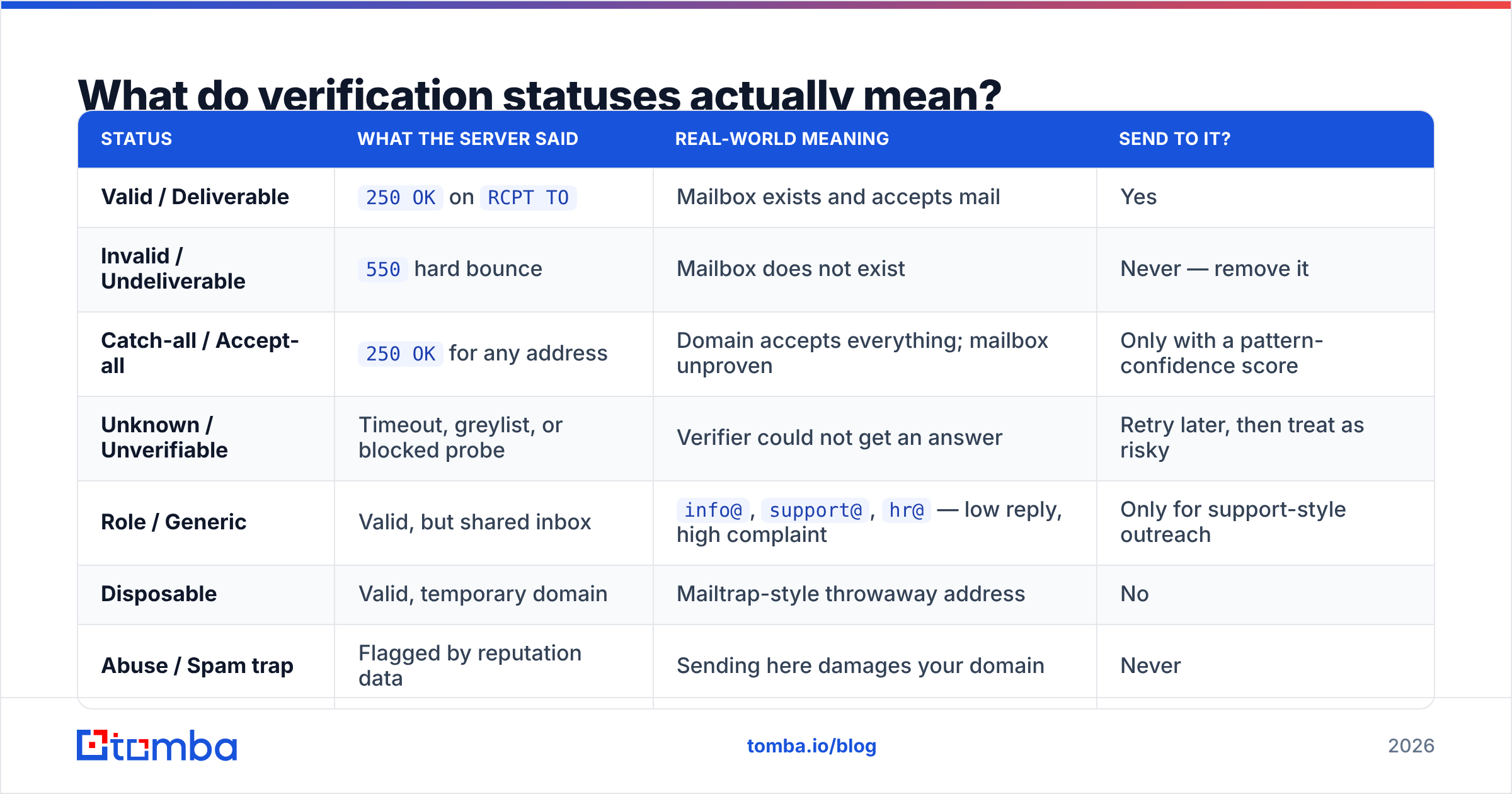
Every vendor uses slightly different labels for the same underlying result. Here is the translation table, plus what you should actually do with each bucket.
| Status | What the server said | Real-world meaning | Send to it? |
|---|---|---|---|
| Valid / Deliverable | 250 OK on RCPT TO |
Mailbox exists and accepts mail | Yes |
| Invalid / Undeliverable | 550 hard bounce |
Mailbox does not exist | Never — remove it |
| Catch-all / Accept-all | 250 OK for any address |
Domain accepts everything; mailbox unproven | Only with a pattern-confidence score |
| Unknown / Unverifiable | Timeout, greylist, or blocked probe | Verifier could not get an answer | Retry later, then treat as risky |
| Role / Generic | Valid, but shared inbox | info@, support@, hr@ — low reply, high complaint |
Only for support-style outreach |
| Disposable | Valid, temporary domain | Mailtrap-style throwaway address | No |
| Abuse / Spam trap | Flagged by reputation data | Sending here damages your domain | Never |
The share of catch-all and unknown in your results is the number that separates a good tool from a bad one. Two verifiers can both report "97% accuracy" while one returns 8% unknowns and the other returns 31%. The second one just handed you a third of your list back as homework.
Why does a 5% bounce rate cost more than the credits you saved?#
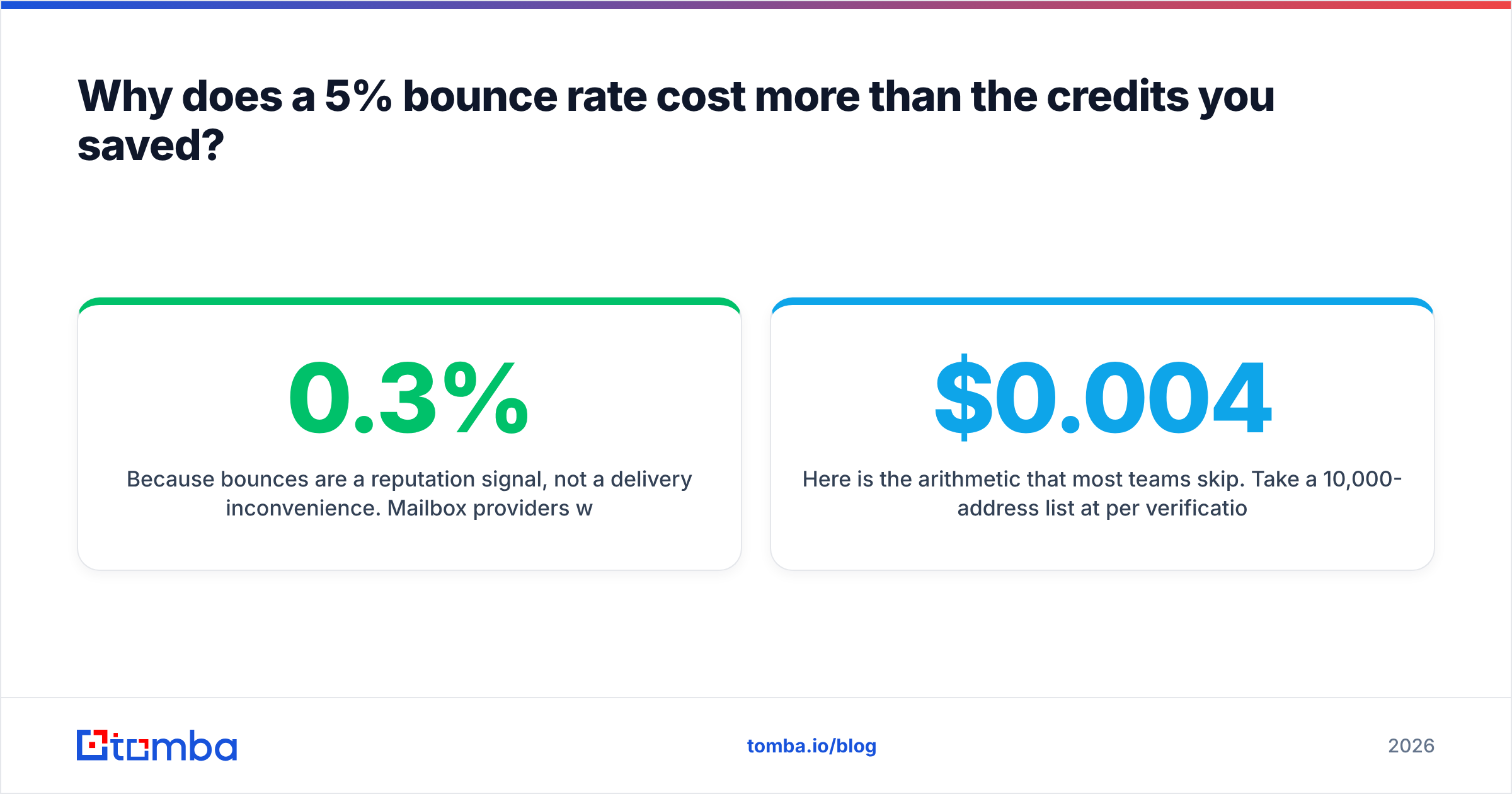
Because bounces are a reputation signal, not a delivery inconvenience. Mailbox providers watch hard-bounce rates as a proxy for list hygiene, and list hygiene is a proxy for "is this sender a spammer." Google's bulk sender guidelines make the expectation explicit: keep spam complaints under 0.3% and keep your lists clean.
Here is the arithmetic that most teams skip. Take a 10,000-address list at $0.004 per verification — $40 to clean. Skip it, and if 12% of the list is dead you send 1,200 messages into hard bounces. Those bounces do not just fail; they drag down the sending reputation of the domain you spent three months warming. Recovery takes weeks, during which every campaign underperforms. The $40 was never the expensive number.
Two secondary effects compound it:
- Sequencer credits burn on dead addresses. If you pay per contact in your outreach tool, every invalid address is billed for the full multi-step sequence.
- Reply-rate metrics lie. Bounces inflate your denominator and hide which messaging is actually working, so you optimise copy against noise.

Which email verification approach fits your workflow?#
There are three distinct ways to buy verification, and picking the wrong one is the most common budgeting mistake.
- Bulk list cleaning — upload a CSV, get a scored file back. Best for one-off list purchases, CRM hygiene sweeps, and pre-campaign cleanup. Use a bulk email finder workflow when the volume justifies batching.
- Real-time API verification — a single call at the moment of capture. Best for signup forms, lead-gen landing pages, and inline CRM enrichment. Latency matters here; anything above 2 seconds hurts form conversion.
- Verify-at-source — the address is verified as part of finding it, so you never store an unverified record. This is where an integrated email finder and email verifier pairing beats stitching two vendors together, because the pattern data that found the address also informs the confidence score.
Most teams need two of the three. A common stack: verify-at-source for new prospecting, real-time API on inbound forms, and a quarterly bulk sweep of the CRM.
How do the main tool categories compare?#
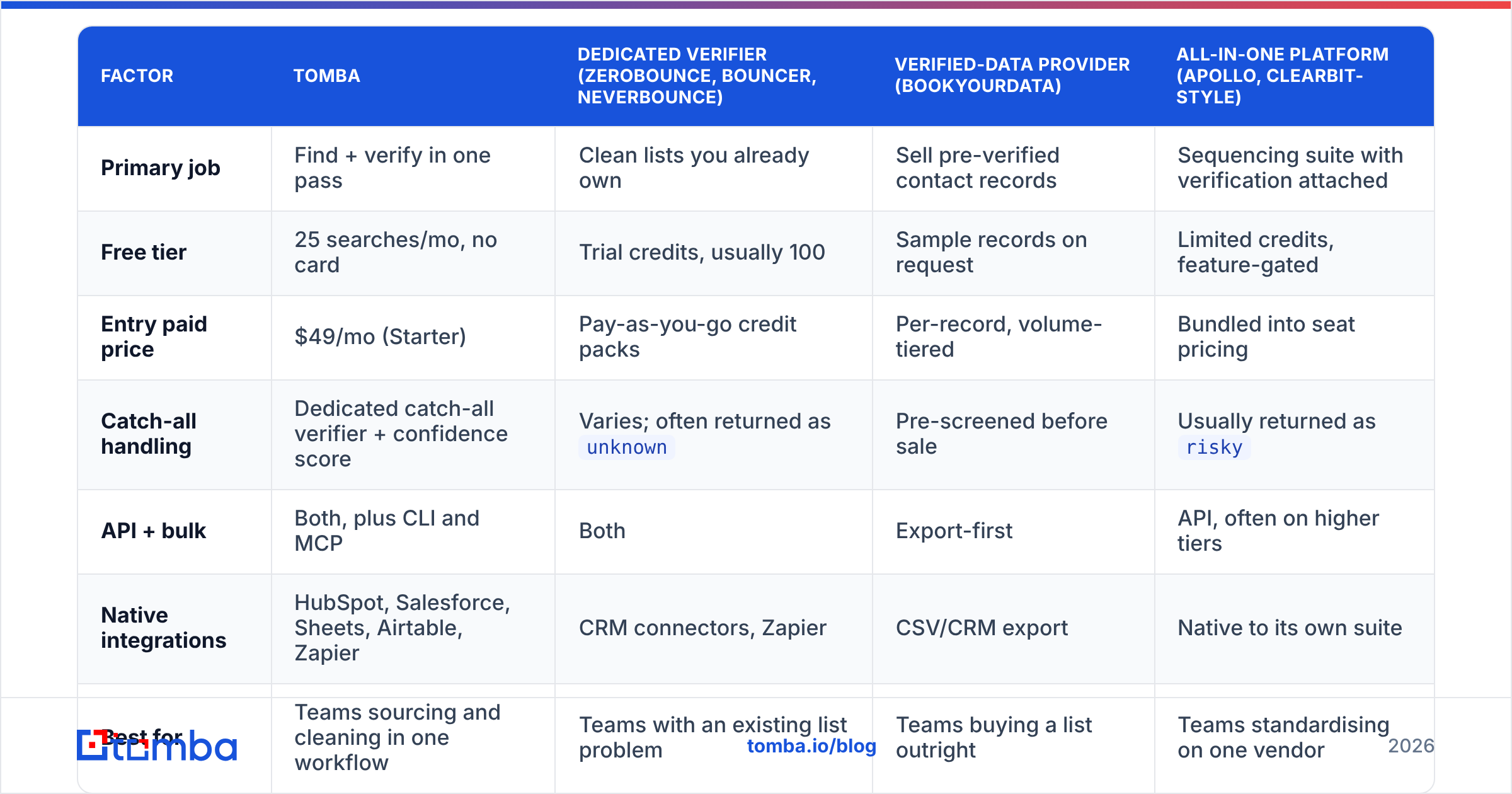
Pricing and packaging shift constantly, so treat the numbers below as a shape rather than a quote — check each vendor's current page before you commit. Cross-referencing user reviews on G2's email verification category is a good sanity check on accuracy claims.
| Factor | Tomba | Dedicated verifier (ZeroBounce, Bouncer, NeverBounce) | Verified-data provider (BookYourData) | All-in-one platform (Apollo, Clearbit-style) |
|---|---|---|---|---|
| Primary job | Find + verify in one pass | Clean lists you already own | Sell pre-verified contact records | Sequencing suite with verification attached |
| Free tier | 25 searches/mo, no card | Trial credits, usually 100 | Sample records on request | Limited credits, feature-gated |
| Entry paid price | $49/mo (Starter) | Pay-as-you-go credit packs | Per-record, volume-tiered | Bundled into seat pricing |
| Catch-all handling | Dedicated catch-all verifier + confidence score | Varies; often returned as unknown |
Pre-screened before sale | Usually returned as risky |
| API + bulk | Both, plus CLI and MCP | Both | Export-first | API, often on higher tiers |
| Native integrations | HubSpot, Salesforce, Sheets, Airtable, Zapier | CRM connectors, Zapier | CSV/CRM export | Native to its own suite |
| Best for | Teams sourcing and cleaning in one workflow | Teams with an existing list problem | Teams buying a list outright | Teams standardising on one vendor |
The honest summary: if your problem is a dirty list you already have, a dedicated verifier is the cheapest fix. If your problem is that you need contacts and they need to be clean, paying twice for two vendors is the expensive path. And if you would rather buy a pre-screened list than build one, a data provider like BookYourData handles that end of the market well — different job, different budget line.
How do you handle catch-all domains without guessing?#
Catch-all domains are roughly 20–25% of B2B addresses, and they are where most verification products quietly give up. You cannot resolve a catch-all with SMTP alone, so the answer has to come from elsewhere:
- Pattern confidence. If 40 known-good addresses at
acme.comall followfirst.last@, thenjane.doe@acme.comis far more likely real than a random string. Check the company email pattern before you decide. - Cross-source corroboration. The same address appearing in a public repo commit, a conference speaker page, and a press release is not a guess.
- Recency weighting. A pattern confirmed six months ago beats one confirmed in 2021.
- Dedicated catch-all logic. Some vendors run additional probing and historical-response analysis specifically for accept-all domains — the catch-all verifier approach — rather than dumping them into
unknown. - Send-side risk control. Route catch-all addresses to a separate, lower-volume sending domain so a bad batch cannot damage your primary.
Never treat catch-all as automatically valid. Never discard it either — you would be deleting a fifth of your addressable market, and a large share of them are real.
How often should you re-verify?#
B2B email data decays at roughly 20–30% per year, driven by job changes, restructures, and domain migrations. That decay is not evenly spread, so a flat annual sweep wastes credits on stable records and misses volatile ones.
A practical cadence:
- Before every campaign — verify anything not checked in the last 90 days.
- Quarterly — full CRM sweep on active pipeline contacts.
- Semi-annually — dormant and nurture segments.
- On trigger — whenever an account shows a job-change signal, re-verify immediately and re-run data enrichment on the record.
Log the verification date on every contact record. Without that timestamp you have no way to distinguish a fresh valid from a two-year-old one, and you will re-verify the whole database every time out of caution.
What should email verification actually cost?#
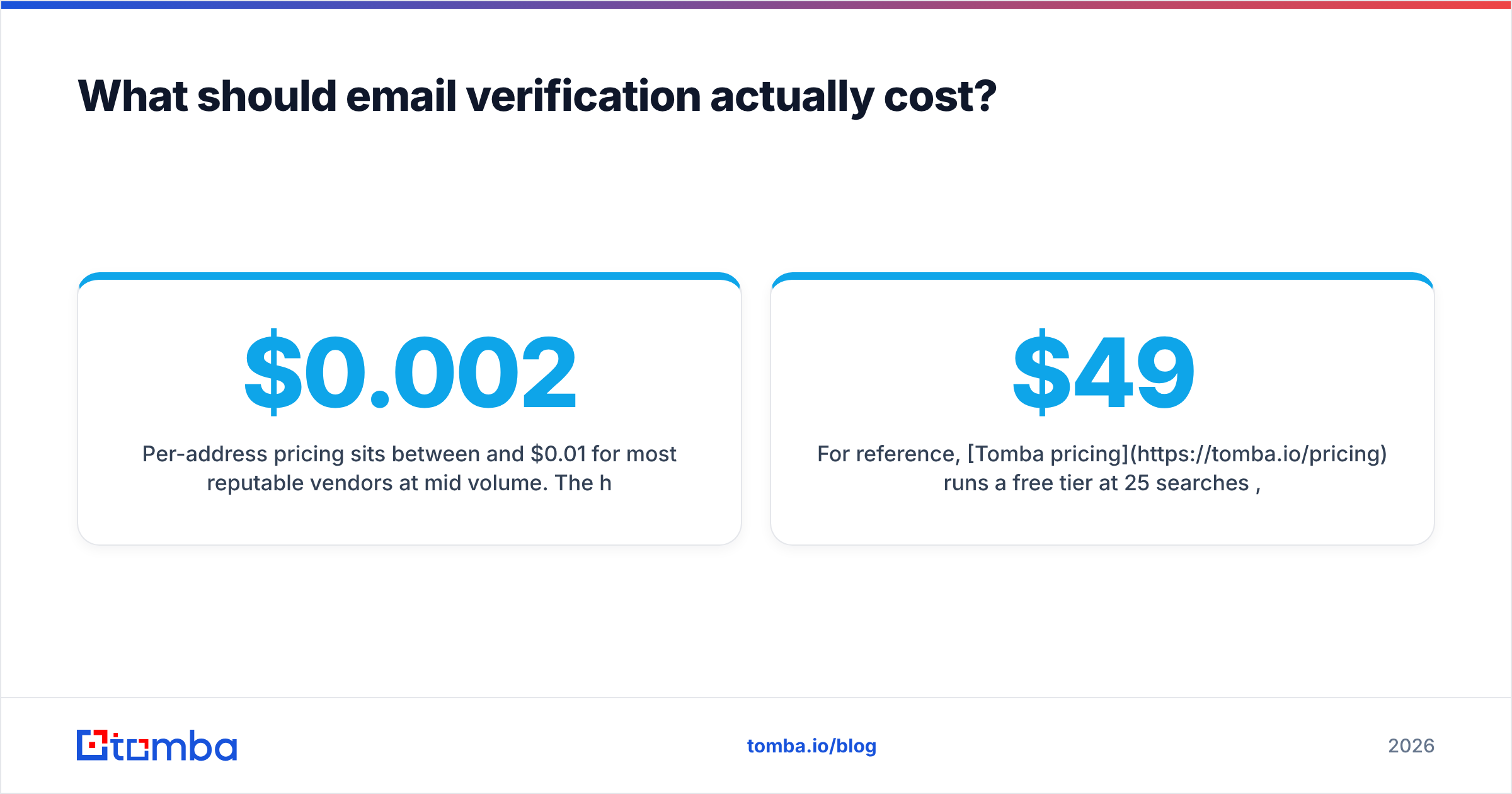
Per-address pricing sits between $0.002 and $0.01 for most reputable vendors at mid volume. The headline rate is rarely where the money goes. Ask these four questions before buying:
- Do failed or unknown lookups consume credits? Some vendors charge for every attempt, including the ones that returned nothing useful.
- Do catch-all checks cost extra? Deeper catch-all analysis is more expensive to run, and some vendors bill it separately.
- Do credits expire or roll over? Monthly-expiring credits punish uneven prospecting cycles.
- Is API access gated to a higher tier? A cheap entry plan is not cheap if the API you need sits two tiers up.
For reference, Tomba pricing runs a free tier at 25 searches per month, Starter at $49/mo, Growth at $99/mo, and Pro at $249/mo, with Enterprise custom — finding and verification draw from the same pool rather than being billed as separate products.
Where should you start?#
Start with the data you already have. Export your CRM, run a bulk verification pass, and look at three numbers: the invalid percentage, the catch-all percentage, and the unknown percentage. If invalids are above 10%, your sourcing is the problem and no amount of cleaning will fix it. If unknowns are above 20%, your verifier is the problem.
Then fix the intake, not just the inventory — verify at the moment of capture so dead addresses never enter the database in the first place.
If you want finding and verification running as one step instead of two invoices, start with the Tomba Email Finder. It returns a confidence score alongside every address, handles catch-all domains with dedicated logic rather than an unknown shrug, and the free tier gives you 25 searches a month to test the accuracy against a list you already know the answers to. Verify your assumptions before you verify your list.
Related guides#
Ready to find emails that actually work?
Join 150,000+ professionals who stopped guessing and started sending. Free credits on signup — no credit card required.
Get the Tomba newsletter
Practical outbound tactics and product updates — once every two weeks.
About the author