Email Verification Best Practices: A 2026 Field Guide
Bounce rates now decide whether your cold email reaches the inbox at all. Here are the email verification best practices that hold up in 2026, from syntax checks to catch-all handling and re-verification cadence.
TL;DR
- A bounce rate above 2% is the fastest way to lose the inbox at Gmail and Microsoft. Email verification best practices are damage control, not list-hygiene theater.
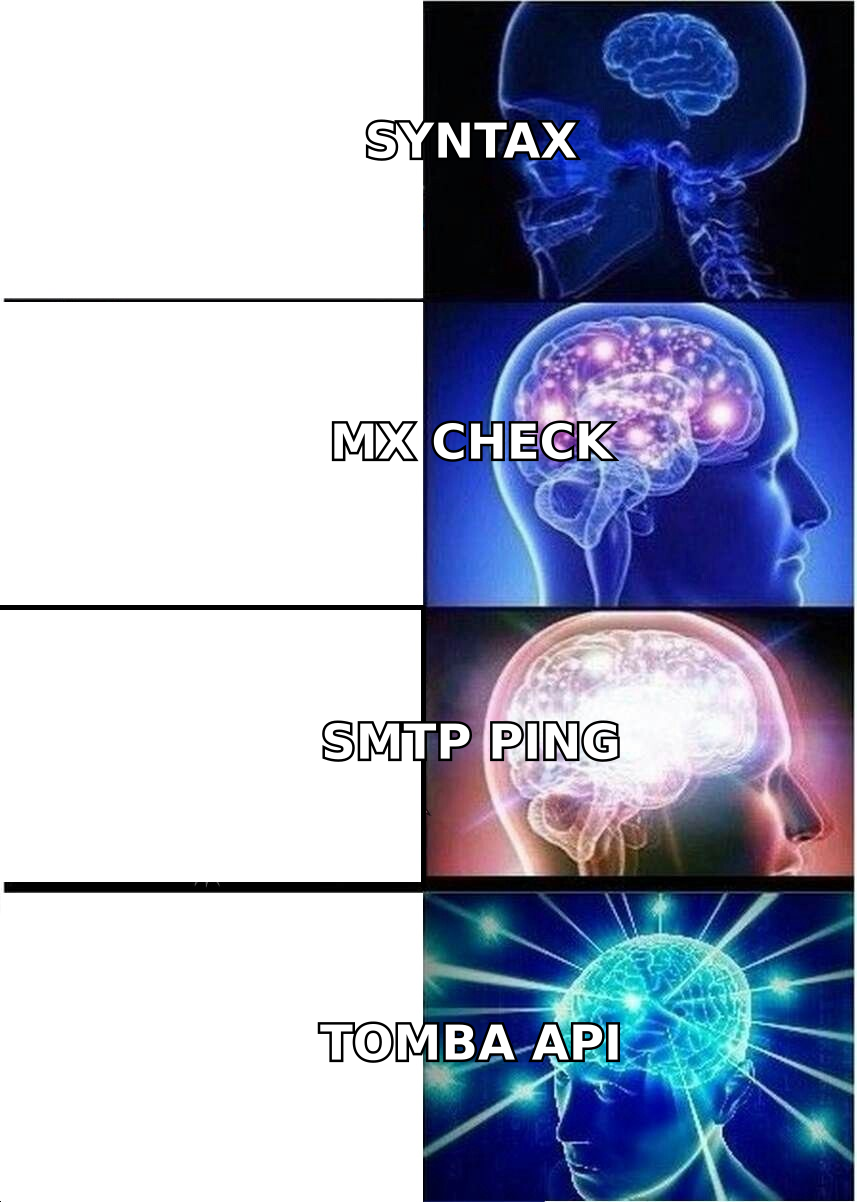
- Verification runs in four layers: syntax, domain/MX, mailbox (SMTP), and risk scoring. Cheap tools stop at layer two and still say "valid".
- Catch-all domains are where vendors quietly differ. Treat "accept-all" as its own bucket with its own send rules.
- Verify at capture and on a schedule. B2B data decays 25–30% a year. A list verified in January is much worse by June.
- Never send to a list you bought until you verify it yourself.
What is email verification, and what does it actually check?#
Email verification confirms that an address can receive mail before you send to it. Think of it like checking a delivery address before you send a courier. You can confirm the street exists. You can confirm the building exists. Sometimes you can knock on the door. Each step costs more and tells you more. Email verification best practices simply run those steps in the right order.
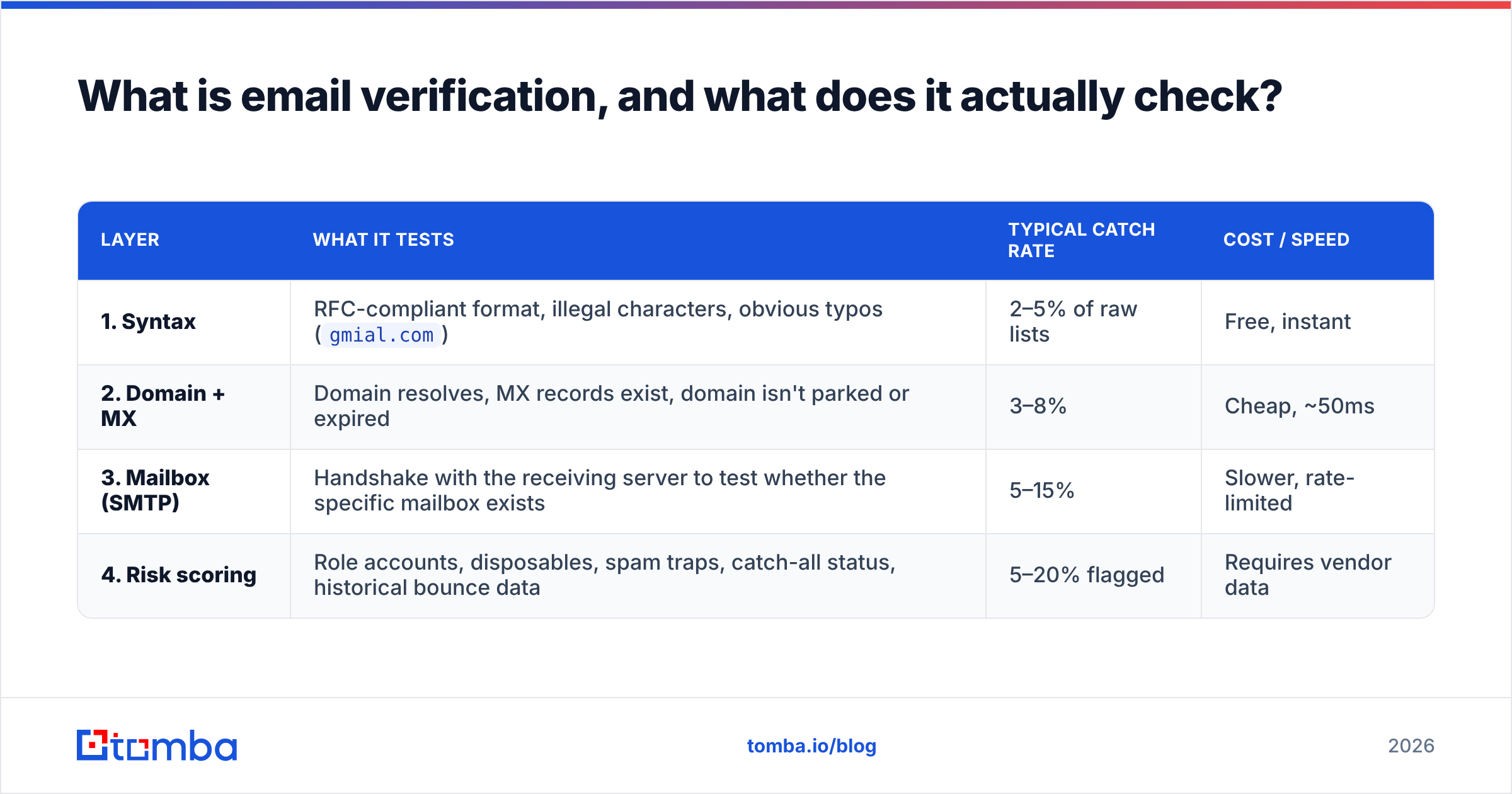
A verification pipeline works in layers. Each layer drops bad addresses, so the costly checks run on fewer records.
| Layer | What it tests | Typical catch rate | Cost / speed |
|---|---|---|---|
| 1. Syntax | RFC-compliant format, illegal characters, obvious typos (gmial.com) |
2–5% of raw lists | Free, instant |
| 2. Domain + MX | Domain resolves, MX records exist, domain isn't parked or expired | 3–8% | Cheap, ~50ms |
| 3. Mailbox (SMTP) | Handshake with the receiving server to test whether the specific mailbox exists | 5–15% | Slower, rate-limited |
| 4. Risk scoring | Role accounts, disposables, spam traps, catch-all status, historical bounce data | 5–20% flagged | Requires vendor data |
Good verifiers and weak ones split on layers 3 and 4. Layers 1 and 2 are commodity checks. Any developer can build them in an afternoon with public DNS.
Layer 3 is harder. It needs a warm IP pool and careful throttling. Mailbox providers rate-limit SMTP probes fast.
Layer 4 needs data you cannot fake. Think spam-trap patterns, daily disposable-domain lists, and bounce feedback from real send volume.
Want the protocol detail? The SMTP specification on Wikipedia shows why an RCPT TO reply can stay vague. No verifier can settle that answer for you.
Why do bounce rates matter more in 2026 than they did in 2022?#
Because providers turned a soft guideline into a hard rule. Google's bulk sender requirements set a spam-complaint ceiling. They also name sending to dead addresses as a reputation signal. Microsoft did the same on Outlook and Office 365.
What that means in practice:
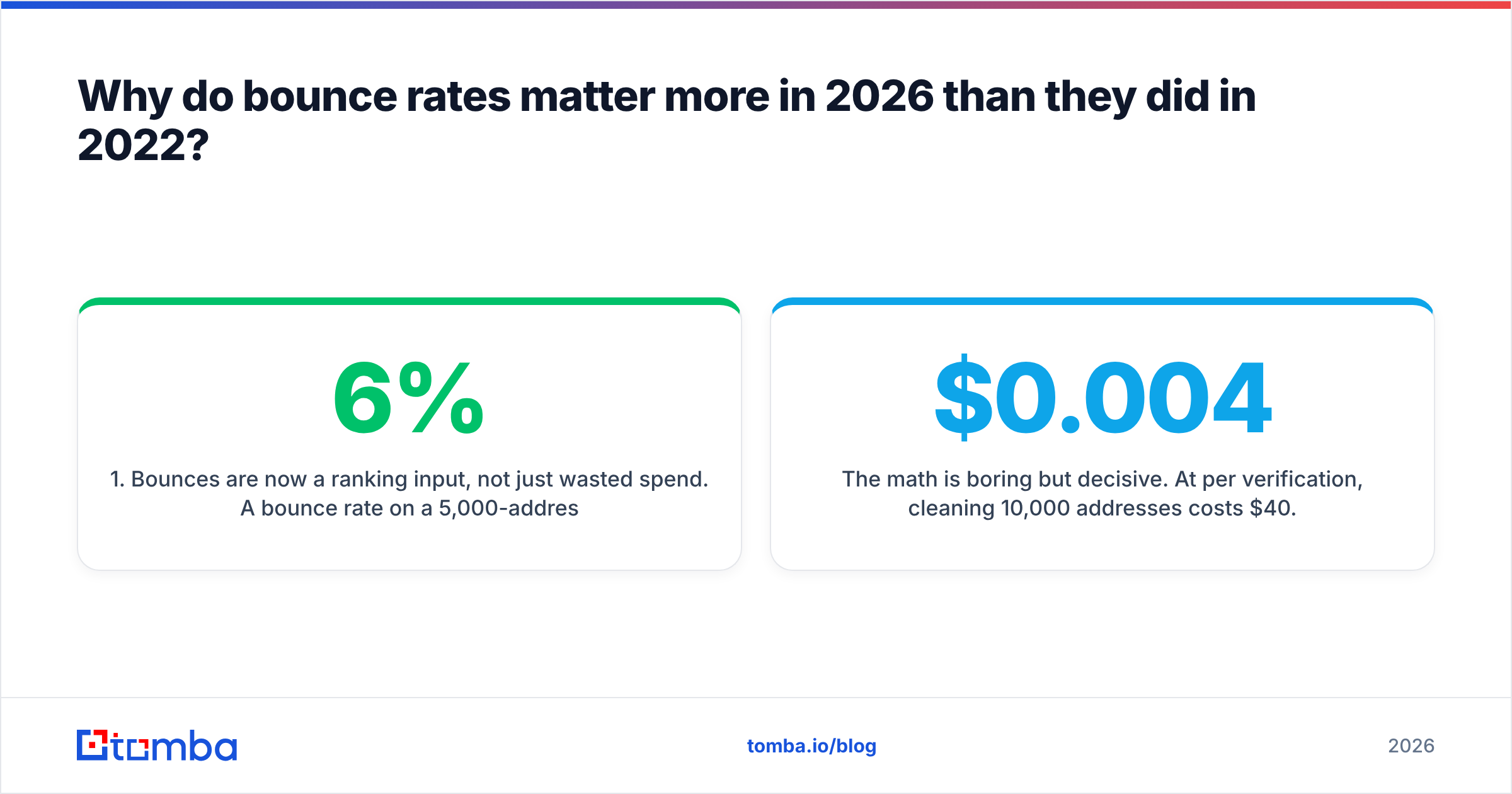
- Bounces are a ranking input now. A 6% bounce rate on a 5,000-address send wastes 300 emails. Worse, the other 4,700 slide into Promotions or Spam.
- New domains have no credit. One bad list can undo a six-week warmup. Old domains absorb mistakes. New ones do not.
- Recovery is slow. Rebuilding sender reputation takes weeks of clean, low-volume sending.
- Shared IPs spread the damage. On a pooled IP, your bad list hurts everyone. Platforms now suspend accounts for it.
The math is dull but clear. At $0.004 per check, cleaning 10,000 addresses costs $40. One burned domain costs weeks of pipeline.
What are the core email verification best practices?#
These email verification best practices separate teams at 0.5% bounce from teams at 7%.
- Verify at capture, not at send. Check every form submission and every address your team adds to the CRM. Catching
john@copmany.comon entry costs one API call. Catching it later costs a bounce and a lead. - Write down your accept and reject rules. Most verifiers return a score, not a yes or no. Decide up front: send to
valid, holdaccept-all, dropinvalidanddisposable. - Split role accounts into their own segment.
info@,sales@,support@, andadmin@usually deliver but rarely reply. Some are monitored spam traps.
The next three habits keep the list clean over time.
- Re-verify on a decay schedule. People change jobs, so B2B data ages fast. Re-check anything older than 90 days before a sequence, and 180 days before a nurture flow.
- Never trust a bought or scraped list. Even good providers sell data that has aged. Run it through your own email verifier first. It is cheap insurance.
- Log the result on the contact record. Store status, score, and date as CRM fields. Without them you cannot trace a bounce spike.
How do verification methods compare in accuracy and risk?#
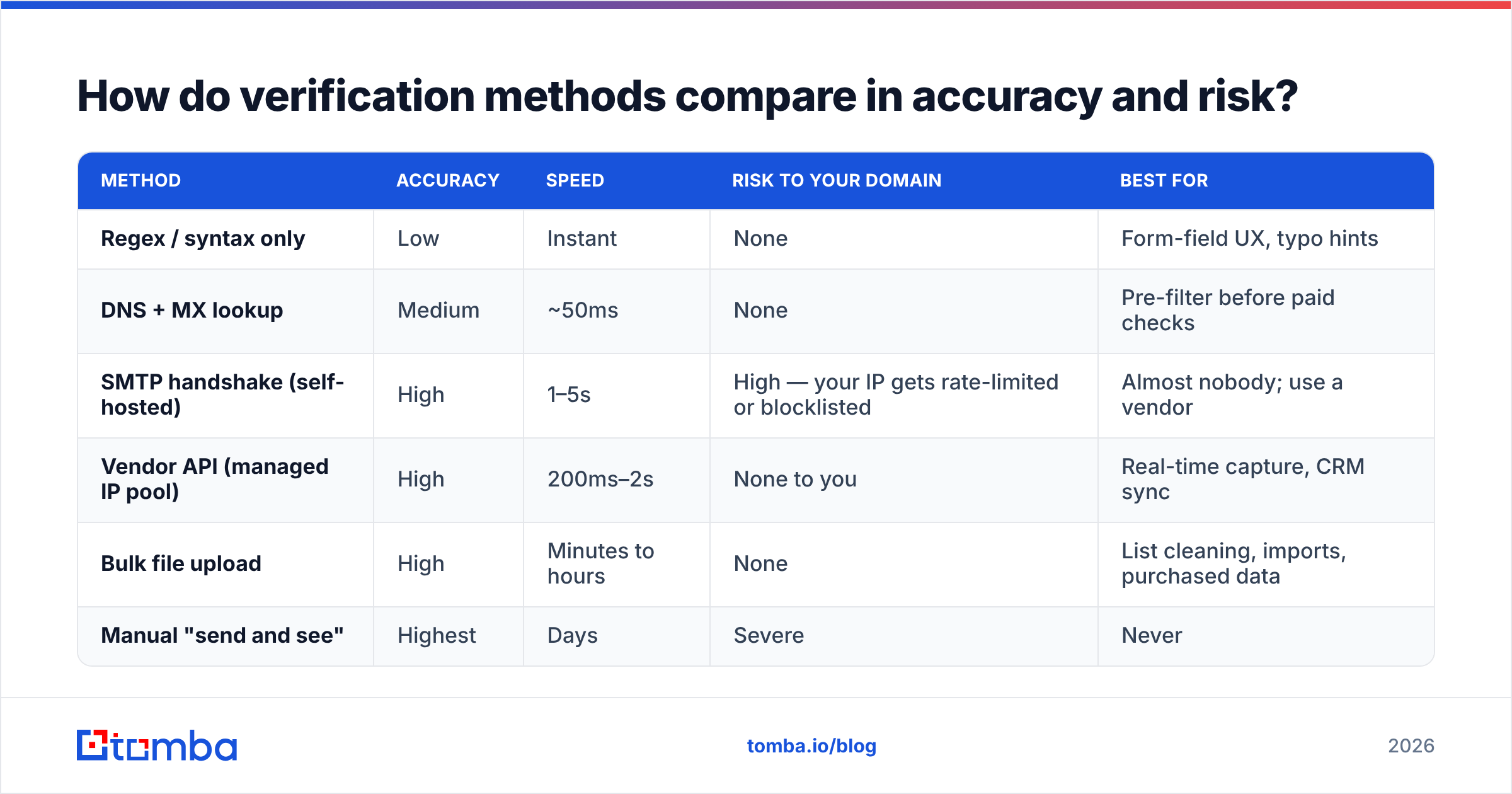
Methods trade speed for certainty. Pick based on the latency and the SMTP exposure you can accept. Sound email verification best practices favor a vendor here.
| Method | Accuracy | Speed | Risk to your domain | Best for |
|---|---|---|---|---|
| Regex / syntax only | Low | Instant | None | Form-field UX, typo hints |
| DNS + MX lookup | Medium | ~50ms | None | Pre-filter before paid checks |
| SMTP handshake (self-hosted) | High | 1–5s | High — your IP gets rate-limited or blocklisted | Almost nobody; use a vendor |
| Vendor API (managed IP pool) | High | 200ms–2s | None to you | Real-time capture, CRM sync |
| Bulk file upload | High | Minutes to hours | None | List cleaning, imports, purchased data |
| Manual "send and see" | Highest | Days | Severe | Never |
Look at row three. Some teams build their own SMTP verifier to save money. Within a week the server IP is blocklisted. Providers read fast RCPT TO probing as an attack. Vendors exist because they carry that risk on rotating, warmed infrastructure.
What should you do about catch-all domains?#
Catch-all domains accept mail for any address, even asdfgh@company.com. Roughly 15–25% of B2B domains work this way. The share is higher at enterprises on Microsoft 365 with a wildcard rule.
This is the most misread label in the market. Some vendors mark every catch-all address valid to lift their pass rate. Others mark them all unknown and skip the charge. That is honest, but it does not help you.
Here is the practical approach, and it is where email verification best practices earn their keep:
- Bucket them on their own. Never merge catch-all results into your verified segment. Give them a separate reporting line.
- Use pattern confidence as a tiebreaker. If the domain uses
first.last@and your address matches, the odds are decent. A catch-all verifier that cross-checks known-good addresses at the same domain helps here. - Send at low volume from a second domain. Cap catch-all sends at 10–15% of a day's volume.
- Watch replies per domain. Zero replies in 50 sends? Stop sending there.

How do the main email verification tools compare?#
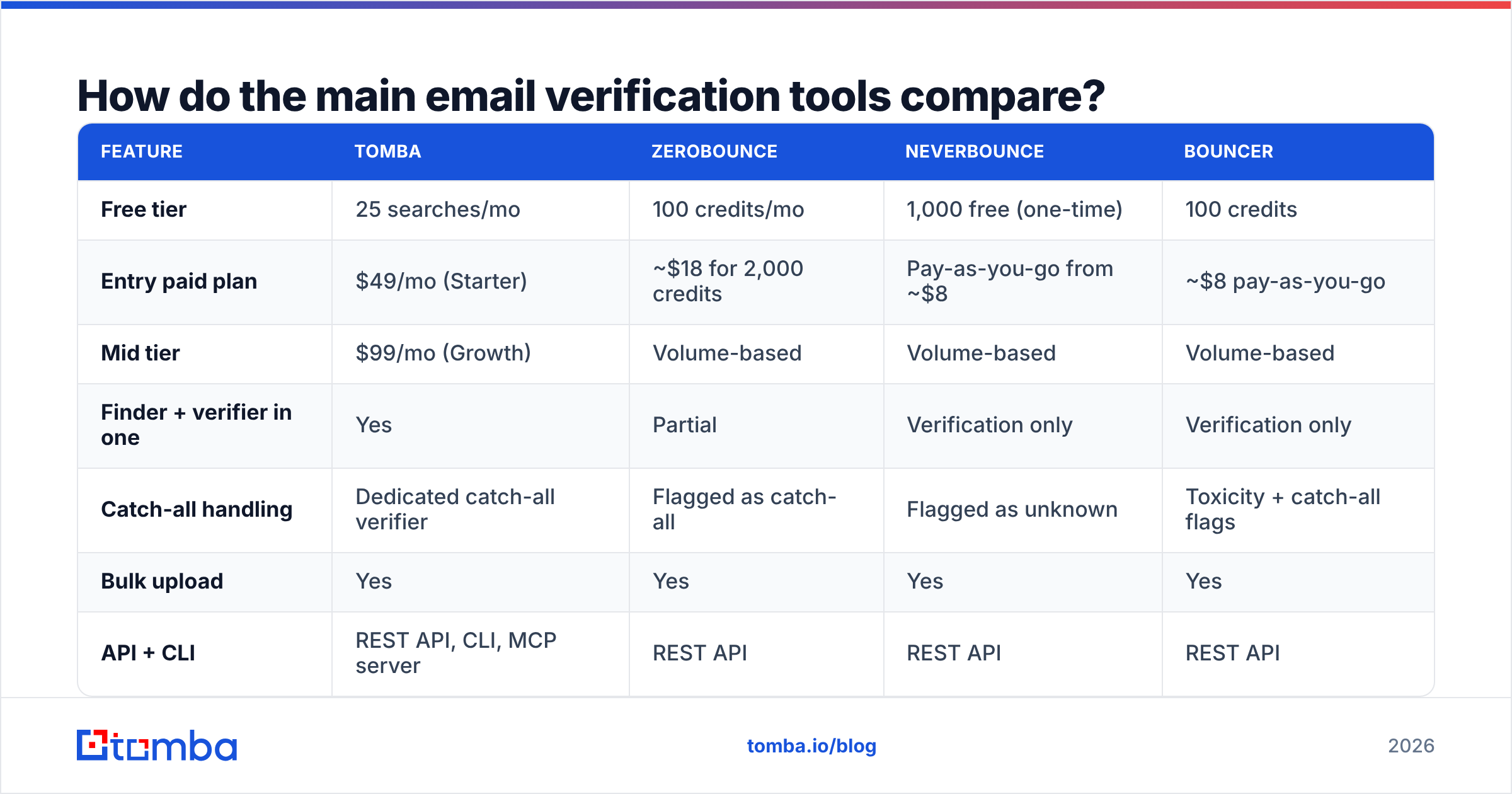
Prices and behavior differ more than the marketing pages admit. Here is a like-for-like view at a mid-volume tier, based on plans listed in 2026.
| Feature | Tomba | ZeroBounce | NeverBounce | Bouncer |
|---|---|---|---|---|
| Free tier | 25 searches/mo | 100 credits/mo | 1,000 free (one-time) | 100 credits |
| Entry paid plan | $49/mo (Starter) | ~$18 for 2,000 credits | Pay-as-you-go from ~$8 | ~$8 pay-as-you-go |
| Mid tier | $99/mo (Growth) | Volume-based | Volume-based | Volume-based |
| Finder + verifier in one | Yes | Partial | Verification only | Verification only |
| Catch-all handling | Dedicated catch-all verifier | Flagged as catch-all | Flagged as unknown | Toxicity + catch-all flags |
| Bulk upload | Yes | Yes | Yes | Yes |
| API + CLI | REST API, CLI, MCP server | REST API | REST API | REST API |
| Native spreadsheet add-ins | Sheets, Excel, Airtable | Limited | Limited | Limited |
Two honest notes. First, if you only need verification at millions of addresses a year, pay-as-you-go credits usually beat a subscription. Second, if you find and verify in one workflow, a combined platform removes an integration and a bill. That is where Tomba pricing wins on total cost, not unit cost.
For a wider vendor list with buyer reviews, the G2 email verification category is a fair neutral start.
What does a healthy verification workflow look like week to week?#
Verification fails when it is a one-off project. Turn these email verification best practices into a standing cadence:
- Real time: every form entry, every manual CRM add, every scraped address. One API call, under a second.
- Before each campaign: re-verify any segment older than 90 days. Use a bulk verify job, not the real-time API.
- Weekly: review bounces by source. One source at 4x the others is a source problem, not a verifier problem.
- Quarterly: sweep the database. Suppress hard bounces for good and re-check anything untouched for 180 days.
- After any list purchase: verify all of it before a single send. Even solid providers like BookYourData age between refreshes.
Wiring this into a CRM is easy with the Tomba API or a no-code path through Zapier or Make. One choice matters most: the result belongs on the contact record, not in a stray spreadsheet.
What mistakes still kill otherwise good lists?#
Even teams that follow email verification best practices trip on these:
- Treating one clean pass as permanent. Data decays every month. A January stamp means nothing in July.
- Ignoring soft bounces. Repeat soft bounces often mean a full or disabled mailbox. Suppress after three.
- Sending to
unknownresults to "test them." You trade reputation for information at a bad rate. - Sloppy suppression lists. Hard bounces must be blocked in every tool you send from, not just one.
Two more are subtle:
- Optimizing for pass rate, not bounce rate. A verifier that passes 96% is not better than one that passes 88%. Judge on bounce rate after the send.
- Using verification as a stand-in for targeting. A clean list of the wrong people still gets marked as spam. Complaints hurt faster than bounces. Verification protects delivery. Relevance protects email deliverability.
For a wider view of how list quality moves engagement, HubSpot's email marketing statistics roundup is a useful benchmark.
Where should you start?#
Start with one number: your bounce rate on the last 5,000 sends. Under 2%? Your process works. Just add the re-verification schedule. Above 3%? The cause is almost always raw capture points or aged data. Both are fixable in an afternoon.
If you buy finding and verifying separately, consolidate. The Tomba Email Finder returns an address with a confidence score and a verification status in one call. A lead never enters the CRM unchecked. Start free with 25 searches a month, test it against a list you already know, then scale.
Related guides#
Ready to find emails that actually work?
Join 150,000+ professionals who stopped guessing and started sending. Free credits on signup — no credit card required.
Get the Tomba newsletter
Practical outbound tactics and product updates — once every two weeks.
About the author