Email Verification Checker: How to Cut Bounces in 2026
An email verification checker is the cheapest insurance policy in outbound. Here's how SMTP checks actually work, what 99% accuracy claims hide, and which tool fits your list size.
TL;DR
- An email verification checker confirms an address exists and can receive mail before you send — syntax, DNS, MX, and an SMTP handshake, in that order.
- Mailbox providers now enforce a hard bounce ceiling. Google and Yahoo's bulk-sender rules put spam complaints at 0.3%; sustained bounce rates above ~2% will throttle you regardless.
- "99% accuracy" is a marketing number. What matters is the unknown rate — how many addresses a tool refuses to judge and still bills you for.
- Catch-all domains are the real dividing line between tools. Most verifiers punt; a few actually resolve them.
- Free single-address checkers are fine for spot checks. Anything over 1,000 records a month needs a bulk API with a documented credit policy.
What is an email verification checker?#
An email verification checker is a tool that decides whether an email address will accept mail — without sending anything the recipient can see. Think of it as knocking on a door and listening for footsteps instead of shipping a package and waiting three days for "return to sender."
The distinction matters because two different jobs get lumped under one label:
- Finding an address (you know the person and company, you need the address) — that's an email finder.
- Verifying an address (you already have it, you need to know if it's alive) — that's an email verifier.
Most teams need both, and most vendors sell both, but the underlying engineering is different. Finding is a data problem: crawling, pattern inference, and source triangulation. Verifying is a networking problem: DNS lookups and SMTP conversations at scale without getting your verification IPs blocked.
If you only remember one thing: verification is not optional anymore. In 2020 you could send to a 15%-stale list and eat the bounces. In 2026, the bounce itself is the punishment — it feeds back into your sender reputation and depresses inbox placement for every clean address on the same domain.
How does an email verification checker actually work?#
Every serious verifier runs the same pipeline. The differences are in how far down the chain they're willing to go and what they do when the chain gives an ambiguous answer.
- Syntax validation — Does the string parse as a valid address under RFC 5322? Catches typos like
john@@acme.comandjane@acmewith no TLD. Costs nothing, catches maybe 1–2% of a typical list. - Domain and DNS check — Does
acme.comresolve? Is it a parked domain, a recently expired registration, or a known disposable provider like Mailinator? This layer also flags free-mail domains if you only want corporate addresses. - MX record lookup — Does the domain publish mail exchange records? A domain with no MX record cannot receive email, full stop. This is a hard reject and it's fast.
- SMTP handshake — The verifier opens a connection to the receiving mail server, issues
HELO,MAIL FROM, andRCPT TO, then reads the response code before disconnecting without sendingDATA. A250means the mailbox exists. A550means it doesn't. No email is delivered. - Risk classification — Role accounts (
info@,sales@,support@), spam traps, known complainers, and catch-all domains get flagged separately from the binary valid/invalid split. This is where tools diverge most.
The SMTP handshake is where reputation gets spent. Providers rate-limit and blacklist IPs that hammer RCPT TO without ever sending mail — which is exactly what a verifier does all day. That's the real reason you shouldn't roll your own with a shell script: a vendor spreads the load across a rotating pool and maintains relationships with the big providers. Your single VPS will be throttled inside an hour.
What do accuracy claims really mean?#
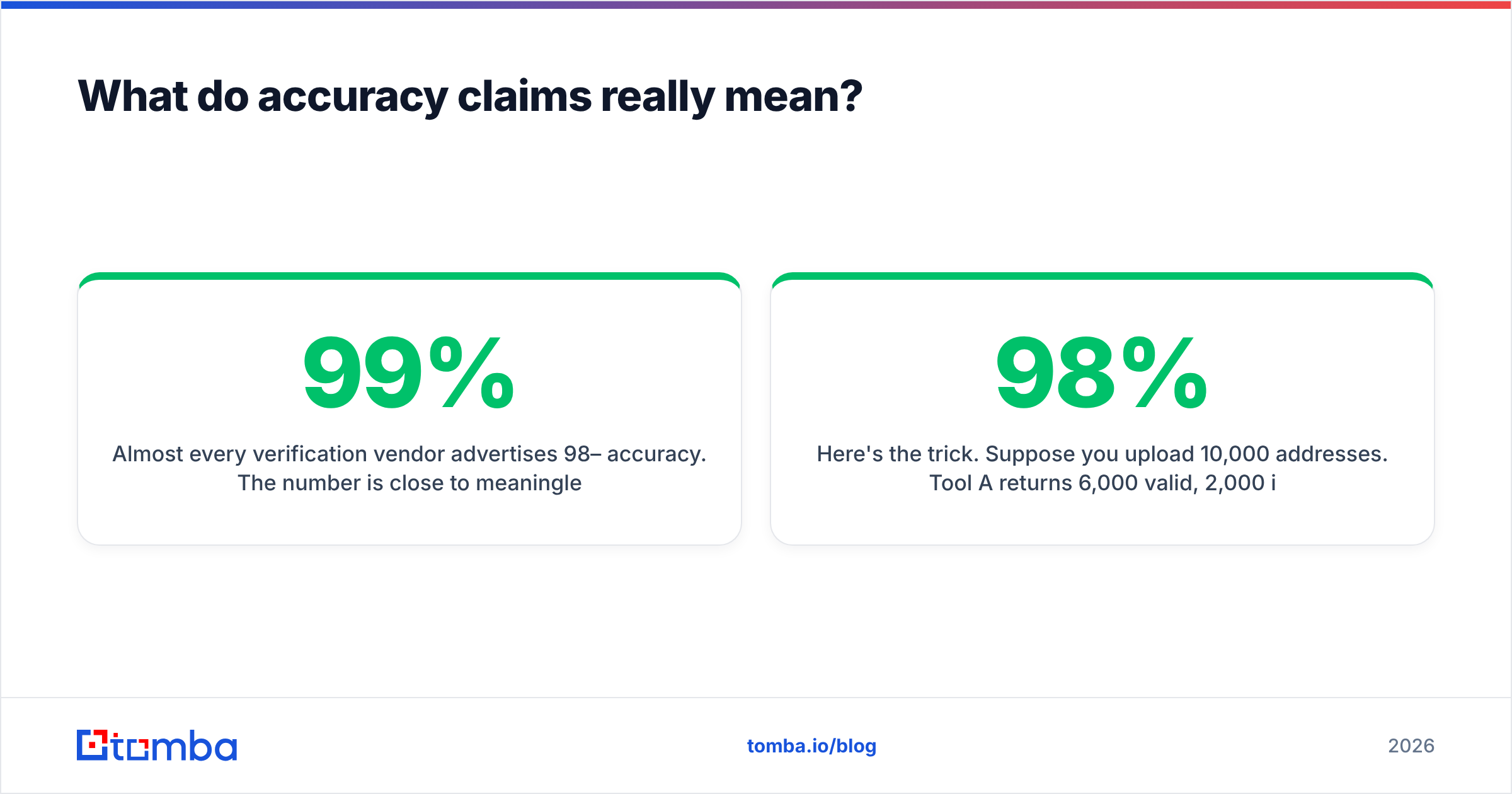
Almost every verification vendor advertises 98–99% accuracy. The number is close to meaningless on its own, because accuracy is only measured across the addresses the tool was willing to judge.
Here's the trick. Suppose you upload 10,000 addresses. Tool A returns 6,000 valid, 2,000 invalid, and 2,000 "unknown" or "risky." Tool B returns 8,500 valid, 1,200 invalid, and 300 unknown. If both are 98% accurate on the judged subset, Tool B is dramatically more useful — you got 2,500 more sendable addresses out of the same file. Tool A charged you for 10,000 credits and handed back a 20% shrug.
So when you evaluate an email verification checker, measure four things, in this order:
- Coverage — what percentage of the file got a definitive verdict?
- False-valid rate — of the addresses marked valid, how many actually bounced? This is the number that costs you deliverability. Test it by sending to a 500-address sample and reading the bounce log.
- False-invalid rate — how many good prospects were thrown away? Harder to measure, but you can spot-check by manually confirming 50 "invalid" addresses on LinkedIn or the company site.
- Credit policy on unknowns — are you billed for addresses the tool couldn't resolve? Some vendors refund them, most don't.

Run this test yourself before committing to an annual plan. Take 1,000 addresses you already know the outcome for — a segment you emailed last quarter, where you have the actual bounce data — and push it through two or three tools. The vendor that reproduces your known bounces most closely wins. Published benchmarks, including your own, age badly; providers change their SMTP behavior constantly.
How do the main email verification checkers compare?#
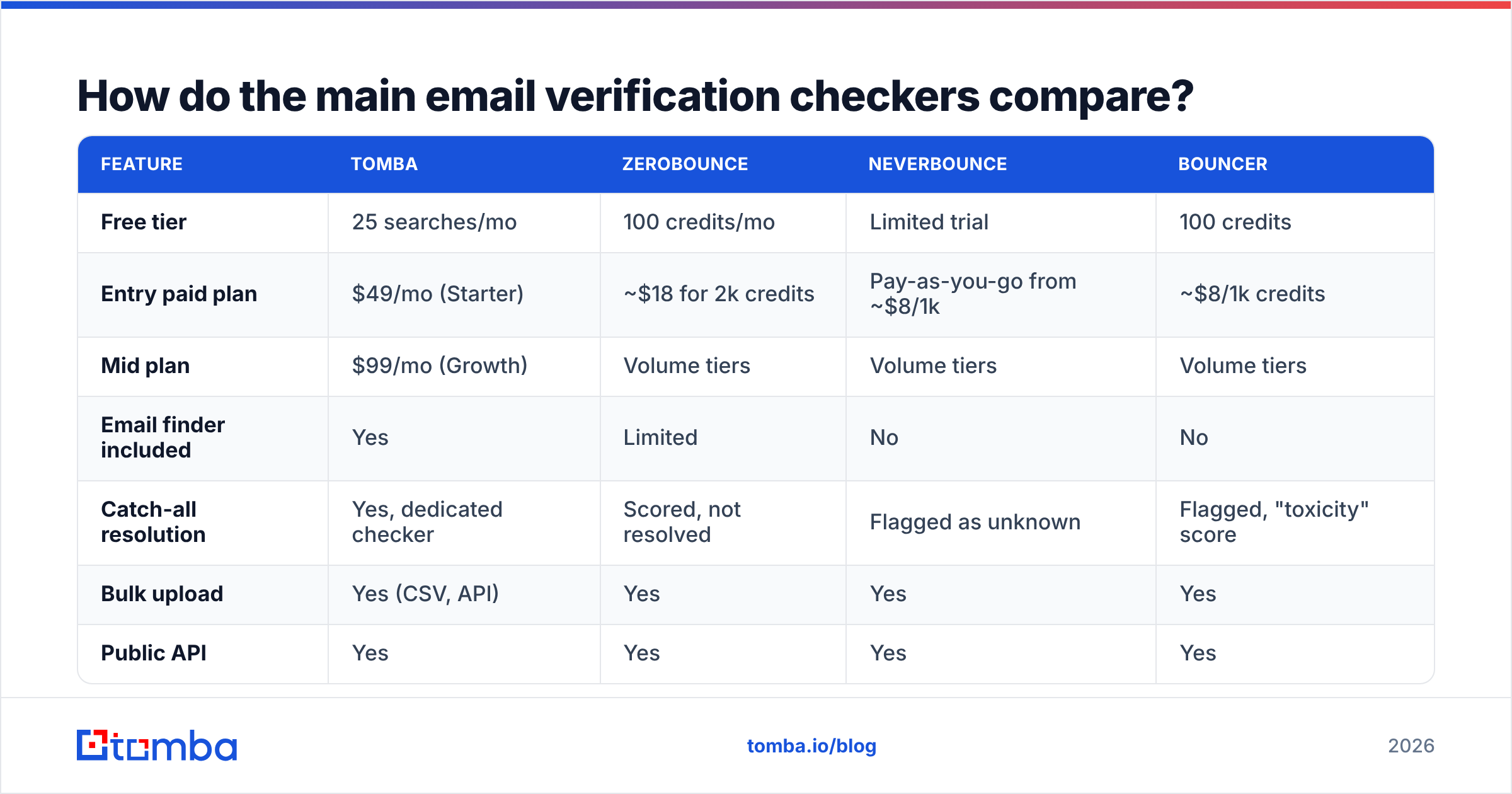
Pricing below reflects list prices at publication. Verify current numbers on each vendor's own page before you buy — this category re-prices often.
| Feature | Tomba | ZeroBounce | NeverBounce | Bouncer |
|---|---|---|---|---|
| Free tier | 25 searches/mo | 100 credits/mo | Limited trial | 100 credits |
| Entry paid plan | $49/mo (Starter) | ~$18 for 2k credits | Pay-as-you-go from ~$8/1k | ~$8/1k credits |
| Mid plan | $99/mo (Growth) | Volume tiers | Volume tiers | Volume tiers |
| Email finder included | Yes | Limited | No | No |
| Catch-all resolution | Yes, dedicated checker | Scored, not resolved | Flagged as unknown | Flagged, "toxicity" score |
| Bulk upload | Yes (CSV, API) | Yes | Yes | Yes |
| Public API | Yes | Yes | Yes | Yes |
| Phone verification | Yes | Yes (paid add-on) | No | No |
| Best for | Teams that find and verify in one workflow | Standalone list hygiene at volume | High-volume one-off cleans | Simple, fast bulk cleans |

The structural choice is subscription versus credits. Pay-as-you-go verifiers like NeverBounce and Bouncer are excellent if your job is "clean this 200k list once before we migrate ESPs." They're poor value if you verify 3,000 addresses a month, every month, and also need to source those addresses — you end up paying two vendors and stitching two APIs together.
Bundled platforms make the opposite trade. Tomba pricing starts at $49/mo for Starter, $99/mo for Growth, and $249/mo for Pro, with finding, verification, domain search, and enrichment drawing from a shared credit pool. If your workflow is find → verify → push to CRM, one pool and one API key beats juggling three.
For genuinely occasional use, don't buy anything. A free email checker handles the "is this one address real before I send a proposal" case without a contract.
What about catch-all domains?#
Catch-all is where most lists quietly die. A catch-all (or "accept-all") domain is configured to say 250 OK to every RCPT TO, regardless of whether the mailbox exists. The SMTP handshake tells you nothing.
This isn't a niche edge case. Depending on your target market, 15–30% of B2B domains are catch-all — it's especially common in enterprise environments running Microsoft 365 with a permissive connector, and in agencies that route everything to a shared inbox.
Your options, ranked by how much they actually help:
- Discard them — safest, and you'll throw away roughly a quarter of your addressable market. Fine for regulated industries, wasteful for everyone else.
- Send anyway and hope — the address may be valid, or it may accept and then silently discard, or it may accept and bounce asynchronously hours later. Async bounces are the worst kind because they hit your reputation after the send report says everything's fine.
- Pattern-confirm — if you've independently confirmed that
firstname.lastname@acme.comis the company's format from three other verified employees, a catch-all address matching that pattern is a reasonable bet. - Use a dedicated resolver — a catch-all verifier cross-references the address against known-good source data rather than relying on the SMTP verdict alone, returning a confidence score instead of a shrug.
Whatever you choose, segment catch-all sends into their own campaign on a separate sending domain. If they bounce, the damage is contained.
How much does an unverified list actually cost?#
Concretely, with round numbers. Say you send 10,000 cold emails a month across four inboxes.
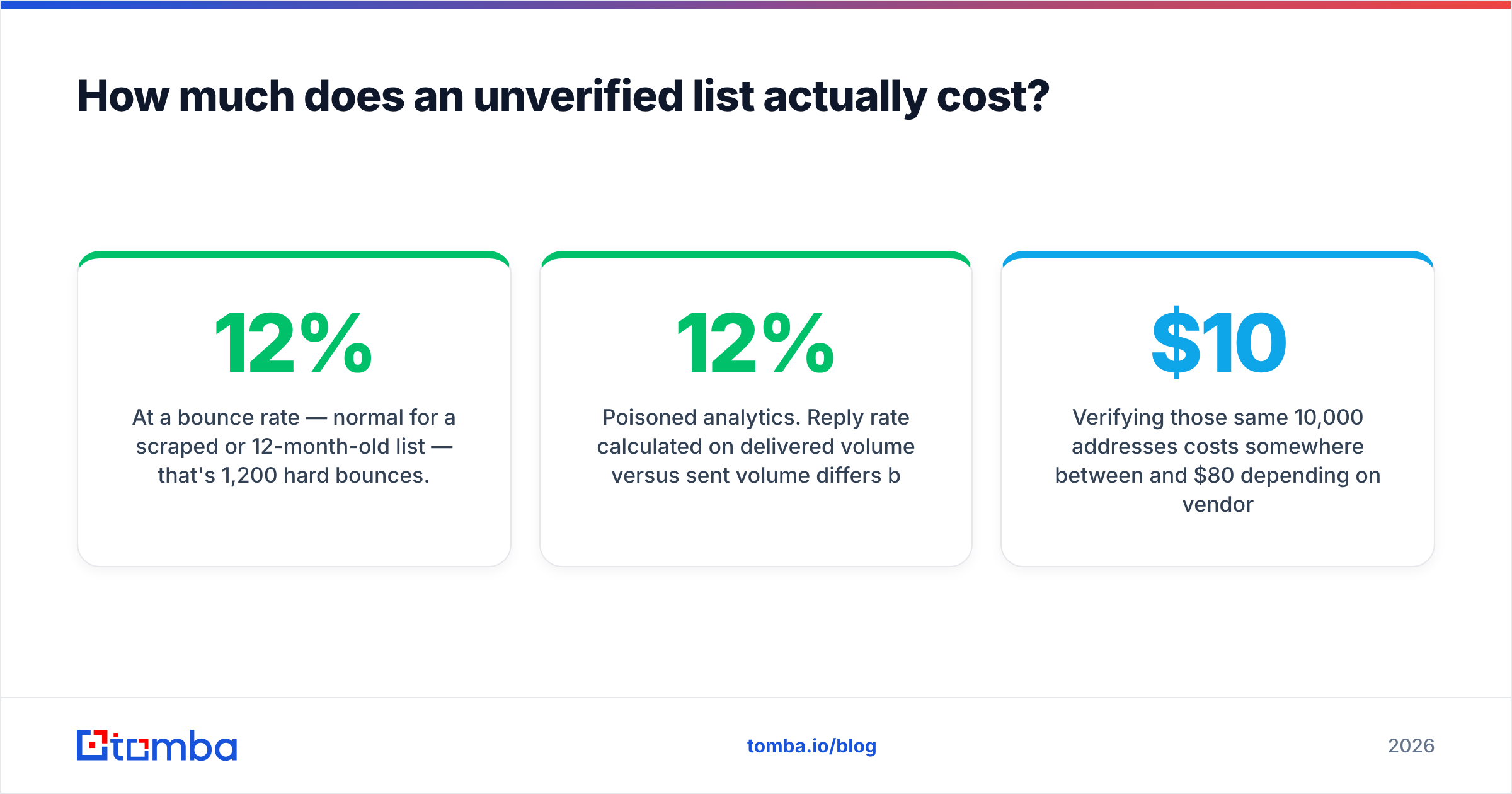
At a 12% bounce rate — normal for a scraped or 12-month-old list — that's 1,200 hard bounces. Google and Yahoo's bulk sender requirements set a hard spam-complaint threshold of 0.3%, and while bounce rate isn't published as a hard number, filtering behavior degrades sharply past 2–3%. At 12%, you're not getting throttled next quarter; you're getting throttled next week.
Then the second-order costs stack up:
- Domain burn. A cooked sending domain takes 3–4 weeks of warmup to recover, if it recovers. Replacement domains cost money and time.
- Wasted sequencing credits. Your outreach platform bills for every send, including the 1,200 that never arrived.
- Poisoned analytics. Reply rate calculated on delivered volume versus sent volume differs by 12%, so every A/B test you ran that month is noise.
- Rep time. Bounce triage is manual and nobody enjoys it.
Verifying those same 10,000 addresses costs somewhere between $10 and $80 depending on vendor and plan. It is the highest-ROI line item in an outbound budget, and it's not close. For monthly list maintenance at scale, a bulk email finder that verifies as it enriches removes the separate cleaning step entirely.
How do you build verification into your workflow?#
Stop treating verification as a pre-send ritual. Make it a property of the data itself.
At capture. Every inbound form, every trade-show scan, every CSV a rep uploads — verify at the point of entry via API. A bad address that never enters the CRM never needs cleaning. Most verification APIs return in under a second, fast enough to run inline on form submit.
At enrichment. When you find a new address, verify it in the same call. Sourcing and verifying as two separate batch jobs guarantees drift between them.
On a decay schedule. B2B email data decays at roughly 2–2.5% per month through job changes alone, per the standard figures cited across the data industry. That compounds to about 25–30% a year. Re-verify:
- Active sequence lists: before every campaign launch.
- Warm CRM contacts: every 90 days.
- Dormant database records: every 6 months, or archive them.
- Anything older than 12 months and never engaged: re-verify or delete, no middle ground.
On bounce feedback. Wire your ESP's bounce webhook back into your CRM so a hard bounce marks the record invalid automatically. Enormous number of teams skip this and re-import the same dead address three quarters running.
If your stack runs on spreadsheets, the Google Sheets add-on covers the last-mile case where a rep needs to clean 200 rows without opening a ticket.
What should you actually check before buying?#
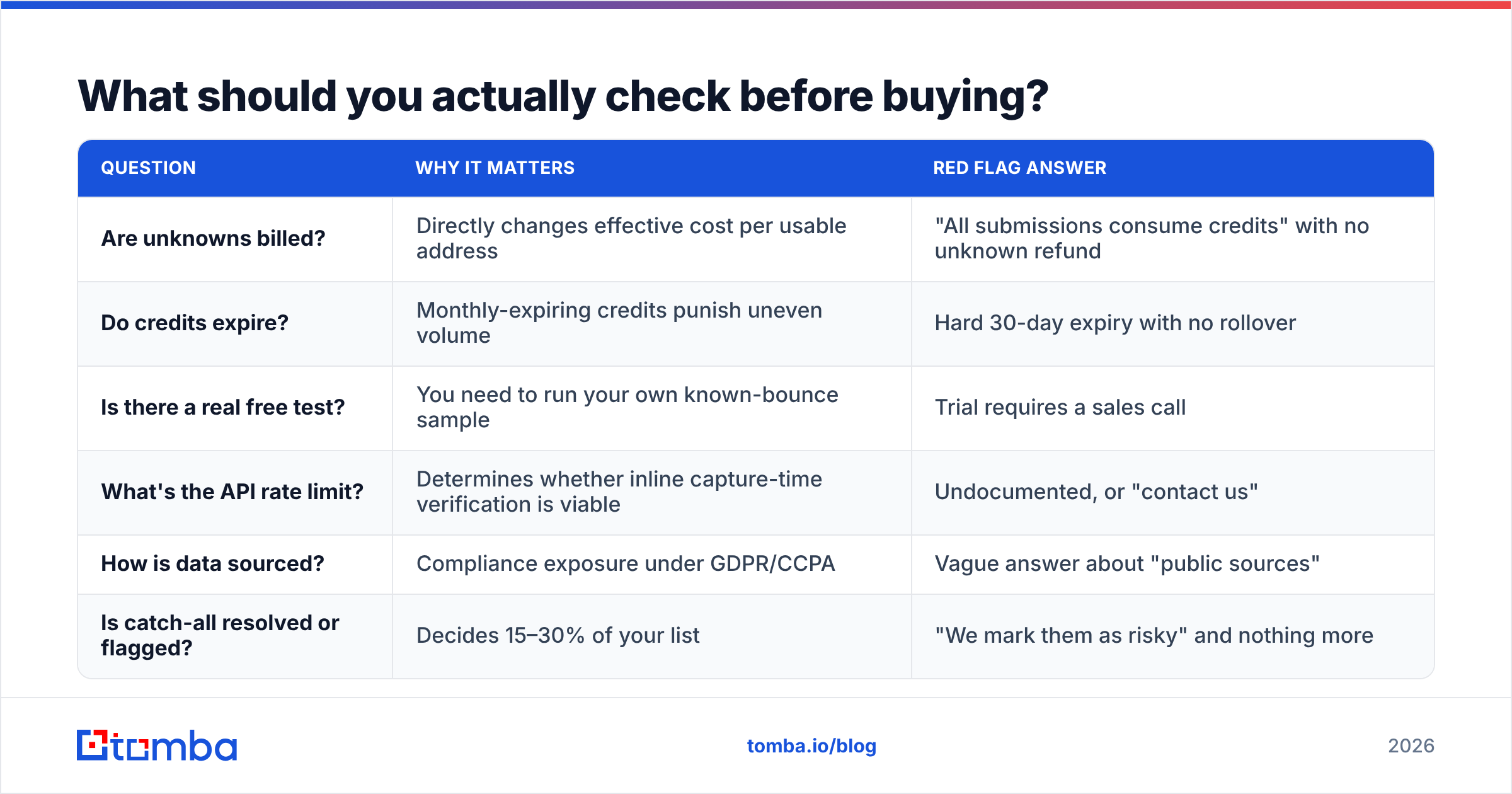
A short due-diligence list, because the vendor demo will not volunteer any of this:
| Question | Why it matters | Red flag answer |
|---|---|---|
| Are unknowns billed? | Directly changes effective cost per usable address | "All submissions consume credits" with no unknown refund |
| Do credits expire? | Monthly-expiring credits punish uneven volume | Hard 30-day expiry with no rollover |
| Is there a real free test? | You need to run your own known-bounce sample | Trial requires a sales call |
| What's the API rate limit? | Determines whether inline capture-time verification is viable | Undocumented, or "contact us" |
| How is data sourced? | Compliance exposure under GDPR/CCPA | Vague answer about "public sources" |
| Is catch-all resolved or flagged? | Decides 15–30% of your list | "We mark them as risky" and nothing more |
Cross-check the vendor's own claims against third-party review volume on G2's email verification category — not the star rating, which is gameable, but the recency and specificity of the reviews. A tool with forty detailed 2026 reviews mentioning bounce rates is telling you more than one with four hundred generic five-stars.
And read the docs before you sign. If the email verification API documentation doesn't show you actual response payloads with every status enum listed, integration will take three times longer than the sales estimate.
Where does verification stop and judgment start?#
A verifier tells you an address can receive mail. It does not tell you the person still works there, that they're the right buyer, or that they want to hear from you. Those are separate problems, and no amount of SMTP checking solves them.
The practical order of operations: verify to protect your infrastructure, then qualify to protect your reply rate. A perfectly verified list of the wrong 5,000 people will land in the inbox and get ignored, which is a nicer failure mode than getting blocked, but still a failure.
Verification buys you the right to be judged on your message. That's all it does — and it's worth every dollar, because without it your message never gets read at all.
Ready to stop guessing? Start with the Tomba Email Finder — it sources professional addresses by domain, name, or company and returns a confidence score on every result, so finding and verifying happen in the same call instead of across two vendors and two invoices. The free tier gives you 25 searches a month to test it against a list where you already know the answers. Run your own benchmark, read your own bounce log, and decide from there.
Related guides#
Ready to find emails that actually work?
Join 150,000+ professionals who stopped guessing and started sending. Free credits on signup — no credit card required.
Get the Tomba newsletter
Practical outbound tactics and product updates — once every two weeks.
About the author