Email Verification Generator: How It Really Works in 2026
Email generators guess addresses; verifiers prove them. Here's how the combined workflow actually performs in 2026, what accuracy to expect, and which tools deserve the budget.

TL;DR
- An "email verification generator" is really two jobs stitched together: a permutator that guesses likely address formats from a name and domain, and a verifier that proves which guess is deliverable.
- Generation alone is a coin flip. Raw permutations land somewhere around 25–40% valid on typical B2B domains. Verification is what turns a guess into a usable contact.
- SMTP-level verification catches most dead addresses, but catch-all domains, greylisting, and role accounts still break naive tools. Ask how a vendor handles each before you trust its "valid" label.
- Cost per verified address matters more than list price. A cheap generator that produces 60% unknowns is more expensive than a $49/mo tool with a clean confidence score.
- Use a generator when you have a name and a domain but no data provider coverage. Use a database-backed finder first — it is faster, cheaper, and does not risk your sender reputation.
If you have ever pasted a lead list into a spreadsheet, built 12 permutations of first.last@company.com, and then wondered which one to actually send to, this guide is for you. Below is how the generate-then-verify pipeline works under the hood, where it breaks, and how the main tools compare in 2026.
What is an email verification generator?#
An email verification generator combines two distinct operations that most people describe as one thing.
The generator takes structured inputs — first name, last name, company domain — and produces every plausible address format. Give it "Sarah Chen" and "acme.com" and it returns sarah@acme.com, schen@acme.com, sarah.chen@acme.com, s.chen@acme.com, chens@acme.com, and a dozen more. No network calls, no intelligence. It is string concatenation with a pattern library.
The verifier then tests each candidate against the receiving mail server to determine which one actually exists. This is where the real work happens: syntax parsing, MX record lookup, SMTP handshake, catch-all detection, and disposable-domain screening.
Think of it like a locksmith with a bump key set. The generator hands you 15 keys that might fit the lock. The verifier is the person who walks up and tries each one — quietly, without breaking the door. Neither half is useful alone. A generator with no verifier gives you a bounce-rate problem. A verifier with no generator gives you nothing to check.
Most free tools online only do the first half and label it "email generator." Read the fine print before you assume the addresses have been validated. If you want the two steps separated so you can see what each contributes, Tomba splits them into an email permutator and a standalone email verifier.

How does an email generator actually build an address?#
Generation follows a ranked pattern library. The order matters more than the count, because trying 40 permutations against one mail server looks like a dictionary attack and gets your verifier IP blocked.
Here is the sequence a competent generator follows:
- Normalize the input. Strip accents, hyphens, and middle names. "José Martínez-Ruiz" becomes candidate tokens
jose,martinez,ruiz, andmartinezruiz. Skipping this step is the single most common source of missed matches in European and Latin American lists. - Look up the domain's known pattern. If the tool has already confirmed that
acme.comusesfirst.last, it should generate that format first and stop. This is why database-backed tools outperform pure permutators — they are not guessing blind. A company email pattern check answers this in one request. - Rank remaining formats by global frequency. Across B2B domains,
first.lastandfirstdominate, followed byfirst_initial + last, thenfirst + last_initial. Rare formats likelast.firstorfirstlast_departmentsit at the bottom and rarely justify the verification credits. - Resolve the domain, not the brand.
acme.ioandacme.commay both resolve, but only one carries the MX records. Generating against the wrong host wastes every subsequent check. - Cap the candidate set. Good tools stop at 6–10 permutations per person. Beyond that, marginal hit rate collapses while server-side rate limiting climbs.
- Hand off to verification in priority order and short-circuit on the first confirmed valid result.
Steps 2 and 6 are where the money is. A generator that fires all 15 permutations at the mail server in parallel burns credits, triggers throttling, and often returns "unknown" for every single one.
Why do generated emails fail verification?#
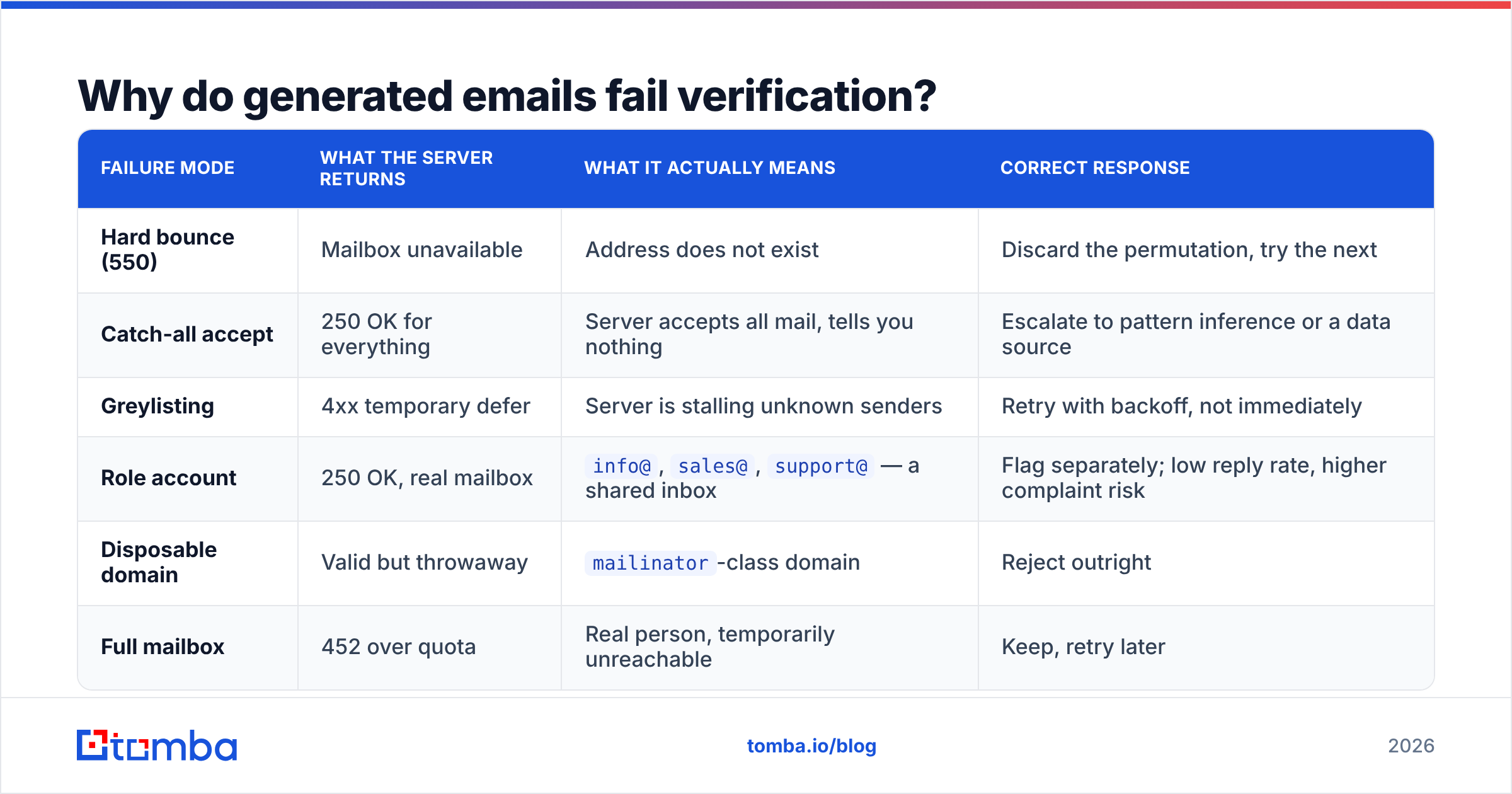
Because the address never existed, or because the server refuses to tell you the truth. Those are very different failures and they need different responses.
| Failure mode | What the server returns | What it actually means | Correct response |
|---|---|---|---|
| Hard bounce (550) | Mailbox unavailable | Address does not exist | Discard the permutation, try the next |
| Catch-all accept | 250 OK for everything | Server accepts all mail, tells you nothing | Escalate to pattern inference or a data source |
| Greylisting | 4xx temporary defer | Server is stalling unknown senders | Retry with backoff, not immediately |
| Role account | 250 OK, real mailbox | info@, sales@, support@ — a shared inbox |
Flag separately; low reply rate, higher complaint risk |
| Disposable domain | Valid but throwaway | mailinator-class domain |
Reject outright |
| Full mailbox | 452 over quota | Real person, temporarily unreachable | Keep, retry later |
The two rows that ruin campaigns are catch-all and greylisting. A weak verifier reports both as "valid" because the SMTP conversation did not explicitly reject the address. You then send to a permutation that was never real, and the bounce lands weeks later — after you have already burned domain reputation on a cold sending mailbox.
Ask any vendor a direct question: what percentage of your "valid" results come from catch-all domains? If they cannot answer, they are not measuring it. Tomba addresses this with a dedicated catch-all verifier that scores the likelihood an address is real on an accept-all server rather than shrugging and returning "unknown."
What does a real verification pipeline check?#
Verification is a cascade. Each stage is cheaper than the one after it, so order determines cost.
Stage 1 — Syntax. RFC 5322 parsing. Catches typos, illegal characters, and the double-dot mistakes that survive copy-paste. Free, instant, and eliminates roughly 2–5% of a messy list.
Stage 2 — Domain and MX. Does the domain resolve? Does it publish MX records? A domain with no MX cannot receive mail regardless of how plausible the local part looks. This stage also flags parked domains and expired registrations.
Stage 3 — Disposable and role detection. Match against maintained lists of throwaway providers and generic mailbox prefixes. Cheap, list-driven, and worth doing before you spend an SMTP connection.
Stage 4 — SMTP handshake. Open a connection to the mail exchanger, issue MAIL FROM and RCPT TO, read the response code, and disconnect before DATA. No email is ever sent. This is the step that produces the definitive answer, and it is described in detail in the SMTP specification if you want the protocol-level view.
Stage 5 — Catch-all probing. Send a RCPT TO for a deliberately fake address at the same domain. If the server accepts x7f3q9zz@acme.com, it accepts everything, and stage 4's result was meaningless.
Stage 6 — Confidence scoring. Combine pattern frequency, historical data on that domain, engagement signals, and stage 5's result into a numeric score. This is the only stage where vendors genuinely differ. Everything before it is commodity plumbing.

How accurate is a generated-and-verified email in practice?#
Expect meaningfully lower accuracy than a database lookup, and plan around it.
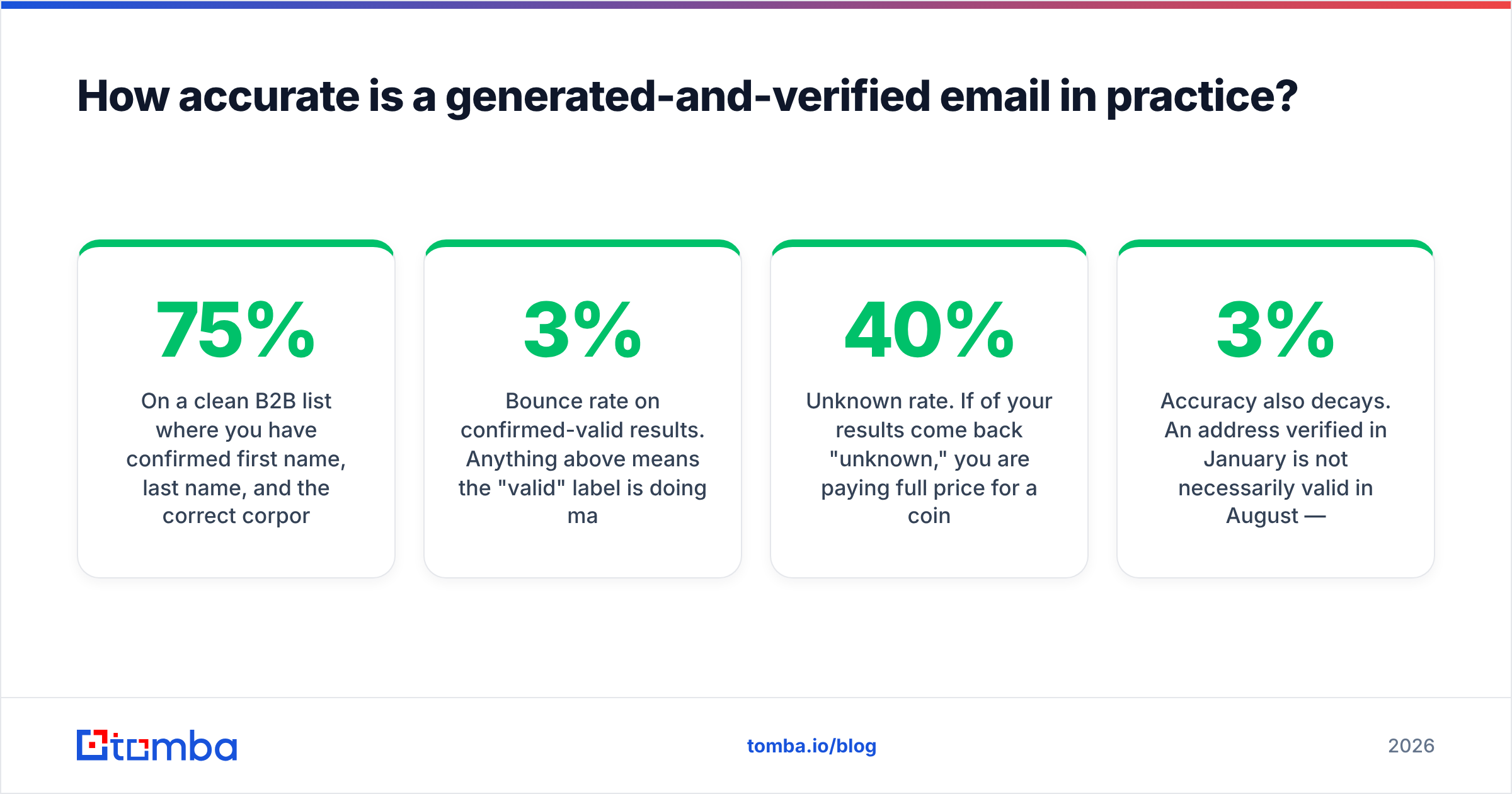
On a clean B2B list where you have confirmed first name, last name, and the correct corporate domain, generate-then-verify typically resolves 55–75% of contacts to a confirmed address. The remainder splits between catch-all domains that cannot be resolved by SMTP alone and people whose address genuinely does not follow a guessable pattern — contractors, acquisitions retained on legacy domains, and anyone at a company using randomized aliases.
Compare that with a database-backed email finder, which queries known-good records first and only falls back to pattern inference. Coverage on the same list usually runs higher because the tool is not starting from zero on every lookup.
Two numbers to hold vendors to:
- Bounce rate on confirmed-valid results. Anything above 3% means the "valid" label is doing marketing work, not engineering work. Under 2% is what a serious verifier delivers.
- Unknown rate. If 40% of your results come back "unknown," you are paying full price for a coin flip. Independent user reviews on G2 are a reasonable sanity check here, because vendors rarely publish unknown rates themselves.
Accuracy also decays. An address verified in January is not necessarily valid in August — B2B contact data churns roughly 2–3% per month as people change jobs. Re-verify anything older than 90 days before a send, especially if you are re-using a list across campaigns.

Which email verification generator should you use in 2026?#
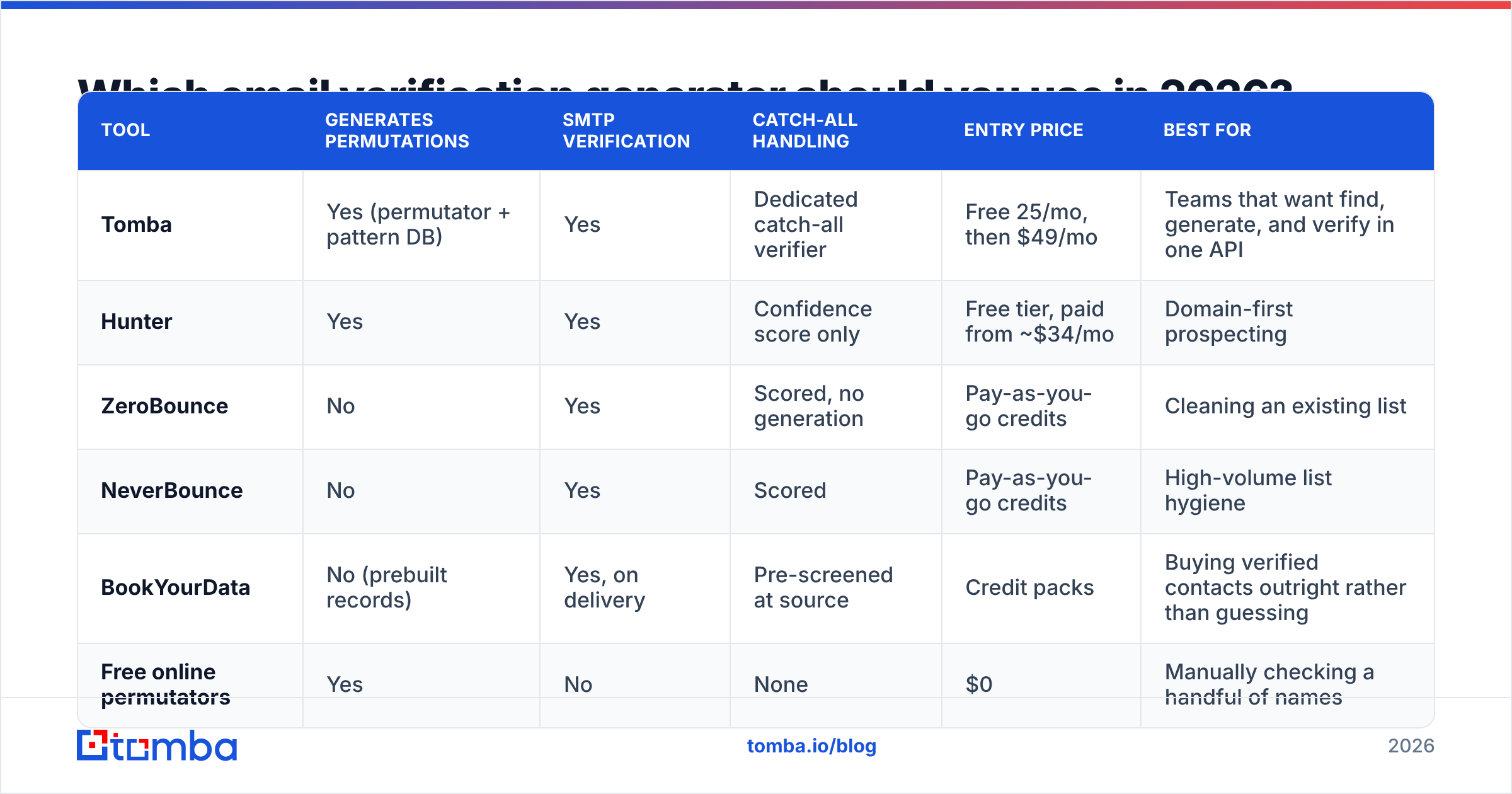
The category splits into three types: free permutators with no verification, standalone verifiers with no generation, and combined platforms that do both plus enrichment. Here is how the realistic options line up.
| Tool | Generates permutations | SMTP verification | Catch-all handling | Entry price | Best for |
|---|---|---|---|---|---|
| Tomba | Yes (permutator + pattern DB) | Yes | Dedicated catch-all verifier | Free 25/mo, then $49/mo | Teams that want find, generate, and verify in one API |
| Hunter | Yes | Yes | Confidence score only | Free tier, paid from ~$34/mo | Domain-first prospecting |
| ZeroBounce | No | Yes | Scored, no generation | Pay-as-you-go credits | Cleaning an existing list |
| NeverBounce | No | Yes | Scored | Pay-as-you-go credits | High-volume list hygiene |
| BookYourData | No (prebuilt records) | Yes, on delivery | Pre-screened at source | Credit packs | Buying verified contacts outright rather than guessing |
| Free online permutators | Yes | No | None | $0 | Manually checking a handful of names |

A note on that last row: free permutators are genuinely useful for one-off research, and there is no reason to pay for a tool that only concatenates strings. The problem is what happens next. Generating 12 addresses and sending to all of them is the fastest way to destroy a sending domain. If you use a free permutator, pair it with a real verifier before anything reaches your sequencer.
BookYourData sits in a different lane worth understanding — it sells pre-verified records rather than generating candidates, which sidesteps the guessing problem entirely when your ICP maps cleanly to available inventory. Generate-and-verify tools earn their place when your target list is idiosyncratic and no prebuilt dataset covers it.
How much should you actually pay?#
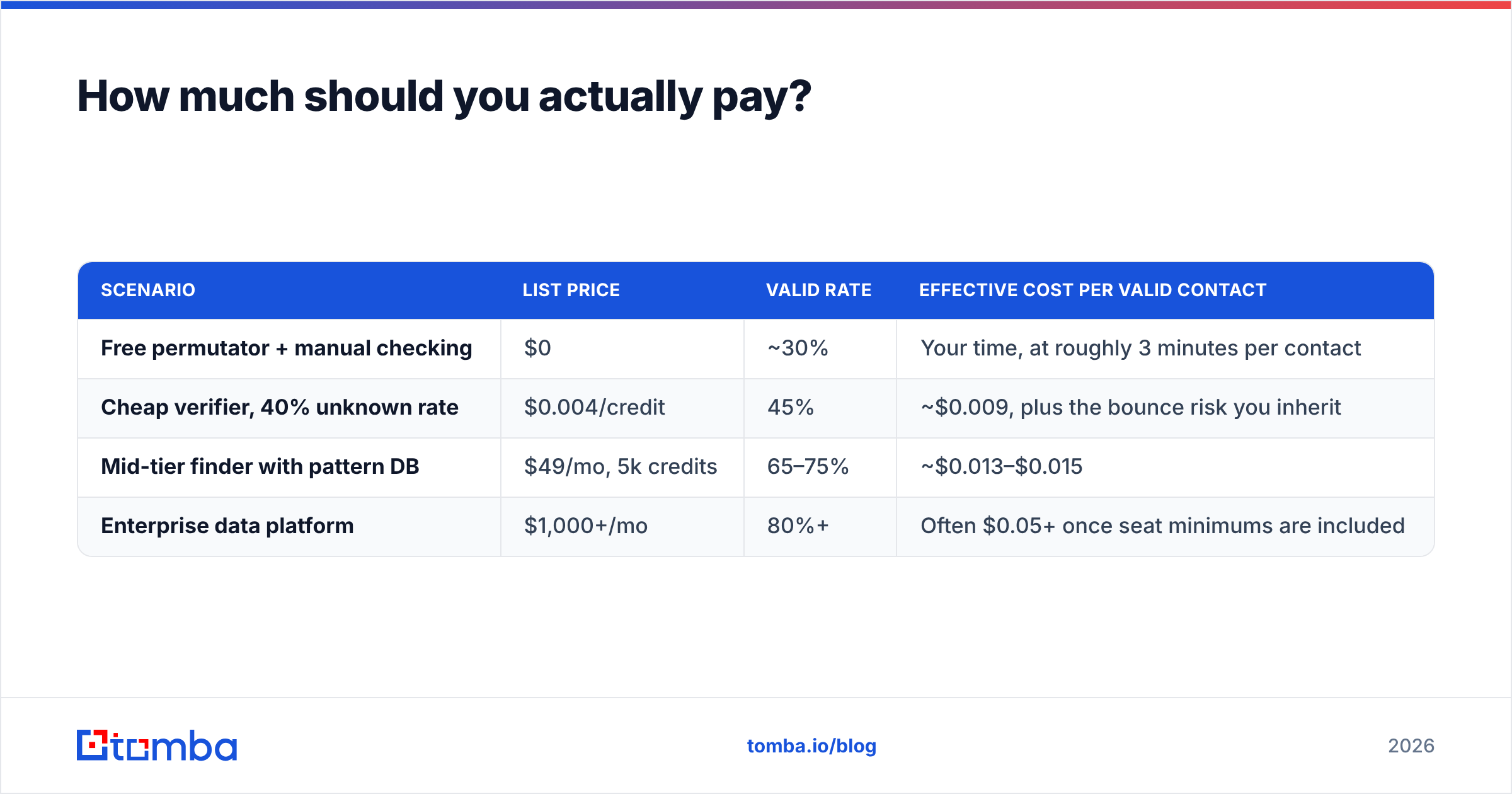
Price the output, not the input. The number that matters is cost per confirmed valid address.
| Scenario | List price | Valid rate | Effective cost per valid contact |
|---|---|---|---|
| Free permutator + manual checking | $0 | ~30% | Your time, at roughly 3 minutes per contact |
| Cheap verifier, 40% unknown rate | $0.004/credit | 45% | ~$0.009, plus the bounce risk you inherit |
| Mid-tier finder with pattern DB | $49/mo, 5k credits | 65–75% | ~$0.013–$0.015 |
| Enterprise data platform | $1,000+/mo | 80%+ | Often $0.05+ once seat minimums are included |
Tomba's tiers run Free (25 searches/mo), Starter at $49/mo, Growth at $99/mo, Pro at $249/mo, and custom Enterprise pricing — full details on the pricing page. The reason a $49/mo tool can beat a $0.004/credit verifier on total cost is simple: it wastes fewer credits on permutations that were never going to resolve, because the pattern database already knows the domain's format.
Run the math on your own list before committing. Take 200 contacts, run them through two tools' free tiers, and count confirmed valid results. That fifteen-minute test is worth more than any vendor benchmark, including this one.
When should you skip generation entirely?#
Three situations where permutation is the wrong tool:
- You have the domain but not the person. Use a domain search instead — it returns known addresses at the company along with the confirmed pattern, which is strictly better than guessing at a name you do not have.
- Your list is under 20 contacts. Manual research on LinkedIn, company about-pages, and press releases beats any tool at that scale, and costs nothing.
- The domain is a known catch-all. Google Workspace and Microsoft 365 tenants configured to accept all mail will happily confirm every permutation you throw at them. Generating 12 candidates against a catch-all produces 12 false positives. Detect the catch-all first, then decide whether the contact is worth pursuing through another channel.
There is also a deliverability argument. Every SMTP probe is a signal to the receiving infrastructure. Hammering one domain with dozens of RCPT TO commands for nonexistent mailboxes is exactly the pattern spam filters are built to notice, and it feeds into the sender reputation that determines whether your legitimate mail reaches the inbox. HubSpot's own email deliverability guidance makes the same point from the sending side: list quality is upstream of everything else in cold outreach performance.
What does a good workflow look like end to end?#
Run it in this order and you will waste far fewer credits:
- Check whether the domain's pattern is already known. If yes, generate one address and verify it.
- If the pattern is unknown, run a domain search to surface any confirmed addresses at that company and infer the pattern from them.
- Only if both fail, generate a ranked permutation set — six candidates maximum.
- Verify in priority order, stopping at the first confirmed valid result.
- Flag catch-all domains into a separate segment. Do not mix them with confirmed addresses in the same send.
- Re-verify anything older than 90 days before it goes into a sequence.
That sequence typically cuts credit consumption by half compared with generating everything up front, because most B2B domains resolve at step 1 or 2.
If you are building a list from names and domains, start with the tool that does the least guessing. Tomba's Email Finder checks a database of known-good records first, infers the domain pattern second, and only permutates as a last resort — then runs SMTP and catch-all verification on the result before handing it back. The free tier gives you 25 searches a month to test it against your own list, and Starter runs $49/mo when you are ready to scale. Bring 200 real contacts, compare the confirmed-valid rate against whatever you use now, and let the numbers decide.
Related guides#
Ready to find emails that actually work?
Join 150,000+ professionals who stopped guessing and started sending. Free credits on signup — no credit card required.
Get the Tomba newsletter
Practical outbound tactics and product updates — once every two weeks.
About the author