Email Verification Open Source Tools: The 2026 Guide
Email verification open source tools promise free, unlimited checks. Here is what really happens when you self-host: accuracy ceilings, IP reputation, blocklists, and the upkeep bill nobody plans for.

Email verification open source tools are easy to find and easy to run. The hard part starts later. This guide shows what an email verification open source stack does well, where it stalls, and what it really costs to keep alive in 2026.
TL;DR#
- Email verification open source tools cover the cheap layers well: syntax, MX records, disposable domains, and role accounts.
- The costly layer is SMTP checks at scale. That needs clean IPs, PTR records, retry logic, and daily blocklist care.
- A self-hosted stack settles 70-85% of addresses. A mature paid API settles 95%+. Catch-all domains and Microsoft 365 cause most of the gap.
- Self-host when you have a platform team, spare budget, privacy rules, and steady volume. Buy when your bottleneck is pipeline, not principle.
- Best of both: run email verification open source filters first, then send only the survivors to a paid API.
What does "email verification open source" actually mean?#
It means you run the checks yourself. You do not pay per lookup. But verification is not one job. It is five checks. Each has its own cost and its own failure mode. Email verification open source projects cover them unevenly.
- Syntax check — Does the address parse under RFC 5322? Every language has a solid library. It is free and instant. It catches typos like
john@gmail,com. It cannot tell you if the mailbox exists. - Domain and MX check — Does the domain resolve? Does it publish MX records? A DNS lookup takes microseconds. It kills dead companies, parked domains, and misspelled brands.
- Disposable and role filters — Is this
mailinator.comorinfo@? This is list matching. The free lists on GitHub are good. But new burner domains show up weekly, so a stale list quietly rots.
Those three are commodity work. The last two are where an email verification open source setup starts to strain.
- SMTP mailbox probe — Connect to the mail server. Run
HELO,MAIL FROM,RCPT TO. Read the reply. This check decides deliverability. It is also the one that breaks when you self-host. - Catch-all handling — Some domains say yes to every address. Telling a real mailbox from a made-up one needs pattern data and history. No open source library ships that.
Layer four is an infrastructure problem. Layer five is a data problem. Most teams hope to solve layer five for free. That part does not work.
Which email verification open source tools are worth using?#
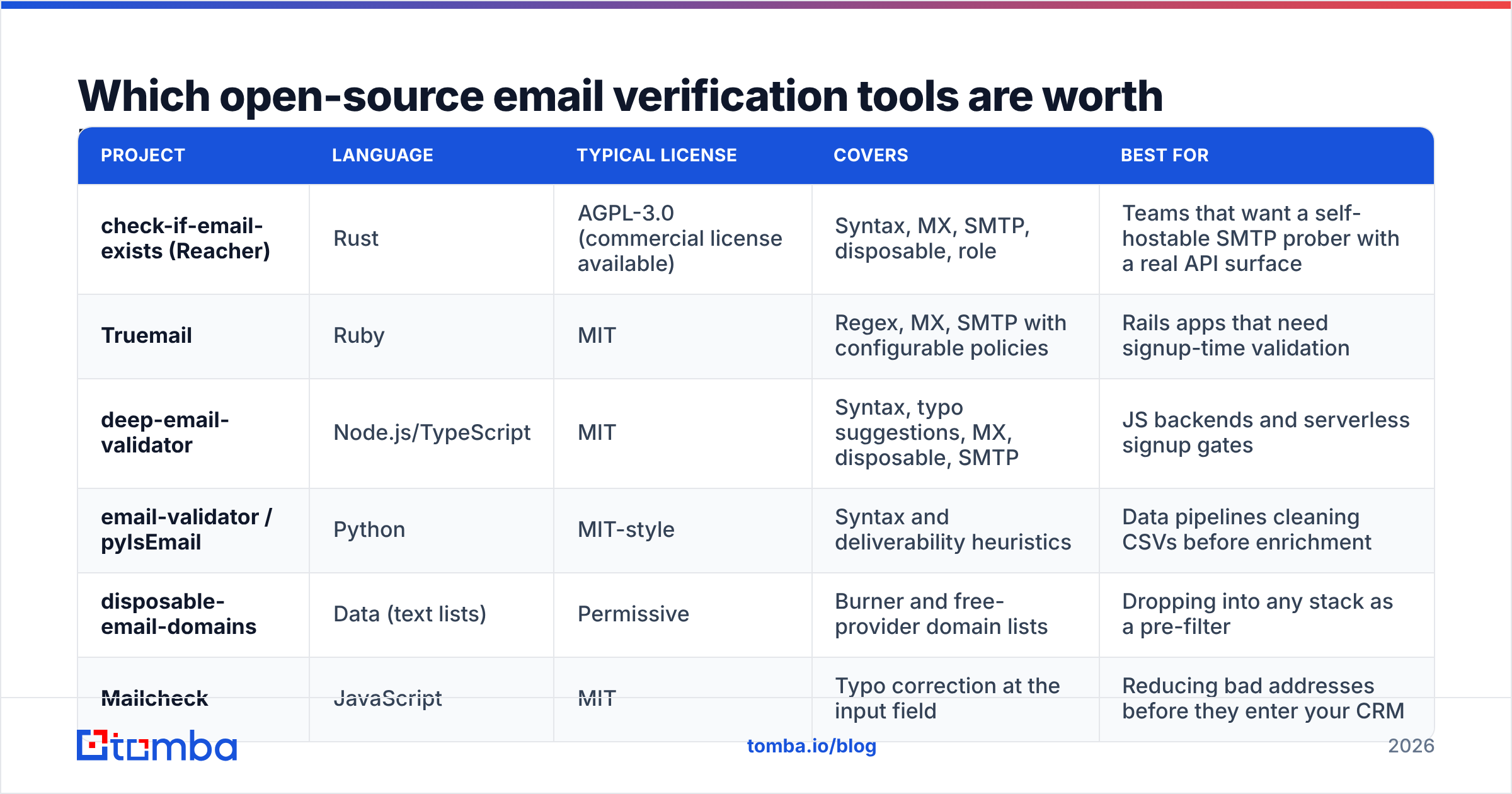
Here are the projects you see most in production. Licenses change, so read the repo before you ship. AGPL matters if you expose the tool as a network service.
| Project | Language | Typical license | Covers | Best for |
|---|---|---|---|---|
| check-if-email-exists (Reacher) | Rust | AGPL-3.0 (commercial license available) | Syntax, MX, SMTP, disposable, role | Teams that want a self-hostable SMTP prober with a real API surface |
| Truemail | Ruby | MIT | Regex, MX, SMTP with configurable policies | Rails apps that need signup-time validation |
| deep-email-validator | Node.js/TypeScript | MIT | Syntax, typo suggestions, MX, disposable, SMTP | JS backends and serverless signup gates |
| email-validator / pyIsEmail | Python | MIT-style | Syntax and deliverability heuristics | Data pipelines cleaning CSVs before enrichment |
| disposable-email-domains | Data (text lists) | Permissive | Burner and free-provider domain lists | Dropping into any stack as a pre-filter |
| Mailcheck | JavaScript | MIT | Typo correction at the input field | Reducing bad addresses before they enter your CRM |
Reacher's check-if-email-exists is the most complete email verification open source project of the group. It also frames the trade-off well: the code is free, and the code is not the hard part.
Small validation libraries still earn their place. Blocking bob@gmial.com at the form costs nothing. It also keeps a bad row out of your database forever. If you ship one thing from this post, ship typo correction and MX checks at signup.

Why is SMTP the hard part?#
Because the mail server on the other end decides whether to tell you the truth. More and more, it does not.
An SMTP probe is a half-finished delivery. You open port 25. You say hello. You name a sender. You name a recipient. Then you hang up before the body. The SMTP protocol allows this. Nothing forces a server to answer honestly. Four things go wrong.
Port 25 is often blocked. AWS, Google Cloud, Azure, DigitalOcean, and most home ISPs block or throttle port 25. You will file tickets to open it. Many hosts say no. Teams find this out after they build the tool.
Your IP score becomes a dependency. Probing thousands of mailboxes from a new IP looks like a harvest attack. First you get greylisted. Then rate-limited. Then listed on Spamhaus or Barracuda. Now your results are wrong and your sending domain sits next to a flagged IP. To stay safe, run a blacklist checker on a schedule and swap IPs as they rot.
Microsoft 365 and Google Workspace hide the answer. These two host most business mail. Both now accept every recipient at the SMTP step and bounce later. Or they give a vague reply to an unknown prober. A simple prober calls that "valid" or "unknown". Neither answer helps a cold campaign.
Catch-all domains say yes to everything. On an accept-all domain, ceo@company.com and asdfgh@company.com both return a 250. To sort them you need pattern data. You need to know the company uses first.last@, and that the person is real. That is a data asset, not an algorithm. It is why catch-all verification is its own product.
None of this is a bug in the libraries. This is how mail works now. An email verification open source library does its job. The internet declines to help.
What does a self-hosted stack cost?#
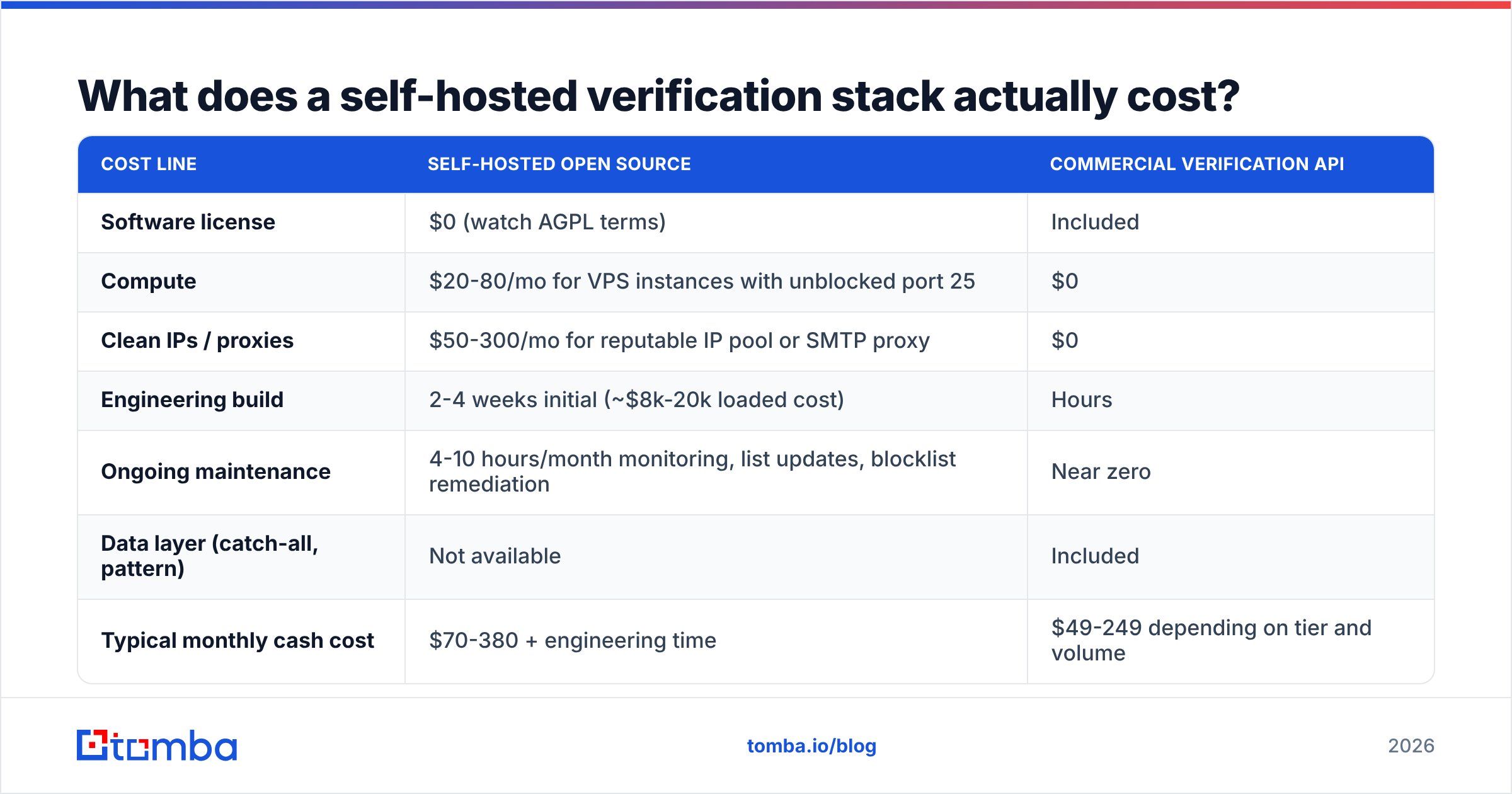
Run the numbers first. Here is a fair view for a team checking 50,000 addresses a month.
| Cost line | Self-hosted open source | Commercial verification API |
|---|---|---|
| Software license | $0 (watch AGPL terms) | Included |
| Compute | $20-80/mo for VPS instances with unblocked port 25 | $0 |
| Clean IPs / proxies | $50-300/mo for reputable IP pool or SMTP proxy | $0 |
| Engineering build | 2-4 weeks initial (~$8k-20k loaded cost) | Hours |
| Ongoing maintenance | 4-10 hours/month monitoring, list updates, blocklist remediation | Near zero |
| Data layer (catch-all, pattern) | Not available | Included |
| Typical monthly cash cost | $70-380 + engineering time | $49-249 depending on tier and volume |
| Conclusive-result rate | ~70-85% | ~95%+ |
The pattern holds. Self-hosting moves cost from a line you can see to a line you cannot. That is fine if your engineer time is cheap or your volume is huge. At ten million checks a month, the math favors self-hosting. At 50,000, you pay a senior engineer to babysit an IP pool to save under $200.
Weigh the accuracy gap too. Say your email verification open source stack leaves 20% of the list as unknown. You either drop those contacts or mail them anyway. Dropping them costs pipeline. Mailing them raises bounces, drags down sender reputation, and hurts inbox placement for the whole domain. That is how a $200 saving turns into a three-month cleanup.
How accurate is email verification open source versus a paid API?#
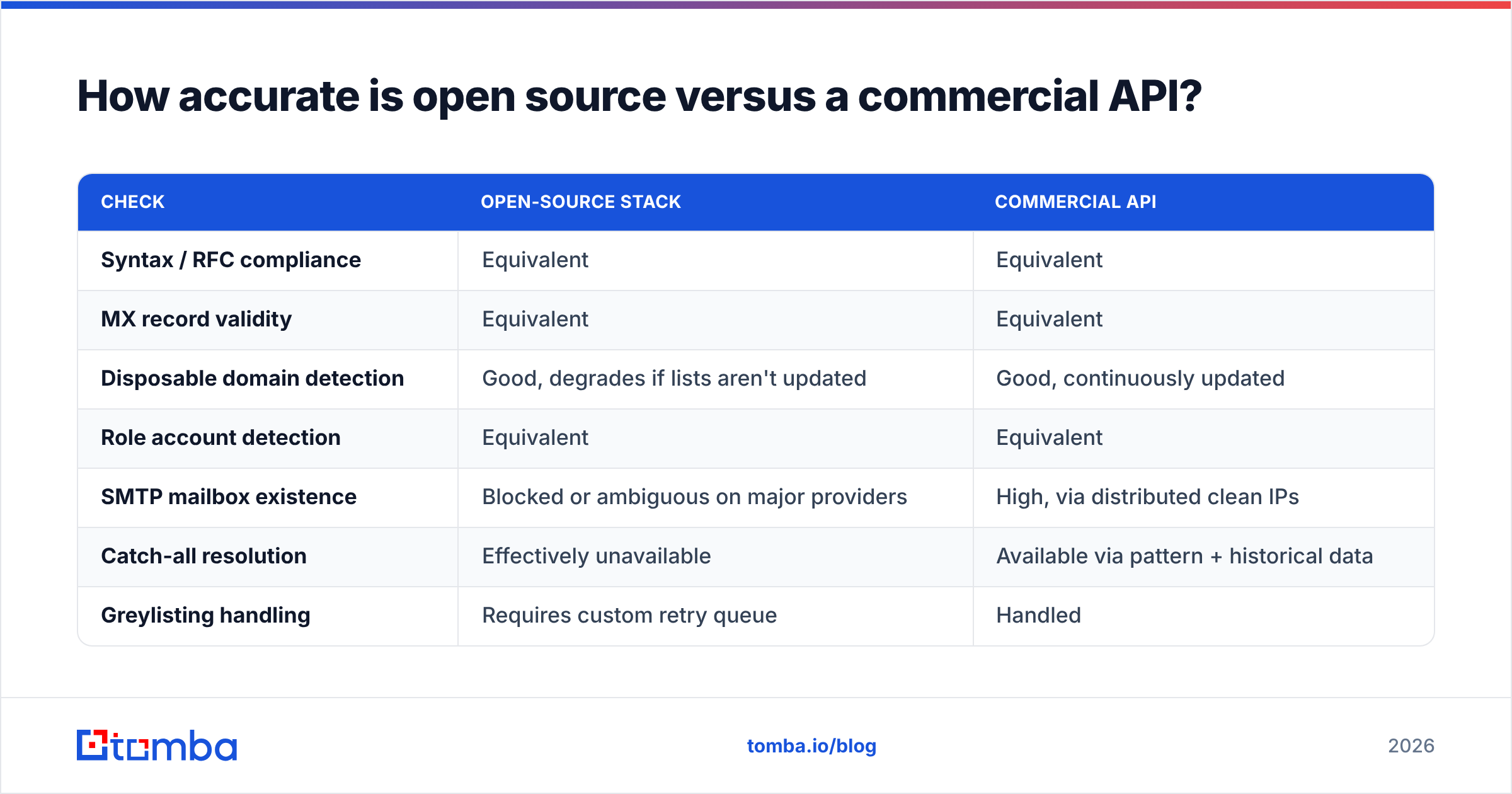
It depends on the layer. On syntax and MX checks, open source matches paid tools exactly. Same DNS. Same RFCs. Same answer. The gap opens on the layers that need infrastructure and private data.
| Check | Open-source stack | Commercial API |
|---|---|---|
| Syntax / RFC compliance | Equivalent | Equivalent |
| MX record validity | Equivalent | Equivalent |
| Disposable domain detection | Good, degrades if lists aren't updated | Good, continuously updated |
| Role account detection | Equivalent | Equivalent |
| SMTP mailbox existence | Blocked or ambiguous on major providers | High, via distributed clean IPs |
| Catch-all resolution | Effectively unavailable | Available via pattern + historical data |
| Greylisting handling | Requires custom retry queue | Handled |
| Throughput at 100k+ rows | Slow, rate-limited by receiving servers | Parallelized |
Short version: a good email verification open source stack gives you a clean list. A paid API gives you a confident list. For signup forms, clean is enough. For cold outbound, every hard bounce costs you reputation, so you are paying for confidence.
Want a quick sanity check? Run a few addresses through a free email checker and see where it disagrees with your own results.
When should you self-host, and when should you buy?#
Self-host if three or more of these are true:
- You check more than a million addresses a month, so unit cost rules.
- Privacy or data-residency rules forbid sending contact data to a vendor.
- You already run mail infrastructure with clean IPs and staff who know blocklists.
- Verification is part of your product, so you need control of the logic.
- You only need signup checks. There, syntax, MX, and disposable filters do 90% of the work.
Buy if two or more of these are true:
- Your main use is outbound sales, where catch-all handling decides results.
- Your team is under ten engineers and nobody wants to own an SMTP prober.
- Volume is spiky. A batch of 200,000 rows once a quarter is painful to self-host.
- You want verification and enrichment together, so one email verifier removes an integration.
There is no ideology here. Teams regret self-hosting when they built it to save money, then found the savings were smaller than one engineer-week.
How do you build a sensible hybrid stack?#
Most strong setups are not pure open source or pure API. They are both, in cost order.
- Check at the input. Run syntax checks and typo hints in the browser. This is free, instant, and no bad data gets in.
- Filter with DNS. Resolve MX records in bulk. Drop domains with none. This cuts paid volume before you spend a credit.
- Match blocklists locally. Apply disposable and role lists in your own code. Refresh them weekly. A stale list is worse than none, because it looks trustworthy.
Steps 1 to 3 are pure email verification open source work. The last three steps need data you cannot download.
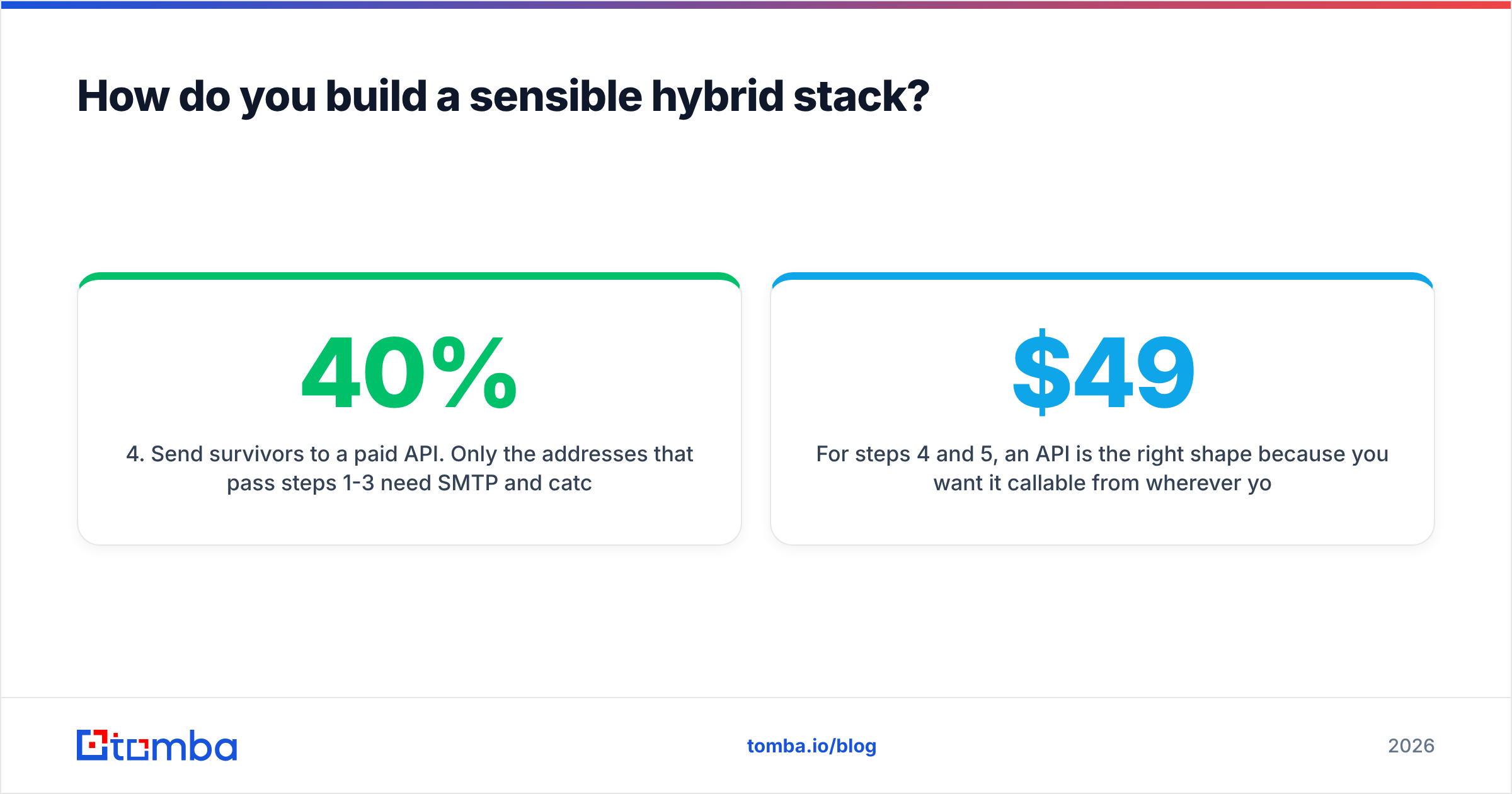
- Send survivors to a paid API. Only these need SMTP and catch-all work. That often trims paid volume by 20-40%.
- Route catch-alls on their own. Treat them as a separate bucket with its own risk rules. Some teams mail the strong ones from a warmed domain. Others skip them.
- Close the loop with bounces. Feed real bounce data back into your scoring. Ground truth beats every guess. Two campaigns will tell you if the stack works.
For steps 4 and 5, an API fits, because you call it from wherever the data lives. The Tomba API handles single and bulk calls. For lists rather than streams, bulk verification beats a loop. Plans start free at 25 searches a month, then $49/mo for Starter and $99/mo for Growth on the Tomba pricing page. Compare that with your VPS and IP pool estimate above.
What questions come up most often?#
Is email verification open source accurate enough for cold outreach? For syntax and domain checks, yes. For a single mailbox on Microsoft 365 or a catch-all domain, no. Cold outreach is where the missing layers hurt most.
Can I run an SMTP prober on AWS or Google Cloud? Usually not without a support ticket, and often not at all. Both block port 25 to stop spam. Plan for a niche host or an SMTP proxy, and put it in your budget.
Does verification protect deliverability on its own? No. It removes hard bounces, which helps but is not enough. Auth, warmup, list hygiene, and content all matter. See email deliverability for the full picture.
How do I compare vendors if I decide to buy? Test with your own list, not a vendor sample. Split 1,000 known addresses across two or three tools. Send a real campaign. Compare real bounces with predicted ones. G2's email verification category helps you shortlist. Only your own data settles it.
What license issues should I watch for? AGPL is the one to read closely. If you host an AGPL tool and expose it to users over a network, you may have to publish your changes. MIT projects carry no such rule. Check this before it becomes a legal problem.
Where should you go from here?#
Start cheap and measure. Wire in syntax, MX, and disposable filters from an email verification open source library this week. It costs a day of work and improves every list you touch.
Then run a test. Take 1,000 addresses your stack marks unknown or catch-all. Push them through a hosted verifier. Compare the guess with your real bounce data. That one test beats any vendor chart.
If the gap is too wide to close with code, and for most B2B lists it will be, buy the missing data. The Tomba Email Finder sits upstream of the problem. It returns addresses that arrive verified, with catch-all handling and confidence scores built in. Start on the free tier, run your own list, and let the bounce rate decide.
Related guides#
Ready to find emails that actually work?
Join 150,000+ professionals who stopped guessing and started sending. Free credits on signup — no credit card required.
Get the Tomba newsletter
Practical outbound tactics and product updates — once every two weeks.
About the author