Email Verification Test: How to Check Any List in 2026
Most email verification tests measure the wrong thing. Here's what the checks actually do, why catch-all domains wreck accuracy scores, and how to read results before you press send.
TL;DR
- An email verification test is a layered set of checks — syntax, domain, MX, mailbox, and risk signals — not a single yes/no lookup.
- The mailbox-level SMTP check is the only step that actually predicts bounces, and it is the step most cheap tools skip or fake.
- Catch-all domains (roughly 15-25% of B2B domains) cannot be resolved by SMTP alone. How a vendor handles them is the single biggest accuracy differentiator.
- Test any vendor on your own list, not their sample: send 500 verified addresses, measure real bounces, and compare that to the claimed accuracy.
- Target under 2% hard bounces. Google and Microsoft treat sustained bounce rates above that as a sender-quality signal.
What is an email verification test?#
An email verification test is the process of checking whether an email address can actually receive mail — before you send anything to it. Think of it like calling a phone number and listening for a ring tone versus a "this number is not in service" message, except a good verifier listens for six different signals, not one.
The confusion starts because "email verification test" gets used for three different things:
- Checking one address — you paste an address into a free email checker and get a status back in a second.
- Checking a list — you upload 10,000 addresses and get a scored CSV back, usually within minutes.
- Testing a verifier — you benchmark a vendor's accuracy claims against known-good and known-dead data.
All three matter, and the third one is the one almost nobody does properly. Vendors advertise 98% or 99% accuracy with no shared benchmark, no published methodology, and no definition of what counts as a miss. You have to run your own test.
Which checks does a real email verification test run?#
Any verifier worth paying for runs these layers in order, cheapest to most expensive. If a tool returns results instantly on a large list, it almost certainly stopped after layer three.
- Syntax and RFC validation — Does the string parse as a valid address? Catches typos like
john@@acme.comandjane@acmewith no TLD. Free, instant, and catches maybe 2% of a typical list. - Domain and DNS resolution — Does the domain exist and resolve? Catches dead companies, misspelled domains (
gmial.com), and parked domains. - MX record check — Does the domain have mail exchange records? A domain with a website but no MX records cannot receive email at all. This is where you catch a lot of small-business addresses scraped from directories.
- Disposable and role detection — Is it a burner domain (
mailinator.com,10minutemail) or a role account (info@,sales@,support@)? Neither is invalid, but both behave differently in outreach and should be segmented, not deleted blindly. - SMTP mailbox verification — The verifier opens a connection to the receiving mail server and asks whether that specific mailbox exists, without delivering a message. This is the step that predicts bounces. It is also rate-limited, IP-reputation-sensitive, and expensive to do at scale, which is exactly why cheap tools skip it.
- Catch-all and risk scoring — When the server accepts every address regardless of whether the mailbox exists, SMTP gives you no answer. The vendor now has to fall back on pattern data, historical engagement, and its own database to produce a confidence score.
Layers one through four are commodity. Nobody differentiates there. Layers five and six are where accuracy is won or lost, and where price differences are justified.

What do email verification results actually mean?#
Status labels are not standardized across vendors, which makes cross-tool comparison harder than it should be. Here is the practical translation table.
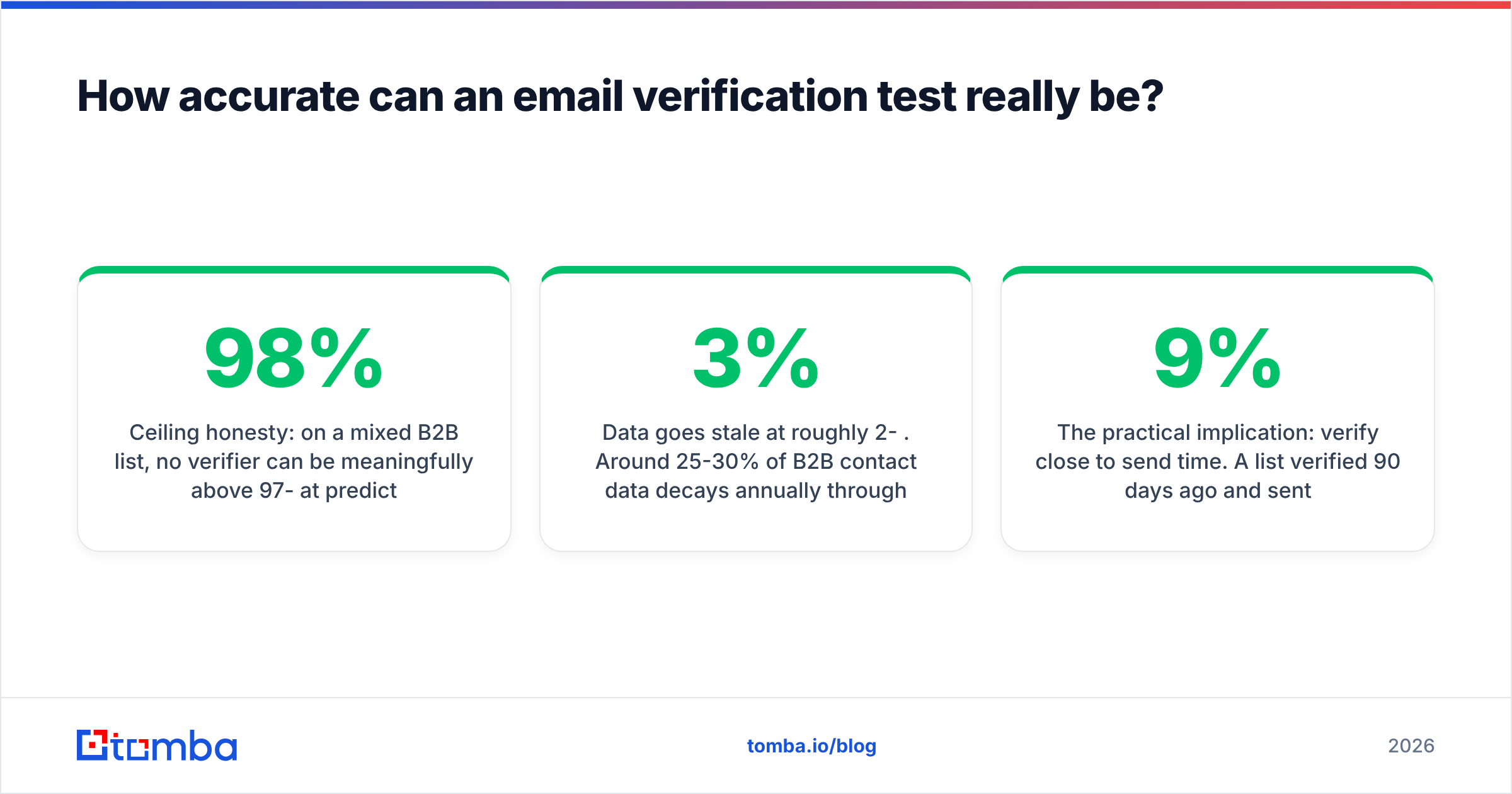
| Status | What the verifier found | Real bounce risk | What to do |
|---|---|---|---|
| Valid / Deliverable | SMTP confirmed the mailbox exists | Under 1% | Send |
| Invalid / Undeliverable | Mailbox rejected or domain has no MX | 95%+ | Delete, never retry |
| Catch-all / Accept-all | Server accepts all addresses; mailbox unconfirmed | 10-30% | Segment, send on a warmed secondary domain |
| Risky / Unknown | Timeout, greylisting, or rate limit — no clear answer | 15-40% | Re-verify in 48h before deciding |
| Role-based | Valid but shared inbox (info@, hr@) |
Low bounce, low reply | Keep for support flows, exclude from cold outreach |
| Disposable | Temporary or burner domain | Valid today, dead next week | Delete |
| Spam trap (flagged) | Address exists only to catch senders | Deliverable but toxic | Delete immediately |
Two things follow from this table. First, "valid" and "safe to send" are not the same thing — a role account is valid and still a poor outreach target. Second, the interesting decisions all live in the middle rows. A vendor that returns almost no catch-all or unknown results is not more accurate; it is guessing and reporting the guess as certainty.
How accurate can an email verification test really be?#
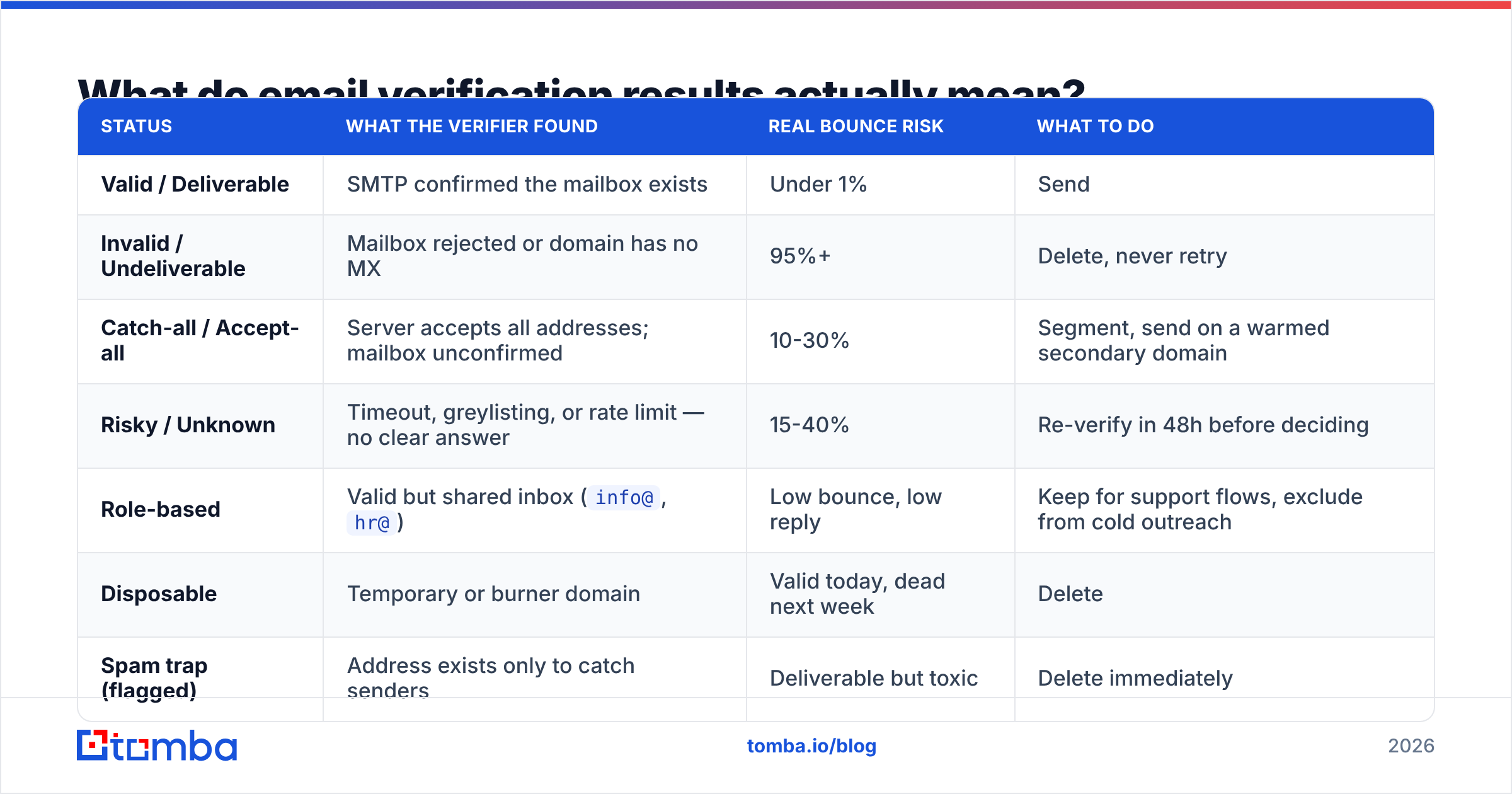
Ceiling honesty: on a mixed B2B list, no verifier can be meaningfully above 97-98% at predicting deliverability, and anyone claiming 99.9% is either testing on a scrubbed sample or counting catch-alls as correct by default.
Three structural limits cause this:
- Microsoft 365 tenants often refuse mailbox-level answers. A large share of enterprise domains sit behind Exchange Online configurations that accept-then-bounce, so SMTP verification returns an ambiguous result no matter which vendor asks.
- Greylisting and rate limits create false negatives. Ask the same server twice within a minute and you can get "unknown" then "valid." Verifiers that don't retry inflate their invalid counts.
- Data goes stale at roughly 2-3% per month. Around 25-30% of B2B contact data decays annually through job changes alone, which is why a list verified in January is materially worse by June. Verification is a recurring cost, not a one-time cleanup.
The practical implication: verify close to send time. A list verified 90 days ago and sent today is carrying about 6-9% rot before you've written a single subject line.
Why do catch-all domains break most email verification tests?#
Because SMTP simply cannot answer the question. A catch-all server says "yes" to ceo@company.com and to asdkjhasd@company.com with equal enthusiasm. If your verifier's only tool is an SMTP handshake, every catch-all address becomes either a false "valid" or a shrugged "unknown."
The vendors that handle this well do something extra:
- Pattern confidence — the address matches the company's dominant format (
first.last@) that appears across dozens of confirmed contacts at the same domain. - Historical deliverability — the address has been observed accepting mail in past sends.
- Cross-source corroboration — the same person-to-address mapping appears in more than one independent source.
That is why a catch-all verifier built on top of a large confirmed-contact database returns usable confidence scores where a pure SMTP tool returns nothing. It is also why testing vendors on a list with no catch-all domains tells you almost nothing about how they'll perform on real enterprise prospects.
How do the main email verification tools compare in 2026?#
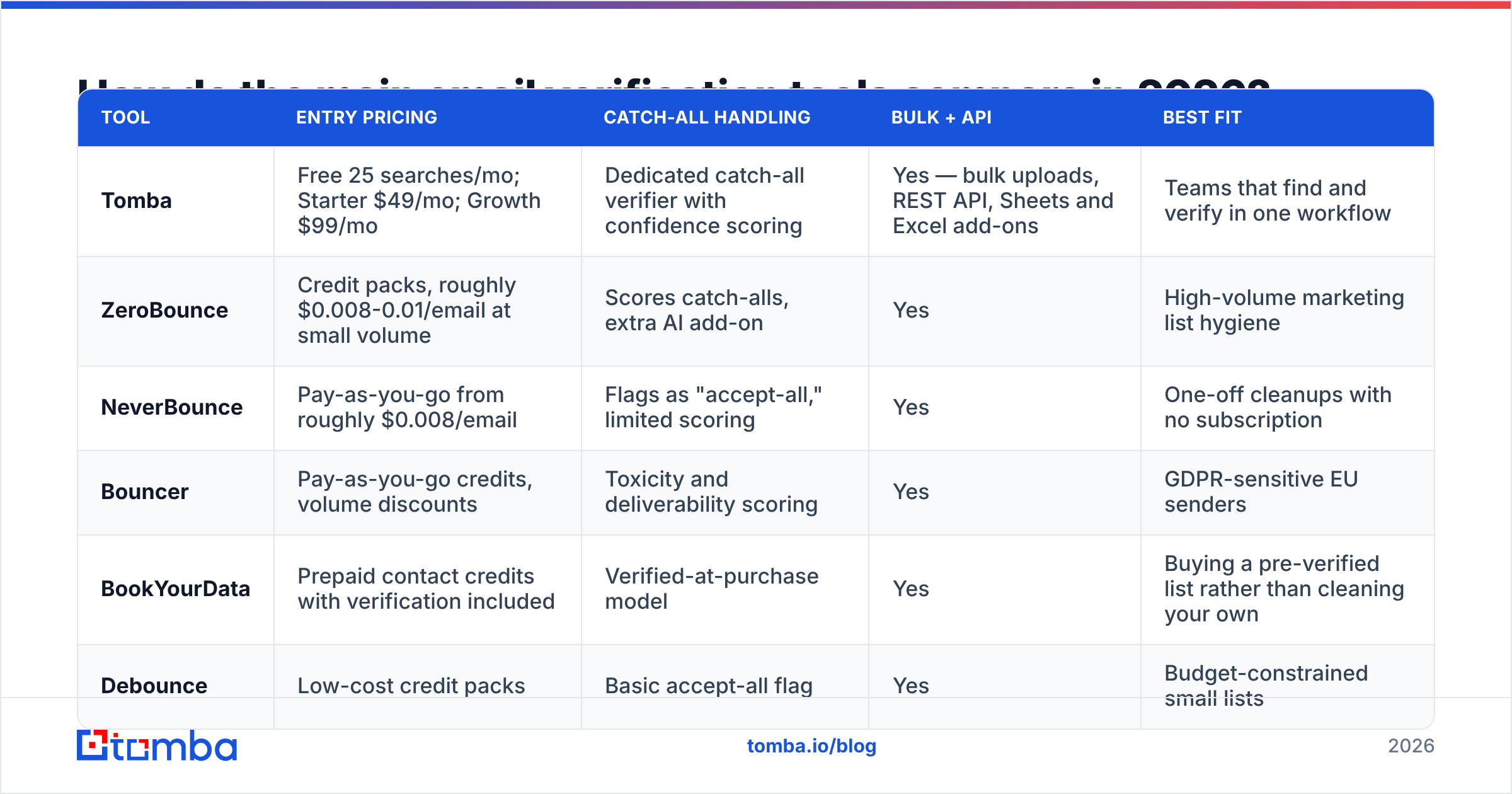
Prices below are published list pricing as of early 2026 and change frequently — treat them as ballpark, and confirm on each vendor's own page before committing. The pattern that matters is the trade-off between per-email cost, catch-all handling, and whether verification sits next to your data-sourcing workflow or in a separate tab.
| Tool | Entry pricing | Catch-all handling | Bulk + API | Best fit |
|---|---|---|---|---|
| Tomba | Free 25 searches/mo; Starter $49/mo; Growth $99/mo | Dedicated catch-all verifier with confidence scoring | Yes — bulk uploads, REST API, Sheets and Excel add-ons | Teams that find and verify in one workflow |
| ZeroBounce | Credit packs, roughly $0.008-0.01/email at small volume | Scores catch-alls, extra AI add-on | Yes | High-volume marketing list hygiene |
| NeverBounce | Pay-as-you-go from roughly $0.008/email | Flags as "accept-all," limited scoring | Yes | One-off cleanups with no subscription |
| Bouncer | Pay-as-you-go credits, volume discounts | Toxicity and deliverability scoring | Yes | GDPR-sensitive EU senders |
| BookYourData | Prepaid contact credits with verification included | Verified-at-purchase model | Yes | Buying a pre-verified list rather than cleaning your own |
| Debounce | Low-cost credit packs | Basic accept-all flag | Yes | Budget-constrained small lists |
Notice the two different products hiding in that table. ZeroBounce, NeverBounce, Bouncer, and Debounce are cleaners — you bring a list, they score it. BookYourData sells contacts that arrive verified, which removes a step if you're buying data rather than building it. Tomba sits across both: the email verifier runs on lists you already own, and the finder produces verified addresses at discovery time so fewer bad records ever enter your CRM. Which model is cheaper depends entirely on whether your bottleneck is cleaning or sourcing.
If you want independent signal beyond vendor claims, the G2 email verification category is the least-bad public source — filter reviews by company size, because SMB and enterprise experiences diverge sharply on catch-all handling.
How do you run your own email verification test?#
Run this once per vendor you're seriously considering. It takes about an hour of setup and a week of waiting, and it will save you a quarter of wasted spend.
- Build a 500-address control set. Include 100 addresses you know are deliverable (colleagues, existing customers who replied last month), 100 you know are dead (bounced in the last 90 days, kept in your ESP's suppression log), 200 unverified prospects from your actual target market, and 100 from known catch-all domains.
- Run the set through each vendor blind. Same file, same day. Do not tell the vendor it's a benchmark — trial credits are enough for 500 addresses at every tool on the list.
- Score the known answers first. Count how many of your 100 known-good come back valid and how many of your 100 known-dead come back invalid. A vendor that marks known-good addresses invalid is destroying pipeline, which is far more expensive than a bounce.
- Send the unverified "valid" segment for real. Use a warmed domain, plain text, small batches. Measure actual hard bounces after 72 hours. This is the only number that matters.
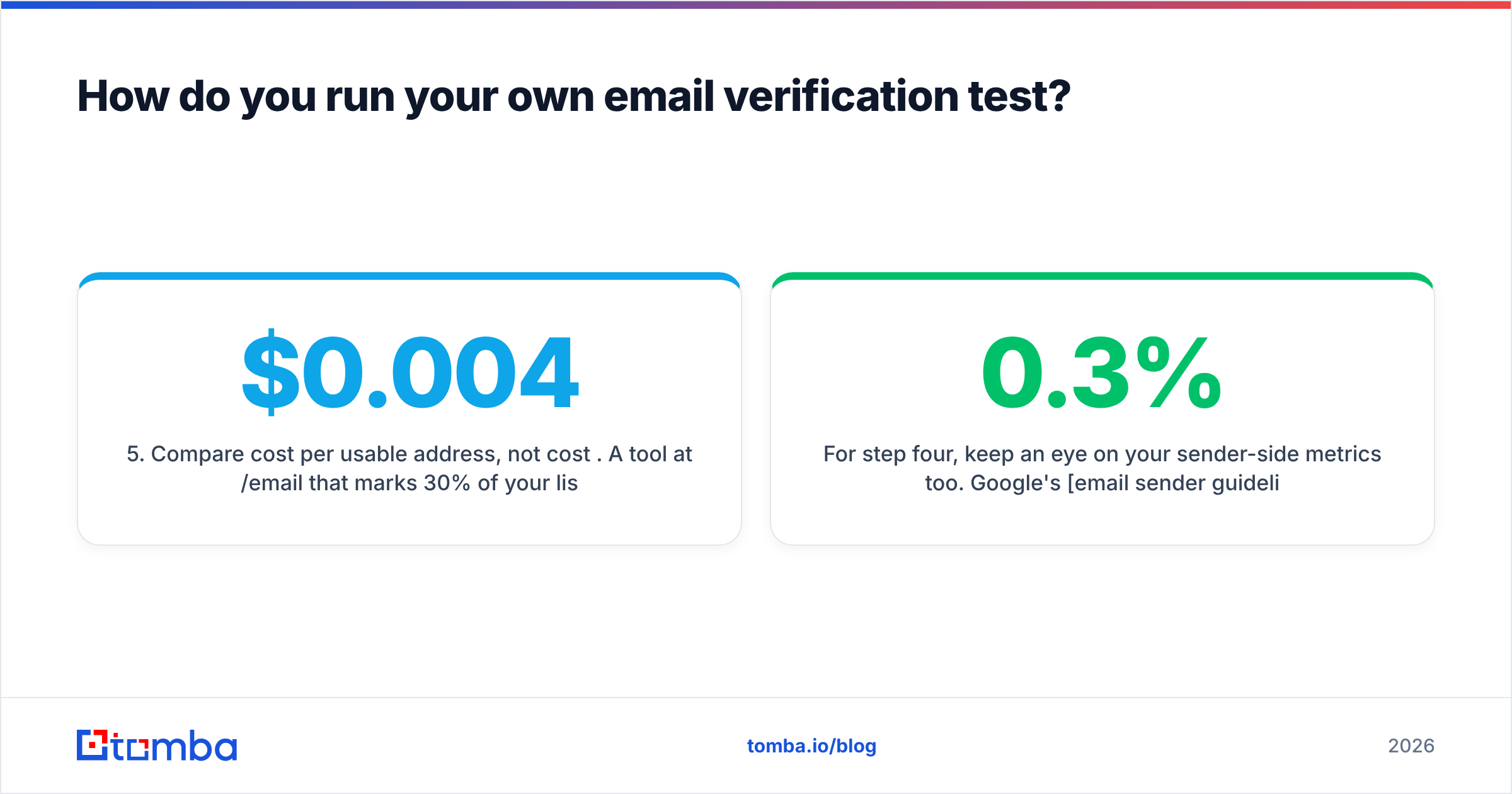
- Compare cost per usable address, not cost per credit. A tool at $0.004/email that marks 30% of your list "unknown" is more expensive than one at $0.008/email that resolves them, because unknowns are either wasted spend or wasted opportunity.

For step four, keep an eye on your sender-side metrics too. Google's email sender guidelines are explicit that bulk senders need to keep spam complaints under 0.3% and avoid sending to non-existent addresses — bounce rate is a reputation input, not just a list-quality metric. Pair verification with a sender reputation checker so you can tell a list problem from a domain problem.
What bounce rate should an email verification test get you to?#
Under 2% hard bounces, ideally under 1%. Above 3% you are actively damaging your sending domain, and above 5% most ESPs will start throttling or reviewing your account.
Here is the honest mapping from verification behavior to outcome:
- No verification at all: 8-25% bounce on scraped or purchased lists. Domain reputation damage within two or three sends.
- Syntax and MX only: 5-12%. Catches the obvious garbage, misses every dead mailbox at a live domain.
- Full SMTP verification, catch-alls excluded: 0.5-1.5%. The safest configuration, at the cost of dropping a meaningful chunk of enterprise prospects.
- Full SMTP plus scored catch-alls: 1-2.5%. More reach, slightly more risk — run catch-alls on a separate subdomain so a bad batch cannot hurt your primary.
Note that verification does nothing about soft bounces, full mailboxes, or content-based filtering. If your bounces are clean but replies are zero, the problem is not your list — it's your targeting or your copy, and no verifier will fix that.
What mistakes ruin an email verification test?#
- Verifying once and reusing the list for months. Data decay is the single biggest cause of "but I verified it" bounces.
- Deleting every catch-all. You're throwing away a fifth of the enterprise market. Segment instead.
- Deleting every role account.
info@is useless for a VP-level pitch and perfectly fine for a partnership or vendor inquiry. - Trusting a verifier that never says "unknown." Confidence without evidence is just a guess wearing a suit.
- Benchmarking on a clean list. Consumer Gmail addresses verify near-perfectly at every vendor. Your test needs the messy enterprise domains you actually sell into.
- Ignoring your own SMTP hygiene. If your SPF record, DKIM, and DMARC are broken, a perfectly verified list still lands in spam. Verification and email deliverability are two separate problems that share a symptom.
Should you verify or find verified addresses in the first place?#
Cleaning a bad list is triage. Not building one is prevention, and prevention is cheaper.
If most of your bad addresses came from scraping, exports, or a purchased CSV, verification is a permanent tax you pay on every batch. If instead you source addresses through a finder that confirms them at discovery — checking pattern, MX, and mailbox before the record ever reaches your CRM — the separate cleanup pass becomes an occasional refresh rather than a standing line item. That's the argument for handling discovery and verification in the same system: one credit pool, one API, one audit trail of why a given address was marked valid.
The practical setup for most B2B teams: find and verify at source, re-verify anything older than 60 days before a send, and keep a standalone bulk verifier for inherited lists you didn't build. You can compare what that costs across volumes on the Tomba pricing page, and bulk verify handles the inherited-list case.
Run the test before you run the campaign#
Start with the Tomba Email Finder. It returns addresses with verification already applied — mailbox-checked where SMTP allows it, confidence-scored where the domain is catch-all — so you can see exactly which of your target accounts are reachable before you commit budget to a sequence. The free tier gives you 25 searches a month, which is enough to run the 500-address benchmark above on a sample and see whether the accuracy claim holds on your data, not someone else's.
Run your own email verification test. Trust the bounce rate, not the marketing page.
Related guides#
Ready to find emails that actually work?
Join 150,000+ professionals who stopped guessing and started sending. Free credits on signup — no credit card required.
Get the Tomba newsletter
Practical outbound tactics and product updates — once every two weeks.
About the author