Email Verifier Website: How to Pick One That Cuts Bounces
Most email verifier websites quote 98% accuracy and still let bounces through. Here's how verification actually works, what the pricing really costs per 1,000 emails, and which tool fits your list size.
TL;DR
- An email verifier website checks whether an address can actually receive mail — syntax, domain, MX records, mailbox existence — before you send to it.
- Vendor "98% accuracy" claims are mostly marketing. What matters is how a tool labels the ~15–25% of addresses that sit on catch-all domains.
- Real cost is per verified address, not per plan. At scale the spread between vendors is roughly $0.0004 and $0.007 per email — a 17x gap for the same job.
- Free browser tools are fine for one-off checks. For lists over ~500 addresses you need bulk uploads, an API, and a documented risk taxonomy.
- The cheapest fix is upstream: find the address correctly the first time, then verify. Verification alone can't rescue a scraped list.
What Is an Email Verifier Website?#
An email verifier website is a hosted service that tells you whether a given email address will accept mail — without you having to send anything to it. You paste an address (or upload a CSV of 50,000), and it returns a status: valid, invalid, catch-all, disposable, role-based, or unknown.
Think of it like a doorman checking a guest list before you throw a party. You could just let everyone walk in and see who belongs, but the bouncers who run your inbox — Gmail, Outlook, Yahoo — are keeping score. Too many people showing up to addresses that don't exist and they stop letting you through the door at all.
That scorekeeping is the actual reason verification exists. Google's bulk sender guidelines tell senders to keep spam complaints under 0.3%, and mailbox providers treat a high hard-bounce rate as the strongest available signal that a sender is working from purchased or scraped data. Most deliverability teams target a hard-bounce rate under 2%. A raw, unverified B2B list will typically land somewhere between 8% and 25%.

How Does an Email Verifier Website Actually Check an Address?#
Every serious verifier runs the same five-stage funnel. Understanding it tells you exactly where each vendor's results diverge.
- Syntax and format check. Does the string comply with RFC 5322? This kills typos like
john@@acme.comorjane@acmeinstantly. It's free, instant, and worth roughly nothing — every tool does it, and it catches maybe 1% of a real list. - Domain and MX record lookup. A DNS query asks whether
acme.comexists and whether it publishes mail exchange records. No MX record means no mailbox can exist there, full stop. This catches dead companies, parked domains, and misspelled domains (gmial.com). - Disposable and role-based classification. Addresses from throwaway providers (Mailinator, Guerrilla Mail) and generic mailboxes (
info@,sales@,support@) get flagged. They're technically deliverable but usually worthless for one-to-one outbound, and role addresses attract complaints. - SMTP handshake (the real test). The verifier opens a connection to the receiving mail server and starts the conversation an actual sending server would —
HELO,MAIL FROM,RCPT TO— then hangs up before sending data. The server's response toRCPT TOreveals whether the mailbox exists. This is the step described in the SMTP specification, and it's where accuracy is won or lost. - Catch-all resolution. Some domains accept mail for every possible address, so the SMTP handshake returns "yes" for
asdkjhasd@acme.comtoo. Weak verifiers mark these valid. Honest ones mark them catch-all and offer a secondary method — pattern confidence, historical engagement data, or a dedicated catch-all verifier — to score them properly.
Stages 4 and 5 are where vendors actually differ. Everything before that is commodity DNS and regex work.
Why Don't Accuracy Claims Match Your Bounce Rate?#
Because "accuracy" has no standard definition, and every vendor picks the one that flatters it.
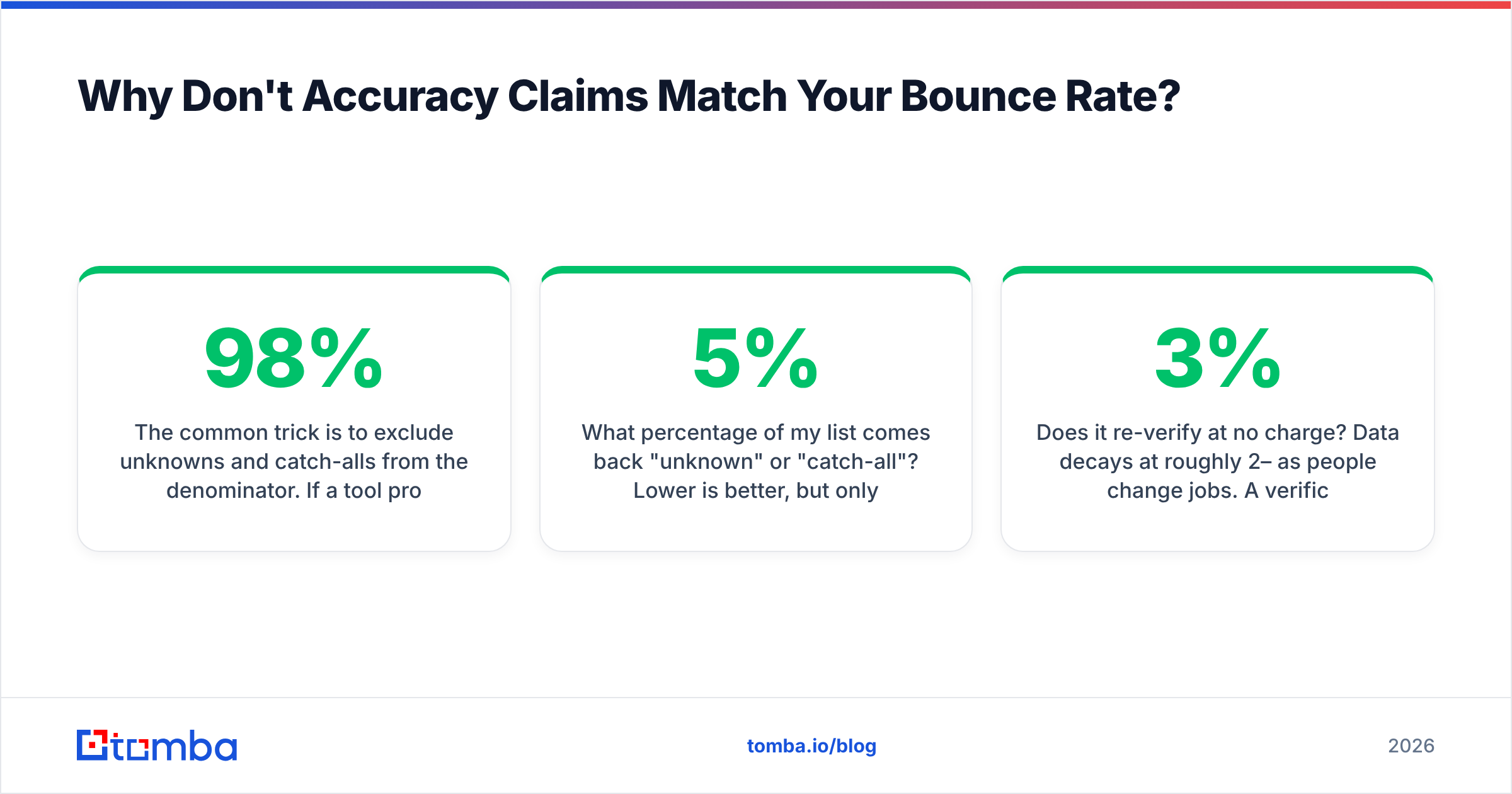
The common trick is to exclude unknowns and catch-alls from the denominator. If a tool processes 10,000 addresses, returns "unknown" on 2,000, and gets 7,840 of the remaining 8,000 right, it can honestly advertise 98% accuracy — while you paid for 10,000 verifications and got a usable verdict on 80% of them.

Three questions cut through the noise when you're evaluating any email verifier website:
- What percentage of my list comes back "unknown" or "catch-all"? Lower is better, but only if the confident answers are right. A tool that returns 5% unknown and 6% bounces is worse than one that returns 18% catch-all and 1.2% bounces.
- What's the bounce rate on addresses it labeled valid? This is the only number that matters. Run 1,000 verified addresses through a real send and count.
- Does it re-verify at no charge? Data decays at roughly 2–3% per month as people change jobs. A verification from March is a guess by September.
Run your own test before committing. Take 500 addresses you already know the outcome for — from a campaign that shipped last quarter, where you have the bounce log — and push them through each vendor's free tier. Two hours of work will tell you more than every G2 review combined, though the G2 email verification category is a reasonable place to shortlist candidates first.
Which Email Verifier Website Should You Use in 2026?#
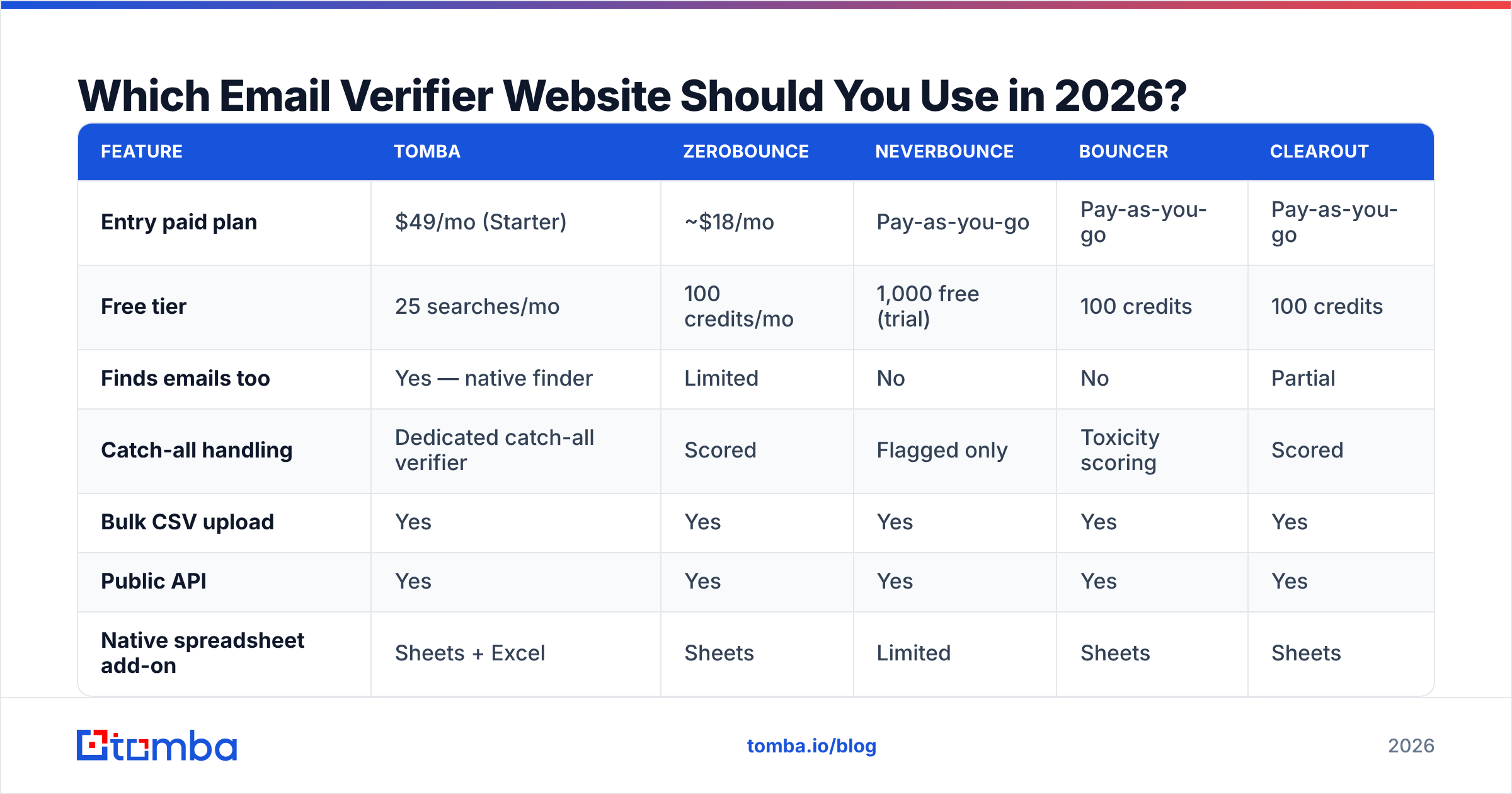
Here's how the main options compare on the attributes that change your outcome. Pricing reflects published list prices at the time of writing; check each vendor's page before you buy, since credit packs shift often.

| Feature | Tomba | ZeroBounce | NeverBounce | Bouncer | Clearout |
|---|---|---|---|---|---|
| Entry paid plan | $49/mo (Starter) | ~$18/mo | Pay-as-you-go | Pay-as-you-go | Pay-as-you-go |
| Free tier | 25 searches/mo | 100 credits/mo | 1,000 free (trial) | 100 credits | 100 credits |
| Finds emails too | Yes — native finder | Limited | No | No | Partial |
| Catch-all handling | Dedicated catch-all verifier | Scored | Flagged only | Toxicity scoring | Scored |
| Bulk CSV upload | Yes | Yes | Yes | Yes | Yes |
| Public API | Yes | Yes | Yes | Yes | Yes |
| Native spreadsheet add-on | Sheets + Excel | Sheets | Limited | Sheets | Sheets |
| Best for | Find + verify in one place | Verify-only at volume | One-off list cleaning | EU data residency | Budget bulk cleaning |
The split is straightforward. If you already have lists and only need cleaning, a verify-only specialist is the cheaper unit-economics play. If you're building lists from scratch — which is most outbound teams — paying twice (once to find, once to verify) is a workflow tax. Tools that combine an email finder with an email verifier under one credit pool remove a whole export/import step and one vendor relationship.
What Does an Email Verifier Website Cost Per 1,000 Emails?#
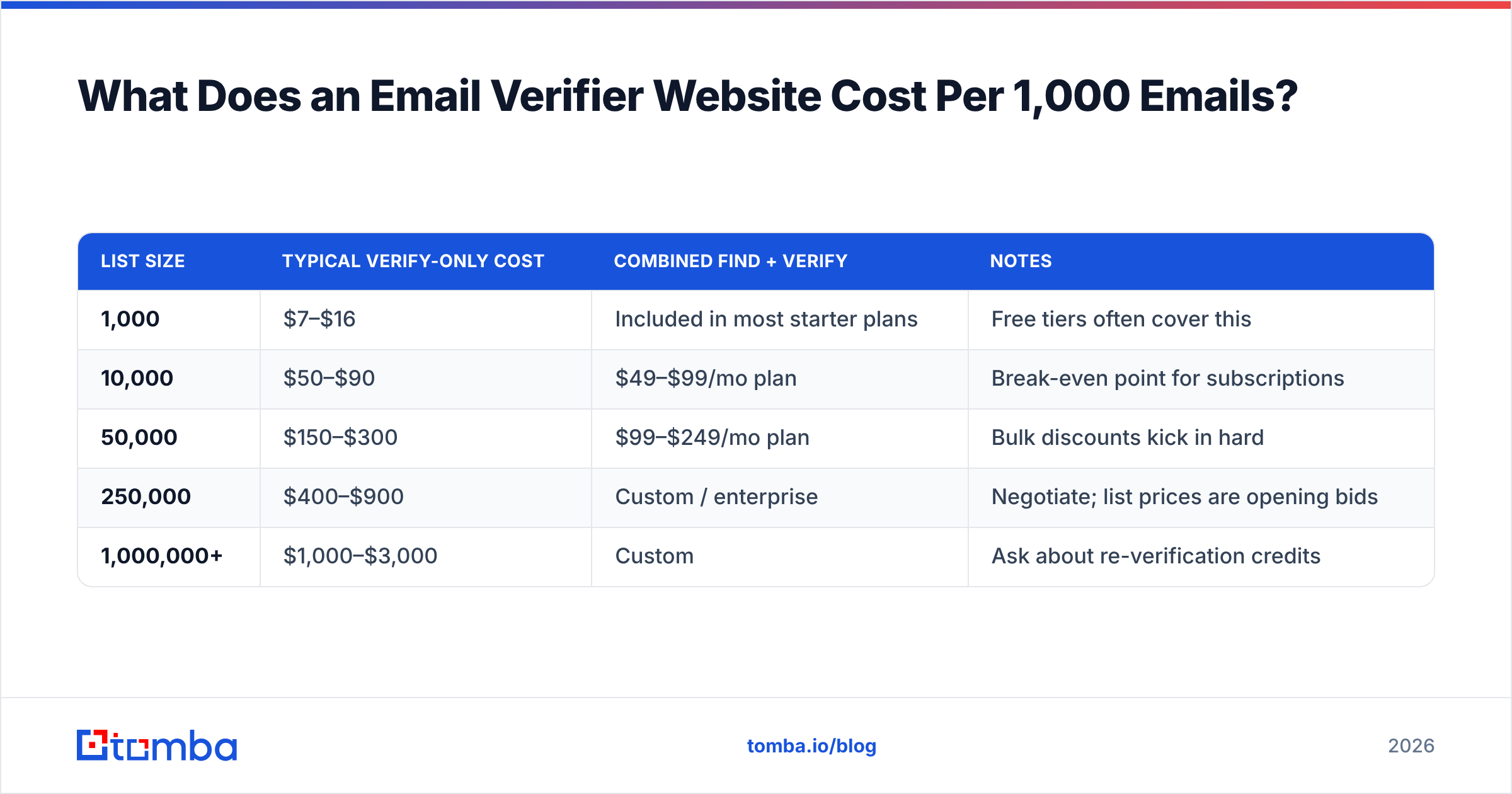
Plan prices hide the number you actually care about. Normalize everything to cost per thousand verified addresses:
| List size | Typical verify-only cost | Combined find + verify | Notes |
|---|---|---|---|
| 1,000 | $7–$16 | Included in most starter plans | Free tiers often cover this |
| 10,000 | $50–$90 | $49–$99/mo plan | Break-even point for subscriptions |
| 50,000 | $150–$300 | $99–$249/mo plan | Bulk discounts kick in hard |
| 250,000 | $400–$900 | Custom / enterprise | Negotiate; list prices are opening bids |
| 1,000,000+ | $1,000–$3,000 | Custom | Ask about re-verification credits |
Two cost traps to watch for. First, some vendors bill for unknowns and catch-alls at full rate — so a list with a 20% catch-all population costs you 20% more than the quoted rate for zero decisions. Ask explicitly. Second, credits that expire monthly punish uneven workloads; if you clean lists quarterly, rolling credits or a pay-as-you-go pack beats a subscription. Compare that against Tomba pricing — Free at 25 searches/mo, Starter at $49/mo, Growth at $99/mo, Pro at $249/mo — and pick the shape that matches your actual cadence, not your best month.
Are Free Email Verifier Websites Good Enough?#
For a handful of addresses, yes. For a campaign, no — and the reasons are structural, not stingy.
Where free works: you found one contact on LinkedIn, you want to confirm the address before sending a high-stakes intro email. A browser tool like a free email checker resolves that in a few seconds with no account. Same for sanity-checking a form submission or confirming that a domain still has live MX records.
Where free breaks down:
- No bulk processing. Pasting 4,000 addresses one at a time isn't a workflow, it's a punishment.
- Rate limits and shared IPs. Free verifiers run SMTP checks from pooled infrastructure that receiving servers have often throttled or blocklisted, which inflates the unknown rate.
- No catch-all logic. Free tools almost universally return "accept-all — cannot verify" and stop there. That's the exact segment where you needed help.
- No audit trail. If a GDPR or CAN-SPAM question surfaces later, you want records of when each address was verified and by whom.
Use free tools as a spot-check instrument. Use a paid bulk email finder when the unit of work is a list.
How Do You Handle Catch-All Domains Without Guessing?#
Catch-all domains are the single largest source of post-verification bounces, and they're common — a meaningful share of mid-market and enterprise domains run accept-all configurations, either deliberately (to avoid leaking which mailboxes exist) or as a side effect of a security gateway sitting in front of the real mail server.
Three practical strategies, roughly in order of reliability:
1. Pattern confidence scoring. If you know firstname.lastname@acme.com resolves for eleven known employees, a twelfth address in the same format on the same domain is a strong bet even though SMTP can't confirm it. Good verifiers expose this as a confidence score rather than a binary.
2. Segment and throttle. Put catch-all addresses in their own campaign, send from a secondary domain, and cap volume at a few hundred a day. If bounces stay low over a week, promote the segment. If they spike, you've learned it cheaply and your primary sending domain never took the hit.
3. Cross-reference a second source. Verify the person exists in the role before you worry about the mailbox syntax. A quick pass through data enrichment that confirms current employer and title makes a pattern-matched address far more defensible than one generated from a permutator alone.
What you should never do is treat catch-all as valid and blend it into your main sending list. That's how a 1.5% bounce rate becomes a 9% bounce rate and a warm domain becomes a cold one.
How Should Verification Fit Into Your Outbound Workflow?#
Verification is a checkpoint, not a stage. Four places it belongs:
- At capture. Verify form submissions and signups in real time via API. It stops typos at the source and keeps your CRM clean instead of cleaning it later.
- At list build. Verify immediately after finding, while the source context is fresh and you can re-find a failed address.
- Before every send. Re-verify anything older than 60–90 days. Job changes make this non-optional in B2B.
- After bounces. Feed hard bounces back as suppression rules so the same dead address never re-enters from a different import.
Teams that wire this into their stack rather than running it as a manual Tuesday chore see the compounding benefit. An email verification API call at the point of capture costs a fraction of a cent and prevents a bad record from propagating through five systems. If your team lives in spreadsheets, a Google Sheets add-on gets you 80% of the value with none of the engineering time.
The Bottom Line#
The best email verifier website is the one that's honest about what it doesn't know. A tool that returns 18% catch-all with a confidence score is more useful than one that returns 4% unknown and quietly guesses on the rest — because the first tool lets you make a decision and the second one makes it for you, badly.
Test with your own data. Normalize pricing to cost per thousand. Ask specifically how catch-alls are billed and labeled. And fix the upstream problem too: verification cleans a list, but it can't turn a bad list into a good one.
If you're finding addresses and verifying them as two separate line items, consolidate. The Tomba Email Finder finds professional addresses by domain, name, or company and verifies them in the same pass, so what lands in your sequencer is already checked. Start on the free tier with 25 searches a month, run your own 500-address bounce test, and let the numbers decide.
Related guides#
Ready to find emails that actually work?
Join 150,000+ professionals who stopped guessing and started sending. Free credits on signup — no credit card required.
Get the Tomba newsletter
Practical outbound tactics and product updates — once every two weeks.
About the author