Email Warm Up Schedule: A 4-Week Plan for 2026 Inboxes
A concrete, day-by-day email warm up schedule with volume ramps, reply targets, per-provider caps, and an honest look at where automated warmup tools help — and where they now hurt you.
TL;DR
- A working email warm up schedule takes 3-4 weeks per mailbox, not 5 days. Ramp from 5-10 sends/day to 30-50/day, and treat 50/day as a permanent ceiling per inbox for cold outreach.
- Volume is the least important variable. Reply rate, spam-complaint rate (keep it under 0.10%), and bounce rate (keep it under 2%) decide whether the ramp works.
- Automated warmup networks still help a brand-new domain establish baseline engagement, but Google and Microsoft have gotten better at discounting obviously synthetic reply loops. Treat them as a supplement, not the plan.
- Warmup cannot rescue a dirty list. Bouncing 8% of your first real campaign undoes four weeks of careful ramping in two days.
- Buy the domain 30+ days before you plan to send, set SPF/DKIM/DMARC on day zero, and verify every address before it enters the sequence.
What is an email warm up schedule?#
An email warm up schedule is a planned, gradual increase in sending volume from a new mailbox or domain, paired with engagement signals (opens, replies, moves-out-of-spam), designed to build sender reputation before you send real outbound at scale.
Think of it like a new credit card. The bank does not hand a stranger a $50,000 limit on day one. It gives you $1,000, watches how you pay, and raises the ceiling as trust accumulates. Mailbox providers work the same way: a domain that has never sent mail has no history, so its first 500 messages get scrutinised far harder than the 500,000th message from a ten-year-old domain with clean stats.
Technically, what you are building is a reputation record inside Gmail, Outlook, and the major filtering layers (Proofpoint, Mimecast, Barracuda). Those systems track your domain, your sending IP, your DKIM signing domain, and increasingly your content fingerprints. A warm up schedule feeds them consistent, low-risk, positively-engaged mail until the pattern reads "legitimate business correspondence" instead of "someone just spun up a burner domain."
Why does warming up still matter in 2026?#
Because the bar moved. In February 2024 Google and Yahoo rolled out bulk sender requirements that made authentication mandatory and put a hard number on complaints: stay under 0.30%, aim for under 0.10%. Microsoft followed with similar enforcement for high-volume senders. Those thresholds have only tightened since, and the enforcement is now automatic rather than manual review.
The practical effect is that a cold domain sending 200 messages on day one no longer lands in spam — it often gets rejected at the SMTP layer or silently dropped. You will see a 95% "delivered" rate in your sequencer and a 0.4% reply rate, and you will spend three weeks debugging copy that was never seen by a human.
Warming up is also cheaper than the alternative. Burning a domain means buying a new one, re-authenticating, re-warming, and reconnecting it to your sequencer — roughly a month of lost pipeline per domain. Most teams running outbound at any real scale now budget warmup time into their GTM plan the same way they budget onboarding time for a new rep.
How long should an email warm up schedule take?#
Plan for 21 to 28 days per mailbox. Shorter ramps exist, and they work sometimes — usually on an aged domain with existing sending history, or a subdomain of a well-established parent domain. For a freshly registered domain, 28 days is the honest number.
Three factors change the timeline:
- Domain age. A domain registered 60 days ago and sitting idle warms faster than one registered yesterday. Buy your outbound domains early and park them.
- Parent domain reputation. Sending from
mail.yourcompany.comwhenyourcompany.comhas ten years of clean transactional mail is a materially easier start than a brand-new.colookalike. - Recipient mix. Warming into Gmail-heavy lists is more forgiving than warming into enterprise Microsoft 365 tenants behind a third-party gateway, which tend to be stricter and slower to trust.
If you want a rough per-mailbox projection before you commit, run the numbers through a warmup calculator and then add a week of buffer. Every experienced deliverability person has shipped a ramp that looked fine on a spreadsheet and stalled in week three.
What does a 4-week email warm up schedule look like?#
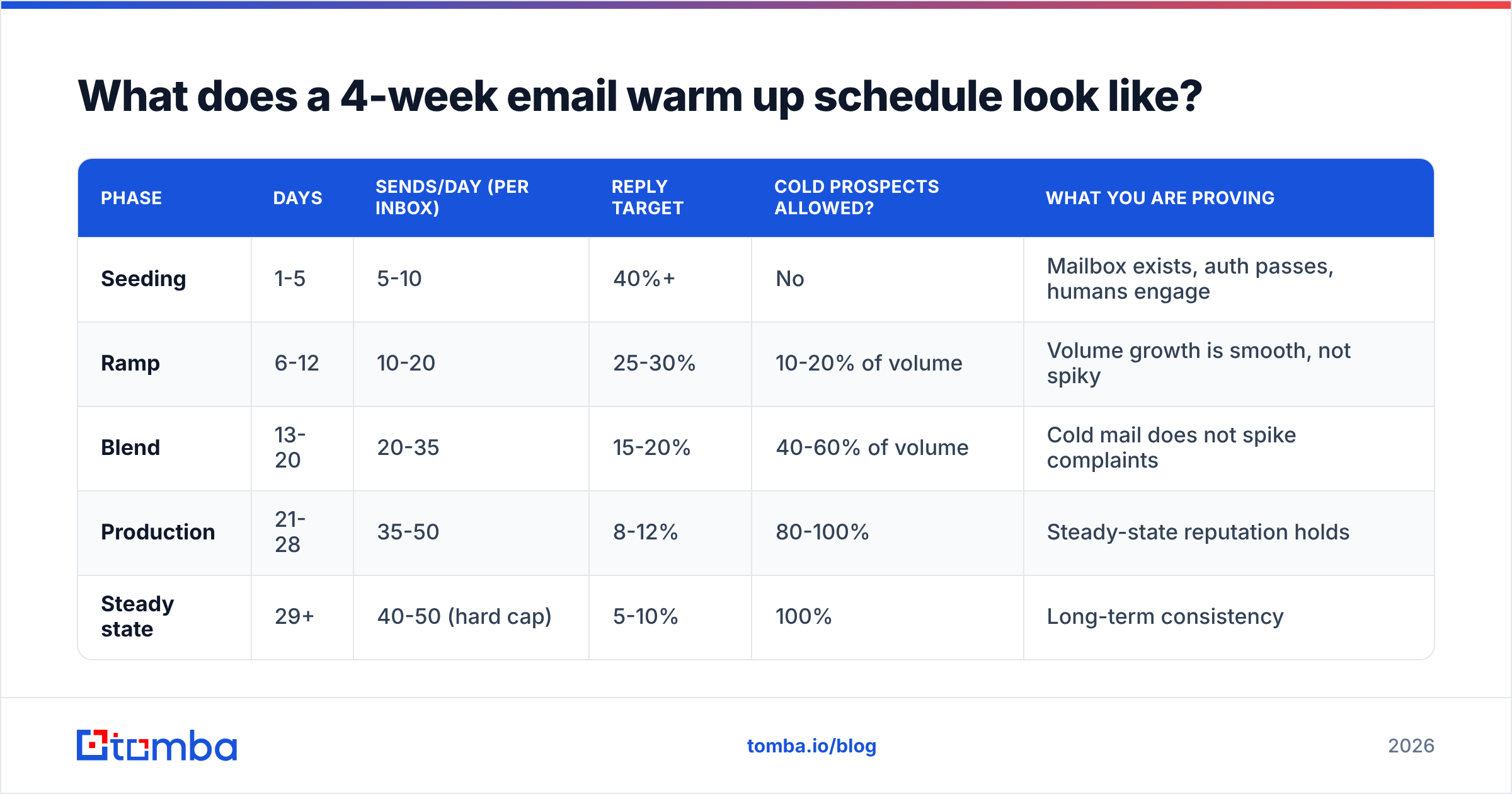
Here is the schedule I would run on a new domain with three mailboxes. Volumes are per mailbox, per business day. Weekends stay quiet or drop to 20-30% of weekday volume — real humans do not send 40 sales emails on a Sunday, and the pattern is visible.
| Phase | Days | Sends/day (per inbox) | Reply target | Cold prospects allowed? | What you are proving |
|---|---|---|---|---|---|
| Seeding | 1-5 | 5-10 | 40%+ | No | Mailbox exists, auth passes, humans engage |
| Ramp | 6-12 | 10-20 | 25-30% | 10-20% of volume | Volume growth is smooth, not spiky |
| Blend | 13-20 | 20-35 | 15-20% | 40-60% of volume | Cold mail does not spike complaints |
| Production | 21-28 | 35-50 | 8-12% | 80-100% | Steady-state reputation holds |
| Steady state | 29+ | 40-50 (hard cap) | 5-10% | 100% | Long-term consistency |
A few things people get wrong about this table:
- Do not exceed 50/day per mailbox for cold outreach, even at day 90. Adding mailboxes scales volume; pushing one mailbox to 150/day gets it flagged. Ten mailboxes at 40/day is 400 sends and a boring reputation profile. One mailbox at 400/day is a spam trap magnet.
- Ramp percentage matters more than the absolute number. Roughly +30-40% week over week is safe. Doubling volume overnight — day 12 at 20, day 13 at 45 — reads as compromised-account behaviour.
- The reply targets are the point. If your day 6-12 replies are all coming from a warmup network and none from real prospects, you have a synthetic engagement profile, and that is a fragile thing to build on.
What daily volume caps should you use per provider?#
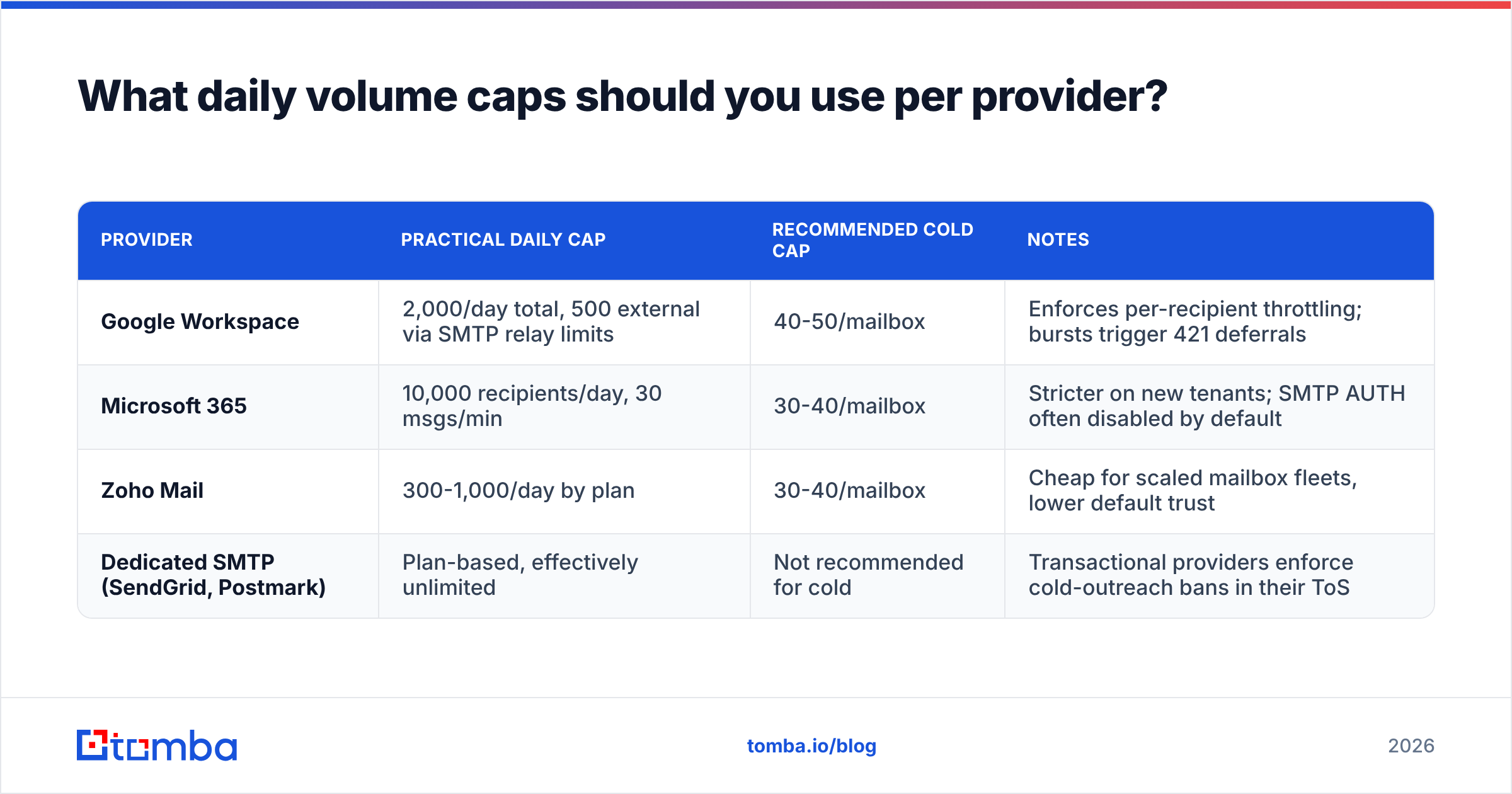
Provider limits are separate from reputation limits, and hitting the hard cap will get you rate-limited regardless of how well the warmup is going.
| Provider | Practical daily cap | Recommended cold cap | Notes |
|---|---|---|---|
| Google Workspace | 2,000/day total, 500 external via SMTP relay limits | 40-50/mailbox | Enforces per-recipient throttling; bursts trigger 421 deferrals |
| Microsoft 365 | 10,000 recipients/day, 30 msgs/min | 30-40/mailbox | Stricter on new tenants; SMTP AUTH often disabled by default |
| Zoho Mail | 300-1,000/day by plan | 30-40/mailbox | Cheap for scaled mailbox fleets, lower default trust |
| Dedicated SMTP (SendGrid, Postmark) | Plan-based, effectively unlimited | Not recommended for cold | Transactional providers enforce cold-outreach bans in their ToS |
The last row deserves emphasis. Sending cold outbound through a transactional ESP is the fastest way to get an account terminated, and it also pollutes shared IP pools that other customers depend on. Use real mailboxes on real domains for cold; keep transactional mail on your primary domain, entirely separate.
Which signals actually build sender reputation?#
Volume is the input everyone obsesses over. These are the signals that actually move the needle, ordered by weight:
- Reply rate. A human writing back is the single strongest positive signal available. It is why a 20-message day with four genuine replies beats a 200-message day with two.
- Spam complaints. The hard ceiling. Google's threshold is 0.30% with a recommended target below 0.10% — that is three complaints per thousand messages before you are in trouble. Monitor it in Google Postmaster Tools, which is free and the only direct view into how Gmail rates you.
- Bounce rate. Anything above 2% signals list hygiene problems; above 5% and you are being treated as a scraper. This is entirely preventable with pre-send email verification.
- Authentication pass rate. SPF, DKIM, and DMARC must all pass, and DMARC alignment must be correct. Confirm the record with an SPF checker before day one — not after your first campaign underperforms.
- Consistency. Sending 40/day every weekday beats sending 0, 0, 200, 0, 0. Filters model your normal pattern, and deviations from your own baseline are themselves a signal.
- Content stability. Wildly different templates, heavy link counts, tracking pixels on every message, and link shorteners all add risk during the ramp. Keep warmup-phase mail plain-text-ish, one link maximum, no images.
Notice that four of six have nothing to do with how many emails you send. That is the whole lesson.
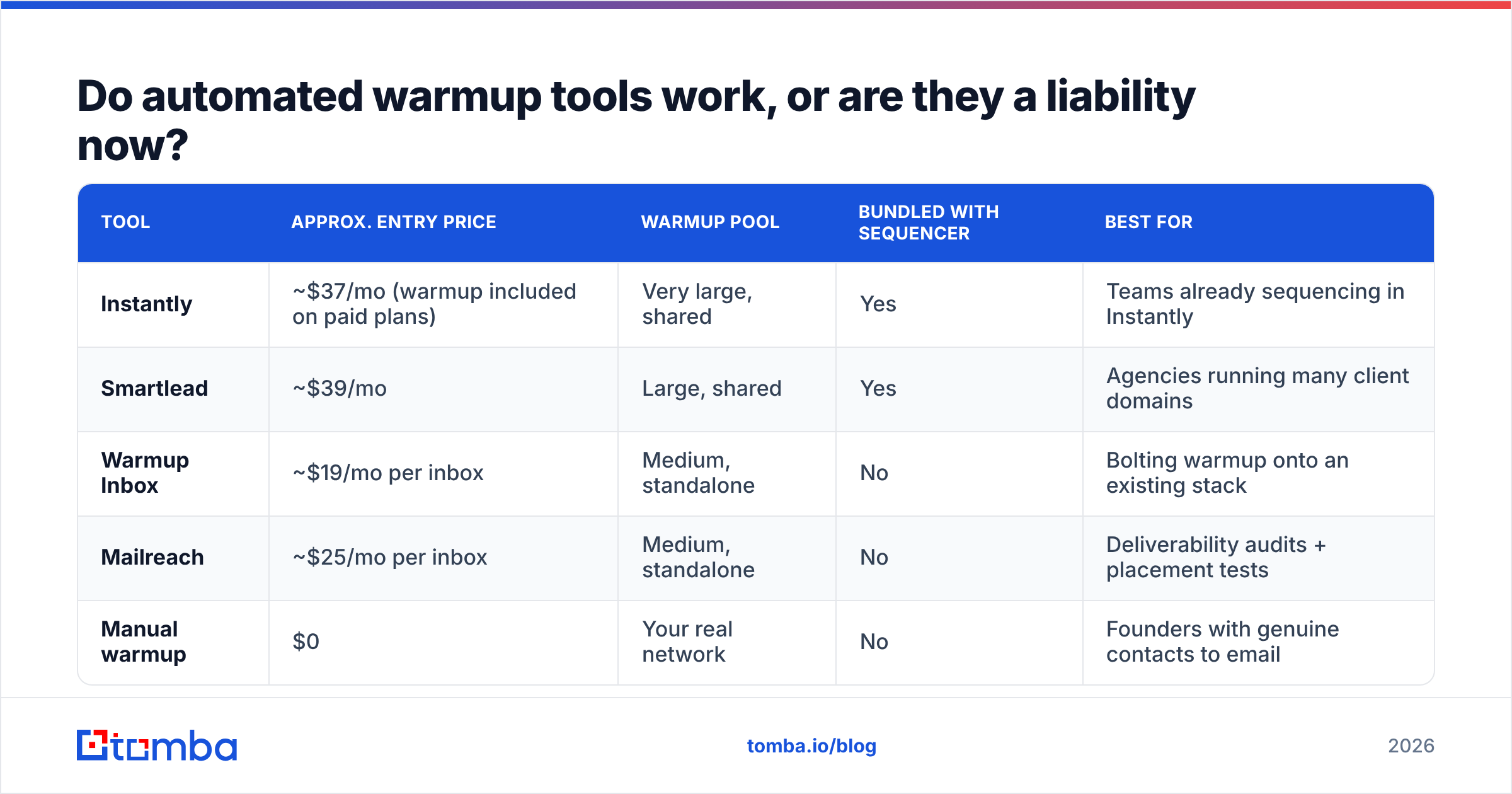
Do automated warmup tools work, or are they a liability now?#
They work, partially, and the honest framing is: warmup networks are useful for the first 10-14 days of a brand-new domain, and progressively less useful after that.
How they work: your mailbox joins a pool of other mailboxes that email each other, open, reply, and drag messages out of spam. This manufactures engagement history where none exists. The weakness is that manufactured engagement has a fingerprint — identical timing distributions, unnaturally high reply rates, message bodies drawn from a small template pool, and reciprocal sending graphs where A always replies to B who always replies to A. Filtering systems have had years to learn those patterns, and several large pools have been effectively discounted.
| Tool | Approx. entry price | Warmup pool | Bundled with sequencer | Best for |
|---|---|---|---|---|
| Instantly | ~$37/mo (warmup included on paid plans) | Very large, shared | Yes | Teams already sequencing in Instantly |
| Smartlead | ~$39/mo | Large, shared | Yes | Agencies running many client domains |
| Warmup Inbox | ~$19/mo per inbox | Medium, standalone | No | Bolting warmup onto an existing stack |
| Mailreach | ~$25/mo per inbox | Medium, standalone | No | Deliverability audits + placement tests |
| Manual warmup | $0 | Your real network | No | Founders with genuine contacts to email |
Manual warmup is underrated. For the first week, email people who will actually reply: your co-founder, three customers, an old colleague, a supplier. Twenty real conversations in week one is a better foundation than two hundred synthetic ones, and it costs nothing.
The pragmatic setup for most teams: run a warmup network at low intensity throughout the ramp and forever after (it does provide ongoing positive baseline), but do not treat the tool's green "97% deliverability" dashboard as truth. Those scores measure placement inside the pool, not placement in your prospects' inboxes. Validate independently with seed-list placement tests and Postmaster Tools data.

How do you warm up multiple domains and inboxes at scale?#
The standard architecture for a team sending meaningful outbound volume:
- Buy 2-4 secondary domains that resemble your brand (
getyourcompany.com,yourcompany.co,try-yourcompany.com). Never send cold from your primary domain — a reputation hit there takes down invoices, password resets, and customer support mail. - Create 2-3 mailboxes per domain. More than three per domain concentrates risk; if the domain gets flagged, you lose all of them at once.
- Stagger the ramps. Start domain B one week after domain A. Simultaneous identical ramps across five new domains registered on the same day, with the same registrar and the same MX records, is a recognisable footprint.
- Set up forwarding and a real site. Each secondary domain should redirect to your main site and have basic DNS hygiene. Empty parked domains sending outbound look exactly like what they are.
- Rotate sending inside a single campaign. Modern sequencers distribute one campaign across a mailbox pool, so each inbox stays under its cap while the campaign runs at 400-600/day aggregate.
Budget accordingly: 4 domains × 3 mailboxes is 12 Google Workspace seats plus warmup tooling — call it $120-180/month in infrastructure before you have sent a single prospect email. That is the real cost of outbound at scale, and it is why list quality matters so much. Paying for 12 mailboxes to send garbage addresses is a fast way to spend money on nothing.
What breaks a warmup, and how do you recover?#
The five most common failure modes, in the order I see them:
- A dirty list on the first real campaign. You warmed carefully for 21 days, then imported a scraped list with a 9% invalid rate. Bounces spike, reputation collapses in 48 hours. This is the single most common cause of failed warmups, and it has nothing to do with the schedule.
- Catch-all domains counted as valid. Catch-all servers accept everything at SMTP time, so naive verifiers mark them "valid" and you find out the truth when your reply rate is zero. Run them through a dedicated catch-all verifier rather than guessing.
- Volume spikes after a pause. Team goes quiet for a two-week holiday, then resumes at pre-holiday volume. Restart at 50% and ramp back over four days.
- DMARC set to reject before alignment is verified. Legitimate mail gets rejected by your own policy. Start at
p=none, read the aggregate reports for two weeks, then tighten. - Content flags. Attachments, three or more links, spam-trigger phrasing, or a tracking-pixel-plus-shortener combo in early-ramp messages. Run drafts through a spam checker during weeks one and two.
Recovery when a domain does get hit: stop all sending for 72 hours, drop volume to 20% of prior levels for a week, send only to contacts likely to reply, and re-verify the entire list before resuming. If Postmaster Tools shows your domain reputation at "Bad" for more than three weeks despite clean behaviour, the domain is usually not worth saving — retire it and start a fresh one, correctly this time.
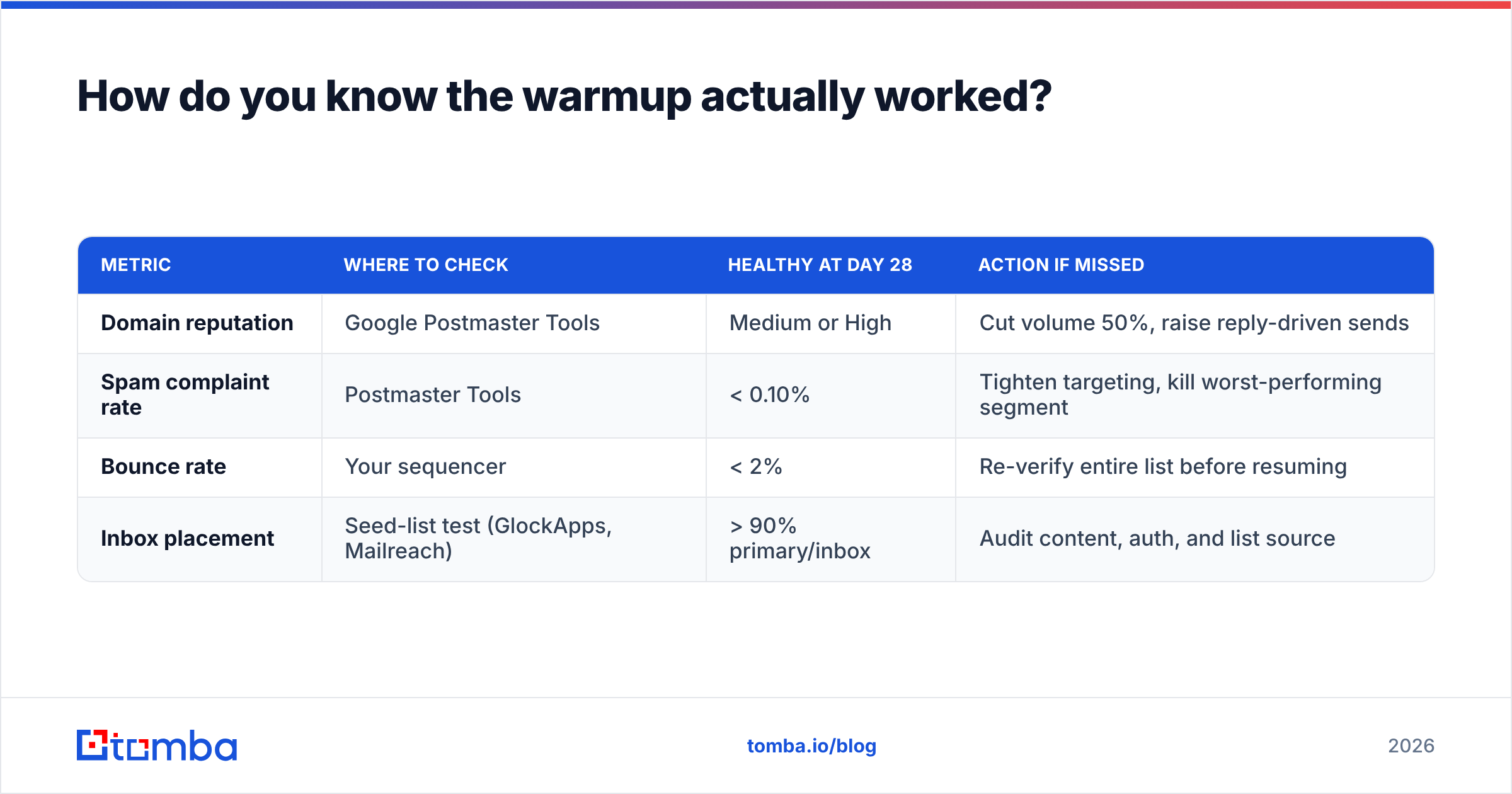
How do you know the warmup actually worked?#
Measure four things, weekly:
| Metric | Where to check | Healthy at day 28 | Action if missed |
|---|---|---|---|
| Domain reputation | Google Postmaster Tools | Medium or High | Cut volume 50%, raise reply-driven sends |
| Spam complaint rate | Postmaster Tools | < 0.10% | Tighten targeting, kill worst-performing segment |
| Bounce rate | Your sequencer | < 2% | Re-verify entire list before resuming |
| Inbox placement | Seed-list test (GlockApps, Mailreach) | > 90% primary/inbox | Audit content, auth, and list source |
If those four are green at day 28, you have a working mailbox. If domain reputation still reads "Low" after four clean weeks, the problem is almost always list quality or content, not the ramp curve.
One more check worth doing before you scale: pull a sample of 200 addresses from your target list and verify them. If more than 5% come back invalid, unknown, or catch-all, fix the data source before you touch the send button. A warmup schedule protects your reputation from your sending pattern; it cannot protect you from your data. That is why teams that run clean outbound treat email verification and warmup as a single workflow rather than two separate chores — and why G2's deliverability category is full of tools that do one and quietly assume you handled the other.
For the underlying concepts and how filters weigh each signal, the email deliverability and sender reputation entries in the glossary are a reasonable 10-minute read before you build your own ramp.
Where should you start this week?#
Do these five things in order: register your sending domains today so they age while you build everything else; publish SPF, DKIM, and DMARC (p=none) on day one; create two mailboxes per domain; start week one at 5-10 sends/day to people who will genuinely reply; and verify every address on your target list before a single cold message goes out.
That last step is where most warmups quietly die. If you want the ramp you just planned to survive contact with your first real campaign, source and validate the addresses properly — find verified, deliverable contacts with the Tomba Email Finder, which runs each result through validation before it reaches your list. The free tier covers 25 searches a month if you want to test the accuracy on your own target accounts first; paid plans start at $49/mo, with full details on the Tomba pricing page. Warm the mailbox, clean the list, then send.
Related guides#
// get started
Find, verify and enrich your first contacts today
Start on the free plan with 25 searches a month, then scale when your team is ready.
Free plan · No credit card required · GDPR & CCPA
// about the author