Email Wording to Schedule a Meeting: Templates That Work
The exact phrasing that turns a meeting request into a booked calendar slot — subject lines, opening lines, CTA formats, and follow-up cadence, with side-by-side wording comparisons for cold, warm, and internal asks.
TL;DR
- The wording that books meetings is short, specific, and asks for one decision — not "let me know if you'd like to connect."
- Your call-to-action does more work than your subject line. A single proposed time beats an open-ended "when works for you?" in almost every test.
- Cold, warm, and internal requests need different phrasing. Reusing a cold template on a warm lead reads like a mail merge.
- Cut the throat-clearing: "I hope this email finds you well" and "I wanted to reach out" waste the two lines that get read.
- Perfect wording sent to a bounced or guessed address is worth zero. Verify the address before you obsess over the verb tense.
What does "email wording to schedule a meeting" actually mean?#
It means the specific sentence-level choices that decide whether someone opens their calendar or archives your message. Not the strategy, not the sequence — the words.
Most meeting request emails fail for one of three reasons: the recipient does not know why you are writing, does not know what you are asking for, or does not know what happens if they say yes. Every wording decision below exists to close one of those gaps.
Think of it like asking a stranger for directions. You do not open with your life story. You say where you are trying to go and what you need from them. A meeting request email is the same transaction compressed into about 90 words.
The benchmark to beat: response rate on a well-targeted cold meeting request typically lands between 3% and 8%. Warm intros and existing-relationship asks run far higher — 30% to 60% is normal. If your numbers are well under those bands, wording is usually the second problem. Targeting and data quality are the first.
What are the five parts of a meeting request email?#
Every effective meeting request email — cold, warm, or internal — contains the same five components in roughly the same order. Change the tone, keep the skeleton.
- Subject line (3–7 words). States the topic or the ask, never the pitch. "15 min on Q3 pipeline reporting" outperforms "Transform your revenue operations."
- Context line (1 sentence). Why this person, right now. A trigger event, a mutual connection, a specific detail from their site or a recent announcement.
- Relevance line (1–2 sentences). What you do, framed as the outcome they care about. Not your feature list. This is where most drafts balloon to four sentences — cut it back.
- The ask (1 sentence). One meeting, one duration, one or two proposed times. Specificity removes the mental work of scheduling.
- The exit ramp (1 short line). A graceful no. "If this isn't a priority right now, no problem — just say so and I'll close the loop." Counterintuitively, this raises reply rates because it lowers the cost of responding.
Total: 70–120 words. If your draft is longer, you are explaining rather than asking.

What subject line wording gets meetings booked?#
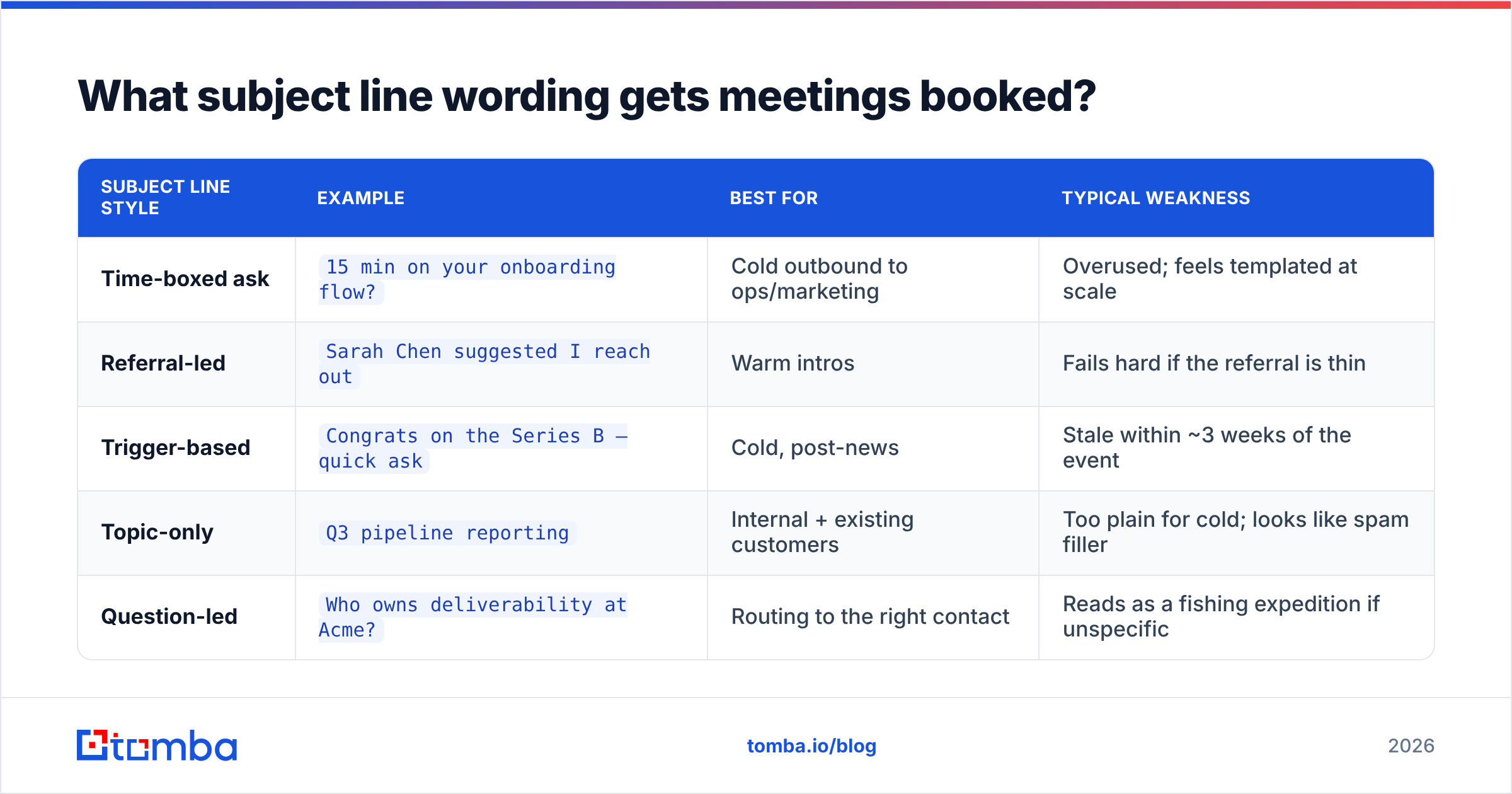
Subject lines for meeting requests have one job: signal that a decision is being requested, not a pitch delivered. Vague curiosity-bait ("Quick question") still gets opens but tanks reply quality, because the body never matches the promise.
| Subject line style | Example | Best for | Typical weakness |
|---|---|---|---|
| Time-boxed ask | 15 min on your onboarding flow? |
Cold outbound to ops/marketing | Overused; feels templated at scale |
| Referral-led | Sarah Chen suggested I reach out |
Warm intros | Fails hard if the referral is thin |
| Trigger-based | Congrats on the Series B — quick ask |
Cold, post-news | Stale within ~3 weeks of the event |
| Topic-only | Q3 pipeline reporting |
Internal + existing customers | Too plain for cold; looks like spam filler |
| Question-led | Who owns deliverability at Acme? |
Routing to the right contact | Reads as a fishing expedition if unspecific |
Two rules that survive most A/B tests: keep it under 50 characters so it survives mobile truncation, and write it in lowercase-adjacent sentence case. Title Case Every Word reads like a newsletter. If you want to pressure-test variants before sending, run them through a subject line generator and pick the shortest one that still states the topic.
Avoid entirely: "Touching base," "Checking in," "Following up" as first-touch subjects. They imply a prior relationship that does not exist, and recipients notice.
Which wording works for cold, warm, and internal requests?#
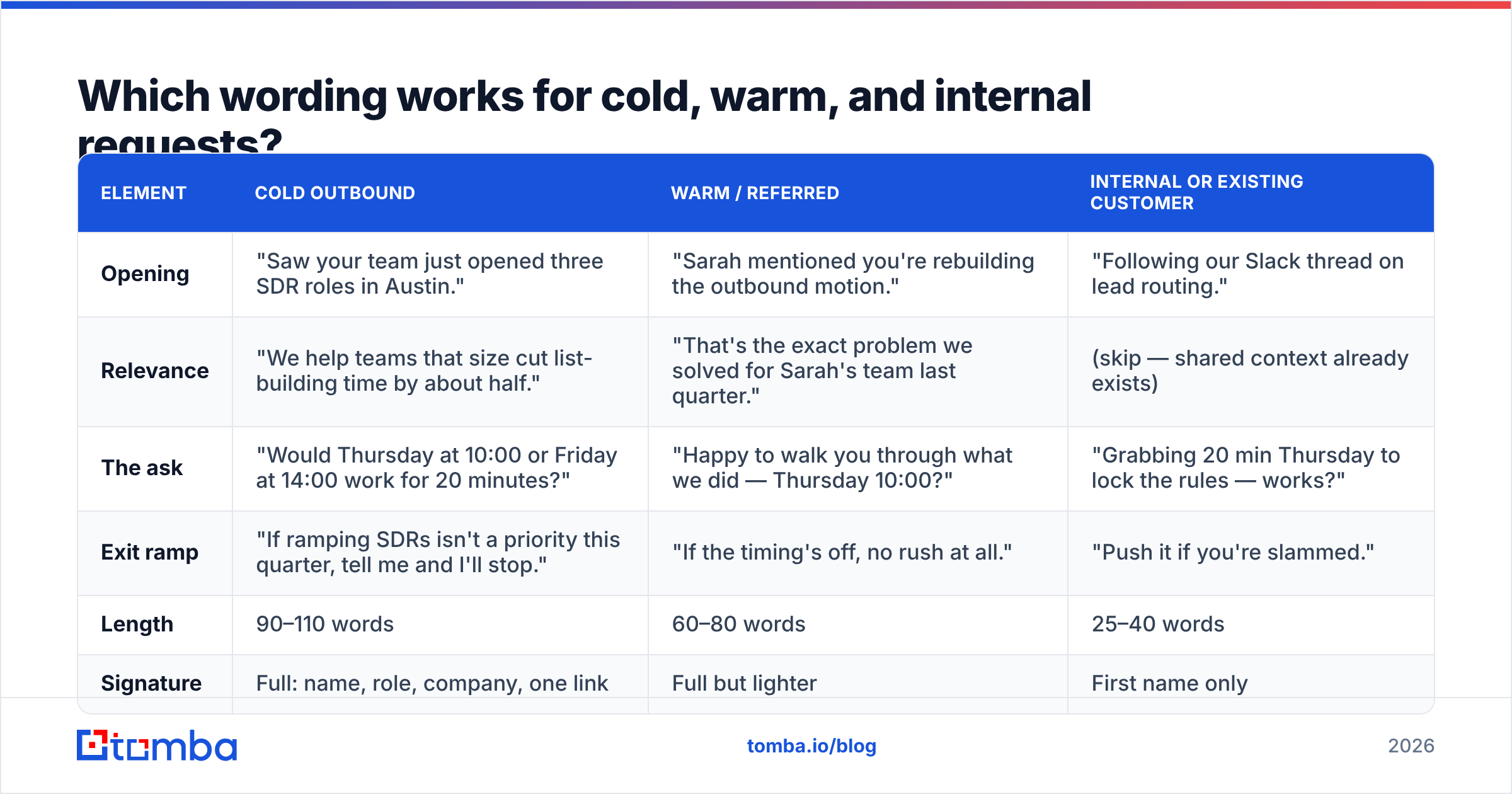
The single biggest wording error is tone mismatch. Here is the same request — a 20-minute meeting — phrased three ways.
| Element | Cold outbound | Warm / referred | Internal or existing customer |
|---|---|---|---|
| Opening | "Saw your team just opened three SDR roles in Austin." | "Sarah mentioned you're rebuilding the outbound motion." | "Following our Slack thread on lead routing." |
| Relevance | "We help teams that size cut list-building time by about half." | "That's the exact problem we solved for Sarah's team last quarter." | (skip — shared context already exists) |
| The ask | "Would Thursday at 10:00 or Friday at 14:00 work for 20 minutes?" | "Happy to walk you through what we did — Thursday 10:00?" | "Grabbing 20 min Thursday to lock the rules — works?" |
| Exit ramp | "If ramping SDRs isn't a priority this quarter, tell me and I'll stop." | "If the timing's off, no rush at all." | "Push it if you're slammed." |
| Length | 90–110 words | 60–80 words | 25–40 words |
| Signature | Full: name, role, company, one link | Full but lighter | First name only |
Notice what shrinks as warmth increases: the relevance paragraph disappears, the exit ramp softens, and the signature deflates. Cold emails need to earn the ask. Warm emails need to not waste the goodwill by over-explaining.
What are the actual templates?#
Copy these, then replace every bracket with something a competitor could not have written.
Cold — trigger-based
Subject: 15 min on [specific initiative]?
Hi [First name],
Saw [company] announced [specific trigger] last week. Teams doing that usually hit [specific, narrow problem] within a quarter or two.
We built [product] for exactly that — [customer type] typically [concrete outcome with a number].
Would Tuesday 10:00 or Wednesday 15:00 work for 15 minutes? Happy to send a two-line summary instead if that's easier.
[Name]
Warm — referral
Subject: [Referrer] suggested I reach out
Hi [First name],
[Referrer] and I worked together on [specific project] — she mentioned you're tackling [problem] right now.
I'd rather show you what worked than describe it. 20 minutes Thursday at 11:00?
[Name]
Re-engagement — gone quiet
Subject: Closing the loop on [topic]
Hi [First name],
We talked in [month] about [specific thing]; you mentioned revisiting after [event]. That's happened, so: still worth 20 minutes, or should I close this out?
Either answer is a good answer.
[Name]
Internal — cross-functional
Subject: 20 min: [decision to be made]
Hi [First name],
Need a decision on [X] before [date]. Thursday 14:00 or Friday 09:30 — either works, pick one and I'll send the invite with the doc attached.
[Name]
The re-engagement template is the highest-yield of the four for most teams, because the recipient already knows who you are. If you want a broader starting library, the cold email templates collection covers adjacent scenarios like post-demo follow-ups and event outreach.
Should you propose a time or ask for their availability?#
Propose a time — but offer exactly two, and add an escape hatch.
Here is the reasoning. "When are you free next week?" asks the recipient to do three tasks: open a calendar, evaluate options, and compose a reply. "Thursday 10:00 or Friday 14:00?" asks them to do one: pick a letter. Fewer cognitive steps, more replies. HubSpot's sales research team has documented this pattern across large template datasets, and it holds up in most internal tests you can run yourself (HubSpot sales blog).
But do not over-index. Three failure modes to avoid:
- Too many options. Listing five slots looks desperate and creates decision paralysis. Two is the sweet spot; three is the ceiling.
- Calendar link as the primary CTA in a cold email. A booking link before any relationship exists reads as "do my admin work." Put it as a fallback line, not the ask: "Or grab any slot here if that's faster."
- No time zone. "Thursday at 10" is useless across regions. Write "Thursday 10:00 ET" every time.
For senior buyers — VP and above — flip the pattern slightly. Executives protect calendar control. "Does 20 minutes late next week work? Happy to fit your schedule" tends to outperform hard slot proposals with that audience, a distinction Gartner's buyer research repeatedly surfaces in B2B purchase behavior studies (gartner.com).
What wording kills a meeting request?#
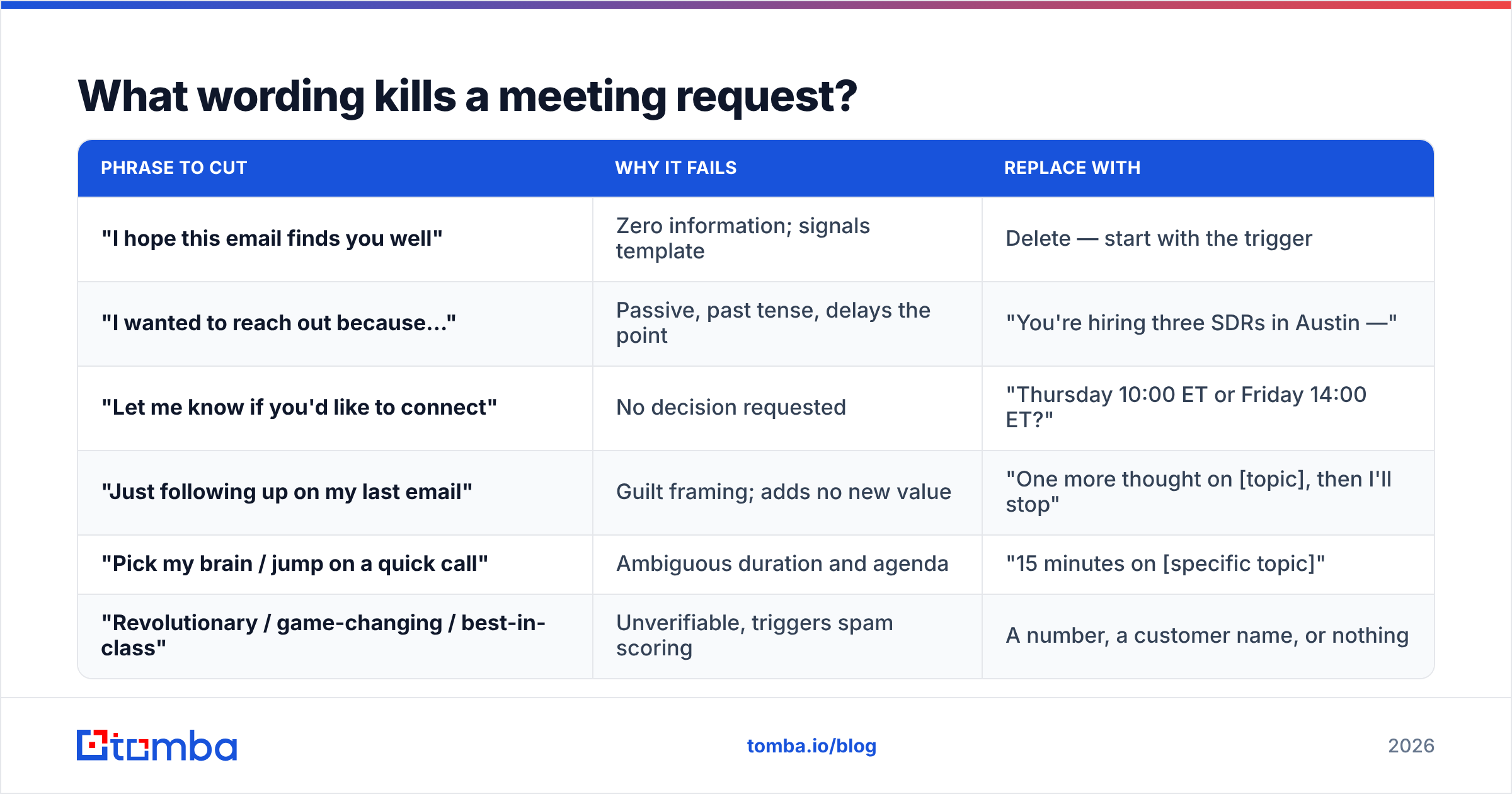
Some phrases are so common that they now function as filters. Recipients skim past them, which means anything attached to them gets skipped too.
| Phrase to cut | Why it fails | Replace with |
|---|---|---|
| "I hope this email finds you well" | Zero information; signals template | Delete — start with the trigger |
| "I wanted to reach out because…" | Passive, past tense, delays the point | "You're hiring three SDRs in Austin —" |
| "Let me know if you'd like to connect" | No decision requested | "Thursday 10:00 ET or Friday 14:00 ET?" |
| "Just following up on my last email" | Guilt framing; adds no new value | "One more thought on [topic], then I'll stop" |
| "Pick my brain / jump on a quick call" | Ambiguous duration and agenda | "15 minutes on [specific topic]" |
| "Revolutionary / game-changing / best-in-class" | Unverifiable, triggers spam scoring | A number, a customer name, or nothing |
The last row matters for more than tone. Superlative-heavy copy raises spam scores, and a message that lands in Promotions never gets a wording critique — it just never gets read. Run a draft through a spam checker before you scale a template to hundreds of sends.
How many follow-ups, and what should they say?#
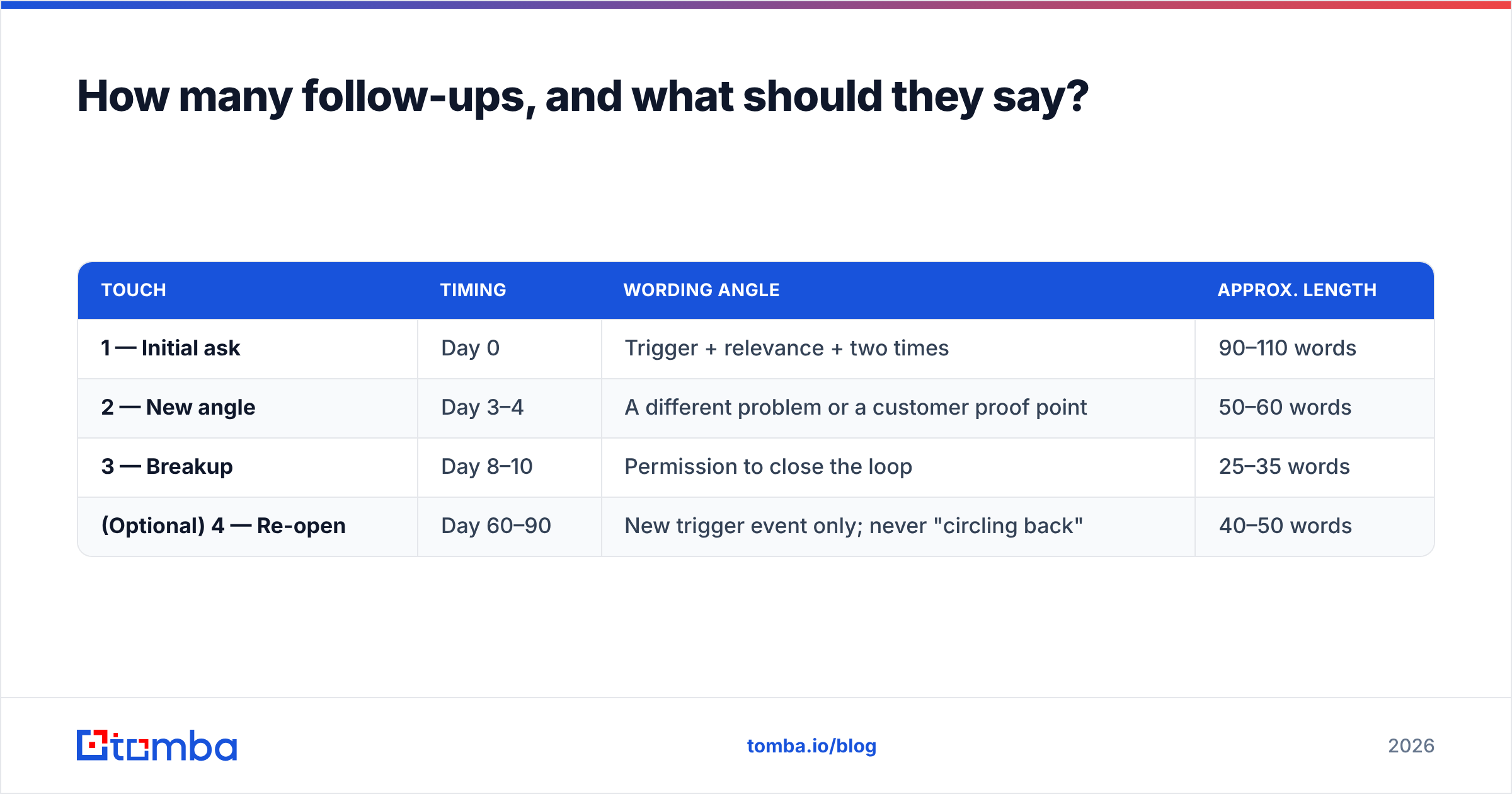
Three total touches for cold, two for warm. Each one must add something new — a follow-up that only repeats the ask is why "just checking in" became a punchline.
| Touch | Timing | Wording angle | Approx. length |
|---|---|---|---|
| 1 — Initial ask | Day 0 | Trigger + relevance + two times | 90–110 words |
| 2 — New angle | Day 3–4 | A different problem or a customer proof point | 50–60 words |
| 3 — Breakup | Day 8–10 | Permission to close the loop | 25–35 words |
| (Optional) 4 — Re-open | Day 60–90 | New trigger event only; never "circling back" | 40–50 words |
The breakup email is the one people underuse. "Sounds like this isn't a priority — I'll close the file. If that's wrong, just reply 'not yet' and I'll check back in Q4." It converts because it hands control back to the recipient and sets a deadline without manufacturing urgency.
Send timing matters less than most blogs claim, but two things are consistent: avoid Monday before 09:00 (inbox triage kills you) and avoid Friday after 14:00 (nothing gets calendared into next week).
Does the email address matter more than the wording?#
Yes — and it is not close.
A perfectly worded meeting request sent to first.last@company.com when the real pattern is flast@company.com produces a hard bounce. Enough hard bounces and your sender reputation degrades, at which point even your correctly-addressed emails start landing in spam. The wording never gets evaluated.
Practical order of operations before you send a meeting request at any volume:
- Confirm the person still holds the role. Titles churn fast; a request aimed at a departed VP is dead on arrival regardless of phrasing.
- Find the address rather than guess it. Permutation guessing produces bounce rates in the 20–40% range on unfamiliar domains. A dedicated email finder returns the address with a confidence score and the sources behind it.
- Verify before sending. Run the list through an email verifier and drop anything below a solid deliverable status. Catch-all domains need their own handling — they accept everything at the SMTP layer and tell you nothing.
- Keep daily volume sane. Under 50 cold sends per mailbox per day for a warmed domain. Wording cannot rescue a burned domain.
That is also why sequencing tools and finders are complementary, not competing purchases. Tools like BookYourData sell verified list access; finders like Tomba resolve specific named prospects on demand. Which you need depends on whether you are working from an account list you already built or discovering contacts one company at a time. Many teams run both.
How do you know if your wording is actually working?#
Track three numbers per template, not one:
| Metric | Healthy cold benchmark | What a bad number tells you |
|---|---|---|
| Bounce rate | Under 2% | Data problem, not wording |
| Open rate | 40–60% | Subject line or deliverability |
| Reply rate | 3–8% | Body relevance or targeting |
| Positive reply rate | 1–3% | Your ask or offer is mismatched |
| Meeting-held rate | 60%+ of booked | Confirmation and reminder wording |
Change one variable at a time and hold each variant for at least 200 sends before judging it. Below that volume you are reading noise. And when a template stops working after months of good performance, suspect list fatigue or domain reputation before you rewrite the copy — the words rarely go stale faster than the data does.
Where should you start?#
Pick one template above, rewrite the bracketed sections with details only you could know about that specific prospect, and send it to 25 verified contacts. Measure reply rate. Then change exactly one thing — usually the CTA — and send 25 more.
The wording work is cheap and fast. The part that quietly determines your ceiling is whether those 25 addresses are real, current, and attached to people who still hold the job you think they hold. Start there: use the Tomba Email Finder to resolve verified addresses by name and domain, with a free tier of 25 searches per month to test the workflow before committing. Paid plans start at $49/month on Starter and scale to $99/month on Growth — see Tomba pricing for the full breakdown. Get the address right, then let the wording do its job.
Related guides#
Ready to find emails that actually work?
Join 150,000+ professionals who stopped guessing and started sending. Free credits on signup — no credit card required.
Get the Tomba newsletter
Practical outbound tactics and product updates — once every two weeks.
About the author