Email Workflow Automation: The Complete 2026 Playbook
Most teams stitch together five tools and call it an email workflow. Here's how the stages actually fit — trigger, data, verification, send, and handoff — with the numbers to prove which links are leaking.
TL;DR
- An email workflow is the full chain from trigger to reply — not just the sequence builder. Most teams only automate the middle third and wonder why results are inconsistent.
- The five stages that matter: trigger, enrichment, verification, send logic, and CRM handoff. A break in any one caps the entire system's output.
- Verification is the cheapest insurance in the chain. Bouncing 5% of a 10,000-contact send costs more in domain reputation than the verification credits would have cost in dollars.
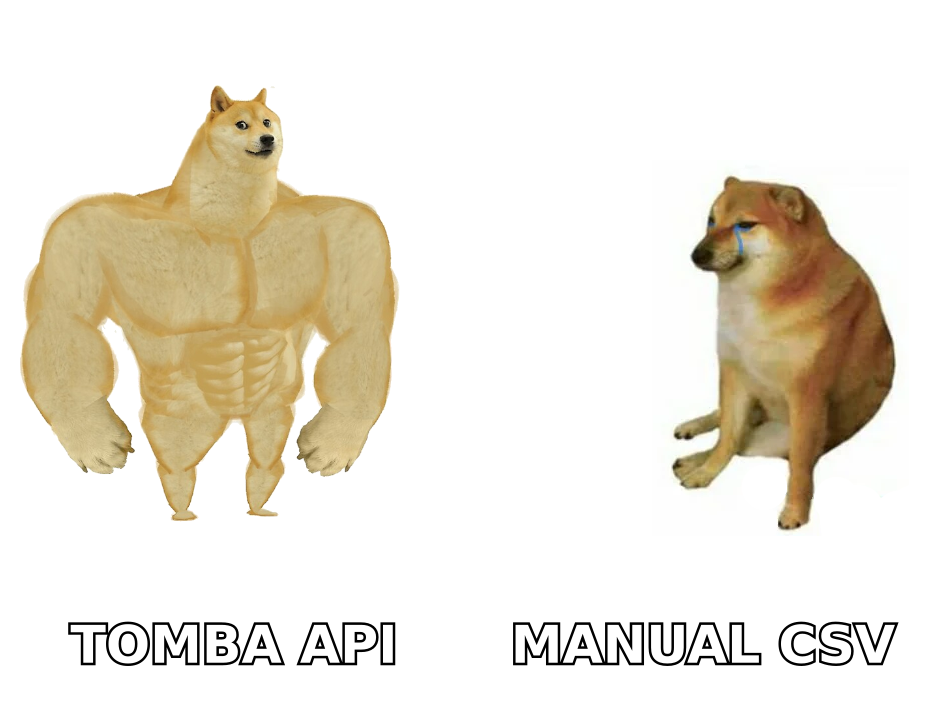
- Manual CSV round-trips are the single most common bottleneck. Moving enrichment and verification to an API call inside the workflow removes days of latency per cycle.
- Build the workflow around a single source of truth — usually your CRM — and treat every other tool as a worker that reads from and writes back to it.
What Is an Email Workflow, Exactly?#
An email workflow is the end-to-end system that turns a signal into a sent, tracked, and routed email. Think of it like a factory line rather than a single machine: raw material comes in at one end (a signal that someone might be worth emailing), passes through stations that add data and remove defects, and exits as a message that lands in an inbox and a record that lands in your CRM.
Most teams conflate "email workflow" with "email sequence." A sequence is one station on the line — the part that decides message one goes out Tuesday and message two goes out Friday if nobody replied. The workflow is everything around it, and the parts nobody automates are usually the parts that break.
Here's the honest breakdown of the five stages:
- Trigger — the event that says this contact deserves an email now. A form fill, a job change, a funding announcement, a website visit, a list import, a closed-lost deal aging past 90 days.
- Enrichment — turning a partial record (name + company, or a LinkedIn URL, or just a domain) into a complete one with a valid work email, title, and firmographics.
- Verification — confirming the address actually accepts mail before you send to it, including the awkward middle case of catch-all domains.
- Send logic — sequencing, timing, inbox rotation, personalization tokens, and reply detection.
- Handoff — writing activity back to the CRM, routing replies to an owner, and suppressing the contact from other campaigns.
Stage 1 and stage 5 are where the leaks live. Everyone buys a tool for stage 4.
Which Stage Is Actually Breaking Your Numbers?#
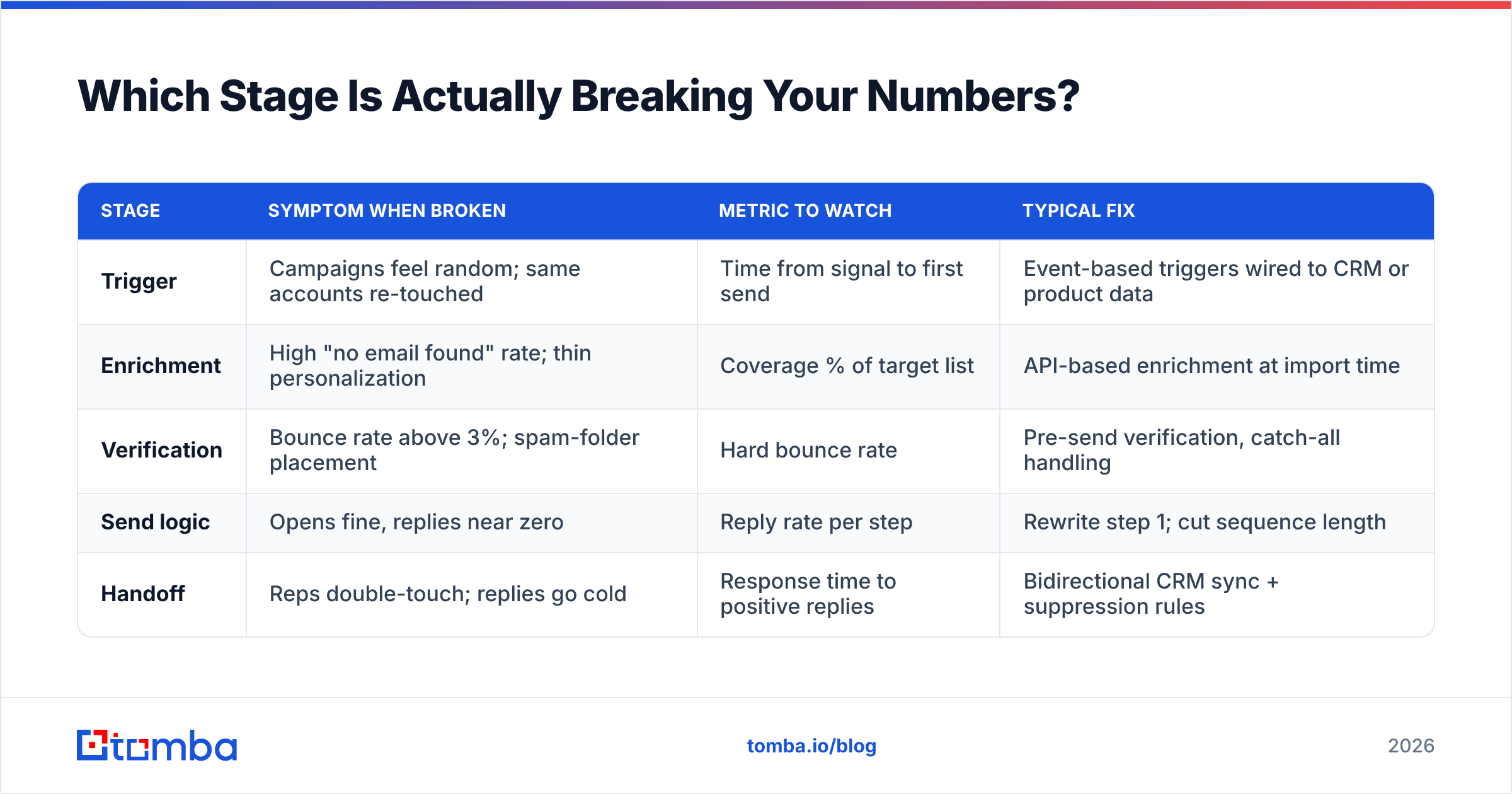
Diagnose before you buy. Each stage produces a measurable symptom when it fails, and the fixes are not interchangeable.
| Stage | Symptom when broken | Metric to watch | Typical fix |
|---|---|---|---|
| Trigger | Campaigns feel random; same accounts re-touched | Time from signal to first send | Event-based triggers wired to CRM or product data |
| Enrichment | High "no email found" rate; thin personalization | Coverage % of target list | API-based enrichment at import time |
| Verification | Bounce rate above 3%; spam-folder placement | Hard bounce rate | Pre-send verification, catch-all handling |
| Send logic | Opens fine, replies near zero | Reply rate per step | Rewrite step 1; cut sequence length |
| Handoff | Reps double-touch; replies go cold | Response time to positive replies | Bidirectional CRM sync + suppression rules |
Run this table against your last 90 days before changing anything. If your bounce rate is 8% and you spend the quarter rewriting subject lines, you have optimized the wrong station — the line is still shipping defective units.
A useful rule from operations: the throughput of the whole line equals the throughput of the slowest station. Adding capacity anywhere else produces inventory, not output. In email terms, a better sequence builder on top of a bad list produces more bounces faster.
How Do You Wire the Trigger Stage?#
Triggers are the difference between a campaign and a workflow. A campaign is something you launch. A workflow is something that runs.
The practical trigger types, ranked by the reply rates teams typically see:
- Product or intent signals — someone hit your pricing page, started a trial, or their company appeared in a technology-change dataset. Highest intent, lowest volume. Tools like website visitor reveal turn anonymous traffic into a named trigger.
- Job-change signals — a champion moved to a new company. Historically the strongest single trigger in B2B, because the buyer already knows your product.
- Funding and hiring signals — a Series B announcement or fifteen open SDR roles both imply budget movement.
- Lifecycle triggers — a closed-lost deal hits its renewal anniversary, a trial expires, an MQL crosses a score threshold.
- List-based triggers — the classic ICP list build. Lowest intent per contact, but it's the only one that scales on demand, and it's still the backbone of most outbound programs.
The engineering requirement is the same regardless of type: the trigger must fire into a queue automatically, not into a spreadsheet a human checks on Fridays. If your trigger fires on Monday and the email goes out the following Wednesday, the signal has decayed to noise.
Wire it with whatever automation layer you already own. HubSpot workflows, Salesforce Flow, Zapier, or Make all work. The choice matters far less than whether the connection exists at all. HubSpot's own workflow documentation is a reasonable starting reference for the enrollment-and-branching model most tools have copied.
Why Does Data Quality Break More Workflows Than Copy?#
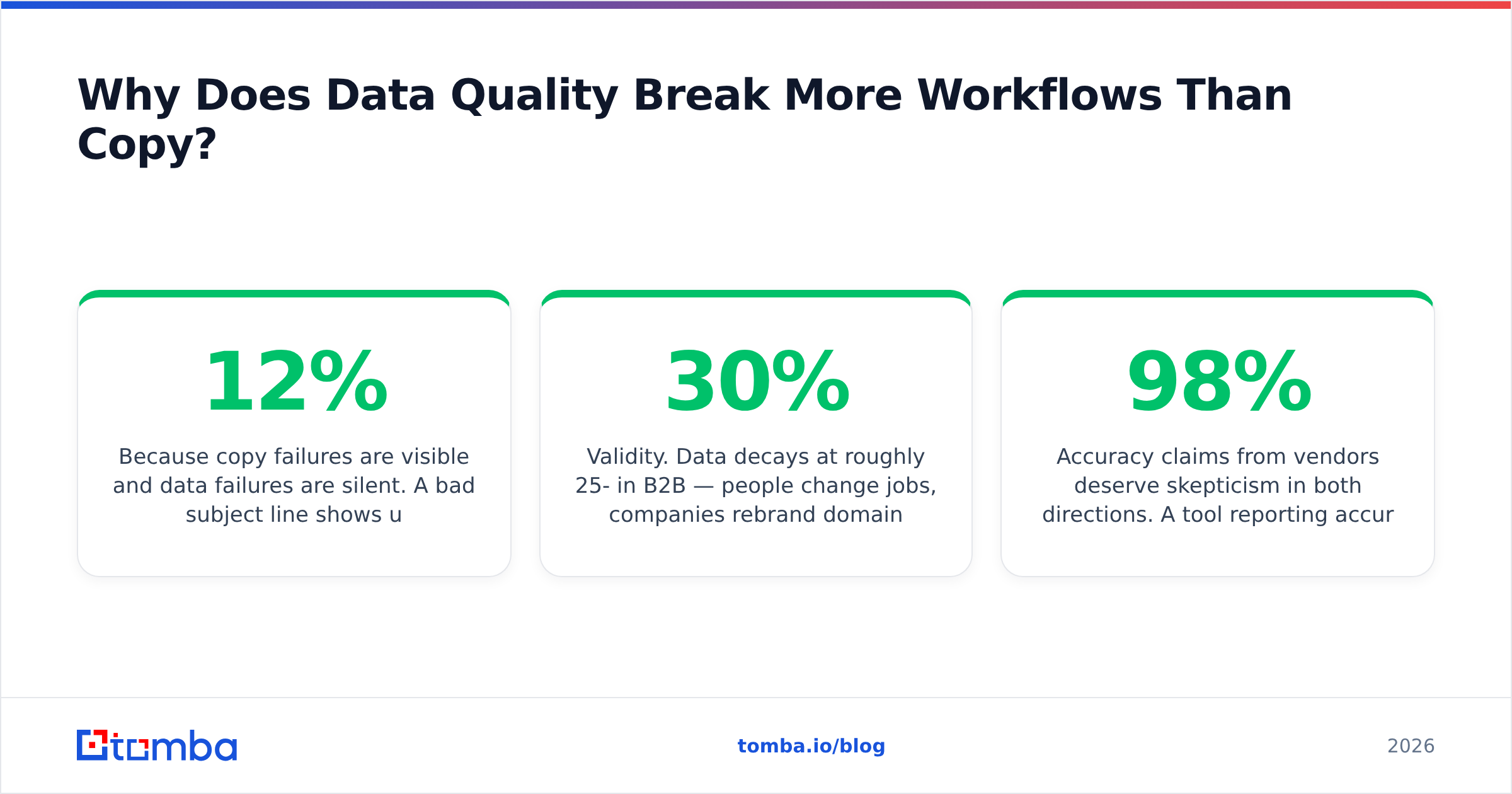
Because copy failures are visible and data failures are silent. A bad subject line shows up as a low open rate you can see in a dashboard. A 12% invalid-address rate shows up three weeks later as a deliverability problem that took your whole domain down with it.
Two data problems dominate:
Coverage. You have 800 target accounts and contact data for 340 of them. The other 460 are not "later" — they're the ceiling on your pipeline. Coverage is fixed at the enrichment stage using a domain search to pull every known address at a company, or an email finder to resolve a specific name-plus-domain pair into a deliverable address.
Validity. Data decays at roughly 25-30% per year in B2B — people change jobs, companies rebrand domains, aliases get deprecated. A list you built in January is measurably worse in July. This is why verification is a step in the workflow rather than a one-time cleanup project.

Accuracy claims from vendors deserve skepticism in both directions. A tool reporting 98% accuracy on a sample of Fortune 500 marketing directors will report something very different on a list of European SMB operations managers. Test on your own ICP, with a sample of 200-500 contacts, and measure the hard bounce rate of an actual send rather than the tool's self-reported confidence score.
The catch-all case deserves its own note. Catch-all domains accept mail for any address, so a standard SMTP check returns "valid" for nonexistent@company.com just as readily as for the real thing. If a meaningful chunk of your ICP runs catch-all — common in enterprise and in Microsoft 365 environments — you need a catch-all verifier that applies pattern confidence and secondary signals rather than trusting the SMTP handshake alone.
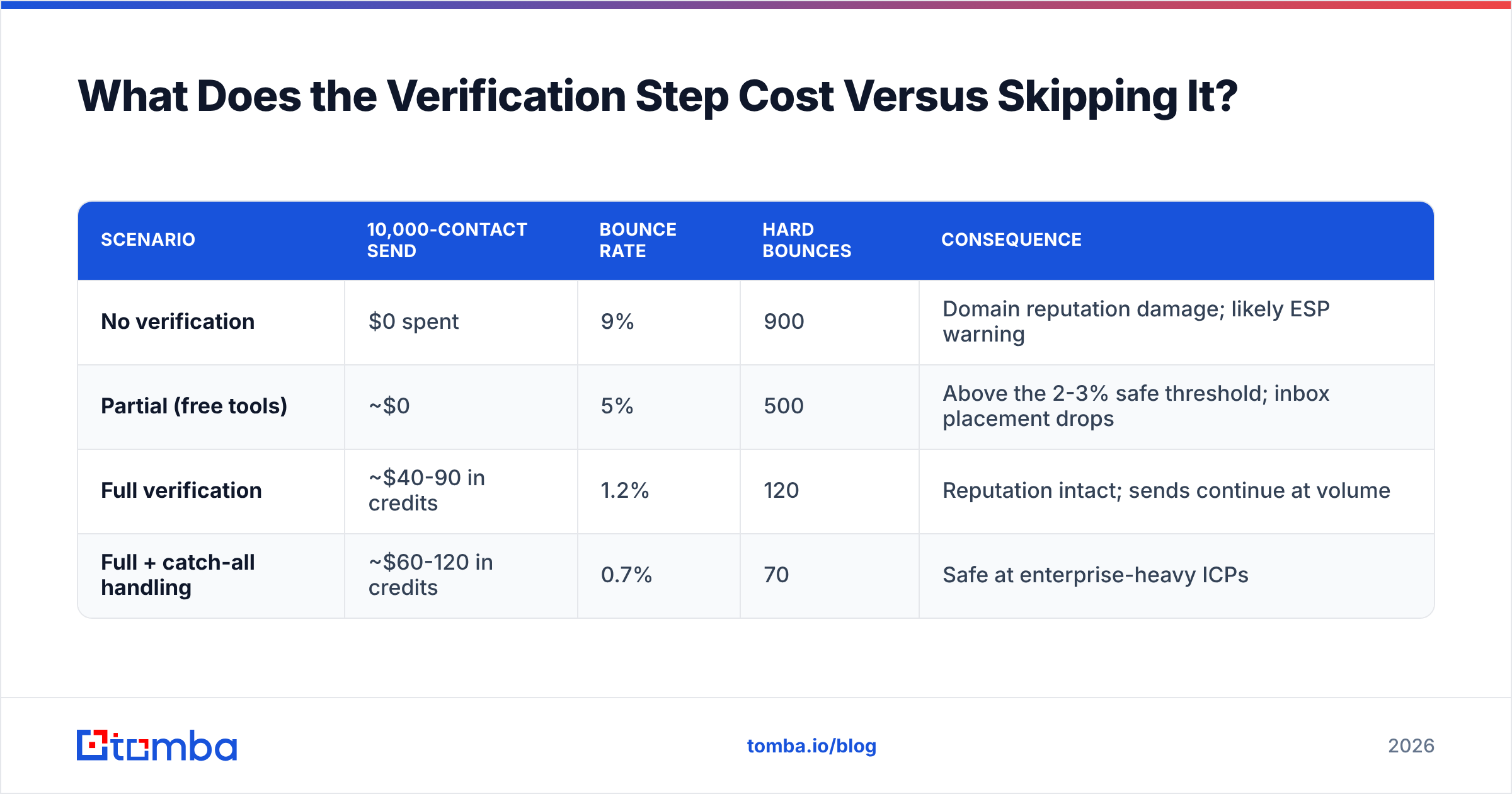
What Does the Verification Step Cost Versus Skipping It?#
Run the arithmetic once and the debate ends.
| Scenario | 10,000-contact send | Bounce rate | Hard bounces | Consequence |
|---|---|---|---|---|
| No verification | $0 spent | 9% | 900 | Domain reputation damage; likely ESP warning |
| Partial (free tools) | ~$0 | 5% | 500 | Above the 2-3% safe threshold; inbox placement drops |
| Full verification | ~$40-90 in credits | 1.2% | 120 | Reputation intact; sends continue at volume |
| Full + catch-all handling | ~$60-120 in credits | 0.7% | 70 | Safe at enterprise-heavy ICPs |
The right column is the real cost. Mailbox providers treat a sustained bounce rate above roughly 2% as a signal that you're sending to a purchased or stale list, and the penalty is applied to your sending domain — which means it also hits the transactional and one-to-one mail going out from the same domain. Google and Yahoo's bulk sender requirements codified this: spam complaint rates above 0.3% and unauthenticated mail now get filtered aggressively regardless of content quality.
You cannot rewrite your way out of a reputation problem. You can only avoid causing one, which is why email verification belongs inside the workflow as a mandatory gate rather than beside it as an optional cleanup.
How Do the Main Workflow Approaches Compare?#
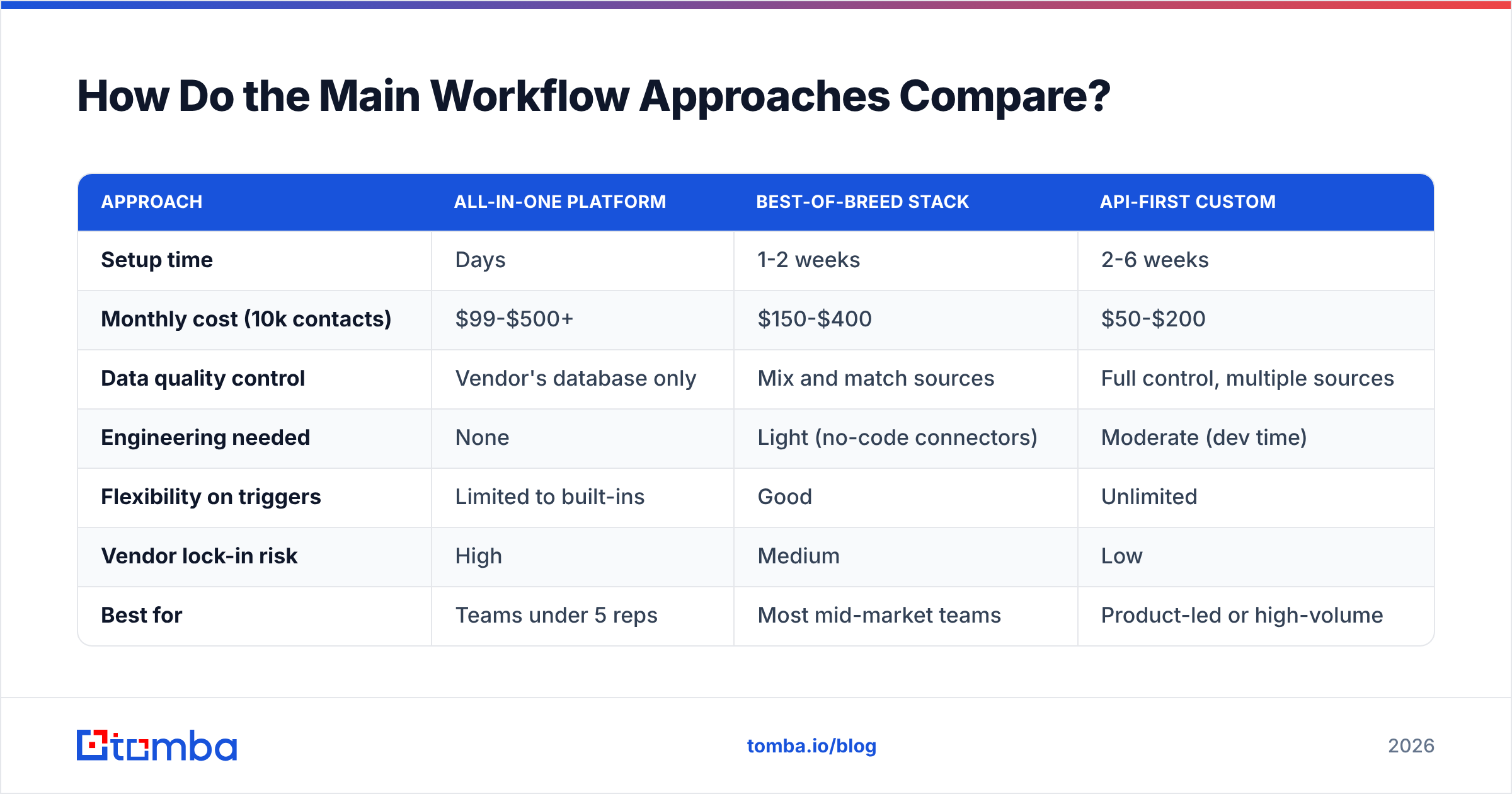
There are three realistic architectures. Pick based on volume and engineering capacity, not on which vendor called you last.
| Approach | All-in-one platform | Best-of-breed stack | API-first custom |
|---|---|---|---|
| Setup time | Days | 1-2 weeks | 2-6 weeks |
| Monthly cost (10k contacts) | $99-$500+ | $150-$400 | $50-$200 |
| Data quality control | Vendor's database only | Mix and match sources | Full control, multiple sources |
| Engineering needed | None | Light (no-code connectors) | Moderate (dev time) |
| Flexibility on triggers | Limited to built-ins | Good | Unlimited |
| Vendor lock-in risk | High | Medium | Low |
| Best for | Teams under 5 reps | Most mid-market teams | Product-led or high-volume |
All-in-one platforms — Apollo, Outreach, Salesloft and similar — put every stage in one login. The trade is that you inherit their data coverage whether or not it matches your ICP, and switching later means rebuilding sequences from scratch. Worth it if your team has no operations resource. Compare features honestly on G2 rather than on vendor landing pages.
Best-of-breed is where most teams land: a CRM as the source of truth, a data provider for enrichment and verification, and a sending tool for sequences, connected with a no-code automation layer. It costs slightly more in tooling but lets you replace the weak component without a migration project. Providers with strong verified-contact databases — including peers like BookYourData for pre-built list purchases — slot in cleanly at the enrichment stage alongside a real-time finder.
API-first means your enrichment and verification live in code, called at the moment the trigger fires. For product-led companies where the trigger is a signup event, this is the only architecture that keeps latency near zero. An email finder API call at signup resolves the work email and firmographics before the welcome sequence starts, so personalization is already in place on message one.
What Does a Working Workflow Look Like End to End?#
Here's a concrete build a two-person team can ship in a week, using the best-of-breed pattern.
- Trigger fires. A new account matching ICP criteria appears in your CRM — imported from a list build, a form fill, or an intent signal.
- Enrichment runs automatically. The automation layer calls a domain search on the company URL, pulls contacts matching target titles, and writes them back as contact records with source and confidence fields populated.
- Verification gates the record. Each new address goes through verification. Valid addresses advance. Invalid ones are marked and excluded. Catch-all addresses route to a separate track with a lower-volume, higher-personalization sequence — you send, but you don't bet the domain on them.
- Sequence enrolls only verified records. This is the rule most teams skip. Your sending tool should be structurally incapable of receiving an unverified address; enforce it with a required field, not a reminder in a doc.
- Reply detection routes ownership. Positive replies create a task for the account owner within minutes. Out-of-office replies pause and re-enroll. Hard negatives write a suppression flag that every other campaign respects.
- Write back everything. Sent, opened, replied, bounced — all of it lands on the contact record. Without this, your next list build re-targets people who told you no six weeks ago.
Two implementation notes. First, run enrichment and verification in bulk for list imports and via API for real-time triggers — same data, different latency requirements, and the bulk path is meaningfully cheaper per record. Second, if your team lives in spreadsheets, a Google Sheets add-on for enrichment is a legitimate transitional step; it beats manual lookup by an order of magnitude even if it's not the final architecture.
What Should You Measure Once It's Running?#
Track stage-level metrics, not just campaign-level ones. Campaign metrics tell you a campaign underperformed. Stage metrics tell you which station to fix.
- Coverage rate — % of target accounts with at least one verified contact. Target: above 80% for a well-defined ICP.
- Hard bounce rate — below 2%, ideally below 1%. Above 3% means stop sending and fix verification today.
- Time-to-first-touch — hours from trigger firing to email sent. Under 24 hours for intent signals; under 1 hour for product triggers.
- Reply rate by step — if step 1 gets 4% and steps 2-5 get 0.3% combined, your sequence is too long and you're paying for it in unsubscribes.
- Positive reply response time — minutes from reply landing to a human answering. This is the metric with the most direct revenue impact and the one most often unmeasured.
- List decay rate — % of previously-valid addresses that fail re-verification each quarter. Above 10% per quarter means you need a scheduled re-verification job.
Set a re-verification cadence based on that last number. Most B2B lists should be re-verified quarterly at minimum; contact-heavy databases in high-churn industries like tech and agencies need it monthly.
What Are the Three Mistakes That Cost the Most?#
Sending before verifying. Covered above, but worth repeating because it's the one that damages assets you can't easily replace. Domain reputation takes months to rebuild and affects mail you didn't intend to gamble.
Treating the sequence tool as the system of record. Your sequencing platform knows who it emailed. It does not know who your AE talked to at a conference, which account is in a legal review, or that the champion left. When the sequence tool is the source of truth, you email people your company is mid-negotiation with. Keep the CRM authoritative and sync everything into it.
Over-automating the reply. Automate discovery, enrichment, verification, timing, routing, and logging. Do not automate the conversation. The moment a human replies, the workflow's job is to get a human there fast — not to fire message four because the "no reply" condition technically evaluated true at 9am. Add an immediate suppression on any inbound reply, including the ambiguous ones.
Where Should You Start This Week?#
Pick the leaking stage from the diagnostic table and fix only that one. Sequential fixes beat simultaneous rebuilds, because you can attribute the change in results.
If coverage is your constraint, start at enrichment. If bounce rate is above 3%, start at verification — it's the fastest fix with the largest downside avoided. If both look fine and reply rates are still flat, the problem is genuinely your copy and your targeting, and no amount of workflow engineering will substitute.
For the data layer specifically, the Tomba Email Finder handles the enrichment and verification stages in one place — resolve a name and domain into a verified work email, pull every contact at a target company via domain search, and gate the whole thing behind verification before anything reaches your sequencer. The free tier gives you 25 searches a month to test coverage against your own ICP list, and paid plans start at $49/mo. Check the Tomba pricing page for the tier that matches your volume, or wire it directly into your existing stack via the API and skip the CSV round-trip entirely.
Build the line once. Then spend your time on the only part that was never automatable: what you actually say.
Related guides#
Ready to find emails that actually work?
Join 150,000+ professionals who stopped guessing and started sending. Free credits on signup — no credit card required.
Get the Tomba newsletter
Practical outbound tactics and product updates — once every two weeks.
About the author