Emailable vs LeadEngineAI: Which Email Data Tool Wins in 2026?
Emailable verifies the emails you already have. LeadEngineAI promises to generate them with AI. Here is how the two actually compare on accuracy, pricing, and bounce protection — plus the cheaper way to cover both jobs.
Emailable vs LeadEngineAI looks like a head-to-head fight, but it is not one. One tool checks the emails you already have. The other tries to find new ones for you. Here is what each does well, what each really costs once you add the missing half, and how to test both in about an hour.
TL;DR
They are not the same category. Emailable is a mature, narrowly focused email verification platform. LeadEngineAI is a newer AI lead-generation product that hands you contacts. The head-to-head only makes sense if your real question is simpler: where do my emails come from, and who checks them?
Emailable wins on verification depth. You get SMTP-level checks, role and disposable detection, and a documented API that plugs into signup forms.
LeadEngineAI wins on top-of-funnel breadth. It aims to hand you a list, not grade one. But public docs and independent reviews are thin. Test its claims against your own list before you commit budget.
Neither tool is a complete stack alone. Verification without sourcing leaves you nothing to send. Sourcing without verification puts your domain at risk under Google and Microsoft bulk-sender rules.
The pragmatic pick for most teams: one vendor that finds and verifies. Tomba starts at $49/mo, the free tier gives you 25 searches, and one API key covers both jobs.
What does Emailable actually do?#
Emailable is an email verification specialist. You give it addresses — one at a time, in a CSV, or through its API. It returns a verdict for each one: deliverable, undeliverable, risky, or unknown. It also flags role accounts (info@, sales@), throwaway inboxes, and catch-all domains.
That narrow scope is the product's strength. Emailable has been on the market for years, publishes real API docs, and plugs into the usual ESPs. So you can screen a list before you send to it. If your bounce rate crept from 1% to 6% and your ESP is threatening you, Emailable is a legitimate answer. Check the current plans on emailable.com. Verification vendors change credit pricing often, so any number quoted in a blog post ages badly.
What Emailable does not do is find contacts. There is no domain-level discovery and no "give me the VP of Engineering at Stripe" lookup. It cannot turn a name plus a company into a working address either. If your list is empty, Emailable has nothing to grade.
What is LeadEngineAI, and how much of it is verifiable?#
LeadEngineAI sits in the AI lead-generation bucket. You describe your ideal customer, and the system assembles matching contacts. Often it attaches AI-drafted outreach as well. A dozen 2024–2026 entrants make the same promise: fewer tabs, less manual list-building, a faster first send.
Here is the honest caveat, and it applies to any newer vendor in this space. LeadEngineAI has far less independent evidence behind it than the incumbents do. Before you buy, check review volume and recency on a neutral site such as G2's email verification and lead intelligence categories. Do not lean on the vendor's own testimonial carousel. Two questions settle most of it:
Where does the data come from? Ask for a written answer. "AI-generated" is not a data source. Contacts are crawled from public pages, contributed, licensed, or guessed from a pattern. Each route carries a different accuracy and compliance profile.
Is verification included or bolted on? Many AI lead-gen tools guess an address, such as firstname.lastname@domain, and ship it without an SMTP check. That is where bounces come from.
If the answers are vague, treat the output as raw material. It still needs an independent check. That is exactly the workflow gap this comparison exposes.
Emailable vs LeadEngineAI: how do they compare feature by feature?#

Accuracy claims deserve scrutiny on both sides. For a verifier, accuracy means how often a "deliverable" verdict actually lands. False positives cost you bounces. False negatives cost you real prospects you deleted. For a finder, accuracy is hit rate and bounce rate together. A tool that answers 90% of inputs but bounces on a fifth of them is worse than one that returns 60% clean.
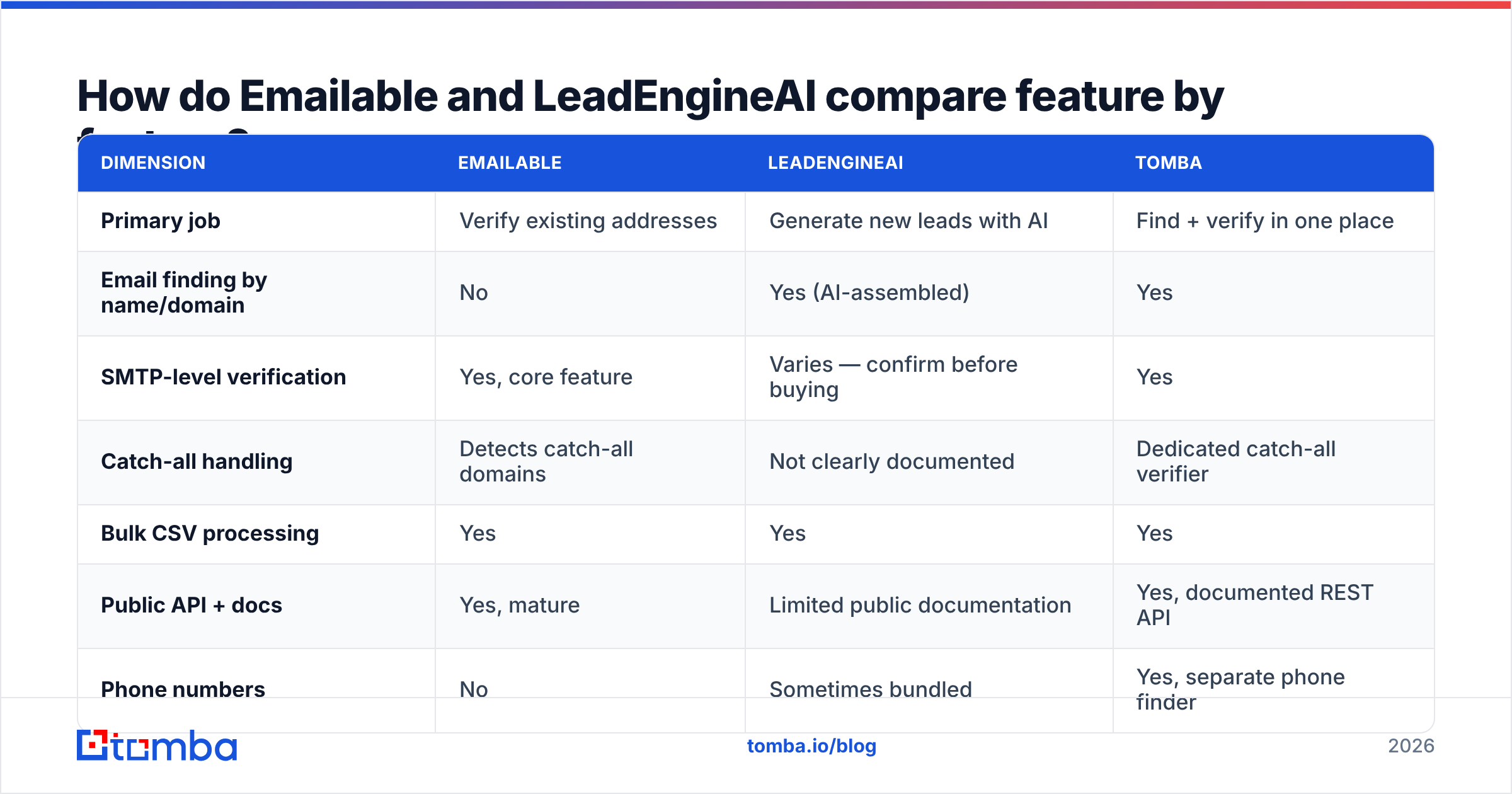
| Dimension | Emailable | LeadEngineAI | Tomba |
|---|---|---|---|
| Primary job | Verify existing addresses | Generate new leads with AI | Find + verify in one place |
| Email finding by name/domain | No | Yes (AI-assembled) | Yes |
| SMTP-level verification | Yes, core feature | Varies — confirm before buying | Yes |
| Catch-all handling | Detects catch-all domains | Not clearly documented | Dedicated catch-all verifier |
| Bulk CSV processing | Yes | Yes | Yes |
| Public API + docs | Yes, mature | Limited public documentation | Yes, documented REST API |
| Phone numbers | No | Sometimes bundled | Yes, separate phone finder |
| Entry price | Credit-based, check vendor page | Not consistently published | $49/mo Starter |
| Free tier | Trial credits | Varies | 25 searches/mo, no card |
| Independent review depth | Established | Thin — verify claims yourself | Established |
Two things jump out of that grid. First, the overlap between the two tools is small. You are choosing between a scalpel and a net, not between two scalpels. Second, the cheapest column is usually the one that folds two subscriptions into one.

Which one should you pick for your use case?#
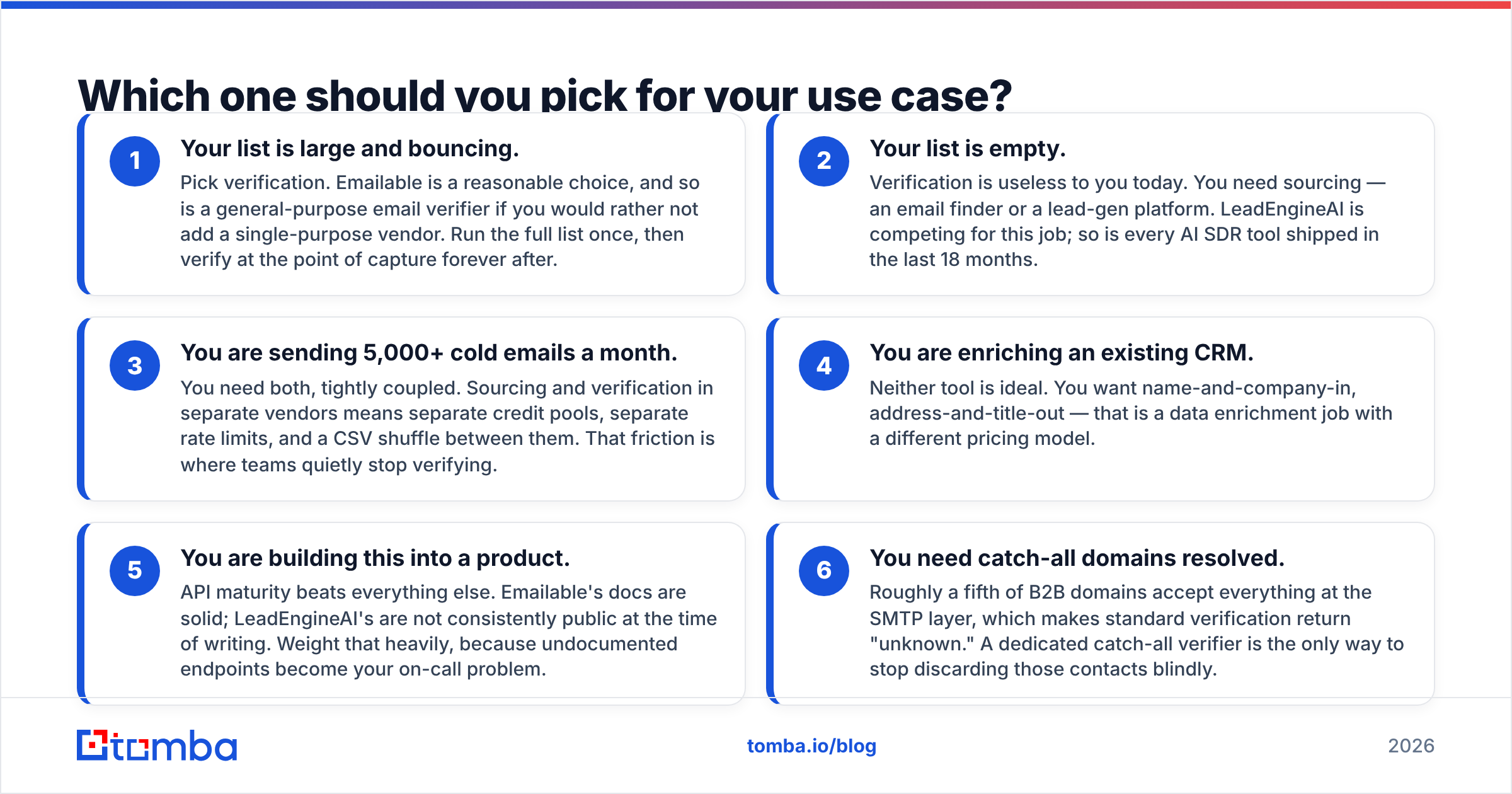
Match the tool to your bottleneck, not to the louder marketing page.
Your list is large and bouncing. Pick verification. Emailable is a reasonable choice. So is a general-purpose email verifier if you would rather not add a single-purpose vendor. Clean the full list once, then verify at the point of capture from then on.
Your list is empty. Verification is useless to you today. You need sourcing: an email finder or a lead-gen platform. LeadEngineAI is competing for that job, and so is every AI SDR tool shipped in the last 18 months.
You send 5,000+ cold emails a month. You need both jobs, tightly coupled. Two vendors means two credit pools, two rate limits, and a CSV shuffle in between. That friction is where teams quietly stop verifying.
You are enriching an existing CRM. Neither tool is ideal. You want name and company in, address and title out. That is a data enrichment job with a different pricing model.
You are building this into a product. API maturity beats everything else. Emailable's docs are solid. LeadEngineAI's are not consistently public today. Weight that heavily, because undocumented endpoints become your on-call problem.
You need catch-all domains resolved. Roughly a fifth of B2B domains accept everything at the SMTP layer, so standard checks return "unknown." A dedicated catch-all verifier keeps you from throwing those contacts away blindly.
Why does verification matter more in 2026 than it did in 2022?#
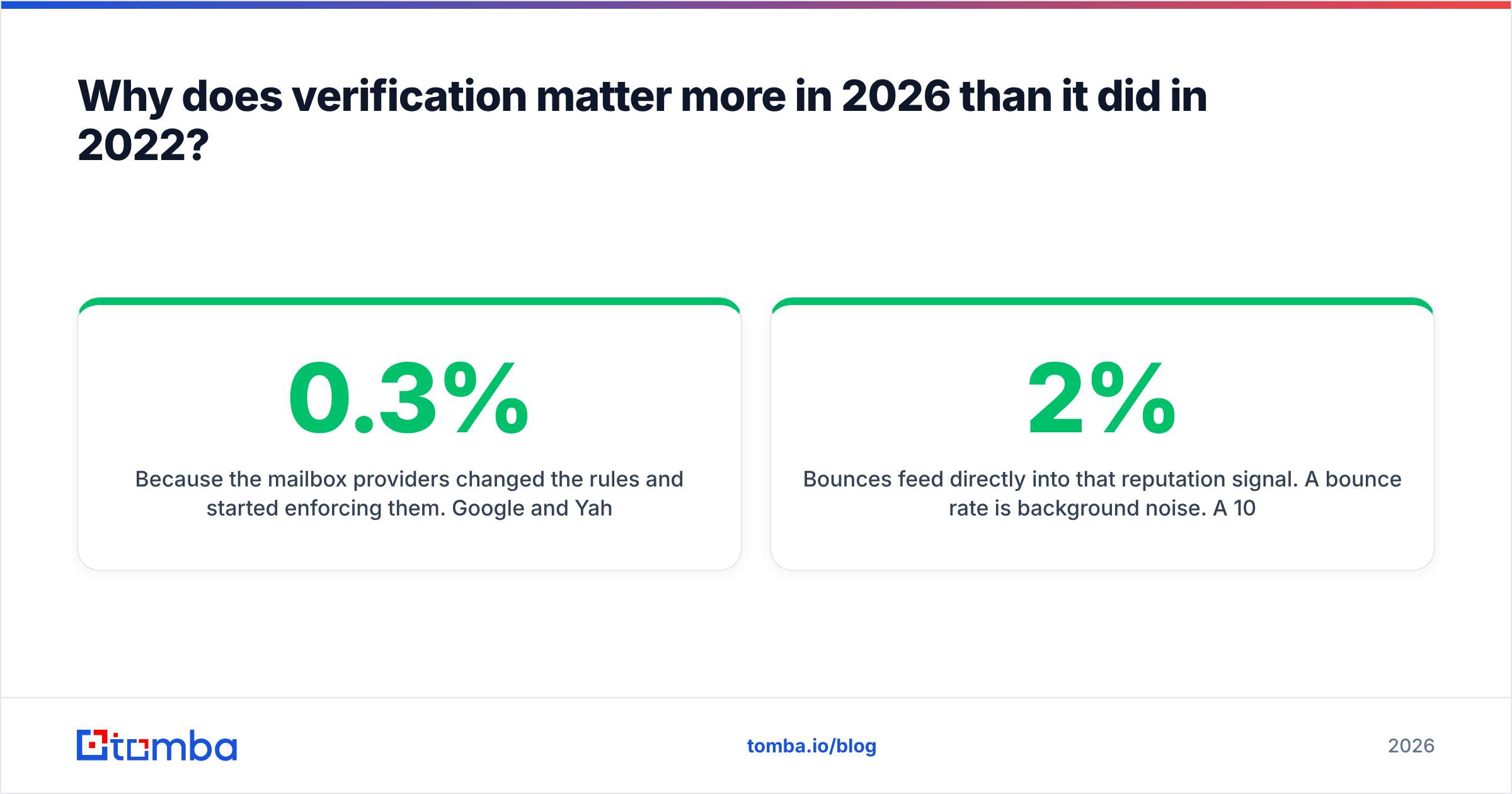
Because the mailbox providers changed the rules and started enforcing them. Google and Yahoo turned informal norms into bulk sender requirements. Authenticate your domain, keep spam complaints under 0.3%, and make unsubscribing easy. Google's own bulk sender guidelines are clear on one point: reputation sits at the domain level and is slow to repair.
Bounces feed straight into that reputation signal. A 2% bounce rate is background noise. A 10% bounce rate on a cold campaign tells the receiving server that you bought a list and never checked it. The penalty lands on your sending domain, not on the vendor who sold you the data.
That is the structural argument against buying AI-generated leads with no verification layer. Guessed addresses look right. firstname.lastname@company.com is the most common corporate format, so a guesser is often correct. It is also confidently wrong the rest of the time, and confident errors at scale are what burn domains. To sanity-check a format before you trust it, a company email pattern lookup takes ten seconds.
What does each option really cost once you add the missing half?#
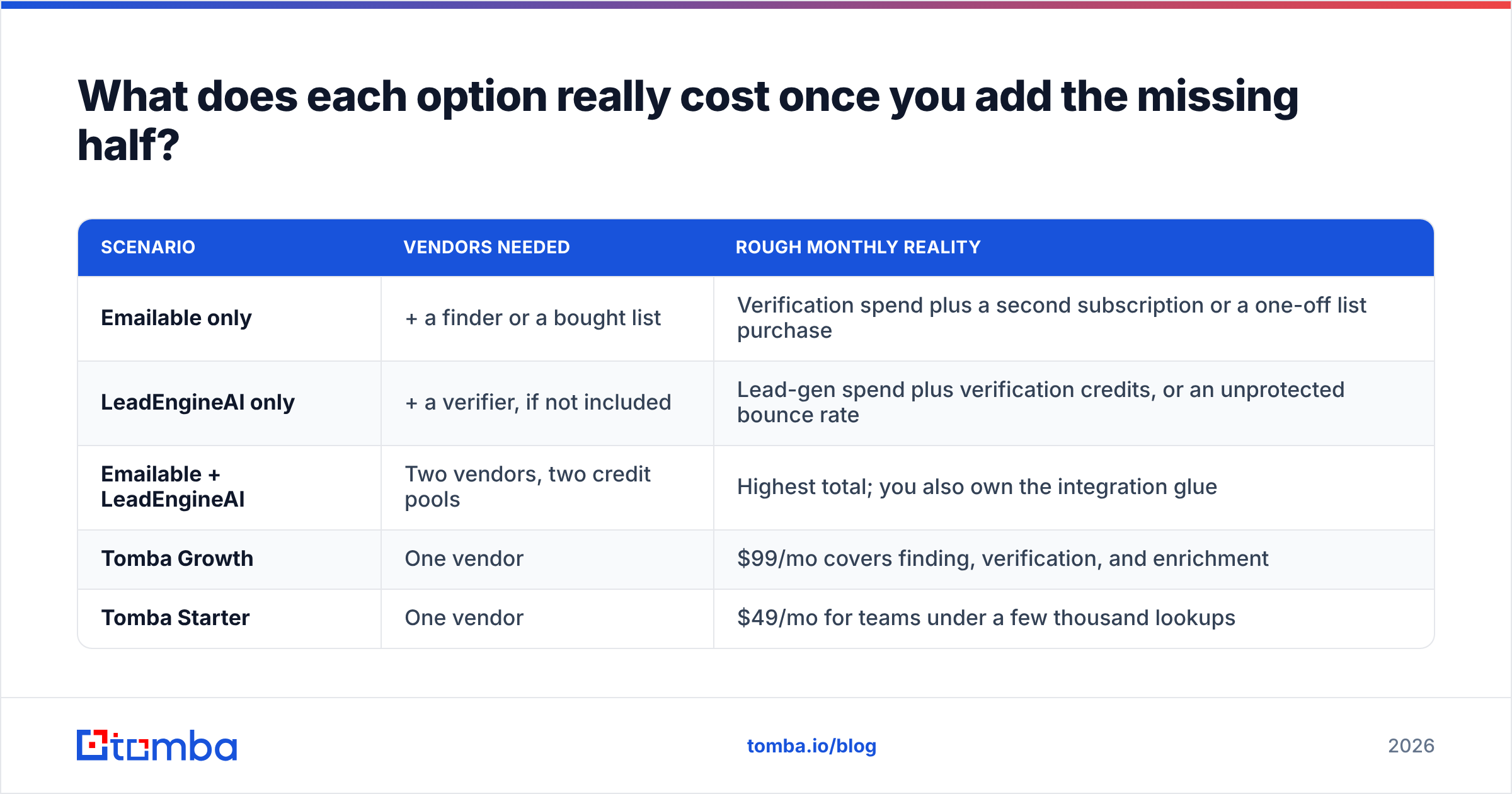
Sticker price misleads here, because each tool solves half the problem. Model the full stack instead.
| Scenario | Vendors needed | Rough monthly reality |
|---|---|---|
| Emailable only | + a finder or a bought list | Verification spend plus a second subscription or a one-off list purchase |
| LeadEngineAI only | + a verifier, if not included | Lead-gen spend plus verification credits, or an unprotected bounce rate |
| Emailable + LeadEngineAI | Two vendors, two credit pools | Highest total; you also own the integration glue |
| Tomba Growth | One vendor | $99/mo covers finding, verification, and enrichment |
| Tomba Starter | One vendor | $49/mo for teams under a few thousand lookups |
For reference, Tomba pricing runs Free (25 searches/mo), Starter $49/mo, Growth $99/mo, Pro $249/mo, and Enterprise custom. The point is not that one number beats another. The two-vendor row is almost always the priciest one, and most teams land there by accident rather than by choice.
If you process lists in the thousands, compare how each vendor charges for bulk verify runs. Per-credit pricing that looks cheap at 1,000 addresses can look very different at 50,000. Some vendors also bill "unknown" results at full rate.
How should you run a fair test before you buy?#
Do not trust anyone's accuracy chart, including the ones in this post. Build a 200-address control set and score the vendors yourself.
Take 100 addresses you know are live. Use colleagues, current customers, or anyone who replied in the last 90 days. A verifier that marks these undeliverable is shrinking your pipeline for no reason.
Take 50 addresses you know are dead. Departed employees and bounced records from your ESP logs work well. A verifier that passes these makes the expensive kind of error.
Take 50 names with no known address. First name, last name, company domain only. This is the finder test. Record hit rate, then bounce rate after a real send.
Include at least 10 catch-all domains. Note which vendor returns a usable verdict instead of "unknown."
Time everything. API latency matters if you verify at form submit. A 4-second check breaks your signup flow.
Run the same 200 through each candidate on a free tier or trial. The results usually settle the question in under an hour, and they beat every G2 badge on the internet.
Verdict: Emailable vs LeadEngineAI, or neither?#
Choose Emailable if verification is truly your only gap. It fits when you already have a reliable sourcing pipeline and you prefer a mature, documented, single-purpose API over consolidation.
Consider LeadEngineAI if you are early and list-poor, and you want AI to compress list-building. Insist on written answers about where the data comes from and whether SMTP verification is included. Run the 200-address test before you sign anything annual.
Choose neither if what you need is one system that turns a domain or a name into a verified, sendable address. That is the workflow most outbound teams run. Splitting it across two vendors adds cost and latency, and it gives verification one more place to get skipped on a busy Friday.
Start with the Tomba Email Finder. The free tier gives you 25 searches a month with no card, and every result comes back with a verification status attached. The same API key covers domain search, catch-all checks, and enrichment when you outgrow the free tier. Run your 200-address control set through it alongside whatever else you are testing, and let the numbers pick the winner.
Related guides#
Ready to find emails that actually work?
Join 150,000+ professionals who stopped guessing and started sending. Free credits on signup — no credit card required.
Get the Tomba newsletter
Practical outbound tactics and product updates — once every two weeks.
About the author