Emailable vs Leadsforge 2026: Which Tool Should You Use?
Emailable verifies the emails you already have. Leadsforge builds lists you don't. Here's an honest breakdown of what each one costs, where each one breaks, and which stage of outbound they actually belong in.
Emailable vs Leadsforge: the short version
- They are not rivals. Emailable checks addresses you already have. It tells you which ones will bounce.
- Leadsforge finds people. It builds contact lists you did not have before.
- Pick Emailable if your bounce rate is over 3% and you already have a source of contacts.
- Pick Leadsforge if your sending is healthy but your list is used up. Its prompt-driven list building beats manual filter stacking.
- Most teams need both jobs done. A finder-plus-verifier (Tomba, Hunter, Findymail, Dropcontact) often replaces one line item or both.
- Catch-all domains drive the real cost. Each tool treats them differently. That gap moves your cost per usable contact more than the sticker rate does.
Emailable vs Leadsforge: what does each tool do?#
Emailable is an email verification service. You upload a list or call the API. It runs syntax checks, MX lookups, and SMTP handshakes. It also flags role accounts, throwaway domains, and free providers.
Every address comes back with a status: deliverable, undeliverable, risky, or unknown. You also get a confidence score. Emailable does not find new addresses. That is on purpose. It does one job at production scale.
Leadsforge sits at the other end of the pipeline. It is an AI lead list builder. You describe your ideal buyer in plain language. For example: heads of marketing at Series B fintech firms in Germany with 50–200 staff. It then assembles the list, so you skip twelve filter dropdowns. It checks the emails too, but that check is a feature, not the product.
So the honest way to frame emailable vs leadsforge is by pipeline stage. One cleans. One sources.

The failure modes differ too. A weak verifier costs you sender reputation. A weak list builder costs you relevance. You land in inboxes that were never going to buy.
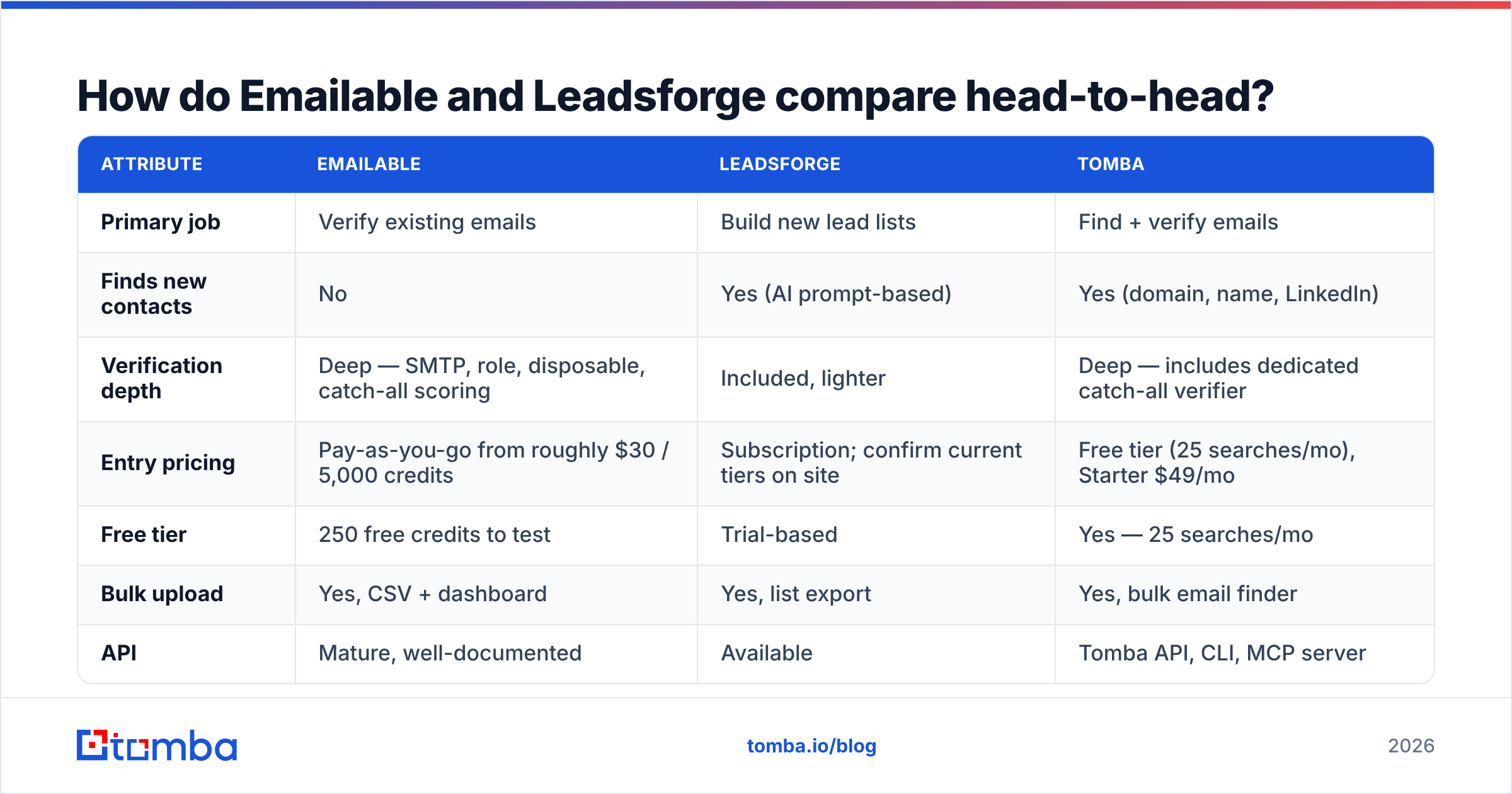
Emailable vs Leadsforge: the head-to-head table#
Treat the prices below as a guide. Check each vendor page before you buy. Both firms have repriced in the last 18 months.
| Attribute | Emailable | Leadsforge | Tomba |
|---|---|---|---|
| Primary job | Verify existing emails | Build new lead lists | Find + verify emails |
| Finds new contacts | No | Yes (AI prompt-based) | Yes (domain, name, LinkedIn) |
| Verification depth | Deep — SMTP, role, disposable, catch-all scoring | Included, lighter | Deep — includes dedicated catch-all verifier |
| Entry pricing | Pay-as-you-go from roughly $30 / 5,000 credits | Subscription; confirm current tiers on site | Free tier (25 searches/mo), Starter $49/mo |
| Free tier | 250 free credits to test | Trial-based | Yes — 25 searches/mo |
| Bulk upload | Yes, CSV + dashboard | Yes, list export | Yes, bulk email finder |
| API | Mature, well-documented | Available | Tomba API, CLI, MCP server |
| Native integrations | Zapier, Mailchimp, HubSpot, ESPs | CRM + sequencer exports | HubSpot, Salesforce, Pipedrive, Sheets, Airtable |
| Best for | Cleaning lists before send | Sourcing net-new ICP contacts | Doing both in one credit pool |

The first row decides most purchases. Do you already run Apollo, ZoomInfo, BookYourData, or a scraper? Then sourcing is covered, and Leadsforge is a lateral move. Are you buying broker lists and seeing 12% bounces? Then Emailable pays for itself in a week.
What does Emailable do well?#
Four things, concretely.
- Catch-all scoring that is not a coin flip. Most tools give up on accept-all domains and return unknown. Emailable scores the risk instead, using pattern history. You still get no certainty, because the receiving server will not say. But a ranked risk beats a shrug.
- Speed at volume. A 100,000-row list clears in hours, not overnight. That matters if you verify every week.
- A steady API. Live checks on signup forms break many verifiers. This endpoint holds up inside a signup flow without slowing users down.
- Clean-up on upload. Gmail dot tricks, plus-addresses, and stray spaces get fixed before billing. You stop paying to check the same person three times.
One limit: it finds nobody. If your list is empty, Emailable has nothing to work on. That is a scoping choice, not a flaw. Buyers still miss it when they line it up against bundled platforms.
Where does Leadsforge fit?#
Leadsforge argues that filter grids are a poor way to describe a buyer. That is fair. Try encoding firms that just raised and are hiring SDRs into checkboxes. A sentence is faster for exploratory prospecting.
Where it gets tricky:
- The data is the product, not the chat box. A friendly front end does not create coverage. If the database is thin in your market, prompts will not fix it. Test your real ICP, not a generic query any vendor can nail.
- Bundled checks hide the pass rate. When a list builder grades its own output, a 92% valid rate could mean quality or a loose threshold. Spot-check a sample with a separate email verifier.
- Exports are where lock-in shows. Ask about credit rollover, export caps, and access to paid contacts after a downgrade.
None of this makes it a bad tool. It makes it a tool to pilot. Run 200 contacts through it before you sign for a year.
How accurate are they, and how would you know?#
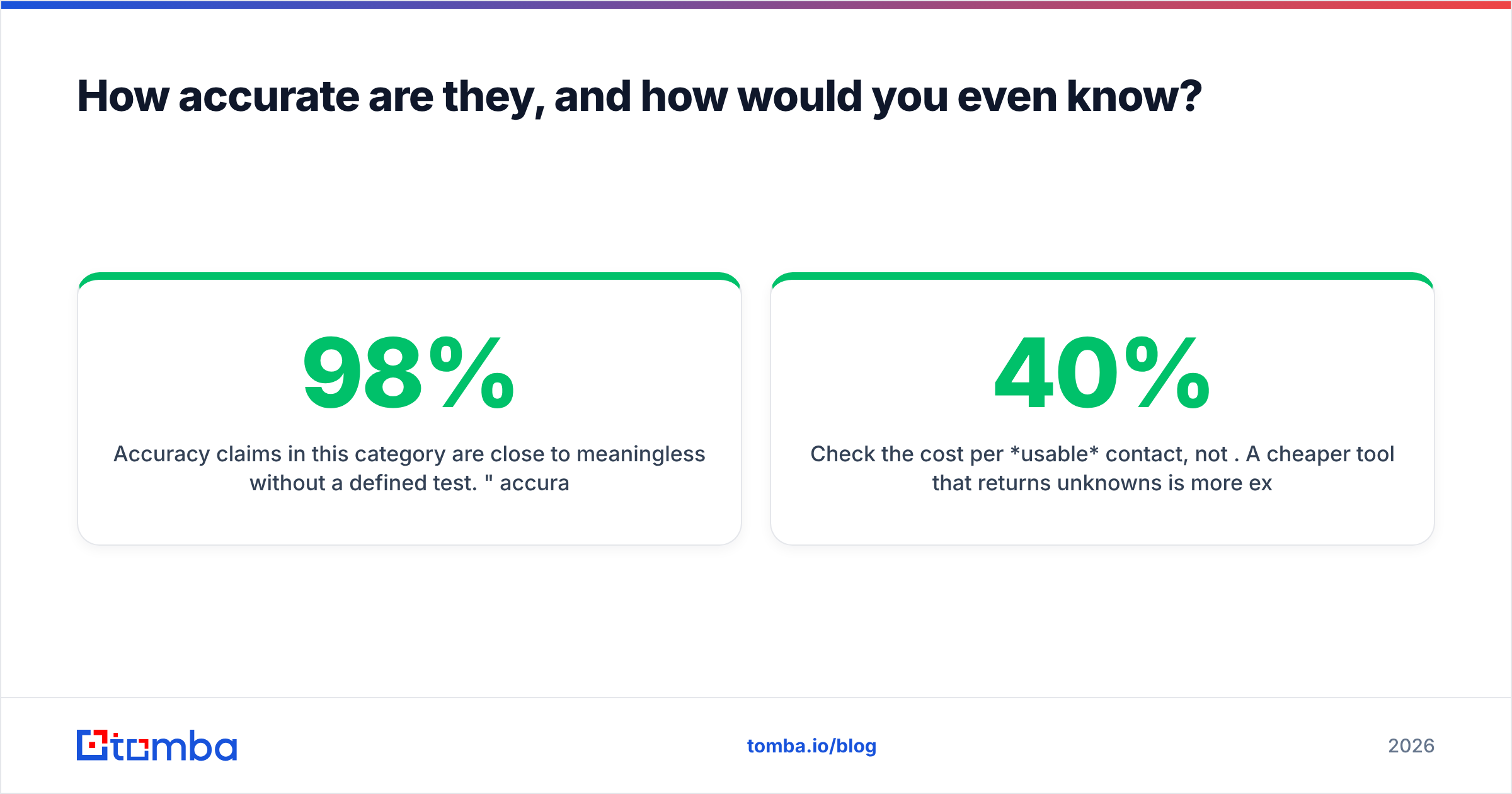
Accuracy claims mean little without a defined test. Both sides of the emailable vs leadsforge choice quote high numbers. A 98% claim usually means 98% of addresses labeled deliverable did not hard bounce. That is easy to hit. Label every doubtful address as risky and drop it from the math.

Run your own test. It takes an afternoon.
- Build a 300-address control set. Use 100 live addresses, 100 dead ones, and 100 unknowns from your market.
- Run the same set through each tool. Do not tell it which group is which.
- Track three numbers. False positives burn your domain. False negatives shrink your market. Unknowns show how often a tool refuses to decide.
- Weight false positives 5x. One false negative costs one prospect. One false positive costs part of your sender reputation, which every future send shares.
- Test catch-all domains on their own. Tools differ most here. A catch-all verifier built for accept-all servers beats a plain SMTP check.
- Price per usable contact. A cheap tool that returns 40% unknowns costs more in practice.
Review sites like G2's email verification category help you spot billing and support complaints. A feature grid never shows those. They still do not replace a test on your own data. Vendor figures are marketing. Your control set is evidence.

What do these tools cost per usable contact?#
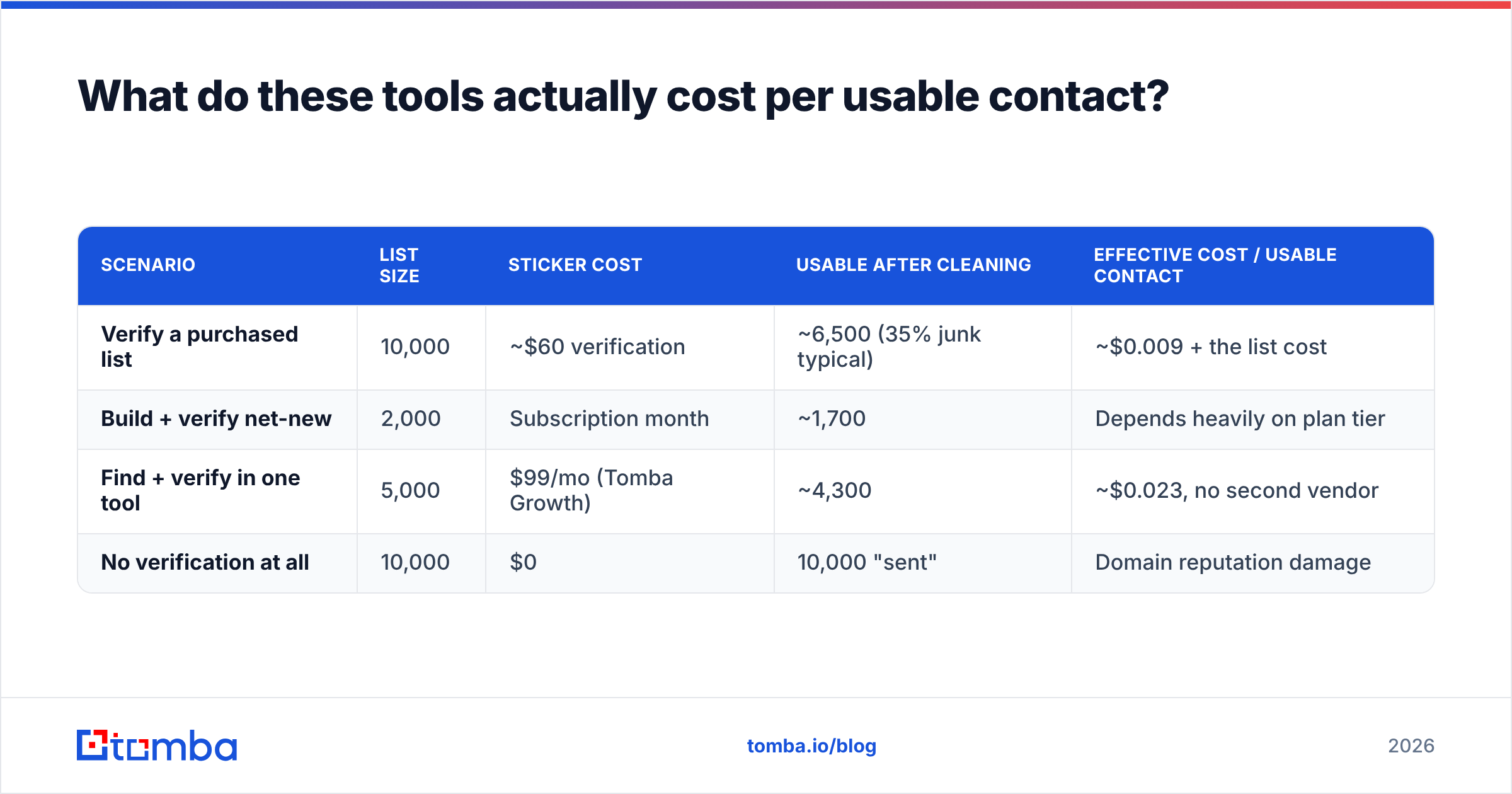
Sticker price is the wrong unit. Here is the math that counts.
| Scenario | List size | Sticker cost | Usable after cleaning | Effective cost / usable contact |
|---|---|---|---|---|
| Verify a purchased list | 10,000 | ~$60 verification | ~6,500 (35% junk typical) | ~$0.009 + the list cost |
| Build + verify net-new | 2,000 | Subscription month | ~1,700 | Depends heavily on plan tier |
| Find + verify in one tool | 5,000 | $99/mo (Tomba Growth) | ~4,300 | ~$0.023, no second vendor |
| No verification at all | 10,000 | $0 | 10,000 "sent" | Domain reputation damage |
The last row is the one people underprice. A 12% bounce rate does more than waste sends. It tells Google and Microsoft that you mailed a list you never checked. The penalty then hits your next campaign, including the valid contacts in it. Both firms tightened bulk sender rules in 2024 and have not eased them. HubSpot's deliverability guidance covers the mechanics.
Two vendors also means two invoices. You get two credit pools with different expiry dates and two sets of API keys to rotate. The emailable vs leadsforge price gap looks small next to that overhead. It is the strongest case for consolidating.
Emailable vs Leadsforge: which one should you pick?#
Decide by the limit you actually have.
- Bounce rate above 3% → Emailable. You have contacts and they are dirty. Clean them, then re-check anything older than 90 days. B2B data decays about 2–2.5% a month as people change jobs.
- List exhausted, replies fine → Leadsforge. Supply is your problem, not deliverability. Pilot it on your real ICP before you sign an annual plan.
- Doing both jobs by hand → consolidate. A scraper, a standalone verifier, and a spreadsheet merge is three failure points and two bills.
- Targeting named accounts → domain search. Neither tool is built for everyone in marketing at these 40 firms. A domain search fits that motion better.
- Working at API scale → read the docs, not the dashboard. Rate limits, webhooks, and bulk endpoints matter more than UI polish.
- Tight budget → start free and measure. Both categories offer free tiers big enough for a 200-contact test. Buy after the data, not before.
Where does Tomba fit?#
Tomba overlaps with both, and that is the whole pitch. It finds addresses by domain, by name, through LinkedIn finder, and by author. It also verifies them with SMTP checks and a dedicated catch-all verifier. One credit pool covers both jobs.
Emailable wins when verification is your only job and you push millions of addresses a month. A single-purpose engine with pay-as-you-go rates can beat a bundle on unit cost. That is real for ESPs, marketplaces, and consumer signup forms.
Leadsforge wins on exploring. The plain-language ICP box beats filter stacking while you are still testing who to target.
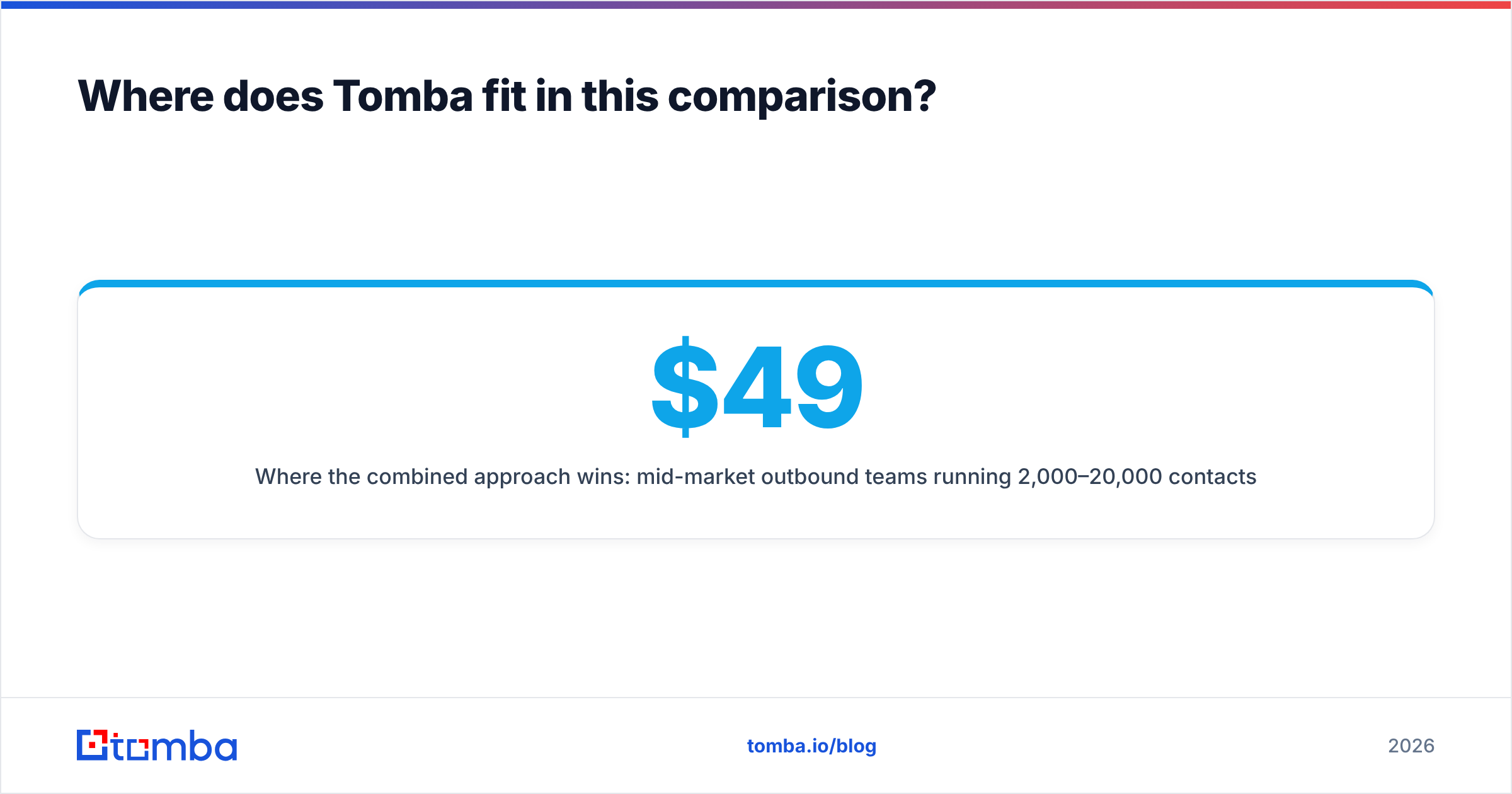
The blended option wins for mid-market teams. Think 2,000–20,000 contacts a month, with no appetite for two vendors, two renewal dates, and a CSV shuttle. That is where Tomba settles the emailable vs leadsforge question. Tomba pricing opens with a free tier of 25 searches a month. Starter is $49/mo, Growth is $99/mo, and Pro is $249/mo. Finding and verifying draw from one balance, so you budget once.
FAQ#
Is emailable vs leadsforge even the right comparison? Only for deciding which gap to fill first. One verifies. The other sources. They rarely replace each other.
Can Emailable find email addresses? No. It checks addresses you supply. Feed it from a sourcing tool, a CRM export, or a scraper.
Does Leadsforge replace a dedicated verifier? For low volume, probably. If deliverability is business-critical, verify a sample yourself. Self-reported valid rates cannot be audited.
How often should I re-verify a list? Every 60–90 days for active segments. Always re-check anything older than three months before a send. A list verified in January is measurably worse by April.
What about catch-all domains? No tool can confirm a catch-all address, because the server accepts everything. You get a probability score at best. Keep catch-alls in their own segment, send at low volume from a second domain, and judge them by replies.
Is a free email checker good enough? For one or two addresses, yes. A free email checker confirms syntax and a live MX record. For list-level calls that affect your sending domain, no.
Start with the gap you actually have#
Cleaning an empty list gets you nothing. If you lack good addresses, start there. The Tomba Email Finder finds work addresses by domain, name, or company. It verifies them in the same step, so the list is ready to send. The free tier covers 25 searches a month. That is enough to run the 300-address benchmark above and settle emailable vs leadsforge with your own numbers.
Related guides#
Ready to find emails that actually work?
Join 150,000+ professionals who stopped guessing and started sending. Free credits on signup — no credit card required.
Get the Tomba newsletter
Practical outbound tactics and product updates — once every two weeks.
About the author