Emailable vs Tomba (2026): Which Email Tool Should You Pick?
Emailable verifies the emails you already have. Tomba finds them and then verifies them. Here is the honest breakdown of accuracy, pricing, catch-all handling, and which one actually belongs in your stack.
TL;DR
- Emailable is a verification specialist: you bring a list, it tells you which addresses are deliverable. It does not find new contacts.
- Tomba is a find-and-verify platform: domain search, email finder, verifier, catch-all checks, phone data, and enrichment behind one API and one credit pool.
- If your only problem is a decaying 200,000-row list, a dedicated verifier is the cleaner buy. If your problem is "we don't have enough contacts," verification alone solves nothing.
- Pricing models differ in kind, not just in price: Emailable leans on per-verification credits; Tomba sells seats-and-credits plans starting at $49/mo with a free tier of 25 searches.
- Most teams under 20 reps are better served by one tool that does both, because the handoff between "found" and "verified" is where data quality actually leaks.
What are Emailable and Tomba, exactly?#
They solve adjacent problems, and conflating them is the most common mistake in this comparison.
Emailable is an email verification service. You upload a CSV, connect an ESP, or hit the API, and it returns a status per address: deliverable, undeliverable, risky, or unknown. Its job is to protect your sender reputation and your ESP relationship by stripping addresses that would bounce. It sits at the end of your data pipeline, right before send.
Tomba is a contact data platform whose core product is the email finder — you give it a name and a domain, it returns the professional address with a confidence score and the sources it used. Around that sit a domain search for pulling every known address at a company, an email verifier, a catch-all verifier, phone lookup, and enrichment. It sits at the start of your pipeline and follows the record through to send.
So the honest framing is not "which is better." It is: do you have a list problem or a pipeline problem?
How does email verification actually work under the hood?#
Both tools run the same fundamental checks. Understanding the sequence tells you why "risky" results exist and why no vendor can honestly claim 100% accuracy.
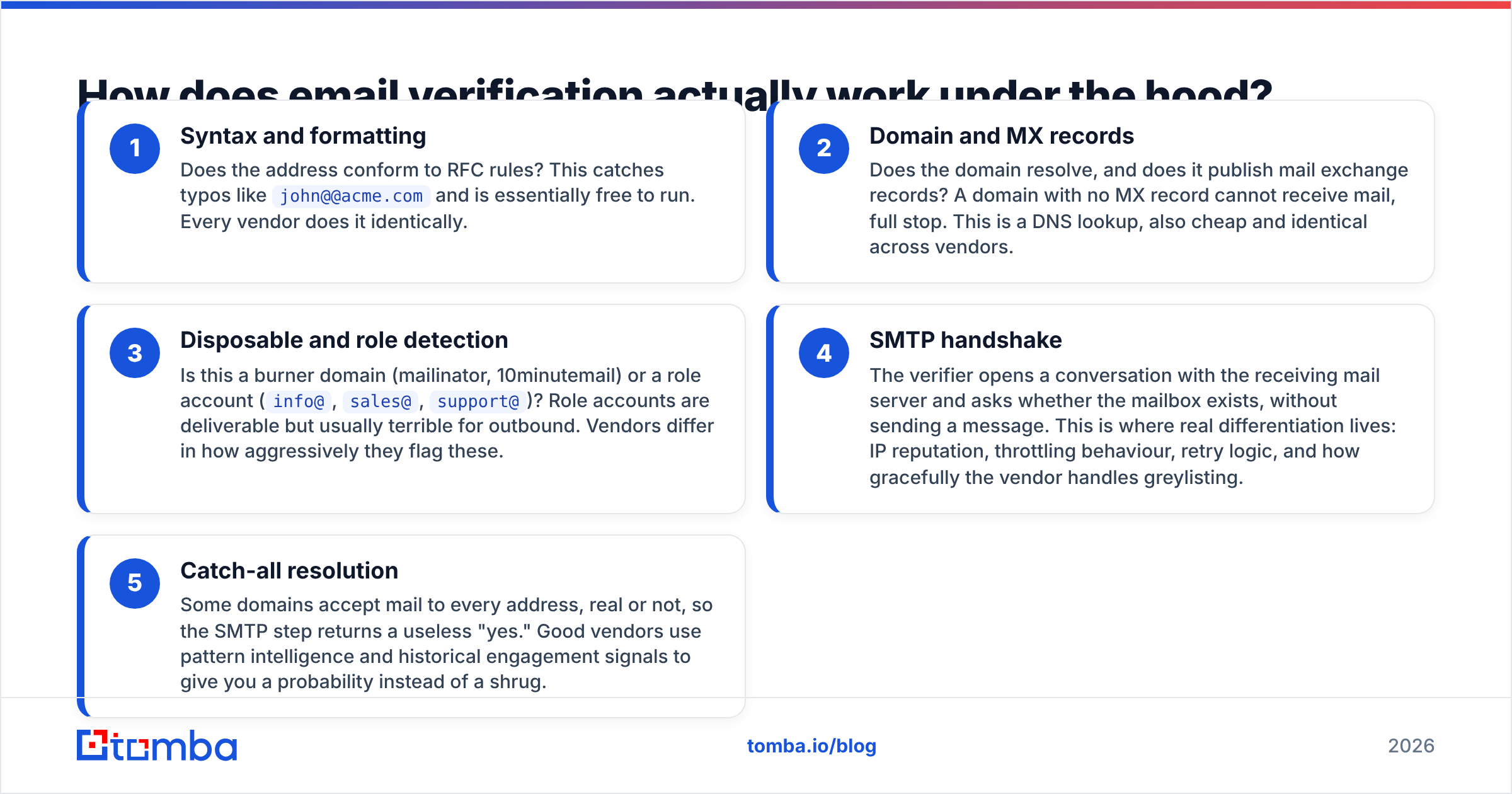
- Syntax and formatting — Does the address conform to RFC rules? This catches typos like
john@@acme.comand is essentially free to run. Every vendor does it identically. - Domain and MX records — Does the domain resolve, and does it publish mail exchange records? A domain with no MX record cannot receive mail, full stop. This is a DNS lookup, also cheap and identical across vendors.
- Disposable and role detection — Is this a burner domain (mailinator, 10minutemail) or a role account (
info@,sales@,support@)? Role accounts are deliverable but usually terrible for outbound. Vendors differ in how aggressively they flag these. - SMTP handshake — The verifier opens a conversation with the receiving mail server and asks whether the mailbox exists, without sending a message. This is where real differentiation lives: IP reputation, throttling behaviour, retry logic, and how gracefully the vendor handles greylisting.
- Catch-all resolution — Some domains accept mail to every address, real or not, so the SMTP step returns a useless "yes." Good vendors use pattern intelligence and historical engagement signals to give you a probability instead of a shrug.
Steps 1–3 are commodity. Steps 4 and 5 are the product. When you compare vendors, you are almost entirely comparing how they behave on catch-alls and on hardened corporate mail servers (Microsoft 365 in particular has become far less chatty over SMTP).

(Placeholder note for editors: the meme above sits here.)

How accurate is each tool in practice?#
Accuracy claims from any vendor should be read as marketing until you test them on your own data. That said, there are structural differences worth knowing.
Emailable publishes high accuracy figures and generally earns strong marks on G2 for bounce reduction on consumer-heavy and mixed lists. Its SMTP infrastructure is mature and it is transparent about the "unknown" bucket rather than silently guessing.
Tomba's accuracy story is different because it verifies addresses it also sourced. When the finder already knows that firstname.lastname@ is the confirmed pattern at a domain, and it has seen that specific mailbox in a public source, verification is a confirmation step rather than a cold guess. That compounding effect is the main argument for keeping finding and verification under one roof. You can read how Tomba assembles and scores that data on its data sources page.

The practical test to run before you commit to either vendor:
- Pull 500 addresses you have already emailed, where you know the real outcome (delivered vs hard bounce).
- Run them through both tools' free tiers or trials.
- Compare not just the hit rate but the false-positive rate — addresses marked deliverable that actually bounced. That number is the one that costs you domain reputation.
- Separately measure the size of the unknown/risky bucket. A tool that hides uncertainty inside "deliverable" looks more accurate and is more dangerous.
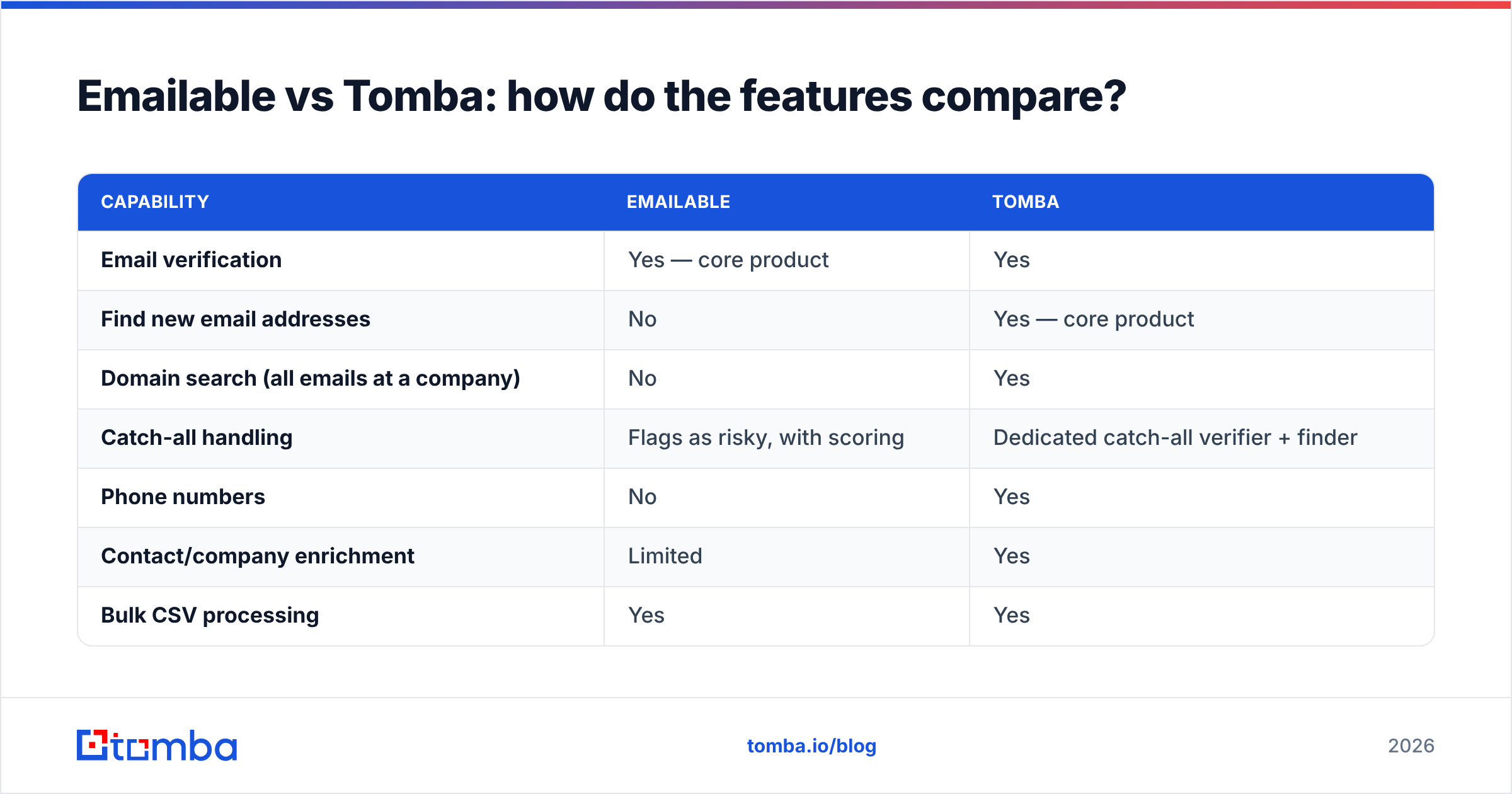
Emailable vs Tomba: how do the features compare?#
| Capability | Emailable | Tomba |
|---|---|---|
| Email verification | Yes — core product | Yes |
| Find new email addresses | No | Yes — core product |
| Domain search (all emails at a company) | No | Yes |
| Catch-all handling | Flags as risky, with scoring | Dedicated catch-all verifier + finder |
| Phone numbers | No | Yes |
| Contact/company enrichment | Limited | Yes |
| Bulk CSV processing | Yes | Yes |
| API | Yes, well documented | Yes, plus CLI and MCP server |
| Chrome extension | No | Yes |
| Google Sheets / Excel add-ons | Integrations via partners | Native add-ons |
| Free tier | Trial credits on signup | 25 searches/month, ongoing |
| Best fit | Cleaning lists you already own | Building and maintaining lists end to end |

The row that matters most is the second one. If you strip everything else away, Emailable answers "is this address good?" and Tomba answers "what is the address, and is it good?" A verifier cannot fill an empty CRM.
Where Emailable has a genuine edge is focus. A single-purpose tool with a single-purpose UI is faster to onboard for a marketing ops person whose entire job this week is de-bouncing a 400,000-record database before a Mailchimp migration. There is no prospecting surface to ignore.
Where Tomba has the edge is coverage of the workflow. The bulk email finder takes a list of names and companies and returns verified addresses in one pass, and the Tomba API exposes finder, verifier, and enrichment through one key — so your engineering team wires one vendor instead of two.
How does pricing compare?#
Pricing structures differ enough that a straight per-credit comparison misleads.
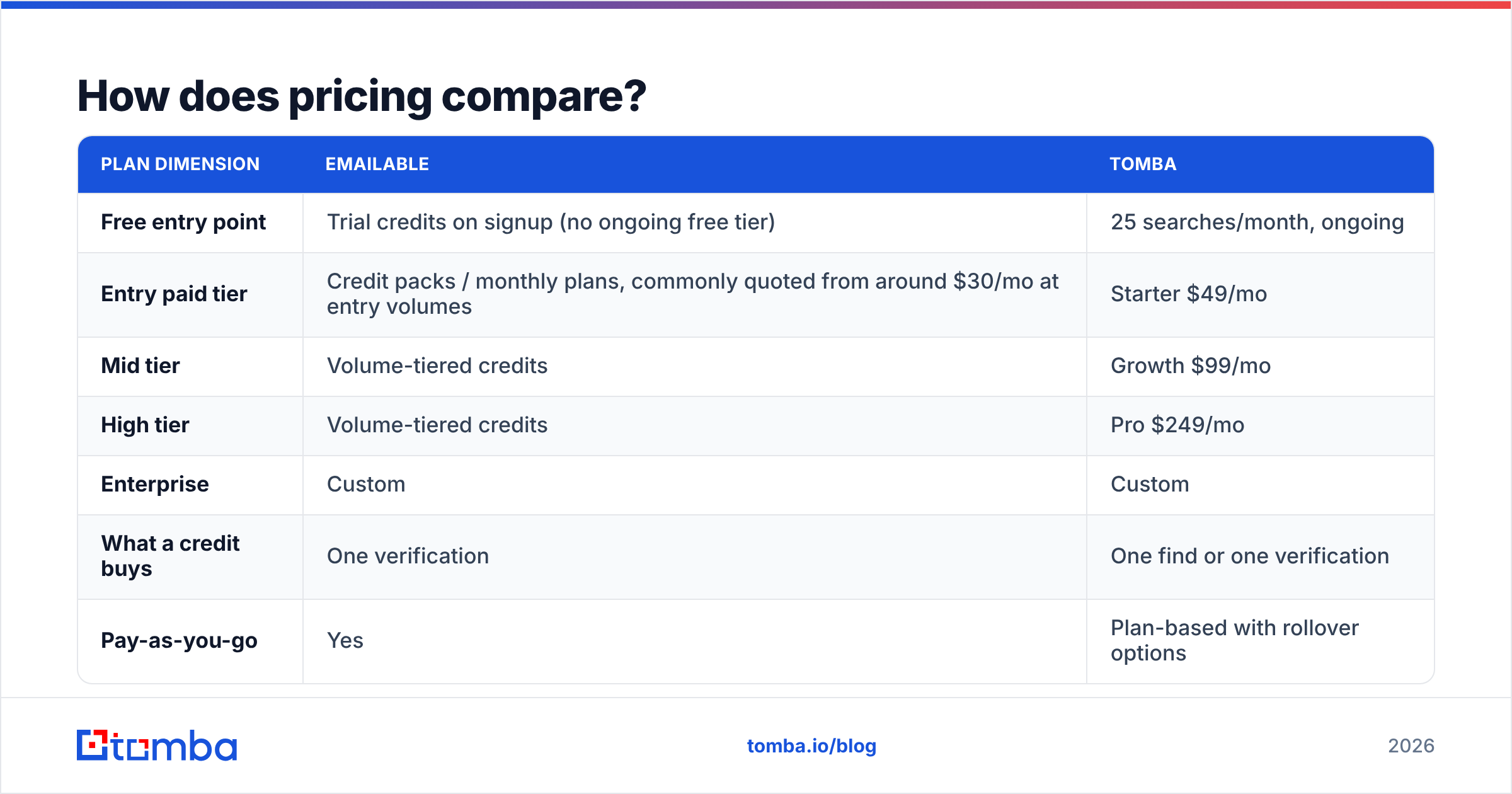
| Plan dimension | Emailable | Tomba |
|---|---|---|
| Free entry point | Trial credits on signup (no ongoing free tier) | 25 searches/month, ongoing |
| Entry paid tier | Credit packs / monthly plans, commonly quoted from around $30/mo at entry volumes | Starter $49/mo |
| Mid tier | Volume-tiered credits | Growth $99/mo |
| High tier | Volume-tiered credits | Pro $249/mo |
| Enterprise | Custom | Custom |
| What a credit buys | One verification | One find or one verification |
| Pay-as-you-go | Yes | Plan-based with rollover options |
Two caveats. First, verification-only credits are cheaper per unit than find-and-verify credits, and that is correct — finding is a harder computational problem than checking. Comparing $0.005 per verification against a finder credit is apples to oranges. Second, vendor pricing pages change; confirm current numbers on emailable.com and on Tomba pricing before you build a business case.
The real cost question is total cost of tooling. If you are already paying for a data provider to find contacts, adding a dedicated verifier is a second line item, a second contract, a second API integration, and a second place where credits expire unused. If your finder verifies competently, that second line item disappears.
Which one should you choose for your workflow?#
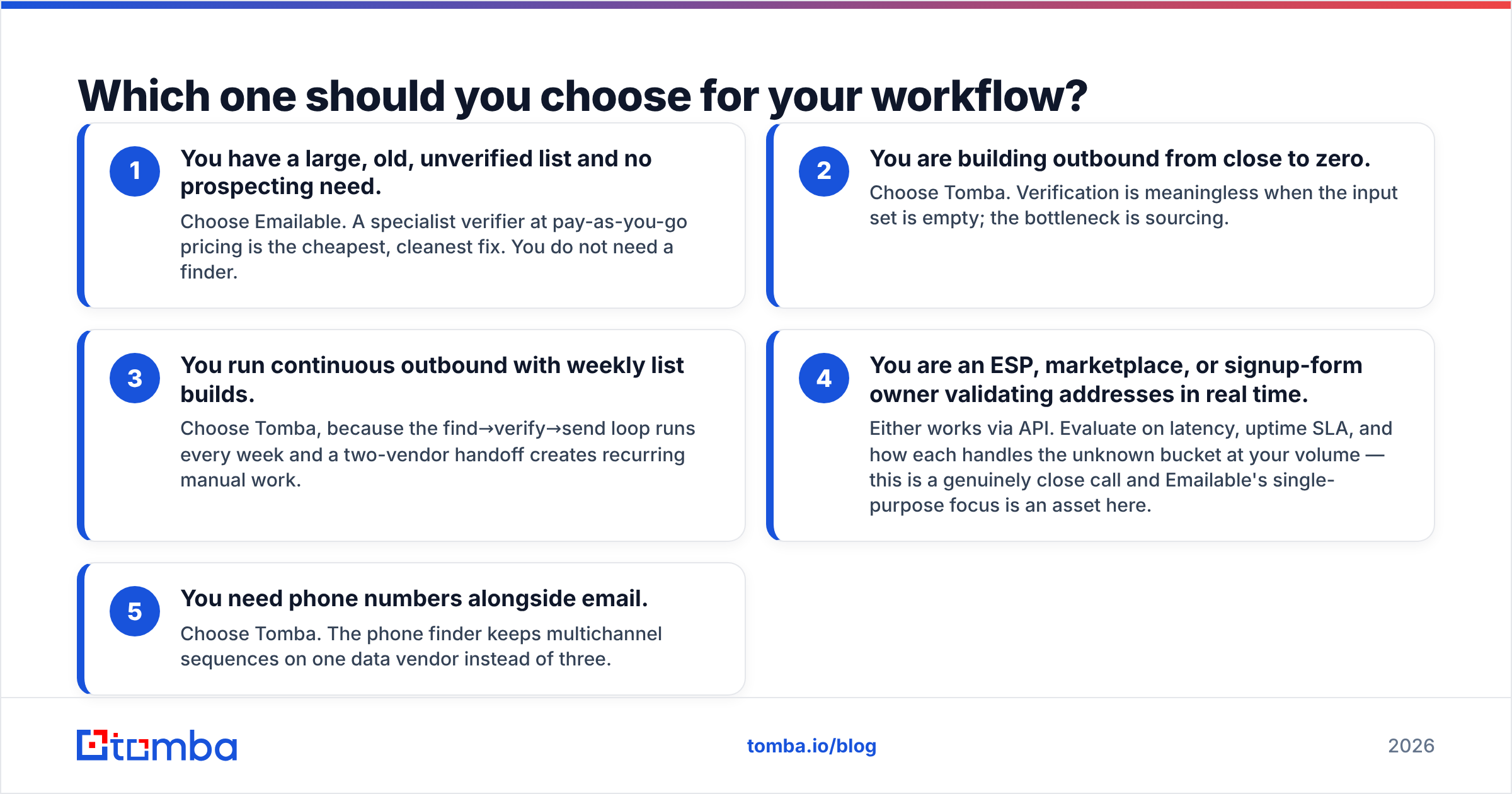
Pick based on which of these five situations describes you.
- You have a large, old, unverified list and no prospecting need. Choose Emailable. A specialist verifier at pay-as-you-go pricing is the cheapest, cleanest fix. You do not need a finder.
- You are building outbound from close to zero. Choose Tomba. Verification is meaningless when the input set is empty; the bottleneck is sourcing.
- You run continuous outbound with weekly list builds. Choose Tomba, because the find→verify→send loop runs every week and a two-vendor handoff creates recurring manual work.
- You are an ESP, marketplace, or signup-form owner validating addresses in real time. Either works via API. Evaluate on latency, uptime SLA, and how each handles the unknown bucket at your volume — this is a genuinely close call and Emailable's single-purpose focus is an asset here.
- You need phone numbers alongside email. Choose Tomba. The phone finder keeps multichannel sequences on one data vendor instead of three.

What about catch-all domains?#
Catch-alls are where most of the disagreement between vendors originates, and they now cover a large share of corporate domains.
A catch-all domain accepts mail to any local part, so the SMTP handshake returns "accepted" for ceo@acme.com and for asdfjkl@acme.com alike. Verifiers have three honest options: mark it risky and let you decide, mark it risky with a confidence score, or attempt pattern-based inference.
Emailable takes the transparent route — catch-alls land in a risky bucket with guidance, which protects you from false confidence but leaves the decision on your desk. That is defensible; it also means a chunk of your best enterprise prospects come back as "we don't know."
Tomba splits the problem across two tools: the catch-all finder tries to establish which specific mailbox is real using known company patterns and source evidence, and the catch-all verifier scores the result. You still should not treat a catch-all as a confirmed address, but you get a ranked guess instead of a blank.
Practical rule regardless of vendor: send to catch-alls in small, separate batches on a secondary domain, watch the bounce rate, and never mix them into a large primary-domain send. That single habit protects sender reputation more than any vendor's accuracy claim.
Can you use both together?#
Yes, and for some teams it is the right answer.
The pattern is: Tomba for sourcing and first-pass verification, a dedicated verifier as a final gate immediately before send, especially for high-value campaigns or when you are warming a new domain. Two independent SMTP infrastructures disagreeing on an address is useful signal — if both say deliverable, your confidence is genuinely higher than either alone.
The cost of that pattern is real: two vendors, two credit pools, and an extra step in your ops runbook. It makes sense above roughly 50,000 sends per month, or when a single bounce spike would put a critical domain at risk. Below that, the marginal accuracy gain rarely justifies the operational overhead, and you would be better off spending the same budget on better targeting. If you want to sanity-check individual addresses without a subscription, Tomba's free email checker handles one-off lookups.
For teams standardising on a CRM, check the integration path before you buy either tool. Both plug into common stacks, but the depth varies — Tomba maintains native HubSpot and Salesforce connectors, and HubSpot's own guidance on list hygiene is worth reading before you decide how aggressive to be with removals.
What's the verdict?#
Emailable is the better buy if verification is the whole job. It is focused, transparent about uncertainty, and priced per verification, which suits one-off cleanups and real-time validation endpoints. Nothing in this comparison should be read as a knock on it.
Tomba is the better buy if your pipeline starts before verification — if you need to find the contacts in the first place, keep them fresh, add phone numbers, and do it without stitching two vendors together. One credit pool, one API key, one place to audit data quality.
If you are stuck between them, answer one question: in the last 30 days, did you spend more time cleaning contacts you already had, or hunting for contacts you did not have? Buy for whichever number is bigger.
Ready to test the sourcing side? Start with the Tomba Email Finder — the free tier gives you 25 searches per month with no card, enough to run the 500-address accuracy test described above and see how the confidence scores hold up on your own domains. Paid plans start at $49/mo when you are ready to scale, and every found address runs through verification before it reaches your CRM.
Related guides#
Ready to find emails that actually work?
Join 150,000+ professionals who stopped guessing and started sending. Free credits on signup — no credit card required.
Get the Tomba newsletter
Practical outbound tactics and product updates — once every two weeks.
About the author