9 Best EmailAnalytics Alternatives for Sales Teams in 2026
EmailAnalytics tells you how fast your team replies — but not much else. Here are nine alternatives compared on price, data depth, setup time, and what they actually change about pipeline.
TL;DR
EmailAnalytics does one narrow thing well. It plugs into Gmail or Outlook and charts email volume, response time, and per-rep activity. It does not source contacts, verify addresses, or run sequences.
Most teams shopping for EmailAnalytics alternatives want one of three things instead: cheaper per-seat pricing, deeper reply-and-revenue attribution, or a tool that also does outreach rather than just measuring it.
Per-seat pricing is the usual trigger. Activity dashboards priced per rep get expensive fast on a 20-person team, and the insight ceiling stays flat.
Best picks by job: Timetoreply for response-time SLAs, Yesware or HubSpot for tracking inside the inbox, Salesloft/Outreach/Klenty for sequence-level analytics, Gong for conversation intelligence, and native Gmail/Outlook reports piped into Looker Studio if you want free.
Measuring reply rate does not fix a bad list. If bounces and catch-alls drag your numbers down, fix the data layer first with an email finder and email verifier. Then measure.
What is EmailAnalytics and what does it actually measure?#
EmailAnalytics is a read-only reporting layer for your team's mailbox. You connect Gmail or Outlook with OAuth. It scans message metadata. Then it renders dashboards: emails sent and received per day, average and median response time, busiest hours, top contacts, and a per-rep leaderboard.
That is genuinely useful for one audience. Sales managers and support leads need to know how fast the team replies and who is falling behind. EmailAnalytics answers that without asking reps to log activity by hand. No workflow change. No CRM cleanup. That is the whole pitch.
The limits show up fast. EmailAnalytics reads metadata, not outcomes. It cannot tell you which reply came from a verified contact rather than a role address. It cannot tell you which thread turned into a meeting. It cannot tell you whether a low reply rate is a copy problem or a data problem. It measures effort, not pipeline.
It also bills per connected mailbox — around $15 per user per month at the time of writing, so check their current pricing page. So the cost grows with headcount while the insight stays flat. That gap is why most EmailAnalytics alternatives look quite different.
Why do teams look for EmailAnalytics alternatives?#
Five reasons come up again and again in G2 reviews and in buying calls:
Per-seat cost on a growing team. Twenty reps at $15/mo is $3,600 a year. That buys dashboards nobody opens after week three. Activity reporting rarely survives a budget review.
Activity metrics reward the wrong behavior. Rank reps by email volume and you get more email, not more revenue. Managers who chase the leaderboard often end up with worse response rates.
No outreach execution. You still need a sequencer, a data source, and a verifier. That is three vendors before you send a single email.
Privacy and legal review. Scanning every company mailbox also scans inbound customer threads. In regulated industries, legal will ask about that. Some teams need reporting scoped to outbound only.
No link to the CRM object model. If the analytics tool does not know what an opportunity is, it cannot tell you whether fast replies correlate with closed-won.
If none of those apply to you, EmailAnalytics is a cheap, low-effort tool and you can stop reading. If two or more apply, keep going.
How do the top EmailAnalytics alternatives compare?#
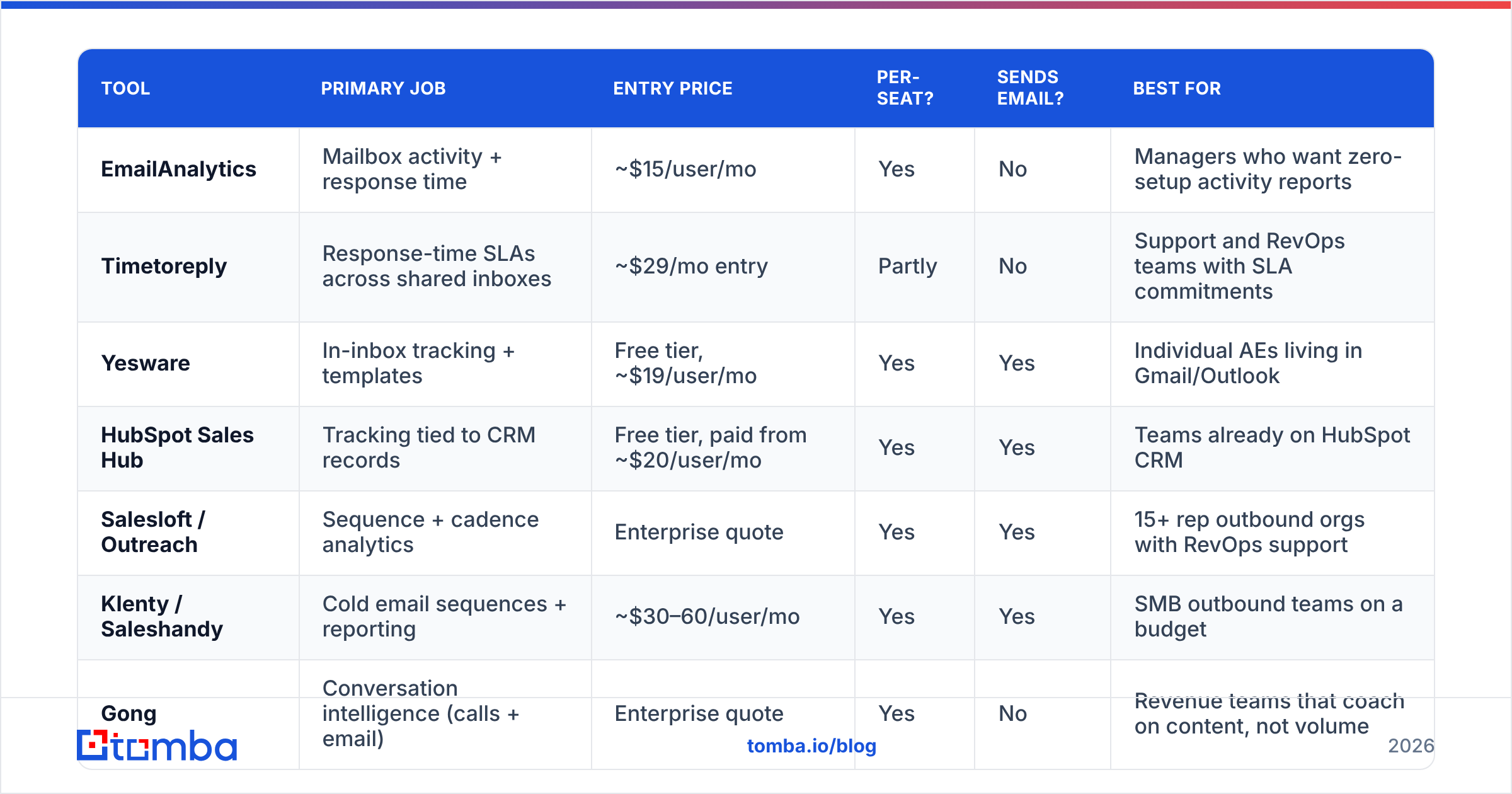
| Tool | Primary job | Entry price | Per-seat? | Sends email? | Best for |
|---|---|---|---|---|---|
| EmailAnalytics | Mailbox activity + response time | ~$15/user/mo | Yes | No | Managers who want zero-setup activity reports |
| Timetoreply | Response-time SLAs across shared inboxes | ~$29/mo entry | Partly | No | Support and RevOps teams with SLA commitments |
| Yesware | In-inbox tracking + templates | Free tier, ~$19/user/mo | Yes | Yes | Individual AEs living in Gmail/Outlook |
| HubSpot Sales Hub | Tracking tied to CRM records | Free tier, paid from ~$20/user/mo | Yes | Yes | Teams already on HubSpot CRM |
| Salesloft / Outreach | Sequence + cadence analytics | Enterprise quote | Yes | Yes | 15+ rep outbound orgs with RevOps support |
| Klenty / Saleshandy | Cold email sequences + reporting | ~$30–60/user/mo | Yes | Yes | SMB outbound teams on a budget |
| Gong | Conversation intelligence (calls + email) | Enterprise quote | Yes | No | Revenue teams that coach on content, not volume |
| Gmail/Outlook + Looker Studio | DIY activity dashboards | Free (Workspace admin) | No | No | Ops teams that can write a query |
| Tomba | Contact data, verification, enrichment | Free tier, $49/mo Starter | No | No | Fixing the list quality behind the metrics |
Two things stand out about these EmailAnalytics alternatives. First, almost every option except EmailAnalytics and Timetoreply bundles analytics into a tool that also does the work. That is usually the better buy, because you pay for one seat instead of two. Second, only one row is not priced per seat. On a 20-person team, that matters more than it looks.
Which EmailAnalytics alternative fits which team?#
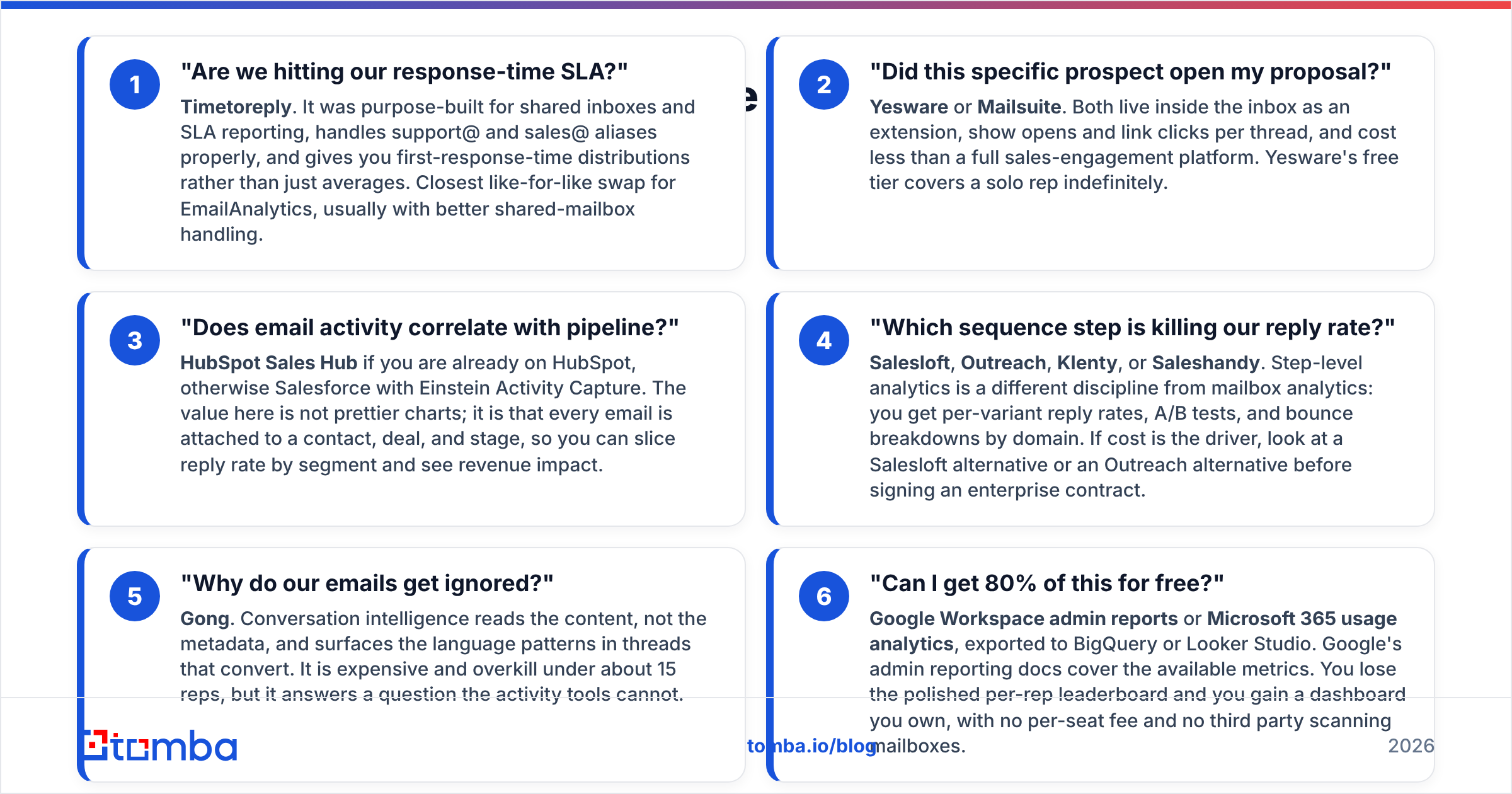
Match EmailAnalytics alternatives to the question you actually need answered. Do not shop by feature count.
"Are we hitting our response-time SLA?" — Timetoreply. It was built for shared inboxes and SLA reporting. It handles support@ and sales@ aliases properly. You get first-response-time distributions, not just averages. It is the closest like-for-like swap for EmailAnalytics.
"Did this specific prospect open my proposal?" — Yesware or Mailsuite. Both sit inside the inbox as an extension. They show opens and link clicks per thread. Both cost less than a full sales-engagement platform. Yesware's free tier covers a solo rep for good.
"Does email activity correlate with pipeline?" — HubSpot Sales Hub if you are already on HubSpot. Otherwise use Salesforce with Einstein Activity Capture. The value here is not prettier charts. Every email is attached to a contact, deal, and stage. So you can slice reply rate by segment and see revenue impact.
"Which sequence step is killing our reply rate?" — Salesloft, Outreach, Klenty, or Saleshandy. Step-level analytics is a different discipline from mailbox analytics. You get reply rates per variant, A/B tests, and bounce breakdowns by domain. If cost is the driver, look at a Salesloft alternative or an Outreach alternative before you sign an enterprise contract.
"Why do our emails get ignored?" — Gong. Conversation intelligence reads the content, not the metadata. It surfaces the language patterns in threads that convert. It is expensive and overkill under about 15 reps. But it answers a question the activity tools cannot.
"Can I get 80% of this for free?" — Google Workspace admin reports or Microsoft 365 usage analytics, exported to BigQuery or Looker Studio. Google's admin reporting docs list the metrics you get. You lose the polished per-rep leaderboard. You gain a dashboard you own, with no per-seat fee and no third party scanning mailboxes.
What about the data feeding those dashboards?#
Here is the awkward part of every email analytics conversation. The metric you watch is mostly set by inputs the analytics tool cannot see.
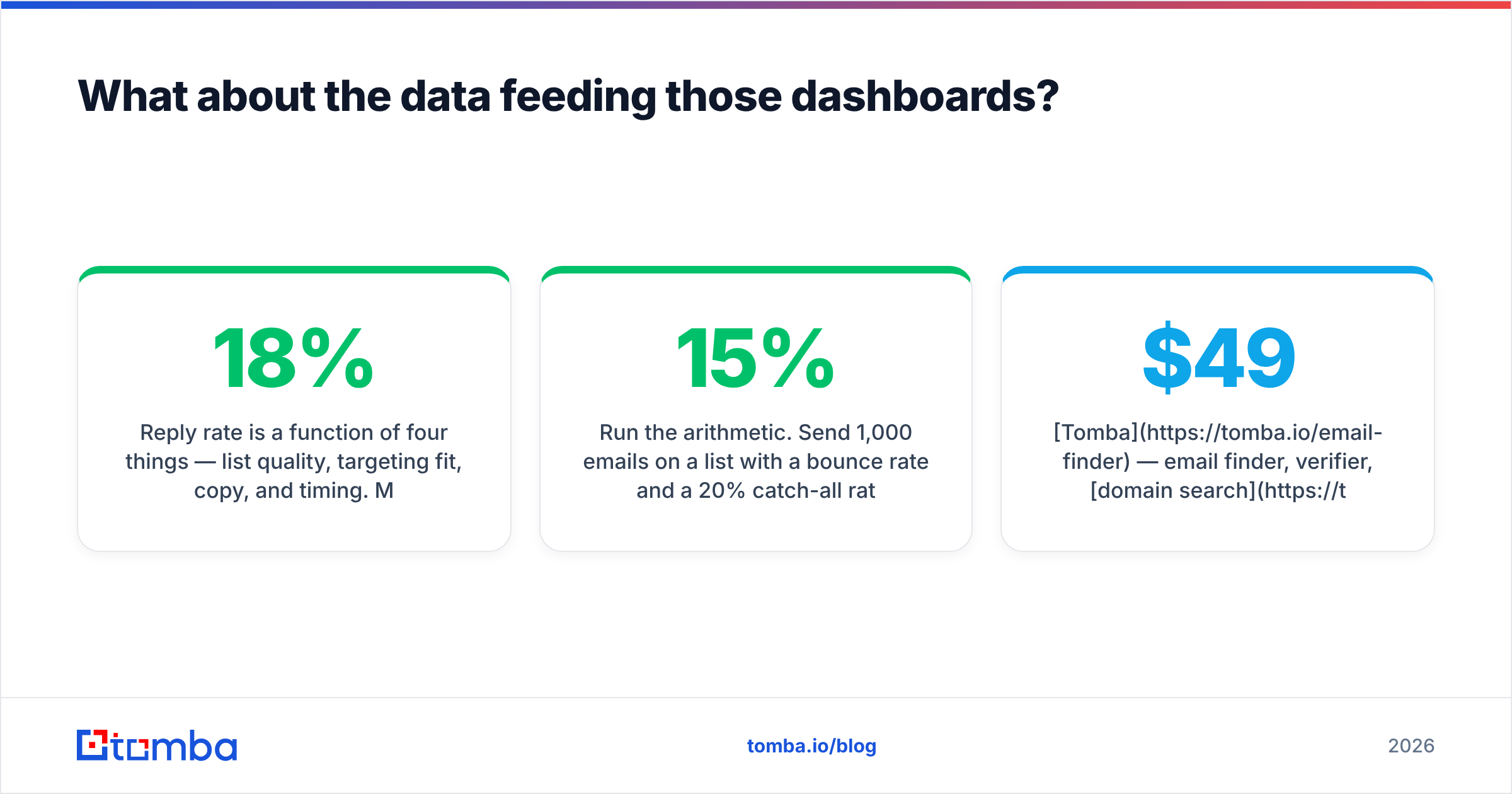
Reply rate depends on four things: list quality, targeting fit, copy, and timing. Mailbox analytics measures none of them, and most EmailAnalytics alternatives cannot see them either. They measure the shadow those inputs cast. If 18% of your list bounces, your reply rate is capped. No dashboard will explain why, because it only knows that messages went out and few came back.
Run the math. Send 1,000 emails to a list with a 15% bounce rate. Add a 20% catch-all rate that half-fails in silence. Roughly 700 messages land. At a 6% reply rate on delivered mail, you get 42 replies. The dashboard reports that as a 4.2% reply rate. So you spend a quarter rewriting subject lines to fix a data problem. Worse, the bounces keep eroding your sender reputation, so next month even fewer emails land.
The fix order is simple: clean the list, then measure. Verify every address before it enters a sequence. Push unverifiable catch-alls into a lower-priority segment. Only then compare reply rates across campaigns. Tools worth putting in front of the analytics layer:
Tomba — email finder, verifier, domain search, and enrichment on flat monthly pricing rather than per seat. The free tier is 25 searches a month. Starter is $49/mo, Growth $99/mo, Pro $249/mo. Full Tomba pricing is public, and the Tomba API lets verification run inside your sequencer instead of as a manual CSV step.
BookYourData — a solid choice if you want ready-built, pre-verified B2B lists rather than building them domain by domain. Different buying motion, same goal: fewer bad addresses reaching your sequencer.
Native verification inside your sending tool — most sequencers now bundle a basic check. It catches syntax errors and dead domains, not catch-alls. Treat it as a floor, not a solution.
How much do these tools actually cost at 20 reps?#
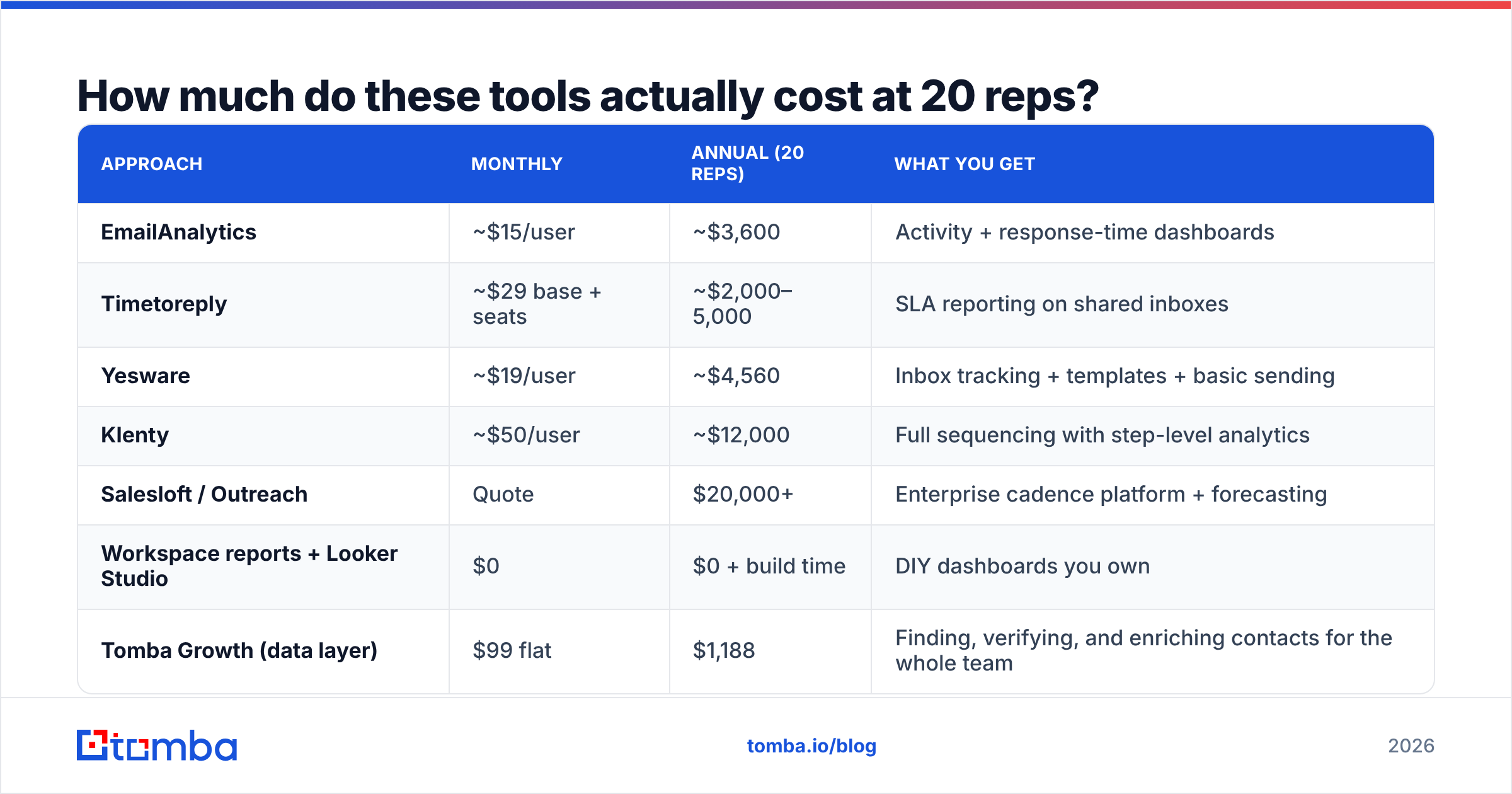
Per-seat pricing hides the real number. Here is what the main EmailAnalytics alternatives cost per year for a 20-person team, using published entry-tier pricing where available:
| Approach | Monthly | Annual (20 reps) | What you get |
|---|---|---|---|
| EmailAnalytics | ~$15/user | ~$3,600 | Activity + response-time dashboards |
| Timetoreply | ~$29 base + seats | ~$2,000–5,000 | SLA reporting on shared inboxes |
| Yesware | ~$19/user | ~$4,560 | Inbox tracking + templates + basic sending |
| Klenty | ~$50/user | ~$12,000 | Full sequencing with step-level analytics |
| Salesloft / Outreach | Quote | $20,000+ | Enterprise cadence platform + forecasting |
| Workspace reports + Looker Studio | $0 | $0 + build time | DIY dashboards you own |
| Tomba Growth (data layer) | $99 flat | $1,188 | Finding, verifying, and enriching contacts for the whole team |
Prices move, so check each vendor's page before you budget. The pattern holds anyway. Analytics-only tools are a fixed tax that grows with headcount. Execution tools fold analytics in for free. The data layer is the only line item that gets cheaper per rep as you grow, because it is not seat-based.
What should you check before switching?#
Ask these six questions before you switch to any of the EmailAnalytics alternatives above. They are ordered to save you the most rework.
What decision changes because of this dashboard? If you cannot name one, do not buy the tool. "Visibility" is not a decision.
Does it read inbound mail? Full-mailbox scanning is the most common blocker in legal review. Ask whether the vendor can scope to outbound-only, and where the data is stored.
Is it per seat or flat? Model it at 2× your current headcount. Per-seat tools that look cheap at 5 reps are the first cut at 30.
Does it write back to the CRM? Read-only analytics creates a second source of truth. Anything that does not sync to your CRM will drift within a quarter.
What is your bounce rate right now? If it is above 5%, fix the data before you buy reporting. Run a sample of 500 addresses through a free email checker and see what comes back.
Can you get it from a tool you already pay for? HubSpot, Salesforce, Gmail admin reports, and most sequencers already ship 70% of these metrics. Check before you add a vendor.
What is the honest verdict on EmailAnalytics alternatives?#
There is no single winner, because "EmailAnalytics alternative" covers three different purchases.
Want the same job done better? Timetoreply is the upgrade for SLA-driven teams. Native Workspace reporting is the upgrade for teams with an ops person and no budget. Want analytics built into execution? Pick your sequencer — Klenty or Saleshandy at the SMB end, Salesloft or Outreach at the enterprise end — and stop paying separately for dashboards. Want to know why the numbers look the way they do? Buy conversation intelligence, or far more often, fix the list.
So the best EmailAnalytics alternatives depend on the question you need answered. The mistake to avoid is buying a second reporting tool to explain the first one. Activity dashboards are cheap to add and hard to remove. And they rarely change what a rep does on Tuesday morning.
Fix the data behind the dashboard#
Reply-rate dashboards sit downstream of list quality. If you want the metric to move, start where the leads come from.
Tomba Email Finder finds professional addresses by domain, name, or company. It verifies them before they hit your sequencer. And it runs on flat monthly pricing instead of per-seat billing — free for 25 searches a month, $49/mo on Starter, with API and Chrome extension access on every paid plan. Clean the inputs first. Then let your analytics tool report a number worth acting on.
Related guides#
Ready to find emails that actually work?
Join 150,000+ professionals who stopped guessing and started sending. Free credits on signup — no credit card required.
Get the Tomba newsletter
Practical outbound tactics and product updates — once every two weeks.
About the author