EmailAnalytics Pricing, Reviews, Pros and Cons (2026)
EmailAnalytics tracks how fast your reps reply, but the per-seat bill scales with headcount, not pipeline. Here's what it really costs, what reviewers praise, and where it falls short.
TL;DR
- EmailAnalytics is a read-only layer on top of Gmail or Outlook. It counts emails sent and received, reply times, busy hours, and volume per rep. Then it mails you a weekly report. It does not send email, find contacts, or run sequences.
- EmailAnalytics pricing is per seat, per month — about $15–$20 per user at list price, with custom quotes above that. Big teams pay the most, and the report stays the same size.
- Reviewers like the fast setup and the fact that reps cannot game the numbers. They dislike the thin depth, the missing revenue data, and the cost creep as seats grow.
- It tracks effort, not results. A fast reply to a bad list still books nothing.
- Best fit: a manager with 5–25 reps who wants an honest activity baseline. Poor fit: teams that need contact data, deliverability control, or revenue attribution.
What is EmailAnalytics, and what does it do?#
EmailAnalytics (emailanalytics.io) is a mailbox analytics tool. You connect Gmail or Outlook with OAuth. It reads message metadata: time stamps, senders, recipients, and thread counts. It turns that into charts and a weekly email digest.
The core metrics are simple. They are also hard to fake:
- Emails sent and received per person, per day, week, or month.
- Average first reply time — how long a rep takes to answer an inbound thread.
- Average thread length — how many replies a chat takes to end.
- Busiest hours and days, so you can see when a rep really works.
- Team rollups with a rep-by-rep view. Managers buy the tool for this.
- Weekly email report, sent to you. Nobody has to log in to see it.
That is the whole product. There is no sequencer, no dialer, no contact list, and no deliverability check. Know that limit before you look at EmailAnalytics pricing. Most teams who shop for this tool are really shopping for two or three tools at once.
The pitch is simple. Manual activity logs lie. Reps log what they recall. CRM counts miss mail sent from a phone or a side thread. Reading the mailbox closes that gap. If you do not trust your activity data, this tool is a fair answer.
How much does EmailAnalytics cost in 2026?#
EmailAnalytics pricing is charged per connected mailbox, month by month or year by year. List rates sit in the $15–$20 per user range. The exact rate depends on your tier and billing term. Larger teams get a custom quote. There is a free trial, but no free plan. Check the vendor page before you budget, since SaaS list prices move often.
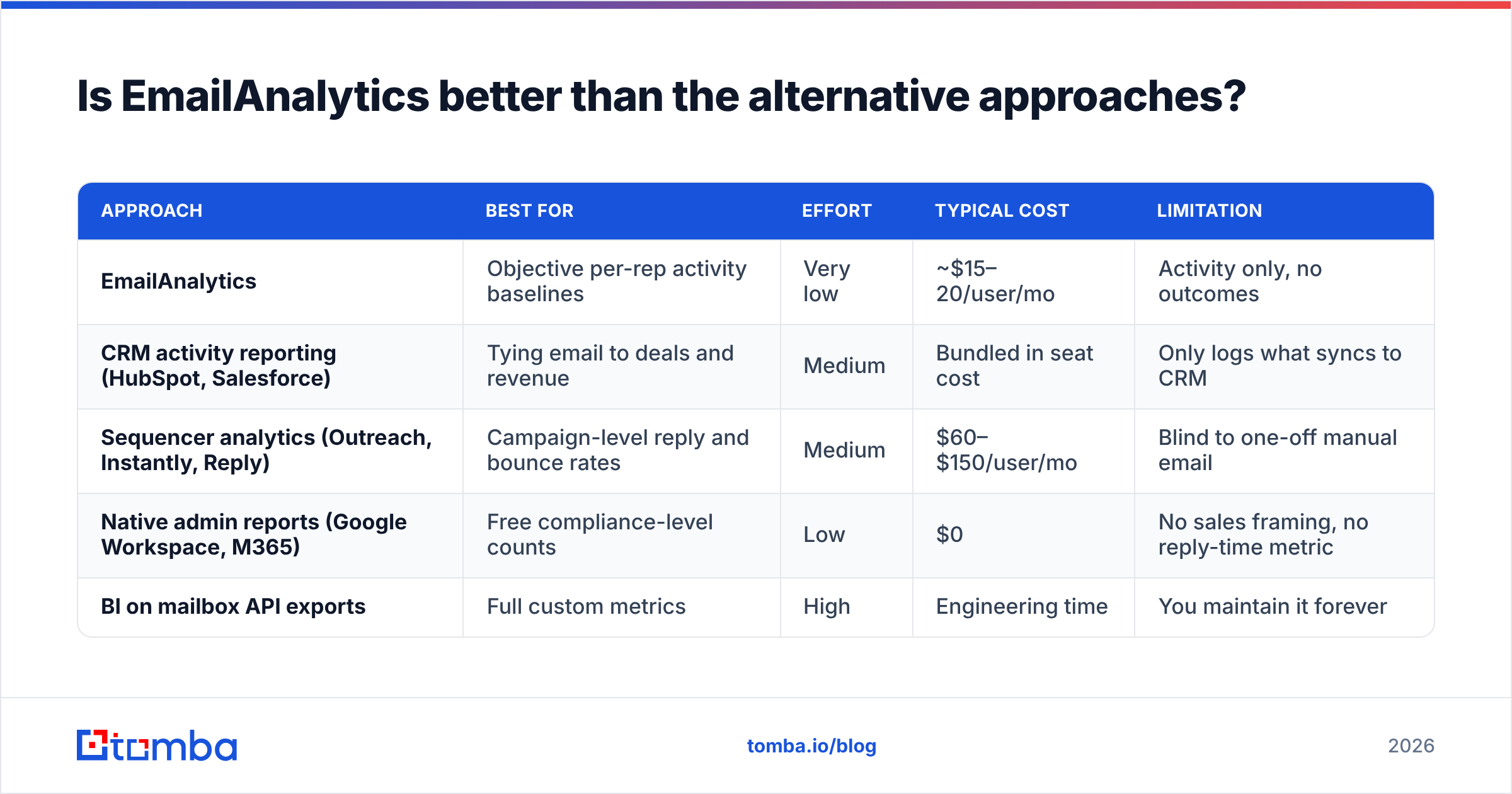
Here is how EmailAnalytics pricing plays out at real team sizes, next to tools buyers weigh at the same time:
| Cost factor | EmailAnalytics | HubSpot Sales Hub | Tomba |
|---|---|---|---|
| Model | Per user/mo | Per seat/mo + tiers | Flat plan, shared credits |
| Entry price | ~$15/user/mo (annual) | Free tier, paid from ~$20/seat | Free (25 searches/mo) |
| Mid tier | ~$20/user/mo (monthly) | Professional, ~$100/seat | Growth $99/mo |
| 10-person team | ~$150–$200/mo | ~$200–$1,000/mo | $99/mo (whole team) |
| 25-person team | ~$375–$500/mo | ~$500–$2,500/mo | $249/mo (Pro) |
| Free trial | Yes, time-limited | Free plan available | Free plan available |
| What you get | Mailbox activity metrics | CRM + sequences + reporting | Contact data + verification |
The pattern is clear once you lay it out. The tool is cheap for a squad and costly for a department. What you buy is a management report. That report does not get 25 times better when you add 25 reps. You pay for coverage, not for power.
So raise this point in any budget talk. Per-seat EmailAnalytics pricing on a read-only report means the bill grows with headcount forever. The insight, though, levels off after month two.

Watch the hidden line items#
Four things push EmailAnalytics pricing past the sticker rate:
- Every mailbox counts. Shared inboxes, aliases, SDR burner domains, and the founder's own mailbox each take a seat.
- Annual lock-in for the best rate. The low per-user rate usually needs a 12-month deal. Monthly billing costs more.
- Backfill limits. How far back the tool reads on connect varies. Ask first if you need year-over-year trends on day one.
- Admin work on Microsoft 365. Google OAuth is easy. Microsoft often needs tenant consent from an admin. A five-minute rollout can turn into a two-week ticket.
What do EmailAnalytics reviews say — the real pros and cons?#
Review counts on G2 and Capterra are low next to the CRM giants. So treat the scores with care. The themes, though, repeat.
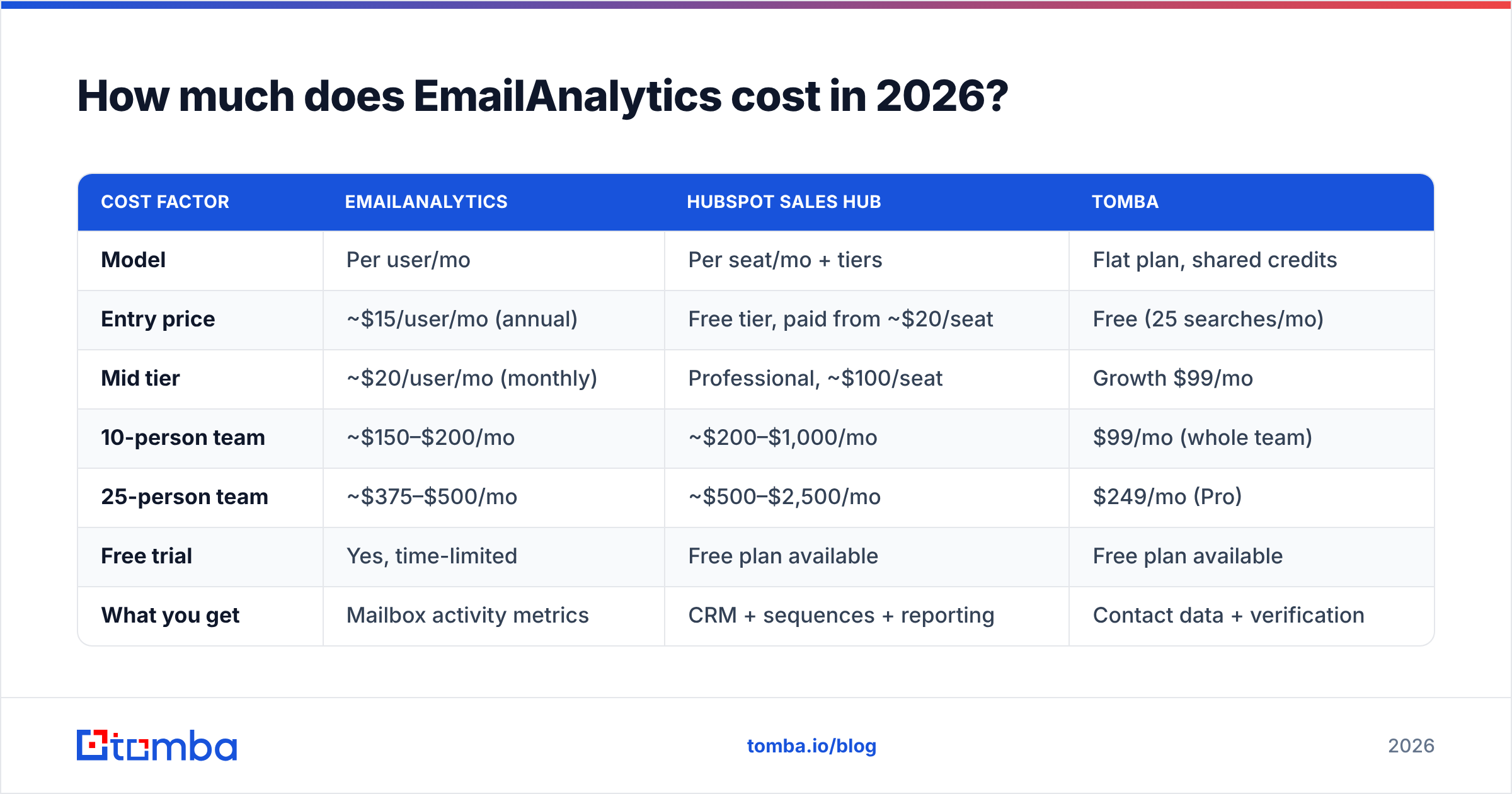
| Dimension | Pros | Cons |
|---|---|---|
| Setup | OAuth connect in minutes, no code, no Chrome extension required | Microsoft 365 tenants may need admin consent first |
| Data integrity | Reads the mailbox directly — reps cannot inflate activity | Metadata only; no view into email content quality |
| Reporting | Clean weekly digest lands in your inbox automatically | Dashboards are shallow; limited custom segmentation |
| Team management | Objective per-rep view ends "I sent tons of emails" debates | Can slide into surveillance if used to punish |
| Integrations | Works with Gmail and Outlook out of the box | Thin CRM and BI story; exports do the heavy lifting |
| Pricing | Low entry cost for small teams | Per-seat cost compounds fast past ~15 users |
| Scope | Does one job cleanly | No contact data, no deliverability, no attribution |
Reviewers tend to call EmailAnalytics pricing fair at small scale and steep past 15 seats. The split shows up again and again in the write-ups.
The best part is trust in the number. Try to coach a rep off CRM activity logs and the data turns into a debate. Mailbox counts do not. That alone can be worth a few hundred dollars a month to a manager who is flying blind.
The worst part is the ceiling. After a few weeks you know who replies fast. You know when the team goes quiet. That insight is useful once. Then you act on it, and that happens outside the tool. Or you keep paying per seat for a chart you already know by heart.
There is a culture risk too. Volume metrics create volume. Post a leaderboard of emails sent and you will get more email, not more meetings. If reply rates are already weak, a stopwatch on the inbox makes it worse. Track response rate next to volume, or you tune the wrong half of the funnel.
Is EmailAnalytics better than the other options?#
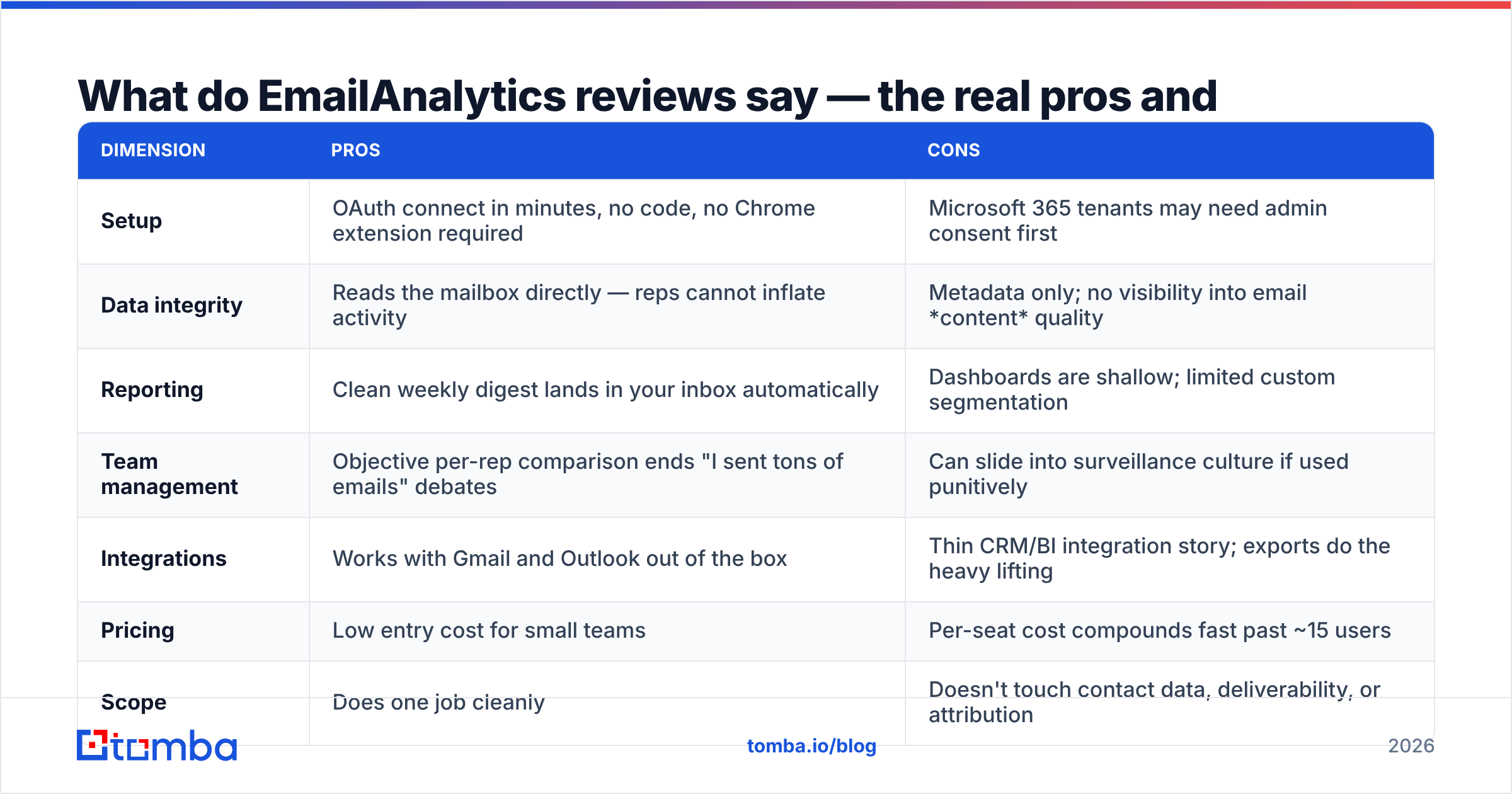
There are four common ways to see what your team emails. This tool is only one of them. Weigh EmailAnalytics pricing against each one:
| Approach | Best for | Effort | Typical cost | Limitation |
|---|---|---|---|---|
| EmailAnalytics | Objective per-rep activity baselines | Very low | ~$15–20/user/mo | Activity only, no outcomes |
| CRM activity reporting (HubSpot, Salesforce) | Tying email to deals and revenue | Medium | Bundled in seat cost | Only logs what syncs to CRM |
| Sequencer analytics (Outreach, Instantly, Reply) | Campaign-level reply and bounce rates | Medium | $60–$150/user/mo | Blind to one-off manual email |
| Native admin reports (Google Workspace, M365) | Free compliance-level counts | Low | $0 | No sales framing, no reply-time metric |
| BI on mailbox API exports | Full custom metrics | High | Engineering time | You maintain it forever |
Say you run HubSpot or Salesforce well. Much of what this tool shows, your CRM can show too. Better yet, the CRM ties that work to pipeline. People still buy EmailAnalytics because "well" is doing a lot of work in that sentence. Most CRMs miss 20–40% of real email. Reps send from threads and phones the connector never sees.
So here is the honest verdict. EmailAnalytics is not better than a CRM. It is better than a badly kept CRM, and it beats nothing at all. But EmailAnalytics pricing stops being trivial around the 15th seat.
Who should buy it, and who should skip it?#
Buy it if:
- You manage 5–25 reps or agents, and reply speed is a KPI you own.
- You have caught an activity report being wrong and need a source nobody can argue with.
- You want a weekly number without building one.
- Your team lives in Gmail and you want a rollout with no friction.
Skip it if:
- Your real problem is list quality, not effort. More email to bad addresses is not a plan.
- You need to tie email to closed revenue. That is CRM or BI work.
- You run more than 30 mailboxes. At that size EmailAnalytics pricing rivals a full sales platform.
- Your reps struggle with targeting and copy. Activity charts show that only in a roundabout way.
That last point deserves more room. It is where most of these buys go quietly wrong.
What should you pair EmailAnalytics with?#
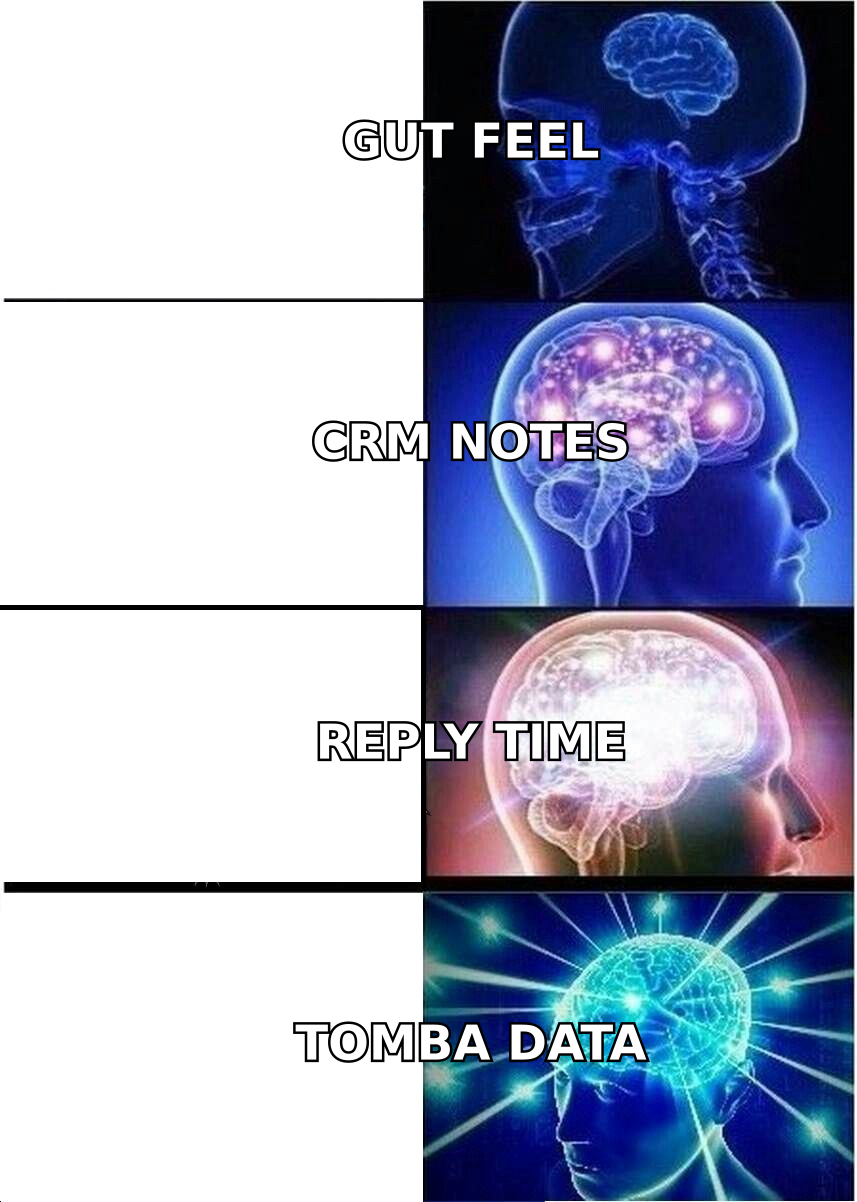
Activity data sits at the end of the outbound chain. It tells you how hard the machine runs. It says nothing about the fuel. Bad fuel is the more common fault.
Run the checks in order:
- Are the addresses real? Hard bounces above 2–3% hurt sender reputation and drag down every metric below it. Clean the list with an email verifier before you send. No dashboard will flag this, because a bounce still counts as a send.
- Are you reaching the right person? Volume aimed at junk personas gives you fast reply times and no pipeline. That combination looks healthy on a chart while the forecast dies. Build lists with a real email finder instead of guessing patterns in a sheet.
- Is the domain data complete? If reps spend 30 minutes a day hunting addresses, your sent count measures research, not selling. A domain search pass on target accounts turns that hour into send volume.
- Then measure activity. With a clean list and the right targets, reply time and volume become real coaching data instead of a vanity board.
Teams that flip this order buy the charts first. Then the reps look slow, so they push harder. The extra volume only bounces. The dashboard was right the whole time. It just watched the wrong number.
Now compare budgets. A flat-rate data layer plus a small seat count often beats blanket per-seat coverage. You get the coaching signal where it counts. You spend the rest on inputs that lift reply rates. Put Tomba pricing next to your per-seat total and the math tends to make the call for you.
What is the final verdict on EmailAnalytics pricing?#
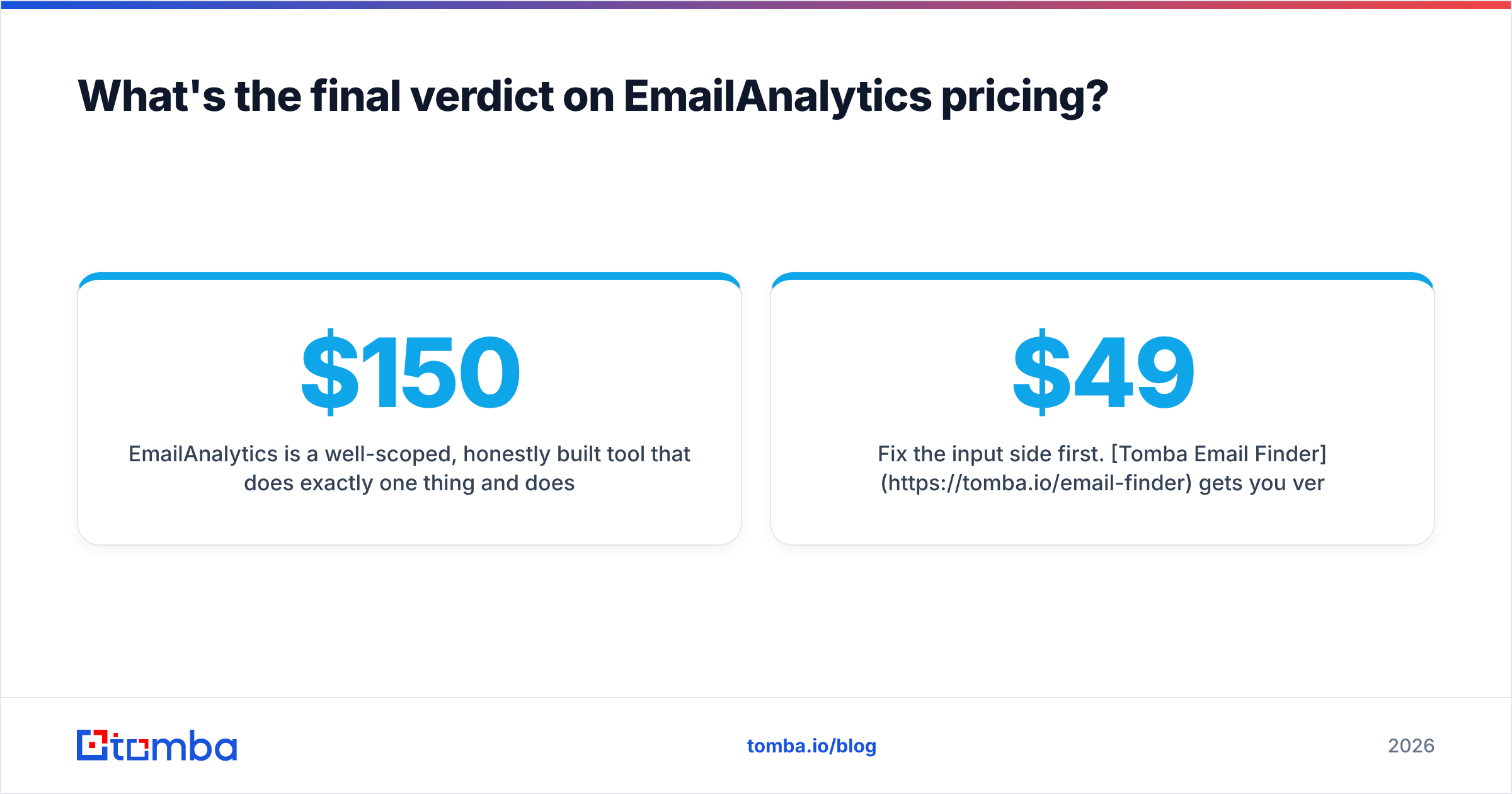
EmailAnalytics is a well-built tool with a narrow job, and it does that job without drama. For a team of 10, the cost lands near $150–$200 a month. That is fair if activity is your real blind spot.
Negotiate two things. First, seat count: cover the managers and mailboxes you will act on, not everyone. Second, billing term: skip the annual lock until the weekly report has changed behavior for a full quarter.
Be clear on what EmailAnalytics pricing buys you. You get a thermometer, not medicine. It measures effort. Turning effort into revenue still depends on who you email and whether those addresses resolve.
Fix the input side first. Tomba Email Finder finds verified contacts by domain, name, or company. The first 25 searches each month are free. Starter is $49/mo and Growth is $99/mo for a whole team, with no per-seat fee when you add a rep. Build a list your dashboards deserve. Then measure how fast your team works it.
Related guides#
Ready to find emails that actually work?
Join 150,000+ professionals who stopped guessing and started sending. Free credits on signup — no credit card required.
Get the Tomba newsletter
Practical outbound tactics and product updates — once every two weeks.
About the author