EmailBison vs FindThatLead (2026): Which Tool Wins?
EmailBison is a white-label cold email sending platform. FindThatLead is a prospecting and email-finding tool. They solve different halves of outbound — here's which one you actually need, and what it costs.
TL;DR
- They are not the same category. EmailBison is a cold-email sending and white-label infrastructure platform. FindThatLead is a prospecting tool that finds and verifies B2B emails, with light sending bolted on.
- Pick EmailBison if you run an agency, need unlimited sending seats under your own brand, and already have a data source.
- Pick FindThatLead if you need lead lists first — LinkedIn scraping, domain search, and a Chrome extension matter more to you than deliverability tooling.
- Neither is best-in-class at both halves. Most teams that scale end up pairing a dedicated data provider with a dedicated sender.
- Data quality is the real cost driver. A $79/mo sending tool is worthless if 22% of your list bounces. Verify before you send, every time.
What are EmailBison and FindThatLead, actually?#
Start here, because the "vs" framing hides the real answer: these tools sit on opposite ends of the outbound pipeline.
EmailBison is a cold email sending platform built with agencies in mind. Its pitch is white-labeling — you host it under your own domain, resell it to clients, and stop paying per-seat to Instantly or Smartlead. It handles inbox rotation, warmup, sequences, reply detection, and per-client workspaces. It does not find leads for you.
FindThatLead is a Spanish-built prospecting suite that has been around since 2015. Its core is lead discovery: domain search, name-to-email lookup, LinkedIn prospecting via extension, and a "Prospector" that filters by role, industry, and location. It also ships a basic email sender ("Scrapper" plus campaigns), but sending is the secondary product.
So the honest framing of emailbison vs findthatlead is: do you have a data problem or a delivery problem? Answer that first and the choice usually makes itself.

How do they compare feature by feature?#
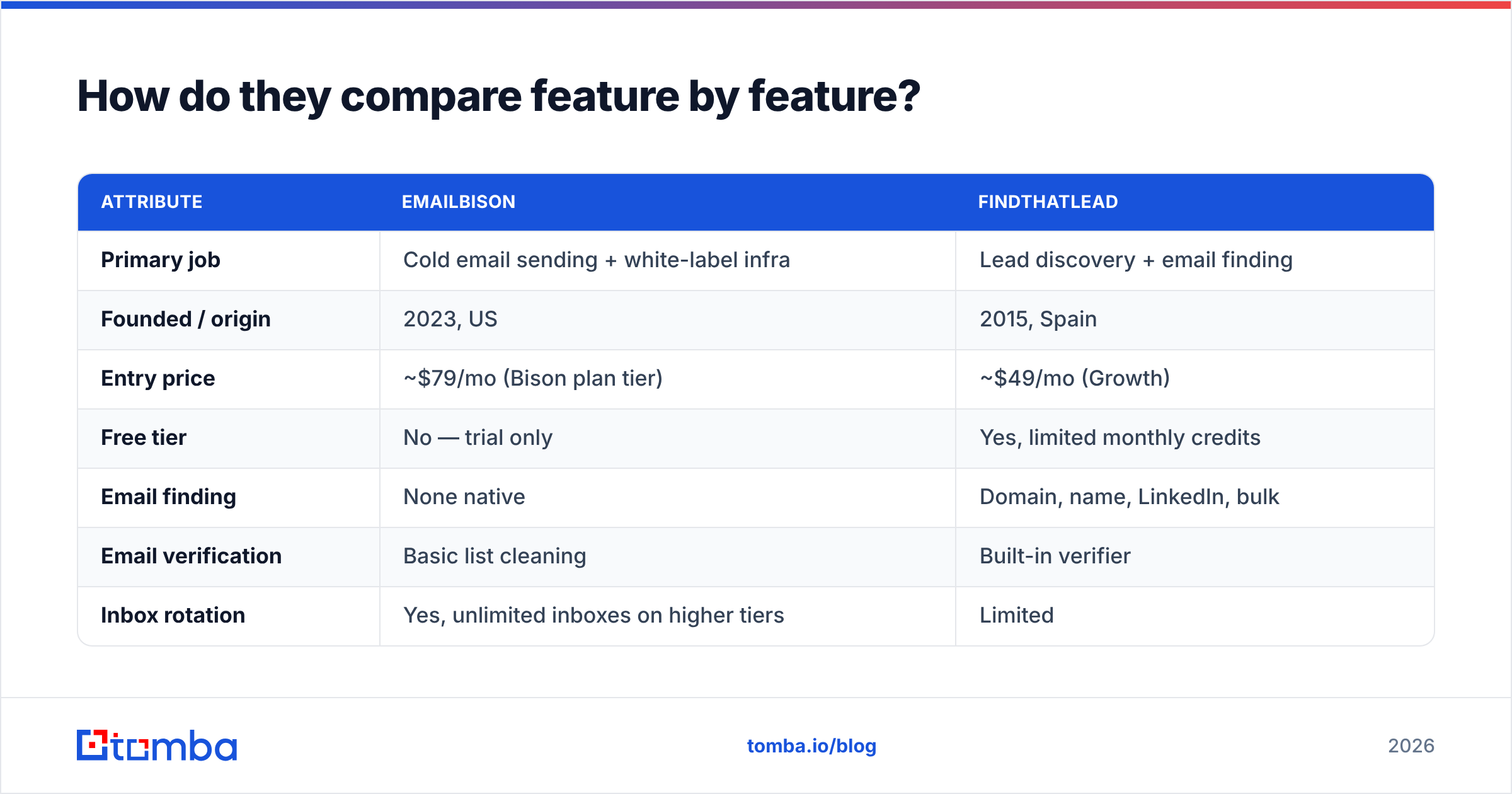
| Attribute | EmailBison | FindThatLead |
|---|---|---|
| Primary job | Cold email sending + white-label infra | Lead discovery + email finding |
| Founded / origin | 2023, US | 2015, Spain |
| Entry price | ~$79/mo (Bison plan tier) | ~$49/mo (Growth) |
| Free tier | No — trial only | Yes, limited monthly credits |
| Email finding | None native | Domain, name, LinkedIn, bulk |
| Email verification | Basic list cleaning | Built-in verifier |
| Inbox rotation | Yes, unlimited inboxes on higher tiers | Limited |
| Warmup included | Yes | No — third party needed |
| White-label / reseller | Yes, core selling point | No |
| Chrome extension | No | Yes |
| API access | Yes | Yes |
| Best for | Agencies, high-volume senders | SDRs, small teams building lists |
The table makes the overlap look small, and it is. The only genuine head-to-head zone is "send a cold email campaign," and even there the two tools serve different volumes. EmailBison is architected for thousands of sending accounts across many client workspaces. FindThatLead's sender is closer to what you'd use for a 500-contact campaign you run yourself.
Which one has better data?#
FindThatLead wins this by default — EmailBison doesn't compete here. But "wins by default" is not the same as "good enough."
Independent tests of B2B email providers consistently show a wide accuracy spread. Tools that lean heavily on pattern-guessing (first.last@domain, f.last@domain) return plausible-looking addresses that fail SMTP checks. FindThatLead's coverage is solid for European SMB domains and weaker on US enterprise and heavily-gated tech companies. Its verifier catches obvious invalids but struggles with catch-all domains, which is where most bounce risk actually hides.

Two practical checks before you commit to any data vendor:
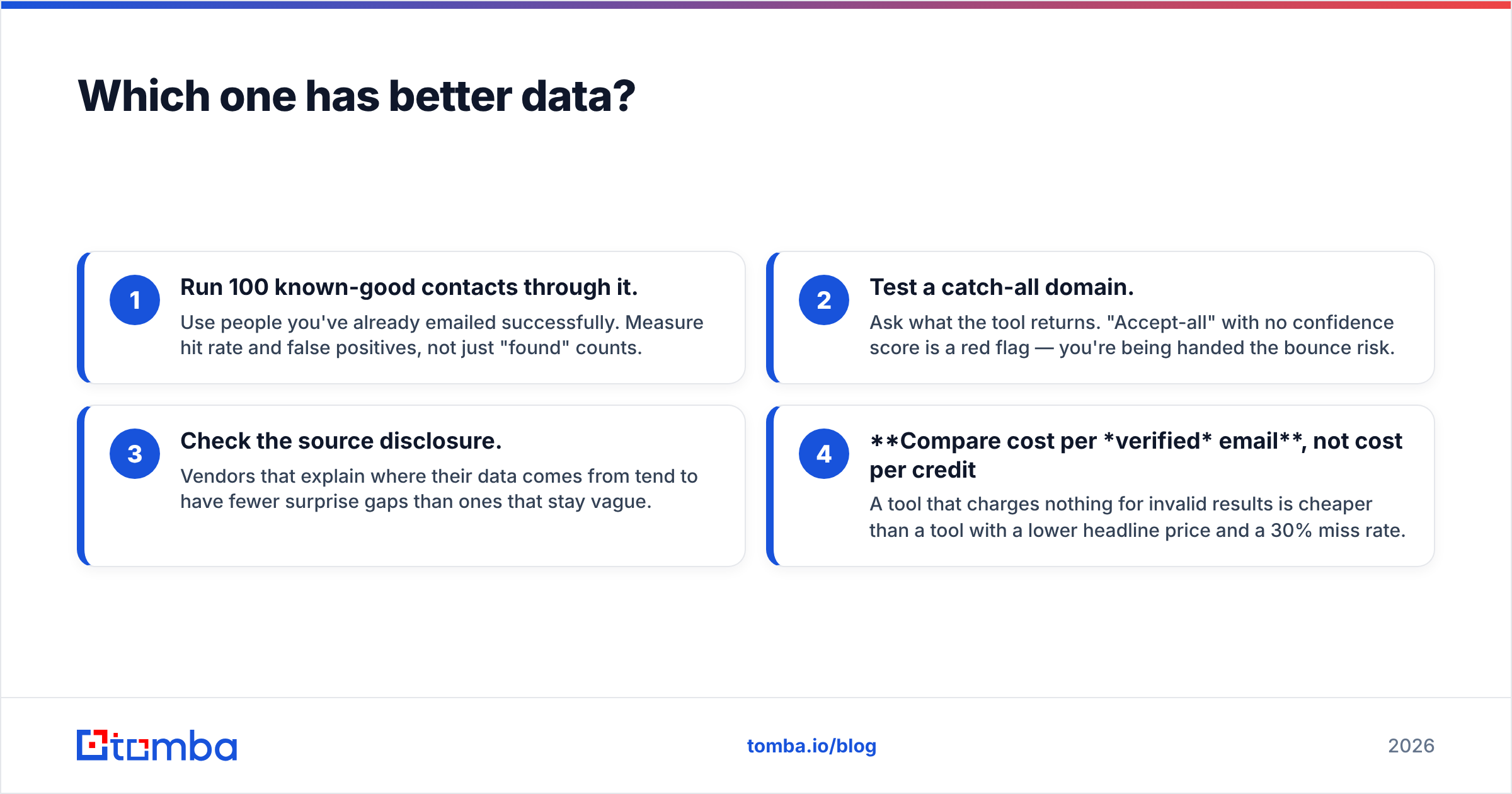
- Run 100 known-good contacts through it. Use people you've already emailed successfully. Measure hit rate and false positives, not just "found" counts.
- Test a catch-all domain. Ask what the tool returns. "Accept-all" with no confidence score is a red flag — you're being handed the bounce risk.
- Check the source disclosure. Vendors that explain where their data comes from tend to have fewer surprise gaps than ones that stay vague.
- Compare cost per verified email, not cost per credit. A tool that charges nothing for invalid results is cheaper than a tool with a lower headline price and a 30% miss rate.
This is where a dedicated finder earns its keep. Tomba's email finder and catch-all verifier exist as separate products precisely because catch-all handling and pattern confidence are different problems from "find an address." Bundled finders inside a sending tool almost never invest in that depth.
Is EmailBison worth it for agencies?#
Yes, if the math works — and the math is entirely about seat count.
EmailBison's value proposition is that you stop paying per-inbox to a sending SaaS and start paying a flat platform fee. If you're an agency running 12 clients with 8 sending inboxes each, you're at 96 inboxes. On per-inbox pricing that's real money every month. On EmailBison, it's one platform bill and you can even mark it up as your own product.
The catch: white-labeling means you own the support burden. When a client's Google Workspace domain gets flagged, they email you, not the vendor. You need someone on your team who genuinely understands email deliverability, SPF/DKIM/DMARC alignment, and domain reputation recovery. If you don't have that person, the flat fee is a false economy.
Also worth knowing: EmailBison is young. It launched in 2023 and iterates fast, which cuts both ways — features ship quickly, and so do bugs. Check current reviews on G2 before signing an annual deal, and compare against the incumbents in this space via a Instantly alternative breakdown.
Is FindThatLead still competitive in 2026?#
Partially. It's a mature, honest tool with a real free tier, and the Prospector search is genuinely useful for building a first list without a contract. For a solo founder or a two-person SDR team in Europe, it does the job.
Where it shows its age:
- Enrichment depth. You get email and basic firmographics. You don't get tech stack, funding signals, intent, or reliable direct dials. Modern outbound targets on signals, not just titles.
- Verification confidence. The built-in verifier is fine for syntax and MX, weaker on catch-all and role-account risk.
- Sending features. The campaign builder is basic next to purpose-built senders. No serious inbox rotation, no native warmup.
- API ergonomics. Workable, but not something you'd build a data pipeline on. Compare against a documented email finder API if you're automating enrichment at volume.
If FindThatLead is your only tool, you're likely paying for a mediocre sender you don't use and a finder that leaves 30-40% of your ICP unfound.
What does each one actually cost?#
Published pricing moves, so treat these as directional and verify on each vendor's page before you buy.
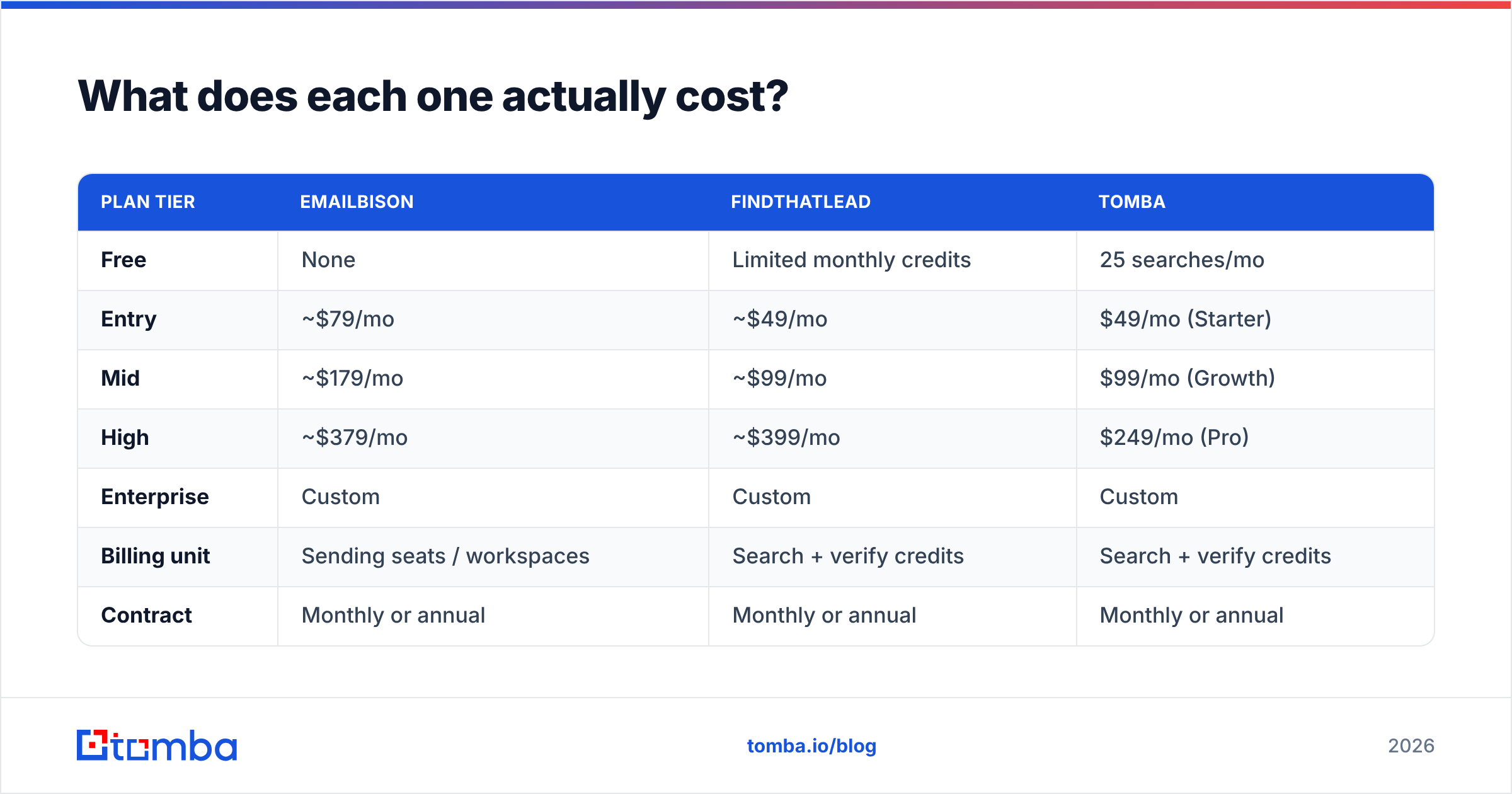
| Plan tier | EmailBison | FindThatLead | Tomba |
|---|---|---|---|
| Free | None | Limited monthly credits | 25 searches/mo |
| Entry | ~$79/mo | ~$49/mo | $49/mo (Starter) |
| Mid | ~$179/mo | ~$99/mo | $99/mo (Growth) |
| High | ~$379/mo | ~$399/mo | $249/mo (Pro) |
| Enterprise | Custom | Custom | Custom |
| Billing unit | Sending seats / workspaces | Search + verify credits | Search + verify credits |
| Contract | Monthly or annual | Monthly or annual | Monthly or annual |
The comparison that matters isn't tier-to-tier. It's total stack cost. A typical working setup looks like:
- Data provider: $49–$99/mo
- Sending platform: $79–$179/mo
- Warmup (if not bundled): $0–$50/mo
- Domains and inboxes: $30–$80/mo
That's $160–$400/mo for a functioning outbound motion, regardless of which two vendors you name. Picking the cheaper tool in one slot and eating a 20% bounce rate costs more than the savings — bounces damage sender reputation, and a damaged domain takes weeks to recover.


Which should you choose?#
Run it through these four scenarios.
You run an agency with 5+ clients. EmailBison, plus a separate data provider. The white-label economics are the whole point, and you'll outgrow any bundled finder inside a quarter. Budget for a real deliverability owner on staff.
You're a solo founder testing outbound for the first time. FindThatLead's free tier, or Tomba's free tier, plus a cheap sender. Don't buy infrastructure for volume you don't have yet. Prove the offer converts on 200 contacts before you spend $400/mo.
You're an SDR team of 3–10. Split the stack. Use a dedicated finder with strong verification for the list, and a dedicated sender for the campaigns. Neither EmailBison nor FindThatLead covers both halves well enough to justify the compromise.
You need contacts at companies that aren't in any database. Neither tool solves this alone. You want domain search to map who works there, pattern detection to construct the address, and verification to confirm it — a three-step workflow rather than a single lookup.
One more filter: if you're comparing against other options in this bracket, tools like BookYourData take a different approach entirely — pay-per-lead, no subscription, with a bounce guarantee attached. That model suits teams with lumpy, campaign-driven buying patterns better than either monthly SaaS here. It's worth a look before you assume subscription is the only shape available.
What's the smarter way to build the stack?#
Separate the layers and buy the best tool for each. The outbound stack has four jobs, and bundling them into one vendor almost always means three of the four are mediocre.
- Identify — who fits your ICP. Prospecting filters, intent data, or a manual list from LinkedIn.
- Find — get the address. A dedicated finder with domain search and pattern confidence beats a bundled lookup.
- Verify — confirm it's deliverable. Run every list through an email verifier before it touches your sending platform. Non-negotiable.
- Send — sequences, rotation, warmup, reply handling. This is where EmailBison lives.
- Enrich and route — push clean records into your CRM with data enrichment so reps aren't retyping firmographics.
The failure mode we see most often: teams buy the sending platform first because that's the visible, exciting part, then feed it a list they scraped for free. Bounce rate hits 15%, Google throttles the domain, and they blame the sending tool. The sending tool was fine. The data was garbage.
Do it in the other order. Get the list right, verify it, then send.
Frequently asked questions#
Can EmailBison find email addresses? No. It's a sending and infrastructure platform. You bring your own contact data, either from a finder tool or a CSV.
Does FindThatLead replace a dedicated sending platform? For small campaigns, yes. For anything involving multiple domains, inbox rotation, or client workspaces, no — you'll want a purpose-built sender.
Which has better deliverability? EmailBison, because deliverability tooling is its actual product — rotation, warmup, and sending-limit controls are built in. But deliverability is mostly determined by your list quality and domain setup, not the platform's logo.
Can I use both together? Yes, and some teams do: FindThatLead for list building, EmailBison for sending. It works, though you'll get better data coverage swapping the finder for a dedicated provider.
Is there a free way to test both? FindThatLead has a free tier. EmailBison is trial-only. You can also test finder accuracy at zero cost with a free email checker before committing to any paid plan.
Where to start#
If your bottleneck is data — you can't find enough of the right addresses, or too many of the ones you find bounce — fix that layer first. The Tomba Email Finder covers domain search, name-based lookup, LinkedIn extraction, and catch-all verification in one place, with a free tier of 25 searches a month so you can test accuracy against your own ICP before paying anything. Paid plans start at $49/mo, and you can see the full breakdown on Tomba pricing.
Run 100 of your known-good contacts through it. If the hit rate beats what you're getting today, you've found your data layer — then go pick a sender.
Related guides#
Ready to find emails that actually work?
Join 150,000+ professionals who stopped guessing and started sending. Free credits on signup — no credit card required.
Get the Tomba newsletter
Practical outbound tactics and product updates — once every two weeks.
About the author