Emailchaser vs Generect: Which B2B Prospecting Tool Wins in 2026?
Emailchaser bundles cold email sending with lookups. Generect leans on LinkedIn-sourced B2B data. We break down accuracy, pricing, and which one fits your outbound stack in 2026.
TL;DR
- Emailchaser is a cold email sending platform with a bundled email finder. You pay mainly for sequences, inboxes, and deliverability tooling — the lookup is a convenience feature, not the core engine.
- Generect is a B2B data provider built around LinkedIn-sourced company and people records, with an API-first pitch. You pay mainly for data volume and filtering depth, not for sending.
- They are not really the same product. Comparing them head-to-head only makes sense if you're deciding where in your stack to spend the next $50–$200/month.
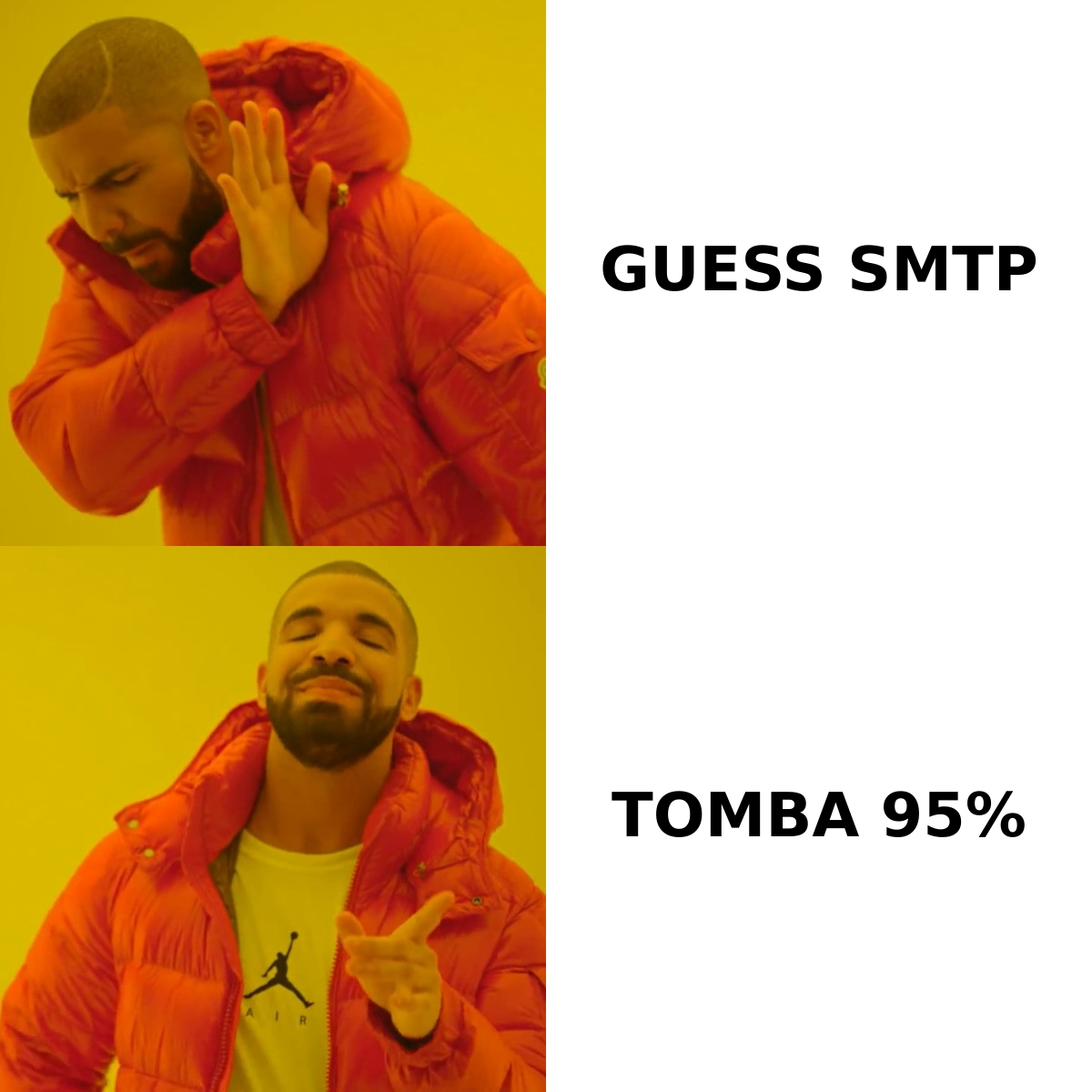
- On raw email-finding accuracy and per-credit cost, a dedicated finder like Tomba Email Finder usually beats both — then you feed the results into whichever sender you already trust.
- Best rule of thumb: pick Emailchaser if you have data but no sending motion, pick Generect if you have a sender but thin lists, and pick a dedicated finder + verifier if your bounce rate is the thing actually hurting you.
What are Emailchaser and Generect, exactly?#
Emailchaser (emailchaser.com) positions itself as a simple cold email tool for small teams and agencies. The pitch is unlimited-ish sending across connected inboxes, automated follow-up sequences that stop on reply, and a built-in email finder so you don't have to leave the app to build a list. It targets people who find Instantly or Lemlist overbuilt.
Generect (generect.com) is a different animal. It sells B2B contact and company data — heavily LinkedIn-derived — through both a UI and an API. Its differentiator is real-time lookups against live profiles rather than serving from a stale snapshot, plus deep filtering (headcount, tech stack, hiring signals, group membership). Generect expects you to have a sending tool already; it wants to be the fuel, not the engine.
So the honest framing of emailchaser vs generect is: one is a sender that also finds emails, the other is a data source that doesn't send. If someone tells you one is "better," ask them which half of the outbound problem they were solving.
How do they compare feature by feature?#
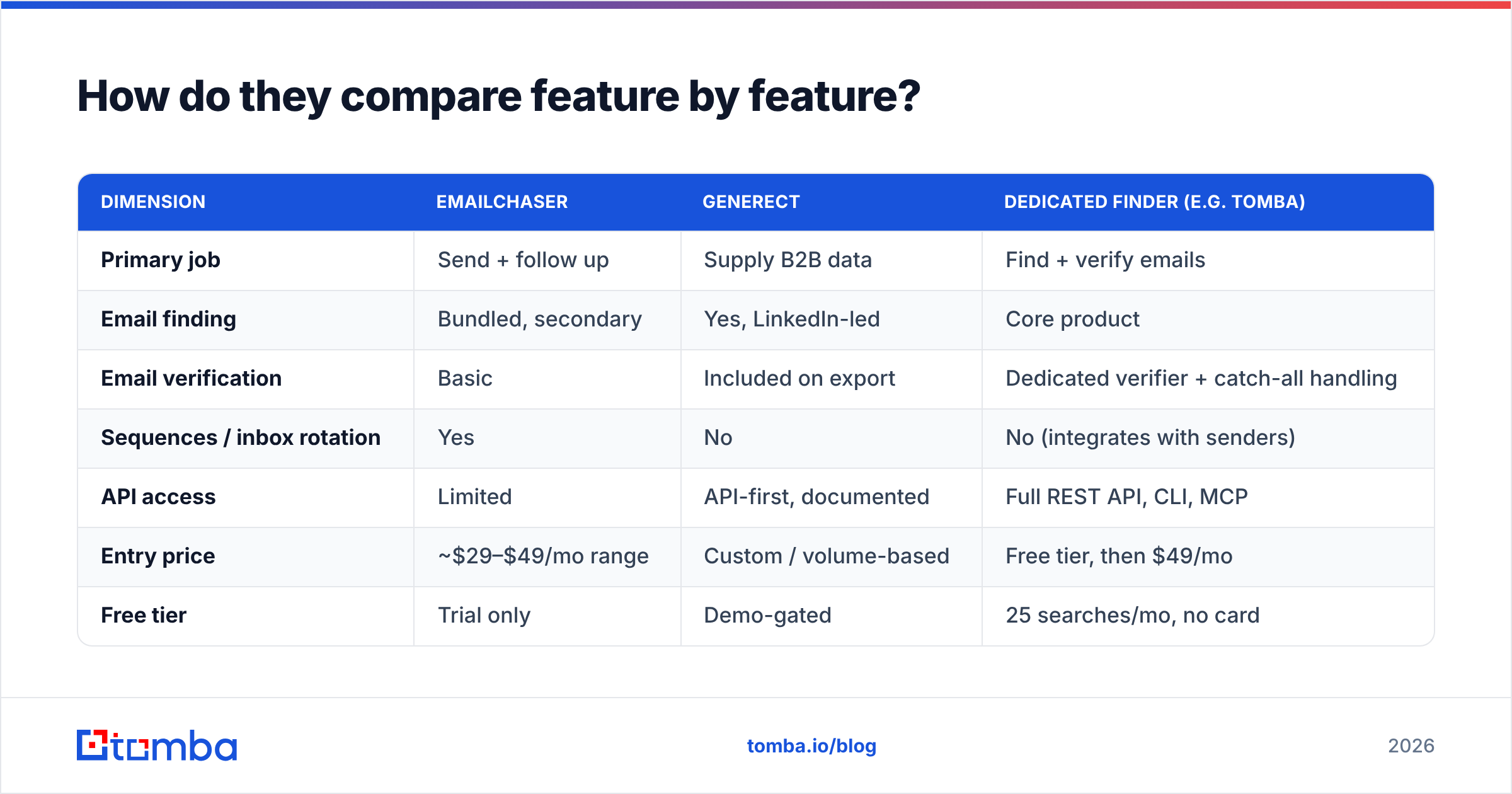
| Dimension | Emailchaser | Generect | Dedicated finder (e.g. Tomba) |
|---|---|---|---|
| Primary job | Send + follow up | Supply B2B data | Find + verify emails |
| Email finding | Bundled, secondary | Yes, LinkedIn-led | Core product |
| Email verification | Basic | Included on export | Dedicated verifier + catch-all handling |
| Sequences / inbox rotation | Yes | No | No (integrates with senders) |
| API access | Limited | API-first, documented | Full REST API, CLI, MCP |
| Entry price | ~$29–$49/mo range | Custom / volume-based | Free tier, then $49/mo |
| Free tier | Trial only | Demo-gated | 25 searches/mo, no card |
| Best fit | Solo founders, small agencies | Data teams, RevOps, resellers | Anyone list-building at volume |
Two things jump out of that table.
First, Generect is quote-driven. That's normal for data vendors, but it means you can't price-compare on a landing page — you book a call, describe your volume, and get a number. For a two-person team testing outbound, that friction alone can be disqualifying.
Second, Emailchaser's finder is a feature, not a product. Bundled finders inside sending tools are almost always thinner than standalone ones: fewer data sources, weaker catch-all logic, no bulk workflow worth the name. That's not a knock on Emailchaser specifically — it's true of nearly every all-in-one.
Which one has better data accuracy?#
This is where most comparisons get lazy, so let's be precise about what "accuracy" means. There are three separate numbers people conflate:
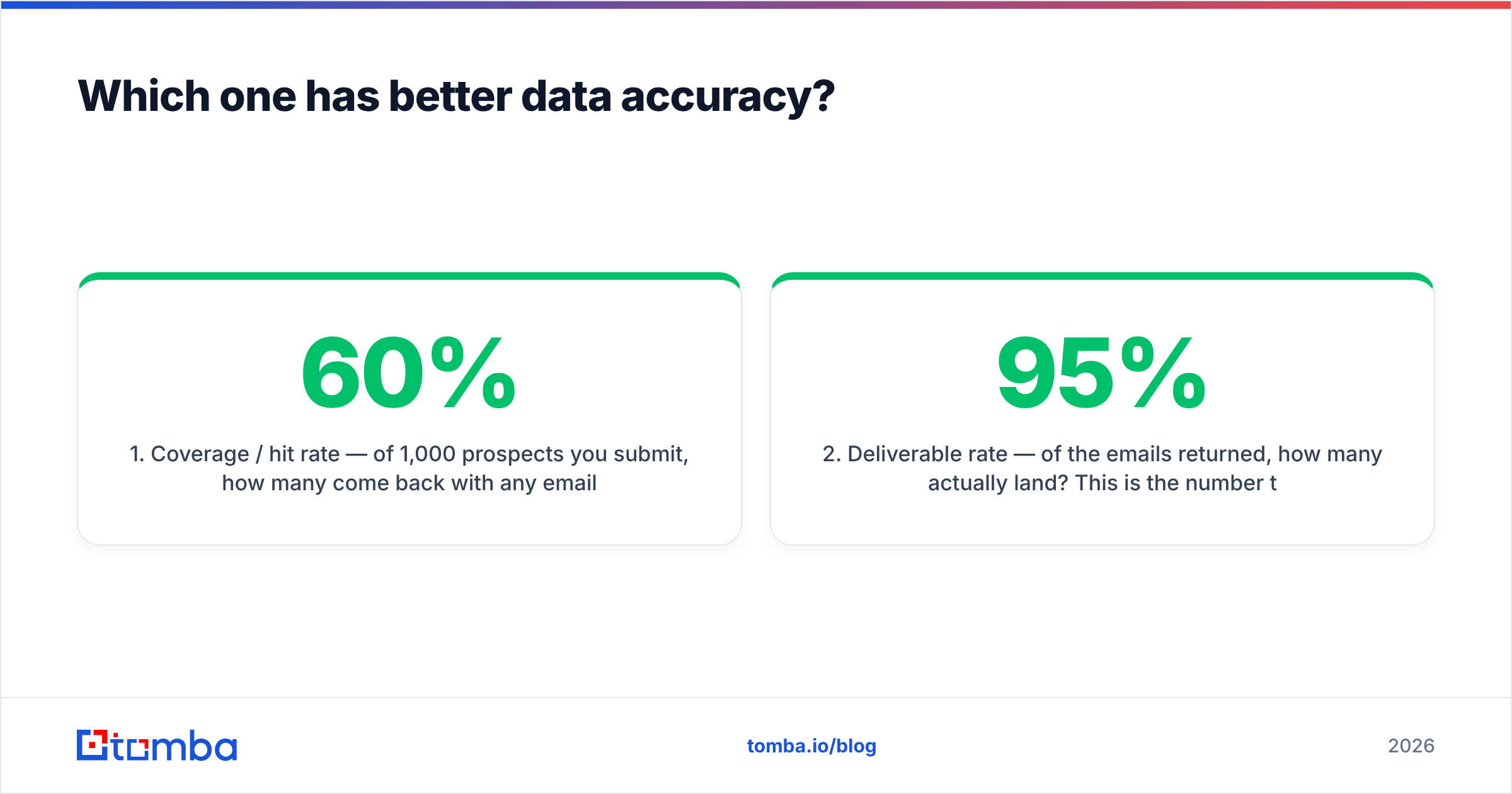
- Coverage / hit rate — of 1,000 prospects you submit, how many come back with any email at all? Bundled finders in sending tools typically land in the 40–60% range on mixed lists. Dedicated finders push 65–80%.
- Deliverable rate — of the emails returned, how many actually land? This is the number that decides whether your domain survives. Anything under 95% and you're gambling.
- Freshness — how old is the underlying record? Generect's real-time LinkedIn approach is genuinely strong here, because job changes surface fast. Static databases can be 6–18 months stale.
Generect wins on freshness for people data. Emailchaser wins on convenience. Neither is optimized for the deliverable-rate problem, which is why teams using either still end up running exports through a separate email verifier before loading a campaign.

The other thing that quietly wrecks accuracy: catch-all domains. Roughly a fifth of B2B domains accept every address at the SMTP layer, so a naive verifier marks them "valid" and you bounce anyway. If your target market skews enterprise, a catch-all verifier is not optional — and it's a capability neither Emailchaser nor Generect leads with.
What does each one actually cost?#
Pricing is the most common reason people search emailchaser vs generect in the first place, so here's the shape of it.
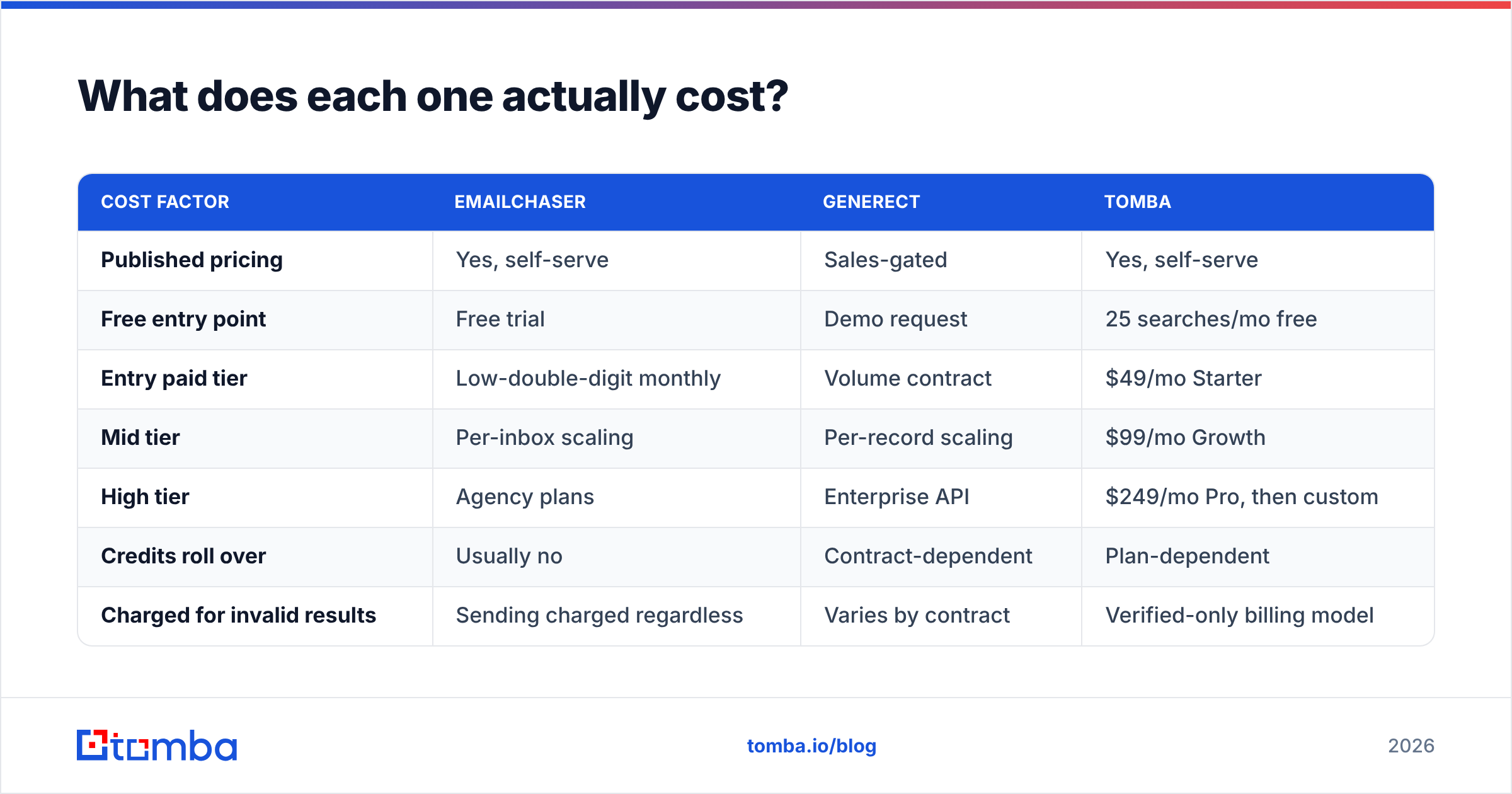
| Cost factor | Emailchaser | Generect | Tomba |
|---|---|---|---|
| Published pricing | Yes, self-serve | Sales-gated | Yes, self-serve |
| Free entry point | Free trial | Demo request | 25 searches/mo free |
| Entry paid tier | Low-double-digit monthly | Volume contract | $49/mo Starter |
| Mid tier | Per-inbox scaling | Per-record scaling | $99/mo Growth |
| High tier | Agency plans | Enterprise API | $249/mo Pro, then custom |
| Credits roll over | Usually no | Contract-dependent | Plan-dependent |
| Charged for invalid results | Sending charged regardless | Varies by contract | Verified-only billing model |
Watch the billing unit, not the sticker price. Emailchaser charges by inbox and sending volume; Generect charges by record; a finder charges by lookup. A $49/mo finder that returns 1,000 verified emails is cheaper per usable contact than a $29/mo sender whose bundled finder returns 400 usable ones out of 1,000 tries — even though the sticker is higher. Do that math with your own list before you commit. Full Tomba pricing is public so you can run the comparison honestly.
Also budget for the hidden line items nobody quotes: inbox costs (Google Workspace seats at $6–$12 each), domain purchases for burner sending domains, and warmup. Those often exceed the tool subscription itself.
Is Emailchaser better than Generect for cold outreach?#
For running cold outreach end to end with one login: yes, Emailchaser is the only one of the two that can do it. Generect has no sequencer, no inbox rotation, no reply detection. If you buy Generect and nothing else, you have a spreadsheet.
But "better for cold outreach" splits by team shape:
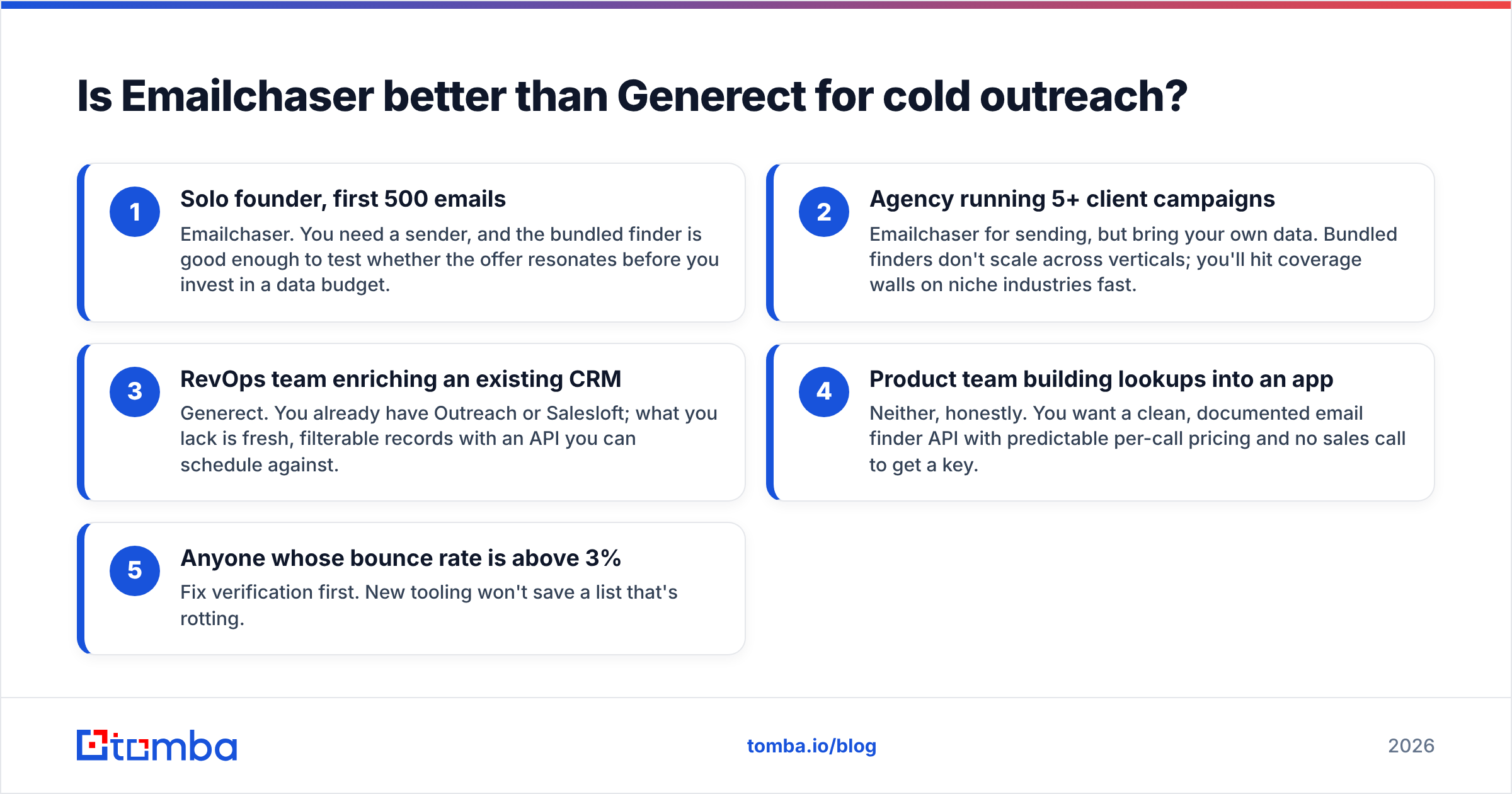
- Solo founder, first 500 emails — Emailchaser. You need a sender, and the bundled finder is good enough to test whether the offer resonates before you invest in a data budget.
- Agency running 5+ client campaigns — Emailchaser for sending, but bring your own data. Bundled finders don't scale across verticals; you'll hit coverage walls on niche industries fast.
- RevOps team enriching an existing CRM — Generect. You already have Outreach or Salesloft; what you lack is fresh, filterable records with an API you can schedule against.
- Product team building lookups into an app — Neither, honestly. You want a clean, documented email finder API with predictable per-call pricing and no sales call to get a key.
- Anyone whose bounce rate is above 3% — Fix verification first. New tooling won't save a list that's rotting.
Worth noting: comparing these two against broader database plays like BookYourData is also fair game. BookYourData sells pay-as-you-go verified B2B lists with no subscription, which suits teams that buy in bursts rather than monthly — a genuinely different purchasing model from both tools here, and a strong option if you'd rather own the list outright than rent a seat.
What do reviewers say about each tool?#
Third-party signal is thin for both, which is itself informative. Neither has the review volume of Apollo or Hunter on G2 or Capterra, so you're mostly reading founder-adjacent posts and a handful of Reddit threads.
The recurring themes from what does exist:
- Emailchaser praise: simplicity, fast setup, fair price for small volume. Users like that it doesn't try to be a CRM.
- Emailchaser complaints: finder coverage on non-US/non-tech domains, limited reporting depth, fewer native integrations than the bigger sequencers.
- Generect praise: data freshness, filter granularity, responsive account teams, solid API docs.
- Generect complaints: opaque pricing, minimum commitments that scare off small teams, and the usual LinkedIn-sourcing volatility when the source changes its defenses.
Treat both sets of claims as directional. Run your own 200-row test list against each trial before signing anything longer than a month — that single test will tell you more than every review page combined.
How should you actually structure your stack?#
Here's the pattern that works for most teams under 50 people, and it doesn't require picking a winner in this matchup at all.
Separate the three jobs. Find, verify, send. When one vendor owns all three, you can't swap the weak link without ripping out the whole thing. When they're separate, a bad finder costs you one migration, not your entire outbound motion.
Find with a dedicated tool. Run domain search when you're targeting accounts and know the company but not the people; run name-based lookups when you have a list from LinkedIn or a conference roster. A bulk email finder handles the 1,000-row CSVs that break browser extensions.
Verify as a separate, non-negotiable step — including catch-all handling. Aim for a validated list before a single email leaves your domain.
Send with whatever fits your workflow. Emailchaser is a legitimate choice here. So are Instantly, Smartlead, or plain HubSpot sequences if you're already paying for the CRM. The sender matters far less than the list quality feeding it.
Enrich afterward. Once a reply lands, data enrichment fills in firmographics and phone numbers so your CRM record is complete before the call.
The teams that struggle are the ones who buy an all-in-one, discover the weakest module is the one their business depends on, and then have to re-architect mid-quarter.
What's the verdict for 2026?#
No single winner — they solve different halves of the problem.
Choose Emailchaser if you need a sender today, your volume is modest, you're price-sensitive, and you'd rather have one login than three. Accept that you'll outgrow the bundled finder and plan for that day rather than being surprised by it.
Choose Generect if you have a mature sending stack, your bottleneck is fresh and filterable people data, you can clear a sales call, and your volume justifies a contract. Its LinkedIn freshness advantage is real and it's the clearest reason to pick it over a static database.
Choose neither as your finder if what you actually need is high hit rates and verified deliverability at a published price. That's the specific job a dedicated finder does better than a bundled feature or a broad data contract — and it's usually the cheapest fix for the metric that's hurting you most.
One last practical note: whichever way you go, instrument it. Track hit rate, bounce rate, and cost-per-usable-contact for 30 days. Tools change; those three numbers don't lie.
Ready to fix the data half of the equation? Start with the Tomba Email Finder — 25 free searches a month, no card, no sales call. Run your next 200-prospect list through it alongside whatever you're using now, compare the hit rate and the bounce rate side by side, and let the numbers pick your stack. Paid plans start at $49/mo when you're ready to scale, with a documented API, Chrome extension, and Google Sheets add-on so the results land wherever you already work.
Related guides#
Ready to find emails that actually work?
Join 150,000+ professionals who stopped guessing and started sending. Free credits on signup — no credit card required.
Get the Tomba newsletter
Practical outbound tactics and product updates — once every two weeks.
About the author