Emailchaser vs Jet Leads Pro: Which Tool Wins in 2026?
One is a sending-first cold email platform, the other a lead-list tool with a thin public footprint. Here's how Emailchaser and Jet Leads Pro actually stack up on data quality, pricing, and deliverability in 2026.
TL;DR
- Emailchaser is a sending-first cold email platform: sequences, inbox rotation, reply detection, with an email-finding feature bolted alongside. Its strength is campaign execution, not data depth.
- Jet Leads Pro positions itself as a lead-list and contact-discovery tool. Its public documentation, changelog, and third-party review footprint are thin — which is a real buying risk, not a knock on the product itself.
- Neither tool is a serious replacement for a dedicated email finder if your bounce rate is what's killing you. Sending tools optimize for throughput; data tools optimize for accuracy.
- The honest split: use a sender for sending, a finder for finding. Pairing a campaign tool with a verified data source beats forcing one product to do both.
- If you only fix one thing this quarter, fix the list. A 12% bounce rate makes every other optimization irrelevant.
What are Emailchaser and Jet Leads Pro?#
Two very different products get lumped into the same search because both promise "more replies from cold email." They solve different halves of the problem.
Emailchaser (emailchaser.com) is a cold email outreach platform. You connect mailboxes, build a sequence, upload or find contacts, and it handles the sending cadence, follow-ups, reply detection, and unsubscribe handling. It's built around simplicity — fewer knobs than Instantly or Smartlead, which some teams genuinely prefer. Its email-finding capability exists so you don't have to leave the tool, not because it's the deepest database on the market.
Jet Leads Pro markets itself in the lead-generation and contact-discovery space: build a list, get emails, export, send elsewhere. Here's the part most comparison posts won't tell you — its public footprint is unusually thin. There's limited independent review coverage on G2, sparse public API documentation, and no widely-cited accuracy benchmark. That doesn't make it a bad tool. It does mean you should treat any accuracy claim as unverified until you run your own test on 200 known-good contacts.
That asymmetry shapes the entire comparison. One product you can evaluate from public evidence. The other you have to evaluate by trial.
How do Emailchaser and Jet Leads Pro compare feature by feature?#
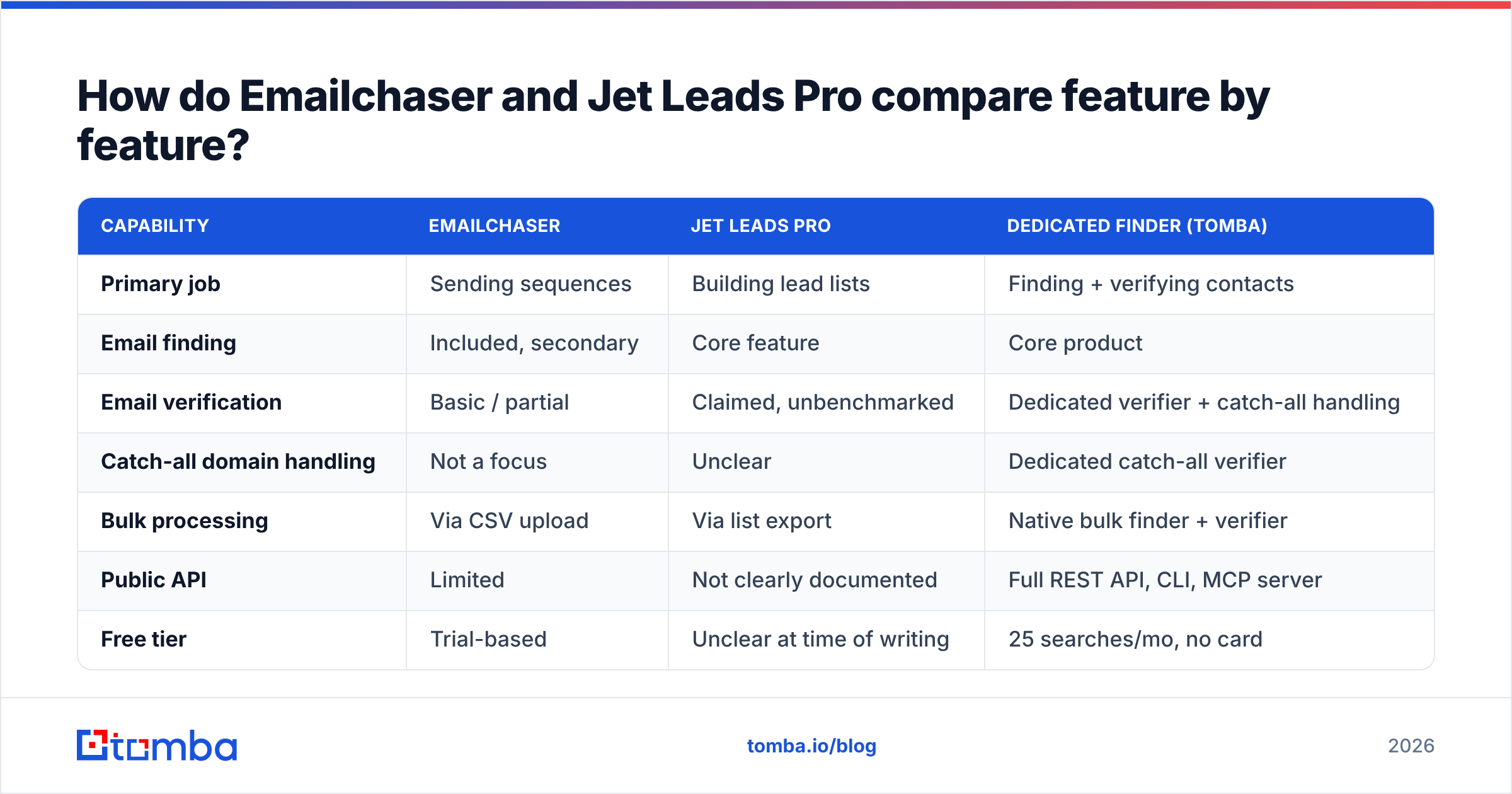
| Capability | Emailchaser | Jet Leads Pro | Dedicated finder (Tomba) |
|---|---|---|---|
| Primary job | Sending sequences | Building lead lists | Finding + verifying contacts |
| Email finding | Included, secondary | Core feature | Core product |
| Email verification | Basic / partial | Claimed, unbenchmarked | Dedicated verifier + catch-all handling |
| Catch-all domain handling | Not a focus | Unclear | Dedicated catch-all verifier |
| Bulk processing | Via CSV upload | Via list export | Native bulk finder + verifier |
| Public API | Limited | Not clearly documented | Full REST API, CLI, MCP server |
| Free tier | Trial-based | Unclear at time of writing | 25 searches/mo, no card |
| Entry paid price | Roughly $49/mo (check vendor page) | Not consistently published | $49/mo Starter |
| Native integrations | Sending-stack focused | Export-focused | HubSpot, Salesforce, Pipedrive, Sheets, Zapier |
| Best for | Small teams running simple sequences | Quick one-off list pulls | Teams whose bounce rate is the bottleneck |
Prices and features move. Verify both vendors' current pricing pages before you commit — this table reflects public information at time of writing, and Jet Leads Pro in particular does not publish stable, easily-cited tiers.
The row that matters most for most buyers is the third one. Verification is where cold email campaigns quietly die, and it's the feature both of these tools treat as an add-on rather than a discipline.
Which tool finds more valid email addresses?#
Nobody can answer that for you from a blog post — including this one. What you can do is run the same test both vendors' own engineers would run.

Here's the protocol, and it takes about an hour:
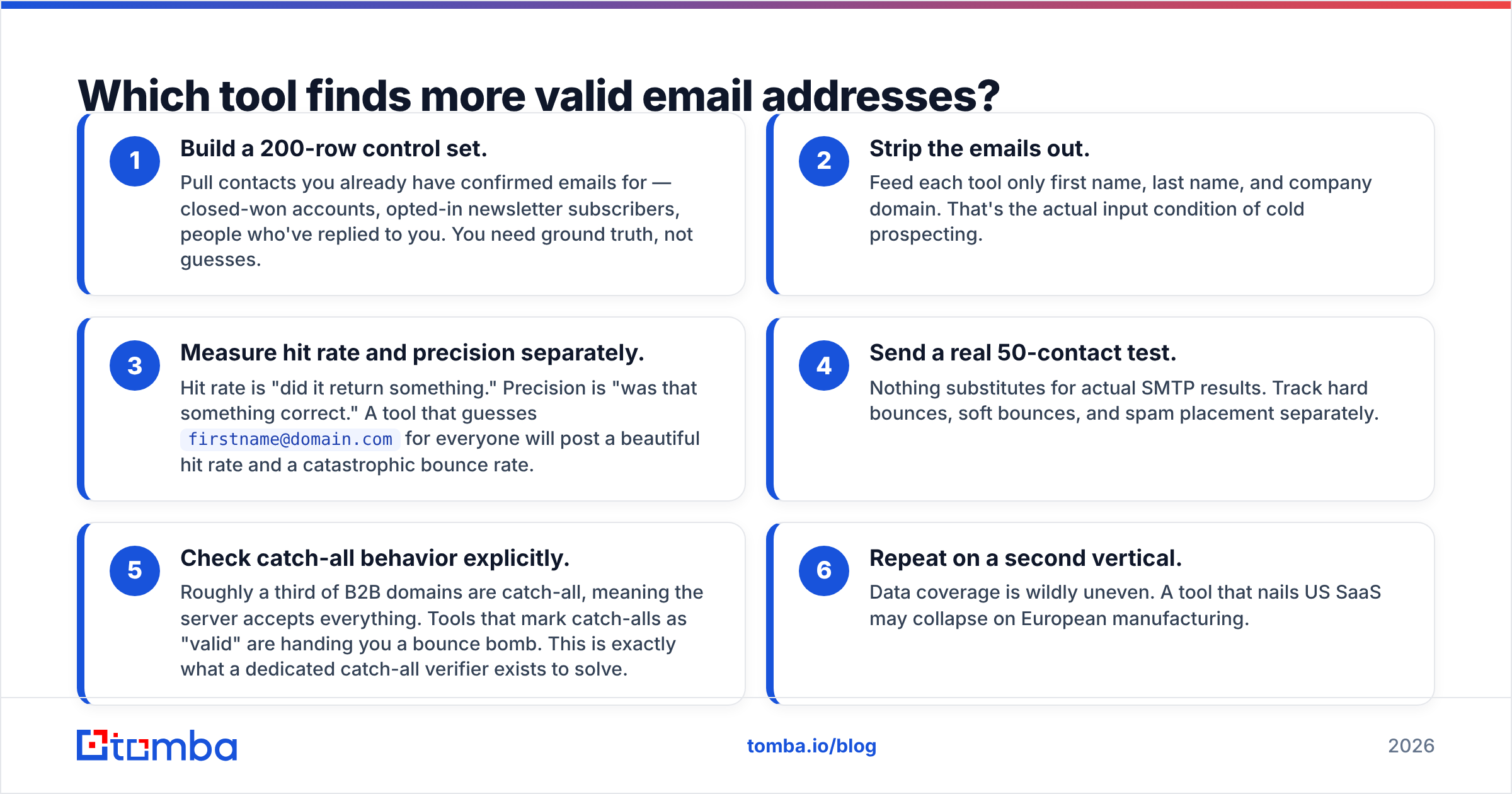
- Build a 200-row control set. Pull contacts you already have confirmed emails for — closed-won accounts, opted-in newsletter subscribers, people who've replied to you. You need ground truth, not guesses.
- Strip the emails out. Feed each tool only first name, last name, and company domain. That's the actual input condition of cold prospecting.
- Measure hit rate and precision separately. Hit rate is "did it return something." Precision is "was that something correct." A tool that guesses
firstname@domain.comfor everyone will post a beautiful hit rate and a catastrophic bounce rate. - Send a real 50-contact test. Nothing substitutes for actual SMTP results. Track hard bounces, soft bounces, and spam placement separately.
- Check catch-all behavior explicitly. Roughly a third of B2B domains are catch-all, meaning the server accepts everything. Tools that mark catch-alls as "valid" are handing you a bounce bomb. This is exactly what a dedicated catch-all verifier exists to solve.
- Repeat on a second vertical. Data coverage is wildly uneven. A tool that nails US SaaS may collapse on European manufacturing.
When teams actually run this, the pattern is consistent: platforms whose core business is sending return fewer verified addresses than platforms whose core business is data. That's not a scandal, it's specialization. Emailchaser's roadmap is about deliverability and sequence logic. A dedicated email finder spends its entire engineering budget on crawl coverage, pattern inference, and SMTP validation.

What does each tool actually cost?#
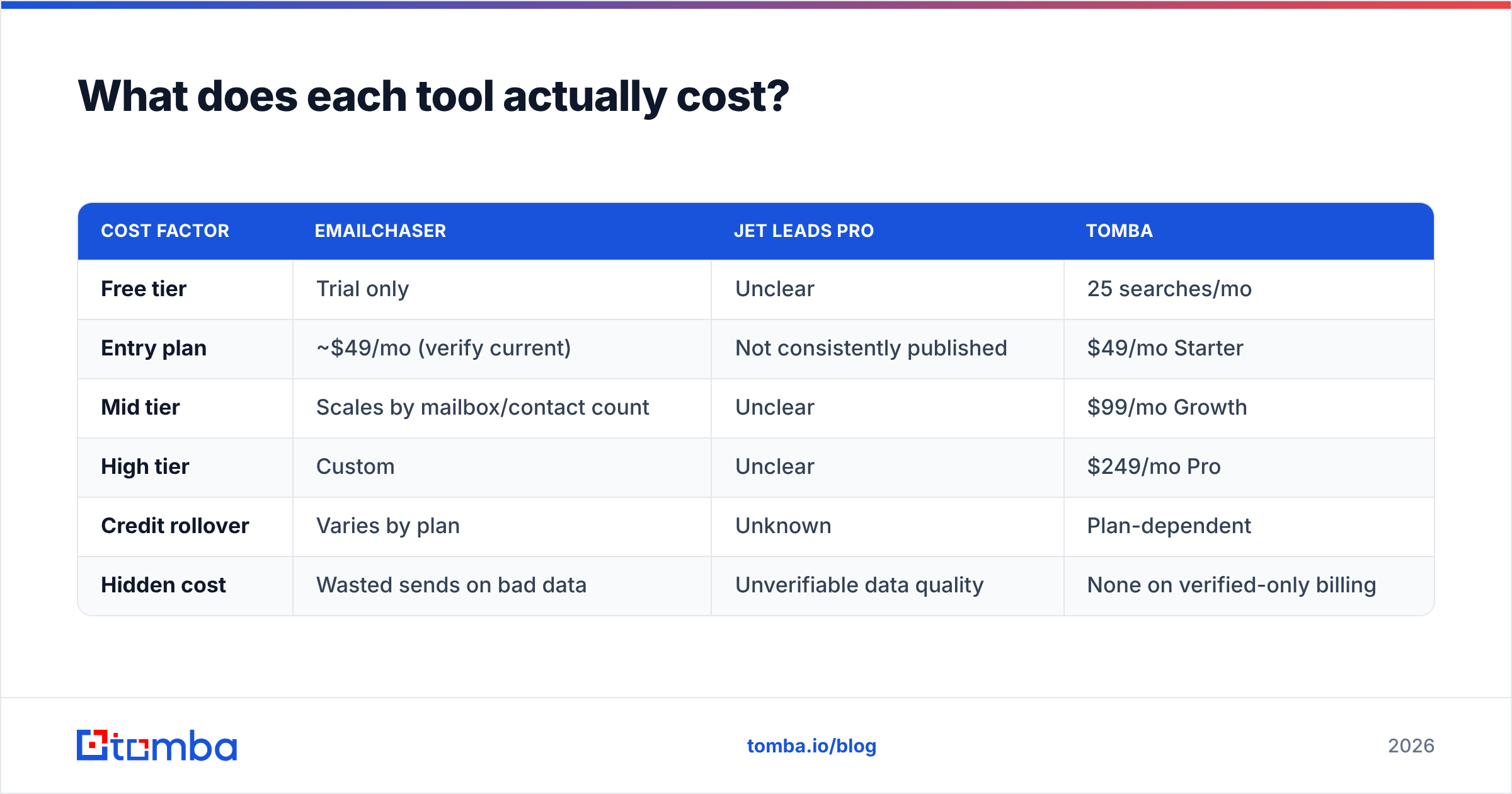
| Cost factor | Emailchaser | Jet Leads Pro | Tomba |
|---|---|---|---|
| Free tier | Trial only | Unclear | 25 searches/mo |
| Entry plan | ~$49/mo (verify current) | Not consistently published | $49/mo Starter |
| Mid tier | Scales by mailbox/contact count | Unclear | $99/mo Growth |
| High tier | Custom | Unclear | $249/mo Pro |
| Credit rollover | Varies by plan | Unknown | Plan-dependent |
| Hidden cost | Wasted sends on bad data | Unverifiable data quality | None on verified-only billing |
The hidden cost row is the one finance never sees. If you buy a $49/mo sending tool and feed it a list with a 12% bounce rate, you don't lose $49 — you lose domain reputation, which takes weeks to rebuild and costs you every campaign that follows. Google and Yahoo's bulk sender requirements, in force since 2024, put a hard spam-complaint ceiling on senders. Bad data is now a compliance problem, not just a hygiene problem.
Compare that against transparent Tomba pricing, where a free tier of 25 searches per month is enough to run the control-set test above before you spend anything.
Is Emailchaser better than Jet Leads Pro for cold outreach?#
For actually sending campaigns: yes, and it isn't close. Emailchaser is a purpose-built sequencer with reply handling, inbox rotation, and unsubscribe management. Jet Leads Pro is oriented toward producing a list you export somewhere else. Comparing them head-to-head on outreach is comparing a delivery van to a warehouse.
For sourcing contacts: the answer is "test it, and don't assume either wins." Emailchaser's finder is a convenience feature. Jet Leads Pro's finder is the product, but without published benchmarks or an independently documented API, you're buying on trust.
Where both tools leave money on the table is enrichment depth. Neither is built to answer "give me the CFO of every 50–200 person logistics company in the Benelux, with verified email and direct dial." That's a job for a B2B database plus data enrichment, and it's the workflow most outbound teams eventually land on.
Where does each tool fall short?#
Emailchaser's limits:
- Data is not the core competency. You'll hit coverage gaps on smaller domains and non-US regions.
- Verification is shallow. Basic syntax and MX checks are not the same as SMTP-level validation with catch-all logic.
- Fewer power features than the big senders. That's a deliberate design choice — a plus if you're a two-person team, a ceiling if you're running 40 mailboxes.
Jet Leads Pro's limits:
- Opacity. Thin public docs, limited third-party reviews, and unstable published pricing make procurement genuinely harder.
- No independently verifiable accuracy claim. Any vendor can print "98% accurate." Only some will let you audit it.
- Unclear compliance posture. With GDPR and CCPA enforcement tightening, "where did this data come from" is a question your legal team will ask. Look for a vendor that publishes its data sources rather than one that doesn't discuss them.
Neither list is disqualifying on its own. Both are reasons to run a paid pilot rather than an annual contract.
Should you use a dedicated email finder instead?#
If your bounce rate is above 3%, yes — and you should fix that before you optimize anything else in your stack.

The stack that consistently outperforms a single all-in-one looks like this:
- Source and verify with a dedicated finder — domain search for company-wide coverage, single lookups for named targets, and an email verifier pass on every record before export.
- Send with whatever sequencer fits your team — Emailchaser if you want simplicity, a heavier platform if you're running many mailboxes.
- Enrich and sync into your CRM so reps aren't working from stale CSVs.
- Automate the boring part with an email finder API or a bulk job, so list-building isn't a person's Tuesday.
The reason this beats bundling is boring but decisive: each layer gets replaced independently. When a better sequencer ships next year, you swap it without touching your data pipeline. When your data vendor's coverage slips in a region, you swap that without rebuilding every campaign.

How should you choose between them?#
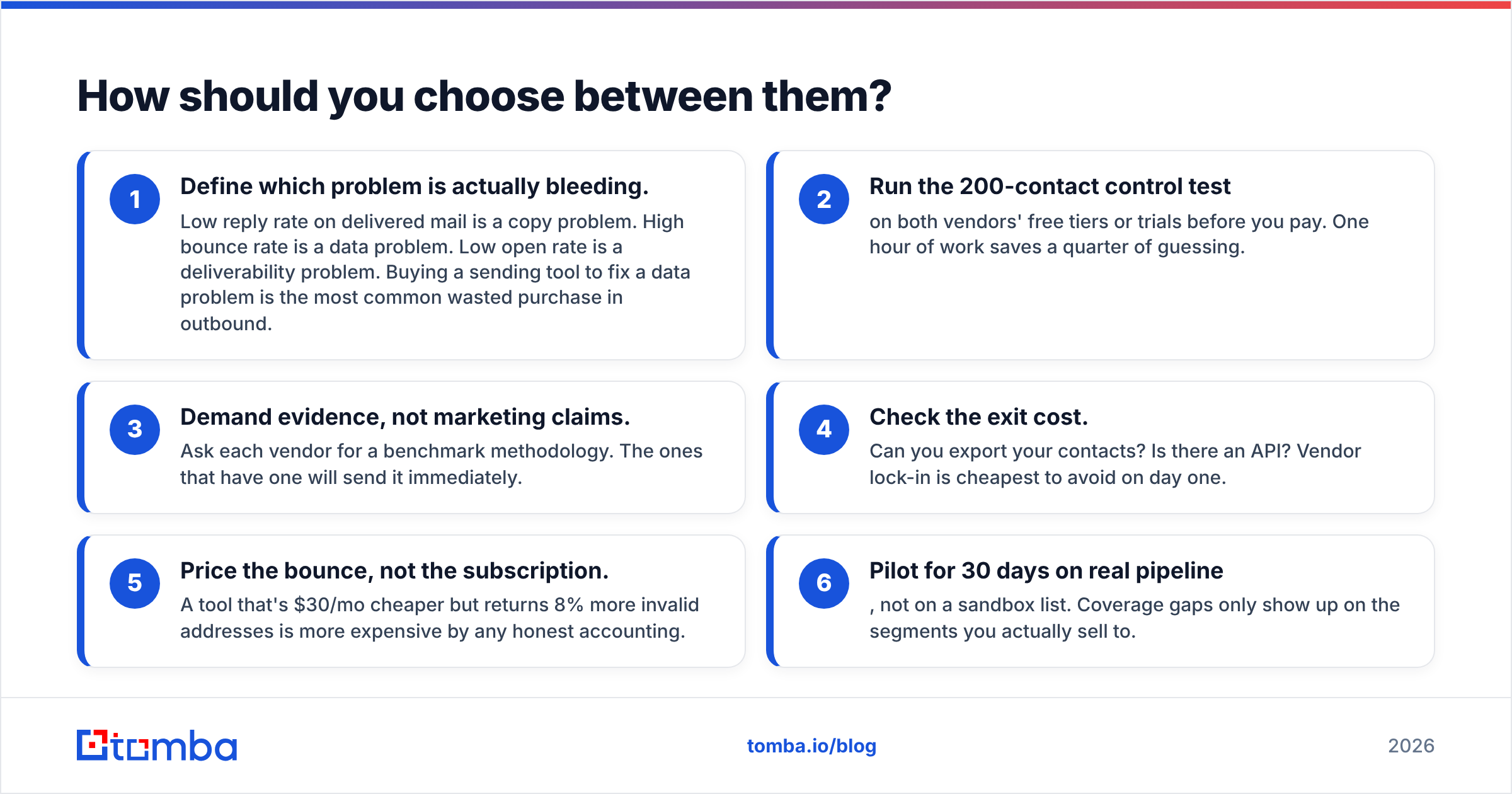
- Define which problem is actually bleeding. Low reply rate on delivered mail is a copy problem. High bounce rate is a data problem. Low open rate is a deliverability problem. Buying a sending tool to fix a data problem is the most common wasted purchase in outbound.
- Run the 200-contact control test on both vendors' free tiers or trials before you pay. One hour of work saves a quarter of guessing.
- Demand evidence, not marketing claims. Ask each vendor for a benchmark methodology. The ones that have one will send it immediately.
- Check the exit cost. Can you export your contacts? Is there an API? Vendor lock-in is cheapest to avoid on day one.
- Price the bounce, not the subscription. A tool that's $30/mo cheaper but returns 8% more invalid addresses is more expensive by any honest accounting.
- Pilot for 30 days on real pipeline, not on a sandbox list. Coverage gaps only show up on the segments you actually sell to.
What's the verdict on Emailchaser vs Jet Leads Pro?#
Pick Emailchaser if you're a small team that wants one simple place to run sequences and you already have a data source you trust. It does the sending job well and doesn't overwhelm you with configuration.
Pick Jet Leads Pro only after a hands-on trial that proves its data holds up on your specific ICP. The product may well perform — but the thin public evidence means the burden of proof sits with your own test, not with a review site.
Pick neither as your data layer if bounce rate is your bottleneck. Both tools treat verification as a feature. For teams sending real volume, verification needs to be the foundation.
Start with the free tier of the Tomba Email Finder — 25 searches a month, no card required — and run it side by side against whichever of these two you're evaluating. Feed all three the same 200 contacts, compare precision instead of hit rate, and let the bounce numbers pick your stack for you. If the results hold up, plans start at $49/mo, and the same data flows through the API, Chrome extension, Google Sheets, and your CRM without a second export.
Related guides#
Ready to find emails that actually work?
Join 150,000+ professionals who stopped guessing and started sending. Free credits on signup — no credit card required.
Get the Tomba newsletter
Practical outbound tactics and product updates — once every two weeks.
About the author