Emailchaser vs Kaspr (2026): Which One Wins for Cold Outreach?
Emailchaser sends the emails. Kaspr finds the contacts. They solve different halves of the same problem — and picking wrong costs you a wasted subscription. Here's the honest breakdown.
TL;DR
- They are not the same category. Emailchaser is a cold email sending platform with a built-in email finder. Kaspr is a contact data tool — a LinkedIn-first source of emails and mobile numbers, owned by Cognism.
- Pick Emailchaser if your bottleneck is running sequences at low cost across many inboxes and you want finding bundled in.
- Pick Kaspr if your bottleneck is getting mobile numbers and verified emails off LinkedIn profiles while you prospect, and you already have a sender.
- Neither is a great bulk data layer. Both charge per seat or per credit in ways that get expensive once you cross a few thousand contacts a month.
- The common third option: keep your sender, and feed it a dedicated finder/verifier API so data cost scales with volume instead of headcount.
What are Emailchaser and Kaspr, exactly?#
Start here, because half the "Emailchaser vs Kaspr" comparisons online treat them as interchangeable. They aren't.
Emailchaser is a cold email platform. You connect mailboxes, build sequences with follow-ups, and it handles sending, reply detection, and thread-level tracking. Its differentiator is price positioning and simplicity — it's aimed at solo founders, agencies, and small sales teams who found Instantly, Lemlist, or Outreach either too expensive or too heavy. It also ships an email finder so you can go from a name and domain to a sendable address without leaving the tool.
Kaspr is a prospecting data tool. Its centre of gravity is a Chrome extension that sits on LinkedIn: open a profile or a Sales Navigator list, click the widget, and Kaspr surfaces email addresses and — the real draw — mobile phone numbers. It was acquired by Cognism, which anchors it to a larger European B2B data operation. Kaspr does have basic outreach features (LinkedIn invite sequences, simple email steps), but nobody buys it as a sending engine.
So the honest framing is:
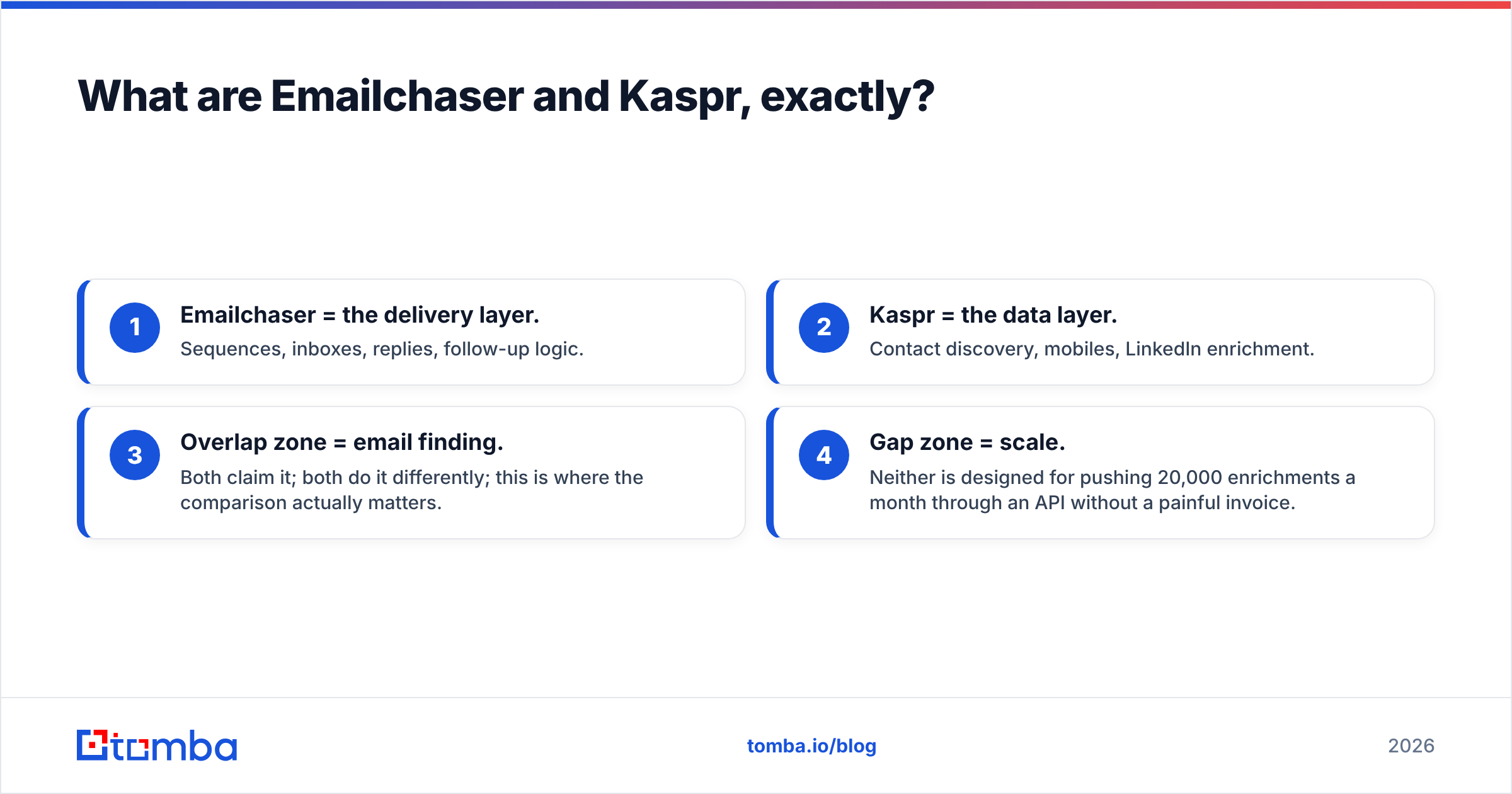
- Emailchaser = the delivery layer. Sequences, inboxes, replies, follow-up logic.
- Kaspr = the data layer. Contact discovery, mobiles, LinkedIn enrichment.
- Overlap zone = email finding. Both claim it; both do it differently; this is where the comparison actually matters.
- Gap zone = scale. Neither is designed for pushing 20,000 enrichments a month through an API without a painful invoice.

How do Emailchaser and Kaspr compare feature by feature?#
Here's the side-by-side, with a dedicated finder/verifier column so you can see where the third path sits.
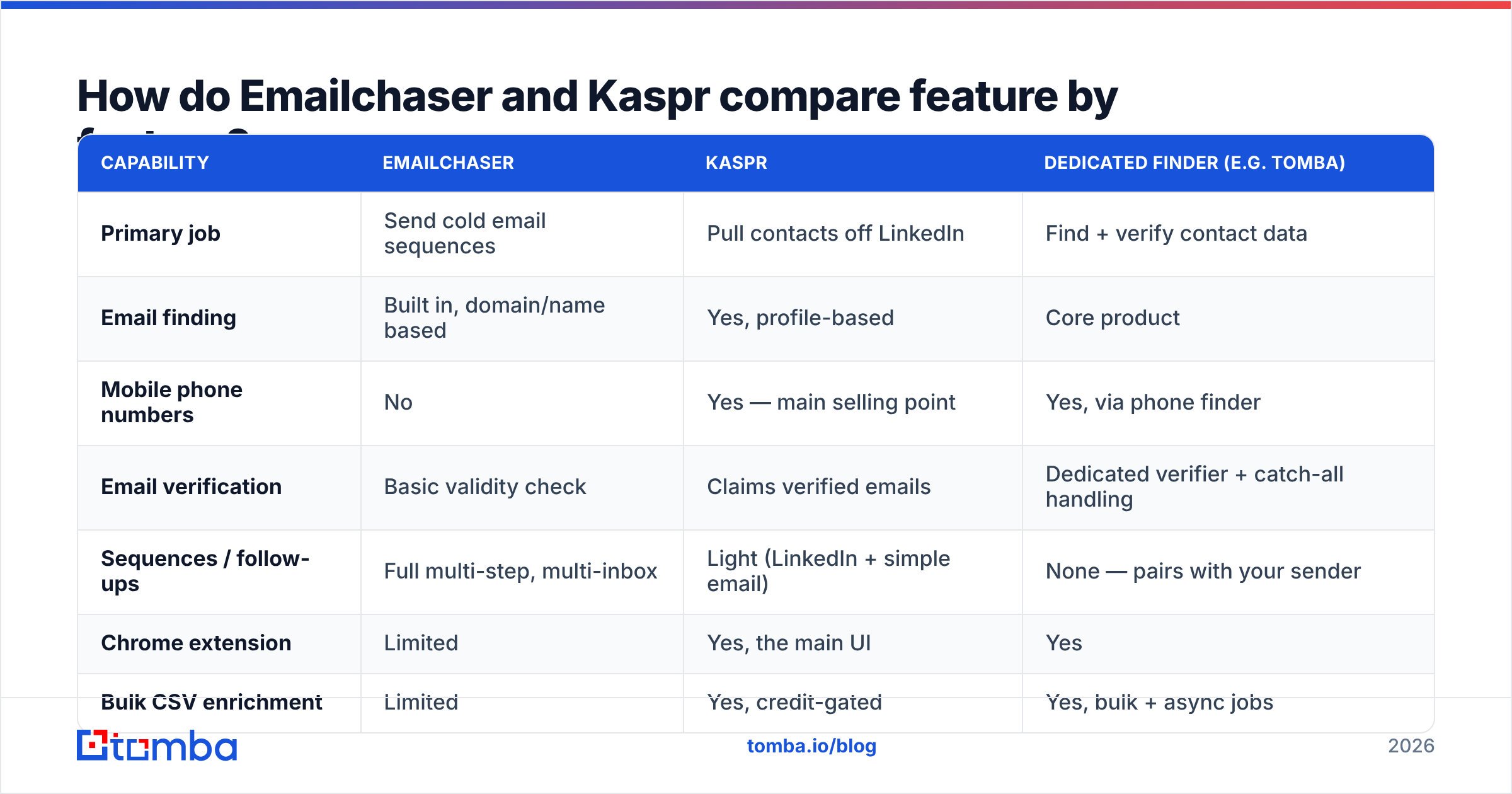
| Capability | Emailchaser | Kaspr | Dedicated finder (e.g. Tomba) |
|---|---|---|---|
| Primary job | Send cold email sequences | Pull contacts off LinkedIn | Find + verify contact data |
| Email finding | Built in, domain/name based | Yes, profile-based | Core product |
| Mobile phone numbers | No | Yes — main selling point | Yes, via phone finder |
| Email verification | Basic validity check | Claims verified emails | Dedicated verifier + catch-all handling |
| Sequences / follow-ups | Full multi-step, multi-inbox | Light (LinkedIn + simple email) | None — pairs with your sender |
| Chrome extension | Limited | Yes, the main UI | Yes |
| Bulk CSV enrichment | Limited | Yes, credit-gated | Yes, bulk + async jobs |
| Public API | Minimal | Available on higher tiers | Full REST API, CLI, MCP |
| Pricing model | Flat, per workspace | Per user, per credit type | Flat plan + credit pool |
| Best fit | Agencies, solo founders sending at volume | SDRs working LinkedIn daily | Data ops, RevOps, developers |

Two things stand out.
First, the overlap is thinner than the marketing suggests. If you buy Emailchaser you still need a data source for anything beyond "I have a list of names and companies." If you buy Kaspr you still need somewhere to actually run a five-touch sequence across four warmed inboxes.
Second, the pricing models are structurally different. Emailchaser charges for the workspace. Kaspr charges per user and meters phone credits, email credits, and export credits separately. That distinction decides more budgets than any feature checkbox.
Which one gets you better contact data?#
Different data, different failure modes.
Kaspr's strength is the mobile number. For SDR teams that call, that's the whole pitch — a direct dial pulled from a LinkedIn profile in two clicks is worth real money. Its email coverage is decent on European and mid-market accounts, weaker on very small companies and on regions outside its core dataset. Kaspr's coverage is also profile-bound: no LinkedIn profile, no result. If your ICP includes trades, local services, or founder-led businesses where nobody maintains a LinkedIn presence, coverage drops off a cliff.
Emailchaser's finder is pattern-driven. It works from a domain and a name, infers the company's format, and checks whether the address resolves. That's fine for the common case and cheap because it's bundled — but it inherits the standard limitations of pattern inference: catch-all domains return "unknown," ambiguous names produce false positives, and role-based addresses slip through unless you filter them yourself.

The accuracy question that actually matters isn't "who has more records." It's what happens on the addresses neither tool is sure about. Roughly 15–25% of B2B domains are catch-all, meaning the mail server accepts everything and tells you nothing. A finder that returns those as "valid" will quietly torch your email deliverability. A finder that returns them as "unknown" is being honest but leaves you stuck.
This is where a dedicated layer earns its keep: a proper email verifier separates syntax, MX, SMTP, disposable, role-based, and catch-all as distinct signals, and a catch-all verifier makes a probabilistic call on the domains that would otherwise be dead ends. Neither Emailchaser nor Kaspr breaks it out at that granularity.
Practical rule: whatever tool you find with, verify with something that isn't the same tool. Self-graded homework has a predictable bias.
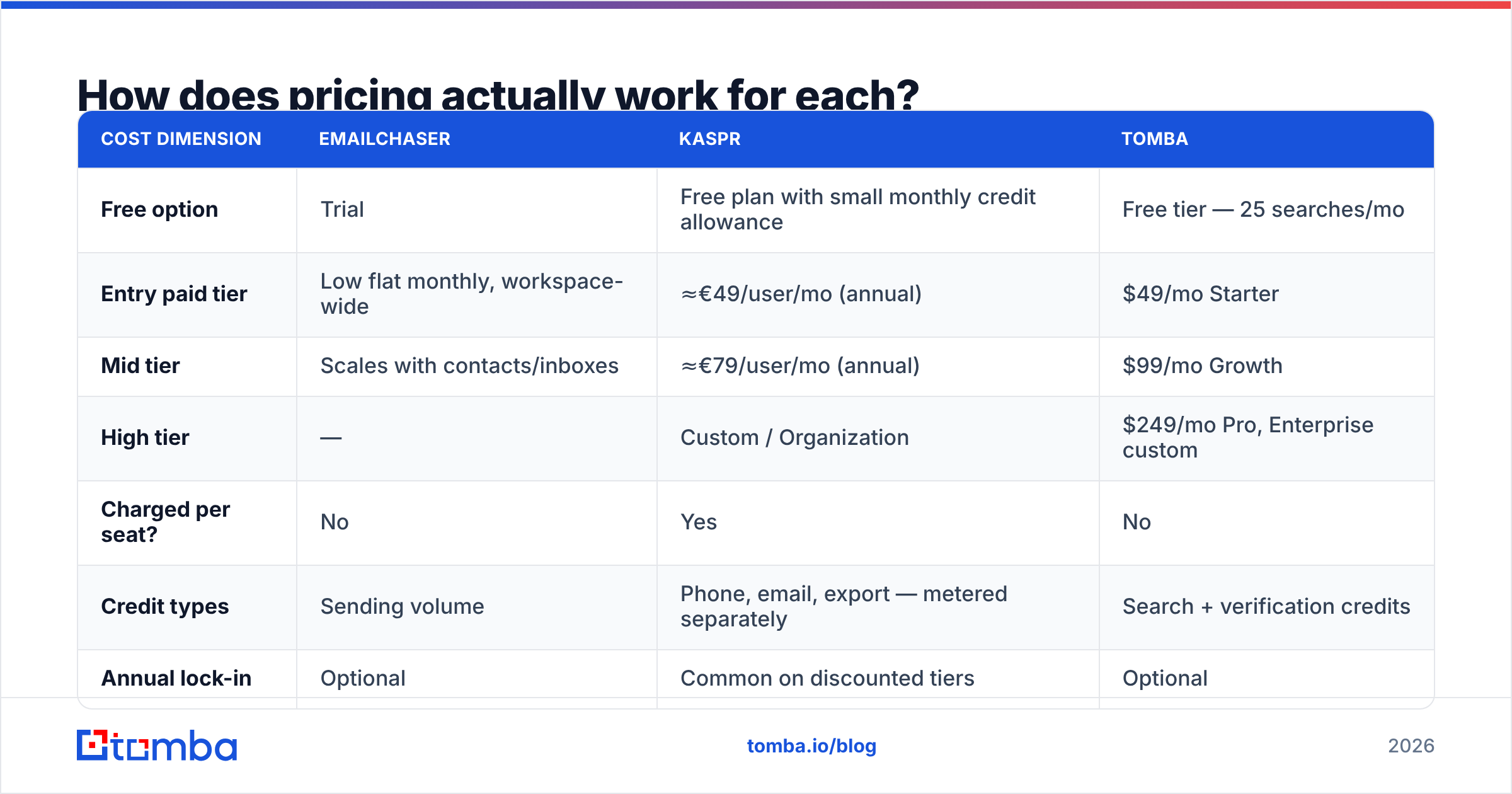
How does pricing actually work for each?#
Published pricing moves — treat these as shape, not gospel, and confirm on the vendor pages before you buy.
| Cost dimension | Emailchaser | Kaspr | Tomba |
|---|---|---|---|
| Free option | Trial | Free plan with small monthly credit allowance | Free tier — 25 searches/mo |
| Entry paid tier | Low flat monthly, workspace-wide | ≈€49/user/mo (annual) | $49/mo Starter |
| Mid tier | Scales with contacts/inboxes | ≈€79/user/mo (annual) | $99/mo Growth |
| High tier | — | Custom / Organization | $249/mo Pro, Enterprise custom |
| Charged per seat? | No | Yes | No |
| Credit types | Sending volume | Phone, email, export — metered separately | Search + verification credits |
| Annual lock-in | Optional | Common on discounted tiers | Optional |
Read that table for the structure, not the numbers.
Emailchaser is cheap per seat because there are no seats. A three-person agency pays roughly what a one-person agency pays. For sending, that's excellent economics.
Kaspr's cost is a function of headcount. Five SDRs on a Business plan is five subscriptions, and each one burns phone credits at a different rate. Teams routinely underestimate this: the sticker price looks like €79, the invoice looks like €395/month plus overage. That's not a knock on the product — direct dials are genuinely expensive to source — but you should model it honestly.
A flat data plan sits between them. Tomba pricing is workspace-based like Emailchaser but sells data like Kaspr: $49/mo Starter, $99/mo Growth, $249/mo Pro, with a free tier at 25 searches a month for testing. The seat count doesn't change the bill.
Is Emailchaser better than Kaspr for cold email?#
For sending cold email, yes — and it isn't close.
Kaspr's outreach features exist so you can fire a LinkedIn connection request and a follow-up without switching tabs. That's a nice convenience for an SDR working 40 profiles a day. It is not a sending infrastructure. There's no serious inbox rotation, no deliverability tuning, no reply-sentiment routing, no per-mailbox throttling that a modern cold email program needs.
Emailchaser is built for that job. Multiple mailboxes, sequence branching, reply detection that stops the sequence when a human answers, and per-thread tracking. If your motion is "1,000 contacts a month across four warmed inboxes," Emailchaser handles it and Kaspr doesn't.
Flip the question and the answer flips too. For getting a mobile number for a VP of Engineering in Berlin, Kaspr wins and Emailchaser doesn't compete — it has no phone product at all. If cold calling is part of your motion, you need a phone source, whether that's Kaspr or a phone finder sitting alongside your existing stack.
Where does each tool fall short?#
Both are honest products with real constraints. The constraints are what you should be shopping on.
Emailchaser's limits:
- Data depth. The finder is a feature, not a product. No firmographic filters, no "give me every marketing manager at companies with 50–200 employees" — you bring the list.
- No phone data. Email-only motion or nothing.
- Thin API. Hard to make it a programmatic node in a bigger RevOps pipeline.
- Smaller ecosystem. Fewer native integrations than the incumbents, so more Zapier glue.
Kaspr's limits:
- LinkedIn dependency. No profile means no data. Coverage for non-LinkedIn-native industries is limited.
- Per-seat cost curve. Scales with team size, not with usage, which punishes small teams doing high volume.
- Credit fragmentation. Phone, email, and export credits deplete on different clocks. Budget forecasting is genuinely annoying.
- Not a sender. You will buy a second tool.
There's also a compliance dimension worth flagging: any LinkedIn-extension-based workflow lives in a grey zone relative to LinkedIn's terms, and GDPR obligations around sourcing personal mobile numbers in the EU are real. Kaspr publishes its compliance posture, and it's better than most, but your legal team should read it rather than take a blog's word for it. Buyer reviews on G2 are a useful sanity check on both the data quality claims and the support experience.
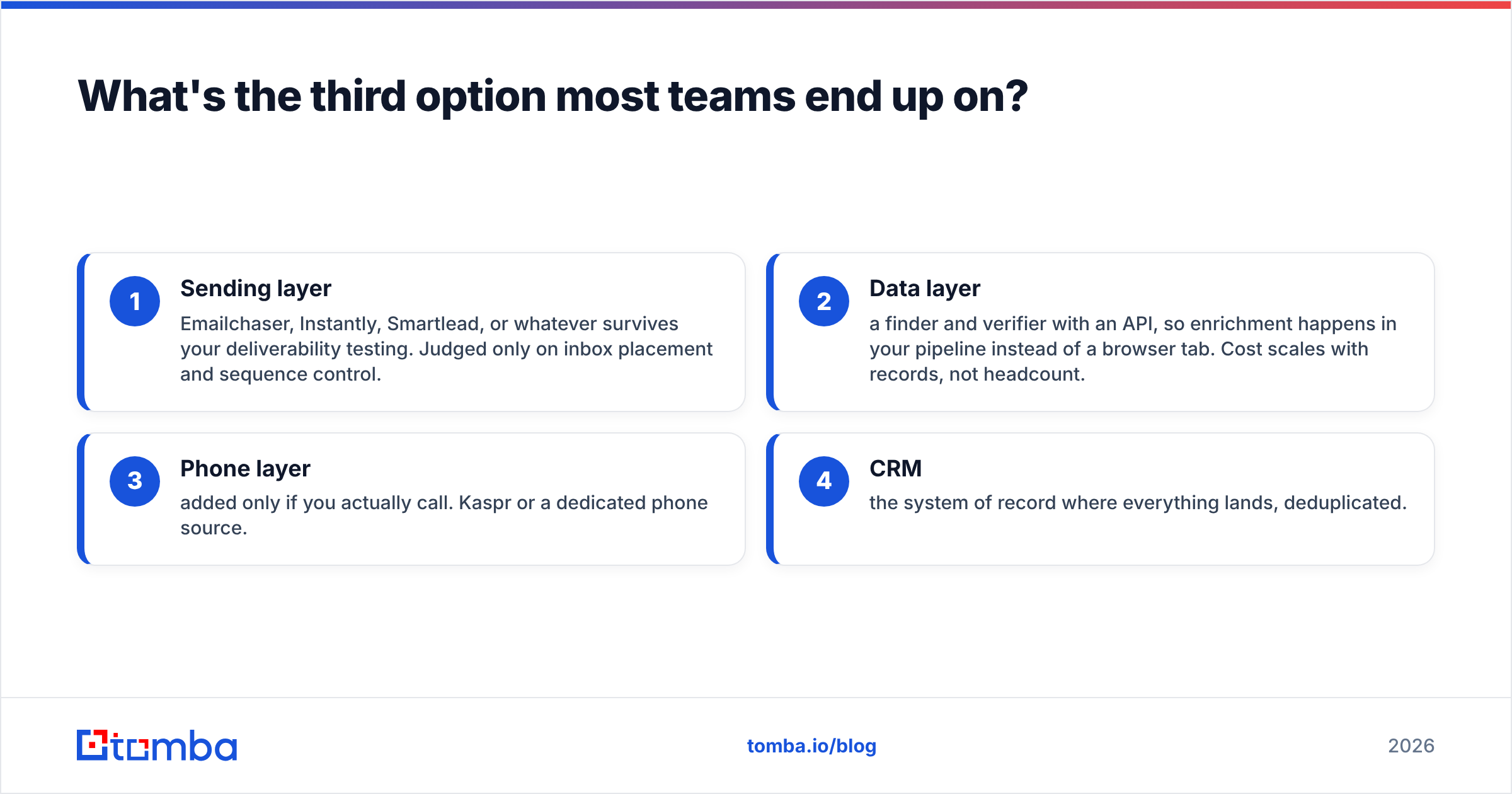
What's the third option most teams end up on?#
Split the stack. Buy sending from a sender, buy data from a data provider.
This is the configuration most teams land on after a year of consolidating and then un-consolidating:
- Sending layer — Emailchaser, Instantly, Smartlead, or whatever survives your deliverability testing. Judged only on inbox placement and sequence control.
- Data layer — a finder and verifier with an API, so enrichment happens in your pipeline instead of a browser tab. Cost scales with records, not headcount.
- Phone layer — added only if you actually call. Kaspr or a dedicated phone source.
- CRM — the system of record where everything lands, deduplicated.
The reason this beats an all-in-one is boring but decisive: you can swap any layer without migrating the others. When your sender's deliverability degrades — and it will, eventually — you change senders in a week instead of rebuilding your entire prospecting motion.
For the data layer specifically, look for: a real email finder with domain-level search, a separate verification step you can call independently, bulk email finder jobs for list work, and a LinkedIn finder if profile-to-email is part of your workflow. Tomba covers those under one flat plan with a documented Tomba API, which is the piece Emailchaser lacks and Kaspr gates behind higher tiers.
So which should you actually buy in 2026?#
Short version:
- Solo founder or small agency, email-only, tight budget: Emailchaser for sending, plus a cheap finder/verifier plan for data. Skip Kaspr — you're paying for phone data you won't dial.
- SDR team that cold calls: Kaspr for mobiles, a real sending platform for email. Emailchaser can be that sender if your needs are simple.
- RevOps or growth team enriching lists at volume: Neither, as your primary data layer. Use an API-first finder and keep your existing sender.
- Testing before committing: Start on free tiers. Run the same 100 contacts through both, then verify the results with a third tool. The disagreement rate tells you more than any review will.
The mistake to avoid is buying either one expecting it to cover the whole funnel. Emailchaser will not build your list. Kaspr will not run your sequences. Priced correctly, both are reasonable purchases for the half of the job they're actually built for.
If your gap is the data half — accurate addresses, verified before they hit your sequence, at a price that doesn't move when you hire — start with the Tomba Email Finder. The free tier gives you 25 searches a month to test coverage on your own ICP before you spend anything, and paid plans start at $49/mo flat with no per-seat charge. Find them, verify them, then let Emailchaser or whatever sender you prefer do the part it's good at.
Related guides#
Ready to find emails that actually work?
Join 150,000+ professionals who stopped guessing and started sending. Free credits on signup — no credit card required.
Get the Tomba newsletter
Practical outbound tactics and product updates — once every two weeks.
About the author