Emailchaser vs LeadRocks: Which B2B Tool Wins in 2026?
Emailchaser sends cold email. LeadRocks sells contact data. They get compared constantly, but they solve different halves of the same problem — here's what each actually does well, what it costs, and which one your pipeline needs first.
TL;DR
- Emailchaser and LeadRocks are not really competitors. Emailchaser is a cold email sending tool built around Gmail and Google Workspace. LeadRocks is a B2B contact database you search and export.
- If you already have a list and need sequences, tracking, and inbox rotation, Emailchaser is the relevant tool. If you have nobody to email yet, LeadRocks (or a live email finder) is the relevant tool.
- LeadRocks' pull is its price-per-contact on lifetime and low-tier plans. Its weakness is the same as every static database: records age, and you pay credits for rows you then have to re-verify.
- Emailchaser's pull is simplicity and per-account pricing that doesn't punish you for sending volume. Its weakness is that it does nothing to find or clean the data you feed it.
- The stack most teams actually end up running: a live finder + verifier for data, a dedicated sender for delivery. Buying one and expecting it to cover the other is where outbound budgets go to die.
What are Emailchaser and LeadRocks, exactly?#
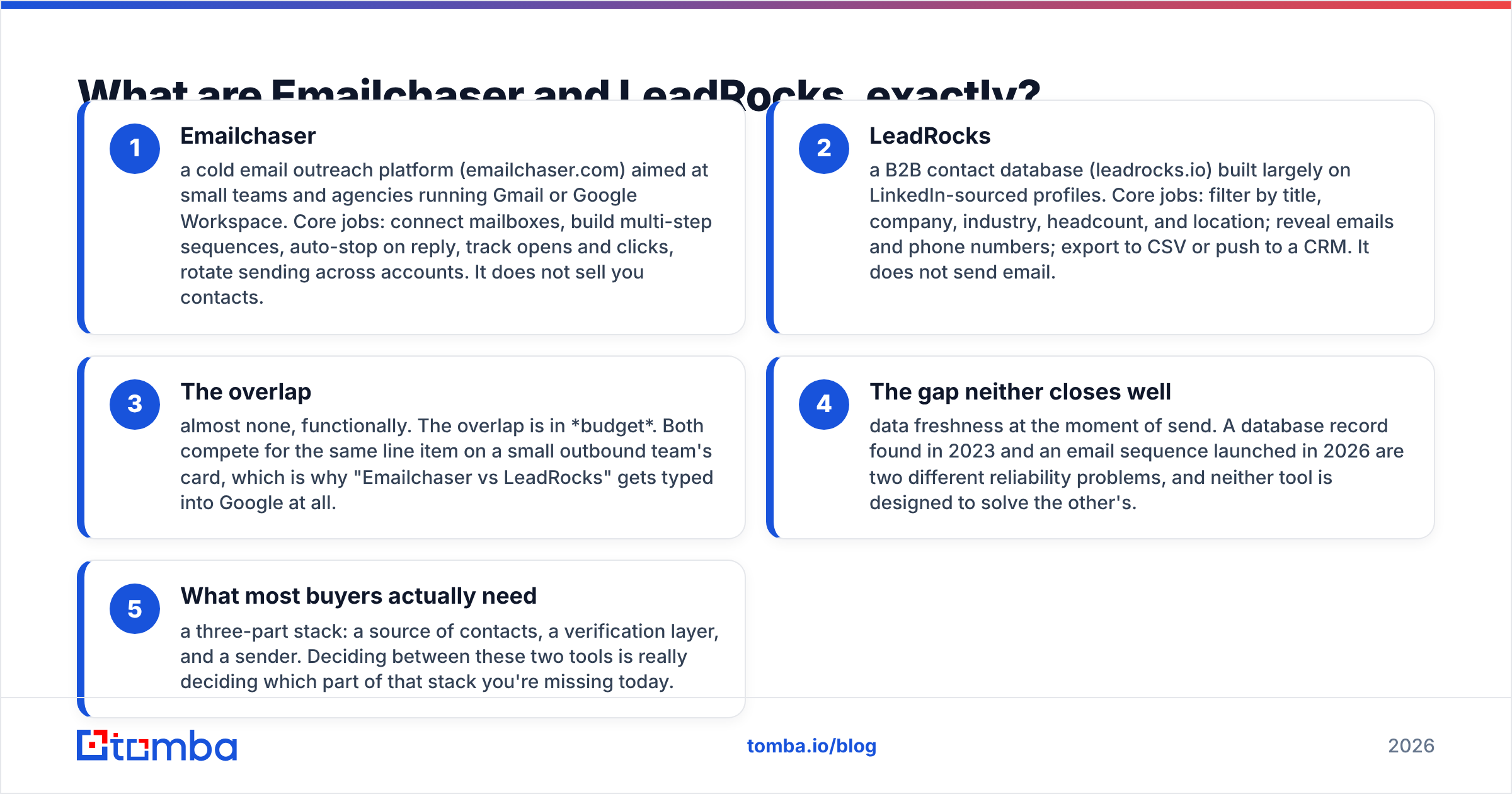
They sit on opposite ends of the outbound workflow, which is why head-to-head reviews of them tend to be confusing. Here's the split in plain terms:
- Emailchaser — a cold email outreach platform (emailchaser.com) aimed at small teams and agencies running Gmail or Google Workspace. Core jobs: connect mailboxes, build multi-step sequences, auto-stop on reply, track opens and clicks, rotate sending across accounts. It does not sell you contacts.
- LeadRocks — a B2B contact database (leadrocks.io) built largely on LinkedIn-sourced profiles. Core jobs: filter by title, company, industry, headcount, and location; reveal emails and phone numbers; export to CSV or push to a CRM. It does not send email.
- The overlap — almost none, functionally. The overlap is in budget. Both compete for the same line item on a small outbound team's card, which is why "Emailchaser vs LeadRocks" gets typed into Google at all.
- The gap neither closes well — data freshness at the moment of send. A database record found in 2023 and an email sequence launched in 2026 are two different reliability problems, and neither tool is designed to solve the other's.
- What most buyers actually need — a three-part stack: a source of contacts, a verification layer, and a sender. Deciding between these two tools is really deciding which part of that stack you're missing today.
If you're evaluating either one, start by answering a single question: do I have a list I trust? If no, a database or an email finder is your bottleneck. If yes, a sender is.

How do Emailchaser and LeadRocks compare head-to-head?#
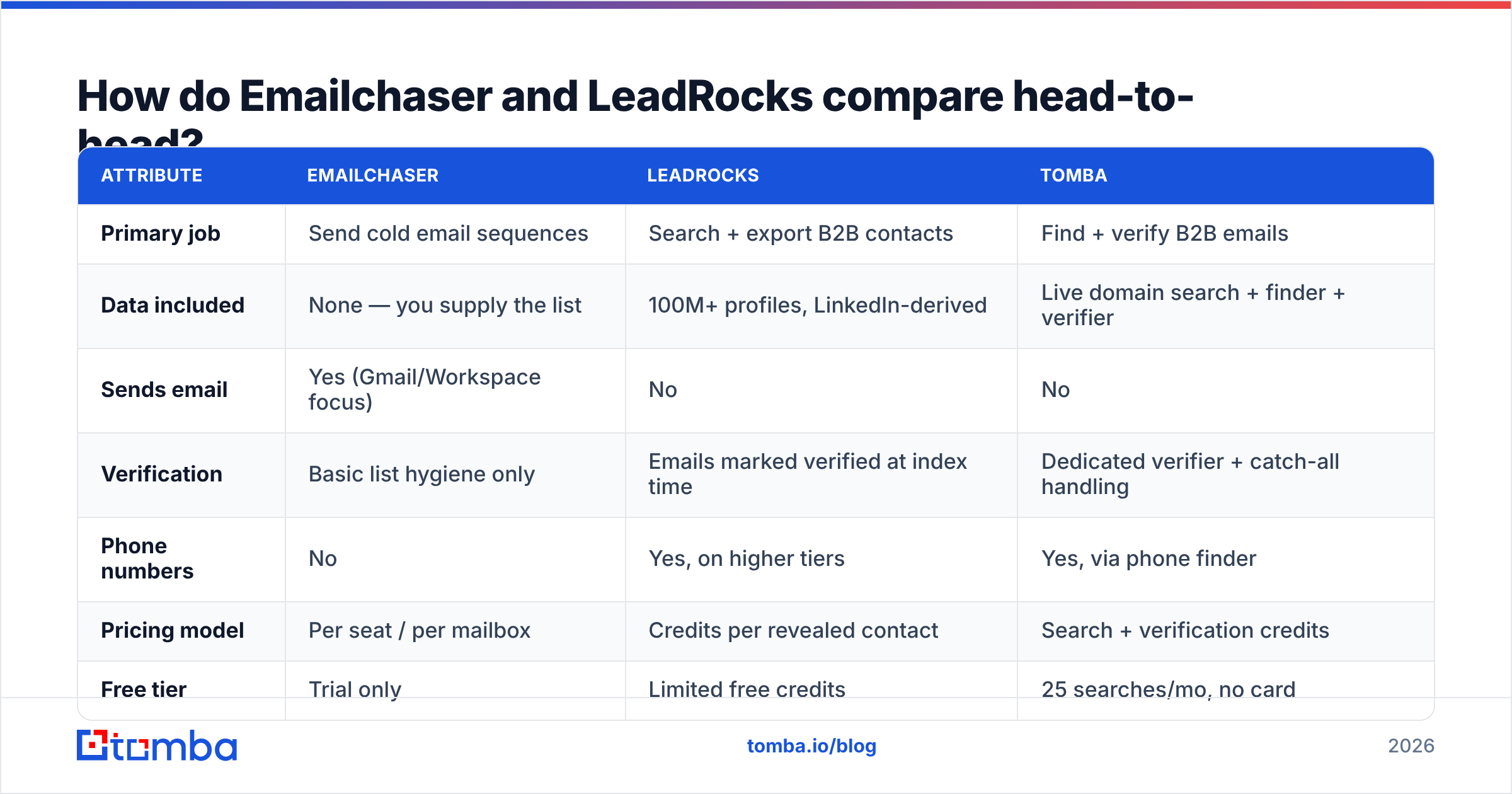
Here's the side-by-side across the attributes that actually change a buying decision. Pricing moves — treat these as directional and confirm on each vendor's page before you commit.
| Attribute | Emailchaser | LeadRocks | Tomba |
|---|---|---|---|
| Primary job | Send cold email sequences | Search + export B2B contacts | Find + verify B2B emails |
| Data included | None — you supply the list | 100M+ profiles, LinkedIn-derived | Live domain search + finder + verifier |
| Sends email | Yes (Gmail/Workspace focus) | No | No |
| Verification | Basic list hygiene only | Emails marked verified at index time | Dedicated verifier + catch-all handling |
| Phone numbers | No | Yes, on higher tiers | Yes, via phone finder |
| Pricing model | Per seat / per mailbox | Credits per revealed contact | Search + verification credits |
| Free tier | Trial only | Limited free credits | 25 searches/mo, no card |
| API access | Limited | Yes, on paid tiers | Full REST API, CLI, MCP |
| Best fit | You have a list, need delivery | You need bulk contacts cheaply | You need accurate emails on demand |
The pattern this table exposes: the "vs" framing collapses the moment you add a third column. Emailchaser and LeadRocks each cover roughly one third of an outbound stack. A finder-plus-verifier covers the middle third that both leave exposed — turning a name and a company into an address that will actually accept mail today.
What does each one cost in 2026?#
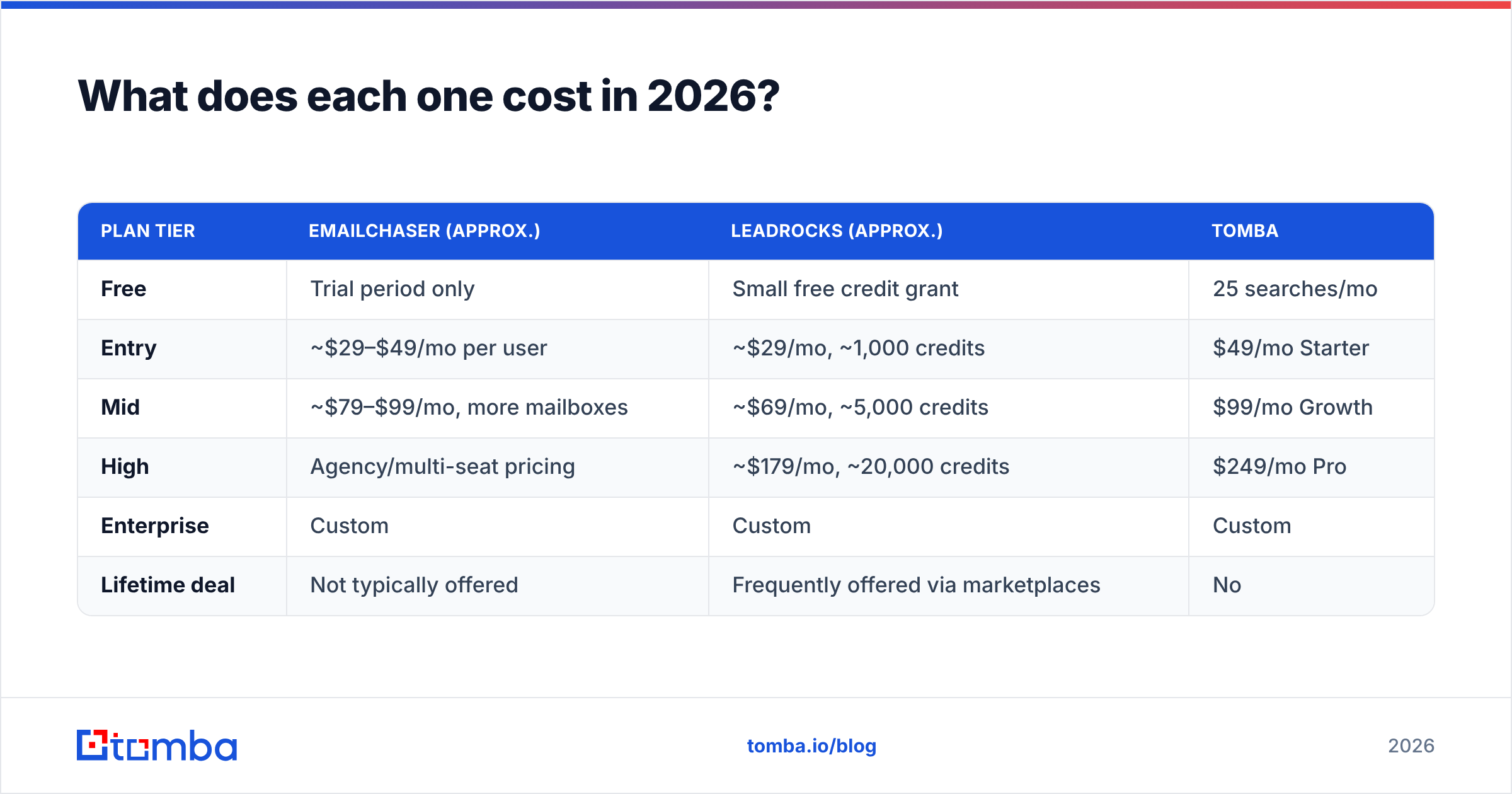
Cost comparison only makes sense per unit of work, not per month. A $29 sender and a $29 database do very different amounts for you.
| Plan tier | Emailchaser (approx.) | LeadRocks (approx.) | Tomba |
|---|---|---|---|
| Free | Trial period only | Small free credit grant | 25 searches/mo |
| Entry | ~$29–$49/mo per user | ~$29/mo, ~1,000 credits | $49/mo Starter |
| Mid | ~$79–$99/mo, more mailboxes | ~$69/mo, ~5,000 credits | $99/mo Growth |
| High | Agency/multi-seat pricing | ~$179/mo, ~20,000 credits | $249/mo Pro |
| Enterprise | Custom | Custom | Custom |
| Lifetime deal | Not typically offered | Frequently offered via marketplaces | No |
Two things worth flagging.
First, LeadRocks became well known through lifetime deals. A lifetime deal on a database is structurally different from a lifetime deal on software. Software keeps shipping features; a database record keeps decaying. A lifetime credit balance bought in one year is spent against records indexed in another. That's not a knock on LeadRocks specifically — it's true of every static contact dump, and it's the single most important thing to understand before you compare its cost-per-contact to anything else.
Second, Emailchaser's per-seat model is generous once you're sending at volume, because you're not paying per contact contacted. But that generosity is exactly why list quality becomes your dominant risk: nothing in the pricing model discourages you from blasting a stale list into a wall of bounces.
Check current Tomba pricing alongside both if you're modeling total cost — the math usually favors paying a little more per verified contact and a lot less in burnt domains.
Which one gives you better contact data?#
LeadRocks wins this comparison by default, because Emailchaser doesn't compete in it. The more useful question is: how good is that data, and compared to what?
Databases like LeadRocks are built by indexing profiles at scale, then attaching emails and phone numbers to them. The strengths are real:
- Breadth. You can filter 100M+ profiles by title, seniority, industry, headcount, and geography and get thousands of rows in one export.
- Phone coverage. Direct dials are genuinely hard to source, and a database is usually your cheapest route to them.
- Speed. Building a 5,000-row target list from filters takes minutes.
The weaknesses are equally real, and they're structural rather than a vendor failing:
- Decay. B2B contact data degrades roughly 25–30% per year through job changes, rebrands, and domain migrations. A record indexed 18 months ago is a coin flip.
- Verification timing. "Verified" in a database means verified when we indexed it, not verified when you exported it.
- Credit waste. You spend a credit revealing a contact, then discover it bounces. The credit is gone either way.
This is why serious senders treat any database export as raw input, not as a list. The step everyone skips — and then pays for in deliverability — is running the export through an email verifier immediately before the send, not immediately after the export. Catch-all domains deserve their own pass too; a plain SMTP check returns "accept-all" and tells you nothing, which is what a dedicated catch-all verifier exists to resolve.
The alternative model is finding addresses live. Instead of pulling a stored row, you query a domain and a name and get a result computed and validated at request time. That's what domain search does — you hand it a company, you get the current email pattern and the people on it. Slower per row than a bulk CSV export, dramatically higher hit rate at send time.
Which one is better for actually sending cold email?#
Emailchaser, uncontested — LeadRocks doesn't send.
Within the sender category, Emailchaser's positioning is "simple and Gmail-native." That's a deliberate trade. Compared to heavier platforms, you get:
- Fast setup on Google Workspace with minimal DNS wrangling
- Multi-step sequences with reply detection and auto-stop
- Sending rotation across multiple connected mailboxes
- Open and click tracking, with the usual caveat that open tracking has become noisy since privacy proxies started pre-fetching images
What you don't get is a deep automation surface. If you need conditional branching across channels, complex CRM writeback rules, or a full multichannel cadence with LinkedIn steps, you'll outgrow it. Compare feature depth on G2 before assuming any sender covers your workflow — the category has 100+ entrants and the differences are mostly in automation depth and inbox management, not in the ability to send.
One thing no sender can do for you: fix a bad list. Bounce rate is the single largest controllable input to email deliverability, and it's determined entirely before the sequence starts. Mailbox providers read a spiking bounce rate as a signal you bought a list — because usually you did. Keeping hard bounces under 2% is the price of entry, and there is no setting inside Emailchaser (or any sender) that gets you there. That work happens upstream.

Where do both tools leave you exposed?#
Four gaps show up repeatedly in teams running this pairing:
- No re-verification loop. You export once, send for six months, and never re-check. Records rot mid-campaign. Fix: re-verify any list older than 60 days before reuse, ideally in bulk. A bulk verify pass on 10,000 rows costs far less than the domain reputation you lose sending into 1,200 dead mailboxes.
- No enrichment beyond the export. A database row gives you a name, title, and email. It doesn't tell you the company raised a round last month or switched email providers. Fix: layer data enrichment onto the records you actually plan to work.
- No programmatic access at the point of need. Manual export → clean → import is fine at 500 contacts and painful at 50,000. Fix: pull contacts where the workflow lives. The Tomba API handles find-and-verify in one call, so your sequencing tool never receives an unvalidated address.
- No coverage for people who aren't in the index. Every database has holes — small companies, non-English markets, recently created roles. Fix: a live finder that computes patterns per domain instead of looking up a stored row. That's the difference between "not in our database" and "here's the address, 97% confidence."
None of these are reasons to avoid either tool. They're the reasons the two-tool stack is almost never enough on its own.
Which should you choose for your situation?#
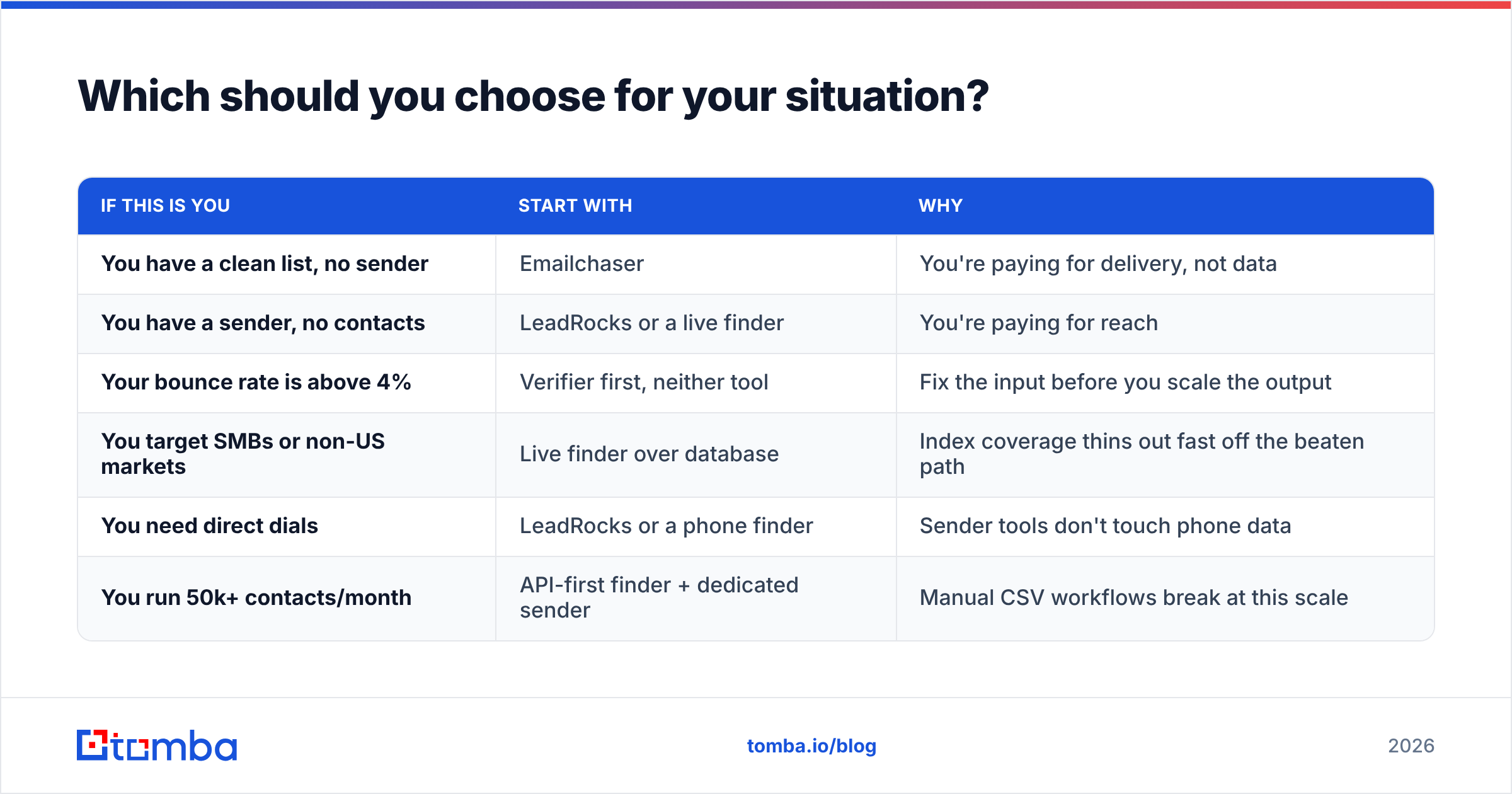
| If this is you | Start with | Why |
|---|---|---|
| You have a clean list, no sender | Emailchaser | You're paying for delivery, not data |
| You have a sender, no contacts | LeadRocks or a live finder | You're paying for reach |
| Your bounce rate is above 4% | Verifier first, neither tool | Fix the input before you scale the output |
| You target SMBs or non-US markets | Live finder over database | Index coverage thins out fast off the beaten path |
| You need direct dials | LeadRocks or a phone finder | Sender tools don't touch phone data |
| You run 50k+ contacts/month | API-first finder + dedicated sender | Manual CSV workflows break at this scale |
For most teams reading this, the honest answer is: buy the sender you like, and stop treating the contact database as a one-time purchase. Data is a subscription whether you pay for it that way or not — you either pay in credits or in reputation.
If you want the phone side covered too, a phone finder fills the gap Emailchaser structurally can't, and does it without committing you to a full database subscription you'll only use quarterly.
How do you build a stack that beats either tool alone?#
Five steps, in order:
- Define the target account list before you touch a tool. Firmographics first, contacts second. Buying credits without a defined ICP is how a 20,000-credit balance turns into a 3% reply rate.
- Source contacts live where you can, in bulk where you must. Use domain search for named accounts, a database export for broad top-of-funnel sweeps.
- Verify immediately before send — not after export. Separate catch-all domains into their own track with softer volume rather than dumping them into the main sequence.
- Warm the sending domain properly, then ramp. New domains need weeks, not days. Rotate across mailboxes rather than pushing volume through one.
- Re-verify on a schedule. Anything older than 60 days goes back through the verifier before it gets reused. This is the step that separates teams whose deliverability holds from teams who rebuy domains every quarter.
Steps 2, 3, and 5 are where a finder and verifier live. Steps 4 and the sending itself are where Emailchaser lives. Step 1 is on you, and no vendor will do it for you. For a deeper reference on the terminology in play here, HubSpot's sales resources cover the process side well, and the underlying mechanics of sender reputation are worth understanding before you scale volume.
The verdict#
Emailchaser and LeadRocks aren't rivals — they're two thirds of a stack, and the missing third is the part that determines whether your campaign lands or bounces. Emailchaser is a reasonable, no-drama sender if you live in Google Workspace and want sequences without a six-week onboarding. LeadRocks is a reasonable way to buy contact volume cheaply, provided you treat every export as unverified until proven otherwise.
The failure mode is buying either one and assuming the data problem is solved. It isn't. Contact data decays continuously, and the only defense is finding and verifying addresses close to the moment you send them.
That's the gap Tomba Email Finder is built for: give it a domain and a name, get a current, confidence-scored email back — with verification, catch-all detection, and bulk processing attached, plus an API when CSVs stop scaling. Start on the free tier at 25 searches a month, no card required, and run it against a slice of whatever list you're about to send. If the bounce rate on the verified slice beats your current one, you've found the third of your stack you were missing.
Related guides#
Ready to find emails that actually work?
Join 150,000+ professionals who stopped guessing and started sending. Free credits on signup — no credit card required.
Get the Tomba newsletter
Practical outbound tactics and product updates — once every two weeks.
About the author