Emailchaser vs Leadsforge: Which B2B Email Tool Wins in 2026?
Emailchaser is a cold email sequencer with a built-in finder. Leadsforge is an AI list builder. They solve different halves of the same problem — here is which one you actually need, and where both fall short.

TL;DR
- Emailchaser is a cold email sending platform with a bolt-on email finder. Its real strength is simple sequencing and reply detection at a low price — not data depth.
- Leadsforge is an AI "chat to build a list" prospecting tool. Its strength is speed of list creation for non-technical users — not verification rigor or sending.
- They are not direct competitors. One sends, one builds lists. Comparing them head-to-head only makes sense if you are trying to buy one tool for both jobs — which usually ends badly.
- Both share the same weak spot: email accuracy on the long tail (small companies, non-US domains, catch-all servers). That is where bounce rates come from.
- The practical 2026 stack: a dedicated finder/verifier for data, plus whichever of these two matches the job you are actually short on. Budget roughly $50–$150/mo total for a one-to-three person outbound team.
What are Emailchaser and Leadsforge?#
Short version: Emailchaser is a sender, Leadsforge is a list builder. Everything else follows from that.
Emailchaser positions itself as a lightweight cold email tool for agencies, recruiters, and small sales teams. You connect a mailbox, upload or find contacts, write a sequence, and it sends with delays and stop-on-reply logic. It bundles a built-in email finder so you can go from a name plus a domain to a send without leaving the app. The pitch is simplicity and price — it is deliberately not trying to be Outreach or Salesloft.
Leadsforge takes the opposite entry point. It is built around a conversational interface: you describe your ICP in plain English ("marketing directors at Series A SaaS companies in Germany"), and it returns a list of contacts with emails attached. The appeal is that you skip filter-building entirely. No Boolean, no saved-search UI, no LinkedIn Sales Navigator gymnastics.
Think of it like a kitchen. Leadsforge is the grocery delivery service that shows up with ingredients based on a text message. Emailchaser is the stove. Neither one is a meal on its own.
That distinction matters more than any feature checklist, because the failure mode of buying the wrong one is expensive: you either end up with a great sequencer pointed at garbage data, or a beautiful list you have no reliable way to send to.
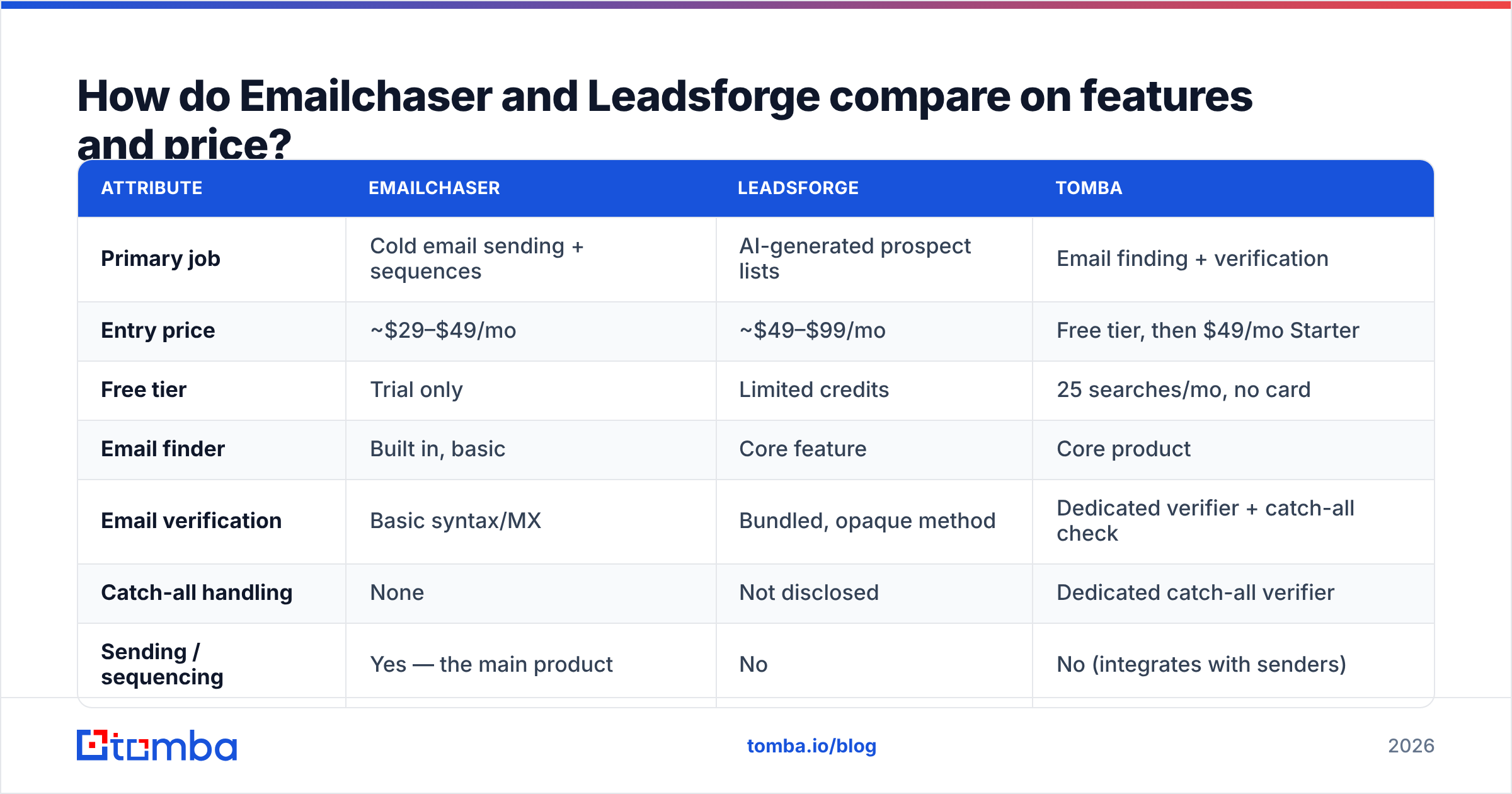
How do Emailchaser and Leadsforge compare on features and price?#
Here is the honest side-by-side. Pricing on both tools moves; treat these as the shape of the offer rather than a quote.
| Attribute | Emailchaser | Leadsforge | Tomba |
|---|---|---|---|
| Primary job | Cold email sending + sequences | AI-generated prospect lists | Email finding + verification |
| Entry price | ~$29–$49/mo | ~$49–$99/mo | Free tier, then $49/mo Starter |
| Free tier | Trial only | Limited credits | 25 searches/mo, no card |
| Email finder | Built in, basic | Core feature | Core product |
| Email verification | Basic syntax/MX | Bundled, opaque method | Dedicated verifier + catch-all check |
| Catch-all handling | None | Not disclosed | Dedicated catch-all verifier |
| Sending / sequencing | Yes — the main product | No | No (integrates with senders) |
| API access | Limited | Limited | Full REST API, CLI, MCP |
| Bulk processing | CSV upload | In-app list export | Bulk finder + bulk verify |
| Best for | Solo senders, agencies | Non-technical founders building first lists | Data layer for any sending stack |
The pattern is obvious once it is laid out: the two tools barely overlap in columns. Emailchaser wins the sending row outright. Leadsforge wins the "I don't want to learn filters" row. Neither wins the data-integrity rows, which is where most cold email programs actually die.
Where each tool genuinely wins#
- Emailchaser — price-per-seat sanity. If you have one or two mailboxes and want stop-on-reply sequencing without a platform contract, it is a reasonable buy. Reply detection works, the UI is not bloated, and onboarding takes an afternoon.
- Emailchaser — agency multi-client setup. Separating clients into workspaces is straightforward, which is more than can be said for several tools three times the price.
- Leadsforge — zero-to-list speed. For a founder who has never built an ICP filter, describing the target in a sentence and getting 500 contacts back is genuinely faster than learning a filter UI.
- Leadsforge — ICP exploration. The conversational loop is useful for testing whether a segment even exists at scale before you commit budget to it.
- Both — low switching cost. Neither locks you into a year. That is worth something in a category where annual contracts are the default.
Is one better than the other for cold outreach?#
Depends entirely on which half of the problem you already solved.
If you already have a list — from a CRM export, a conference attendee sheet, a scraped LinkedIn segment — Emailchaser is the better buy. You need a sender, not a list builder, and paying Leadsforge to regenerate contacts you already own is waste.
If you already have a sending platform — Instantly, Smartlead, Lemlist, or plain Gmail with a sequencer — Leadsforge is the better buy, with a caveat we will get to.
If you have neither, buying one tool to do both is the trap. The all-in-one pitch is seductive at $49/mo, but the bundled data quality in sending-first tools is consistently the weakest component. A sender's finder is a feature; a finder company's finder is the product. Those get built with very different budgets.
There is a third scenario worth naming: you have both, and your problem is that bounce rates are still ugly. In that case neither tool is your answer. You need a verification layer between list and send.
How accurate is the email data in each tool?#
This is the section that decides your sender reputation, so be skeptical of everyone here — including us.
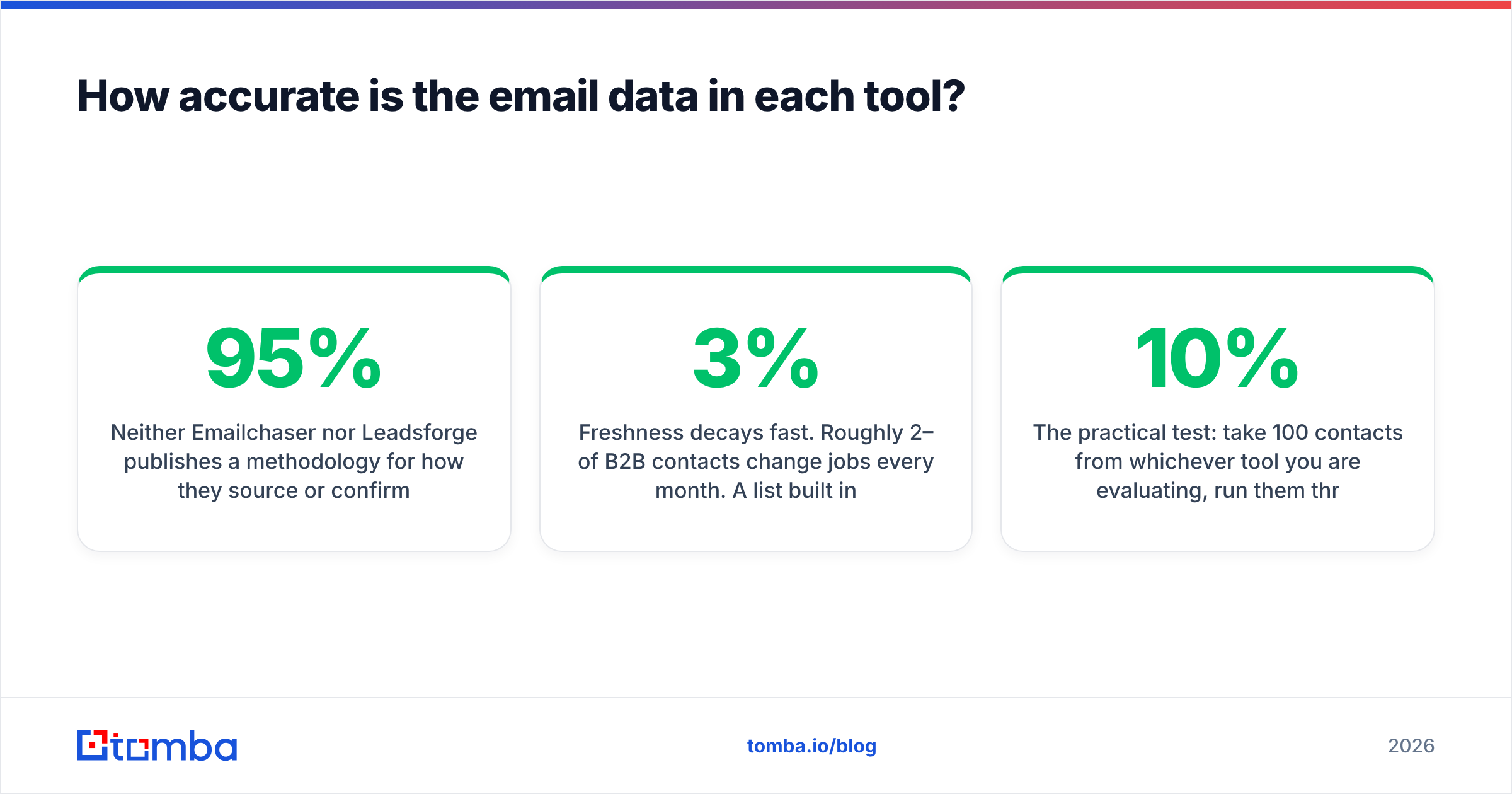
Neither Emailchaser nor Leadsforge publishes a methodology for how they source or confirm addresses. That is not automatically damning, but it is a meaningful gap. When a vendor claims "95% accuracy" without describing the test set, the number is marketing, not measurement.
What you can observe from the outside:
- Pattern-guessing is common. Many bundled finders infer
first.last@domain.comfrom a company's dominant pattern and ship it as a "found" email. On large US companies that works most of the time. On a 20-person agency in Lyon it does not. - Catch-all domains break naive verification. A catch-all server accepts every address at the SMTP layer, so a simple ping returns "valid" for
asdfgh@company.com. Tools without a dedicated catch-all strategy silently pass these through, and they land in your bounce column three weeks later. - Freshness decays fast. Roughly 2–3% of B2B contacts change jobs every month. A list built in January is materially wrong by April. Tools that ship static databases without re-verification at export time hand you decay for free.
The practical test: take 100 contacts from whichever tool you are evaluating, run them through an independent email verifier, and compare. If more than 8–10% come back risky or invalid, your inbox placement is going to suffer regardless of how good your copy is. Google and Yahoo's bulk-sender requirements put the hard bounce threshold well below that, and Google's own Postmaster Tools documentation is explicit that spam complaint and bounce signals compound.
For domains where you get a catch-all verdict, a specialised catch-all verifier is the difference between "we don't know" and an actual decision. That is a category of check neither Emailchaser nor Leadsforge appears to run.

What does a realistic 2026 outbound stack look like?#
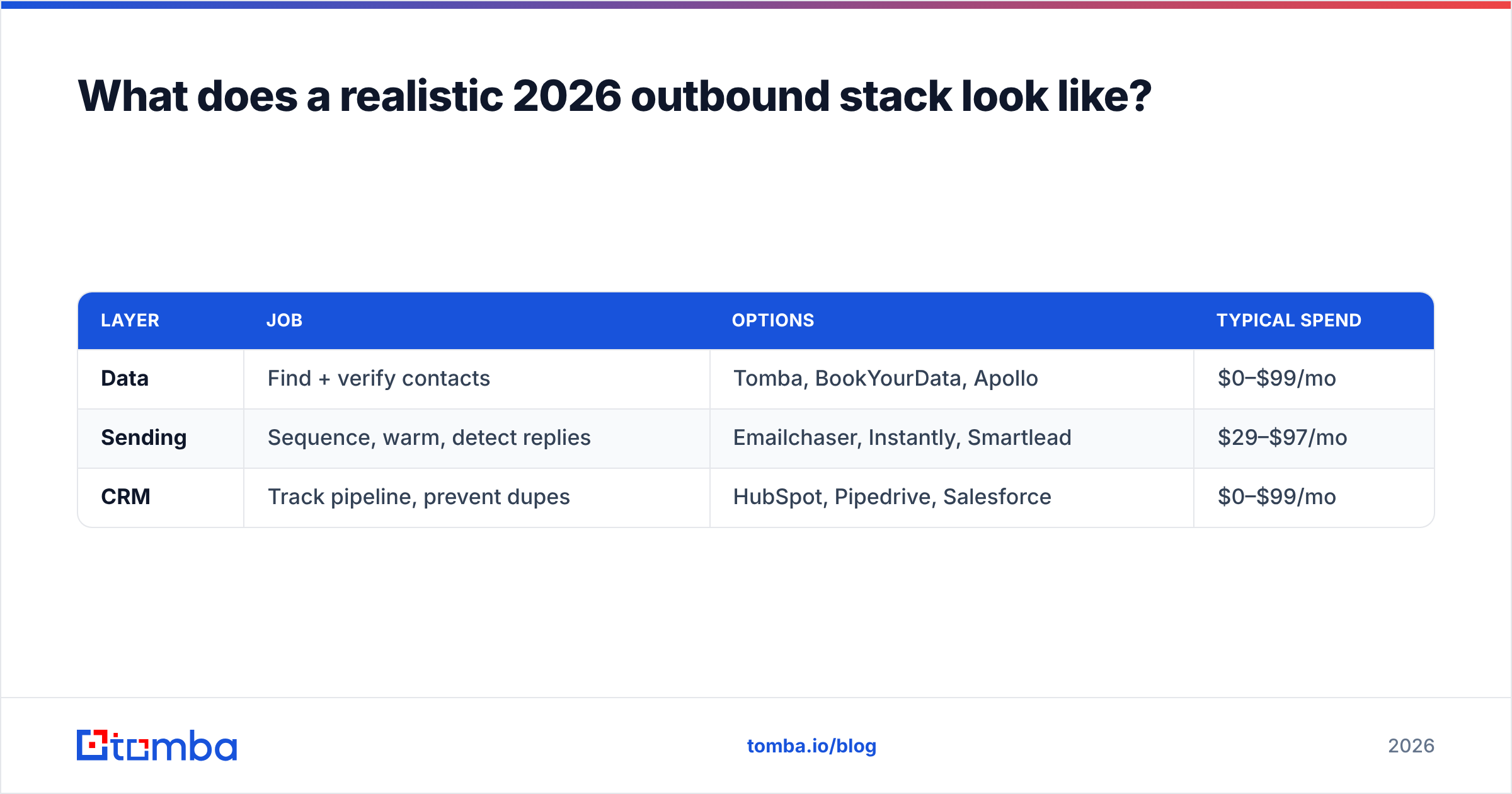
Three layers, and you should be able to name the tool in each one.
| Layer | Job | Options | Typical spend |
|---|---|---|---|
| Data | Find + verify contacts | Tomba, BookYourData, Apollo | $0–$99/mo |
| Sending | Sequence, warm, detect replies | Emailchaser, Instantly, Smartlead | $29–$97/mo |
| CRM | Track pipeline, prevent dupes | HubSpot, Pipedrive, Salesforce | $0–$99/mo |
A note on the data layer: BookYourData is a solid pick when you want pay-as-you-go prebuilt lists with a bounce guarantee, and it is a legitimately different model from credit-based finders — you buy records, not searches. Tomba sits on the other end: real-time lookup by domain or name, with verification built into the same call. Both are defensible; the choice depends on whether you want to buy a list or build one continuously.
Where Leadsforge fits in this table is genuinely ambiguous — it is a data-layer tool with a novel interface. Where Emailchaser fits is not ambiguous at all: it is the sending layer, competing with Instantly and Smartlead, and it should be evaluated against those rather than against a list builder.
The five checks before you commit to either#
- Run a 100-contact bounce test. Export from the tool, verify externally, send a small batch. Measure hard bounces. Anything over 3% means stop.
- Check non-US coverage. If you sell into EMEA or APAC, test 20 contacts from your actual target geography, not the vendor's demo data.
- Confirm export rights. Some list builders restrict CSV export or expire the data. Read the terms before you build a workflow on it.
- Test the API. If you plan to automate, hit the endpoint yourself. A tool with a "limited" API often means single-record lookups at a rate that makes bulk work impractical. Tomba's email finder API and bulk email finder exist for exactly this reason.
- Look at reviews with dates attached. G2 listings for both tools are thin compared to incumbents. Thin review counts mean you are an early adopter, with everything that implies.
What are the main drawbacks of each?#
Emailchaser's weak points: the built-in finder is a convenience feature, not a data product. There is no meaningful catch-all handling, and deliverability tooling (warmup, inbox rotation, domain health monitoring) is lighter than in Instantly or Smartlead. If your problem is landing in the inbox at volume, this is not the tool that solves it. Reporting is also basic — you get opens, clicks, replies, and not much segmentation beyond that.
Leadsforge's weak points: the conversational interface is a genuine UX advance and a genuine transparency problem at the same time. When you cannot see the filters, you cannot audit why a contact was included, and you cannot reproduce a list exactly. For a repeatable outbound motion, non-reproducible lists are a real operational cost. Verification methodology is undisclosed. And because it does not send, you are still buying a second tool.
Shared weak point: neither gives you a defensible answer to "where did this email come from?" That question matters more every year — GDPR legitimate-interest documentation is not optional if you prospect into the EU, and data source transparency is the first thing a privacy review asks for.
Which should you pick?#
Pick Emailchaser if you have list data sorted and need cheap, uncomplicated sending for one to five mailboxes. Pair it with a real finder and verifier so its bundled data layer never touches your send.
Pick Leadsforge if list-building is your bottleneck, you are not technical, and you are willing to verify the output independently before sending. Treat its emails as candidates, not confirmed.
Pick neither if your actual pain is bounce rate. No sequencer and no AI list builder fixes bad data — they distribute it faster. Fix the data layer first, then choose the sender.
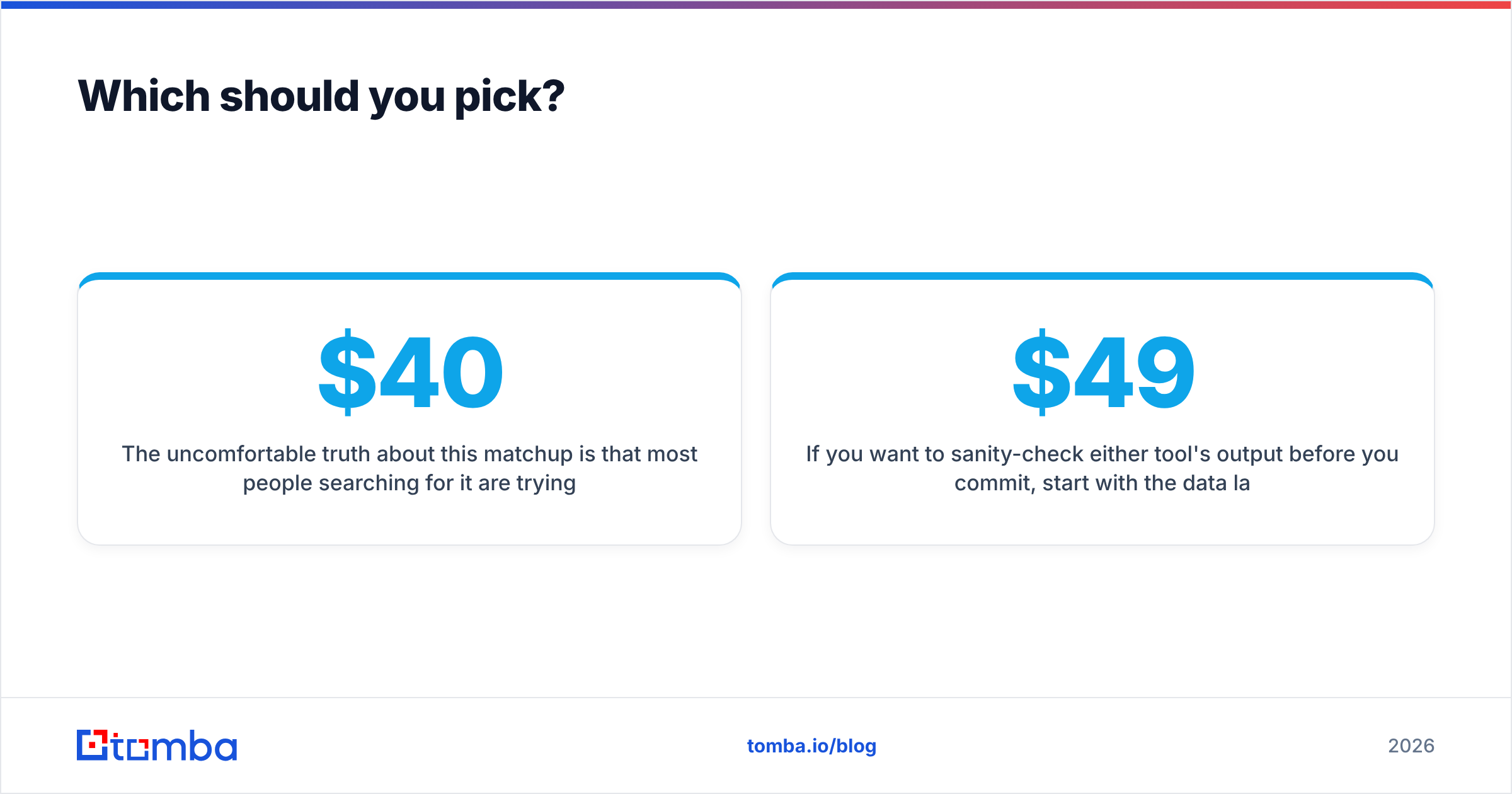
The uncomfortable truth about this matchup is that most people searching for it are trying to consolidate two budget lines into one. That works in exactly one scenario: very low volume, domestic-only targets, low-stakes campaigns. Above that, the consolidation saves $40/mo and costs you a domain.
If you want to sanity-check either tool's output before you commit, start with the data layer. Tomba's Email Finder gives you 25 free searches a month with no card — enough to run a real accuracy test against whatever list either tool hands you. Every result comes back with a confidence score and verification status, and you can escalate to the bulk finder, the domain search, or the API when the workflow proves out. Compare the plans on the Tomba pricing page — Starter is $49/mo, Growth $99/mo — and decide with your own numbers instead of anyone's accuracy claim.
Related guides#
Ready to find emails that actually work?
Join 150,000+ professionals who stopped guessing and started sending. Free credits on signup — no credit card required.
Get the Tomba newsletter
Practical outbound tactics and product updates — once every two weeks.
About the author