Emailchaser vs Limeleads: Which B2B Lead Tool Wins in 2026
Emailchaser sends cold email at a flat rate. Limeleads sells you a static B2B list. They solve different halves of the same problem — here is which one earns your budget, and when neither is the right answer.
TL;DR
- They are not actually competitors. Emailchaser is a cold email sending platform with a built-in finder. Limeleads is a static B2B list database you export from. Buying one does not remove the need for the other.
- Emailchaser wins on simplicity and sending cost — flat pricing, unlimited connected inboxes, no per-seat tax. It is weakest on data depth.
- Limeleads wins on raw list volume and filters — millions of US-heavy B2B records with firmographic filtering, sold in credit packs. It is weakest on freshness; exported records are a snapshot, not a live lookup.
- The bounce math decides most of these evaluations. A cheap list that lands at 8-12% bounce will cost you more in domain reputation than you saved on credits.
- The common ending: teams keep the sender they like and move sourcing to a live, verified email API. That is where a tool like Tomba usually enters the stack.
What are Emailchaser and Limeleads?#
Short answer: one sends, one supplies.
Emailchaser is a cold outreach platform. You connect mailboxes, build sequences, set sending limits, and track replies. It bundles a lightweight email finder and a Chrome extension, and its pitch is deliberately anti-enterprise: flat monthly pricing, no per-user charges, unlimited connected email accounts. It competes with Instantly, Smartlead, and Lemlist — not with a database.
Limeleads is a B2B contact database. You filter by industry, company size, location, job title, and technology, preview matching records, then spend credits to unlock and export them as CSV. It competes with UpLead, Lead411, and BookYourData — not with a sequencer.
So when someone types "emailchaser vs limeleads" into Google, they are usually asking one of two real questions:
- I have a budget for one tool this quarter — which half of the outbound problem should I buy first?
- Can I get away with Emailchaser's built-in finder instead of paying for a list?
This post answers both.
How do Emailchaser and Limeleads actually compare?#
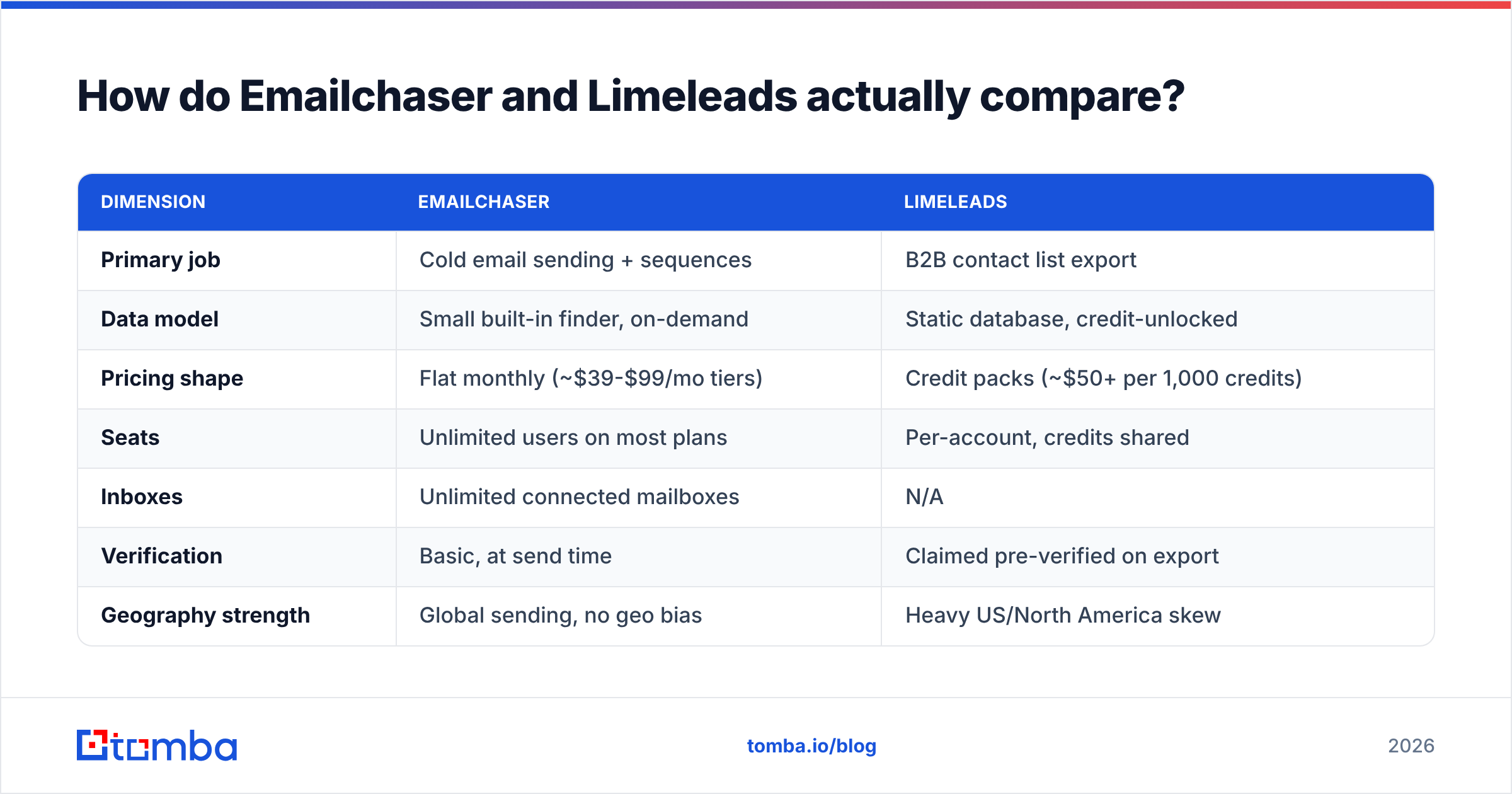
Here is the honest head-to-head. Pricing figures are the publicly listed rates at the time of writing — both vendors change plans, so confirm on their own pages before you buy.
| Dimension | Emailchaser | Limeleads |
|---|---|---|
| Primary job | Cold email sending + sequences | B2B contact list export |
| Data model | Small built-in finder, on-demand | Static database, credit-unlocked |
| Pricing shape | Flat monthly (~$39-$99/mo tiers) | Credit packs (~$50+ per 1,000 credits) |
| Seats | Unlimited users on most plans | Per-account, credits shared |
| Inboxes | Unlimited connected mailboxes | N/A |
| Verification | Basic, at send time | Claimed pre-verified on export |
| Geography strength | Global sending, no geo bias | Heavy US/North America skew |
| API access | Limited | Limited / export-first |
| Best for | Solo founders, small agencies | Volume list buyers in US markets |
| Weak spot | Data depth and coverage | Record freshness and refunds on bad data |
The table makes the split obvious. If you already have a list and need to send it, Emailchaser is the cheaper answer. If you already have a sender and need names, Limeleads is the faster answer. Buying both is a legitimate stack — just know you are buying two products, not choosing between two versions of the same one.
Which one has better data quality?#
Neither is a data-quality leader, and the failure modes are different.
Emailchaser's finder is a convenience feature, not a data business. It works well on well-indexed domains — SaaS companies, agencies, anything with a public team page and a predictable first.last@ pattern. It thins out fast on catch-all domains, smaller regional companies, and roles that never appear publicly. That is expected: the product's revenue comes from sending, so the finder is there to reduce friction, not to be best-in-class.
Limeleads' database has the opposite profile. Coverage is genuinely broad in US mid-market, and the filters are usable. The risk is decay. Every static B2B database is a photograph of a moving thing — roughly 25-30% of B2B contact records go stale each year through job changes, rebrands, and domain migrations. When you export 5,000 records in July, you inherit whatever the refresh cadence left behind. Read the credit-refund policy carefully; the difference between "we replace invalid records" and "credits are non-refundable" is the entire economics of the purchase.
Here is what actually breaks campaigns, in order of how often it happens:
- Job-change decay — the person is real, the email was real, they left in March. Your message bounces or lands with someone who inherited the alias.
- Catch-all ambiguity — the domain accepts everything, so a "verified" flag means nothing. You need a dedicated catch-all verifier to separate real mailboxes from black holes.
- Role-account padding —
info@,sales@,contact@inflate a list's row count and depress its reply rate. - Pattern guessing dressed as verification — a permutated address that passed a syntax check but never an SMTP check.
- Duplicate records across exports — the same contact bought twice, mailed twice, annoyed once.
Any one of those at scale produces the same outcome: a bounce rate above 5%, throttling from mailbox providers, and a sender domain that takes six weeks to recover.

Is Emailchaser's built-in finder enough to skip a database?#
For a narrow use case, yes. For most teams, no.
Skip the database if all three of these are true:
- You prospect fewer than ~200 net-new companies a month.
- You already know which companies you want (inbound signals, event lists, a target account list from your CRM).
- Your targets are digitally visible — tech, agencies, e-commerce, anything with a LinkedIn-active team.
In that scenario you are doing account-first prospecting: you have the company, you need the person's address. That is a lookup problem, and any competent email finder solves it — including Emailchaser's, and including a standalone API if you want higher hit rates.
You need a database when you are doing criteria-first prospecting: "every HVAC company in Texas with 20-100 employees." No finder can invent that list. Only a filterable database can. That is Limeleads' real job, and it is a job Emailchaser does not attempt.
The mistake teams make is paying database prices for lookup work. If you know your accounts, credits spent on bulk list exports are pure waste — you are buying 4,800 rows to use 200.
How does the pricing really compare?#
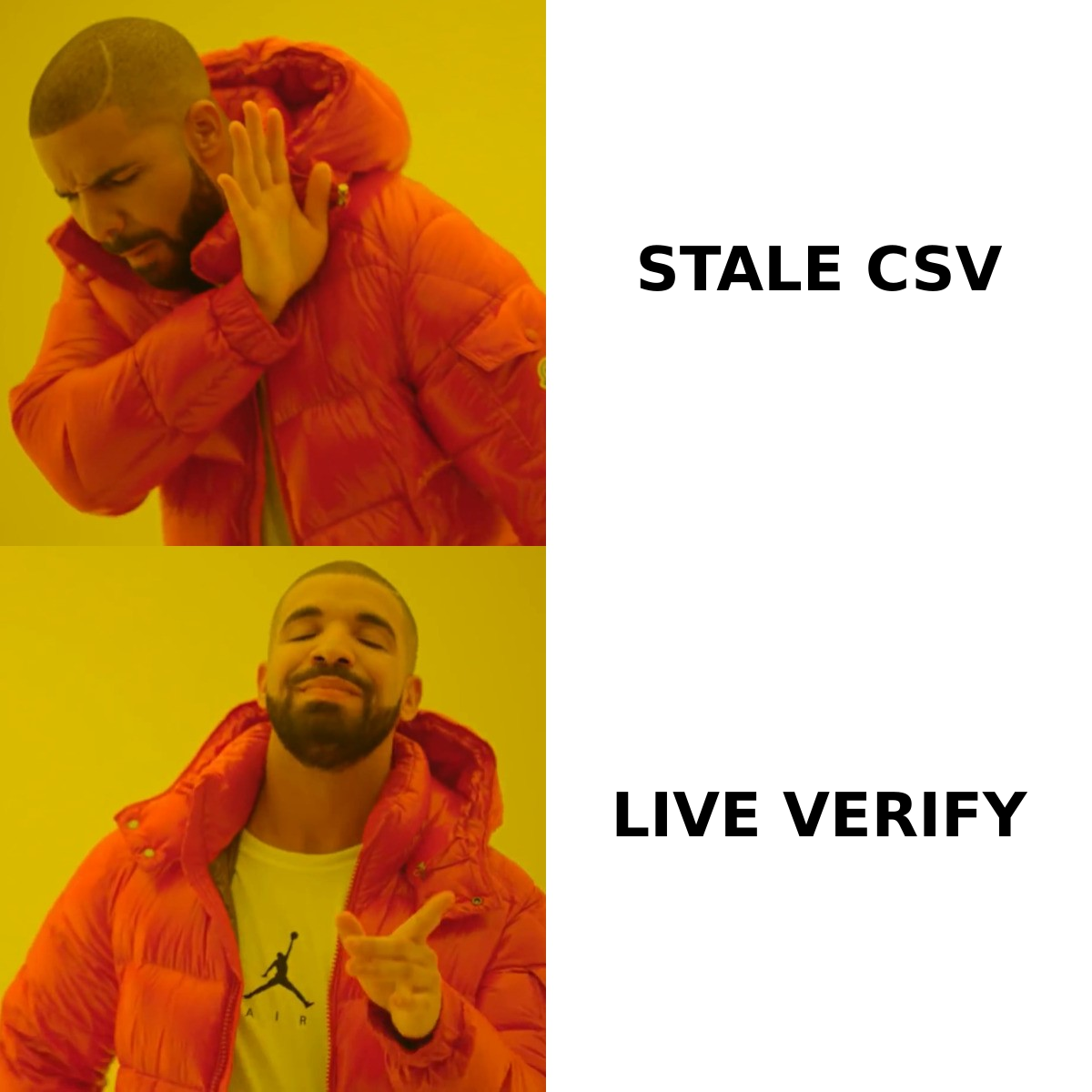
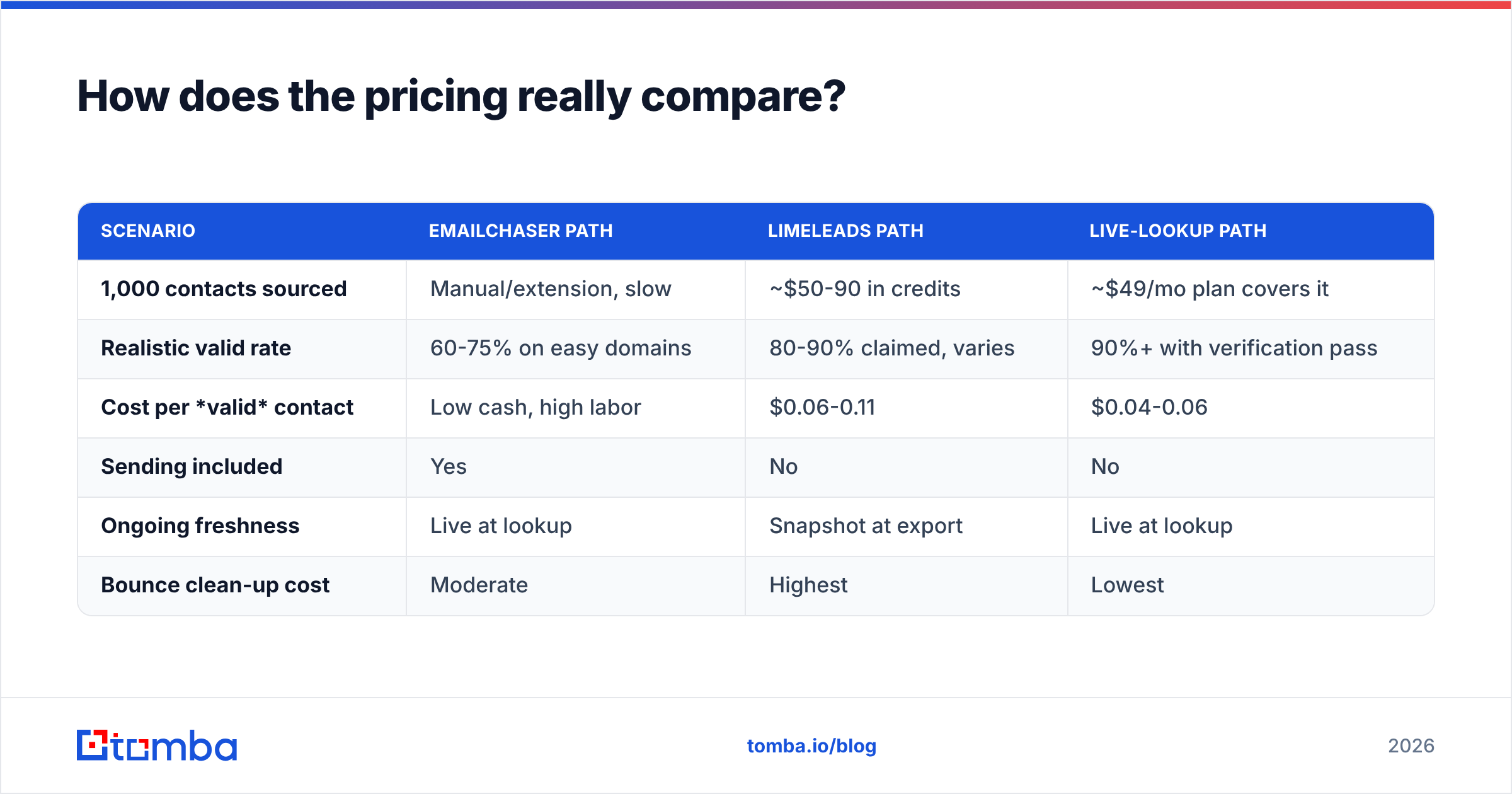
Compare cost per usable contact, not cost per credit. A credit that resolves to a bounced mailbox is not a discount, it is a liability.
| Scenario | Emailchaser path | Limeleads path | Live-lookup path |
|---|---|---|---|
| 1,000 contacts sourced | Manual/extension, slow | ~$50-90 in credits | ~$49/mo plan covers it |
| Realistic valid rate | 60-75% on easy domains | 80-90% claimed, varies | 90%+ with verification pass |
| Cost per valid contact | Low cash, high labor | $0.06-0.11 | $0.04-0.06 |
| Sending included | Yes | No | No |
| Ongoing freshness | Live at lookup | Snapshot at export | Live at lookup |
| Bounce clean-up cost | Moderate | Highest | Lowest |
Two notes on reading that table honestly.
First, Emailchaser's flat pricing is a genuine advantage if you run multiple inboxes. Most sequencers charge per connected mailbox or per seat; a five-inbox setup on a per-mailbox tool can cost more than Emailchaser's entire plan. If sending economics are your bottleneck, that is a real reason to choose it.
Second, list vendors are not interchangeable, and some are considerably better than their price implies. BookYourData, for instance, sells pay-as-you-go B2B lists with a stated accuracy guarantee and no subscription lock-in — worth a look alongside Limeleads if you want criteria-first exports without a recurring commitment. Check current user reports on G2 before committing to any list vendor; the category moves fast and last year's review set ages badly.
What does a working 2026 outbound stack look like?#
Split the stack into three jobs and buy the best fit for each, rather than hoping one tool covers all three.
- Sourcing (who to contact). A database for criteria-first lists; a domain search for account-first work where you already have the company. Domain search returns every discoverable mailbox on a company domain with the pattern and confidence score attached — usually faster than filtering a static database when your account list is already defined.
- Validation (will it land). Never send an exported list unverified, no matter what the vendor claims. Run it through an email verifier so you catch job-change decay that happened after the snapshot. Budget a few dollars per thousand; it is the cheapest insurance in outbound.
- Enrichment (what to say). Titles, headcount, tech stack, LinkedIn profile. Data enrichment turns a row into a reason to write.
- Sending (how it goes out). Emailchaser, Instantly, Smartlead, or your existing sequencer. This is the one layer where switching costs are low and the market is genuinely competitive.
The reason this split matters: sourcing and sending have completely different upgrade cycles. You will change sequencers when deliverability rules shift. You will change data providers when your ICP shifts. Coupling them forces both migrations at once.
Who should choose which?#
Choose Emailchaser if: you are a founder or small agency running outbound yourself, you need unlimited inboxes without per-seat pricing, your target accounts are already identified, and you want one bill instead of three. Its finder will cover a meaningful share of your lookups, and you can top up the gaps with a dedicated API when a domain resists.
Choose Limeleads if: your prospecting is criteria-first, your market is predominantly US, and you want to own exported CSVs outright rather than rent access. Buy the smallest credit pack first, export 100 records, run them through independent verification, and measure the real valid rate before scaling the spend. That single test is worth more than every review you will read.
Choose neither, and build the stack instead, if: you need repeatable, programmatic sourcing — enrichment on form fill, CRM hygiene jobs, lookups triggered from a workflow. That is API territory. A static export cannot serve a live product, and a sequencer's bundled finder is not built to be called ten thousand times a month.
What is the verdict on Emailchaser vs Limeleads?#
Emailchaser is the better single purchase for most small teams — because sending is a recurring need and list buying is episodic, and because flat pricing on unlimited inboxes is unusually founder-friendly in this category. Pair it with verified, on-demand lookups and you have a complete outbound motion for well under $150/month.
Limeleads earns its slot when your prospecting is genuinely criteria-first — regional service businesses, offline industries, anything where no public directory exists and you cannot name your accounts in advance. Just treat every export as unverified until you have proved otherwise.
What you should not do is pick one and assume it covers the other's job. The teams that struggle are the ones who bought a database and wondered why replies did not appear, or bought a sequencer and wondered why the finder went quiet on half their targets.
Where does Tomba fit in this comparison?#
As the sourcing and validation layer under whichever sender you choose.
Tomba is not a sequencer and does not pretend to be — it finds and verifies professional email addresses, by domain, by name, or in bulk, with the confidence score and detected pattern returned on every result. That means you can keep Emailchaser for sending and replace guesswork sourcing with live lookups, or keep buying Limeleads exports and run them through verification before a single message goes out.
Practical starting point: the free tier gives you 25 searches a month to test hit rates on your own target domains — no credit card, no sales call. Paid plans start at $49/mo (Growth $99/mo, Pro $249/mo) with full Tomba API access on every tier, and Tomba pricing is per-search rather than per-seat, so adding teammates does not multiply the bill.
Run the same 100 target companies through your current tool and through the Tomba Email Finder. Compare hit rate, compare bounce rate after a verification pass, and let the numbers decide the stack. That comparison takes an afternoon and will tell you more than any vendor page — including this one.
Related guides#
Ready to find emails that actually work?
Join 150,000+ professionals who stopped guessing and started sending. Free credits on signup — no credit card required.
Get the Tomba newsletter
Practical outbound tactics and product updates — once every two weeks.
About the author