Emailchaser vs Unwrapemail: Which Cold Email Tool Wins?
Both promise simple, affordable cold email from your own inbox. We compare sending models, follow-up logic, deliverability controls and the data gap neither one fills — plus which team each tool actually suits.
TL;DR
- Emailchaser and Unwrapemail sit in the same bracket: lightweight, mailbox-connected cold email senders for small teams that find Outreach, Salesloft and Apollo overbuilt and overpriced.
- Emailchaser leans further toward the classic sequencer model — multi-step follow-ups, reply detection, simple campaign analytics — and markets itself at agencies and recruiters running steady outbound.
- Unwrapemail leans toward simplicity and speed of setup: connect a mailbox, write, send, follow up. Fewer knobs, less to misconfigure, less to grow into.
- Neither is a data platform. Both assume you already have a clean, verified list, and both will happily send to junk addresses that torch your domain.
- Verify contacts before either tool touches them. Run your list through an email verifier and fill gaps with an email finder — that single step moves reply rates more than any feature on this comparison.
What are Emailchaser and Unwrapemail?#
Both tools solve the same narrow problem: sending personalised cold email at modest volume, from mailboxes you already own, without the six-figure contract and the six-week onboarding.
Emailchaser is a cold email outreach tool built around automated follow-ups. You connect Google Workspace or Microsoft 365, upload a CSV, write a sequence, and it drips messages out with delays between steps, stopping the sequence when someone replies. Its positioning has consistently been "cold email software that doesn't need a specialist to operate," and its audience skews toward agencies, recruiters and B2B founders doing their own prospecting.
Unwrapemail occupies adjacent ground with a lighter footprint. The pitch is speed: connect an inbox, get a campaign live the same afternoon, keep the interface small enough that you don't need a training session. Where Emailchaser gives you more sequencing surface area, Unwrapemail gives you fewer decisions.
That difference — surface area versus simplicity — is the entire comparison. Everything below is a variation on it.
One caveat before the tables: both vendors iterate on plans and limits frequently, and pricing pages move faster than blog posts. Treat the numbers here as directional and confirm on the vendor's own page before you put a card down.
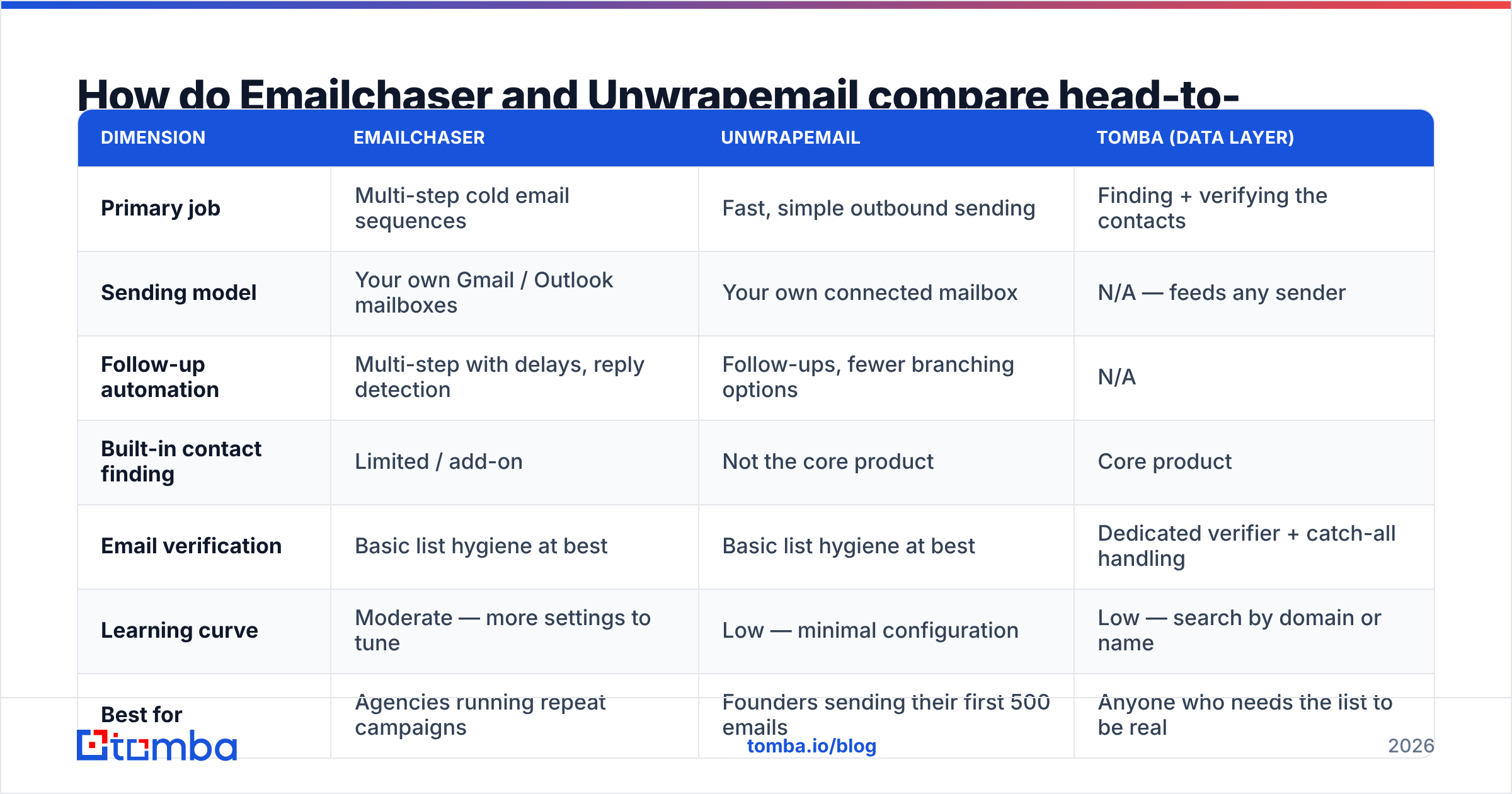
How do Emailchaser and Unwrapemail compare head-to-head?#
| Dimension | Emailchaser | Unwrapemail | Tomba (data layer) |
|---|---|---|---|
| Primary job | Multi-step cold email sequences | Fast, simple outbound sending | Finding + verifying the contacts |
| Sending model | Your own Gmail / Outlook mailboxes | Your own connected mailbox | N/A — feeds any sender |
| Follow-up automation | Multi-step with delays, reply detection | Follow-ups, fewer branching options | N/A |
| Built-in contact finding | Limited / add-on | Not the core product | Core product |
| Email verification | Basic list hygiene at best | Basic list hygiene at best | Dedicated verifier + catch-all handling |
| Learning curve | Moderate — more settings to tune | Low — minimal configuration | Low — search by domain or name |
| Best for | Agencies running repeat campaigns | Founders sending their first 500 emails | Anyone who needs the list to be real |
| Entry price | Low-to-mid double digits/mo (verify current) | Low double digits/mo (verify current) | Free tier (25 searches/mo), Starter $49/mo |
The honest read: on features alone, Emailchaser is the more complete sequencer and Unwrapemail is the faster on-ramp. If you have ever abandoned a tool because setup took three hours, that difference matters more than any feature checkbox.

Which one handles follow-ups better?#
Follow-ups are where cold email revenue actually comes from. Most positive replies land on step two, three or four — not the opener. So the follow-up engine deserves more scrutiny than the editor.
Emailchaser is built around this. You define a sequence of steps, set day gaps between them, and the tool stops chasing a contact the moment they reply. That last behaviour sounds trivial and isn't: a tool that keeps sending step three after a prospect answered step one costs you the deal and the reputation hit.
Unwrapemail supports follow-ups too, but with a thinner configuration layer. For a two- or three-touch sequence that's fine. For a seven-touch sequence with different tracks by persona, you will hit the ceiling and start managing it in your head instead of in the tool.
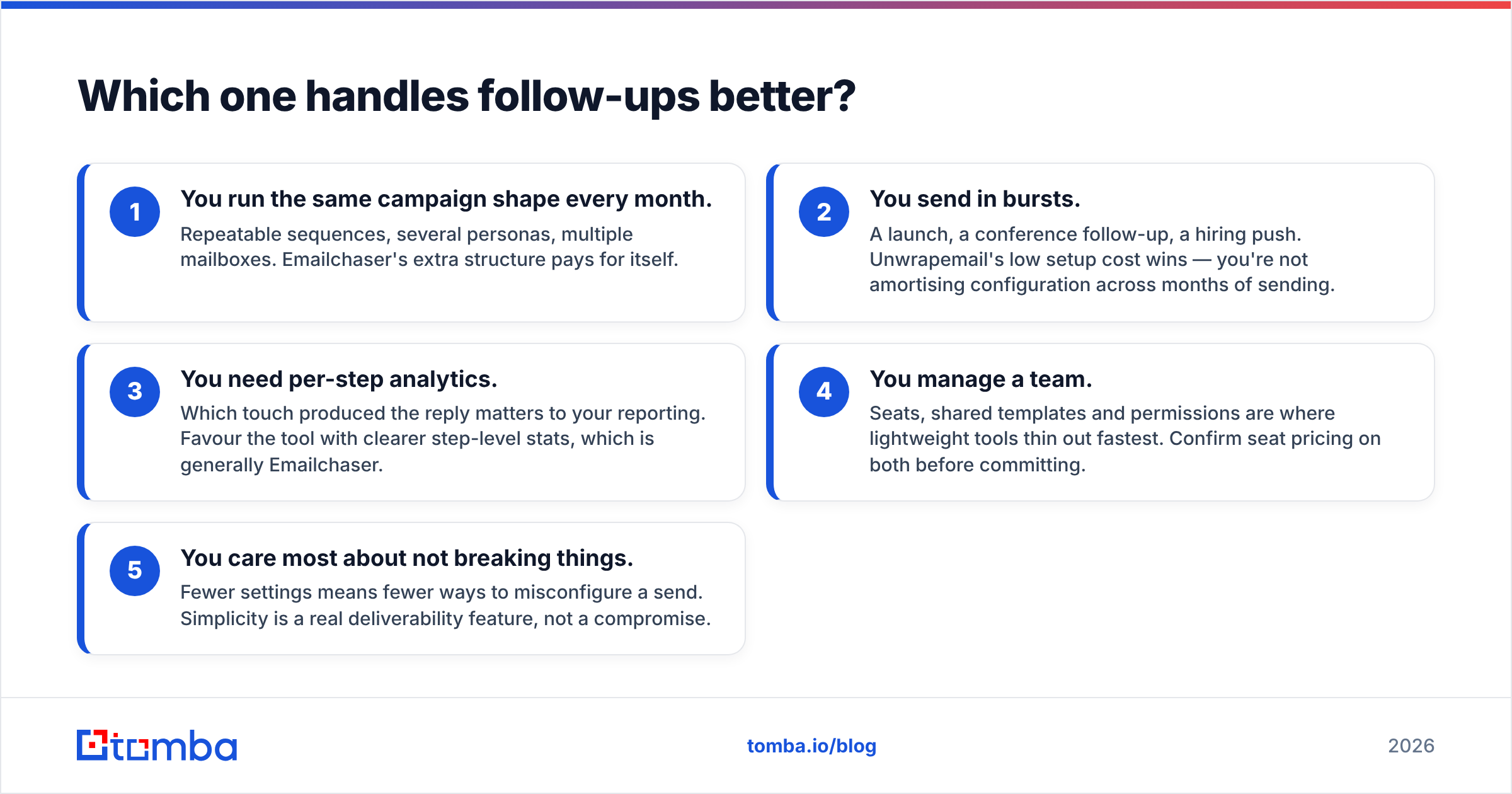
Ask yourself which of these describes you:
- You run the same campaign shape every month. Repeatable sequences, several personas, multiple mailboxes. Emailchaser's extra structure pays for itself.
- You send in bursts. A launch, a conference follow-up, a hiring push. Unwrapemail's low setup cost wins — you're not amortising configuration across months of sending.
- You need per-step analytics. Which touch produced the reply matters to your reporting. Favour the tool with clearer step-level stats, which is generally Emailchaser.
- You manage a team. Seats, shared templates and permissions are where lightweight tools thin out fastest. Confirm seat pricing on both before committing.
- You care most about not breaking things. Fewer settings means fewer ways to misconfigure a send. Simplicity is a real deliverability feature, not a compromise.
Do either of them protect your deliverability?#
Partially — and this is where both tools, like most in their price bracket, hand you the loaded weapon and trust you not to point it at your own domain.
Both send through your real mailbox, which is the right architecture. Mailbox-based sending inherits the reputation of a domain you already control, rather than a shared IP pool you don't. Both apply sending delays and daily caps so you don't blast 2,000 messages in ninety seconds.
What neither does is validate that the addresses you uploaded exist. That's the gap that kills campaigns. Google and Yahoo's bulk sender requirements put a hard spam-complaint threshold on senders and expect authenticated, low-bounce mail — Google's own bulk sender guidance is explicit that high bounce and complaint rates get your mail filtered or rejected. A list with 12% invalid addresses will hit that wall regardless of which of these two tools sends it.
Three controls to have in place before your first send, in either tool:
- Authentication. SPF, DKIM and DMARC on the sending domain. Check your SPF record resolves correctly before campaign one, not after the bounce report.
- List verification. Every address checked, catch-all domains flagged separately. A catch-all verifier matters because catch-all domains accept everything at the SMTP handshake and tell you nothing about whether the mailbox is real.
- Warmup and ramp. New domain, new mailbox, low volume for the first weeks. Neither tool will stop you from ignoring this; both will let you learn the hard way.
Get those right and email deliverability becomes a background concern instead of a monthly fire.
What does each one actually cost?#
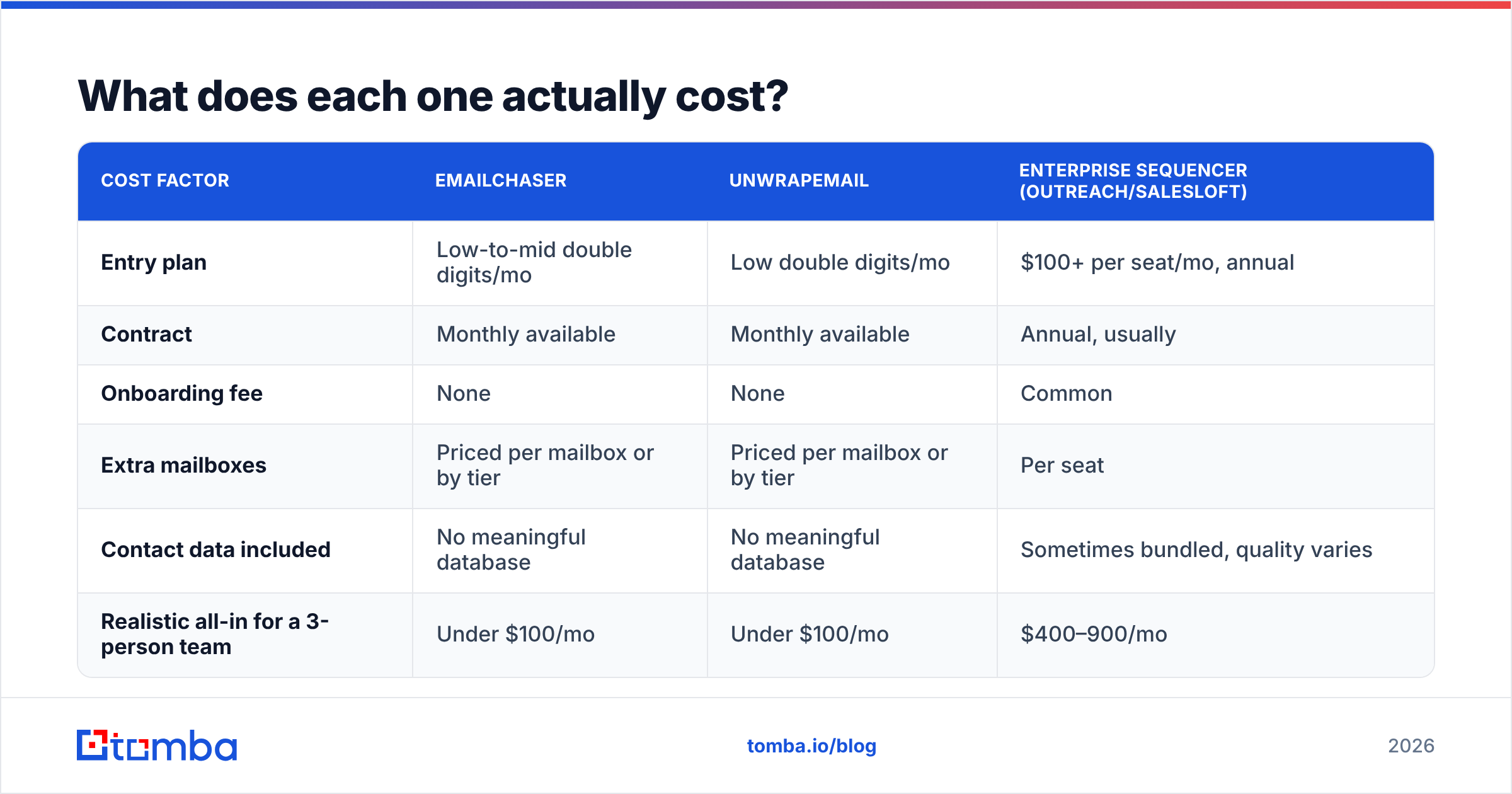
Both sit far below the enterprise sequencers, which is the point. Rough shape of the market at the time of writing:
| Cost factor | Emailchaser | Unwrapemail | Enterprise sequencer (Outreach/Salesloft) |
|---|---|---|---|
| Entry plan | Low-to-mid double digits/mo | Low double digits/mo | $100+ per seat/mo, annual |
| Contract | Monthly available | Monthly available | Annual, usually |
| Onboarding fee | None | None | Common |
| Extra mailboxes | Priced per mailbox or by tier | Priced per mailbox or by tier | Per seat |
| Contact data included | No meaningful database | No meaningful database | Sometimes bundled, quality varies |
| Realistic all-in for a 3-person team | Under $100/mo | Under $100/mo | $400–900/mo |
Two notes on reading that table. First, "no meaningful database" is not a criticism — these are senders, not data vendors, and pretending otherwise would be the actual red flag. Second, the all-in figure is misleading until you add the data line. Budget for contact sourcing separately; a sending tool with an empty CRM behind it produces zero pipeline.
For an independent read on how users rate each, check the category listings on G2 rather than either vendor's own testimonials page — review volume for tools this size is thin, so weigh recency over star ratings.

Is Emailchaser better than Unwrapemail?#
For most teams running consistent outbound: yes, marginally — because sequencing depth compounds. For a founder sending their first campaign this week: no — because the fastest tool to get live in is the one you'll actually use.
Here's the split we'd make:
Choose Emailchaser if you run outbound as a repeating process, you need multi-step sequences with reply detection and step-level reporting, you manage more than one sending mailbox, and you expect campaign complexity to grow over the next year.
Choose Unwrapemail if you want the shortest path from "I have a list" to "emails are going out," you send in bursts rather than continuously, you're a one- or two-person operation, and every extra configuration screen is a reason you'll postpone the campaign again.
Choose neither if your problem is actually contact data. If your CSV is scraped, stale, or half-guessed from a name pattern, no sender fixes that. The bounce rate follows the list, not the tool.
What do both tools leave you to solve?#
The list. That's the whole answer, and it's why this comparison ends somewhere other than "pick the cheaper one."
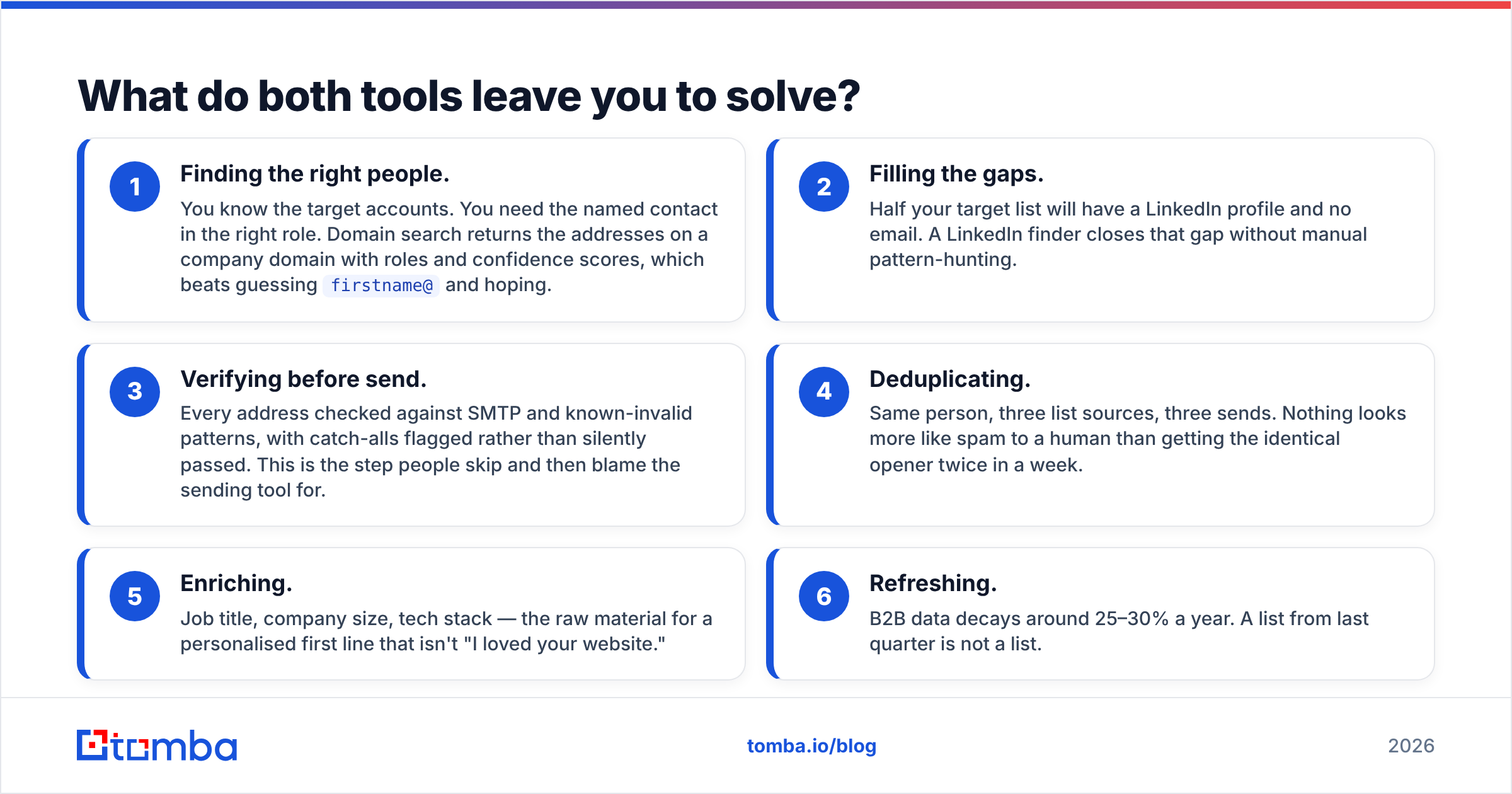
Emailchaser and Unwrapemail both assume a CSV arrives clean. In practice, the pipeline that produces that CSV is where campaigns are won or lost:
- Finding the right people. You know the target accounts. You need the named contact in the right role. Domain search returns the addresses on a company domain with roles and confidence scores, which beats guessing
firstname@and hoping. - Filling the gaps. Half your target list will have a LinkedIn profile and no email. A LinkedIn finder closes that gap without manual pattern-hunting.
- Verifying before send. Every address checked against SMTP and known-invalid patterns, with catch-alls flagged rather than silently passed. This is the step people skip and then blame the sending tool for.
- Deduplicating. Same person, three list sources, three sends. Nothing looks more like spam to a human than getting the identical opener twice in a week.
- Enriching. Job title, company size, tech stack — the raw material for a personalised first line that isn't "I loved your website."
- Refreshing. B2B data decays around 25–30% a year. A list from last quarter is not a list.
Run those six steps and either sending tool performs well. Skip them and both look broken.
How should you actually decide?#
Run the same test on both, in the same week, with the same list:
- Take 200 verified contacts. Not 2,000, and not unverified.
- Split them 100/100 and load one half into each tool.
- Send an identical three-step sequence from separate but comparably warmed mailboxes.
- Measure four numbers: bounce rate, reply rate, time-to-first-send (how long setup actually took you), and how many times you had to open the docs.
That last metric is the one people underweight and then regret. A tool you fight with is a tool you stop using in month three. Bounce rate, meanwhile, should be near-identical across both — if it isn't, your list splitting was uneven, not the tools.
If the numbers come out level, pick on price and on which interface you didn't resent. Both are legitimate tie-breakers at this end of the market.
The verdict#
Emailchaser is the better sequencer; Unwrapemail is the faster start. That's a real choice, and it's a smaller choice than most comparison posts imply — because the variable with the largest effect on your results isn't in either product.
It's whether the addresses are real.
Before you commit to either platform, fix the input. Use the Tomba Email Finder to source verified professional addresses by domain, name or company, with confidence scores and sources attached to every result. The free tier gives you 25 searches a month to test the accuracy against a list you already know, and paid plans start at $49/mo — see Tomba pricing for the full breakdown. Get the list right, then let Emailchaser or Unwrapemail do the part they're actually built for.
Related guides#
Ready to find emails that actually work?
Join 150,000+ professionals who stopped guessing and started sending. Free credits on signup — no credit card required.
Get the Tomba newsletter
Practical outbound tactics and product updates — once every two weeks.
About the author