Emailchaser vs Zintlr 2026: Which Outbound Tool Wins?
Emailchaser sells sending. Zintlr sells data. Neither is a full outbound stack on its own — here's the honest breakdown of pricing, data quality, deliverability control, and which one you actually need in 2026.
Emailchaser vs Zintlr is a fair question with an unfair answer. The two products do different jobs. Emailchaser sends cold email. Zintlr finds the people you send it to. Here is the plain breakdown, so you can pick the right one in 2026.
TL;DR
- They are not the same category. Emailchaser is a cold email sender. It runs sequences, rotates inboxes, and spots replies. Zintlr is a B2B data platform. It holds a contact database, persona profiles, and prospect research. A head-to-head only helps if you are deciding where the next budget line goes.
- Pick Emailchaser if you already have a list. It sends, follows up, and tracks replies without a bloated suite around it.
- Pick Zintlr if your problem is finding people. You get company size, titles, phones, and persona notes before you write a word.
- Neither one is a full stack. Emailchaser's finder is thin. Zintlr has no real sending engine. Most teams still add a finder and a verifier.
- The cheapest working setup pairs a specialist finder and verifier with a lean sender. It usually beats paying one vendor to be average at both.
Emailchaser vs Zintlr: what does each tool do?#
Emailchaser is cold email software. You connect mailboxes, load a list, and build a multi-step sequence. It sends on a schedule with human-like gaps. It stops the sequence when someone replies. It reports opens, replies, and bounces. The pitch is simple pricing per user, not per mailbox. Check the current plans on emailchaser.com before you budget. Entry pricing has moved more than once.
Zintlr goes the other way. It is a prospecting database. You search by industry, headcount, title, location, or tech stack. You pull emails and phone numbers. On top of that sits what the company calls personality intelligence: a guess at how someone behaves, meant to shape your opener. There is a browser extension and a light outreach layer. But the core of the product is data. The feature list lives at zintlr.com.
So the honest framing of emailchaser vs zintlr is simple. One solves how you send. The other solves who you send to. Buy the wrong one and your real bottleneck stays right where it was.
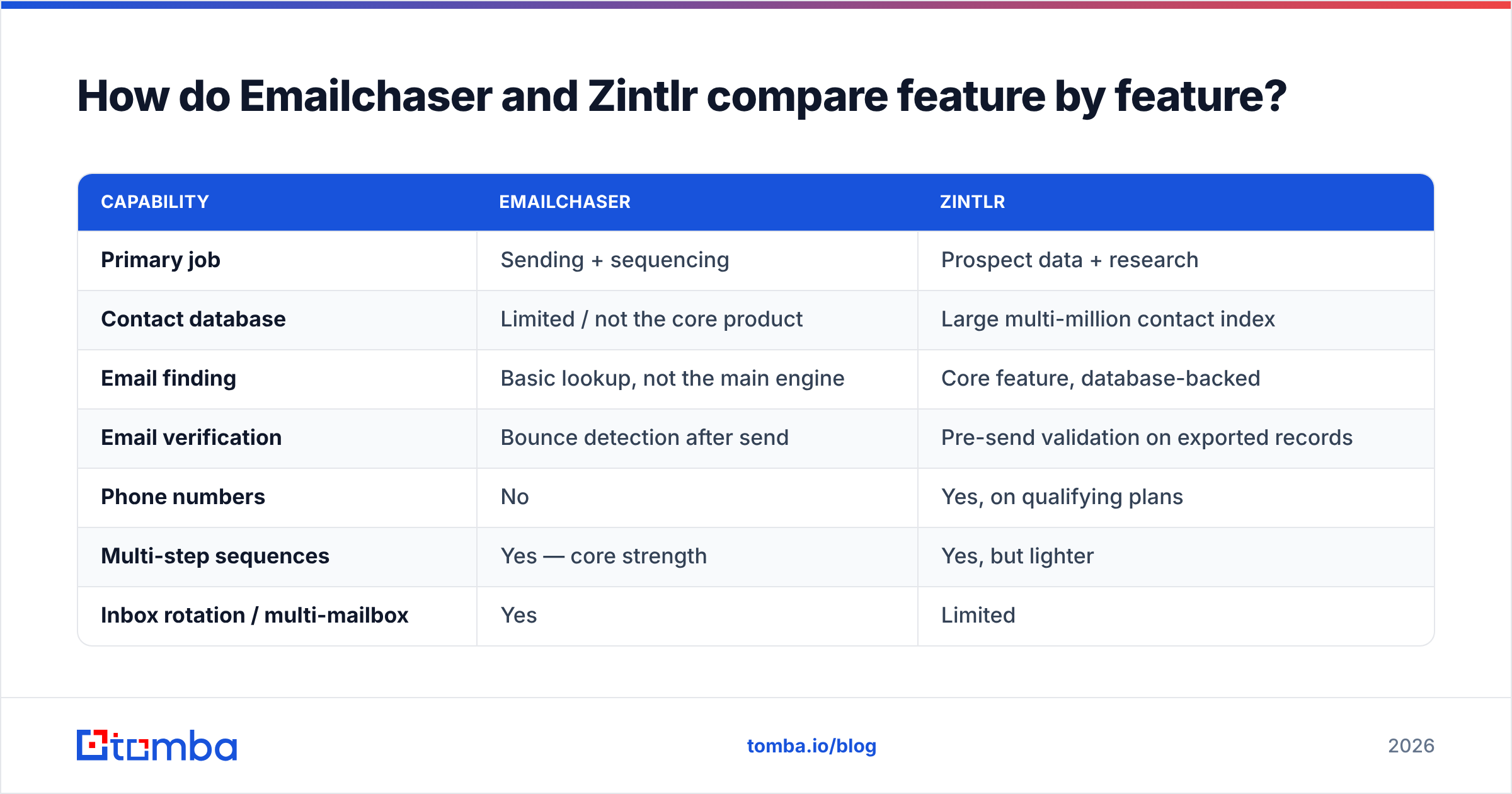
Emailchaser vs Zintlr: how do the features compare?#
| Capability | Emailchaser | Zintlr |
|---|---|---|
| Primary job | Sending + sequencing | Prospect data + research |
| Contact database | Limited / not the core product | Large multi-million contact index |
| Email finding | Basic lookup, not the main engine | Core feature, database-backed |
| Email verification | Bounce detection after send | Pre-send validation on exported records |
| Phone numbers | No | Yes, on qualifying plans |
| Multi-step sequences | Yes — core strength | Yes, but lighter |
| Inbox rotation / multi-mailbox | Yes | Limited |
| Reply detection & auto-stop | Yes | Basic |
| Persona / behavioral intel | No | Yes (differentiator) |
| Chrome extension | Limited | Yes |
| API access | Limited | Yes on higher tiers |
| Best for | SDRs with a list, agencies, founders | Researchers, ABM teams, list builders |
Read that table as a split of labor, not a scoreboard. Emailchaser wins on sending mechanics. Zintlr wins on data depth. Score them as all-rounders and both lose.
Which tool gets you accurate contacts?#
This is where emailchaser vs zintlr gets uncomfortable for both sides.
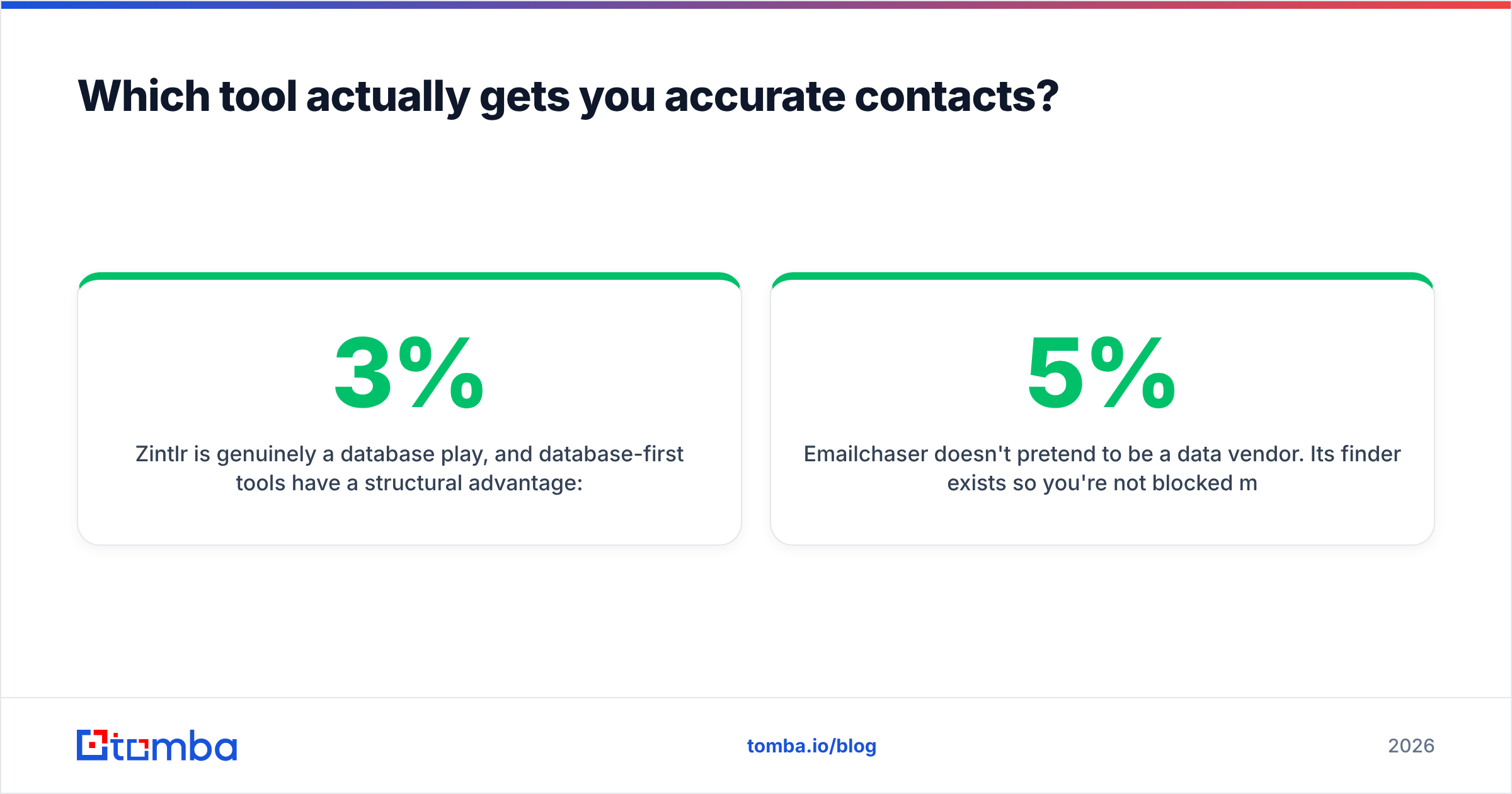
Zintlr is a real database play. Database-first tools start ahead. They have already crawled, matched, and indexed. But every static index rots. B2B contact data goes stale by about 2–3% a month as people change jobs. Call it 25–30% a year. Analysts and vendors have published that range for years. A record that was right in Q1 can bounce in Q4. Persona notes cannot save a message that never lands.
Emailchaser does not claim to be a data vendor. Its finder exists so you are not stuck mid-task. It is not built to beat dedicated providers. Skip verification and you will learn the hard way. A bounce rate above 3–5% is the fastest way to burn a sending domain. Google and Yahoo's bulk sender rules made that far less forgiving than it used to be.
One rule holds either way: verify at send time, not at export time. A record pulled three weeks ago is a guess. Running it through a live email verifier first is the best 30 seconds in the whole workflow. Does your list include accept-all domains? Then a catch-all verifier is what separates a usable segment from a pile of silent bounces.
Emailchaser vs Zintlr: how does pricing compare?#
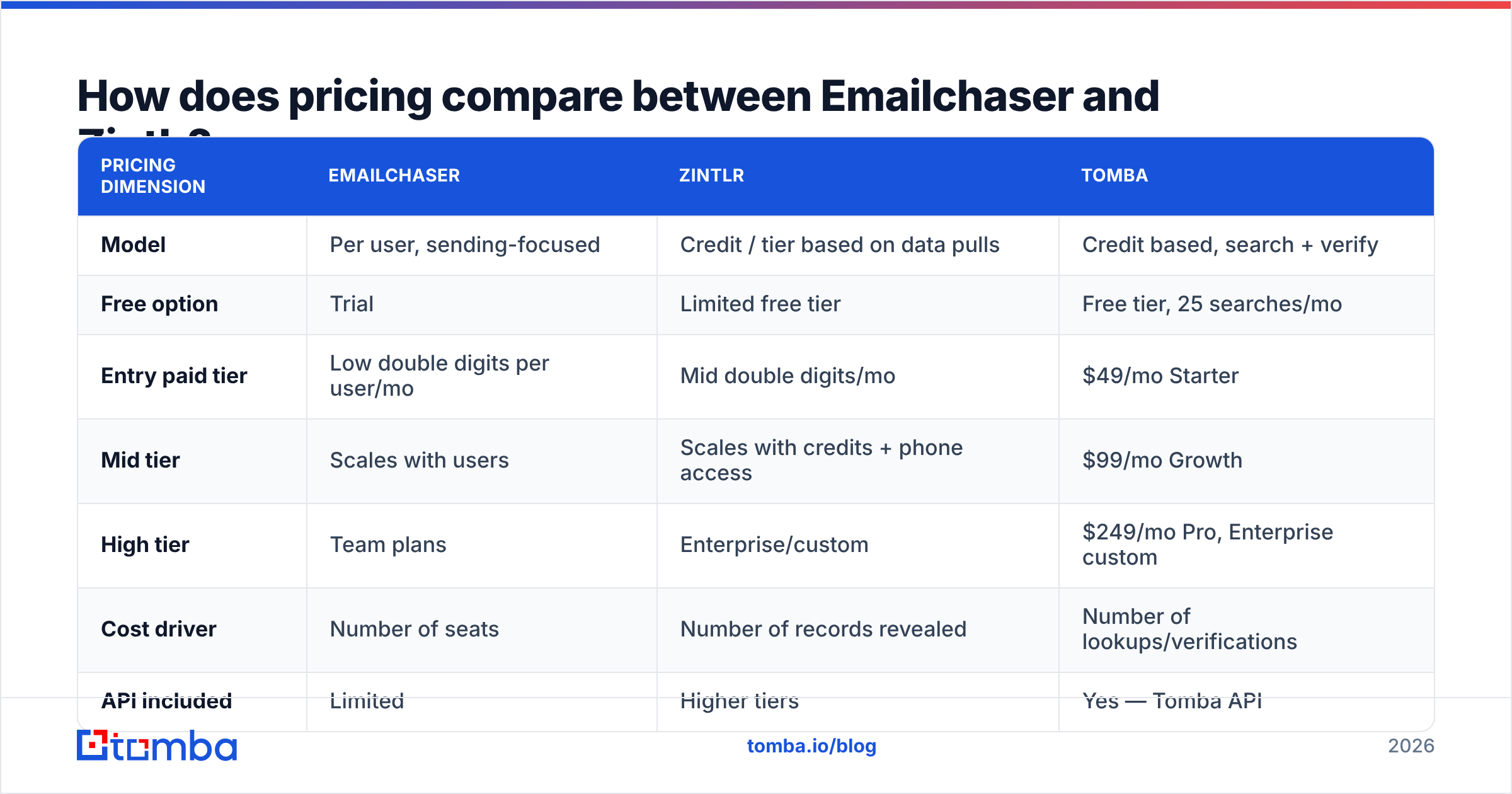
Both vendors changed pricing in the last 18 months. Treat the shape below as directional and confirm it on their pages. The sticker matters less than what the pricing model punishes.
| Pricing dimension | Emailchaser | Zintlr | Tomba |
|---|---|---|---|
| Model | Per user, sending-focused | Credit / tier based on data pulls | Credit based, search + verify |
| Free option | Trial | Limited free tier | Free tier, 25 searches/mo |
| Entry paid tier | Low double digits per user/mo | Mid double digits/mo | $49/mo Starter |
| Mid tier | Scales with users | Scales with credits + phone access | $99/mo Growth |
| High tier | Team plans | Enterprise/custom | $249/mo Pro, Enterprise custom |
| Cost driver | Number of seats | Number of records revealed | Number of lookups/verifications |
| API included | Limited | Higher tiers | Yes — Tomba API |
Seat pricing has one trap. A two-person team sending 8,000 emails a month pays the same as a two-person team sending 400. Great at volume. Bad while you test.
Credit pricing has the opposite trap. You burn credits on records you never contact. Every bad filter costs money. Teams often spend 40% of a data budget on rows that die in a spreadsheet.
For most teams under 10 reps, the cheapest shape is a lean sender plus a pay-as-you-go finder. See Tomba pricing for what a credit-based finder costs next to either platform. The $49/mo Starter plan usually covers one SDR's monthly list building, with no seat penalty.
Is Emailchaser better than Zintlr for cold email?#
For the sending half, yes. Clearly. Emailchaser was built for it, and the details show:
- Inbox rotation. Spreading volume across mailboxes is table stakes now that per-domain reputation is watched so closely. Emailchaser does it natively. Zintlr's outreach layer is not built to carry that load.
- Reply detection that stops the sequence. Nothing kills a deal faster than step 3 firing after a prospect already answered. Emailchaser's thread matching is one of its stronger parts.
- Pacing and jitter. Random gaps and daily caps matter more than a clever subject line if you want the primary tab.
- Bounce handling. Emailchaser flags bad addresses and suppresses them. But it flags them after the damage. That is why pre-send checks are not optional.
- Simplicity as a feature. No forecast modules. No dashboards nobody opens. For a founder or a two-person team, that beats an Outreach-class suite.
Still, better for cold email is not the same as enough for cold email. In emailchaser vs zintlr terms, a well-paced sequence aimed at a stale list still fails. Both sides underplay that part.
Where does each tool break down?#
Emailchaser's weak points
- Thin native data. You will import lists from somewhere else. That means a second tool and a second bill.
- No real enrichment. Headcount, tech stack, funding signals: none of it is there to segment on.
- Reporting is basic. Fine for reply rate. Weak for comparing segments over time.
Zintlr's weak points
- Coverage is uneven outside its strongest regions and mid-market accounts. Test your own ICP before you buy a year.
- Personality intelligence is inferred, not confirmed. Treat it as a writing prompt, not a fact. Openers like I noticed you're a detail-oriented analytical type read worse than no personalization at all.
- The sending layer cannot match a dedicated tool. Using it as your main sender is a deliverability choice you will regret.
What both get wrong
Neither vendor has a real answer for catch-all domains. Those now cover a large share of business mail. Both hand you a record marked as accepted and let you find out at send time. If you sell to enterprise, that is not a rounding error. It is most of your list.
What does a stack that beats both look like?#
You do not have to pick one vendor to do everything badly. This pattern wins more often:
- Source the accounts — Zintlr, LinkedIn Sales Navigator, or a scraped list of companies that fit your ICP. This is the cheap part.
- Find the people — run domains through a dedicated email finder or domain search. You get named contacts with confidence scores, not pattern guesses.
- Verify before you load — every address, at send time, catch-alls included. Anything under 85% confidence waits.
- Enrich for segments — titles, headcount, tech signals. Segment first, write second. Three tight segments beat one generic blast.
- Send with a specialist — Emailchaser, or whatever sender your team already knows, with rotation and careful daily caps.
- Check bounces weekly — if the rate passes 2%, your data source is the problem, not your copy.
Steps 2 to 4 are where most stacks leak. They are also the steps neither vendor fully owns. For big lists, one pass through a bulk email finder beats credit-by-credit reveals and is easier to audit later.
Emailchaser vs Zintlr: which one should you buy in 2026?#
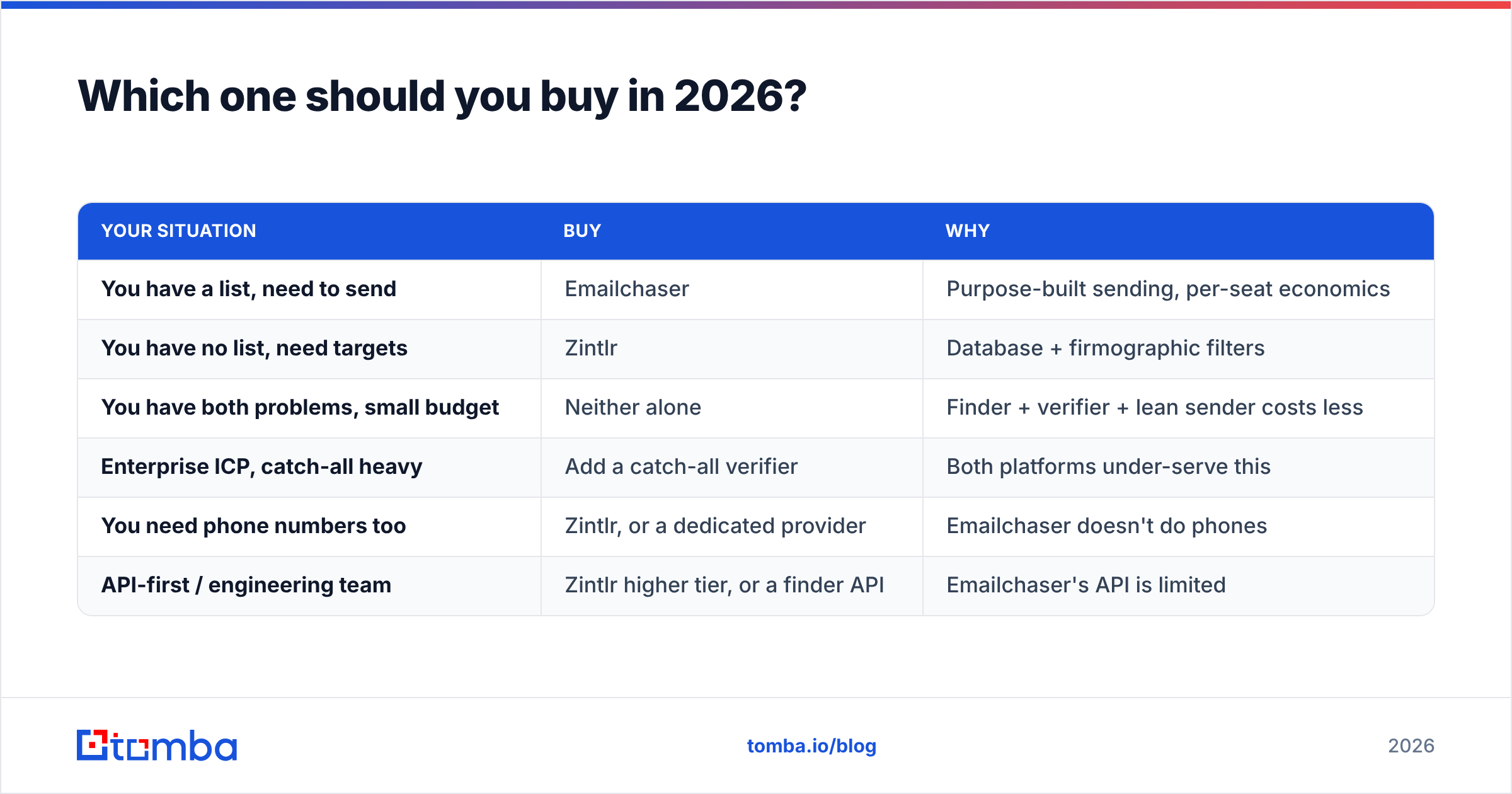
| Your situation | Buy | Why |
|---|---|---|
| You have a list, need to send | Emailchaser | Purpose-built sending, per-seat economics |
| You have no list, need targets | Zintlr | Database + firmographic filters |
| You have both problems, small budget | Neither alone | Finder + verifier + lean sender costs less |
| Enterprise ICP, catch-all heavy | Add a catch-all verifier | Both platforms under-serve this |
| You need phone numbers too | Zintlr, or a dedicated provider | Emailchaser doesn't do phones |
| API-first / engineering team | Zintlr higher tier, or a finder API | Emailchaser's API is limited |
If a peer pushed you toward one, ask which problem they were solving. A recommendation for Emailchaser usually comes from someone with a list. A recommendation for Zintlr usually comes from someone drowning in unqualified accounts. Neither review transfers to you by default.
Check the current versions on G2 before you sign an annual deal. Both products ship changes fast, and a 2025 review may describe a product that no longer exists. Looking to replace a whole sales-engagement suite instead? The Apollo alternative comparison covers the all-in-one end of the market.
The bottom line#
Emailchaser vs Zintlr is not really a fight. They are two halves of one workflow, and each vendor would like to sell you the whole thing. Emailchaser sends well and sources poorly. Zintlr sources well and sends poorly. The failure mode is buying one and assuming the other half is covered.
Either way, one layer decides whether any of it works: contact accuracy. A perfect sequence to a dead mailbox is a bounce. A plain sequence to a verified buyer is a meeting.
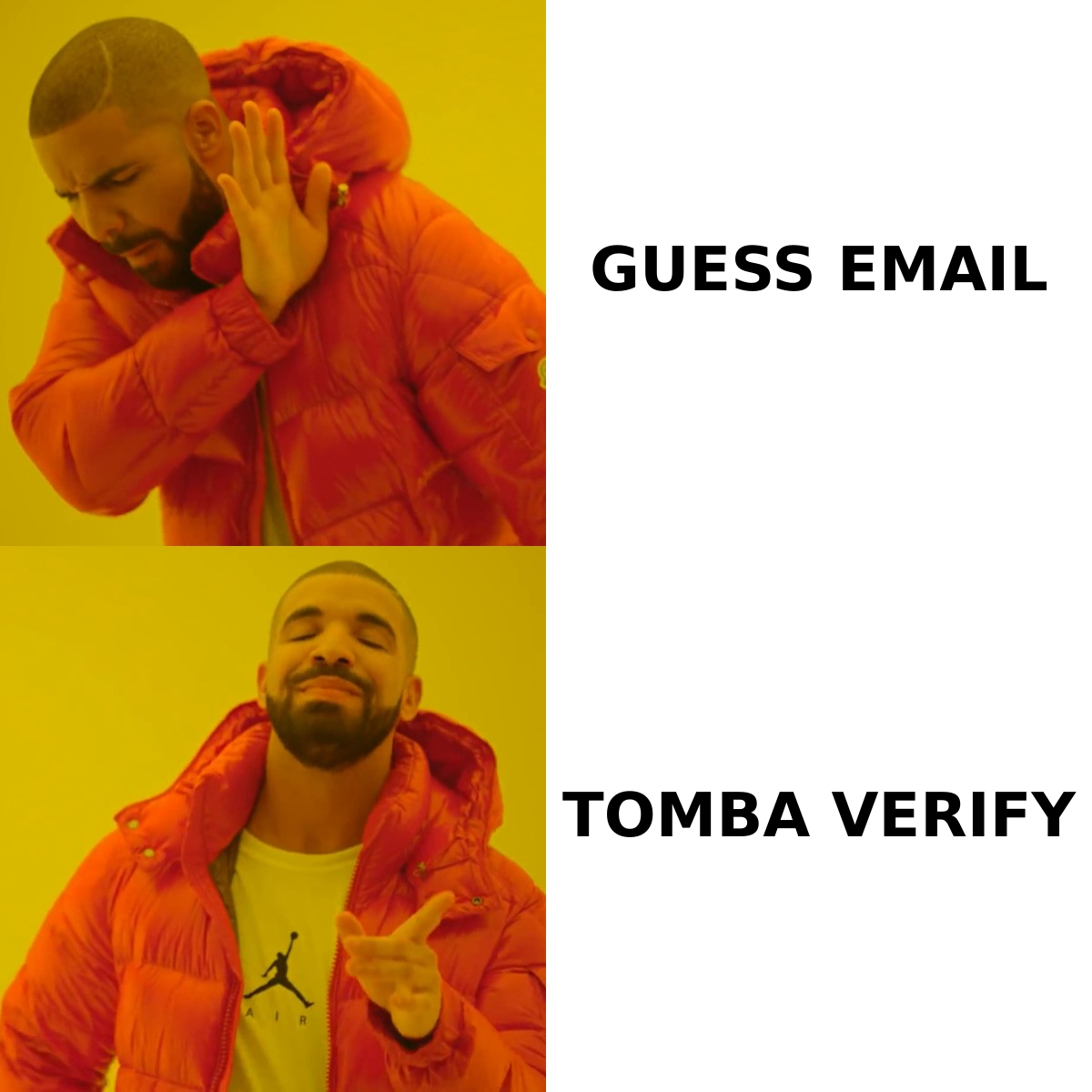
Start there. Tomba's Email Finder gives you named, confidence-scored contacts by domain, name, or company. Verification runs in the same workflow. The free tier covers 25 searches a month, and it is $49/mo when you outgrow that. Put it in front of whichever sender you pick. The rest of your stack finally gets a fair test.
Related guides#
Ready to find emails that actually work?
Join 150,000+ professionals who stopped guessing and started sending. Free credits on signup — no credit card required.
Get the Tomba newsletter
Practical outbound tactics and product updates — once every two weeks.
About the author