EmailGuard Pricing Reviews Pros and Cons: 2026 Breakdown
EmailGuard sells inbox placement tests, blacklist monitoring, and DNS checks for cold email teams. Here's what it really costs per inbox, where reviewers push back, and when a cheaper stack does the same job.

Want a straight answer on EmailGuard pricing reviews pros and cons? Here it is. EmailGuard tells you where your cold email actually lands. This guide covers what it costs per inbox, what reviewers praise, what they complain about, and when a cheaper stack does the same job.
TL;DR
- EmailGuard is a deliverability monitor. It runs inbox placement (spam) tests, seed-list reports, and blacklist and DNS checks for cold email teams.
- Pricing scales with placement tests and connected inboxes, not contacts. That makes it cheap for a solo sender. It gets expensive fast for an agency running 100+ mailboxes.
- Reviewers praise the fast results and the Google/Microsoft split view. The common gripes: seed-list results that swing between runs, thin fix advice, and per-inbox costs stacked on an already crowded tool bill.
- EmailGuard tells you where your mail landed. It does not clean your list, fix your copy, or replace verification. Bad data is still the top reason a warmed domain starts hitting spam.
- Best fit: teams sending from 10+ inboxes who need proof before a client blames them. Worst fit: teams with a 14% bounce rate on a scraped list.
What is EmailGuard and what does it actually do?#
EmailGuard (emailguard.io) is an inbox-placement and deliverability-monitoring platform built for cold outbound teams. You connect your sending mailboxes. It hands you seed addresses on Google Workspace, Microsoft 365, and a few other providers. You send your real campaign to those seeds. It then reports where each copy landed: primary inbox, promotions, or spam.
Think of it like a smoke detector in a restaurant kitchen. It doesn't cook, it doesn't clean, and it won't tell you the sauce is wrong. It tells you something is burning before the customers smell it. That is genuinely useful. It is also a narrower job than the marketing implies.
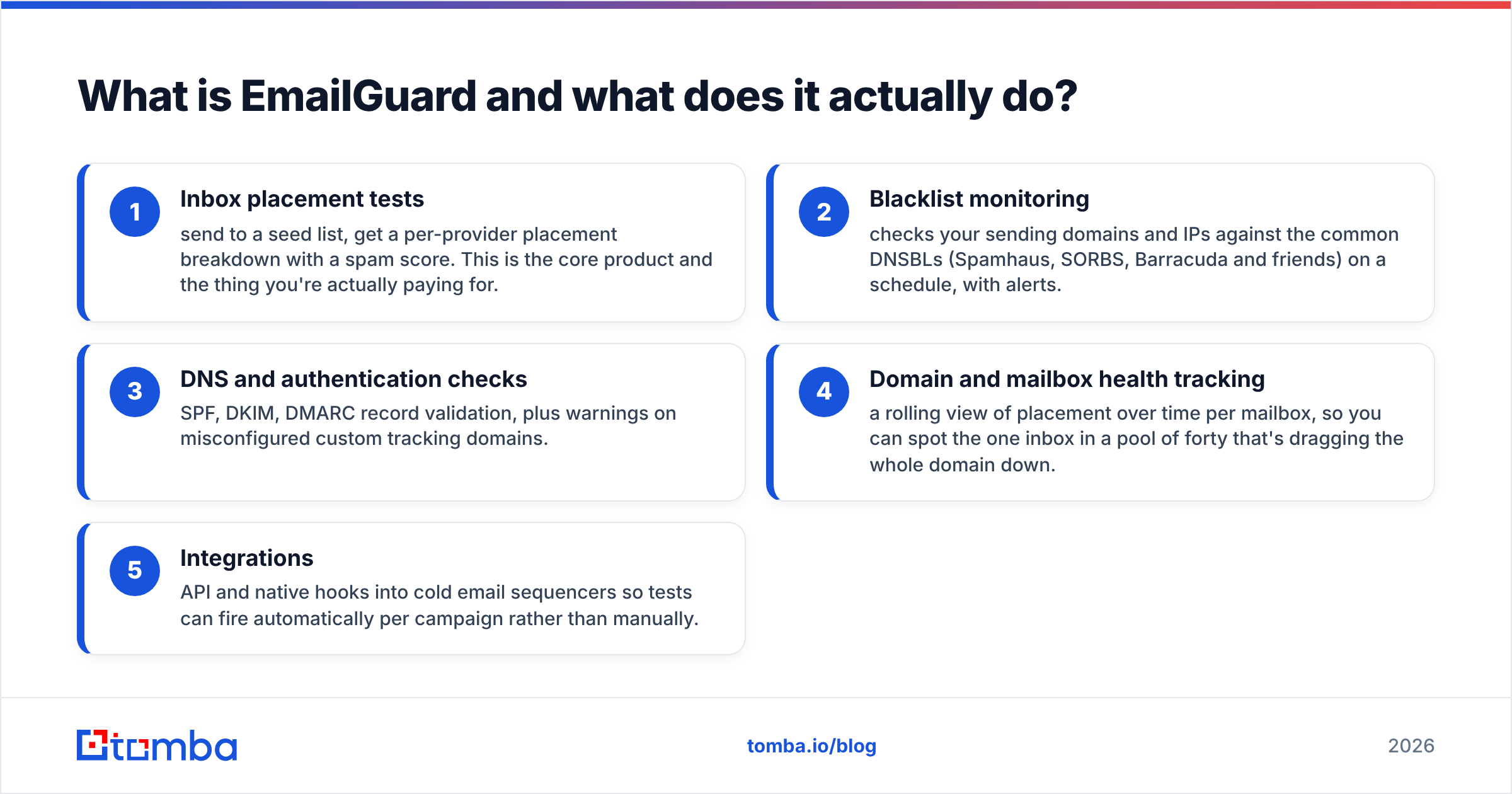
The feature set breaks into four buckets:
- Inbox placement tests — send to a seed list, get a per-provider placement breakdown with a spam score. This is the core product, and the thing you are actually paying for.
- Blacklist monitoring — checks your sending domains and IPs against the common DNSBLs (Spamhaus, SORBS, Barracuda and friends) on a schedule, with alerts.
- DNS and authentication checks — SPF, DKIM, DMARC record validation, plus warnings on misconfigured custom tracking domains.
- Domain and mailbox health tracking — a rolling view of placement per mailbox. It helps you spot the one inbox in a pool of forty that drags the whole domain down.
- Integrations — API and native hooks into cold email sequencers, so tests fire automatically per campaign instead of by hand.
That fifth point is where EmailGuard earns its keep for agencies. Manual spam testing is something everyone plans to do weekly and actually does twice a quarter.

How does EmailGuard pricing work in 2026?#
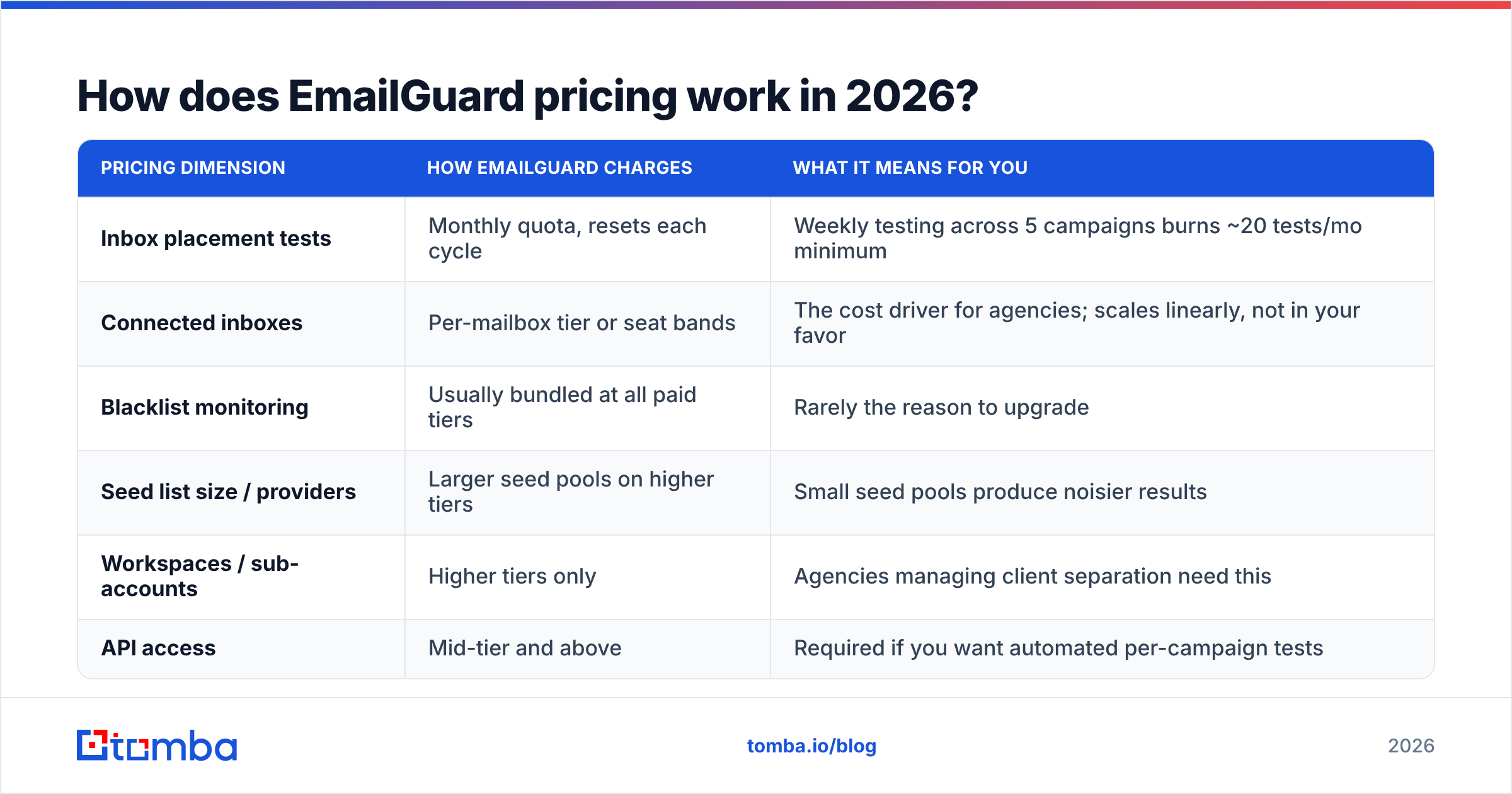
The important thing about EmailGuard pricing is not the sticker number. It is the unit. You are not buying contacts or emails sent. You are buying two things: the number of inbox placement tests you can run each month, and the number of connected sending inboxes being monitored.
That distinction changes the math. A team sending 200,000 emails a month from six mailboxes pays less than an agency sending 40,000 from ninety mailboxes. Volume-based pricing intuition will mislead you here.
| Pricing dimension | How EmailGuard charges | What it means for you |
|---|---|---|
| Inbox placement tests | Monthly quota, resets each cycle | Weekly testing across 5 campaigns burns ~20 tests/mo minimum |
| Connected inboxes | Per-mailbox tier or seat bands | The cost driver for agencies; scales linearly, not in your favor |
| Blacklist monitoring | Usually bundled at all paid tiers | Rarely the reason to upgrade |
| Seed list size / providers | Larger seed pools on higher tiers | Small seed pools produce noisier results |
| Workspaces / sub-accounts | Higher tiers only | Agencies managing client separation need this |
| API access | Mid-tier and above | Required if you want automated per-campaign tests |
Entry paid plans in this category usually start at $20–$40/month. That covers a single workspace and a low test volume. Mid tiers land around $70–$150/month once you need real inbox counts and API access. Agency plans are quoted case by case. Vendors here change tiers often, so check the live page before you budget. Do not trust a comparison post, including this one, for the exact figure.
The honest summary: EmailGuard is not expensive per test. It gets expensive per seat-month as your mailbox count grows. That is exactly what happens to every agency that succeeds at outbound.
What are the hidden costs most EmailGuard reviews skip?#
Three of them. They are the reason the answer to is it worth it? changes depending on who is asking.
1. It's an add-on, never a replacement. EmailGuard sits on top of your sequencer (Instantly, Smartlead, Reply, whatever), your warmup tool, your mailbox provider, and your data source. Nothing it does removes a line item from your stack. Budget it as an extra 5–10% on your outbound tooling spend, not as a swap.
2. Test quota inflation. One placement test is one campaign, from one mailbox, at one point in time. Say you rotate 30 mailboxes across 4 campaigns. Meaningful coverage is not 4 tests a week. It is dozens. Teams routinely buy a tier based on a plan to test weekly, then upgrade within two months.
3. Remediation is on you. A test that reports 62% spam on Microsoft is a diagnosis, not a prescription. Fixing it means rewriting copy, pausing mailboxes, re-warming, auditing your list, or changing your tracking domain. All of that costs time or another tool. Google's own sender requirements documentation is a better remediation reference than most in-app advice from any placement-testing vendor.
What do EmailGuard reviews say — the real pros and cons?#
Pulling from user reviews on G2 and the usual outbound communities, the sentiment clusters cleanly.
What reviewers like:
- Speed. Results land in seconds or a couple of minutes, not hours. Older placement tools batch their results, so this is the most praised feature.
- The provider split. Seeing Google and Microsoft placement separately is genuinely useful. The two fail for different reasons. Microsoft reacts more to content and reputation history. Google leans on engagement signals.
- Native sequencer integrations. Automated per-campaign testing turns a good intention into a habit.
- Clean UI. Low learning curve. Junior SDRs can read the report without a deliverability briefing.
What reviewers criticize:
- Result variance. Run the same campaign twice and placement can shift a lot. That comes with small seed lists. It is not a bug unique to EmailGuard, but users who treat the score as gospel get burned.
- Seed accounts aren't real recipients. Seed inboxes have no engagement history. They never open, reply, or move you to primary. Your seed-list placement is a floor estimate, not a mirror of your real prospect base.
- Per-inbox pricing at scale. The most common agency complaint. Adding mailboxes for capacity means paying twice: once to the mailbox provider, again for monitoring.
- Support depth on strategy. Fast answers on tooling questions. Thinner on why a domain is tanking and what to do about it.
- Overlapping features. Your sequencer may already ship a basic spam-score check, and your warmup tool may already report placement. Then you are paying for a third opinion.
How does EmailGuard compare to other deliverability tools?#
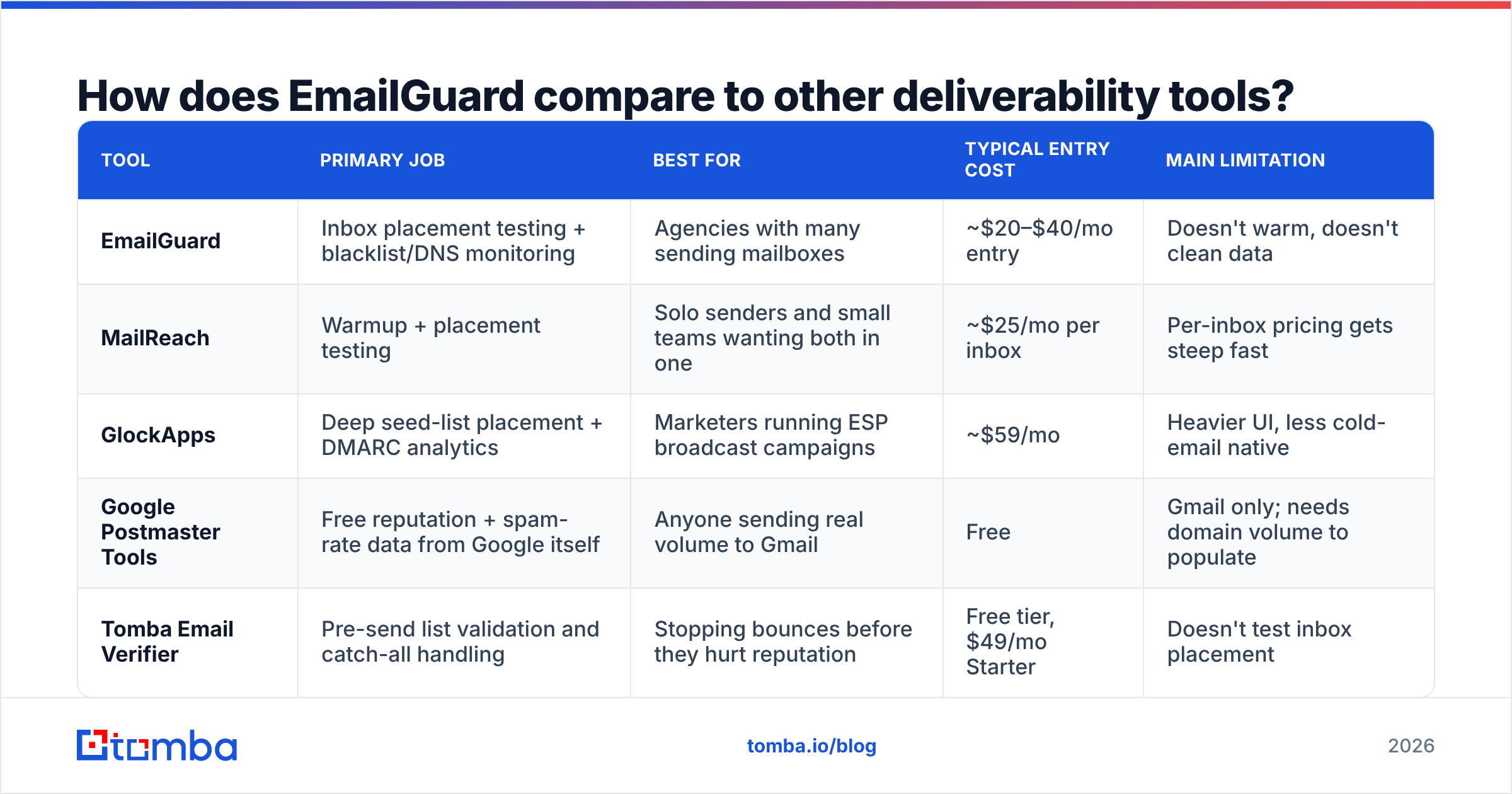
Here is the honest positioning. Nobody in this category does everything. Buying two overlapping tools is the most common outbound-stack mistake.
| Tool | Primary job | Best for | Typical entry cost | Main limitation |
|---|---|---|---|---|
| EmailGuard | Inbox placement testing + blacklist/DNS monitoring | Agencies with many sending mailboxes | ~$20–$40/mo entry | Doesn't warm, doesn't clean data |
| MailReach | Warmup + placement testing | Solo senders and small teams wanting both in one | ~$25/mo per inbox | Per-inbox pricing gets steep fast |
| GlockApps | Deep seed-list placement + DMARC analytics | Marketers running ESP broadcast campaigns | ~$59/mo | Heavier UI, less cold-email native |
| Google Postmaster Tools | Free reputation + spam-rate data from Google itself | Anyone sending real volume to Gmail | Free | Gmail only; needs domain volume to populate |
| Tomba Email Verifier | Pre-send list validation and catch-all handling | Stopping bounces before they hurt reputation | Free tier, $49/mo Starter | Doesn't test inbox placement |
Note the last row, because it is the substitution people get wrong. A placement tool and a verification tool are not competitors. They work at different stages. Verification prevents the damage. Placement testing measures the damage after the fact. If you can only afford one, and your list came from scraping or an aging CRM export, verification comes first.

Does EmailGuard fix bad data? (No — and that matters)#
This is where most EmailGuard pricing reviews pros and cons roundups go sideways. Teams buy a placement monitor because their email deliverability collapsed. Then they spend three months tuning copy while the real cause sits untouched in their CSV.
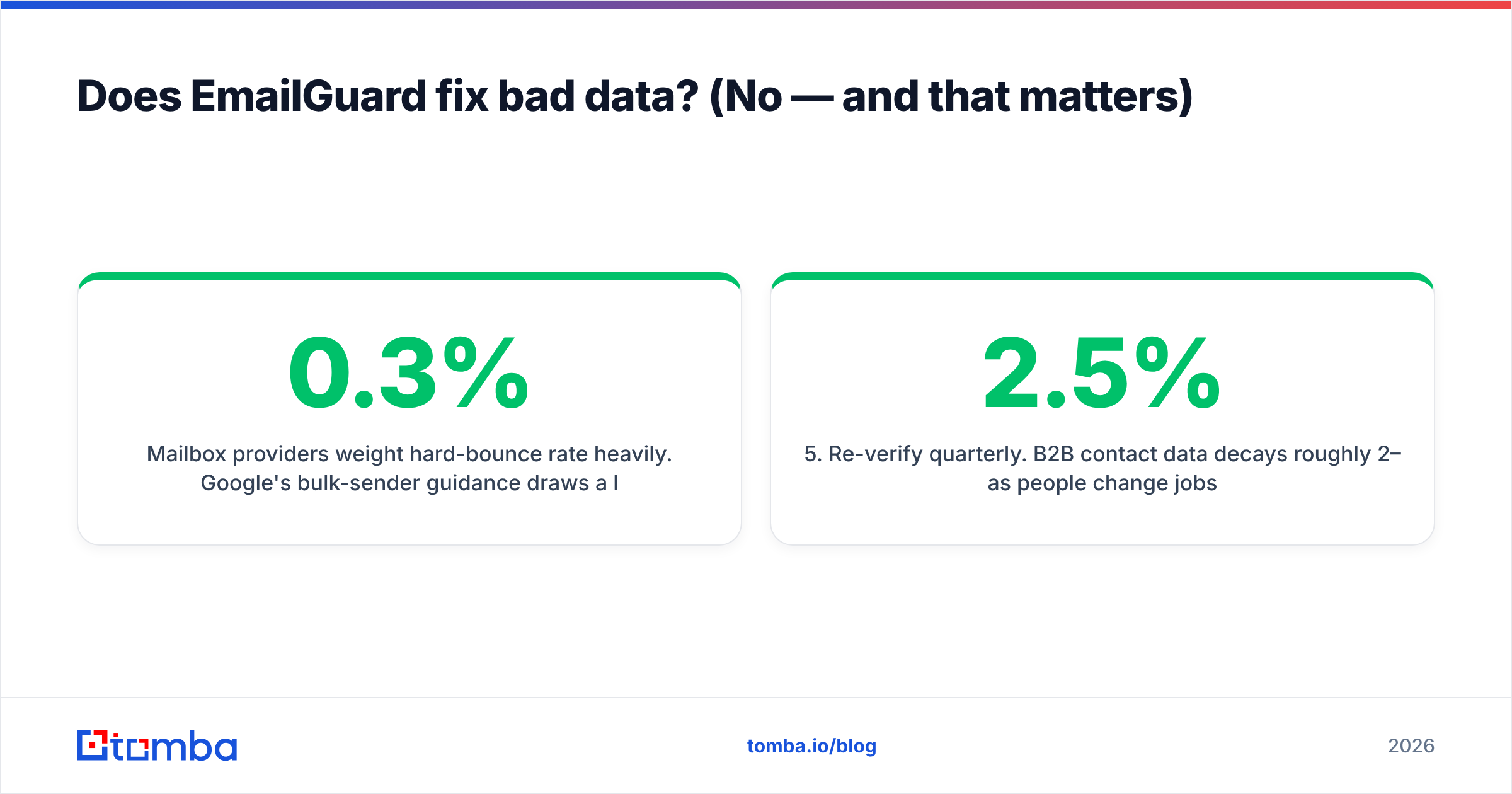
Mailbox providers weight hard-bounce rate heavily. Google's bulk-sender guidance draws a line at a 0.3% spam-complaint rate. Bounce rates above roughly 2–3% read as a purchased or stale list. A campaign with 12% invalid addresses will fail placement tests no matter how good your subject line is. EmailGuard will report that you are in spam. It will not tell you the addresses were guessed.
The fix order that actually works:
- Source verified contacts, don't guess patterns. A permutation guess that looks right is a coin flip on a live server. Use an email finder that returns a confidence score and source attribution.
- Validate the whole list before import. That includes the catch-all domains most tools shrug at. A catch-all verifier is the difference between a usable enterprise list and a bounce grenade.
- De-duplicate and segment by domain, so you are not hitting one company's server with 40 messages in an hour.
- Then warm, send, and measure placement. Now the placement number means something, because data quality is no longer in the way.
- Re-verify quarterly. B2B contact data decays roughly 2–2.5% per month as people change jobs.
Running steps 1–3 through a bulk verify pass costs a fraction of a month of deliverability tooling. It also removes the single largest source of placement noise.
Who should buy EmailGuard, and who shouldn't?#
Buy it if:
- You run outbound as an agency and need hard evidence when a client asks why replies dropped.
- You send from 10+ mailboxes and need per-mailbox health tracking to isolate the bad one.
- Your sequencer has no built-in placement reporting, or it only shows a single blended score.
- You have already fixed list hygiene and copy, and placement is your last unknown.
Skip it if:
- You send from one or two mailboxes at low volume. Google Postmaster Tools plus a free spam checker covers you.
- Your bounce rate is above 3%. Fix data first. The placement tool will just charge you to watch the fire.
- Your warmup provider already reports placement on the same seed network. You would be paying twice for the same data.
- Your budget is fixed and the choice is between placement monitoring and verification. Verification wins on ROI every time.
EmailGuard pricing reviews pros and cons: the 2026 verdict#
Fairly priced for what it is, and often bought for the wrong reason.
EmailGuard does one narrow thing well and fast. The integration story with cold email sequencers is the strongest argument for it over general-purpose deliverability suites. If you run outbound at agency scale, the per-inbox cost is annoying but defensible. You are buying an early warning system for an asset, your domains, that takes weeks to replace.
Are you a small team whose open rates just fell off a cliff? Run the cheaper diagnosis first. Pull a sample of 500 addresses from your last campaign, verify them, and look at the invalid rate. If it is above 5%, you have a data problem wearing a deliverability costume. No amount of placement testing will fix that. Check your SPF record and DMARC alignment too. Both are free to check, and both account for a surprising share of mystery spam foldering.
Fix the input before you monitor the output. Most placement failures trace back to addresses that were guessed rather than found. Tomba's Email Finder returns verified, source-attributed business emails with a confidence score. It pairs with the email verifier and catch-all checks, so your list is clean before the first send instead of diagnosed after the damage. Start on the free tier (25 searches/month), or see Tomba pricing for Starter at $49/mo when you are ready to scale outbound without burning domains.
Related guides#
Ready to find emails that actually work?
Join 150,000+ professionals who stopped guessing and started sending. Free credits on signup — no credit card required.
Get the Tomba newsletter
Practical outbound tactics and product updates — once every two weeks.
About the author