EmailListValidation vs Tomba: Full 2026 Comparison Guide
One tool cleans the list you already have. The other builds the list and then cleans it. Here is an honest breakdown of EmailListValidation vs Tomba on accuracy, pricing, API depth and the workflows each one actually fits.
EmailListValidation vs Tomba comes down to one question: do you need to clean a list, or build one? EmailListValidation verifies the addresses you already have. Tomba finds the addresses first, then verifies them.
TL;DR
- They solve different halves of one problem. EmailListValidation is a bulk verification service. You bring a list, it tells you which addresses are deliverable.
- Already have 200k contacts in a CSV? A pay-as-you-go verifier is the cheaper, simpler buy. Nothing wrong with that.
- No list yet? Verification-only tooling leaves you stuck. You still need a source. That is where Tomba's email finder, domain search and enrichment stack earns its subscription.
The money side splits the same way:
- The pricing models differ in shape. EmailListValidation sells credits that never expire. Tomba sells a monthly plan from $49/mo, and 25 free searches let you test first.
- For most outbound teams in 2026, the answer is "both, or one platform that does both." The deciding factor is simple. Do you pay two vendors, or one stack that covers find, verify and enrich?
What is EmailListValidation, and what does it do?#
EmailListValidation is a dedicated email verification service. You upload a list as CSV or XLSX, or push records through the API. Each address then runs through a validation chain: syntax check, MX record lookup, disposable-domain detection, role-account flags (info@, sales@), and an SMTP handshake to see whether the mailbox accepts mail.
The output is a status per row: valid, invalid, unknown, catch-all, disposable, role. You re-import the clean segment into your ESP and send.
That is the whole product, and the focus is a feature rather than a limit. Verify-only vendors tend to have simple pricing and fast bulk throughput. They also plug into the ESPs marketers actually use: Mailchimp, HubSpot, Klaviyo, Zapier. Credits are usually pay-as-you-go and never expire, which suits agencies with spiky volume.
What it does not do: give you addresses you don't already have. If your prospecting starts with "here are 40 companies we want to sell to," a verifier has nothing to verify yet.
What is Tomba, and where does it overlap?#
Tomba is a lead-data platform built around finding work email addresses. Verification is one step in that pipeline, not the whole product. The core modules:
- Email Finder — give it a name and a company domain. You get the verified work address, a confidence score, and the sources it came from.
- Domain search — enter a domain and get every public work address on it, grouped by department and seniority.
- Email verifier — the same syntax → MX → SMTP checks a standalone verifier runs, applied to any list you bring.
- Catch-all verifier — the hard case. Catch-all domains accept every address at the SMTP layer, so most verifiers just return "unknown." Tomba scores these separately.
- Enrichment and phone data — job title, LinkedIn profile, company details and B2B phone numbers on the contact record.
- API, CLI, MCP server and spreadsheet add-ins — the same functions via the Tomba API, Google Sheets or Excel.
The two products overlap on exactly one module: verification. Everything else is Tomba doing a job EmailListValidation was never built for.

EmailListValidation vs Tomba: how do the features compare?#
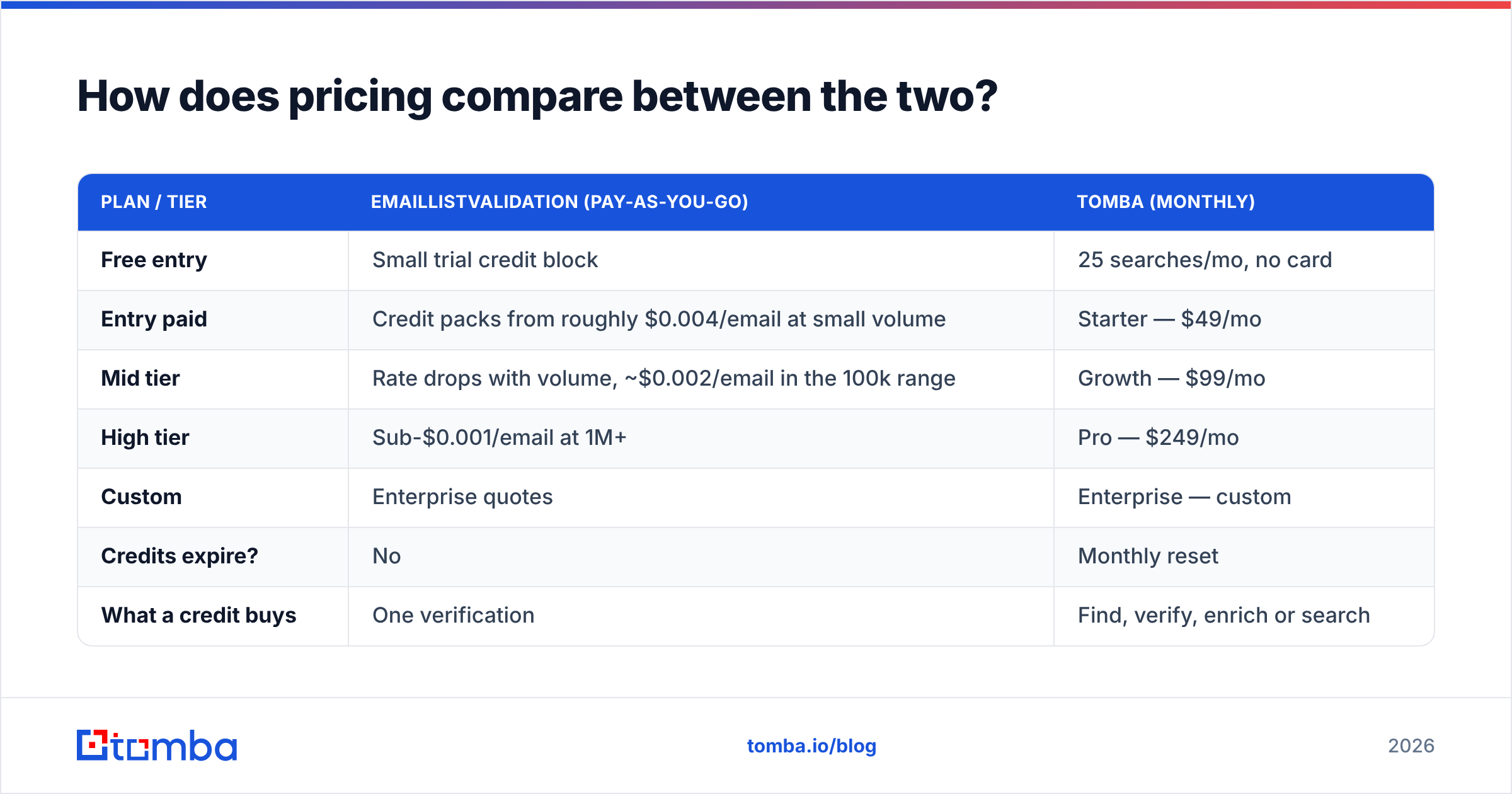
| Capability | EmailListValidation | Tomba |
|---|---|---|
| Bulk list verification | Yes — core product | Yes (bulk verify) |
| Find emails by name + domain | No | Yes |
| Domain-wide email discovery | No | Yes |
| Catch-all handling | Flagged as catch-all/unknown | Dedicated catch-all scoring |
| Phone number lookup | No | Yes |
| Contact enrichment (title, LinkedIn, firmographics) | No | Yes |
| Chrome extension | Limited | Yes |
| Google Sheets / Excel add-ins | Via integrations | Native add-ins |
| API | Yes | Yes, plus CLI and MCP server |
| Pricing model | Pay-as-you-go credits | Monthly plans + free tier |
| Free entry point | Small trial credit allowance | 25 searches/month, no card |
| Best for | Cleaning lists you already own | Building and cleaning lists |
The table makes the difference obvious. The question is not "which verifier is better." It is "do you need a verifier, or a lead-data platform that includes one?"
EmailListValidation vs Tomba: which one is more accurate?#
Accuracy here means two different things, and vendors love to blur them.
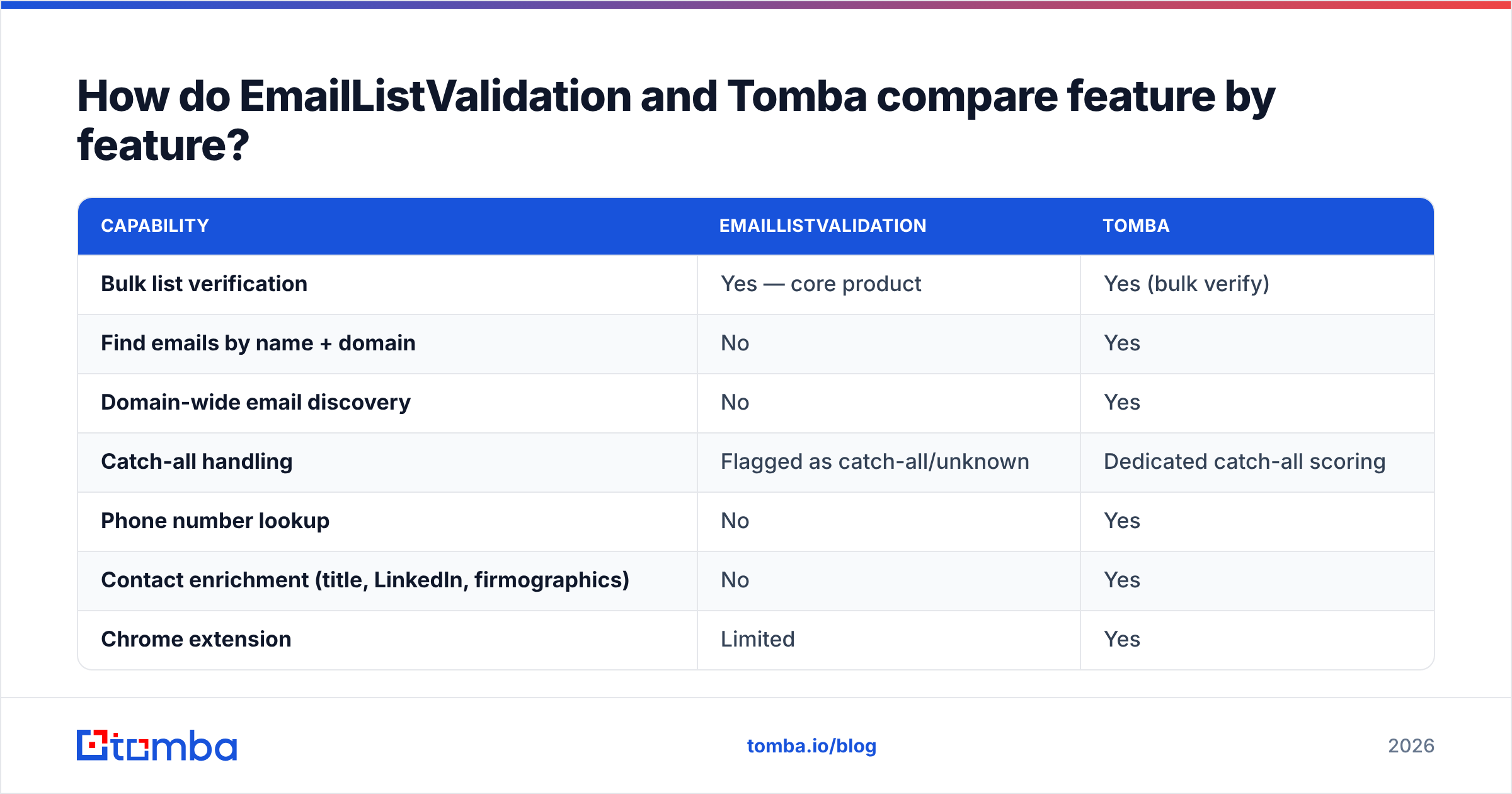
Verification accuracy is the share of addresses sorted correctly into deliverable and undeliverable. Every serious verifier lands in the 97–99% range on clean, non-catch-all domains, EmailListValidation included. The method is the same SMTP conversation, so results converge. Vendors only pull apart on the hard 15–25% of a B2B list: catch-all domains, greylisting servers, Microsoft 365 tenants that confirm nothing, and role accounts.
Discovery accuracy is the share of found addresses that turn out to be real. It decides whether your bounce rate is 1% or 9%. A verify-only tool has no opinion on it, because it never found anything.

You can settle this yourself in an afternoon:
- Take 300 addresses you know the truth about. Replied-to contacts in your CRM are perfect.
- Salt the list with 50 addresses you know are dead, such as departed staff and defunct domains.
- Run the same file through both tools.
- Score four buckets: correct valid, correct invalid, false valid (the expensive one), and unknown rate.
A tool with a 3% false-valid rate and 5% unknowns beats one with 0.5% false-valid and 30% unknowns. Why? The second one hands the call back to you on nearly a third of the list. Ask any vendor for their unknown rate on B2B domains. The ones who answer are usually the ones worth buying.
How does pricing compare between the two?#
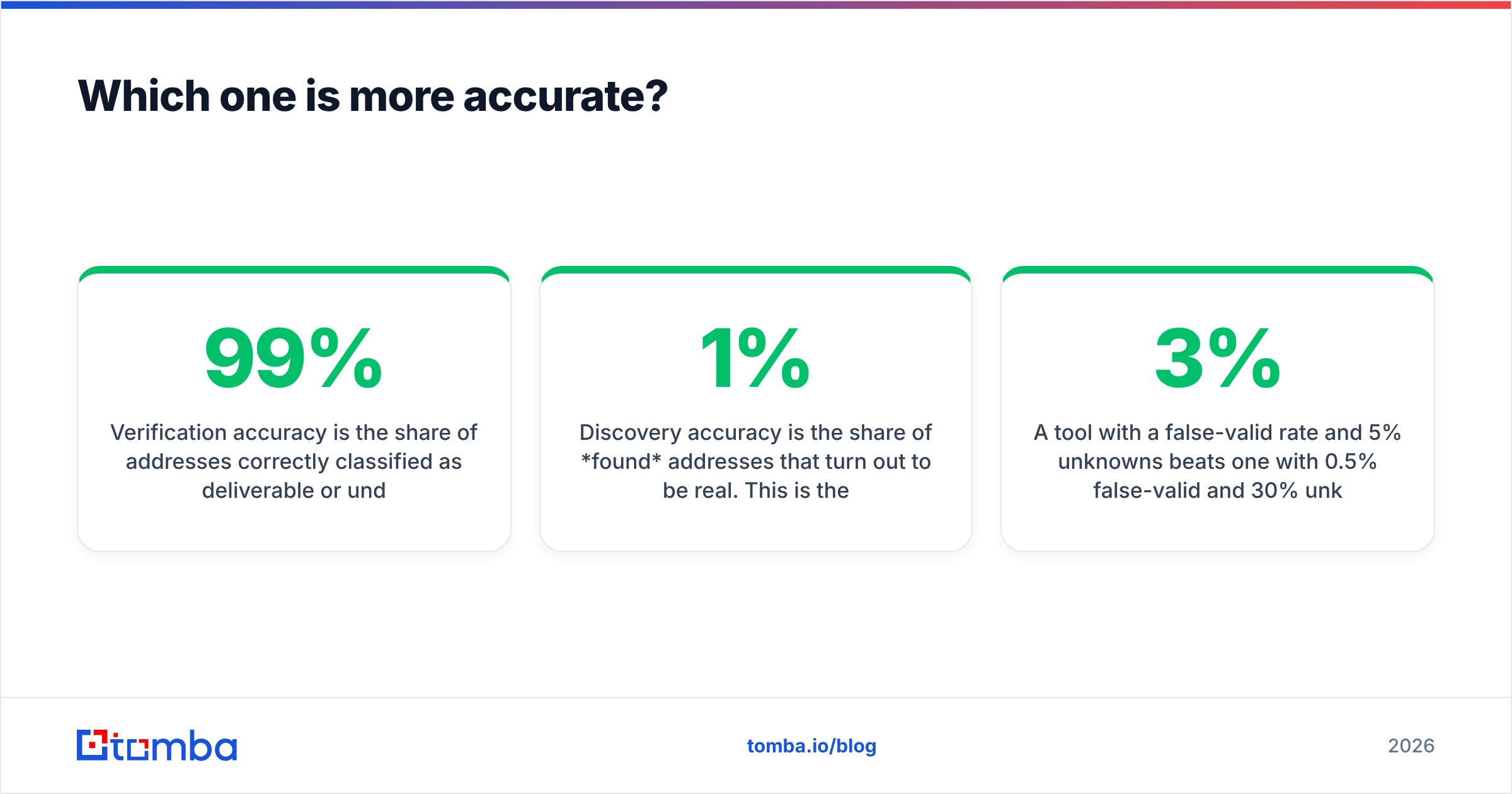
Two different shapes. EmailListValidation sells credits. You buy a block, it never expires, and you burn it when a list needs cleaning. Tomba sells monthly capacity across finding, verifying and enriching.
| Plan / tier | EmailListValidation (pay-as-you-go) | Tomba (monthly) |
|---|---|---|
| Free entry | Small trial credit block | 25 searches/mo, no card |
| Entry paid | Credit packs from roughly $0.004/email at small volume | Starter — $49/mo |
| Mid tier | Rate drops with volume, ~$0.002/email in the 100k range | Growth — $99/mo |
| High tier | Sub-$0.001/email at 1M+ | Pro — $249/mo |
| Custom | Enterprise quotes | Enterprise — custom |
| Credits expire? | No | Monthly reset |
| What a credit buys | One verification | Find, verify, enrich or search |
Two caveats. First, verification list prices move, so check the vendor's page before you budget. The figures above point in the right direction, but they are not a quote. Second, and more important: per-unit price is the wrong comparison when the units differ. A verification credit tells you an address is safe. A Tomba credit can produce an address that was not in your CRM five seconds ago. Full Tomba pricing is public if you want the exact per-plan allowances.
Where verify-only wins on cost: one-time cleanup projects. You inherited a 400k-row list from a merger. You need it clean once and never again. Credits that never expire fit that job, and paying $99/mo for a platform you use twice would be silly.
Where the subscription wins: continuous outbound. If your SDRs build 500 new contacts a week, you already pay for discovery somewhere. Maybe a scraper, a database subscription, or an intern with LinkedIn Sales Navigator. Verification sits on top of that. Two vendors, two invoices, two integrations, and a handoff in the middle where records get lost.
Is a standalone verifier still worth it in 2026?#
Yes, in three cases:
- You verify other people's lists as an ESP, agency or marketplace. You want raw throughput and per-unit pricing, not a prospecting suite.
- Compliance-driven cleaning. Some teams re-verify their whole database every quarter for deliverability. That is a volume job, and volume is what pay-as-you-go pricing is built for.
- You already have a source you like. If your data comes from an in-house scraper or a partner feed, bolting a cheap verifier on the end is rational.
Outside those cases, the market keeps merging tools. G2's email verification category now fills up with tools that also find, enrich or send. Buyers got tired of gluing four subscriptions together. The same pressure turned HubSpot from a marketing tool into a full CRM suite. It is now at work one layer down, in the data stack.

Which should you pick for your workflow?#
Match the tool to how your list gets built, not to a feature checklist.
Pick a verify-only service like EmailListValidation if:
- Your lists come from webforms, events, or a CRM you did not build for cold outreach.
- Your volume is spiky: 300k this quarter, nothing next quarter.
- You want one number on one invoice and no seats to manage.
- Your problem is bounce rate, not pipeline volume.
Pick Tomba if:
- You start from a company list, not a contact list. Domain search turns "these 80 accounts" into "these 340 named contacts" in one pass.
- You want find, verify, catch-all handling and enrichment behind one API key.
- You need contacts inside a spreadsheet, a CRM or an agent workflow. The Sheets add-in, Chrome extension and MCP server all hit the same data.
- You want to test first. The free tier gives 25 searches a month with no card, enough for a small accuracy bake-off.
Pick both if: you run high-volume list hygiene and active prospecting. At that scale, per-unit verification pricing can beat bundled credits. It is a real scenario at enterprise size, but not the common one.
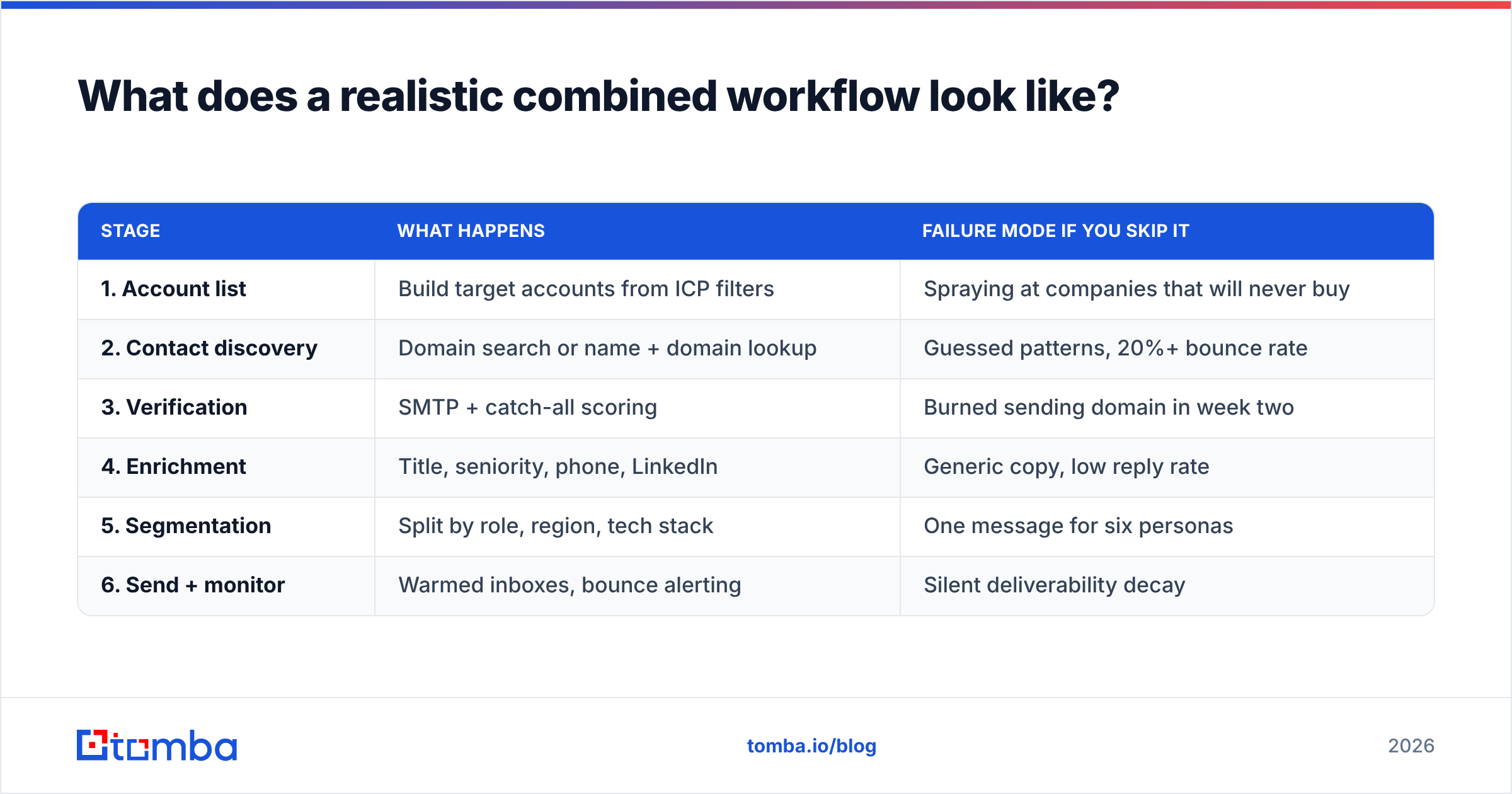
What does a realistic combined workflow look like?#
Most outbound teams end up with the same pipeline, whichever vendor names fill the slots:
| Stage | What happens | Failure mode if you skip it |
|---|---|---|
| 1. Account list | Build target accounts from ICP filters | Spraying at companies that will never buy |
| 2. Contact discovery | Domain search or name + domain lookup | Guessed patterns, 20%+ bounce rate |
| 3. Verification | SMTP + catch-all scoring | Burned sending domain in week two |
| 4. Enrichment | Title, seniority, phone, LinkedIn | Generic copy, low reply rate |
| 5. Segmentation | Split by role, region, tech stack | One message for six personas |
| 6. Send + monitor | Warmed inboxes, bounce alerting | Silent deliverability decay |
EmailListValidation covers stage 3, and covers it well. Tomba covers stages 2 through 4. Whether you buy one product or two depends on how much of that pipeline you have solved already.

What's the honest verdict?#
Neither tool is a worse version of the other. They aim at different points in the funnel. Buying the wrong one is a scoping mistake, not a quality mistake.
If your problem is "my list bounces," a focused verifier is the direct fix. EmailListValidation is a solid, well-established option, and its pricing rewards volume.
If your problem is "I don't have enough of a list to bounce," verification sits downstream of your real bottleneck. You need discovery first, with verification as a step inside it.
For most B2B teams running steady outbound in 2026, the second line fits. So the short answer on EmailListValidation vs Tomba is this: pick the verifier when hygiene is the job, pick the platform when the list itself is the gap. One API key for find, verify and enrich also removes a whole class of integration bugs. It usually costs less than two specialist subscriptions once you count seats and engineering time.
Test it on your own data before you decide. Pull 100 target companies you already chase. Run them through the Tomba Email Finder on the free tier: 25 searches a month, no card needed. Then compare the verified output against your current process. If discovery is not your bottleneck, you will know within an hour, and you can buy verification credits with a clear conscience. If it is, Starter at $49/mo is a smaller line item than the pipeline you are not building.
Related guides#
Ready to find emails that actually work?
Join 150,000+ professionals who stopped guessing and started sending. Free credits on signup — no credit card required.
Get the Tomba newsletter
Practical outbound tactics and product updates — once every two weeks.
About the author