EmailListVerify vs FindThatLead: Verify or Find Emails?
One tool cleans lists. The other builds them. We compare EmailListVerify and FindThatLead on accuracy, pricing, data coverage and workflow fit — plus when a single platform beats paying for both.
EmailListVerify vs FindThatLead is not really a fight. One tool cleans email lists. The other finds new ones. This guide shows which job each tool does well, what each one costs, and when a single platform beats paying for both.
TL;DR
- These two tools do not compete head-to-head. EmailListVerify is a list-cleaning engine. FindThatLead is a lead-sourcing and outreach platform. Comparing them is like comparing a dishwasher to a grocery store.
- Pick EmailListVerify if you already own a list. A CRM export, a webinar sign-up sheet, a scraped file. You need the bounce rate under 3% before you hit send.
- Pick FindThatLead if you have no list at all. It bundles prospect search, email finding, and a basic cold-email sender in one login.
- Running both costs roughly $50–$150/mo once volume is real. You also juggle two credit systems, two exports, and two APIs.
- Want find, verify, and enrich behind one credit pool and one API key? A single platform like Tomba is usually cheaper and less fiddly.
What is EmailListVerify and what does it actually do?#
EmailListVerify is a bulk email verification service. You upload a CSV of addresses. It runs each one through a validation chain. Then it hands back a clean file with a status on every row.
The validation chain is the product. A good verifier starts with syntax checks. Next it looks up DNS and MX records. It flags disposable domains and role accounts (info@, sales@, billing@). It screens for spam traps and honeypots. Last comes the SMTP handshake. The tool asks the mail server whether the mailbox exists, but it never delivers a message.
What you get back is a status per row: valid, invalid, unknown, catch-all (accept-all), disposable, role-based. What you do not get is a single new contact. EmailListVerify has no discovery layer. If your list is empty, the tool has nothing to work with.
It fits three jobs well:
- Pre-send hygiene — clean a list the day before a campaign. Bounces stay under the 2–3% line that mailbox providers punish.
- CRM decay control — B2B contact data rots about 25–30% a year as people change jobs. Re-check a stale database each quarter and you stop emailing ghosts.
- Third-party list vetting — you bought or inherited a file and have no idea what is in it.
What is FindThatLead and where does it sit?#
FindThatLead is a Spanish-built lead generation suite. Its core is an email finder. Give it a first name, a last name, and a company domain, and it returns the most likely work email. Around that core sit a few extras: search by criteria, a LinkedIn and Sales Navigator extension, a domain-based lead search, some enrichment fields, and Scrab.in-style outreach with basic email sequences.
That last part matters. FindThatLead wants to be a full outbound stack in one tab. Find the person, get the email, write the campaign, hit send. For a solo founder or a two-person agency, that is genuinely useful.
The trade-off is depth. A tool that does five things rarely does any of them as well as a specialist. FindThatLead does check emails, but the check is a quick sanity test. It is not the deep pipeline you get from a dedicated verifier. The sending features work, yet they will not replace a real sequencer. Reviews on G2 say much the same thing: easy and cheap, thinner on data in narrow markets.

EmailListVerify vs FindThatLead: how do they compare feature by feature?#
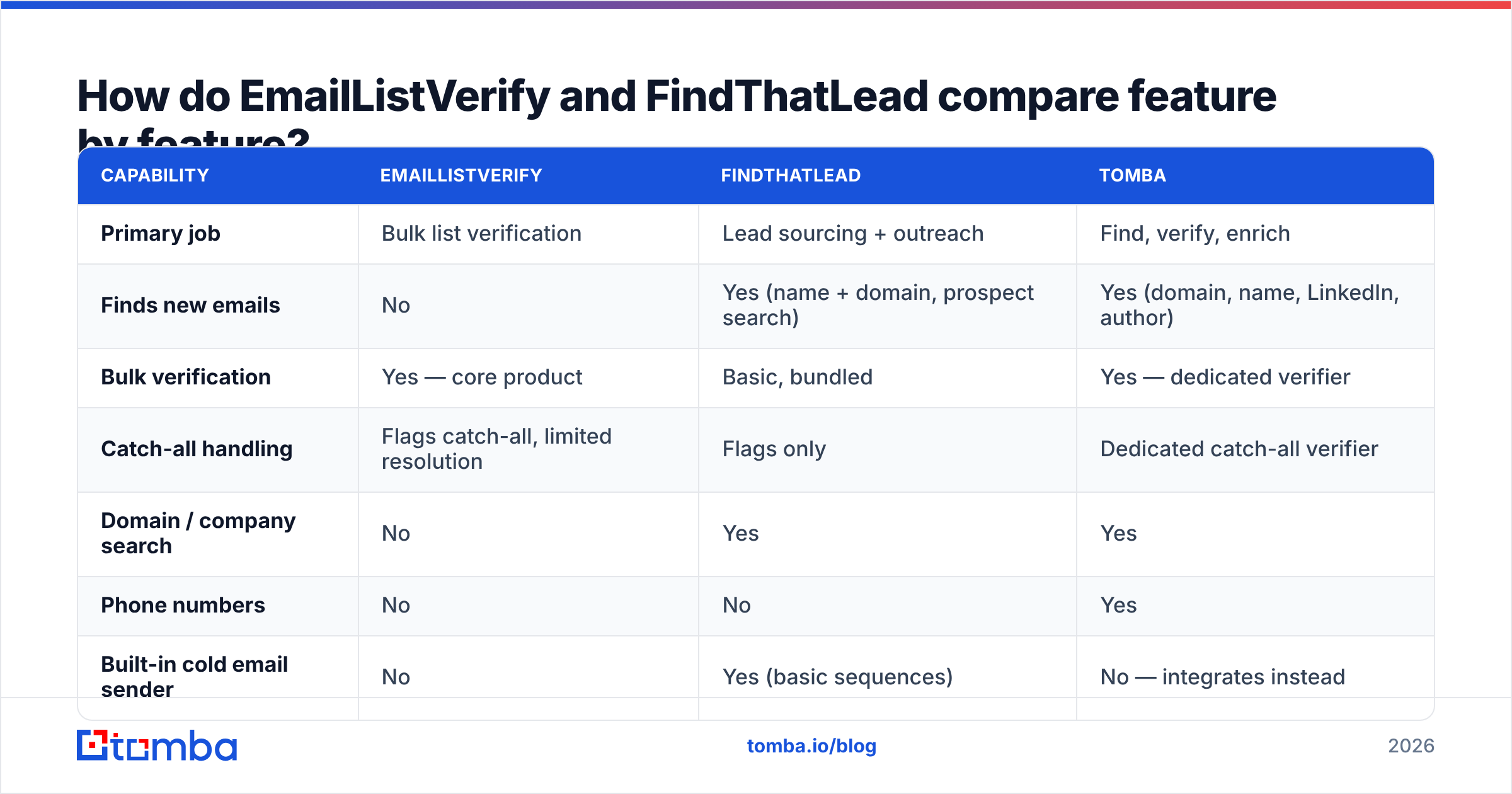
The honest framing: one tool sits upstream of the other. FindThatLead produces addresses. EmailListVerify judges them. Here is where each one stands.
| Capability | EmailListVerify | FindThatLead | Tomba |
|---|---|---|---|
| Primary job | Bulk list verification | Lead sourcing + outreach | Find, verify, enrich |
| Finds new emails | No | Yes (name + domain, prospect search) | Yes (domain, name, LinkedIn, author) |
| Bulk verification | Yes — core product | Basic, bundled | Yes — dedicated verifier |
| Catch-all handling | Flags catch-all, limited resolution | Flags only | Dedicated catch-all verifier |
| Domain / company search | No | Yes | Yes |
| Phone numbers | No | No | Yes |
| Built-in cold email sender | No | Yes (basic sequences) | No — integrates instead |
| Chrome extension | No | Yes | Yes |
| API | Yes (verification) | Yes (search + find) | Yes (find, verify, enrich) |
| Free tier | Small trial credits | Limited free plan | 25 searches/mo, free forever |
| Best for | Cleaning lists you already own | Solo founders building a first list | Teams that need one accurate pipeline |
Read that table as a Venn diagram with almost no overlap. The only shared column is verification. Even there, the two products are different animals. EmailListVerify is built to chew through a 400,000-row file overnight. FindThatLead is built to tell you whether the one address it just found looks safe to email.
Which tool is more accurate — and what does accuracy even mean here?#
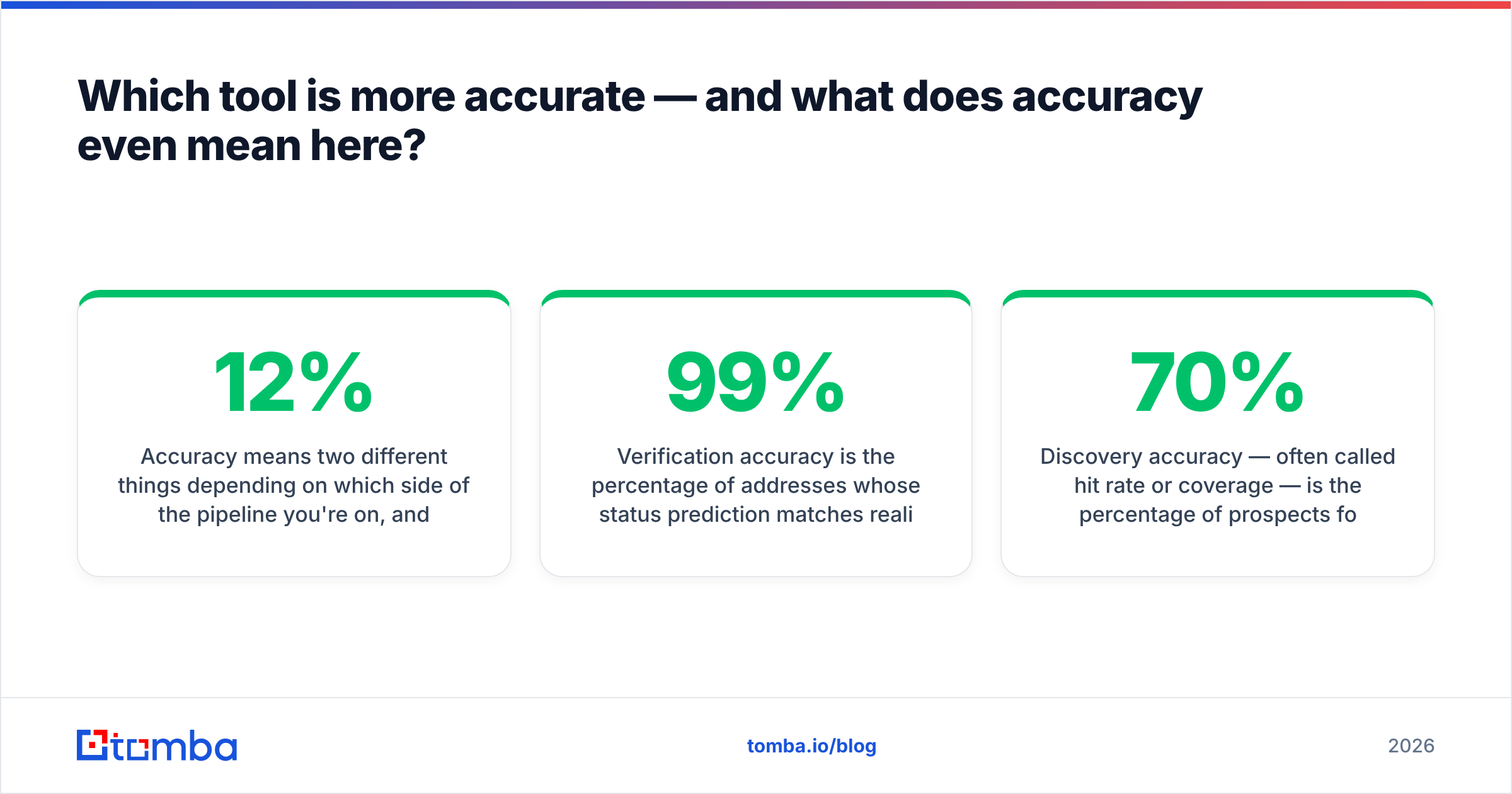
Accuracy means two different things here. Which one you care about depends on where you sit in the pipeline. Mix them up and you end up with a 12% bounce rate on a "verified" list.
Verification accuracy is simple to state. Of the addresses marked valid, how many really are? This is EmailListVerify's arena. Good verifiers land in the 96–99% range on normal company domains. That number falls apart on catch-all domains. Those mail servers accept every address at the SMTP layer, so the test tells you nothing. Any vendor claiming 99%+ accuracy including catch-alls is quietly changing the meaning of the word.
Discovery accuracy is often called hit rate or coverage. It asks how often the tool finds any address at all, and how many of those are right. This is FindThatLead's arena. Hit rates swing hard by market. A US SaaS list might resolve at 70% or better. A mid-market German manufacturing list can drop below 40%.

The practical result: EmailListVerify cannot save you from a bad finder. Say your source tool guesses firstname.lastname@ at a company that uses finitial-lastname@. The verifier marks it invalid, and it is right. You burned two credits and still have no contact. The reverse is also true. FindThatLead's built-in check will not rescue a 60,000-row list of five-year-old conference leads.
Two tests are worth running before you commit to either:
- The known-list test. Take 100 addresses you know are live: colleagues, customers, partners. Run them through the verifier. Anything marked invalid is a false negative. That is money you would throw away.
- The known-person test. Take 100 prospects whose emails you already have. Feed name plus domain to the finder and hide the answer. Count the exact matches. That is your real hit rate, not the one on the marketing page.
Want to run test two for free? The free email checker and the company email pattern tool will get you most of the way.
EmailListVerify vs FindThatLead: how does pricing compare?#
The two pricing models are built differently. A straight per-credit comparison will mislead you.
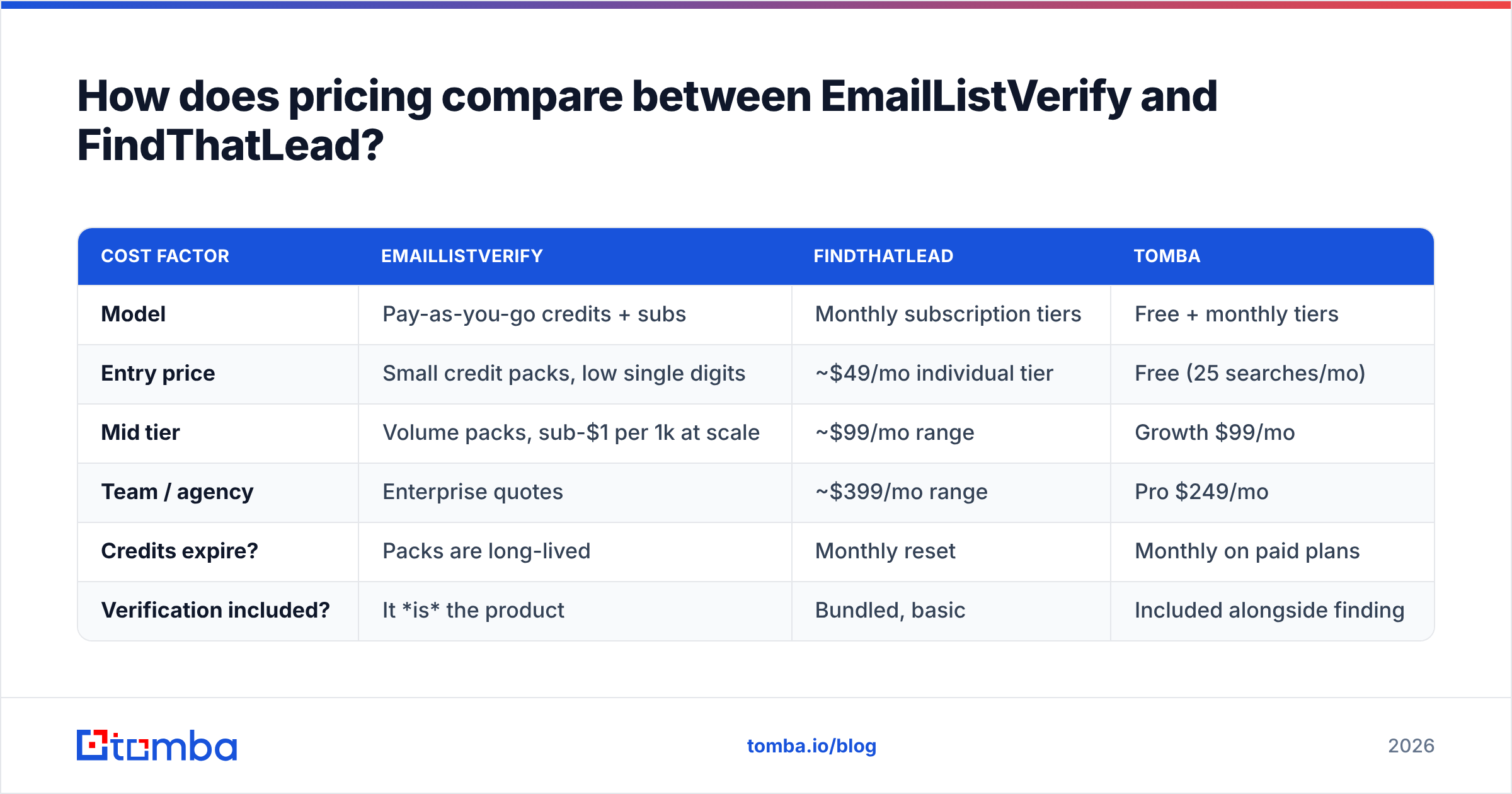
EmailListVerify leans pay-as-you-go. You buy a block of verification credits. They do not expire quickly, and the unit cost drops sharply with volume. Small blocks land in the low single digits per thousand. Large blocks fall well under a dollar per thousand. Monthly plans exist, but most people buy the credit packs.
FindThatLead is subscription-first. Monthly tiers usually start near $49 for one person. Team and agency plans climb into the low hundreds. Credits reset each month, and leftovers rarely roll over.
| Cost factor | EmailListVerify | FindThatLead | Tomba |
|---|---|---|---|
| Model | Pay-as-you-go credits + subs | Monthly subscription tiers | Free + monthly tiers |
| Entry price | Small credit packs, low single digits | ~$49/mo individual tier | Free (25 searches/mo) |
| Mid tier | Volume packs, sub-$1 per 1k at scale | ~$99/mo range | Growth $99/mo |
| Team / agency | Enterprise quotes | ~$399/mo range | Pro $249/mo |
| Credits expire? | Packs are long-lived | Monthly reset | Monthly on paid plans |
| Verification included? | It is the product | Bundled, basic | Included alongside finding |
Prices move. Check both vendors' pages and Tomba pricing before you budget. The structural point outlives any price change: verification is cheap and elastic, discovery is pricey and locked to a subscription. That gap is why so many teams pay two vendors. They keep a finder plan they cannot shrink, plus a verifier they top up as needed.
Now do the math on running both. A FindThatLead individual plan plus a modest EmailListVerify credit budget puts you at $60–$80/mo at low volume. Prospect seriously and you pass $150/mo. At that point you pay two bills, match up two exports, and maintain two API links for one workflow.
Who should choose EmailListVerify?#
Choose it if all of these are true:
- You already have the list. Trade show scans, CRM exports, a bought file, years of sign-ups. Discovery is not your bottleneck.
- Volume is bursty. You clean 80,000 rows in March and nothing in April. Pay-as-you-go beats a plan you do not use.
- Deliverability is the pain. Your bounce rate crossed 4%. Google Postmaster shows your reputation slipping, and a warmed domain is at risk.
- You need it inside a pipeline. Calling a verification API before every CRM write is clean design, and dedicated verifiers do this well.
Weighing up options in this lane? The EmailListVerify alternative breakdown shows how a combined find-and-verify platform handles the same job. The catch-all verifier page explains why accept-all domains need their own treatment.
Who should choose FindThatLead?#
Choose it if:
- You are starting from zero. No list, no CRM, no data. You need names before you need hygiene.
- You want one login for the whole loop. Find, enrich, sequence, send. The built-in sender beats stitching three tools together, as long as your volume stays modest.
- Your ICP is well covered. Test it on your real target segment. Western Europe and North American SaaS are usually solid. Niche verticals and small regional markets are hit-or-miss.
- Budget is a hard ceiling, not a variable. A flat monthly fee is easier to defend than a metered bill.
Where it strains: big-team seat management, deep enrichment fields, phone data, and any workflow where you would stake a domain's reputation on the verification.
Do you actually need both — or one tool that does both?#
Most teams land in the same place after a year of outbound. They start with a finder. Their bounce rate turns ugly. They bolt on a verifier. Now two subscriptions run one workflow: find the person → confirm the address → send.
The case for a single tool is not about features. It is about the seams. Every handoff between two vendors means a CSV export, a column mismatch, a surprise credit balance, and a second API to log into. Seams are where lists go stale, duplicates creep in, and someone emails a contact twice.
One platform closes them. With Tomba, a single credit pool covers email finding, email verification, and domain search for every address at a company. It also handles catch-all resolution, B2B phone numbers, and contact enrichment. Checks run at the moment of discovery. That beats a separate batch job days later, which is when it actually matters.

The Tomba API exposes all of it through one key. The bulk email finder handles the 10,000-row jobs that used to need a dedicated verifier. The free tier is 25 searches a month. Starter is $49/mo, Growth $99/mo, Pro $249/mo. One bill instead of two.
To be fair to both tools reviewed here: if you truly need only half of the workflow, the specialist is the right call. EmailListVerify at high volume, pay-as-you-go, is hard to beat on unit cost for pure cleaning. FindThatLead's built-in sender is something a data platform will not give you. The single-tool case starts the moment you need both halves. For anyone running real outbound, that is month two.
What should you do next?#
Run the two tests from the accuracy section on your own data before you sign anything. A vendor's published hit rate comes from their sample, not yours. One hundred rows of your real ICP will tell you more than any comparison post, this one included.
The EmailListVerify vs FindThatLead call comes down to workflow, not feature count:
- Only cleaning? EmailListVerify.
- Only finding, plus light sending, on a fixed budget? FindThatLead.
- Both, at any real volume? Use one platform.
If you land on the third, start with the Tomba Email Finder. Find verified work emails by domain, name, or company. Verification is built into the same call and the same credit. No second subscription, no CSV round-trip, no second vendor to settle up with at renewal. The free tier gives you 25 searches a month. Test it on the same 100 prospects you used to benchmark everything else, and let the hit rate decide.
Related guides#
Ready to find emails that actually work?
Join 150,000+ professionals who stopped guessing and started sending. Free credits on signup — no credit card required.
Get the Tomba newsletter
Practical outbound tactics and product updates — once every two weeks.
About the author