EmailListVerify vs Kipplo: Which Tool Should You Use in 2026?
EmailListVerify cleans lists. Kipplo sends campaigns. They get compared constantly, but they solve different problems — and one of them may not belong in your stack at all.
TL;DR
- EmailListVerify is a list-cleaning tool. Kipplo is an outbound sending platform. Comparing them head-to-head is like comparing a water filter to a kettle — you probably need the function of both, but only one of them is a verifier.
- If your problem is "my bounce rate is 9% and my domain is getting throttled," EmailListVerify (or any competent verifier) is the fix. Kipplo will not save you.
- If your problem is "I have clean data but no sequencing, no inbox rotation, and no warmup," that's Kipplo's lane — and EmailListVerify does none of it.
- Buying both means two vendors, two credit systems, and a manual CSV shuffle between them. A single find-verify-enrich API plus one sender is usually cheaper and less brittle.
- Price is not the deciding factor here. Where verification happens in your workflow is. Verify at the moment of discovery, not the night before you hit send.
What are EmailListVerify and Kipplo, exactly?#
Start with the category, because half the confusion in the emaillistverify vs kipplo comparison comes from people assuming they're substitutes.
EmailListVerify is a bulk email verification service. You upload a list — CSV, XLSX, or push it through the API — and it runs syntax checks, MX record lookups, SMTP handshakes, disposable-domain detection, role-account flagging, and spam-trap screening. It returns each address bucketed as valid, invalid, catch-all/accept-all, or unknown. That's the whole product. It doesn't find emails, doesn't enrich contacts, and doesn't send anything.
Kipplo sits at the other end of the pipeline. It's a cold outreach platform: connect mailboxes, warm them up, rotate sends across accounts, build multi-step sequences, track replies, and manage a unified inbox. Platforms in this category typically bundle a light verification step so you don't send to obvious garbage, but that bundled check is a guardrail, not a replacement for a dedicated verifier.
So the honest framing is: EmailListVerify is a component. Kipplo is a container. One cleans the fuel; the other is the engine.
How do EmailListVerify and Kipplo compare head to head?#
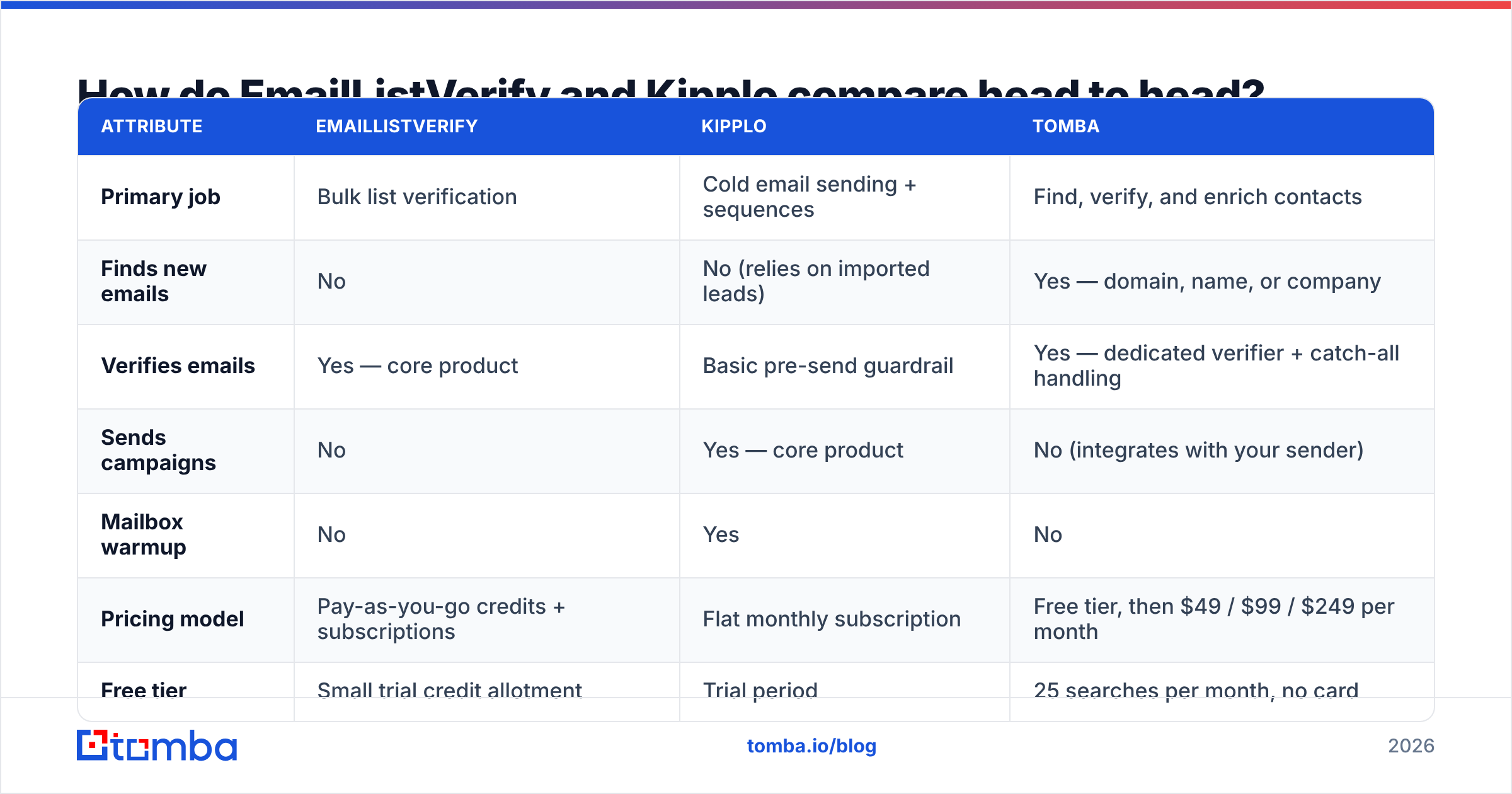
Here's the side-by-side on the attributes that actually change your decision. Pricing on both products moves — treat the cost rows as directional and confirm on the vendor pages before you budget.
| Attribute | EmailListVerify | Kipplo | Tomba |
|---|---|---|---|
| Primary job | Bulk list verification | Cold email sending + sequences | Find, verify, and enrich contacts |
| Finds new emails | No | No (relies on imported leads) | Yes — domain, name, or company |
| Verifies emails | Yes — core product | Basic pre-send guardrail | Yes — dedicated verifier + catch-all handling |
| Sends campaigns | No | Yes — core product | No (integrates with your sender) |
| Mailbox warmup | No | Yes | No |
| Pricing model | Pay-as-you-go credits + subscriptions | Flat monthly subscription | Free tier, then $49 / $99 / $249 per month |
| Free tier | Small trial credit allotment | Trial period | 25 searches per month, no card |
| API access | Yes | Yes | Yes — email finder API on all paid plans |
| Best for | Cleaning an inherited or aging list | Running the actual outbound motion | Building the list correctly in the first place |
The table makes the real point: there is no row where these two overlap meaningfully. They aren't competitors. They're neighbors on the assembly line.
What does EmailListVerify actually do well?#
Credit where it's due — bulk verification is an unglamorous, high-volume problem, and EmailListVerify has been solving it for years. Its strengths:
- Pay-as-you-go economics. Credits don't expire on the PAYG plans, which suits agencies with lumpy workloads. You clean a 50,000-row list in March and don't pay again until June.
- Volume discounts that actually bite. Per-thousand cost drops steeply as list size grows. At six-figure volumes it's one of the cheaper options on the market.
- Real spam-trap and disposable detection. Not just regex plus an MX ping — it screens known honeypot domains and throwaway providers, which is where naive verifiers fail.
- Straightforward API. Single-address and bulk endpoints, predictable JSON, no ceremony.
Its weaknesses are structural rather than technical:
- It only works on lists you already have. Verification is a downstream act. If your list came from a scraper or a shared database, verification tells you which rows are deliverable — not which rows are worth emailing.
- Catch-all domains stay ambiguous. Every SMTP-based verifier hits the same wall on accept-all servers, which is roughly 15–20% of B2B domains. How a vendor handles that grey bucket matters more than its headline "99% accuracy" claim. Tools with a dedicated catch-all verifier resolve a meaningful slice of those; tools without one just hand you a shrug.
- It's a separate step. Someone has to export, upload, wait, download, re-import. That's a human in the loop, every single time, and humans skip steps under deadline.

Where does Kipplo fit in an outbound stack?#
Kipplo competes with the sending layer — the Instantly, Smartlead, Lemlist tier of the market. If you're evaluating it, you're really asking three questions:
- Can it protect my domains? Warmup, inbox rotation, and send throttling are table stakes now. Google and Yahoo's bulk sender requirements pushed spam-complaint thresholds below 0.3%, and platforms that don't pace sends will burn a domain in a fortnight. Read the Google bulk sender guidelines once, properly — most deliverability advice on the internet is a garbled retelling of that page.
- Can it handle my sequence logic? Conditional branches, reply detection, multi-mailbox assignment, per-step A/B tests.
- Does its reporting tell me anything actionable? Open rates are increasingly noise thanks to privacy proxies. Reply rate and positive-reply rate are the only metrics worth a dashboard slot.
What Kipplo is not is a data source. Whatever leads you feed it, it sends to. Its built-in verification is a last-mile safety net — useful, but it runs on a list that's already been assembled, which means any bad sourcing decision upstream is already baked in.
Check current user sentiment on G2 before committing to any sending platform; the sending layer churns faster than any other part of the stack, and a tool that was excellent 18 months ago may be coasting.
Which is cheaper for a 10,000-contact campaign?#
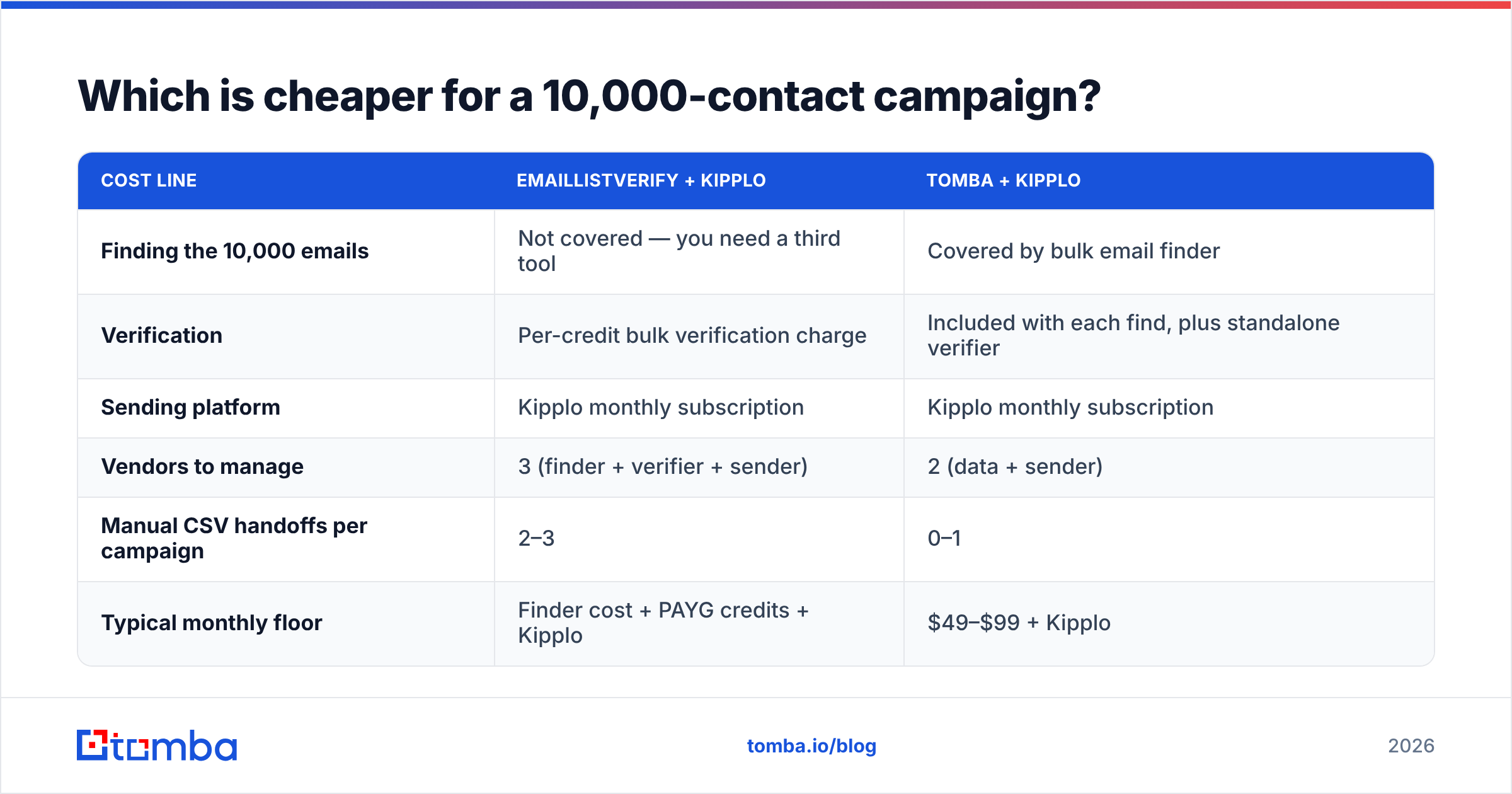
This is the question people actually want answered, so let's model it honestly. Assume you're starting from a list of 10,000 prospect names and companies — no emails yet — and you want to run a three-step sequence.
| Cost line | EmailListVerify + Kipplo | Tomba + Kipplo |
|---|---|---|
| Finding the 10,000 emails | Not covered — you need a third tool | Covered by bulk email finder |
| Verification | Per-credit bulk verification charge | Included with each find, plus standalone verifier |
| Sending platform | Kipplo monthly subscription | Kipplo monthly subscription |
| Vendors to manage | 3 (finder + verifier + sender) | 2 (data + sender) |
| Manual CSV handoffs per campaign | 2–3 | 0–1 |
| Typical monthly floor | Finder cost + PAYG credits + Kipplo | $49–$99 + Kipplo |
The pure-dollar gap is often small. The operational gap isn't. Every CSV handoff is a place where a rep exports the wrong segment, forgets to re-verify the 3,000 rows added last Tuesday, or ships a list with a 4-month-old snapshot in it. B2B contact data decays somewhere around 22–30% per year — HubSpot's own research has been making this point for a decade. A list verified in January is not a clean list in June.
That's the argument for verifying at the moment of discovery rather than as a pre-send ritual. If your finder returns a confidence-scored, already-verified address, the pre-send clean becomes a spot check rather than a load-bearing step.
Do you actually need both — or neither?#
Run yourself through this decision tree:
- You inherited a large, aging list and need it cleaned once. Use a bulk verifier. EmailListVerify's PAYG credits are well suited to exactly this — a one-off job with no ongoing commitment. You do not need a subscription for a one-time task.
- You're building lists continuously from scratch. A standalone verifier is the wrong shape. You want find-and-verify in one call, so bad addresses never enter your CRM. That's the email finder + email verifier combination working as one step, not two.
- You have clean data but no sending infrastructure. Kipplo (or a peer) is the buy. Verification isn't your bottleneck.
- You have neither data nor sending. Buy the data layer first. A great sequencer pointed at a bad list produces bounces faster, which is worse than doing nothing.
- You're running high-volume agency work across many clients. You'll likely end up with a dedicated verifier and a finder and a sender — the volume justifies the specialization. That's the one case where stacking all three is genuinely correct.
- You're a solo founder doing under 500 sends a month. Free and starter tiers cover you. Don't buy an enterprise-shaped stack for a founder-shaped problem.
Most teams land on 2 or 3. Very few genuinely need a standalone bulk verifier as a permanent line item — it tends to be a symptom of sourcing data you don't trust.

How do you build a stack that doesn't need three vendors?#
The consolidation play looks like this:
- Source and verify in one call. Use a domain search to pull every public address at a target company, with pattern confidence and verification status attached. No export, no upload, no waiting on a batch job.
- Handle catch-alls explicitly. Don't let them sit in an "unknown" pile forever. Resolve what's resolvable, then decide a policy for the rest — most teams send to catch-alls on a separate, lower-volume domain to isolate risk.
- Enrich once, at ingest. Job title, seniority, company size, tech stack. If you're enriching after the sequence is built, you've already written the wrong copy.
- Push straight into the sender. Whether that's Kipplo, Instantly, or anything else, the handoff should be an API call or a native integration — not a person with a spreadsheet. Tomba's integrations cover the usual CRM and automation suspects, and the API covers everything else.
- Re-verify on a schedule, not on a panic. Quarterly for active segments, monthly for anything you're sequencing heavily. Put it in a cron job so nobody has to remember.
Do that and the standalone-verifier line item mostly evaporates. You still verify — you just stop paying a separate vendor for a step that should be attached to discovery.
What about accuracy — is a dedicated verifier more accurate?#
Not necessarily, and the marketing claims are close to useless here. Every verification vendor advertises 98–99% accuracy, measured on lists they chose, using a definition of "accuracy" they chose. Some count catch-alls as correctly classified. Some exclude unknowns from the denominator entirely.
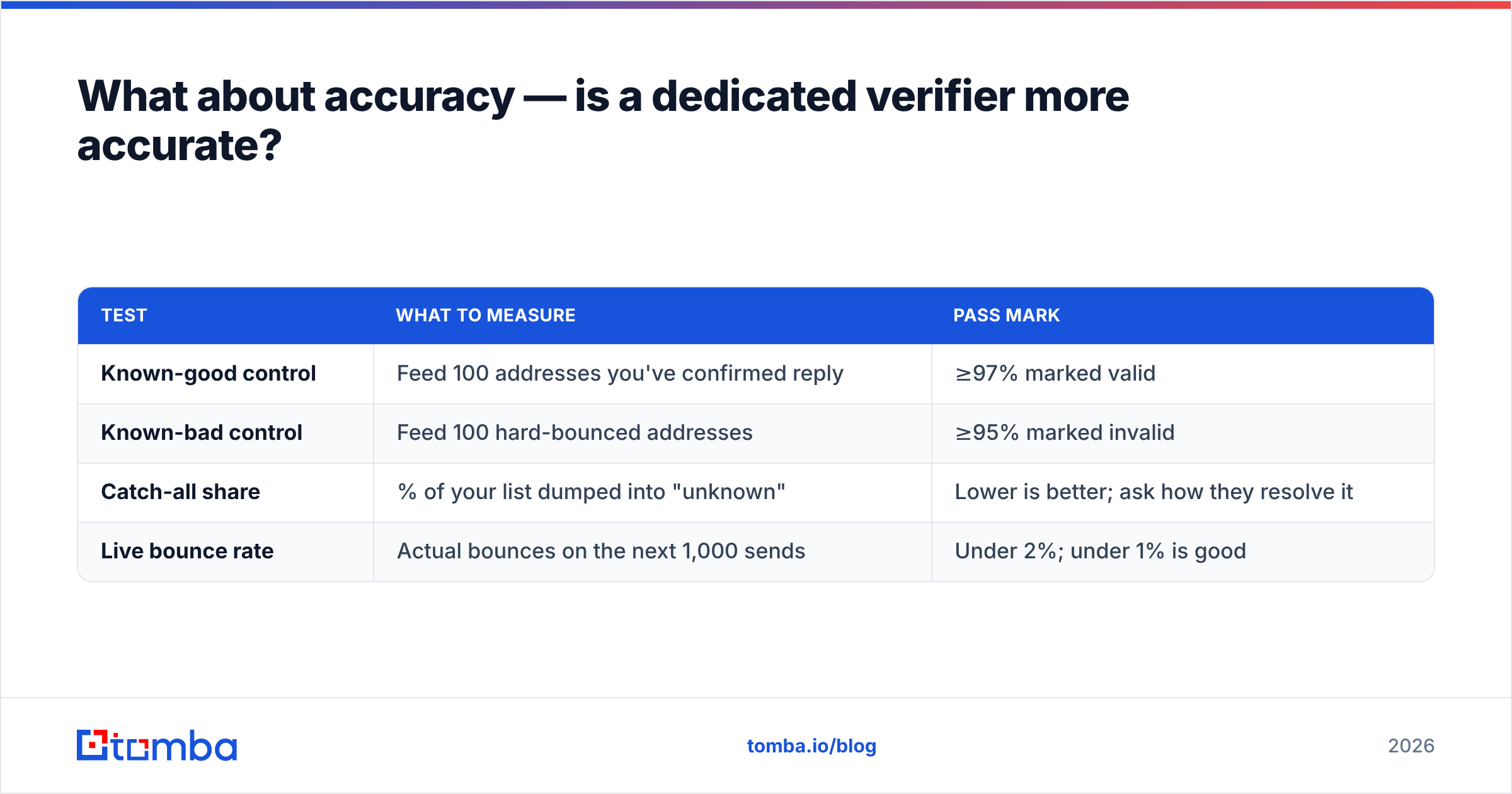
What to test instead, on your own data:
| Test | What to measure | Pass mark |
|---|---|---|
| Known-good control | Feed 100 addresses you've confirmed reply | ≥97% marked valid |
| Known-bad control | Feed 100 hard-bounced addresses | ≥95% marked invalid |
| Catch-all share | % of your list dumped into "unknown" | Lower is better; ask how they resolve it |
| Live bounce rate | Actual bounces on the next 1,000 sends | Under 2%; under 1% is good |
Run that against any two vendors with the same 200 addresses and you'll learn more in an afternoon than from a month of reading comparison pages — including this one. If you want a broader field, our EmailListVerify alternative breakdown covers how the main verification players handle the catch-all problem specifically.
Frequently asked questions#
Is Kipplo a replacement for EmailListVerify? No. Kipplo's pre-send checks reduce obvious risk, but they aren't equivalent to running a list through a dedicated bulk verifier — and neither tool finds emails in the first place.
Can I use EmailListVerify with Kipplo? Yes, and plenty of teams do. Clean in EmailListVerify, import to Kipplo, send. The friction is the manual handoff, which quietly reintroduces stale data between campaigns.
Which is better value in 2026? Wrong question. They price different things. The value question is whether you should be paying for standalone verification at all, versus getting it bundled with discovery.
Do I still need warmup if my list is verified? Yes. Verification protects against bounces; warmup protects against reputation damage from sudden volume changes. Different failure modes, different fixes. Check your setup with an SPF checker before you scale sends.
The verdict#
If you already have the leads and just need them clean, EmailListVerify does that job competently and cheaply at volume. If you already have clean leads and need to send at scale, Kipplo is in the right category — evaluate it against its actual peers in the sending layer, not against a verifier.
But if you're standing at the start of the pipeline with a target account list and no contact data, neither one solves your first problem. You need to find the addresses, verify them at the point of discovery, and hand a trustworthy list to whatever sends it.
That's what the Tomba Email Finder is built for: find by domain, name, or company, get verification and confidence scoring attached to every result, and push straight into your sequencer through the API or a native integration. Start on the free tier — 25 searches a month, no card — and if it holds up on your own control lists, Tomba pricing starts at $49/mo for Starter, $99/mo for Growth, and $249/mo for Pro. Test it against whatever you're using now with the same 200 addresses. The data will settle the argument faster than any comparison table.
Related guides#
Ready to find emails that actually work?
Join 150,000+ professionals who stopped guessing and started sending. Free credits on signup — no credit card required.
Get the Tomba newsletter
Practical outbound tactics and product updates — once every two weeks.
About the author