EmailListVerify vs LeadIQ: Which One Do You Actually Need?
EmailListVerify cleans lists. LeadIQ builds them. Comparing the two head-to-head only makes sense once you know which half of the pipeline you are missing — here is the honest breakdown, with pricing.
TL;DR
- EmailListVerify and LeadIQ are not competitors. EmailListVerify validates email addresses you already have. LeadIQ finds contacts you do not have yet, mostly from LinkedIn.
- If your bounce rate is above 4%, you have a verification problem — EmailListVerify (or any solid verifier) fixes it for pennies per thousand records.
- If your reps are hand-copying names off LinkedIn into a spreadsheet, you have a sourcing problem — LeadIQ fixes that, at roughly $45–$89 per user per month.
- Buying both means two vendors, two credit systems, and two places for data to go stale between sync jobs.
- A combined find-plus-verify platform like Tomba covers both jobs from one credit pool starting at $49/mo, with a free tier to test the match rate on your own domains first.
What are EmailListVerify and LeadIQ, actually?#
They sit at opposite ends of the same pipeline.
EmailListVerify is a bulk email validation service. You upload a CSV, it runs syntax checks, MX lookups, SMTP handshakes, disposable-domain detection, role-account flags, and spam-trap screening, then hands you back a file sorted into valid, invalid, catch-all, and unknown. It does not find a single new address. It is a filter, not a faucet.
LeadIQ is a B2B prospecting data platform. Its core product is a Chrome extension that sits on LinkedIn Sales Navigator, lets a rep capture a prospect in one click, and pushes the contact — work email, mobile where available, company firmographics — straight into Salesforce, HubSpot, Outreach, or Salesloft. It also ships Scribe, an AI writing layer for personalized opening lines, plus buying-signal tracking on job changes.
So the real question behind "EmailListVerify vs LeadIQ" is usually: which gap in my outbound motion is actually costing me meetings right now?
Here is how to tell:
- You already have a list, and it bounces. Exported 40,000 rows from a webinar registration, a scraped directory, or a five-year-old CRM. Symptom: bounce rate above 4%, Gmail throttling, a warning from your ESP. That is a verification job.
- You have no list, and reps are copy-pasting. SDRs spend the first two hours of every day on LinkedIn manually building tomorrow's sequence. Symptom: low activity volume, inconsistent data hygiene. That is a sourcing job.
- You have a list, but half the emails are blank. Your CRM has 12,000 company records and 3,000 contacts. Symptom: your TAM looks huge on paper and tiny in your sequencer. That is an enrichment job — neither tool solves it cleanly on its own.
- You have both problems. Most teams under 50 reps do. This is where the two-vendor tax starts to hurt.
- You need phone numbers too. LeadIQ covers mobiles as part of its dataset; EmailListVerify does not touch phone data at all. If dials matter, that asymmetry decides it.

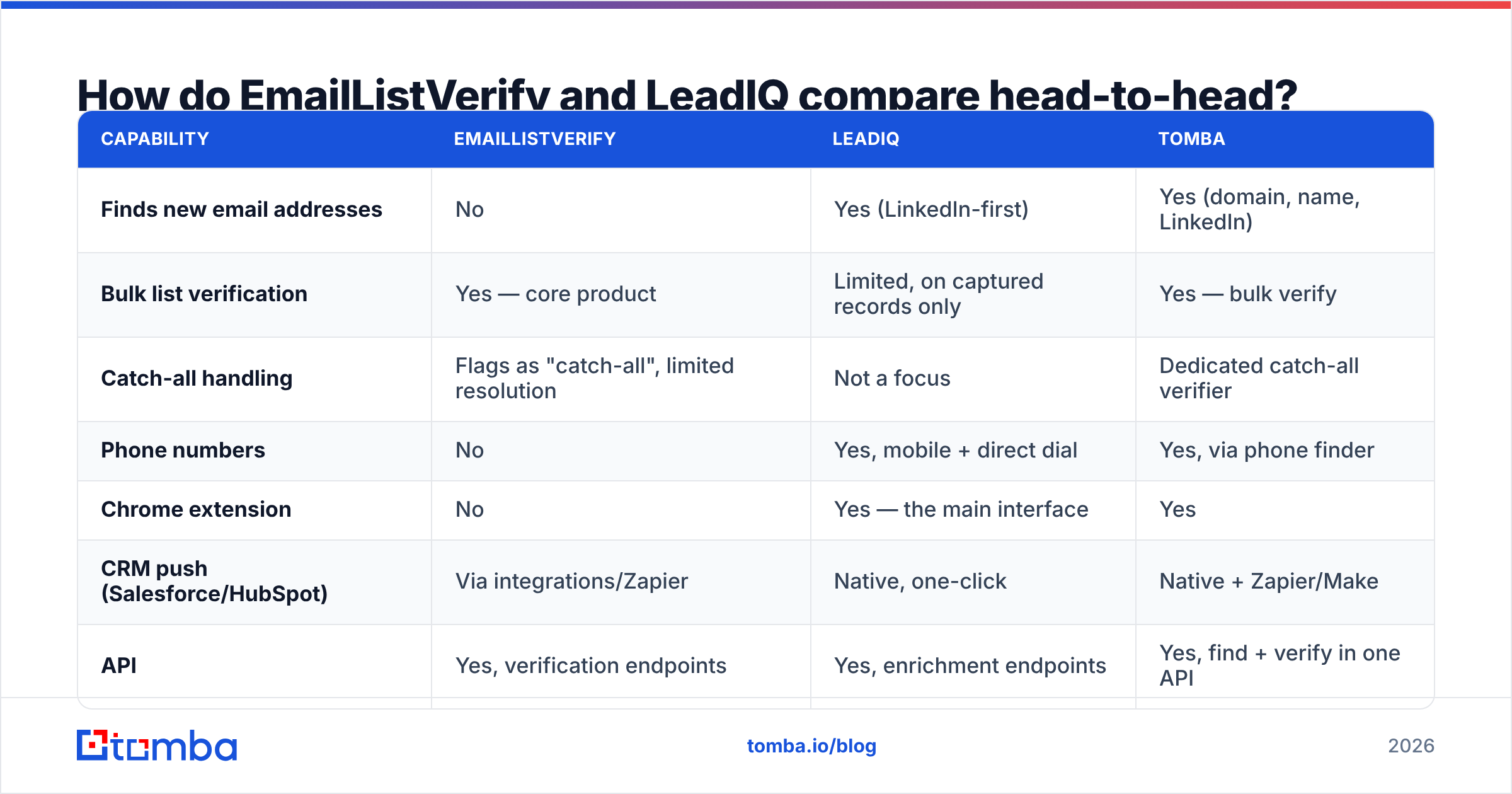
How do EmailListVerify and LeadIQ compare head-to-head?#
The honest comparison is not feature-for-feature, because the feature sets barely overlap. It is coverage-of-the-workflow.

| Capability | EmailListVerify | LeadIQ | Tomba |
|---|---|---|---|
| Finds new email addresses | No | Yes (LinkedIn-first) | Yes (domain, name, LinkedIn) |
| Bulk list verification | Yes — core product | Limited, on captured records only | Yes — bulk verify |
| Catch-all handling | Flags as "catch-all", limited resolution | Not a focus | Dedicated catch-all verifier |
| Phone numbers | No | Yes, mobile + direct dial | Yes, via phone finder |
| Chrome extension | No | Yes — the main interface | Yes |
| CRM push (Salesforce/HubSpot) | Via integrations/Zapier | Native, one-click | Native + Zapier/Make |
| API | Yes, verification endpoints | Yes, enrichment endpoints | Yes, find + verify in one API |
| Pricing model | Pay-as-you-go credits | Per-seat subscription | Credit subscription, no per-seat lock |
| Free tier | ~100 verification credits | Free plan with limited credits | 25 searches/mo |
| Best for | Cleaning inherited lists | SDR teams living in Sales Navigator | Teams that need find + verify in one place |
Two things fall out of that table.
First, LeadIQ is priced per seat and EmailListVerify is priced per record. That single difference changes the math completely at scale. A three-person SDR team on LeadIQ Pro pays the same whether they capture 200 contacts or 2,000. A marketing ops person verifying one 500,000-row database on EmailListVerify pays once and never again — but pays nothing the following month if there is nothing new to clean.
Second, neither tool closes the loop. LeadIQ gives you an email it believes is right. EmailListVerify tells you whether an email is deliverable. Running LeadIQ output through EmailListVerify is a perfectly reasonable stack — it is also two subscriptions, two exports, and a CSV round trip that most teams do once and then quietly stop doing.
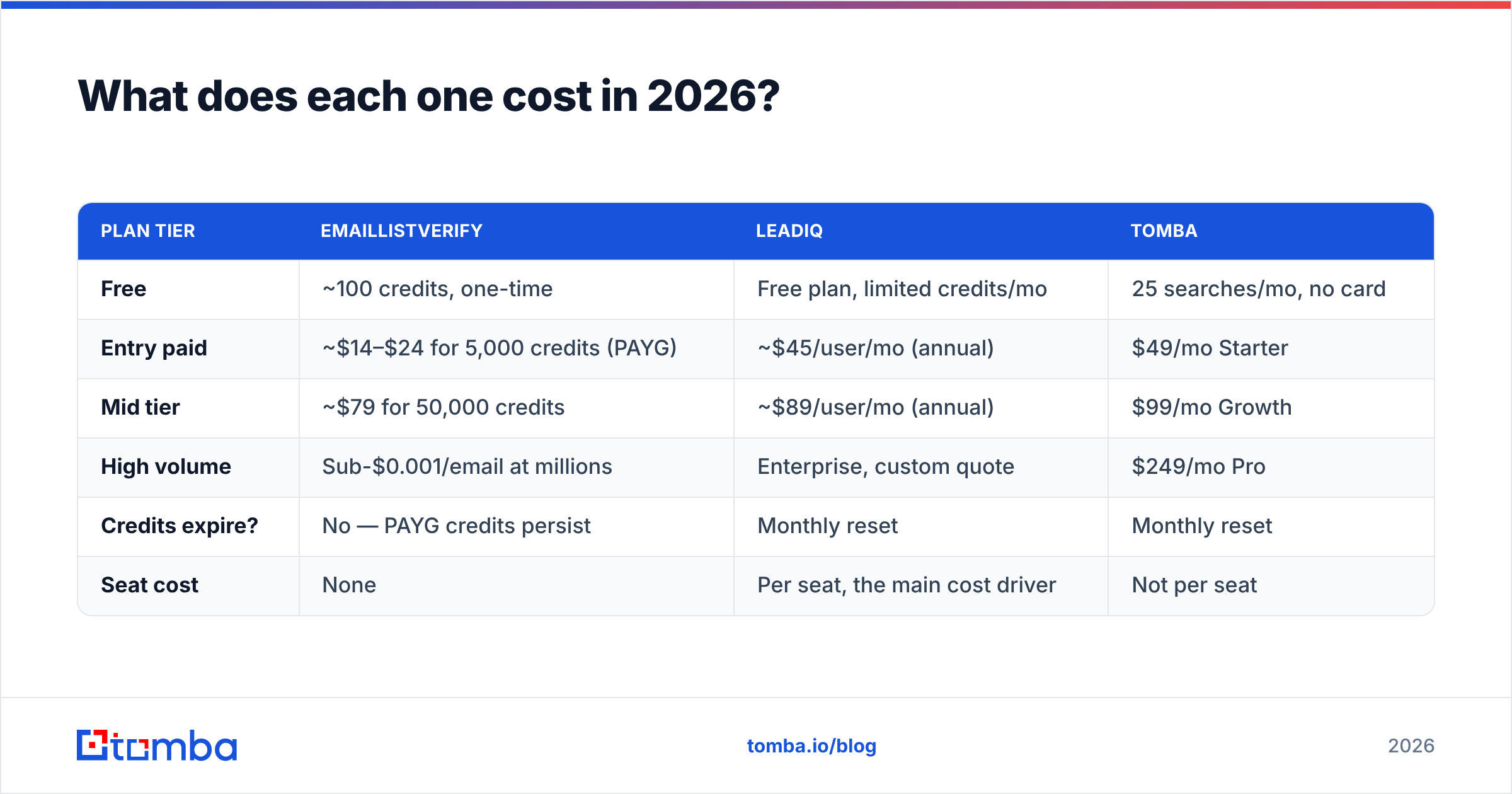
What does each one cost in 2026?#
Pricing shifts, so treat these as directional and confirm on each vendor's page before you sign anything.
| Plan tier | EmailListVerify | LeadIQ | Tomba |
|---|---|---|---|
| Free | ~100 credits, one-time | Free plan, limited credits/mo | 25 searches/mo, no card |
| Entry paid | ~$14–$24 for 5,000 credits (PAYG) | ~$45/user/mo (annual) | $49/mo Starter |
| Mid tier | ~$79 for 50,000 credits | ~$89/user/mo (annual) | $99/mo Growth |
| High volume | Sub-$0.001/email at millions | Enterprise, custom quote | $249/mo Pro |
| Credits expire? | No — PAYG credits persist | Monthly reset | Monthly reset |
| Seat cost | None | Per seat, the main cost driver | Not per seat |
The pattern worth noticing: EmailListVerify's pay-as-you-go credits that do not expire make it genuinely cheap for occasional, lumpy work — you buy 50,000 credits in March and still have 20,000 in September. LeadIQ's per-seat model makes it expensive to give access to a wider go-to-market team, which is why a lot of orgs end up with two "sharing" logins and a compliance problem.
If you are building a budget model, compare against Tomba pricing too, since credits there cover both search and verification rather than splitting the spend across two invoices.
How accurate is each one, and how would you know?#
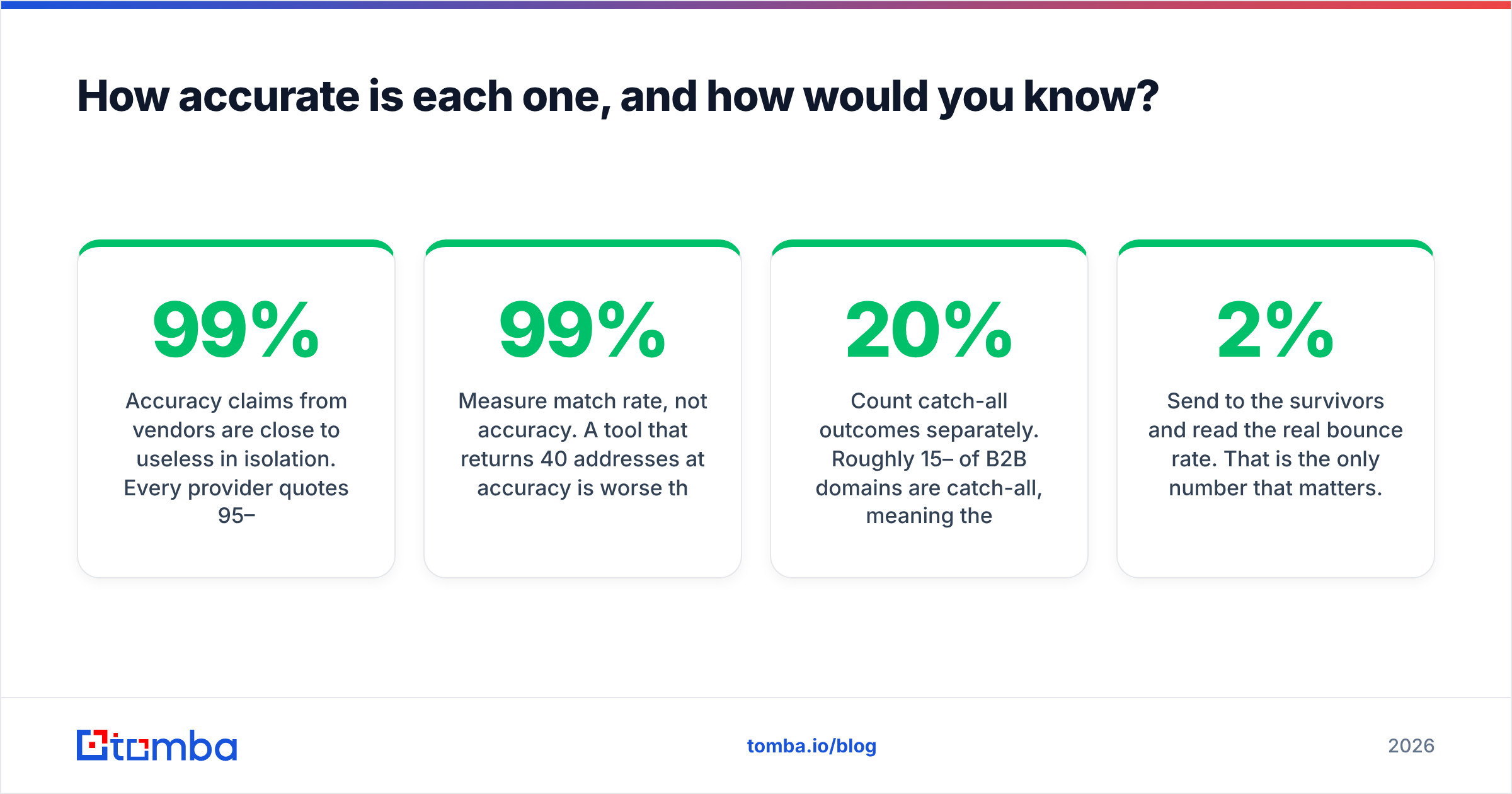
Accuracy claims from vendors are close to useless in isolation. Every provider quotes 95–99% on some internal benchmark you cannot reproduce. What you can do is run the same 200-contact sample through each tool and score it yourself.

Here is the test that actually separates them:
- Take 200 real prospects from your ICP — not famous companies, not tech unicorns. If you sell to regional manufacturers, use regional manufacturers. Coverage on Fortune 500 domains tells you nothing about coverage on 40-person firms in Ohio.
- Measure match rate, not accuracy. A tool that returns 40 addresses at 99% accuracy is worse than one that returns 150 at 94%. Match rate × accuracy = usable contacts.
- Count catch-all outcomes separately. Roughly 15–20% of B2B domains are catch-all, meaning the mail server accepts everything. A verifier that dumps those into "unknown" has handed the risk back to you. This is where a dedicated catch-all finder earns its keep.
- Send to the survivors and read the real bounce rate. That is the only number that matters. Anything under 2% hard bounces is healthy; 5%+ puts your sender reputation at risk with Google and Microsoft.
EmailListVerify tends to score well on the classic validation checks — syntax, MX, disposables, role accounts, known traps. Its weakness is the same as every pure verifier: it cannot tell you anything about an address that does not exist in your file yet, and it will return a meaningful share of "unknown" verdicts on catch-all domains.
LeadIQ's data is strongest where its collection method is strongest: mid-market and enterprise contacts with active LinkedIn presences in North America. It thins out on SMB, on non-English-speaking regions, and on roles that do not maintain LinkedIn profiles — field ops, plant managers, most of the trades. Independent user reviews on G2 reflect that pattern consistently: strong workflow, patchy coverage outside the core segment.
Is EmailListVerify better than LeadIQ for cold email?#
For cold email specifically, EmailListVerify solves the more urgent problem — but only if you already have volume to work with.
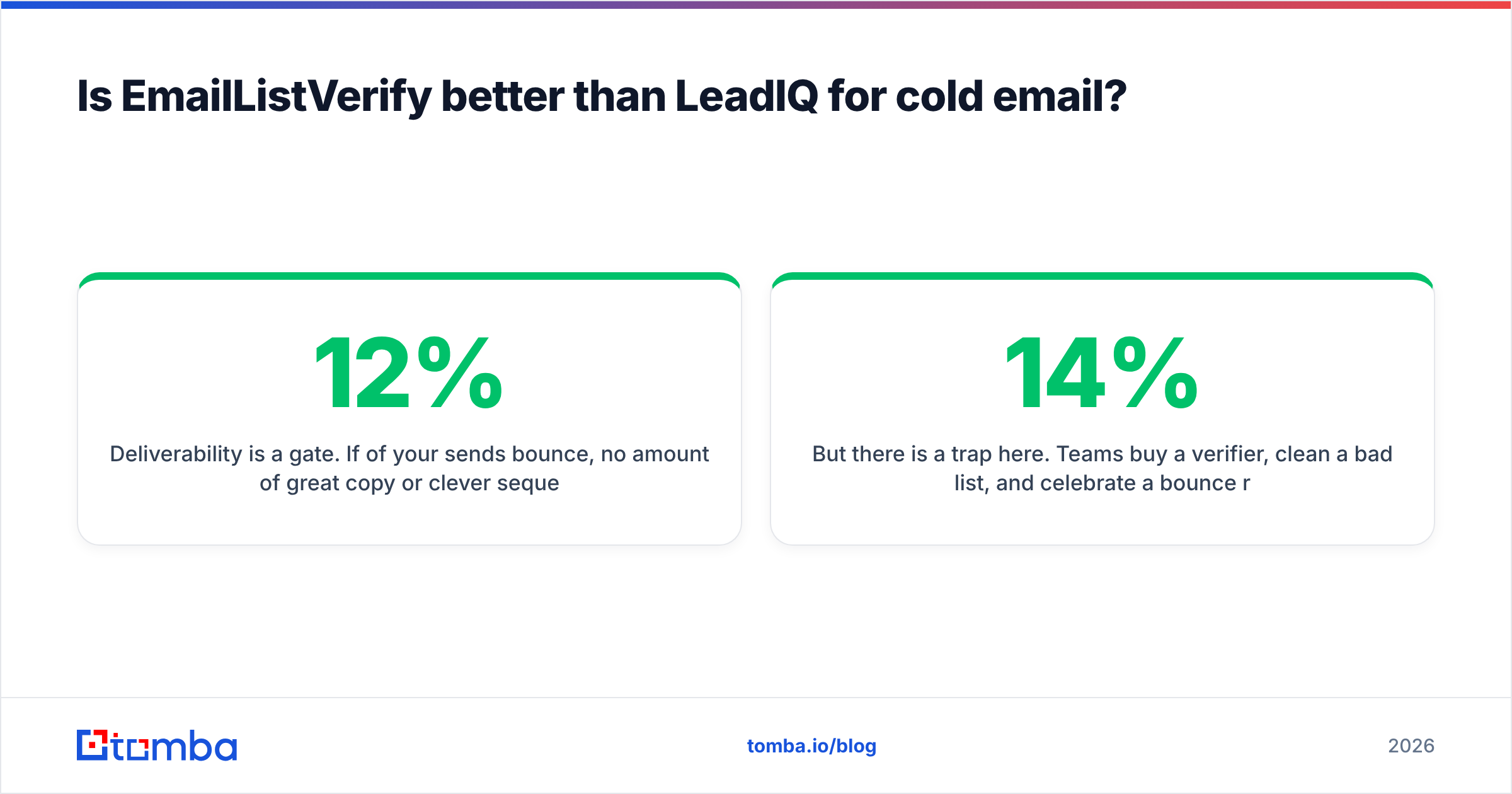
Deliverability is a gate. If 12% of your sends bounce, no amount of great copy or clever sequencing matters, because the mailbox providers stop trusting your domain and your later sends land in spam. Verification is the cheapest insurance in outbound: a few dollars per thousand records against a domain reputation that takes months to rebuild.
But there is a trap here. Teams buy a verifier, clean a bad list, and celebrate a bounce rate drop from 14% to 2% — while ignoring that the verifier deleted 40% of the list. Your bounce rate improved because your list shrank. Pipeline did not improve at all.
That is the moment the sourcing side becomes the bottleneck, and it is why "EmailListVerify vs LeadIQ" so often ends with teams buying both within the same quarter.

When should you pick LeadIQ instead?#
Pick LeadIQ when the following three things are true at once:
- Your reps live in LinkedIn Sales Navigator. LeadIQ's value is workflow adjacency — the capture happens where the research already happens. If your team prospects from lists, conferences, or intent data instead, most of that value evaporates.
- You have a CRM you actually maintain. LeadIQ's one-click push into Salesforce or HubSpot is the feature people renew for. Without a clean CRM on the other end, you are paying a premium for a fancy clipboard.
- You need phone numbers alongside emails. Verifiers do not do this. If your motion is multi-channel and dials are half the plan, that is a hard requirement no email validator will meet.
If any of those are false, LeadIQ's per-seat price is hard to justify against a credit-based email finder that any team member can use without buying a new seat.
What does the combined stack actually look like?#
The three realistic setups:
Setup A — two vendors. LeadIQ for capture, EmailListVerify for periodic list hygiene. Works. Costs roughly $89/user/mo plus a few hundred dollars a year in credits. Downside: nobody owns the handoff, so verification becomes a quarterly cleanup instead of a step in the workflow.
Setup B — verifier only. You already buy data from a provider, or you scrape/import, and you just need to stop bouncing. EmailListVerify alone is a fine answer and one of the cheapest per record on the market.
Setup C — one platform for both. Find the address, verify it in the same call, push it to the CRM, no CSV in the middle. This is where Tomba fits: domain search to map a company's contacts, email verifier on every result before it leaves the system, catch-all resolution instead of a shrug, and a single Tomba API if you want the whole thing to run without a human clicking anything.
The honest caveat: a combined platform will not match LeadIQ's LinkedIn capture UX for a rep who has built their entire day around Sales Navigator. That workflow is LeadIQ's home turf and it is genuinely good at it. What a combined platform gives you instead is one credit pool, no per-seat tax, and verification that happens by default rather than by discipline.
Which should you buy?#
- Bounce rate is your emergency, list already exists → EmailListVerify. Cheapest fix, no subscription lock-in, done this afternoon.
- Reps manually copying LinkedIn profiles, CRM is healthy, phones matter → LeadIQ. The workflow savings are real and per-seat pricing is survivable at small headcount.
- You need to build lists and keep them deliverable, without two invoices → a combined find-and-verify platform.
- You are not sure yet → run the 200-contact test above before spending anything. Every tool here has a free tier that will answer the question in an afternoon, and your own ICP is the only benchmark that counts.
Start with the free tier of Tomba's Email Finder — 25 searches a month, no card required — and run your own 200-prospect sample against whatever else you are considering. Compare match rate, catch-all handling, and real bounce rate on a live send. If a combined workflow wins on your data, Starter is $49/mo and covers finding and verifying from the same credit pool. If it does not, you will at least have a benchmark instead of a vendor's marketing number.
Related guides#
Ready to find emails that actually work?
Join 150,000+ professionals who stopped guessing and started sending. Free credits on signup — no credit card required.
Get the Tomba newsletter
Practical outbound tactics and product updates — once every two weeks.
About the author