EmailListVerify vs LeadRocks: Which One Do You Need in 2026?
EmailListVerify cleans lists you already have. LeadRocks sells you contacts you don't. Here's the honest breakdown of pricing, accuracy, data freshness, and which one belongs in your outbound stack.
EmailListVerify vs LeadRocks is an odd matchup. One tool cleans the list you already have. The other sells you contacts you don't have yet. Here's what each one does, what it costs, and which one your outbound stack really needs.
TL;DR
- These two tools do not compete. EmailListVerify is a bulk email verification service. LeadRocks is a B2B contact database. You search it to get emails and phone numbers in the first place.
- Already have a list — scraped, exported, bought, or aging in your CRM? EmailListVerify is the cheaper, faster answer. Pay-as-you-go verification starts around $4 per 1,000 records.
- No list at all? Then EmailListVerify gives you nothing to send to. You need a source first: LeadRocks, an email finder, or both.
- LeadRocks' weak point is data freshness. Database records are snapshots. Job changes rot them at roughly 20–30% per year, so you still need a verifier on top.
- The realistic stack for most teams in 2026 is source + verify, not one tool. Pick the sourcing layer on coverage and freshness. Then verify every record before it hits your sequencer.
EmailListVerify vs LeadRocks: what's the actual difference?#
Think of it like a restaurant. LeadRocks is the supplier that drops crates of produce at your back door. EmailListVerify is the prep cook who throws out everything that's gone soft before it reaches a plate. You need both. Buying two prep cooks doesn't get you dinner.
Concretely:
- EmailListVerify checks an address you supply. It tells you whether a real mailbox sits behind it: syntax check, MX lookup, disposable and role detection, SMTP handshake, catch-all flag. It never invents an address.
- LeadRocks starts from a person or company you're targeting. It returns contact data — email, phone, title, LinkedIn URL — from a stored database of tens of millions of B2B profiles. It never checks in real time whether that address still works.
- The overlap is close to zero. The two get compared only because both sit in the same cheap-outbound-tools bucket on review sites and lifetime-deal marketplaces.
- The real question is simpler. Do you need more contacts, or do you need your current contacts to stop bouncing? Answer that and the choice is obvious.
- The trap is buying the database, skipping verification, then blaming the copy when replies flatline at 0.4%.

How do EmailListVerify and LeadRocks compare on features and price?#
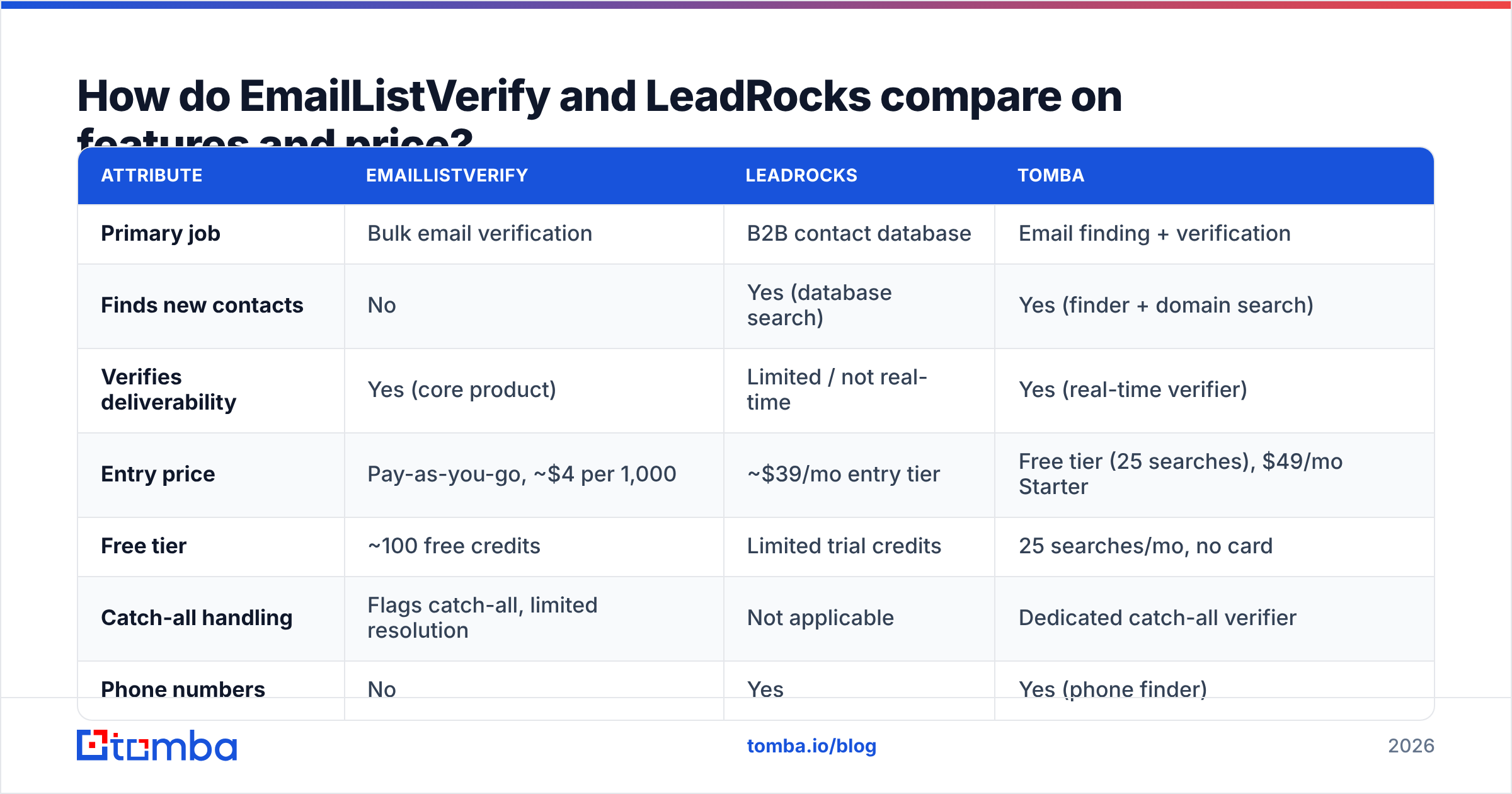
Pricing on both moves. LeadRocks in particular runs heavy lifetime-deal promotions, so published rates are a moving target. Treat the numbers below as a shape, not a quote. Check the vendor pages before you buy.
| Attribute | EmailListVerify | LeadRocks | Tomba |
|---|---|---|---|
| Primary job | Bulk email verification | B2B contact database | Email finding + verification |
| Finds new contacts | No | Yes (database search) | Yes (finder + domain search) |
| Verifies deliverability | Yes (core product) | Limited / not real-time | Yes (real-time verifier) |
| Entry price | Pay-as-you-go, ~$4 per 1,000 | ~$39/mo entry tier | Free tier (25 searches), $49/mo Starter |
| Free tier | ~100 free credits | Limited trial credits | 25 searches/mo, no card |
| Catch-all handling | Flags catch-all, limited resolution | Not applicable | Dedicated catch-all verifier |
| Phone numbers | No | Yes | Yes (phone finder) |
| API access | Yes | Yes, on higher tiers | Yes, full REST API |
| Credit expiry | PAYG credits generally don't expire | Monthly credits reset | Monthly credits reset |
| Best for | Cleaning lists you already own | Building a list from scratch | Both, in one workflow |
The pattern matters more than any single row. EmailListVerify wins on cost per record. Verification is a commodity — a DNS lookup and a short SMTP conversation — and a dozen vendors do it well for pennies. LeadRocks wins on "I have nothing and need something." Neither one covers the other's column.
Is EmailListVerify accurate enough to trust?#
For what it does, yes — with one big asterisk.
Verification accuracy is easy to measure on normal domains. The mailbox either accepts the RCPT TO command or it doesn't. EmailListVerify, ZeroBounce, Bouncer, and Tomba's email verifier all land in a similar band there. Expect 97%+ agreement with real send results.
The asterisk is catch-all domains, and they are not a rounding error. Many enterprise domains — Microsoft 365 tenants especially — accept mail for every address at the SMTP layer. They quietly bin the invalid ones later. A plain verifier returns "unknown" or "accept-all" and hands the risk back to you.

What you do with those unknowns decides your bounce rate:
- Delete them. Safest. You'll also throw away 20–40% of your enterprise TAM.
- Send anyway. You'll find out the hard way. Google and Microsoft both count hard bounces against sender reputation.
- Resolve them with a specialist tool. A catch-all verifier uses pattern confidence, historical send signals, and secondary sources. You get a real verdict instead of a shrug.
That third option is where generalist verifiers, EmailListVerify included, are thinnest. If your ICP is SMB and mostly Google Workspace, it barely matters. If you sell to enterprises, it's the whole ballgame.
Is LeadRocks' data fresh enough for cold outreach?#
This is the honest weak spot. It isn't unique to LeadRocks — it's structural to every database product.
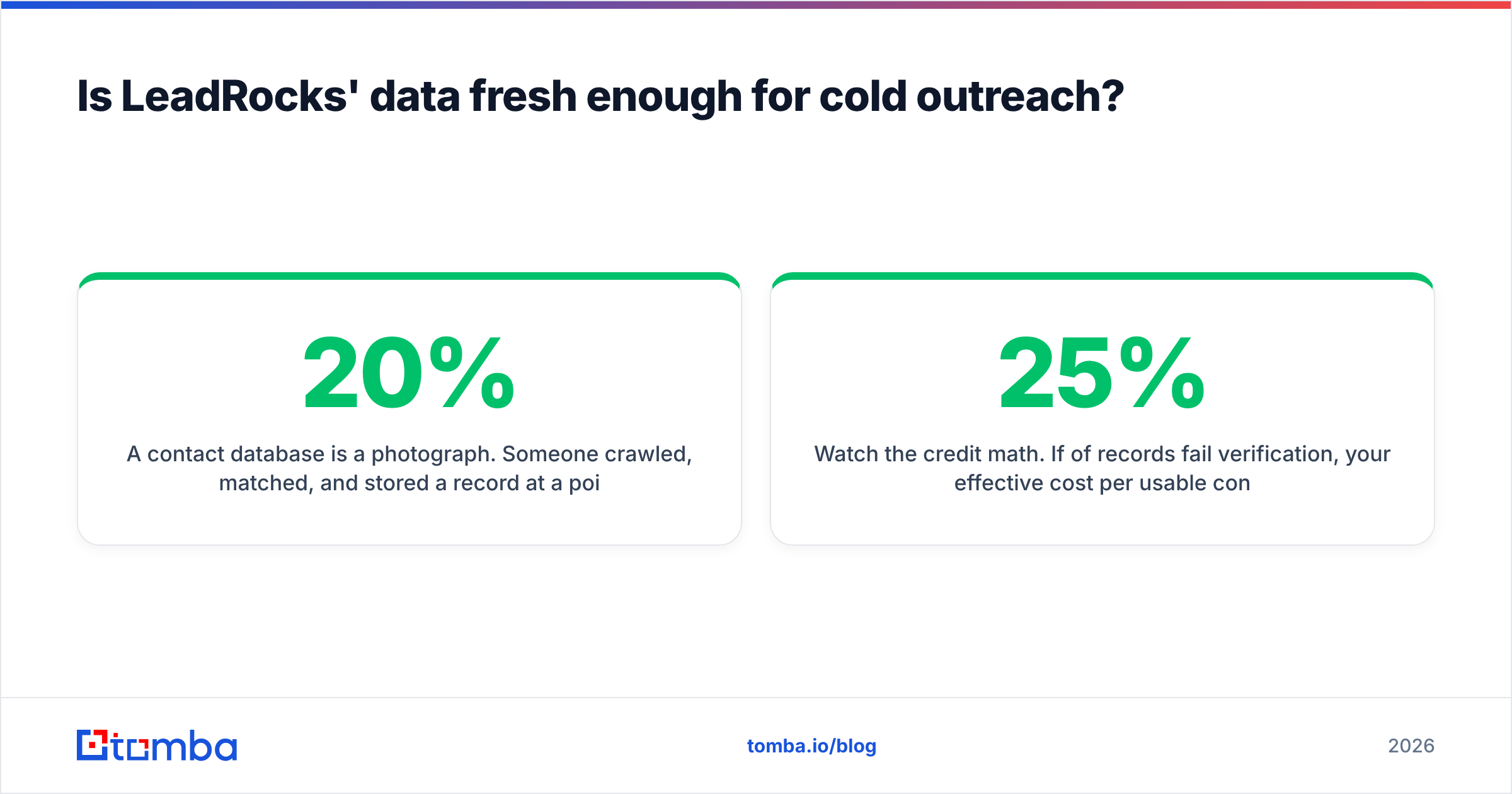
A contact database is a photograph. Someone crawled, matched, and stored a record at one point in time. B2B contact data then decays fast. Estimates from analysts including Gartner and long-running vendor studies put annual decay at 20% to 30%. Job changes, title changes, rebrands, domain migrations, and acquisitions drive it. In a tight labor market it runs hotter.
So a record pulled from any database in 2026 might have been captured in 2024. The name is probably still right. The company might be wrong. The email pattern might have changed after a rebrand. Nothing in the export tells you which.
What that means in practice:
- Never send straight from a database export. Run it through verification first. That holds for LeadRocks, Apollo, ZoomInfo, and everyone else.
- Watch the credit math. If 25% of records fail verification, your real cost per usable contact is 33% above the sticker price. Compare tools on cost per verified contact.
- Check coverage in your own segment before you commit. Coverage swings wildly by geography, company size, and vertical. Run twenty known-good target accounts through a trial and count the hits.
- Prefer tools that verify at retrieval time. A finder that runs a live check when you pull the record collapses two steps into one. It also stops you paying for dead data.
For a broader look at database-first tools, our Apollo alternative and EmailListVerify alternative breakdowns cover the same trade-offs across a wider field. Peers like BookYourData take a different route: human-verified, guarantee-backed lists. Worth a look if you'd rather buy accuracy than build it.

EmailListVerify vs LeadRocks: which one should you buy?#
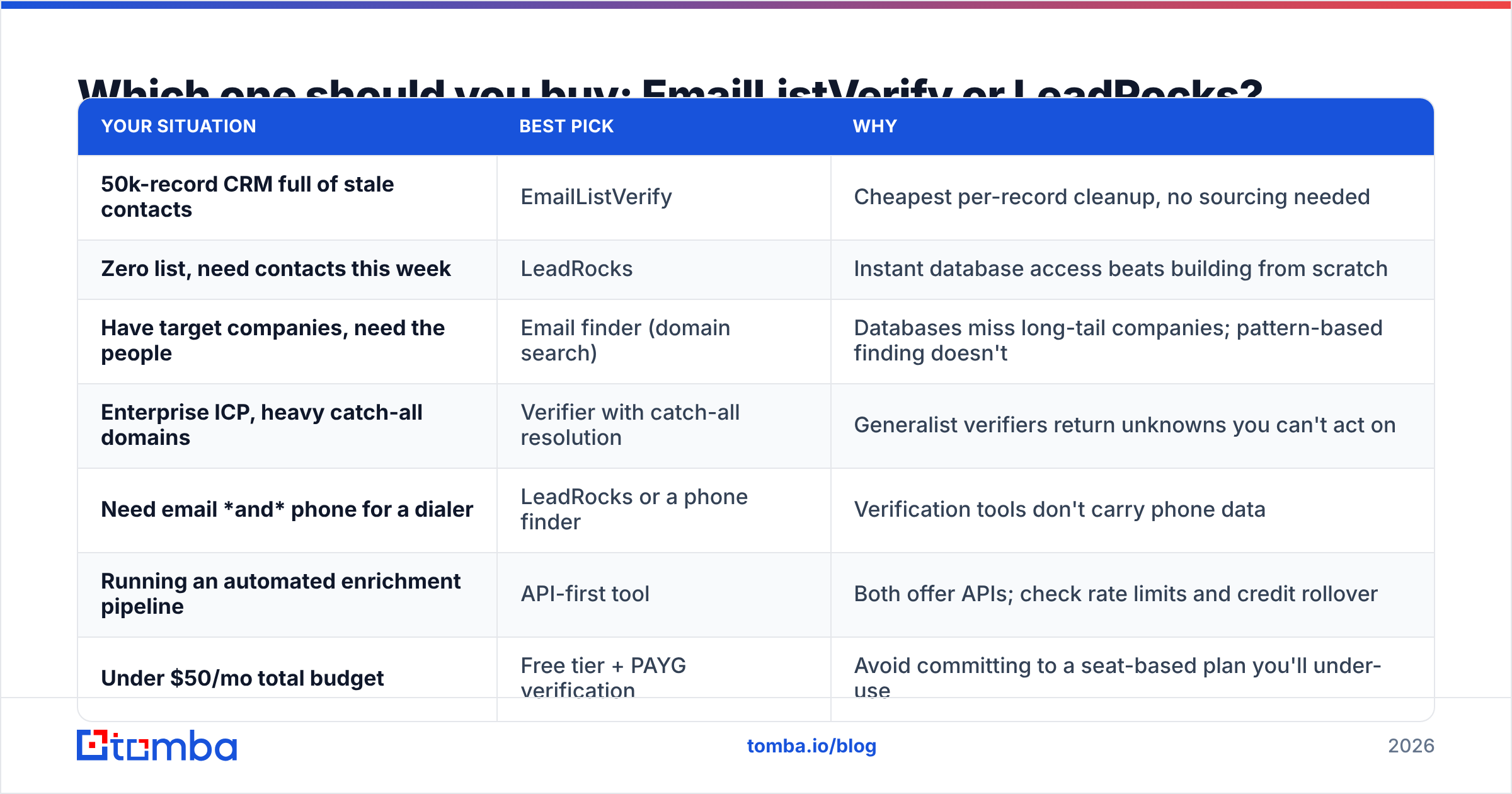
Match the tool to the bottleneck, not to the review score.
| Your situation | Best pick | Why |
|---|---|---|
| 50k-record CRM full of stale contacts | EmailListVerify | Cheapest per-record cleanup, no sourcing needed |
| Zero list, need contacts this week | LeadRocks | Instant database access beats building from scratch |
| Have target companies, need the people | Email finder (domain search) | Databases miss long-tail companies; pattern-based finding doesn't |
| Enterprise ICP, heavy catch-all domains | Verifier with catch-all resolution | Generalist verifiers return unknowns you can't act on |
| Need email and phone for a dialer | LeadRocks or a phone finder | Verification tools don't carry phone data |
| Running an automated enrichment pipeline | API-first tool | Both offer APIs; check rate limits and credit rollover |
| Under $50/mo total budget | Free tier + PAYG verification | Avoid a seat-based plan you'll under-use |
Here's the uncomfortable answer for most readers. You probably need one tool from each column. Compare that combined bill against an all-in-one, not the individual sticker prices.
What does the combined stack actually cost?#
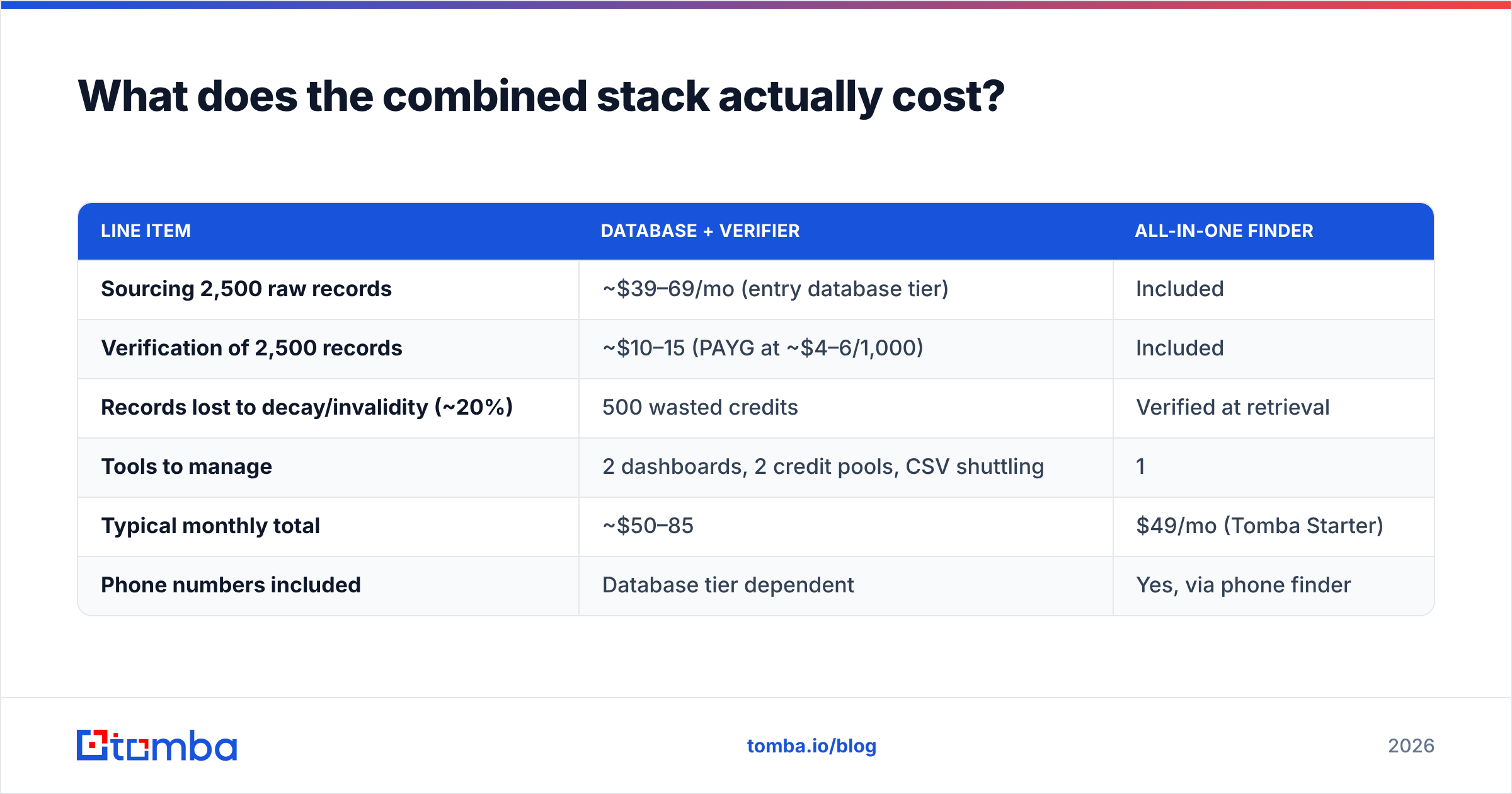
Run the numbers on a real month. Say you want 2,000 usable, verified contacts.
| Line item | Database + verifier | All-in-one finder |
|---|---|---|
| Sourcing 2,500 raw records | ~$39–69/mo (entry database tier) | Included |
| Verification of 2,500 records | ~$10–15 (PAYG at ~$4–6/1,000) | Included |
| Records lost to decay/invalidity (~20%) | 500 wasted credits | Verified at retrieval |
| Tools to manage | 2 dashboards, 2 credit pools, CSV shuttling | 1 |
| Typical monthly total | ~$50–85 | $49/mo (Tomba Starter) |
| Phone numbers included | Database tier dependent | Yes, via phone finder |
The dollar gap is smaller than the operational gap. Two credit pools reset on different dates. Then come two exports, one manual CSV merge, and a column-mapping step someone will get wrong at least once a quarter. That's the real cost of the split stack. It's also why teams consolidate once volume passes a few thousand records a month.

How do you build a list that doesn't bounce?#
Whatever tools you land on, the workflow is the same. Five steps, in order:
- Define the account list first, not the contact list. Pull target companies from your CRM, a funding feed, a job-board scrape, or your site's visitors. Contacts without account context produce generic copy and generic reply rates.
- Source contacts per account. Use a database lookup where coverage exists. Use domain search where it doesn't. Domain search reads the company's own email pattern, so it saves you on long-tail companies no database has indexed.
- Verify everything, every time. That includes records from a database labeled "verified." The only question that matters is verified when? The answer is usually "at crawl time."
- Segment the catch-alls. Don't lump them in with valid addresses. Route them through catch-all resolution, or hold them for a lower-volume warmup domain.
- Re-verify quarterly. Your list decays whether or not you send to it. A 90-day re-verification cycle on your active CRM segment costs a few dollars per thousand. It protects the email deliverability you spent months building.
Skip step 3 and the other four stop mattering. Google's bulk-sender rules put the spam-complaint threshold at 0.3%. Mailbox providers treat hard bounces as a proxy for list hygiene. One bad send to a 10,000-record database dump can undo a quarter of careful warmup.
What do reviewers say about each tool?#
Both tools carry solid public ratings, and the review patterns are consistent enough to be useful.
EmailListVerify (emaillistverify.com) draws praise for price and bulk throughput. The criticism lands on slow support and the volume of "unknown" results on enterprise domains. Nobody complains that it doesn't find emails, because buyers understand what they're buying.
LeadRocks (leadrocks.io) gets credit for value per dollar, especially from anyone who caught a lifetime deal, and for a genuinely simple interface. The recurring gripes are coverage gaps outside North America and Western Europe, plus stale records. That's what you'd expect from a database at this price point.
Cross-check current sentiment on G2 or Capterra before you buy. Weight reviews from companies that look like yours. A five-star review from a US SMB agency tells you nothing about DACH mid-market coverage.
The bottom line#
EmailListVerify vs LeadRocks isn't really a rivalry. They're two halves of one workflow, so picking either still leaves the other half open. EmailListVerify is a good, cheap verifier with a known blind spot on catch-all domains. LeadRocks is a reasonable budget database with the freshness problem every database has.
If you already pay for both, price out the consolidated path first. Tomba's Email Finder sources contacts by domain, name, or company and verifies them in the same call. You stop paying credits for addresses that died before you exported them. The free tier gives you 25 searches a month with no card. That's enough to run twenty real target accounts through it and see whether coverage holds up in your segment. Test it against your current stack on the same account list — that's the only benchmark that counts.
Related guides#
Ready to find emails that actually work?
Join 150,000+ professionals who stopped guessing and started sending. Free credits on signup — no credit card required.
Get the Tomba newsletter
Practical outbound tactics and product updates — once every two weeks.
About the author