EmailListVerify vs RocketReach: Which One Do You Need?
EmailListVerify cleans lists you already have. RocketReach finds contacts you don't. Here's the honest pricing, accuracy and workflow breakdown — plus which one your team should actually buy in 2026.
TL;DR
- They are not the same category. EmailListVerify is a bulk email verification service. RocketReach is a contact discovery database. Comparing them head-to-head only makes sense if you're asking "which problem do I have?"
- Buy EmailListVerify if you already own a list — CRM exports, webinar sign-ups, scraped rosters — and your bounce rate is climbing.
- Buy RocketReach if you have names and companies but no contact details, and you want emails plus phone numbers from a browser extension or API.
- Pricing models clash. EmailListVerify sells cheap pay-as-you-go verification credits; RocketReach sells monthly lookup seats that get expensive fast for teams.
- If you need both jobs done, a combined find-and-verify platform like Tomba usually costs less than stacking two subscriptions, and removes the CSV shuffle between them.
What exactly do EmailListVerify and RocketReach do?#
Think of it like buying a used car. EmailListVerify is the mechanic who inspects the car you already bought and tells you which parts are dead. RocketReach is the dealership that sells you the car in the first place. Both are useful. Neither replaces the other.
EmailListVerify is a list-hygiene tool. You upload a CSV of addresses, it runs syntax checks, MX record lookups, SMTP handshakes, disposable-domain detection, role-account flags and spam-trap screening, then hands back a scored file: valid, invalid, unknown, catch-all. It does not find new addresses. It has no company database. Its entire job is deciding whether an address you already possess will bounce.
RocketReach is a B2B contact database. You search by person, company, title or domain, and it returns work emails, personal emails and phone numbers pulled from a large aggregated index. It ships a Chrome extension for LinkedIn, a search UI, bulk lookups and an API. It does light validation on what it returns, but it is not a dedicated verifier — you don't hand RocketReach a 200,000-row list of third-party addresses and ask it to clean them.
So the honest framing of emaillistverify vs rocketreach is: acquisition vs hygiene. Once you see it that way, the choice usually makes itself.
Which problem do you actually have?#
Run through these five diagnostics before you compare a single price:
- Do you have addresses already? If yes and they're bouncing, that's a verification problem — EmailListVerify's lane.
- Do you have names but no addresses? That's a discovery problem — RocketReach's lane, or an email finder built for the job.
- Is your list aging? B2B contact data decays roughly 25–30% per year as people change jobs. Old lists need verification and re-enrichment, not one or the other.
- Do you need phone numbers? EmailListVerify has none. RocketReach does. So does Tomba's phone finder.
- Are you sending at volume or prospecting one-to-one? Bulk senders live and die by verification. AE-led prospecting lives on discovery depth.
Most teams discover they have both problems at once. That's the expensive realisation — and the reason this comparison keeps getting searched.
How does EmailListVerify vs RocketReach pricing compare?#
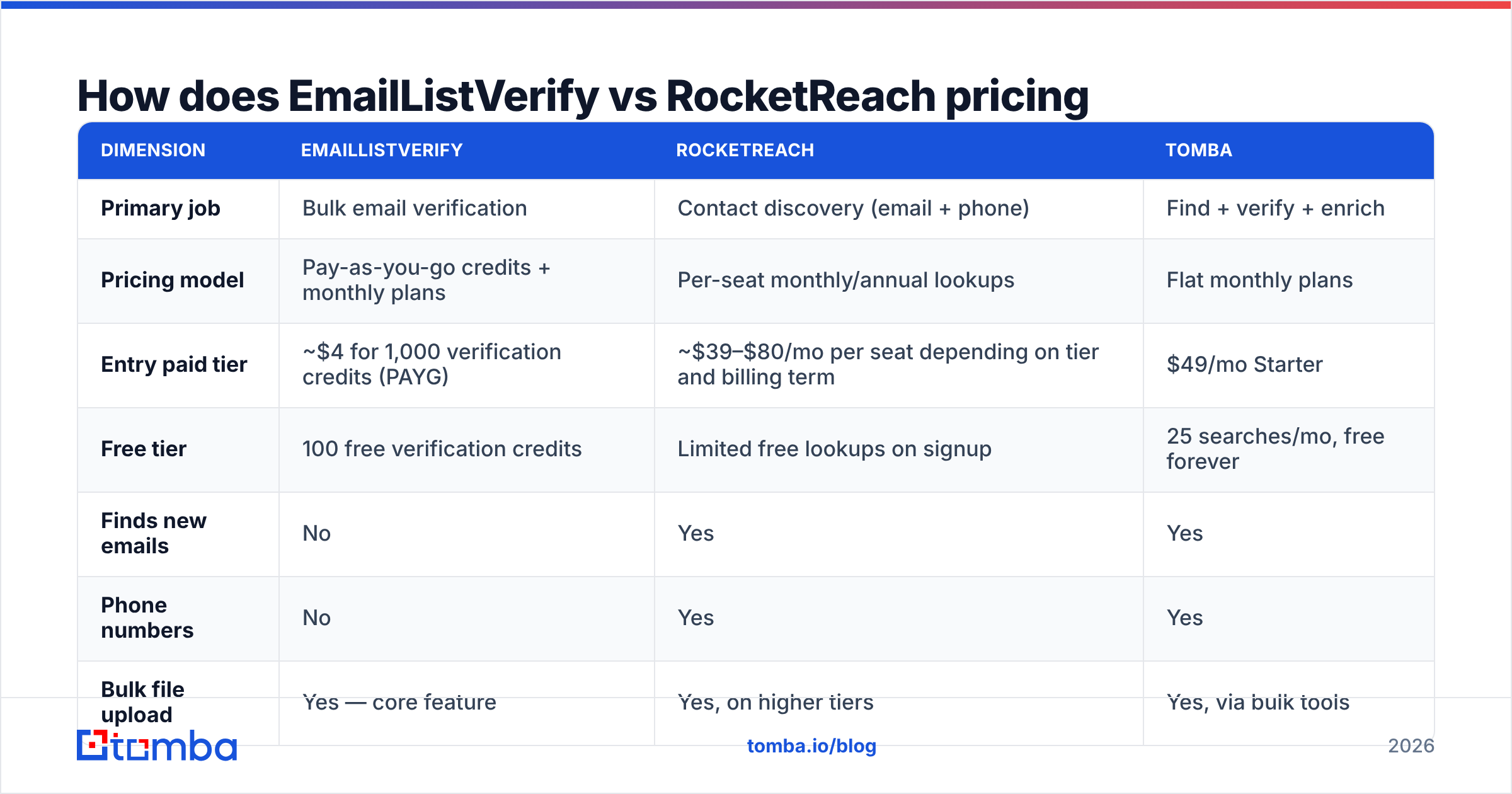
The pricing models are structurally different, which makes a like-for-like table awkward but necessary. EmailListVerify charges per address verified, with credits that don't expire on pay-as-you-go. RocketReach charges per seat per month for a fixed number of lookups, with heavy discounts for annual billing and steep overage pain if you exceed your tier.
| Dimension | EmailListVerify | RocketReach | Tomba |
|---|---|---|---|
| Primary job | Bulk email verification | Contact discovery (email + phone) | Find + verify + enrich |
| Pricing model | Pay-as-you-go credits + monthly plans | Per-seat monthly/annual lookups | Flat monthly plans |
| Entry paid tier | ~$4 for 1,000 verification credits (PAYG) | ~$39–$80/mo per seat depending on tier and billing term | $49/mo Starter |
| Free tier | 100 free verification credits | Limited free lookups on signup | 25 searches/mo, free forever |
| Finds new emails | No | Yes | Yes |
| Phone numbers | No | Yes | Yes |
| Bulk file upload | Yes — core feature | Yes, on higher tiers | Yes, via bulk tools |
| Catch-all handling | Flags as "unknown"/accept-all | Not a focus | Dedicated catch-all verifier |
| API | Yes | Yes, higher tiers | Yes, all paid tiers |
| Best for | List hygiene before a send | Rep-led prospecting | Teams doing both |
Prices shift; always confirm on the vendor's own pricing page before you commit. The structural point matters more than the exact numbers: verification is cheap and volume-based, discovery is expensive and seat-based. If you buy both, you're paying two vendors on two incompatible billing logics, and you're moving CSVs between them by hand.
That last cost is the one nobody budgets for. A rep exporting 500 RocketReach lookups, uploading them to EmailListVerify, waiting for the job, downloading the scored file, re-importing to the CRM — that's 20 minutes of nothing per batch, repeated forever.
Which one has better data accuracy?#
Wrong question, again — they measure accuracy differently.
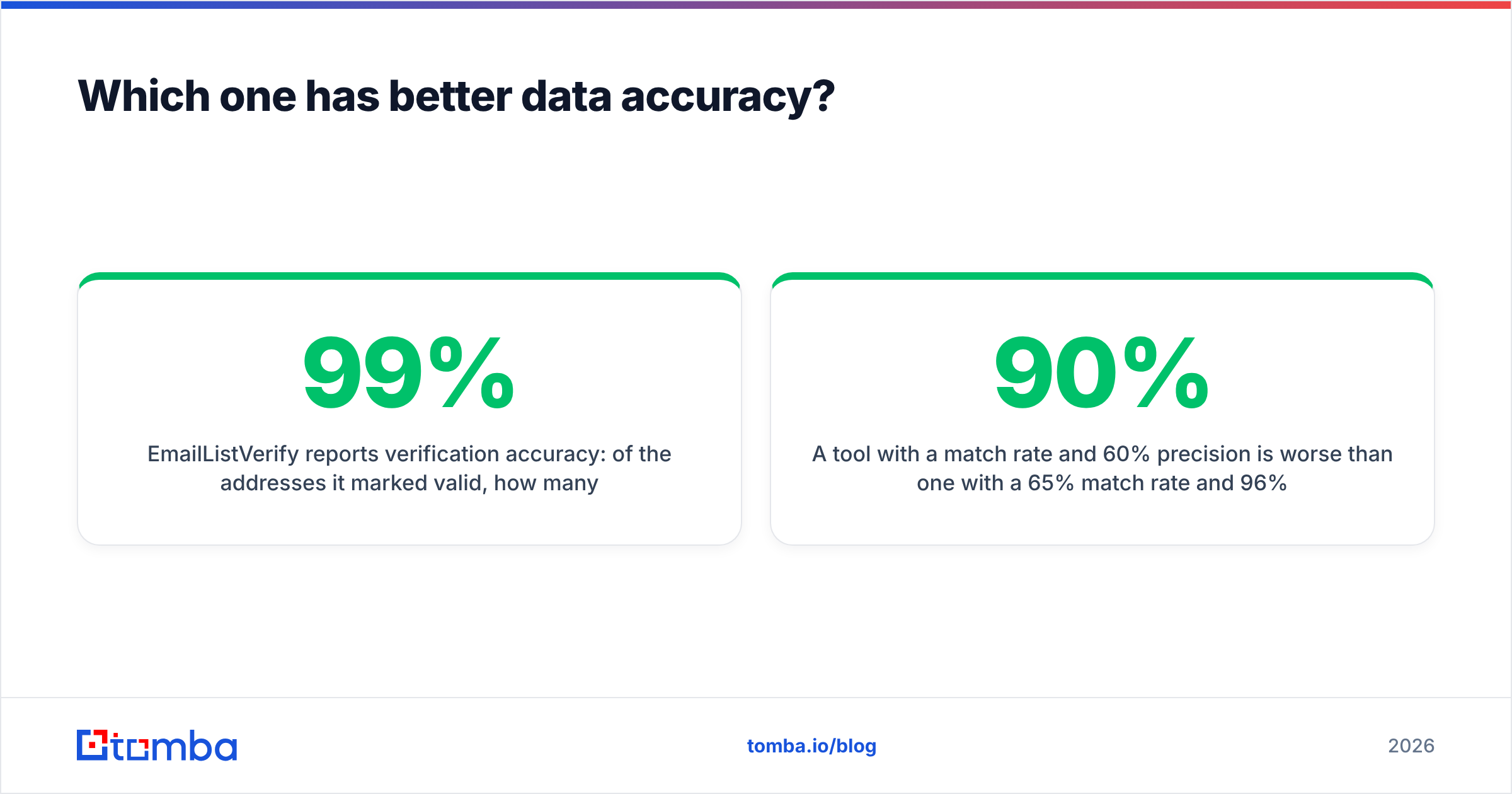
EmailListVerify reports verification accuracy: of the addresses it marked valid, how many actually delivered. Verifiers in the top tier generally land in the 95–99% range on clean, non-catch-all domains. Where they diverge is the hard part: catch-all domains, which accept every address at the SMTP layer and tell you nothing. Most verifiers, EmailListVerify included, park those in an "unknown" or "accept-all" bucket and let you decide. That bucket can be 20–40% of a B2B list depending on your ICP, and it is where money quietly disappears.
RocketReach reports coverage and match rate: given a name and company, how often does it return any contact detail, and how often is that detail current. Coverage on US tech and enterprise profiles is strong. Coverage thins on smaller European companies, non-English markets and recently-changed roles — the same weak spots every aggregated database shares, because they all buy and scrape from overlapping sources.

The practical test is boring but decisive: take 100 contacts you can independently confirm — customers, partners, people you've already emailed — and run them through each tool. Measure three things:
- Match rate — what percentage returned a result at all
- Precision — of those results, how many were correct
- Unknown rate — how many came back as catch-all or unverifiable
A tool with a 90% match rate and 60% precision is worse than one with a 65% match rate and 96% precision, because bounces cost you sender reputation and reputation is not something you buy back cheaply. Vendor-published accuracy claims are marketing; your own 100-row test is evidence. Third-party review aggregates on G2 are a useful sanity check on support quality and billing surprises, but they won't tell you how a tool performs on your ICP.
Is RocketReach a good EmailListVerify replacement?#
No, and it isn't trying to be. If you cancel EmailListVerify and route everything through RocketReach, you get contact discovery with light validation attached — fine for the records RocketReach itself returns, useless for the 40,000 addresses sitting in your marketing database from three years of form fills.
The reverse is equally true. EmailListVerify will happily clean a list of 100,000 addresses for the price of a lunch, but it will never tell you the VP of Engineering at a target account is named Dana and reachable at a specific address.
The teams that get burned are the ones who assume one tool covers both jobs, ship a campaign to a stale list, and watch their domain reputation crater. Google and Yahoo's bulk sender requirements — a spam complaint rate below 0.3%, authenticated sending, one-click unsubscribe — made that failure mode much more expensive than it used to be. HubSpot's deliverability guidance covers the same ground from the marketing side: list quality is the input, inbox placement is the output.

What does the ideal workflow look like?#
Whichever vendors you pick, the sequence is fixed:
- Define the account list first. Firmographics, tech stack, headcount band. Skipping this makes every downstream credit cheaper to waste.
- Discover contacts — by domain, by name, or by scraping a role list. A domain search returns every published address at a company plus the detected email pattern, which is faster than one-by-one lookups when you're building a territory.
- Verify before sending, every time. Even freshly-found addresses go stale between discovery and send if your sequence launches two weeks later.
- Resolve catch-alls separately. Don't blanket-delete them and don't blanket-send to them. Use a dedicated catch-all finder or throttle them into a low-volume test segment.
- Enrich what survives. Job title, seniority, company size and LinkedIn profile turn a raw address into a segmentable record. Data enrichment is what makes personalisation possible at scale.
- Re-verify quarterly. 25–30% annual decay means a list you cleaned in January is meaningfully dirty by July.
Steps 2 and 3 are where the EmailListVerify vs RocketReach decision actually lands. Everything else is process.
How do the two compare on integrations and workflow?#
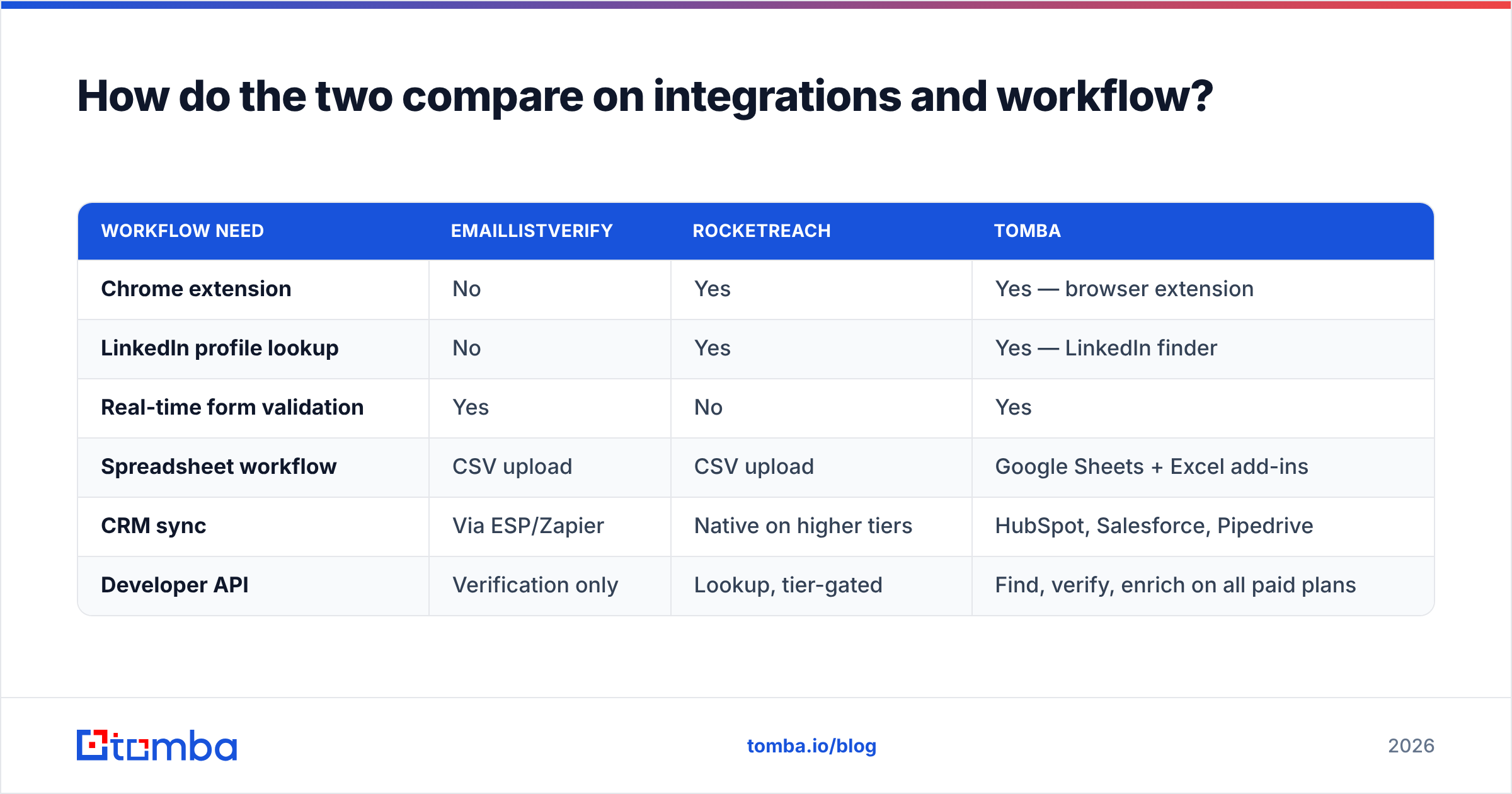
RocketReach's strength is the browser extension — reps live in LinkedIn, and a one-click reveal on a profile is genuinely faster than any search UI. Its API and CRM pushes exist but are gated to higher tiers.
EmailListVerify's strength is throughput. It ingests large files, handles ESP integrations for list sync, and its API is straightforward for engineering teams that want verification inline at form-submit time. What it deliberately doesn't do is live inside your prospecting surface.
| Workflow need | EmailListVerify | RocketReach | Tomba |
|---|---|---|---|
| Chrome extension | No | Yes | Yes — browser extension |
| LinkedIn profile lookup | No | Yes | Yes — LinkedIn finder |
| Real-time form validation | Yes | No | Yes |
| Spreadsheet workflow | CSV upload | CSV upload | Google Sheets + Excel add-ins |
| CRM sync | Via ESP/Zapier | Native on higher tiers | HubSpot, Salesforce, Pipedrive |
| Developer API | Verification only | Lookup, tier-gated | Find, verify, enrich on all paid plans |

If you're a solo founder doing 30 targeted outreaches a week, the extension matters more than the API. If you're a RevOps team wiring enrichment into a lifecycle, the API matters more than the extension. Buy for the workflow you actually run, not the one on the demo call.
When should you pick each tool?#
Pick EmailListVerify when:
- You have a large existing list and no discovery need
- Your primary metric is bounce rate, not pipeline
- You want pay-as-you-go with no seat commitment
- Verification is a batch job, not a live workflow
Pick RocketReach when:
- Reps prospect inside LinkedIn all day
- Phone numbers matter as much as emails
- You're targeting US tech and enterprise, where coverage is deepest
- You can absorb per-seat pricing as headcount grows
Pick a combined platform when:
- You're doing both jobs and don't want two contracts
- Catch-all domains are a meaningful share of your ICP
- You want one API for find, verify and enrich instead of stitching two
- Predictable flat pricing beats seat math
That third case is why Tomba shows up in this comparison at all. The email finder handles discovery by domain, name or company; the email verifier handles hygiene on lists from any source, including ones you didn't find with Tomba; and the catch-all tooling addresses the bucket both categories tend to shrug at. Free tier is 25 searches a month, Starter is $49/mo, Growth $99/mo, Pro $249/mo — one subscription instead of a verification credit balance plus a per-seat database bill.
To be clear about the trade-off: RocketReach's raw contact index and phone coverage on large US enterprises is deep, and if that's your entire market, a specialist database earns its price. Likewise, if you genuinely only verify and never prospect, EmailListVerify's pay-as-you-go pricing is hard to beat on pure cost per address. Neither of those is a knock — they're focused products doing focused jobs well.
What should you do next?#
Run the 100-contact test. Not the vendor's numbers, not this article's table — your own list, your own ICP, three metrics: match rate, precision, unknown rate. Whichever tool wins on precision for your market is the one to buy, and if two tools split the win across discovery and hygiene, price the combined option before you sign both contracts.
If you'd rather test discovery and verification in the same place, start with the Tomba Email Finder. The free tier gives you 25 searches a month with no card, which is enough to run a real accuracy test against whatever you're using now — and to see whether one tool can close the gap that made you compare EmailListVerify and RocketReach in the first place.
Related guides#
Ready to find emails that actually work?
Join 150,000+ professionals who stopped guessing and started sending. Free credits on signup — no credit card required.
Get the Tomba newsletter
Practical outbound tactics and product updates — once every two weeks.
About the author