EmailOversight vs FindThatLead: Which Tool Wins in 2026?
One cleans your list, the other builds it. A neutral breakdown of EmailOversight vs FindThatLead on accuracy, pricing, catch-all handling, and which one actually belongs in your outbound stack.
TL;DR
- EmailOversight vs FindThatLead is not a like-for-like fight. The two tools solve different halves of the same problem. EmailOversight verifies and cleans lists. FindThatLead finds new addresses and sends campaigns. Compare them feature by feature and you will buy the wrong one.
- If your list already exists — CRM exports, form fills, bought data — EmailOversight is the stronger buy. Its multi-method checks and spam-trap detection are built for that job.
- If you have no contacts yet, FindThatLead is the more useful tool. It builds lists from domains, LinkedIn profiles, and search filters. You will still want an independent check before you send.
- Buying both means two subscriptions for one workflow. A combined finder plus verifier (Tomba, Hunter, Findymail-class tools) usually costs less than the pair.
- The real question is not "which tool is better." It is "why am I paying two vendors to cover one loop?"
EmailOversight vs FindThatLead: what does each tool actually do?#
They sit at opposite ends of the same pipeline.
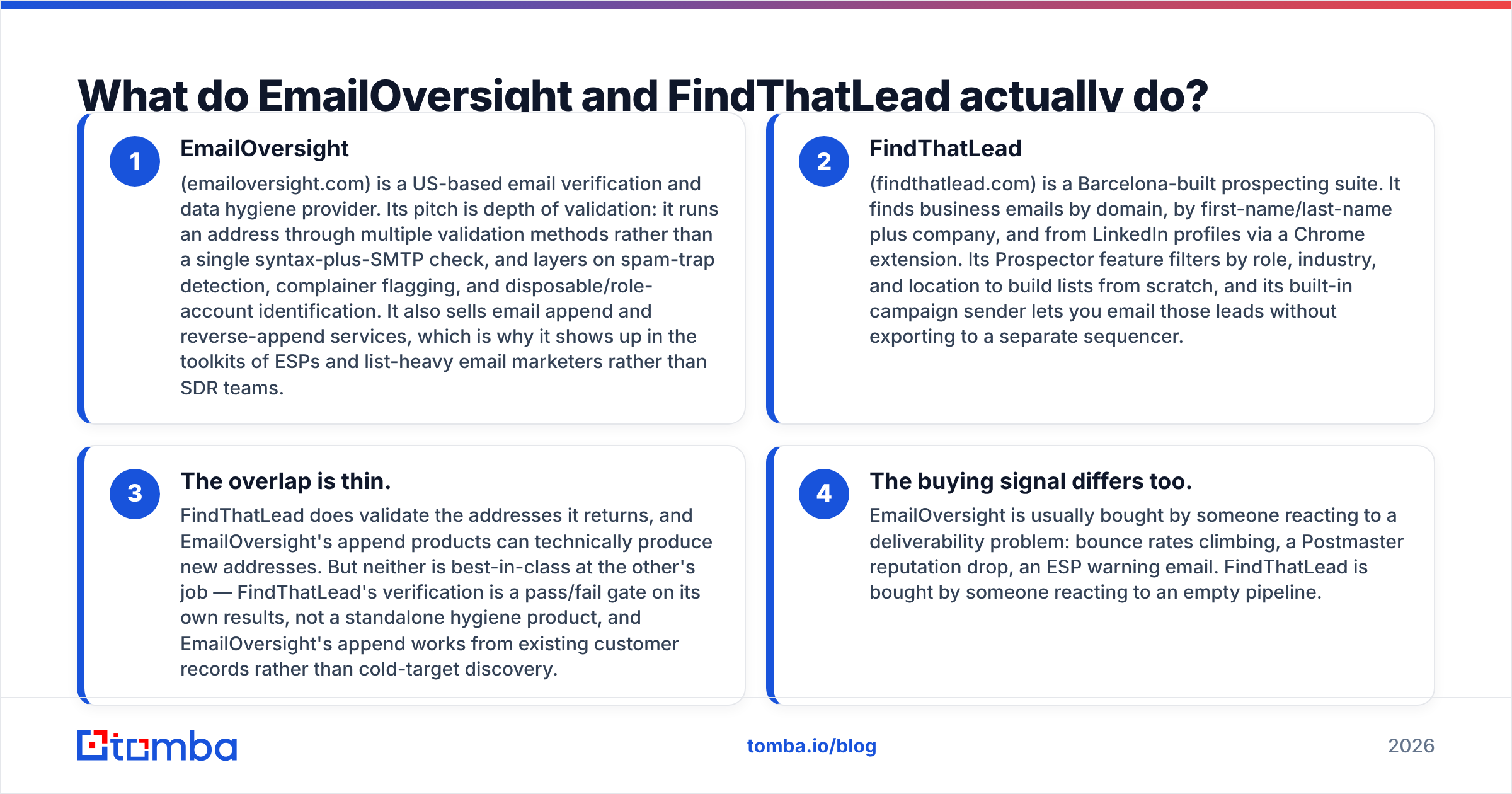
EmailOversight (emailoversight.com) is a US-based email verification and data hygiene provider. Its pitch is depth. It runs each address through several validation methods, not a single syntax-plus-SMTP check. On top of that it flags spam traps, chronic complainers, disposable addresses, and role accounts. It also sells email append and reverse-append services. That mix explains why it shows up in the toolkits of ESPs and list-heavy email marketers rather than SDR teams.
FindThatLead (findthatlead.com) is a Barcelona-built prospecting suite. It finds business emails by domain, by first and last name plus company, and from LinkedIn profiles through a Chrome extension. Its Prospector feature filters by role, industry, and location to build lists from scratch. A built-in campaign sender lets you email those leads without exporting them to a separate tool.
The overlap is thin. FindThatLead does validate the addresses it returns. EmailOversight's append products can technically produce new ones. But neither is best in class at the other's job. FindThatLead's check is a pass/fail gate on its own results, not a standalone hygiene product. EmailOversight's append works from customer records you already own, not from cold discovery.
The buying trigger differs too. People buy EmailOversight after a deliverability scare: bounce rates climbing, a reputation drop, a warning email from their ESP. People buy FindThatLead after looking at an empty pipeline.
[Screenshot placeholder: EmailOversight dashboard showing a verification result breakdown — valid, invalid, catch-all, spam trap, complainer]
EmailOversight vs FindThatLead: the head-to-head table#
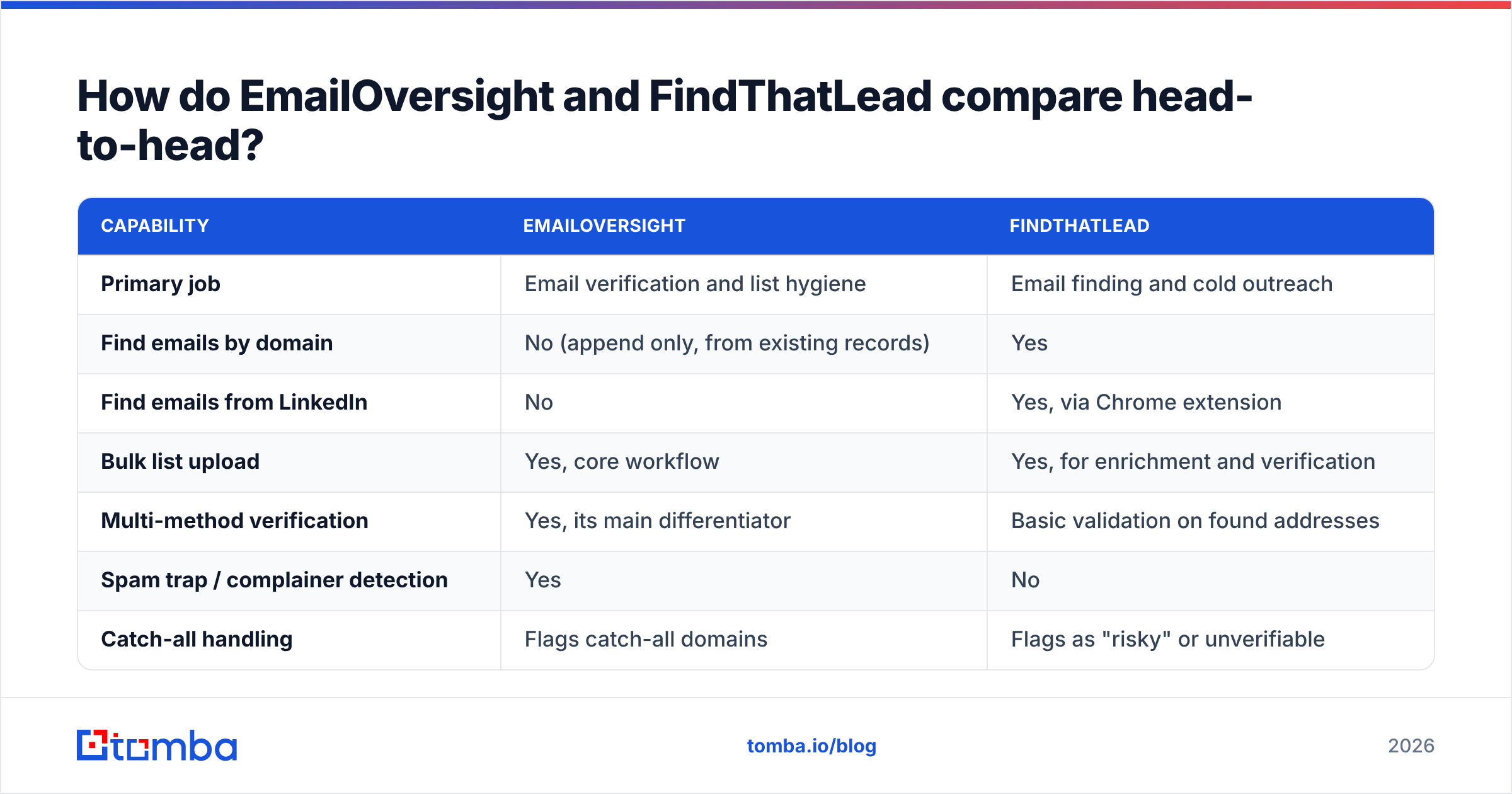
| Capability | EmailOversight | FindThatLead |
|---|---|---|
| Primary job | Email verification and list hygiene | Email finding and cold outreach |
| Find emails by domain | No (append only, from existing records) | Yes |
| Find emails from LinkedIn | No | Yes, via Chrome extension |
| Bulk list upload | Yes, core workflow | Yes, for enrichment and verification |
| Multi-method verification | Yes, its main differentiator | Basic validation on found addresses |
| Spam trap / complainer detection | Yes | No |
| Catch-all handling | Flags catch-all domains | Flags as "risky" or unverifiable |
| Built-in email sending | No | Yes, campaign sender included |
| API access | Yes, real-time verification API | Yes |
| Free tier | Limited trial credits | Yes, small monthly credit allowance |
| Best fit | Email marketers, ESPs, list buyers | SDRs, founders, agencies building lists |
The table makes the split obvious. Draw a line down the middle of an outbound workflow. Find the contact sits on the left. Make sure the contact is safe to email sits on the right. FindThatLead owns the left column. EmailOversight owns the right one.
That is fine if you only need one side. It gets expensive if you need both.
Is EmailOversight accurate enough to protect your sender reputation?#
EmailOversight's accuracy claim rests on one genuinely different idea. It does not rely on a single SMTP handshake to decide whether an address is real.
A basic verifier checks the syntax, looks up the MX record, then opens an SMTP conversation with the receiving server. That catches typos and dead domains. Here is what it misses:
- Spam traps — recycled or brand-new addresses that look perfectly valid to SMTP. They exist to catch senders with dirty lists. Hitting one is a fast route to a blocklist.
- Chronic complainers — real people who mark almost everything as spam. Technically valid, commercially toxic.
- Catch-all domains — servers set up to accept mail at any address. SMTP always says "yes," whether or not the mailbox exists.
EmailOversight's multi-method checks and trap detection cover the first two. Most cheap verifiers ignore them entirely. If you are mailing a list you did not build yourself, that matters more than a small difference in bounce-rate accuracy.
Catch-alls are where every verifier gets uncomfortable, EmailOversight included. Roughly a fifth of B2B domains are set up this way. They also skew toward the large companies you most want to reach.
Most tools return "unknown" or "risky" and hand the decision back to you. Purpose-built catch-all verification scores those addresses instead of shrugging. That is a real advantage when a fifth of your market sits behind one.

One caveat applies to every published accuracy number, including the chart above and each vendor's own marketing. Accuracy is measured against a test list, and test lists differ. A verifier tuned on US software companies will look worse on European manufacturers.
So run your own sample of 500 addresses through any tool before you commit to an annual plan. Reviews on G2 help you spot support and billing complaints. They are close to useless for judging accuracy, because reviewers rarely say what kind of list they tested.
Does FindThatLead find enough of the emails you need?#
FindThatLead's coverage is solid for small and mid-market European targets, which reflects where it was built. Three things decide whether it works for you.
Search modes. Domain search returns the addresses it knows at a company. Name-plus-domain lookup handles individual targets. The Chrome extension pulls addresses while you browse LinkedIn, which is how most users actually work. Prospector builds lists from filters when you have no specific targets in mind.
Credit economics. In most credit-based tools, every lookup burns a credit even when it returns nothing. Check the current policy before you buy. Vendors differ, and a tool that charges for misses costs far more than its list price at a 60% hit rate.
The sender. The built-in campaign tool is genuinely handy for solo founders and small agencies. It saves a separate Instantly or Smartlead subscription. It is also the feature you outgrow first. Once you run multi-inbox rotation, warmup pools, and reply routing, a dedicated sending platform wins on every axis. Treat the sender as a starter feature, not a reason to buy.
FindThatLead is weakest on verification depth — exactly what EmailOversight sells. It tells you whether an address looks deliverable. It does not tell you whether that address is a recycled spam trap.
For a handful of hand-picked targets, that risk is fine. For 10,000 addresses a month it is not. That gap is what pushes teams into buying a second tool.
[Screenshot placeholder: FindThatLead Prospector results grid with role and location filters applied]
EmailOversight vs FindThatLead pricing: what does each one cost?#
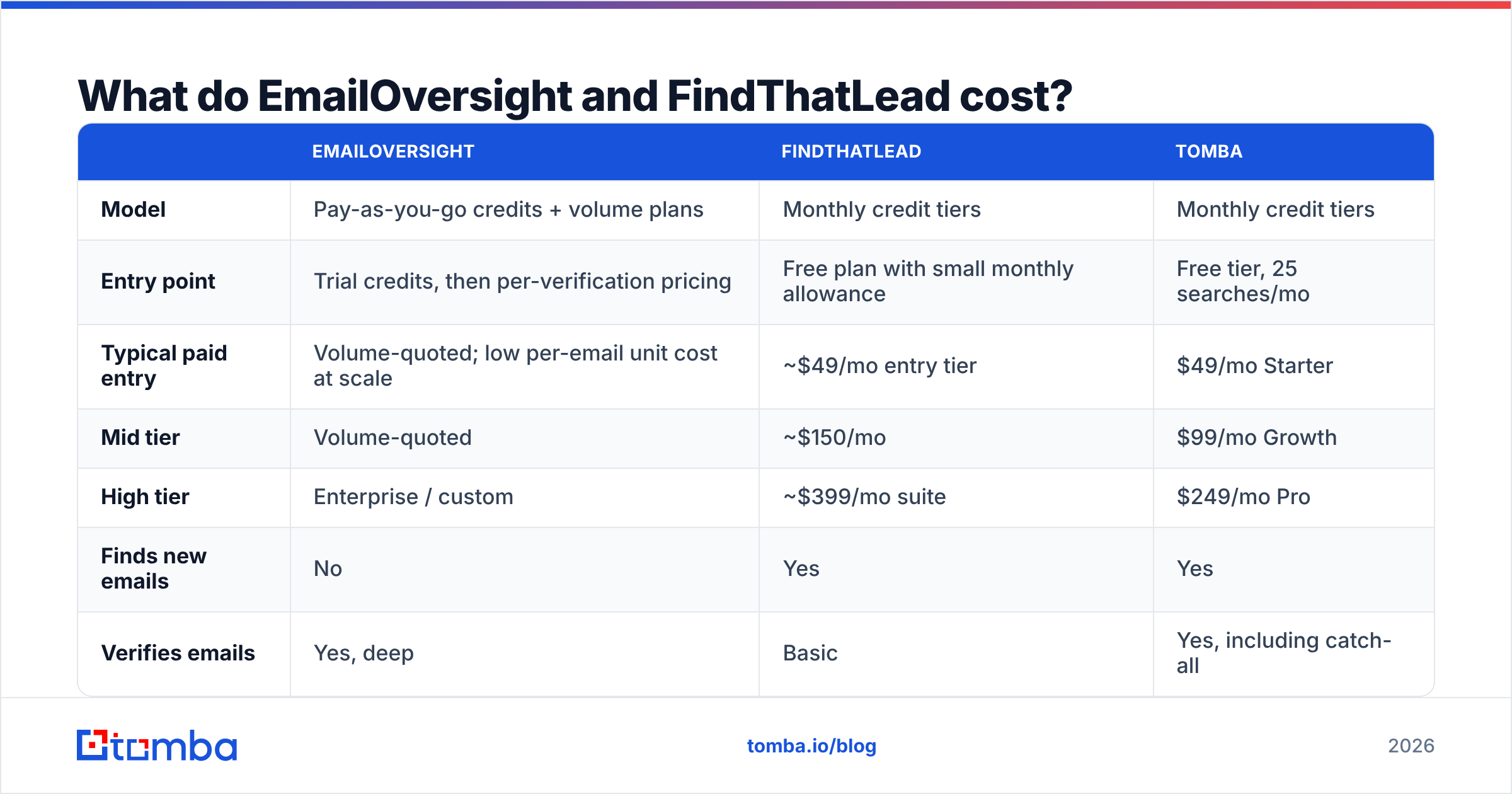
Pricing moves on both sides. EmailOversight quotes by volume rather than publishing a simple ladder. Treat the figures below as the shape of the market, not a quote. Check each vendor's pricing page before you budget.
| EmailOversight | FindThatLead | Tomba | |
|---|---|---|---|
| Model | Pay-as-you-go credits + volume plans | Monthly credit tiers | Monthly credit tiers |
| Entry point | Trial credits, then per-verification pricing | Free plan with small monthly allowance | Free tier, 25 searches/mo |
| Typical paid entry | Volume-quoted; low per-email unit cost at scale | ~$49/mo entry tier | $49/mo Starter |
| Mid tier | Volume-quoted | ~$150/mo | $99/mo Growth |
| High tier | Enterprise / custom | ~$399/mo suite | $249/mo Pro |
| Finds new emails | No | Yes | Yes |
| Verifies emails | Yes, deep | Basic | Yes, including catch-all |
| Sends campaigns | No | Yes | No, integrates instead |
Two things fall out of that table.
First, EmailOversight's per-unit cost at volume is competitive. It is built for people verifying hundreds of thousands of addresses, and the pricing reflects that. If you verify 2,000 addresses a month, you are not its target customer, and the quoting process will make that clear.
Second, run FindThatLead's mid tier next to any serious verification product and you land near or above $200 a month. That covers one workflow. Nobody puts that number on a landing page.

EmailOversight vs FindThatLead: which one should you buy?#
Match the tool to your bottleneck, not to the feature list.
- You have a large list and a deliverability problem. Buy EmailOversight. Trap detection and complainer flagging are what you are missing, and no prospecting tool provides them. Check your SPF record and DMARC setup too, before you blame the list.
- You have no list and need one this week. Buy FindThatLead, or a similar finder. Verification is a problem you get after you have contacts.
- You run client campaigns at an agency. You need both halves, permanently. Price a combined platform before you price the pair. Start with the FindThatLead alternative landscape and Tomba pricing for a baseline.
- You are enriching a CRM, not cold emailing. Neither tool is the obvious answer. Look at data enrichment tools that return company details and job titles next to the address. An email alone will not route or score a lead.
- You are mailing an EU-heavy list. Settle the legal basis before the tooling question. GDPR treats a work email as personal data. A verifier's accuracy is irrelevant if the outreach itself is not compliant. HubSpot's GDPR resources are a reasonable starting point.
Where does a combined finder plus verifier fit?#
The consolidated option exists because the two-tool stack is how this category usually fails.
A platform like Tomba runs the whole loop. Domain search pulls every known address at a company. Email finder handles individual name-plus-domain lookups. Email verification runs on the way out, with catch-all scoring for the fifth of domains that break normal SMTP checks. One credit pool, one API, one bill.

That is not automatically the right answer. Two honest counterpoints:
If verification depth is your whole problem, a specialist beats a generalist. EmailOversight's trap and complainer detection goes further than most finder-plus-verifier platforms ship. If you mail a rented or aged list, that one capability is worth its own line item.
If you want finding and sending in one login, FindThatLead's bundled campaign tool covers ground that finder-only platforms leave to Instantly, Smartlead, or Lemlist. Whether that is a feature or a ceiling depends on how long you stay small.
For everyone in the middle — a few thousand lookups a month, sending through a dedicated platform, no rented lists — the combined tool is cheaper and simpler. The Tomba API means the same credits work from a script, a spreadsheet, or your CRM.
Frequently asked questions#
Can FindThatLead replace a dedicated verifier? For low volumes of self-sourced leads, its built-in validation is usually enough. For bought, rented, or aged lists, it is not. Those lists are where spam traps live, and catching traps is a different technical problem from confirming a mailbox exists.
Does EmailOversight find new email addresses? Not in the prospecting sense. Its append products enrich records you already own. If you need to discover contacts at a target account from nothing, that is a finder's job.
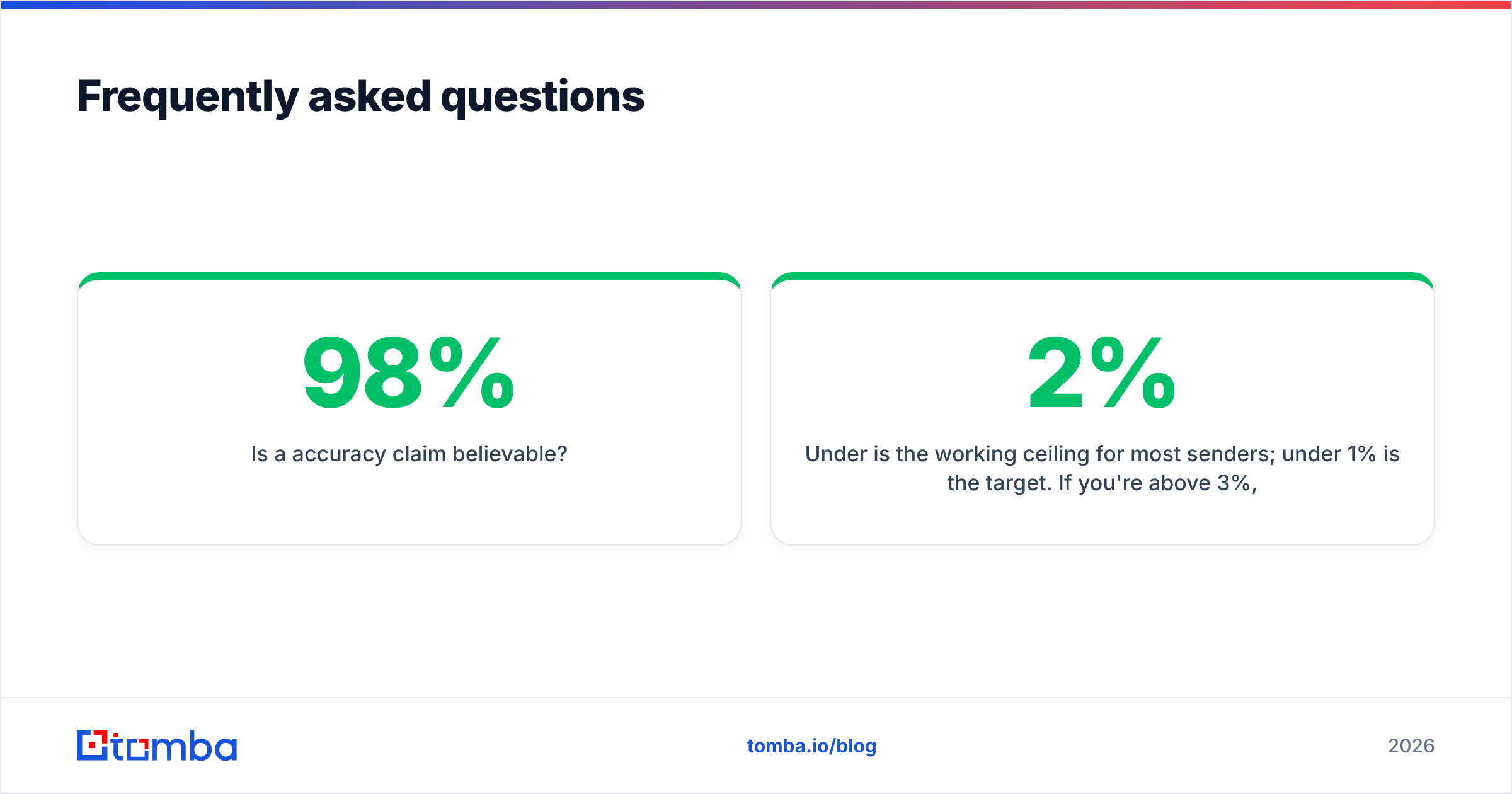
Is a 98% accuracy claim believable? On the vendor's own test list, usually yes. On your list, it depends on how closely your targets resemble theirs. Sample 500 of your own addresses in both tools and compare bounce rates. It takes an afternoon and settles the argument for good.
What should my bounce rate be? Under 2% is the working ceiling for most senders. Under 1% is the target. Above 3%, list quality is the cause far more often than your copy or your sending setup.
Do I need both tools? Only if you do both jobs at real volume. In most EmailOversight vs FindThatLead decisions, the team ends up covering one workflow with two subscriptions and could consolidate instead.
Start with the half you're actually missing#
The EmailOversight vs FindThatLead question resolves fast once you stop treating it as a like-for-like comparison. One tool protects a list you already have. The other builds one you do not. Pick against your bottleneck, and price the combined option before you commit to two subscriptions for a single workflow.
If your bottleneck is finding verified contacts in the first place, start with the Tomba Email Finder. Search by domain or by name, get verification and catch-all scoring on the same credits, and test the whole loop on the free tier's 25 monthly searches before you decide whether you ever needed two tools.
Related guides#
Ready to find emails that actually work?
Join 150,000+ professionals who stopped guessing and started sending. Free credits on signup — no credit card required.
Get the Tomba newsletter
Practical outbound tactics and product updates — once every two weeks.
About the author