EmailOversight vs SalesBot (2026): Which One Should You Buy?
EmailOversight cleans and appends email data. SalesBot automates the conversation. They solve opposite halves of the same pipeline problem — here's which one your team actually needs first, and what both leave on the table.
TL;DR
- EmailOversight and SalesBot are not real competitors. EmailOversight is a data-hygiene and email-append platform; SalesBot is the shorthand for AI sales-agent tooling that automates conversations and follow-up. Buying one does not remove the need for the other.
- If your bounce rate is above 3% or your CRM is full of stale contacts, fix data first. Automation on top of a dirty list just sends bad mail faster.
- If your list is already clean but reps are drowning in manual follow-up, the automation layer is where the ROI sits.
- Neither tool is a strong acquisition tool. Both assume you already have contacts. Sourcing net-new, verified addresses is a third job — that's where an email finder belongs in the stack.
- Realistic 2026 stack for a 5–20 person sales team: finder + verifier for supply, one automation layer for throughput, and a CRM as the source of truth. Budget roughly $150–$600/month total, not $5,000.
Why are people comparing EmailOversight vs SalesBot at all?#
Because both show up in the same searches, and both promise "more pipeline." That's where the similarity ends.
EmailOversight sits on the data side. Its core products are multi-method email validation, email append (turning a name + company or a postal record into a deliverable address), and activity/intent signals on existing records. Marketing ops and email teams buy it. The unit of value is a record.
SalesBot — and note the name is genuinely ambiguous, since several vendors ship a product literally called "Salesbot," including CRM-embedded chat automations and standalone AI SDR agents — sits on the activity side. The unit of value is a conversation: sequence steps triggered, replies drafted, meetings booked. If you're evaluating one, confirm which vendor you actually mean before you compare pricing; the AI sales assistant category on G2 alone lists dozens of tools with near-identical names.
So the honest framing of "EmailOversight vs SalesBot" is not which tool wins. It's which half of my funnel is currently broken.
What does EmailOversight actually do?#
Four jobs, in order of how often teams buy them:
- Email validation. Multi-step checks — syntax, domain/MX, mailbox-level probing, plus proprietary hygiene lists — that classify an address as valid, invalid, risky, or catch-all. This is the flagship.
- Email append. You hand over a name, a company, or a postal record; the platform returns a matched email address from its data cooperative. Match rates vary wildly by industry and record freshness — expect anywhere from 20% to 60% depending on how old your file is.
- Email intelligence / activity scoring. Flags addresses that look deliverable but are effectively dead (no opens, no engagement anywhere in the network), plus spam-trap and complainer detection.
- List monitoring. Ongoing re-validation so a file you cleaned in January isn't rotten by June. B2B email data decays roughly 22–30% per year as people change jobs.
The thing EmailOversight does well that a cheap bulk verifier does not: catching risky-but-syntactically-valid addresses — role accounts, recycled spam traps, complainers. That's the difference between a 0.4% bounce rate and a 2.8% one, and at scale it's the difference between an inbox placement problem and no problem at all.
What it doesn't do: source contacts you've never heard of, write your copy, or run your sequence.
What does SalesBot actually do?#
AI sales-agent products cluster around four capabilities:
- Conversation automation — chat widgets, LinkedIn/DM replies, or inbound qualification bots that book meetings without a human.
- Sequence execution — multi-step email/call/social cadences with branching logic, sent from your connected mailboxes.
- AI drafting — personalization pulled from a company page, funding announcement, or job posting, dropped into the first line of a cold email.
- Reply handling — classifying "interested / not now / unsubscribe" and routing accordingly, which is where most teams actually save hours.
The value proposition is throughput. One rep running a bot-assisted cadence can touch 5–10x the accounts they could manually. The catch is that throughput multiplies whatever you feed it. Point an AI SDR at a list with 15% invalid addresses and you don't get 15% fewer meetings — you get a damaged sending domain, because mailbox providers read hard bounces as a spam signal long before your prospects read your pitch. Google and Microsoft both tightened bulk-sender enforcement through 2024–2025, and a sustained bounce rate over ~2% is one of the fastest ways to land in the bounce message spiral.
How do EmailOversight and SalesBot compare head to head?#
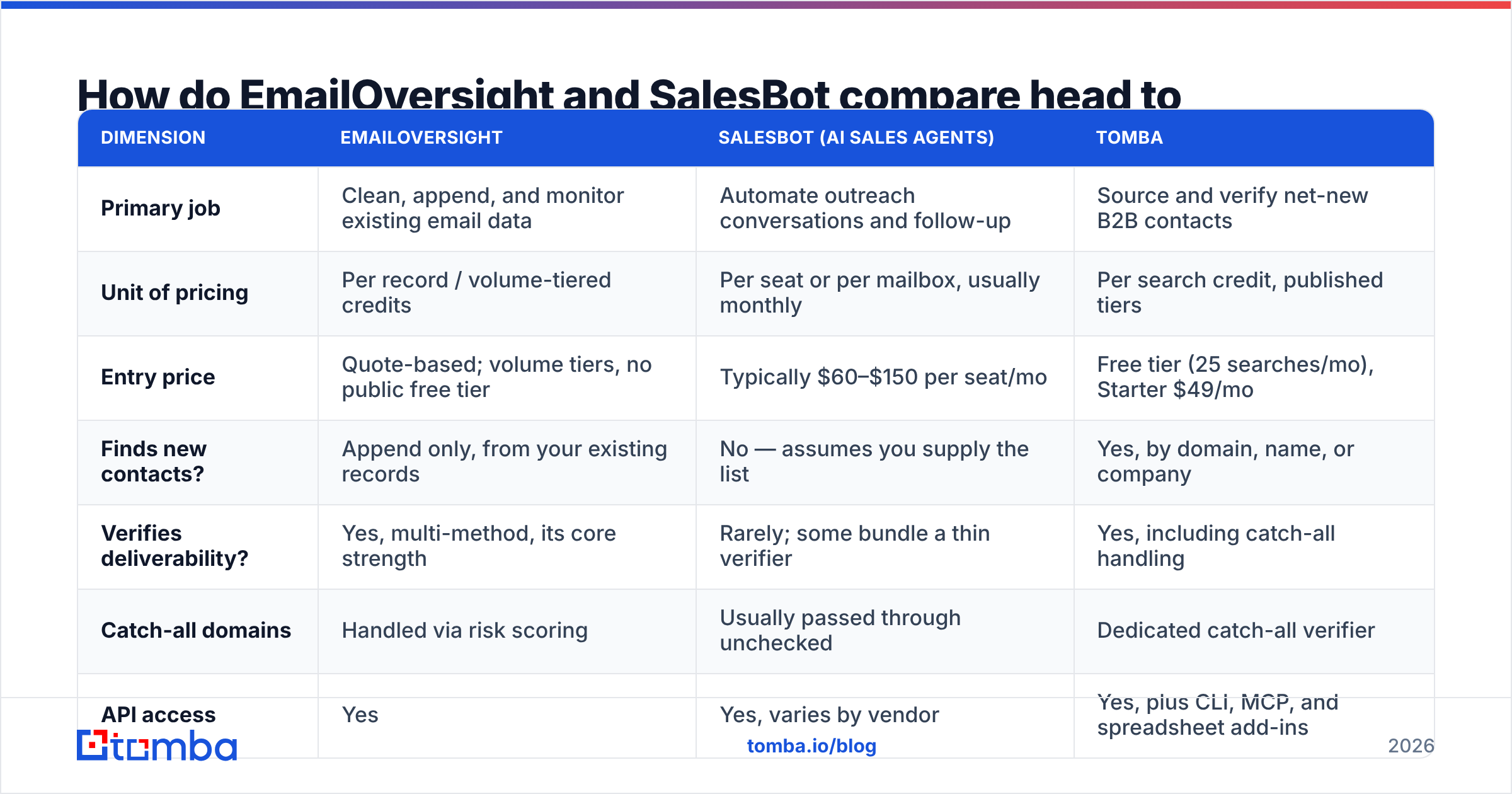
| Dimension | EmailOversight | SalesBot (AI sales agents) | Tomba |
|---|---|---|---|
| Primary job | Clean, append, and monitor existing email data | Automate outreach conversations and follow-up | Source and verify net-new B2B contacts |
| Unit of pricing | Per record / volume-tiered credits | Per seat or per mailbox, usually monthly | Per search credit, published tiers |
| Entry price | Quote-based; volume tiers, no public free tier | Typically $60–$150 per seat/mo | Free tier (25 searches/mo), Starter $49/mo |
| Finds new contacts? | Append only, from your existing records | No — assumes you supply the list | Yes, by domain, name, or company |
| Verifies deliverability? | Yes, multi-method, its core strength | Rarely; some bundle a thin verifier | Yes, including catch-all handling |
| Catch-all domains | Handled via risk scoring | Usually passed through unchecked | Dedicated catch-all verifier |
| API access | Yes | Yes, varies by vendor | Yes, plus CLI, MCP, and spreadsheet add-ins |
| Best-fit buyer | Email/marketing ops with a large existing database | SDR teams needing volume per rep | Teams building lists from scratch |
| What it won't fix | Empty pipeline, no source of new contacts | Bad data, bad offer, bad domain reputation | Sequence orchestration or reply handling |
Read that table as a stack diagram, not a leaderboard. The three columns are three different layers, and most teams eventually run something in each.
Which one should you buy first?#
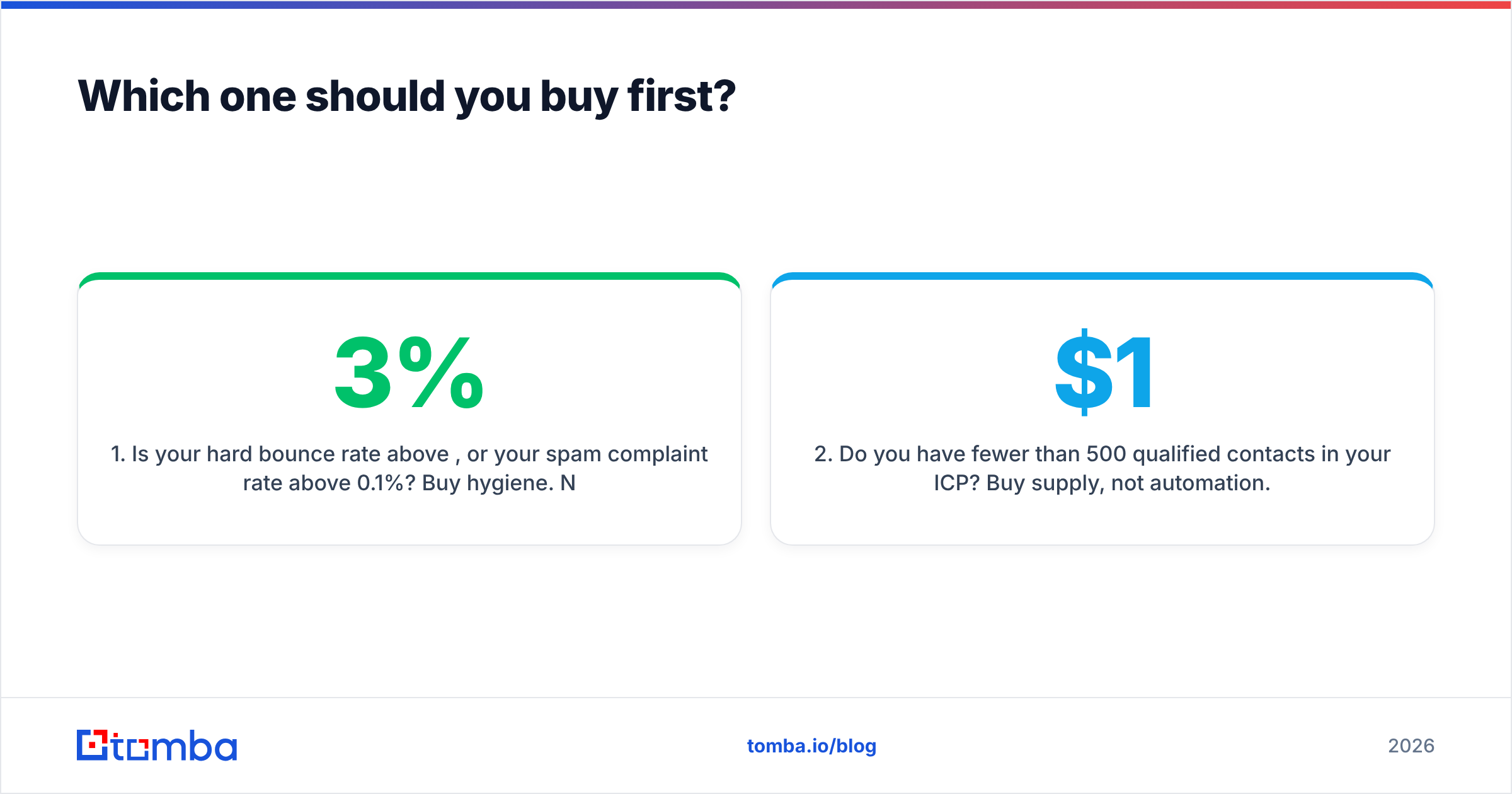
Answer the diagnostic questions in order. The first "yes" is your buy.
- Is your hard bounce rate above 3%, or your spam complaint rate above 0.1%? Buy hygiene. Nothing else matters until this is fixed — your sending domain is actively degrading. Run a full-file pass through an email verifier or EmailOversight before you touch anything else.
- Do you have fewer than 500 qualified contacts in your ICP? Buy supply, not automation. An AI SDR with nothing to send to is a $1,200/year screensaver. Use domain search to pull every reachable contact at your target accounts first.
- Are reps spending more than two hours a day on manual follow-up and reply triage? Now automation pays. That's the point where a bot's throughput advantage is measurable in booked meetings rather than in vanity send volume.
- Is your database large, old, and mostly untouched — say 100k+ records from years of webinars and gated PDFs? EmailOversight's append and activity scoring is the strongest fit in this comparison. That's exactly the use case it was built for.
- Are you starting clean in 2026 with no legacy database at all? Skip the append layer entirely. Source verified contacts directly and you never accumulate the rot that append products exist to repair.
Most teams get this order backwards. They buy the shiny automation layer in month one, watch reply rates crater in month three, and only then start asking about data quality.
What does this cost in practice?#
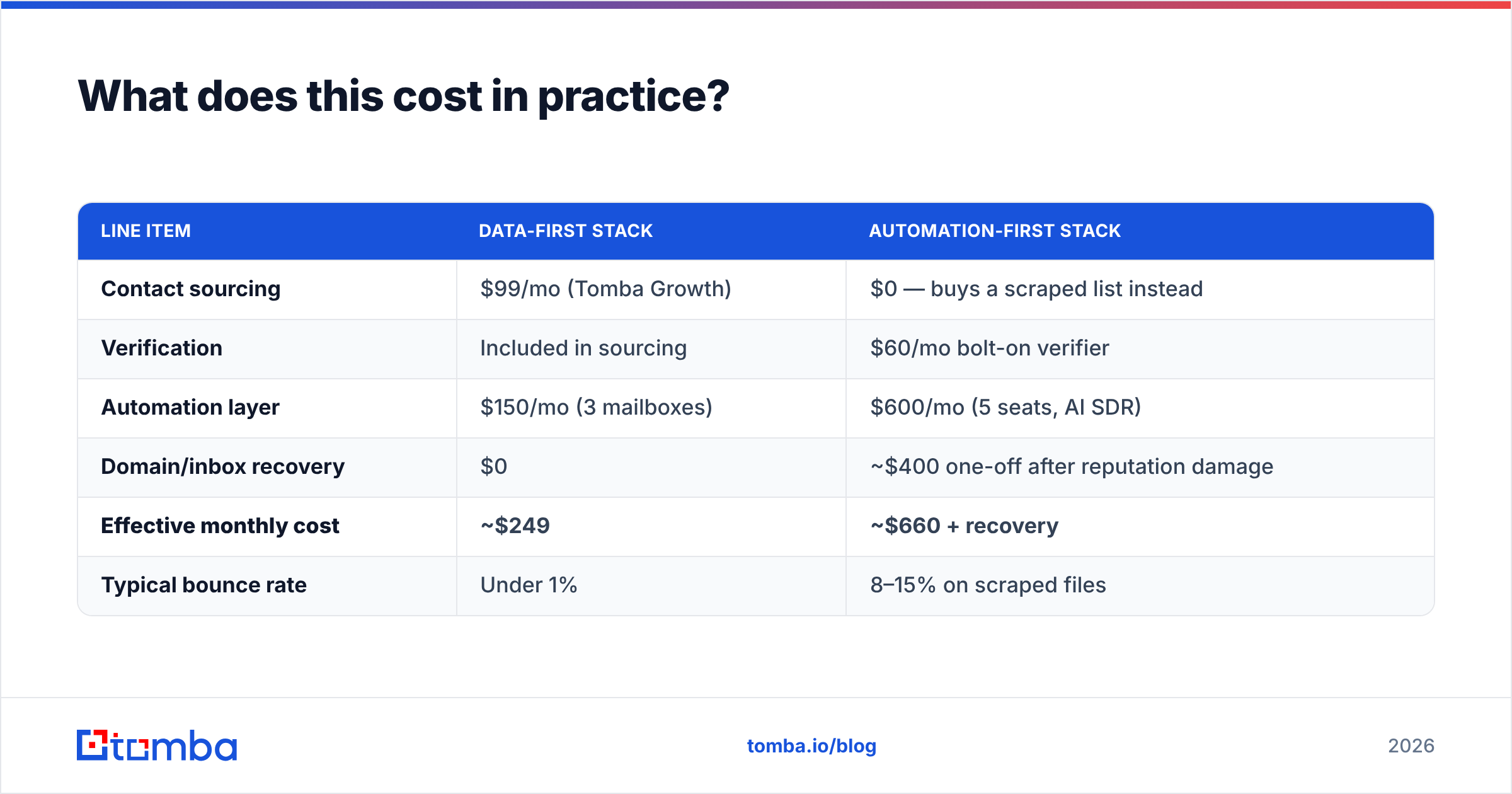
Rough monthly math for a team of five SDRs sending 100 cold emails a day each — 10,000 sends a month:
| Line item | Data-first stack | Automation-first stack |
|---|---|---|
| Contact sourcing | $99/mo (Tomba Growth) | $0 — buys a scraped list instead |
| Verification | Included in sourcing | $60/mo bolt-on verifier |
| Automation layer | $150/mo (3 mailboxes) | $600/mo (5 seats, AI SDR) |
| Domain/inbox recovery | $0 | ~$400 one-off after reputation damage |
| Effective monthly cost | ~$249 | ~$660 + recovery |
| Typical bounce rate | Under 1% | 8–15% on scraped files |
The numbers move by team, but the shape holds: paying for clean supply up front is cheaper than paying for volume and then paying again to repair what volume broke. HubSpot's ongoing marketing benchmark reporting has made the same point for years — list quality outperforms send volume on almost every downstream metric.
Where does an email finder fit alongside both?#
It fills the gap neither product covers: getting a verified address for a person you've identified but never had contact details for.
EmailOversight can append an address if the record already exists in your file. SalesBot can send to an address if someone hands it one. Neither answers "I want the VP of Engineering at these 200 Series-B companies, verified, by Friday."
That's a sourcing job, and it has three practical requirements:
- Coverage by domain, not just by person. You rarely know the exact name up front. Pulling every discoverable contact at a company and filtering by role is faster than guessing.
- Verification baked into the same call. A finder that returns unverified guesses just relocates the bounce problem downstream.
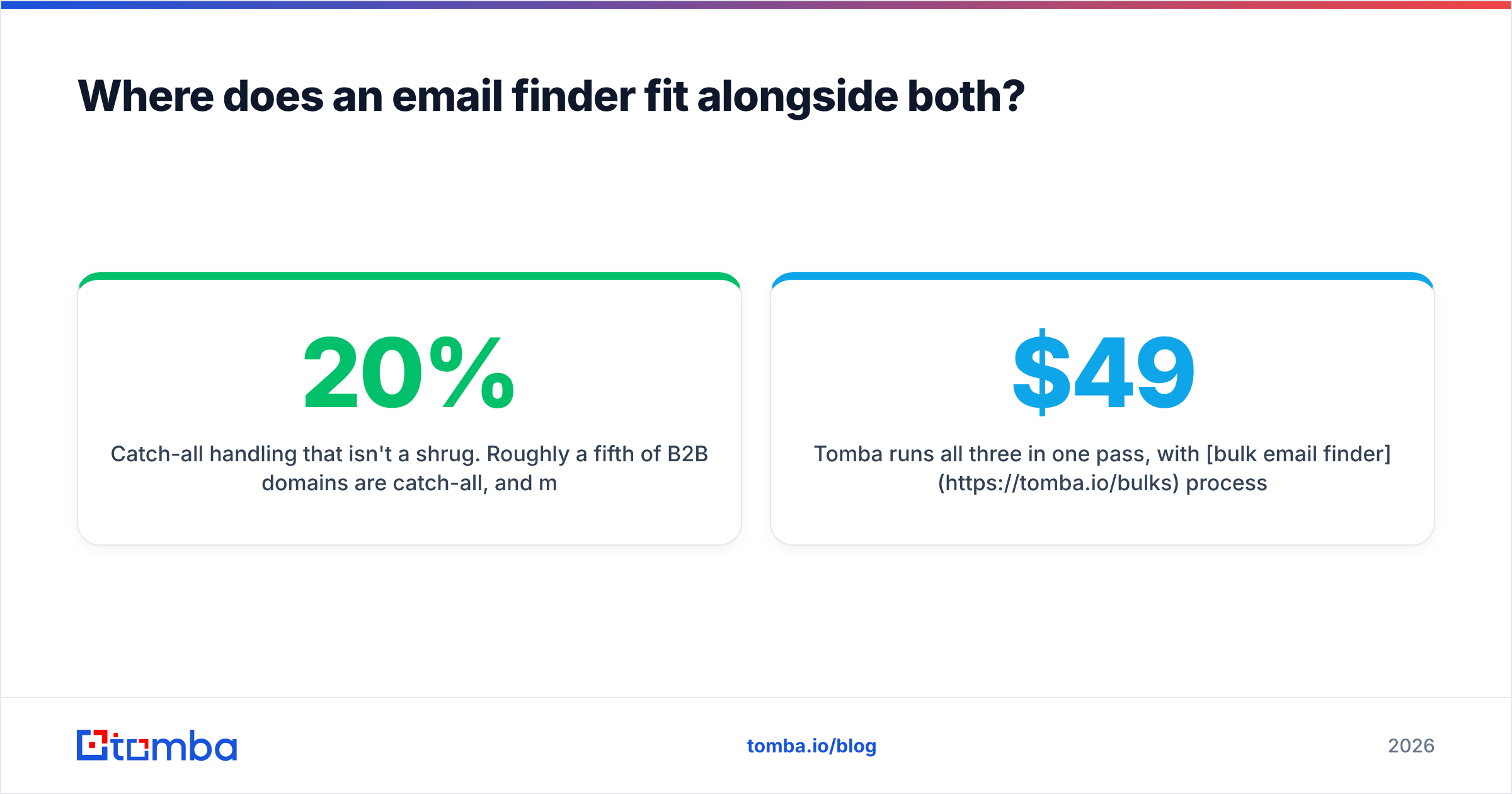
- Catch-all handling that isn't a shrug. Roughly a fifth of B2B domains are catch-all, and most verifiers mark them "unknown" and move on. A catch-all verifier that resolves them is the difference between discarding 20% of your TAM and mailing it.
Tomba runs all three in one pass, with bulk email finder processing for list-level work and an API for anything you want wired into your own pipeline. Tomba pricing starts free at 25 searches a month, then $49/mo Starter, $99/mo Growth, and $249/mo Pro — which puts a fully verified sourcing layer well below what most teams spend on a single automation seat.
What's the honest verdict on EmailOversight vs SalesBot?#
EmailOversight wins if you're a marketing ops or email team with a large legacy database, a real deliverability problem, and budget approved for data quality. Its multi-method validation and append coverage are genuinely strong, and list monitoring is a category few competitors match. Quote-based pricing means it's built for volume buyers, not for a two-person startup.
SalesBot-class tools win if your data is already clean, your offer converts, and your bottleneck is rep hours. AI drafting and reply triage save real time. Just don't buy them as a fix for a pipeline that's empty at the top.
Neither wins the sourcing job — and for most teams under 50 people, sourcing is the actual constraint. You can't clean a list you don't have, and you can't automate outreach to contacts you can't reach.
The sequence that works: source verified contacts, keep them verified, then automate. In that order, every layer compounds. In the reverse order, every layer amplifies the mistake underneath it.
Ready to fix the supply side first?#
Start with the Tomba Email Finder. Search by domain, name, or company, get verification on every result rather than as a separate paid step, and export straight into whatever automation layer you land on. The free tier gives you 25 searches a month — enough to test 25 accounts against your current list and see exactly how many of your "valid" contacts hold up. If they all pass, your data isn't the problem and you can buy automation with confidence. If they don't, you just found the cheaper fix.
Related guides#
Ready to find emails that actually work?
Join 150,000+ professionals who stopped guessing and started sending. Free credits on signup — no credit card required.
Get the Tomba newsletter
Practical outbound tactics and product updates — once every two weeks.
About the author