EmailOversight vs Tomba: Which Email Data Tool Wins in 2026
EmailOversight cleans lists you already own. Tomba builds the list and then verifies it. Here is an honest breakdown of accuracy, pricing, API depth, and which one belongs in your stack.
TL;DR
- EmailOversight vs Tomba is not a fair fight. They solve different halves of one problem. EmailOversight cleans data you already own. Tomba finds new contacts first, then verifies them.
- Own a big legacy list? EmailOversight checks it for spam traps, complainers, and litigators. That is its strongest work.
- Starting from zero contacts? EmailOversight cannot find people. You would still need a finder like Tomba on top.
- The two price models work differently. EmailOversight sells verification credits by volume. Tomba sells monthly plans, from free (25 searches a month) up to $49/mo for Starter.
- The honest verdict: these tools are complements more often than rivals. Pick the one that fixes the broken half of your pipeline.
What problem does each tool solve?#
Think of your outbound pipeline as a water system. EmailOversight is the filtration plant. It takes the water you pour in and strips out what is dirty. Tomba is the drilling rig. It finds the water first, then runs a filter before it reaches you.
That single difference drives everything else. It shapes pricing, API design, and reporting. Most EmailOversight vs Tomba comparisons line the two up as rival verifiers. That framing gives you a misleading scorecard. The two tools overlap on verification and split apart almost everywhere else.
Say you have 200,000 contacts in a CRM and no idea how stale they are. That is a hygiene problem. Say you have a target account list and no contacts at all. That is a discovery problem. Buying the wrong tool for your real problem is the costliest mistake in this market. This post exists to stop that.
What is EmailOversight?#
EmailOversight is a US email data-quality vendor. It focuses on validation, list hygiene, and email appending. The pitch is what the company calls multi-method verification. Instead of one SMTP handshake, it runs several checks over each address.
Those checks usually cover:
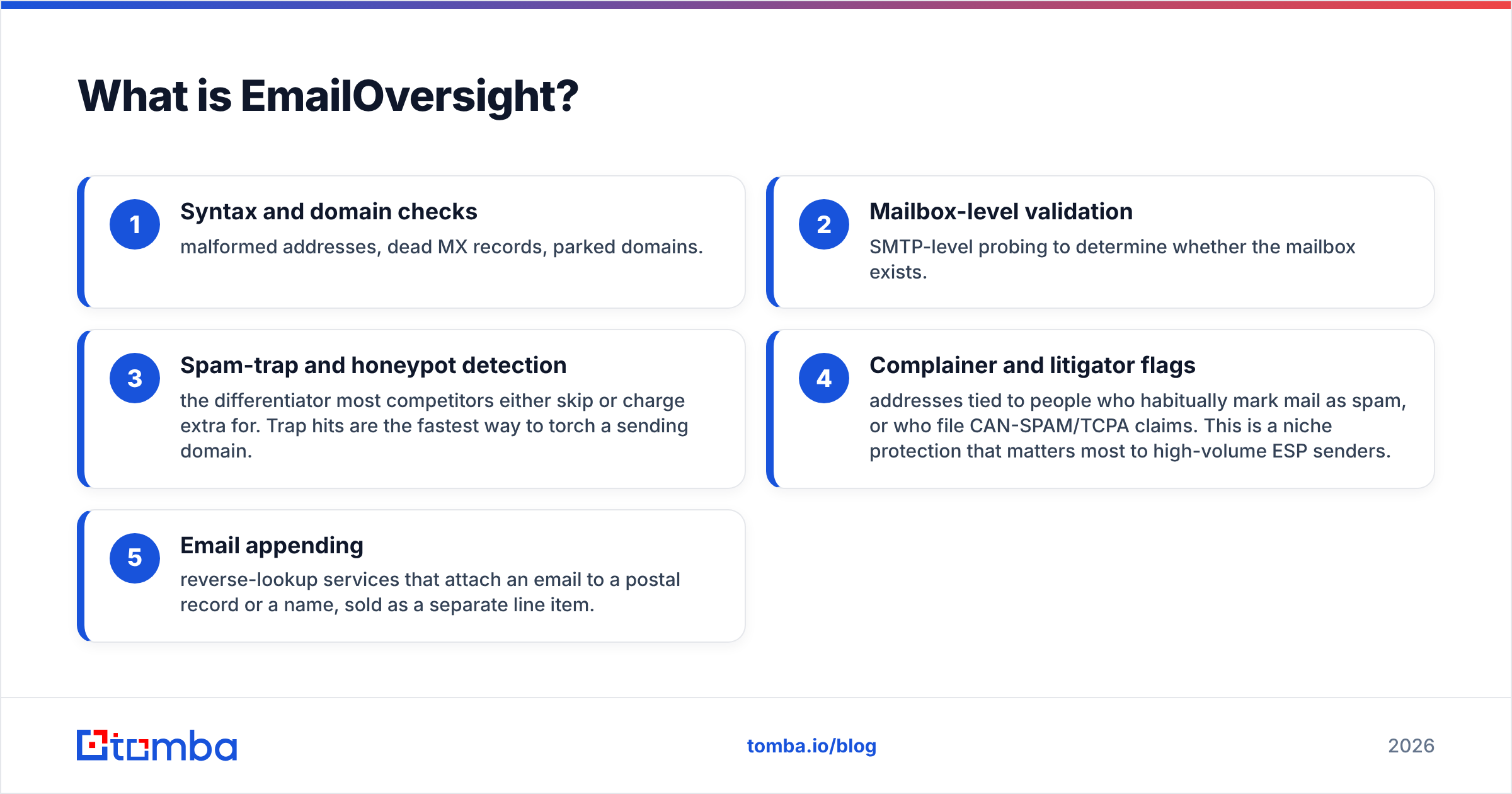
- Syntax and domain checks — bad addresses, dead MX records, parked domains.
- Mailbox-level validation — SMTP probes that test whether the mailbox exists.
- Spam-trap and honeypot detection — the feature most rivals skip or charge extra for. Trap hits burn a sending domain faster than anything else.
- Complainer and litigator flags — people who report mail as spam, or who file CAN-SPAM and TCPA claims. This matters most to high-volume senders.
- Email appending — reverse lookups that tie an email to a name or a postal record. It is sold as a separate line item.
Buyers skew toward email marketers, ESPs, and agencies with large opt-in files. They are not SDR teams building lists from scratch. Reviews on G2 praise the trap detection. They call the interface useful rather than modern.
Where it is weak: discovery. EmailOversight can tell you whether sarah.chen@acme.com is safe to mail. It cannot tell you that Sarah Chen runs Ops at Acme. It cannot tell you the company uses a first.last pattern either.
What is Tomba?#
Tomba is an email finder with a verification layer attached. It also ships a set of nearby data tools. The workflow starts from a company domain or a person's name. It does not start from a file you already own.
The core surfaces:
- Email finder — name and domain in, work address out, with a confidence score.
- Domain search — pull every address found at a company, plus the email pattern that company uses.
- Email verifier — SMTP, MX, syntax, disposable, and role-account checks.
- Catch-all verifier — the tool for domains that accept every address. This is where most verifiers give up.
- Enrichment, phone finder, and reverse lookup — the data layer around the finder.
- Tomba API, CLI, MCP server, Chrome extension, Sheets and Excel add-ins.
Where it is weak: Tomba does not sell spam-trap or litigator detection as a headline feature. Say your main risk is mailing a ten-year-old bought file into a trap network. That gap is real.
EmailOversight vs Tomba: how do the features compare?#
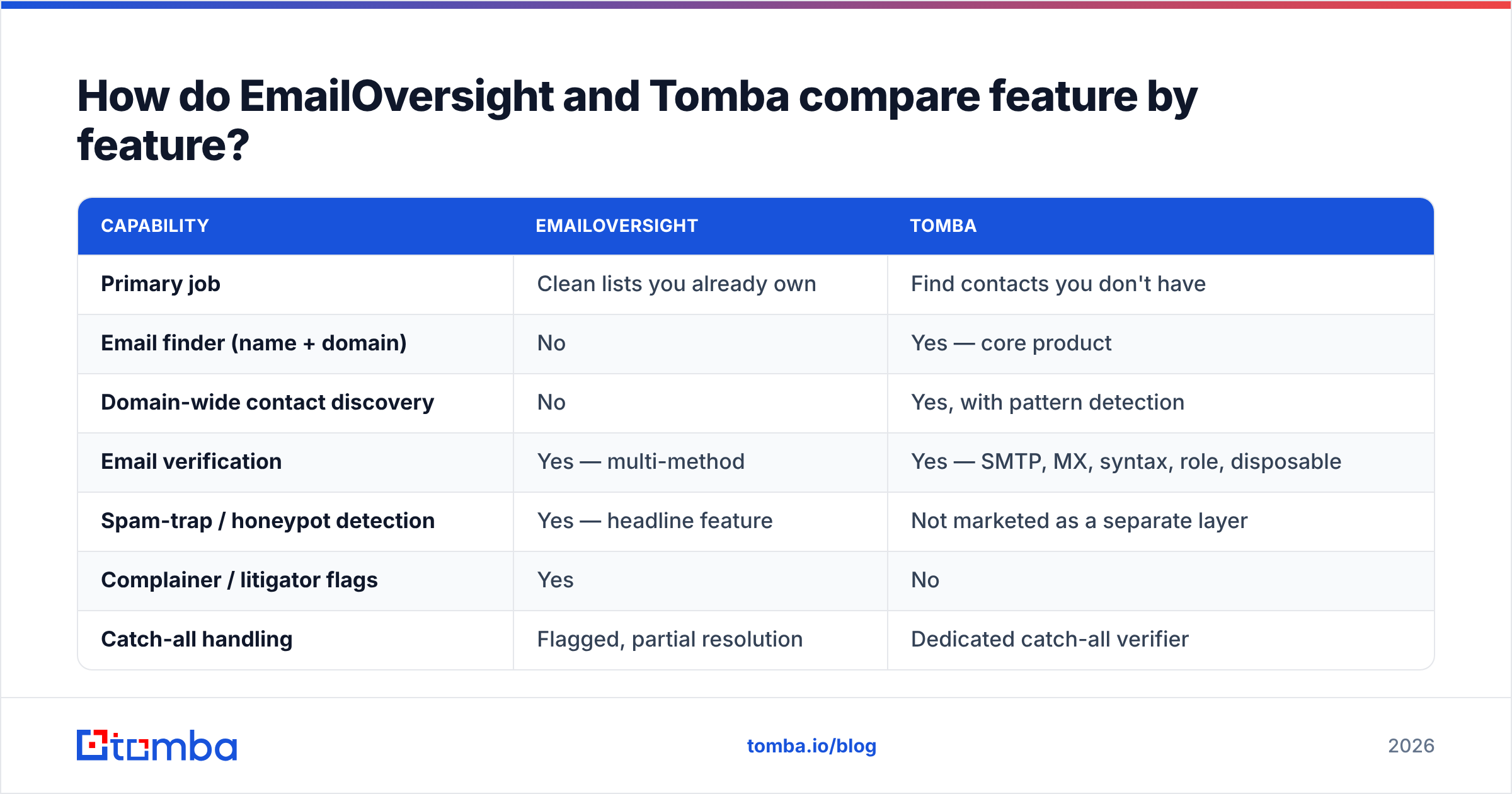
Here is the side-by-side. Read it as a map of what each tool does. It is not a scoreboard. The blank cells tell you as much as the checkmarks.
| Capability | EmailOversight | Tomba |
|---|---|---|
| Primary job | Clean lists you already own | Find contacts you don't have |
| Email finder (name + domain) | No | Yes — core product |
| Domain-wide contact discovery | No | Yes, with pattern detection |
| Email verification | Yes — multi-method | Yes — SMTP, MX, syntax, role, disposable |
| Spam-trap / honeypot detection | Yes — headline feature | Not marketed as a separate layer |
| Complainer / litigator flags | Yes | No |
| Catch-all handling | Flagged, partial resolution | Dedicated catch-all verifier |
| Email append / reverse lookup | Yes (paid add-on) | Yes — reverse email lookup + enrichment |
| Phone data | Limited | Phone finder + validator |
| Bulk processing | Yes — core workflow | Yes — bulk finder and verifier |
| Real-time API | Yes | Yes — REST, CLI, MCP server |
| Native integrations | ESP-centric (Mailchimp, HubSpot, etc.) | CRM + automation (HubSpot, Salesforce, Pipedrive, Zapier, Make, Sheets) |
| Free tier | Trial credits | 25 searches/mo, ongoing |
| Best-fit buyer | Email marketers, ESPs, agencies | SDRs, growth teams, recruiters, developers |
Two rows deserve a closer look.
Catch-all domains. About a fifth of B2B domains accept mail at any address. SMTP checks are useless there. EmailOversight flags those domains and applies rules of thumb. Tomba ships a purpose-built catch-all finder that tries to resolve the address by pattern instead of shrugging. Many of your targets may sit on Google Workspace or Microsoft 365 with catch-all turned on. If so, this row alone may decide your choice.
Litigator lists. This is EmailOversight's real moat. Say you send hundreds of thousands of emails a month to consumer-facing data. Litigator suppression is then a must-have. For a 40-person B2B team sending 200 emails a day, it barely matters.
EmailOversight vs Tomba: which tool is more accurate?#
Accuracy is two questions hiding inside one word. Vendors use that blur to their advantage.
Verification accuracy asks a simple thing. Of the addresses marked valid, how many actually accept mail? Both tools do well here on normal domains. The gap opens on catch-alls and on slow servers that throttle SMTP probes. EmailOversight runs more passes, so it flags fewer bad addresses as good on risky consumer domains. Tomba's catch-all tool saves good B2B addresses that a simpler verifier would throw away as "unknown."
Discovery accuracy asks a different thing. Of the addresses a tool finds for a person, how many are right and current? Only Tomba can be measured here, because EmailOversight does not play in this space.

Treat every published accuracy number as a rough guide. That includes the chart above and every vendor's marketing page. Accuracy swings by country, company size, and industry. A tool that hits 95% on US software firms can drop to 60% on European factories with odd domain setups.
The only test that counts is your own. Take 100 contacts from your real target market. Run them through both tools. Send to the results. Bounce rate is truth. Everything else is a brochure. Tomba publishes its data sources openly, so you can at least reason about where coverage will be thin.
EmailOversight vs Tomba: how does pricing compare?#
The two models are built differently. That makes a straight per-unit comparison misleading.
EmailOversight sells verification credits by volume. Prices run roughly $0.004 to $0.01 per email, based on tier and commitment. Appending costs extra. Check their pricing page yourself, since tiers and minimums move.
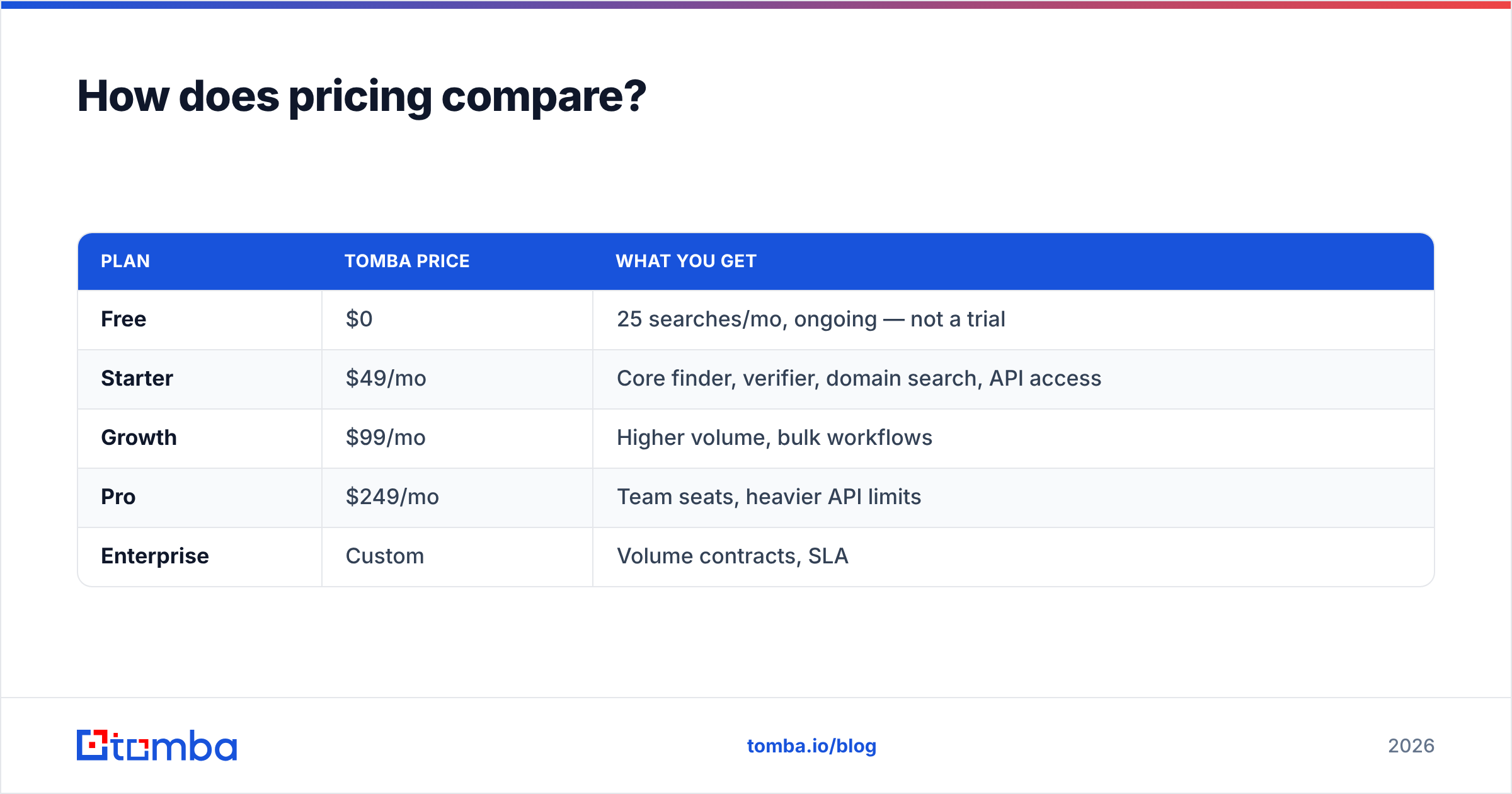
Tomba sells monthly search-and-verify plans:
| Plan | Tomba price | What you get |
|---|---|---|
| Free | $0 | 25 searches/mo, ongoing — not a trial |
| Starter | $49/mo | Core finder, verifier, domain search, API access |
| Growth | $99/mo | Higher volume, bulk workflows |
| Pro | $249/mo | Team seats, heavier API limits |
| Enterprise | Custom | Volume contracts, SLA |
Full details sit on the Tomba pricing page.
Here is the practical math. Say you clean 500,000 records once a quarter. A per-credit verifier will almost surely cost less than a plan with a search cap. Now say you find 2,000 new contacts a month and verify them as you go. A plan wins, because you are paying for discovery. Credit-based verifiers do not sell that at all.
Watch for two hidden costs on both sides. The first is catch-all charges. Some vendors bill full price for a result of "unknown," which means paying for no answer. The second is re-verification. B2B data decays by 22% to 30% a year, per widely cited HubSpot research. Budget to clean the same list more than once.

Which should you choose for your situation?#
Start with the job you need done today.
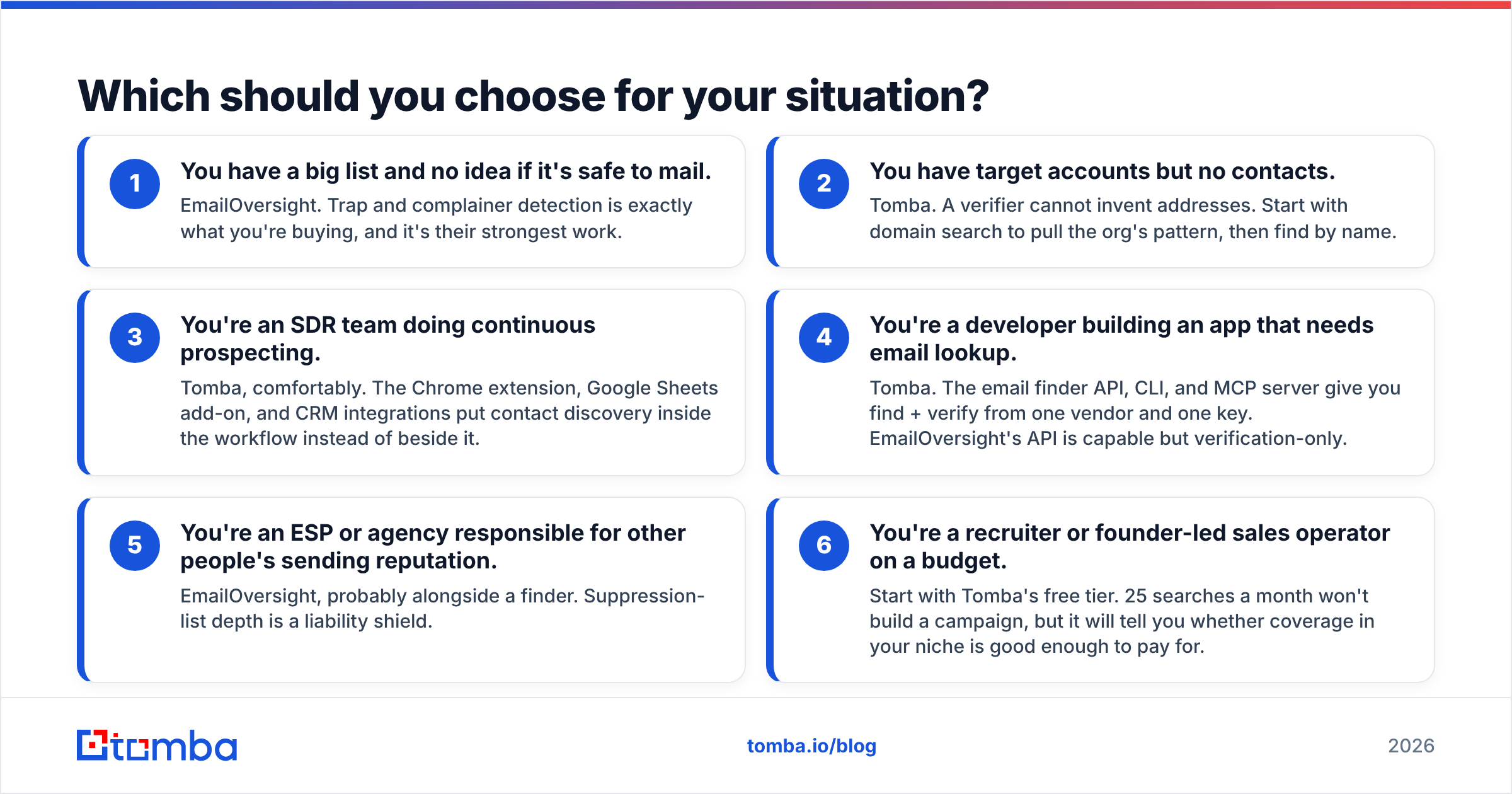
- You have a big list and no idea if it is safe to mail. Choose EmailOversight. Trap and complainer detection is exactly what you are buying.
- You have target accounts but no contacts. Choose Tomba. A verifier cannot invent addresses. Run domain search first to learn the pattern, then find people by name.
- You are an SDR team prospecting every day. Choose Tomba, comfortably. The Chrome extension, the Google Sheets add-on, and the CRM integrations put contact search inside your workflow.
The next three cases are less common, but they come up often enough to name.
- You are a developer building an app that needs email lookup. Choose Tomba. The email finder API, CLI, and MCP server give you find and verify from one vendor and one key. EmailOversight's API is solid, but it only verifies.
- You are an ESP or agency guarding someone else's sending reputation. Choose EmailOversight, probably next to a finder. Deep suppression lists act as a shield.
- You are a recruiter or a founder selling on a budget. Start on Tomba's free tier. 25 searches a month will not build a campaign. It will show you whether coverage in your niche is good enough to pay for.
Can you run both together?#
Yes. For some teams that is the right answer, not a dodge.
A real combined pipeline looks like this:
- Discovery — Tomba finds contacts at target accounts by domain and name, with confidence scores.
- First-pass verification — Tomba's verifier drops the clear failures: bad syntax, dead domains, and role accounts like
info@andsales@. - Catch-all resolution — the catch-all verifier takes on the addresses a normal SMTP check cannot settle.
- Hygiene pass — EmailOversight screens the survivors against trap and complainer databases before anything reaches a sending tool.
- Decay control — bulk verify the active database every quarter. A list checked in January is much worse by July.
That stack costs more than either tool alone. Whether it pays off depends on your send volume. It also depends on what a burned sending domain would cost you. Below about 5,000 B2B sends a month, trap risk is low. One find-and-verify tool is usually enough. Above 50,000 a month, dedicated hygiene starts to pay for itself.
Neither tool replaces sending discipline. Warm your domains. Keep SPF and DKIM correct. Watch your bounce rates. Clean data improves email deliverability, but it cannot save a domain with a bad name. Verification is needed. It is not enough on its own.
What is the verdict on EmailOversight vs Tomba?#
EmailOversight wins on list hygiene. Tomba wins on discovery, developer tools, and total pipeline coverage. Suppose a B2B team must pick one tool while building lists from scratch. Tomba is the fuller answer. A finder with verification solves both halves, while a verifier solves only one. Now suppose your problem is a large inherited file of unknown origin. EmailOversight's suppression data is the sharper instrument, and you should buy the specialist.
Test both against your own market before you commit. Run 100 real contacts through each tool. Send to the results. Compare bounce rates. That thirty-minute test beats every comparison table online, this one included.
Is your bottleneck finding contacts rather than cleaning them? Start with the Tomba Email Finder. The free tier gives you 25 searches a month with no time limit. That is enough to check coverage in your market before you spend a cent. If it holds up, Starter is $49/mo and includes the verifier, domain search, and full API access on day one.
Related guides#
Ready to find emails that actually work?
Join 150,000+ professionals who stopped guessing and started sending. Free credits on signup — no credit card required.
Get the Tomba newsletter
Practical outbound tactics and product updates — once every two weeks.
About the author