EmailValidation.io vs Wiza: Which Email Tool Wins in 2026?
One tool cleans lists, the other scrapes LinkedIn — and neither does the whole job alone. Here's how EmailValidation.io and Wiza actually compare on accuracy, pricing, and workflow fit in 2026.
EmailValidation.io vs Wiza is a strange matchup. One tool checks whether an email will bounce. The other pulls contacts out of LinkedIn. Here is what each one does, what each one costs, and which one fits your team.
TL;DR
- These two tools are not really competitors. EmailValidation.io is a verification API. You give it an address, and it tells you whether it will bounce. Wiza is a LinkedIn-first prospecting tool. You give it a Sales Navigator search, and it gives you contacts.
- Pick EmailValidation.io if you already have a list (signups, CRM records, an old export) and your only problem is bounce rate.
- Pick Wiza if your whole prospecting motion runs through LinkedIn. You get a Chrome extension that turns a saved search into a CSV.
- Neither one covers the full loop on its own: find the address → confirm it's deliverable → enrich the record. That gap is why most teams end up paying for two vendors.
- Want find + verify + enrich behind one API and one credit pool? A consolidated platform (Tomba, Apollo, Dropcontact) usually beats stitching two point tools together.
What is EmailValidation.io, and what problem does it solve?#
EmailValidation.io is a single-purpose email verification service. You send it an address over a REST endpoint. It returns a structured verdict: syntax validity, MX records present, SMTP mailbox response, whether the domain is a disposable provider, whether it's a free provider (gmail.com, outlook.com), whether it's a role account (info@, sales@), and a quality score.
That's the whole product. There is no lead database behind it, no LinkedIn scraper, no sequencer. You bring the addresses. It tells you which ones will survive contact with a mail server.
The design is developer-first. The API is a plain GET request with an API key. Responses come back as JSON, and there's a bulk endpoint for list cleaning. Teams usually wire it into one of three places:
- Signup forms — reject typo'd and disposable addresses before they hit your database.
- Pre-send hygiene — clean a list right before it loads into Instantly, Smartlead, or Mailchimp.
- CRM decay control — re-verify records on a rolling schedule. B2B contact data goes stale at roughly 22–30% per year as people change jobs.
Is your problem "our bounce rate is 8% and Google is throttling us"? Then this kind of tool is the right answer. Is your problem "we don't have enough contacts"? Then it does nothing for you.
What is Wiza, and how does it actually work?#
Wiza sits on the opposite side of the funnel. It's a LinkedIn-native prospecting tool built around one core motion. Take a LinkedIn or Sales Navigator search, run it through Wiza, and get back a spreadsheet of names, titles, companies, work emails, and (on higher tiers) phone numbers.
The delivery mechanism is a Chrome extension plus a web app. You install the extension, run your search on LinkedIn, and hit export. Wiza processes the list in the background. It also does single-profile lookups while you browse, and it pushes results into HubSpot, Salesforce, Outreach, and Salesloft.
Wiza's stated advantage is that emails are validated as part of the export. You're charged for valid contacts, not for every row it attempted. That billing model matters on 2,000-row Sales Navigator lists. A raw scrape of that size might only yield 55–70% usable work emails.
The constraint is just as clear: Wiza is only as good as your LinkedIn access. Some ICPs are thin on LinkedIn — local trades, some manufacturing verticals, non-US SMBs, most of APAC outside enterprise tech. For those, the well runs dry fast. You also need a LinkedIn account in good standing, ideally Sales Navigator, to build the searches at all.

Which one is more accurate — and accurate at what?#
This is where most comparison posts go wrong. The two tools are measured on different axes.
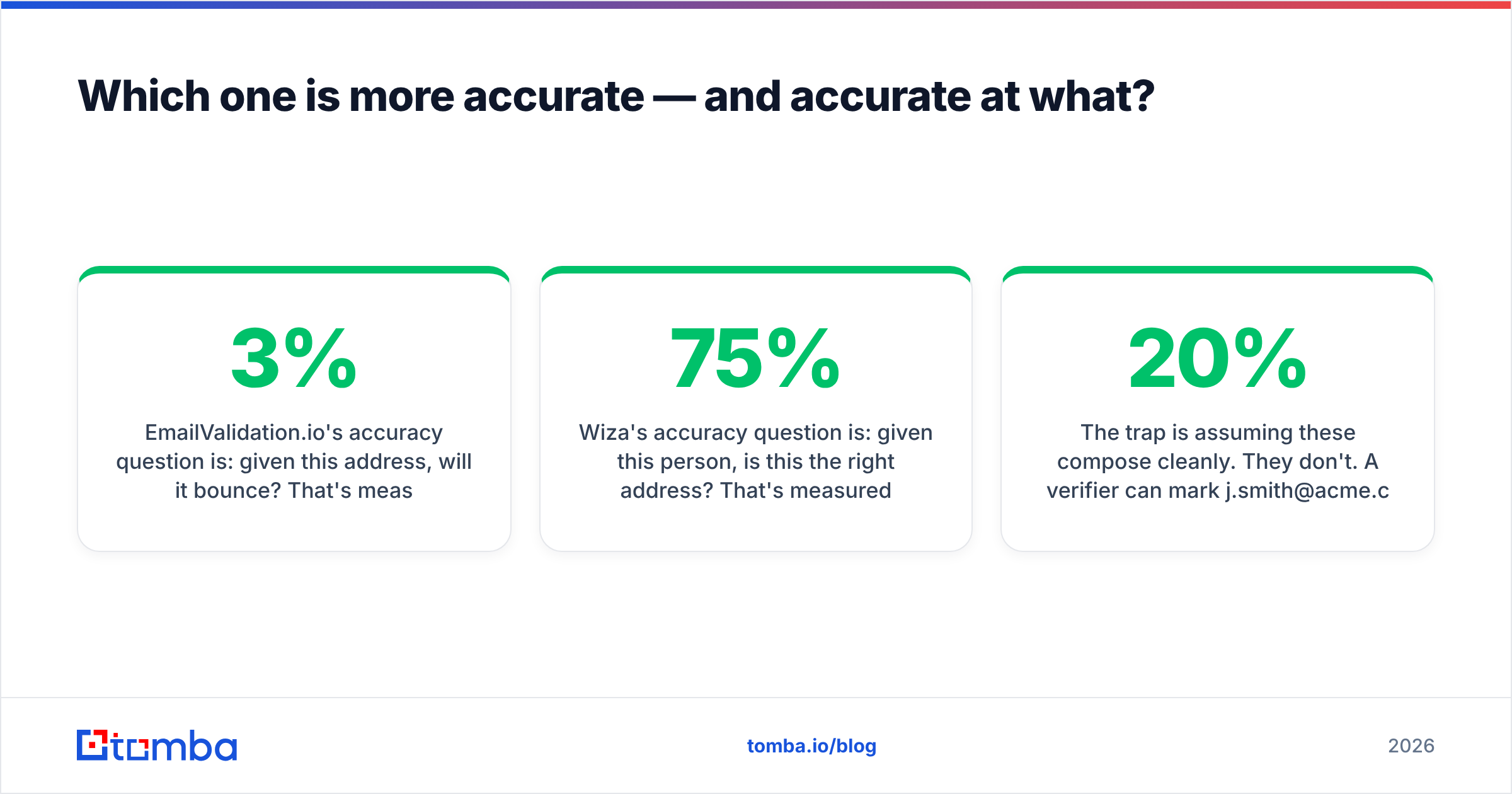
EmailValidation.io's accuracy question is: given this address, will it bounce? That's measured as bounce-rate reduction on a known list. Good verifiers land real-world bounce rates under 2–3% on lists they've marked "deliverable." One caveat: no verifier can fully resolve catch-all domains through SMTP alone.
Wiza's accuracy question is: given this person, is this the right address? That's measured two ways. Coverage is the share of a LinkedIn list that returns an email at all. Correctness is the share of returned addresses that reach the real human. Coverage on Wiza-style tools usually runs 55–75%, depending on region and seniority.
The trap is assuming these compose cleanly. They don't. A verifier can mark j.smith@acme.com as deliverable when the real person is jsmith@acme.com. The first address may belong to a different Smith — or to a catch-all server that accepts everything. Catch-all domains are roughly 20% of B2B domains, and they defeat naive SMTP checks entirely. That's why a dedicated catch-all verifier matters more than a headline accuracy number.

When you test either tool, run your own sample. Take 200 contacts from your real ICP, run them through, send a live campaign, and measure hard bounces plus replies. Vendor accuracy numbers are marketing claims. Your own ICP is the only benchmark that pays your salary.
EmailValidation.io vs Wiza: how do they compare head-to-head?#
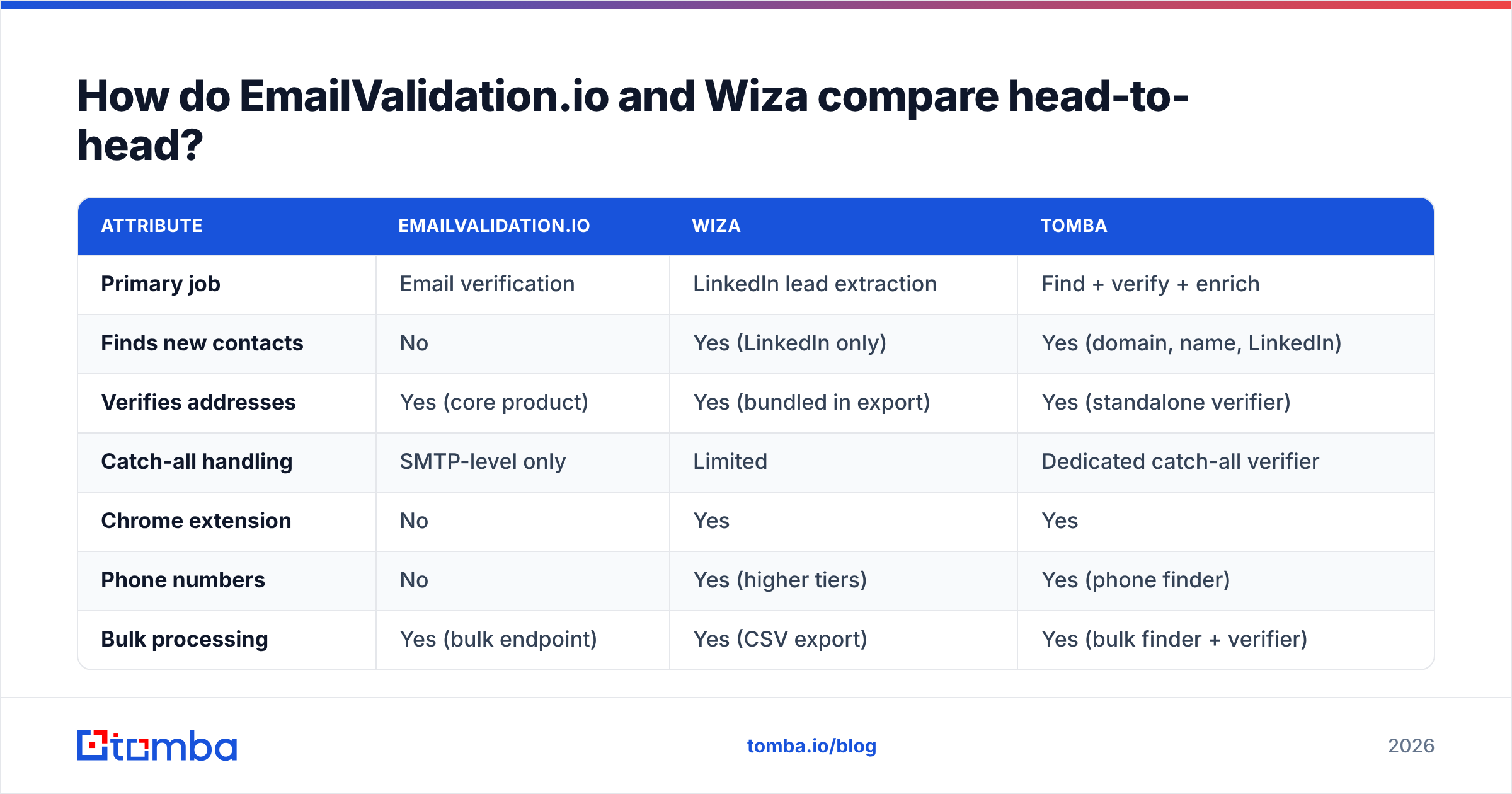
Here's the honest side-by-side, with Tomba included as the consolidated-stack reference point.
| Attribute | EmailValidation.io | Wiza | Tomba |
|---|---|---|---|
| Primary job | Email verification | LinkedIn lead extraction | Find + verify + enrich |
| Finds new contacts | No | Yes (LinkedIn only) | Yes (domain, name, LinkedIn) |
| Verifies addresses | Yes (core product) | Yes (bundled in export) | Yes (standalone verifier) |
| Catch-all handling | SMTP-level only | Limited | Dedicated catch-all verifier |
| Chrome extension | No | Yes | Yes |
| Phone numbers | No | Yes (higher tiers) | Yes (phone finder) |
| Bulk processing | Yes (bulk endpoint) | Yes (CSV export) | Yes (bulk finder + verifier) |
| Public REST API | Yes | Yes | Yes |
| Free tier | Limited free credits | Limited free credits | 25 searches/mo |
| Entry paid price | Low-cost credit packs | Mid ($80–100/mo range) | $49/mo Starter |
| Needs LinkedIn account | No | Yes, effectively required | No |
| Best for | Cleaning lists you own | LinkedIn-native SDR teams | Full find-to-send pipeline |

Read that table as a job-to-be-done map, not a scoreboard. The row that decides your purchase is the first one.
EmailValidation.io vs Wiza: what does each one cost?#
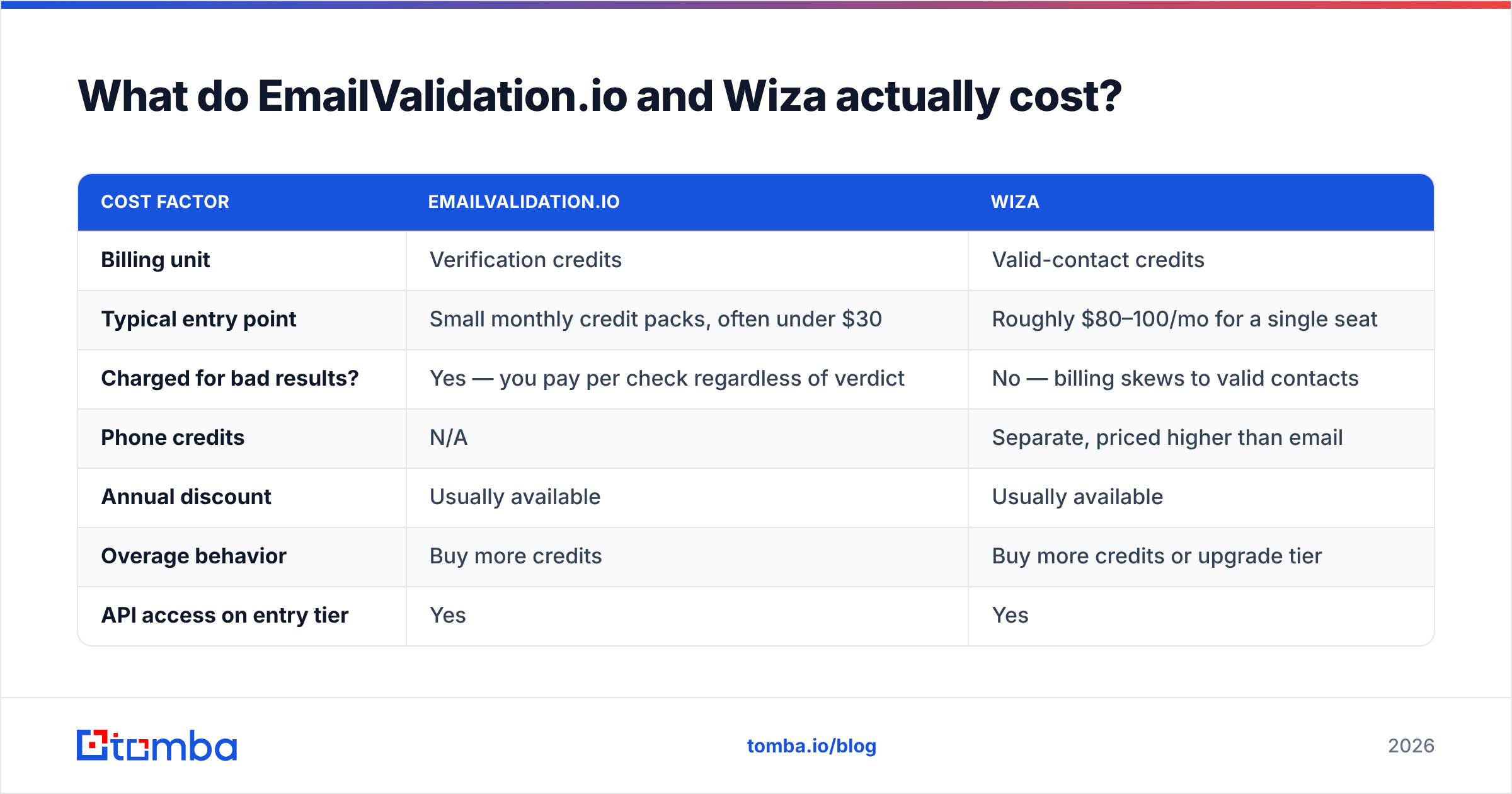
Pricing on both moves. Treat these as shape-of-the-model guidance, and check the vendors' own pages before you sign anything.
| Cost factor | EmailValidation.io | Wiza |
|---|---|---|
| Billing unit | Verification credits | Valid-contact credits |
| Typical entry point | Small monthly credit packs, often under $30 | Roughly $80–100/mo for a single seat |
| Charged for bad results? | Yes — you pay per check regardless of verdict | No — billing skews to valid contacts |
| Phone credits | N/A | Separate, priced higher than email |
| Annual discount | Usually available | Usually available |
| Overage behavior | Buy more credits | Buy more credits or upgrade tier |
| API access on entry tier | Yes | Yes |
The economics diverge more than the sticker price suggests. Verification is cheap per unit, because it's just a lookup. Discovery is expensive per unit, because it takes sourcing, matching, and confirming. Buy both and you pay two subscription floors. You also eat two sets of unused credits at the end of each month. That's the case for consolidation — not brand loyalty, just credit-pool math.
For reference, Tomba pricing runs Free (25 searches/mo), Starter at $49/mo, Growth at $99/mo, and Pro at $249/mo, plus custom Enterprise. Finding, verification, and enrichment all draw from the same pool.

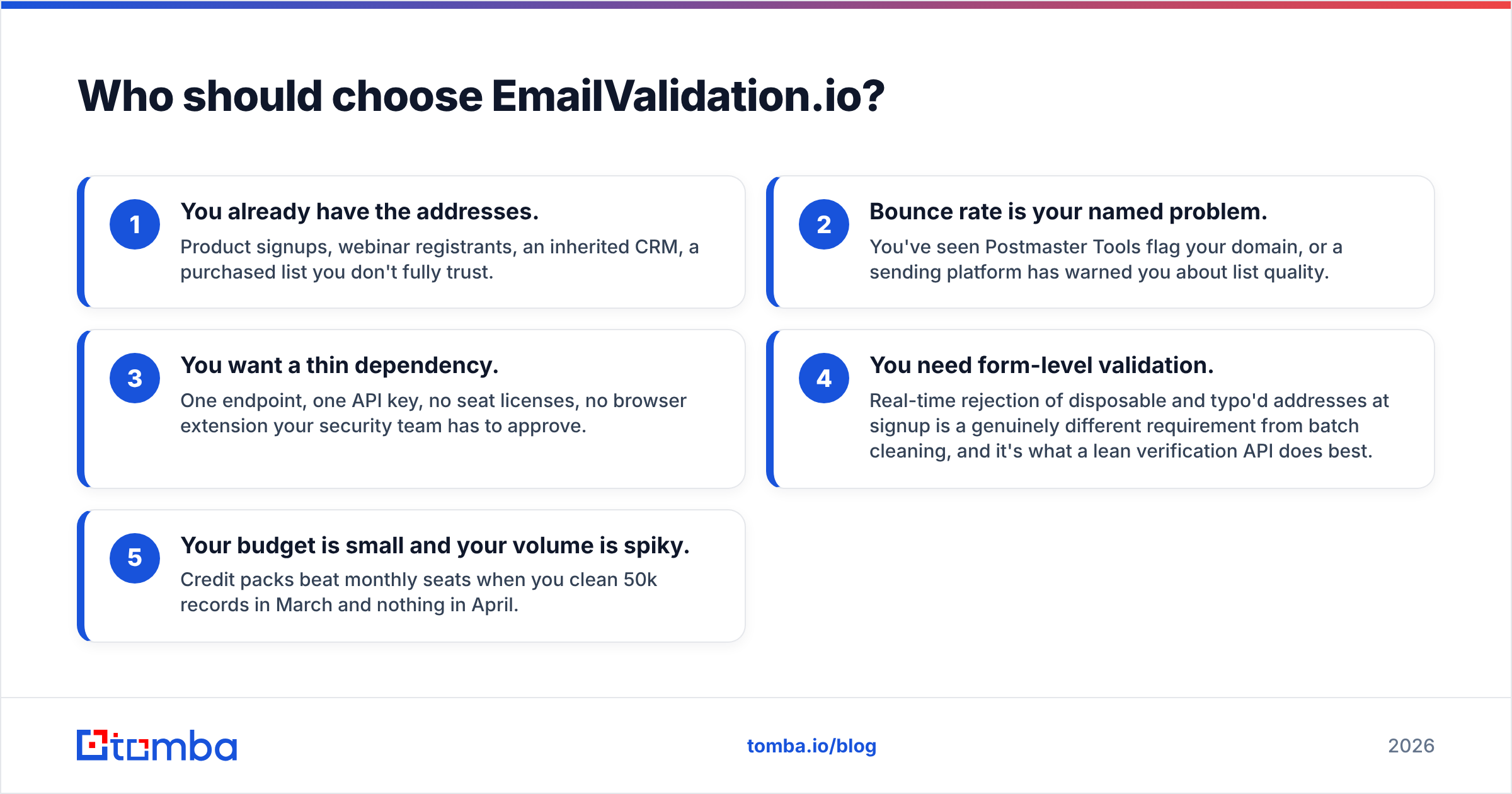
Who should choose EmailValidation.io?#
Choose it when all of these are true:
- You already have the addresses. Product signups, webinar registrants, an inherited CRM, or a bought list you don't fully trust.
- Bounce rate is your named problem. Postmaster Tools has flagged your domain, or a sending platform has warned you about list quality.
- You want a thin dependency. One endpoint, one API key, no seat licenses, no browser extension for your security team to approve.
- You need form-level validation. Rejecting disposable and typo'd addresses at signup is a different job from batch cleaning. A lean verification API does it best.
- Your budget is small and your volume is spiky. Credit packs beat monthly seats when you clean 50k records in March and nothing in April.
Shopping the wider verification category? Benchmark against a standalone email verifier, and read the ZeroBounce alternative breakdown. Prices in this category vary more than anywhere else in the sales stack.
Who should choose Wiza?#
Choose Wiza when:
- LinkedIn is your prospecting surface. Your reps live in Sales Navigator and build lists there anyway.
- You want lists, not lookups. The export-a-saved-search workflow is Wiza's real strength, and it beats any manual alternative on speed.
- You need phones alongside emails. Multichannel SDR teams that actually dial get value from the bundled mobile data.
- You prefer to pay for results. Valid-contact billing softens the "I paid for 2,000 rows and got 900 emails" problem.
- Your CRM is HubSpot, Salesforce, Outreach, or Salesloft. The native pushes save real ops time versus CSV shuffling.
Where it disappoints: non-LinkedIn ICPs, EU contacts where the data is thinner, and any workflow that starts from a domain rather than a person. Want to answer "who works in marketing at acme.com" without touching LinkedIn? This is the wrong tool. That's a domain search job. Also read the Wiza alternative comparison if LinkedIn dependency is a risk you want to design out.
What gap do both tools leave open?#
The handoff. Real outbound looks like this:
Find the contact → verify the address → enrich the record with title, company size, tech stack → push it into your sequencer → re-verify 90 days later when it decays.
EmailValidation.io owns step two. Wiza owns steps one, two, and four, but only for LinkedIn-sourced leads. Neither owns the domain-first discovery path. Neither handles the ongoing decay loop well on its own.
The practical failure mode is duct tape. A Wiza export, a manual CSV upload to a verifier, a VLOOKUP to merge, then a paste into your sequencer. It works at 200 leads a week and quietly collapses at 2,000. Every manual step is one more place where a stale address slips through and dents your sender reputation. That damage takes weeks to undo, as both HubSpot and mailbox-provider docs keep pointing out.
Want user-reported experience before you decide? The category listings on G2 beat any vendor page. They split reviews by company size, and a tool that's great for a 5-person agency often falls over at 200 seats.
How should you actually build the stack?#
Three sane setups, depending on where you are:
- List owner, no discovery need: EmailValidation.io alone. Wire it into your signup form and run a quarterly CRM re-verify. Cheapest correct answer.
- LinkedIn-native SDR team: Wiza for extraction, plus a second verification pass before send. The bundled validation is decent. A separate check on catch-all domains is still worth the extra fraction of a cent per contact.
- Mixed or domain-first prospecting: One consolidated platform. Your leads may come from company lists, conference exhibitor pages, podcast guests, or job postings rather than saved LinkedIn searches. In that case a discovery-plus-verification platform removes the whole integration layer. That's also where a bulk email finder earns its keep — 5,000 rows in, verified rows out, no CSV round-trip.
One more thing, stated plainly: whatever you pick, verify right before send, not at export time. A list verified six weeks ago is not a verified list. Job changes, offboarding, and domain migrations happen every day. A 3% bounce rate on a 10,000-send campaign is enough to get your domain throttled.
Frequently asked questions#
Can I use EmailValidation.io and Wiza together? Yes, and plenty of teams do. Wiza sources the contact, EmailValidation.io runs a second check before send. Just budget for two subscription floors and build the CSV plumbing.
Which is cheaper? EmailValidation.io, by a wide margin per unit. But they aren't buying you the same thing. Verification is a lookup; discovery is sourcing.
Does either work without LinkedIn? EmailValidation.io doesn't need it at all. Wiza effectively does.
What about GDPR? Both process personal data. If you sell into the EU, confirm each vendor's lawful-basis position and data-subject request handling with your counsel before you upload anything.
The bottom line#
Have one problem — bounces? Buy the verifier. Have one channel — LinkedIn? Buy Wiza. For everyone else, the real EmailValidation.io vs Wiza answer is that neither tool is enough alone. Two problems and more than one channel means two point tools, and that's a decision you'll be arguing about again in six months.
That's the case for consolidating. Start with the Tomba Email Finder. It finds addresses from a domain, a name, or a LinkedIn profile. It verifies them against catch-all and SMTP checks in the same run. It enriches the record before it ever reaches your sequencer. All of that runs from one credit pool starting at $49/mo, with a free tier so you can benchmark 25 searches against your own ICP first. Run your list through it next to whichever tool you're testing, then let the bounce rate decide.
Related guides#
Ready to find emails that actually work?
Join 150,000+ professionals who stopped guessing and started sending. Free credits on signup — no credit card required.
Get the Tomba newsletter
Practical outbound tactics and product updates — once every two weeks.
About the author